Socialt samarbejde med nye,
spændende muligheder

© 2014 IBM Corporation
Please Note
IBM’s statements regarding its plans, directions, and intent are subject to change or withdrawal without notice at IBM’s sole
discretion.
Information regarding potential future products is intended to outline our general product direction and it should not be relied
on in making a purchasing decision.
The information mentioned regarding potential future products is not a commitment, promise, or legal obligation to deliver
any material, code or functionality. Information about potential future products may not be incorporated into any contract.
The development, release, and timing of any future features or functionality described for our products remains at our sole
discretion

Performance is based on measurements and projections using standard IBM benchmarks in a controlled environment. The
actual throughput or performance that any user will experience will vary depending upon many factors, including
considerations such as the amount of multiprogramming in the user’s job stream, the I/O configuration, the storage
configuration, and the workload processed. Therefore, no assurance can be given that an individual user will achieve
results similar to those stated here.

4
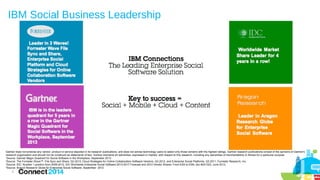
IBM Social Business Leadership

Gartner does not endorse any vendor, product or service depicted in its research publications, and does not advise technology users to select only those vendors with the highest ratings. Gartner research publications consist of the opinions of Gartner's
research organization and should not be construed as statements of fact. Gartner disclaims all warranties, expressed or implied, with respect to this research, including any warranties of merchantability or fitness for a particular purpose
1
Source: Gartner Magic Quadrant for Social Software in the Workplace, September 2013
2
Source: The Forrester Wave™: File Sync and Share, Q3 2013; Cloud Strategies for Online Collaboration Software Vendors, Q3 2012, and Enterprise Social Platforms, Q3 2011, Forrester Research, Inc.
3
Source: IDC: Number 1 position from 2009-2012, IDC Worldwide Enterprise Social Software 2013-2017 Forecast and 2012 Vendor Shares: From ESS to ESN, doc #241323, June 2013.
4
Source: Aragon Research Globe for Enterprise Social Software, September 2012
3
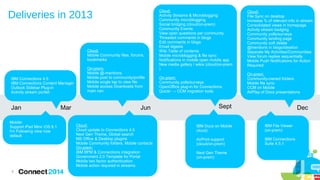
Deliveries in 2013

Cloud:
Mobile Community files, forums,
bookmarks

IBM Connections 4.5
IBM Connections Content Manager
Outlook Sidebar Plug-in
Activity stream portlet

Jan
Mobile:
Support iPad Mini/ iOS 6.1
I'm Following view now
default

6

Mar

On-prem:
Mobile @-mentions
Mobile post to community/profile
Mobile single tap to view file
Mobile access Downloads from
main nav

Jun
Cloud:
Cloud update to Connections 4.5
Next Gen Theme, Global search
MS Office & Desktop plugins
Mobile Community folders, Mobile contacts
On-prem:
IBM BPM & Connections integration
Government 2.0 Template for Portal
Mobile two factor authentication
Mobile action required in streams

Cloud:
Activity Streams & Microblogging
Community microblogging
Social bridging (cloud/on-prem)
Community Events
View open questions per community
Threaded comments in blogs
Edit comments in blogs
Email digests
Wiki Table of contents
Mobile microblogging & file sync
Notifications in mobile open mobile app
New media gallery / wikis (cloud/on-prem
)

Cloud:
File Sync on desktop
Increase % of relevant info in stream
Consolidated views in homepage
Activity stream badging
Community polls/surveys
Community landing page
Community soft delete
@mentions in blogs/ideation
Separate My Activities/Communities
View forum replies sequentially
Mobile Push Notifications for Action
Required

On-prem:
Community polls/surveys
OpenOffice plug-in for Connections
Quickr → CCM migration tools

On-prem:
Community-owned folders
Mobile file sync
CCM on Mobile
AirPlay of Docs presentations

Sept

Dec

IBM Docs on Mobile
cloud)

IBM File Viewer
(on-prem)

AirPrint support
(cloud/on-prem)

IBM Connections
Suite 4.5.1

Next Gen Theme
(on-prem)
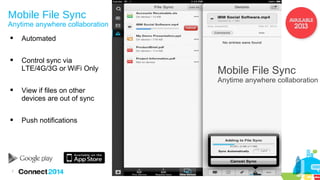
Mobile File Sync

Anytime anywhere collaboration


Automated



Control sync via
LTE/4G/3G or WiFi Only

Mobile File Sync

Anytime anywhere collaboration


View if files on other
devices are out of sync



Push notifications

7
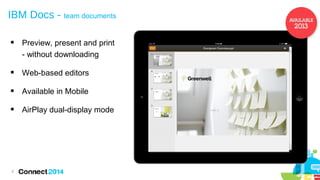
IBM Docs - team documents


Preview, present and print
- without downloading



Web-based editors



Available in Mobile



AirPlay dual-display mode

8
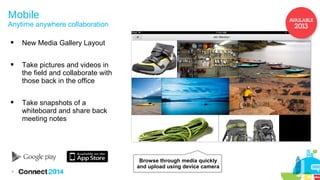
Mobile

Anytime anywhere collaboration


New Media Gallery Layout



Take pictures and videos in
the field and collaborate with
those back in the office



Take snapshots of a
whiteboard and share back
meeting notes

Browse through media quickly
and upload using device camera
9
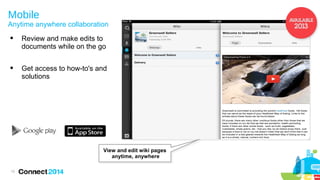
Mobile

Anytime anywhere collaboration


Review and make edits to
documents while on the go



Get access to how-to's and
solutions

View and edit wiki pages
anytime, anywhere
10
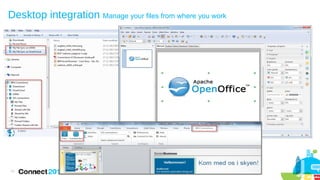
Desktop integration Manage your files from where you work

11
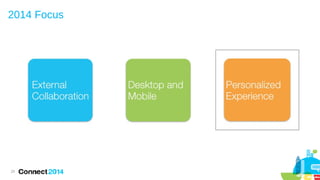
2014 Focus

12
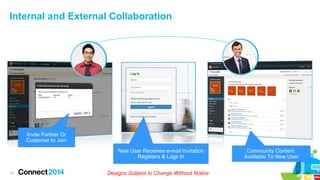
Internal and External Collaboration

Invite Partner Or
Customer to Join
New User Receives e-mail Invitation
Registers & Logs In
13

Designs Subject to Change Without Notice

Community Content
Available To New User
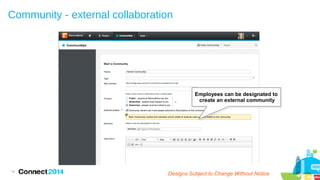
Community - external collaboration

Employees can be designated to
create an external community

14

Designs Subject to Change Without Notice
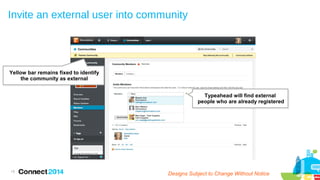
Invite an external user into community

Yellow bar remains fixed to identify
the community as external
Typeahead will find external
people who are already registered

15

Designs Subject to Change Without Notice
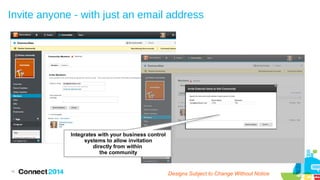
Invite anyone - with just an email address

Integrates with your business control
systems to allow invitation
directly from within
the community

16

Designs Subject to Change Without Notice
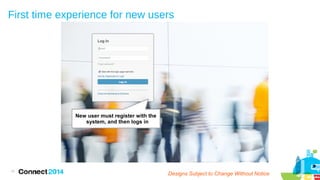
First time experience for new users

New user must register with the
system, and then logs in

17

Designs Subject to Change Without Notice
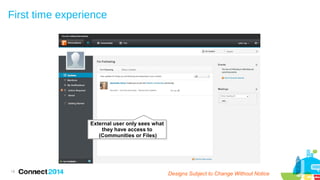
First time experience

External user only sees what
they have access to
(Communities or Files)

18

Designs Subject to Change Without Notice
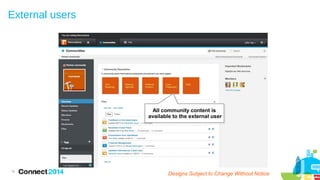
External users

All community content is
available to the external user

19

Designs Subject to Change Without Notice
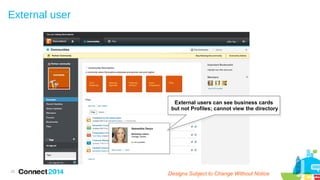
External user

External users can see business cards
but not Profiles; cannot view the directory

20

Designs Subject to Change Without Notice
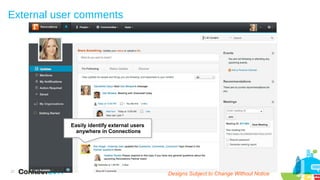
External user comments

Easily identify external users
anywhere in Connections

21

Designs Subject to Change Without Notice
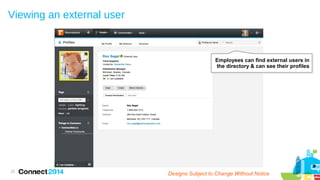
Viewing an external user

Employees can find external users in
the directory & can see their profiles

22

Designs Subject to Change Without Notice
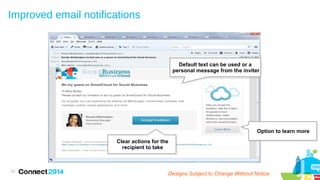
Improved email notifications

Default text can be used or a
personal message from the inviter

Option to learn more
Clear actions for the
recipient to take

23

Designs Subject to Change Without Notice
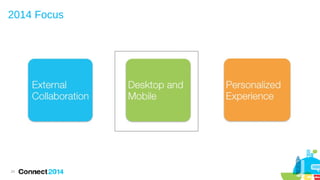
2014 Focus

24
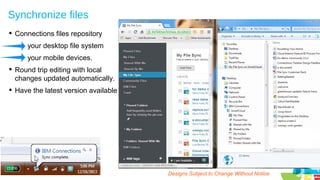
Synchronize files
 Connections files repository
your desktop file system
your mobile devices.
 Round trip editing with local
changes updated automatically.
 Have the latest version available

25

Designs Subject to Change Without Notice
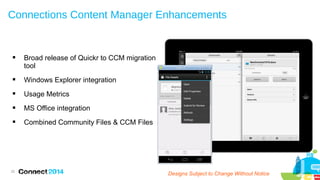
Connections Content Manager Enhancements



Broad release of Quickr to CCM migration
tool



Windows Explorer integration



Usage Metrics



MS Office integration



Combined Community Files & CCM Files

26

Plans are subject to change without notice

Designs Subject to Change Subject to Change
Designs Without Notice
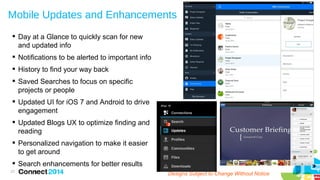
Mobile Updates and Enhancements
 Day at a Glance to quickly scan for new
and updated info
 Notifications to be alerted to important info
 History to find your way back
 Saved Searches to focus on specific
projects or people
 Updated UI for iOS 7 and Android to drive
engagement
 Updated Blogs UX to optimize finding and
reading

2
2

 Personalized navigation to make it easier
to get around
 Search enhancements for better results
27

Designs Subject to Change Without Notice
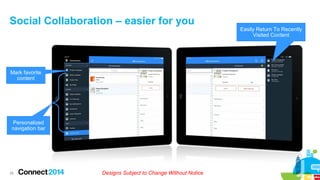
Social Collaboration – easier for you

Mark favorite
content

Personalized
navigation bar

28

Designs Subject to Change Without Notice

Easily Return To Recently
Visited Content
2014 Focus

29
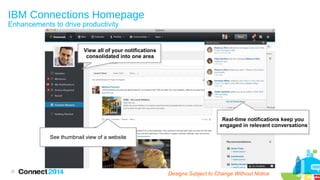
IBM Connections Homepage
Enhancements to drive productivity

View all of your notifications
consolidated into one area

Real-time notifications keep you
engaged in relevant conversations
See thumbnail view of a website

30

Designs Subject to Change Without Notice
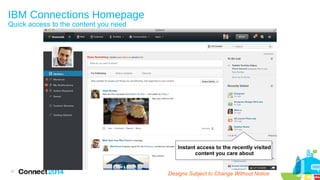
IBM Connections Homepage
Quick access to the content you need

Instant access to the recently visited
content you care about

31

Designs Subject to Change Without Notice
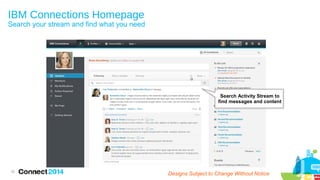
IBM Connections Homepage

Search your stream and find what you need

Search Activity Stream to
find messages and content

32

Designs Subject to Change Without Notice
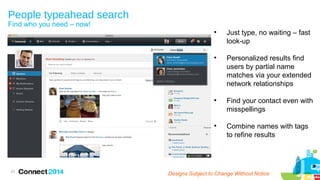
People typeahead search
Find who you need – now!









33

Just type, no waiting – fast
look-up
Personalized results find
users by partial name
matches via your extended
network relationships
Find your contact even with
misspellings
Combine names with tags
to refine results

Designs Subject to Change Without Notice
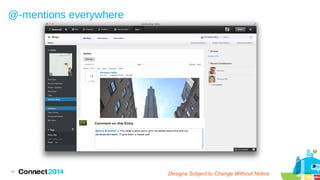
@-mentions everywhere

34

Designs Subject to Change Without Notice
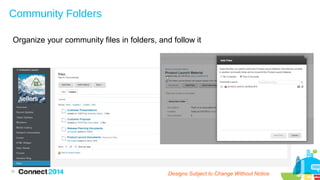
Community Folders
Organize your community files in folders, and follow it

35

Designs Subject to Change Without Notice
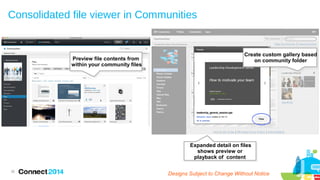
Consolidated file viewer in Communities

Preview file contents from
within your community files

Create custom gallery based
on community folder

Expanded detail on files
shows preview or
playback of content
36

Designs Subject to Change Without Notice
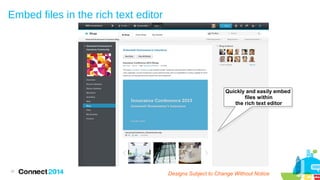
Embed files in the rich text editor

Quickly and easily embed
files within
the rich text editor

37

Designs Subject to Change Without Notice
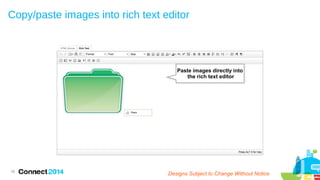
Copy/paste images into rich text editor

Paste images directly into
the rich text editor

38

Designs Subject to Change Without Notice
In Summary...

http://www.ibm.com/social-business
39
23
40
New rich text editor

Entitlement to Ephox
41
Social Business
is not an option
– it's a mandate
Social Business
delivers real
business value

Becoming a Social
Business is easy
with IBM
Connections

Start Your Social Business Journey
http://ibmcloud.com/social
42

Collaboration og Connections - Connect Danmark 2014

  • 1.
    Socialt samarbejde mednye, spændende muligheder © 2014 IBM Corporation
  • 2.
    Please Note IBM’s statementsregarding its plans, directions, and intent are subject to change or withdrawal without notice at IBM’s sole discretion. Information regarding potential future products is intended to outline our general product direction and it should not be relied on in making a purchasing decision. The information mentioned regarding potential future products is not a commitment, promise, or legal obligation to deliver any material, code or functionality. Information about potential future products may not be incorporated into any contract. The development, release, and timing of any future features or functionality described for our products remains at our sole discretion Performance is based on measurements and projections using standard IBM benchmarks in a controlled environment. The actual throughput or performance that any user will experience will vary depending upon many factors, including considerations such as the amount of multiprogramming in the user’s job stream, the I/O configuration, the storage configuration, and the workload processed. Therefore, no assurance can be given that an individual user will achieve results similar to those stated here. 4
  • 3.
    IBM Social BusinessLeadership Gartner does not endorse any vendor, product or service depicted in its research publications, and does not advise technology users to select only those vendors with the highest ratings. Gartner research publications consist of the opinions of Gartner's research organization and should not be construed as statements of fact. Gartner disclaims all warranties, expressed or implied, with respect to this research, including any warranties of merchantability or fitness for a particular purpose 1 Source: Gartner Magic Quadrant for Social Software in the Workplace, September 2013 2 Source: The Forrester Wave™: File Sync and Share, Q3 2013; Cloud Strategies for Online Collaboration Software Vendors, Q3 2012, and Enterprise Social Platforms, Q3 2011, Forrester Research, Inc. 3 Source: IDC: Number 1 position from 2009-2012, IDC Worldwide Enterprise Social Software 2013-2017 Forecast and 2012 Vendor Shares: From ESS to ESN, doc #241323, June 2013. 4 Source: Aragon Research Globe for Enterprise Social Software, September 2012 3
  • 6.
    Deliveries in 2013 Cloud: MobileCommunity files, forums, bookmarks IBM Connections 4.5 IBM Connections Content Manager Outlook Sidebar Plug-in Activity stream portlet Jan Mobile: Support iPad Mini/ iOS 6.1 I'm Following view now default 6 Mar On-prem: Mobile @-mentions Mobile post to community/profile Mobile single tap to view file Mobile access Downloads from main nav Jun Cloud: Cloud update to Connections 4.5 Next Gen Theme, Global search MS Office & Desktop plugins Mobile Community folders, Mobile contacts On-prem: IBM BPM & Connections integration Government 2.0 Template for Portal Mobile two factor authentication Mobile action required in streams Cloud: Activity Streams & Microblogging Community microblogging Social bridging (cloud/on-prem) Community Events View open questions per community Threaded comments in blogs Edit comments in blogs Email digests Wiki Table of contents Mobile microblogging & file sync Notifications in mobile open mobile app New media gallery / wikis (cloud/on-prem ) Cloud: File Sync on desktop Increase % of relevant info in stream Consolidated views in homepage Activity stream badging Community polls/surveys Community landing page Community soft delete @mentions in blogs/ideation Separate My Activities/Communities View forum replies sequentially Mobile Push Notifications for Action Required On-prem: Community polls/surveys OpenOffice plug-in for Connections Quickr → CCM migration tools On-prem: Community-owned folders Mobile file sync CCM on Mobile AirPlay of Docs presentations Sept Dec IBM Docs on Mobile cloud) IBM File Viewer (on-prem) AirPrint support (cloud/on-prem) IBM Connections Suite 4.5.1 Next Gen Theme (on-prem)
  • 7.
    Mobile File Sync Anytimeanywhere collaboration  Automated  Control sync via LTE/4G/3G or WiFi Only Mobile File Sync Anytime anywhere collaboration  View if files on other devices are out of sync  Push notifications 7
  • 8.
    IBM Docs -team documents  Preview, present and print - without downloading  Web-based editors  Available in Mobile  AirPlay dual-display mode 8
  • 9.
    Mobile Anytime anywhere collaboration  NewMedia Gallery Layout  Take pictures and videos in the field and collaborate with those back in the office  Take snapshots of a whiteboard and share back meeting notes Browse through media quickly and upload using device camera 9
  • 10.
    Mobile Anytime anywhere collaboration  Reviewand make edits to documents while on the go  Get access to how-to's and solutions View and edit wiki pages anytime, anywhere 10
  • 11.
    Desktop integration Manageyour files from where you work 11
  • 12.
  • 13.
    Internal and ExternalCollaboration Invite Partner Or Customer to Join New User Receives e-mail Invitation Registers & Logs In 13 Designs Subject to Change Without Notice Community Content Available To New User
  • 14.
    Community - externalcollaboration Employees can be designated to create an external community 14 Designs Subject to Change Without Notice
  • 15.
    Invite an externaluser into community Yellow bar remains fixed to identify the community as external Typeahead will find external people who are already registered 15 Designs Subject to Change Without Notice
  • 16.
    Invite anyone -with just an email address Integrates with your business control systems to allow invitation directly from within the community 16 Designs Subject to Change Without Notice
  • 17.
    First time experiencefor new users New user must register with the system, and then logs in 17 Designs Subject to Change Without Notice
  • 18.
    First time experience Externaluser only sees what they have access to (Communities or Files) 18 Designs Subject to Change Without Notice
  • 19.
    External users All communitycontent is available to the external user 19 Designs Subject to Change Without Notice
  • 20.
    External user External userscan see business cards but not Profiles; cannot view the directory 20 Designs Subject to Change Without Notice
  • 21.
    External user comments Easilyidentify external users anywhere in Connections 21 Designs Subject to Change Without Notice
  • 22.
    Viewing an externaluser Employees can find external users in the directory & can see their profiles 22 Designs Subject to Change Without Notice
  • 23.
    Improved email notifications Defaulttext can be used or a personal message from the inviter Option to learn more Clear actions for the recipient to take 23 Designs Subject to Change Without Notice
  • 24.
  • 25.
    Synchronize files  Connectionsfiles repository your desktop file system your mobile devices.  Round trip editing with local changes updated automatically.  Have the latest version available 25 Designs Subject to Change Without Notice
  • 26.
    Connections Content ManagerEnhancements  Broad release of Quickr to CCM migration tool  Windows Explorer integration  Usage Metrics  MS Office integration  Combined Community Files & CCM Files 26 Plans are subject to change without notice Designs Subject to Change Subject to Change Designs Without Notice
  • 27.
    Mobile Updates andEnhancements  Day at a Glance to quickly scan for new and updated info  Notifications to be alerted to important info  History to find your way back  Saved Searches to focus on specific projects or people  Updated UI for iOS 7 and Android to drive engagement  Updated Blogs UX to optimize finding and reading 2 2  Personalized navigation to make it easier to get around  Search enhancements for better results 27 Designs Subject to Change Without Notice
  • 28.
    Social Collaboration –easier for you Mark favorite content Personalized navigation bar 28 Designs Subject to Change Without Notice Easily Return To Recently Visited Content
  • 29.
  • 30.
    IBM Connections Homepage Enhancementsto drive productivity View all of your notifications consolidated into one area Real-time notifications keep you engaged in relevant conversations See thumbnail view of a website 30 Designs Subject to Change Without Notice
  • 31.
    IBM Connections Homepage Quickaccess to the content you need Instant access to the recently visited content you care about 31 Designs Subject to Change Without Notice
  • 32.
    IBM Connections Homepage Searchyour stream and find what you need Search Activity Stream to find messages and content 32 Designs Subject to Change Without Notice
  • 33.
    People typeahead search Findwho you need – now!     33 Just type, no waiting – fast look-up Personalized results find users by partial name matches via your extended network relationships Find your contact even with misspellings Combine names with tags to refine results Designs Subject to Change Without Notice
  • 34.
  • 35.
    Community Folders Organize yourcommunity files in folders, and follow it 35 Designs Subject to Change Without Notice
  • 36.
    Consolidated file viewerin Communities Preview file contents from within your community files Create custom gallery based on community folder Expanded detail on files shows preview or playback of content 36 Designs Subject to Change Without Notice
  • 37.
    Embed files inthe rich text editor Quickly and easily embed files within the rich text editor 37 Designs Subject to Change Without Notice
  • 38.
    Copy/paste images intorich text editor Paste images directly into the rich text editor 38 Designs Subject to Change Without Notice
  • 39.
  • 40.
  • 41.
    New rich texteditor Entitlement to Ephox 41
  • 42.
    Social Business is notan option – it's a mandate Social Business delivers real business value Becoming a Social Business is easy with IBM Connections Start Your Social Business Journey http://ibmcloud.com/social 42