Key 101: Social Next: The
Evolution of Collaboration
To The Leading Social
Platform
Jeff Schick, IBM
Robert Spaltenstein, AMOS IT Suisse AG

© 2014 IBM Corporation
Please Note
IBM’s statements regarding its plans, directions, and intent are subject to change or withdrawal without notice at IBM’s sole
discretion.
Information regarding potential future products is intended to outline our general product direction and it should not be relied
on in making a purchasing decision.
The information mentioned regarding potential future products is not a commitment, promise, or legal obligation to deliver
any material, code or functionality. Information about potential future products may not be incorporated into any contract.
The development, release, and timing of any future features or functionality described for our products remains at our sole
discretion

Performance is based on measurements and projections using standard IBM benchmarks in a controlled environment. The
actual throughput or performance that any user will experience will vary depending upon many factors, including
considerations such as the amount of multiprogramming in the user’s job stream, the I/O configuration, the storage
configuration, and the workload processed. Therefore, no assurance can be given that an individual user will achieve
results similar to those stated here.

2
Evolution Of Collaboration To The Leading Social Platform
 The platform
 The cloud
– Mail
– Meetings and chat
– Docs
– IBM Connections
 Robert Spaltenstein of Allianz
 Our community of partners
 Closing thoughts

3
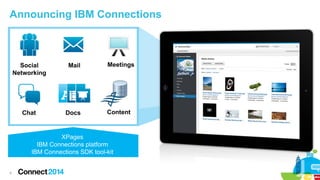
Announcing IBM Connections

Social
Networking

Mail

Chat

Docs

Meetings

Content

XPages
IBM Connections platform
IBM Connections SDK tool-kit

4
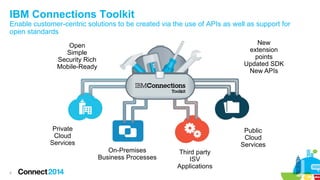
IBM Connections Toolkit
Enable customer-centric solutions to be created via the use of APIs as well as support for
open standards
New
extension
points
Updated SDK
New APIs

Open
Simple
Security Rich
Mobile-Ready

Private
Cloud
Services
On-Premises
Business Processes
5

Public
Cloud
Services
Third party
ISV
Applications
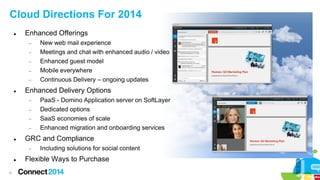
Cloud Directions For 2014


Enhanced Offerings
−
−
−
−
−



Enhanced Delivery Options
−
−
−
−



6

PaaS - Domino Application server on SoftLayer
Dedicated options
SaaS economies of scale
Enhanced migration and onboarding services

GRC and Compliance
−



New web mail experience
Meetings and chat with enhanced audio / video
Enhanced guest model
Mobile everywhere
Continuous Delivery – ongoing updates

Including solutions for social content

Flexible Ways to Purchase
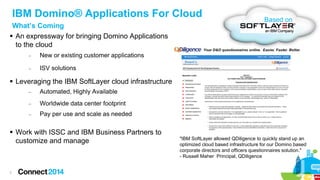
IBM Domino® Applications For Cloud
What’s Coming
 An expressway for bringing Domino Applications
to the cloud
−

New or existing customer applications

−

Based on

ISV solutions

 Leveraging the IBM SoftLayer cloud infrastructure
−

Automated, Highly Available

−

Worldwide data center footprint

−

Pay per use and scale as needed

 Work with ISSC and IBM Business Partners to
customize and manage

7

"IBM SoftLayer allowed QDiligence to quickly stand up an
optimized cloud based infrastructure for our Domino based
corporate directors and officers questionnaires solution."
- Russell Maher Principal, QDiligence
We

8

waste
a lot of time
at work
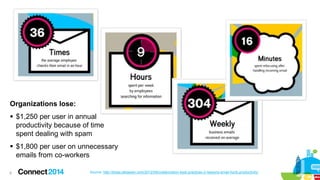
Organizations lose:
 $1,250 per user in annual
productivity because of time
spent dealing with spam
 $1,800 per user on unnecessary
emails from co-workers
9

Source: http://blogs.atlassian.com/2012/09/collaboration-best-practices-3-reasons-email-hurts-productivity/
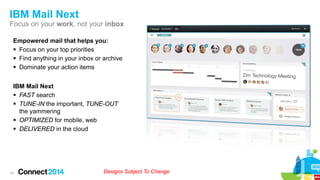
IBM Mail Next
Focus on your work, not your inbox
Empowered mail that helps you:
 Focus on your top priorities
 Find anything in your inbox or archive
 Dominate your action items
IBM Mail Next
 FAST search
 TUNE-IN the important, TUNE-OUT
the yammering
 OPTIMIZED for mobile, web
 DELIVERED in the cloud

10

Designs Subject To Change
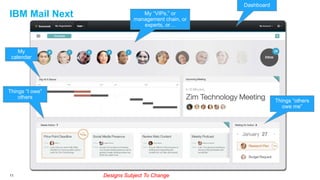
Dashboard

IBM Mail Next

My “VIPs,” or
management chain, or
experts, or…

My
calendar

Things “I owe”
others

11

Things “others
owe me”

Designs Subject To Change
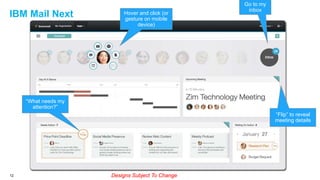
IBM Mail Next

Hover and click (or
gesture on mobile
device)

Go to my
inbox

“What needs my
attention?”
“Flip” to reveal
meeting details

12

Designs Subject To Change
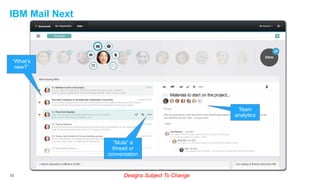
IBM Mail Next

“What’s
new?”

Team
analytics

“Mute” a
thread or
conversation

13

Designs Subject To Change
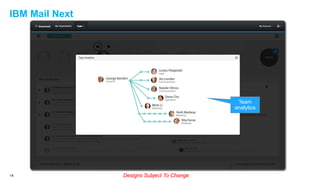
IBM Mail Next

Team
analytics

14

Designs Subject To Change
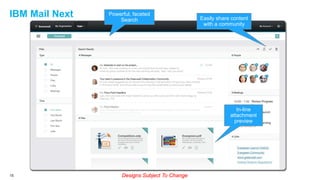
IBM Mail Next

Powerful, faceted
Search

Easily share content
with a community

In-line
attachment
preview

15

Designs Subject To Change
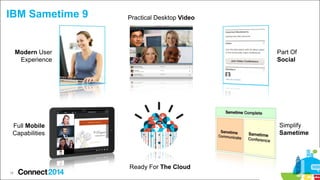
IBM Sametime 9

Practical Desktop Video

Part Of
Social

Modern User
Experience

Simplify
Sametime

Full Mobile
Capabilities

Ready For The Cloud
16
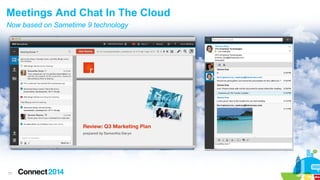
Meetings And Chat In The Cloud
Now based on Sametime 9 technology

17
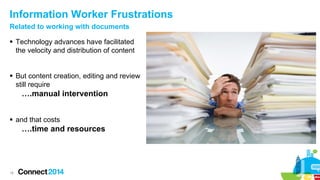
Information Worker Frustrations
Related to working with documents
 Technology advances have facilitated
the velocity and distribution of content
 But content creation, editing and review
still require

….manual intervention
 and that costs

….time and resources

18
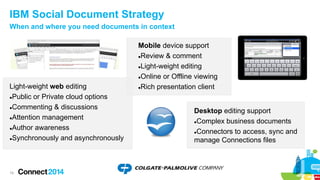
IBM Social Document Strategy
When and where you need documents in context

Light-weight web editing
Public or Private cloud options
Commenting & discussions
Attention management
Author awareness
Synchronously and asynchronously

19

Mobile device support
Review & comment
Light-weight editing
Online or Offline viewing
Rich presentation client
Desktop editing support
Complex business documents
Connectors to access, sync and
manage Connections files
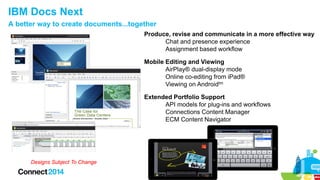
IBM Docs Next
A better way to create documents...together
Produce, revise and communicate in a more effective way
Chat and presence experience
Assignment based workflow
Mobile Editing and Viewing
AirPlay® dual-display mode
Online co-editing from iPad®
Viewing on Androidtm
Extended Portfolio Support
API models for plug-ins and workflows
Connections Content Manager
ECM Content Navigator

Designs Subject To Change
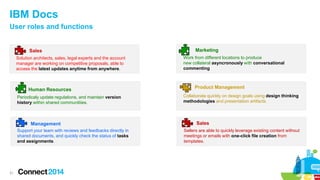
IBM Docs
User roles and functions

Sales
Solution architects, sales, legal experts and the account
manager are working on competitive proposals, able to
access the latest updates anytime from anywhere.

Human Resources
Periodicaly update regulations, and maintain version
history within shared communitiies.

Management
Support your team with reviews and feedbacks directly in
shared documents, and quickly check the status of tasks
and assignments.

21

Marketing
Work from different locations to produce
new collateral asyncronously with conversational
commenting

Product Management
Collaborate quickly on design goals using design thinking
methodologies and presentation artifacts.

Sales
Sellers are able to quickly leverage existing content without
meetings or emails with one-click file creation from
templates.
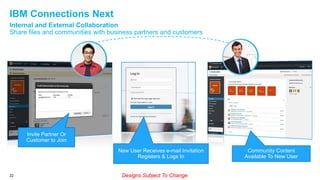
IBM Connections Next
Internal and External Collaboration
Share files and communities with business partners and customers

Invite Partner Or
Customer to Join
New User Receives e-mail Invitation
Registers & Logs In

22

Designs Subject To Change

Community Content
Available To New User
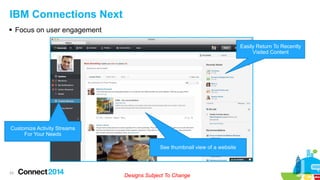
IBM Connections Next
 Focus on user engagement
Easily Return To Recently
Visited Content

Customize Activity Streams
For Your Needs
See thumbnail view of a website

23

Designs Subject To Change
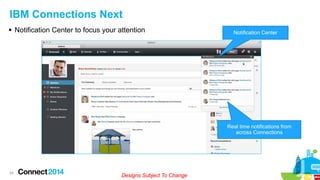
IBM Connections Next
 Notification Center to focus your attention

Notification Center

Real time notifications from
across Connections

24

Designs Subject To Change
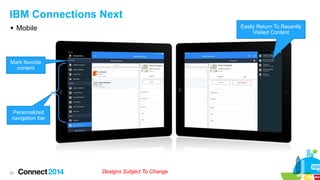
IBM Connections Next
 Mobile

Easily Return To Recently
Visited Content

Mark favorite
content

Personalized
navigation bar

25

Designs Subject To Change
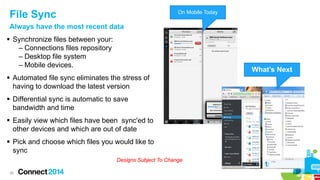
File Sync

On Mobile Today

Always have the most recent data
 Synchronize files between your:
– Connections files repository
– Desktop file system
– Mobile devices.

What’s Next

 Automated file sync eliminates the stress of
having to download the latest version
 Differential sync is automatic to save
bandwidth and time
 Easily view which files have been sync'ed to
other devices and which are out of date
 Pick and choose which files you would like to
sync
Designs Subject To Change
26
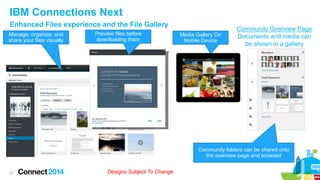
IBM Connections Next
Enhanced Files experience and the File Gallery
Manage, organize, and
share your files visually

Preview files before
downloading them

Media Gallery On
Mobile Device

Community Overview Page
Documents and media can
be shown in a gallery

Community folders can be shared onto
the overview page and browsed

27

Designs Subject To Change
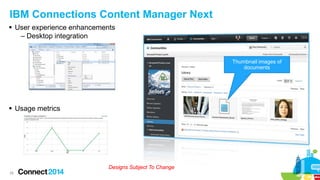
IBM Connections Content Manager Next
 User experience enhancements
– Desktop integration

Thumbnail images of
documents

 Usage metrics

Designs Subject To Change
28
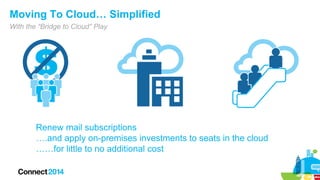
Moving To Cloud… Simplified
With the “Bridge to Cloud” Play

Renew mail subscriptions
….and apply on-premises investments to seats in the cloud
……for little to no additional cost
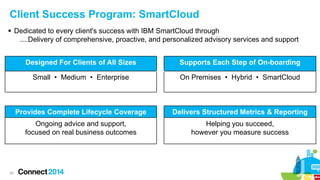
Client Success Program: SmartCloud
 Dedicated to every client's success with IBM SmartCloud through
....Delivery of comprehensive, proactive, and personalized advisory services and support
Designed For Clients of All Sizes
Small • Medium • Enterprise

On Premises • Hybrid • SmartCloud

Provides Complete Lifecycle Coverage

Delivers Structured Metrics & Reporting

Ongoing advice and support,
focused on real business outcomes

30

Supports Each Step of On-boarding

Helping you succeed,
however you measure success
Partners

31
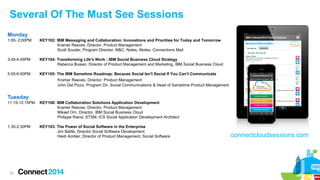
Several Of The Must See Sessions
Monday
1:00- 2:00PM

KEY102: IBM Messaging and Collaboration: Innovations and Priorities for Today and Tomorrow
Kramer Reeves, Director, Product Management
Scott Souder, Program Director, M&C, Notes, iNotes, Connections Mail

3:45-4:45PM

KEY104: Transforming Life's Work - IBM Social Business Cloud Strategy
Rebecca Buisan, Director of Product Management and Marketing, IBM Social Business Cloud

5:00-6:00PM

KEY105: The IBM Sametime Roadmap: Because Social Isn't Social If You Can't Communicate
Kramer Reeves, Director, Product Management
John Del Pizzo, Program Dir, Social Communications & Head of Sametime Product Management

Tuesday
11:15-12:15PM

KEY108: IBM Collaboration Solutions Application Development
Kramer Reeves, Director, Product Management
Mikael Orn, Director, IBM Social Business Cloud
Philippe Riand, STSM, ICS Social Application Development Architect

1:30-2:30PM

KEY103: The Power of Social Software in the Enterprise
Jim Battle, Director Social Software Development
Heidi Ambler, Director of Product Management, Social Software

32

connectcloudsessions.com
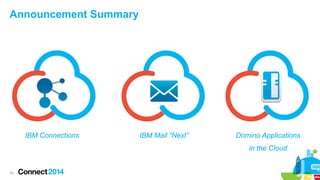
Announcement Summary

IBM Connections

IBM Mail “Next”

Domino Applications
in the Cloud

33
Summary
 IBM is providing a fully integrated social business platform
that provides:
– The easiest environment for collaborating both internally
with employees and externally with customers and
partners
– A full set of integrated, secure services for enterprise
customers (e.g. Social, Collaboration, Messaging, Unified
Communications, Document Mgmt, etc)
– Extensibility options (e.g. API integration, solutions, etc)
– All supported on a variety of deployment choices

34
Engage Online

Draft

 SocialBiz User Group socialbizug.org
– Join the epicenter of Notes and Collaboration user groups
 Follow us on Twitter
– @IBMConnect and @IBMSocialBiz
 LinkedIn http://bit.ly/SBComm
– Participate in the IBM Social Business group on LinkedIn:
 Facebook https://www.facebook.com/IBMSocialBiz
– Like IBM Social Business on Facebook
 Social Business Insights blog ibm.com/blogs/socialbusiness
– Read and engage with our bloggers

35
Draft

 Access Connect Online to complete your session surveys using any:
– Web or mobile browser
– Connect Online kiosk onsite

36
Acknowledgements and Disclaimers
Availability. References in this presentation to IBM products, programs, or services do not imply that they will be available in all countries in which IBM operates.
The workshops, sessions and materials have been prepared by IBM or the session speakers and reflect their own views. They are provided for informational purposes only, and are neither
intended to, nor shall have the effect of being, legal or other guidance or advice to any participant. While efforts were made to verify the completeness and accuracy of the information
contained in this presentation, it is provided AS-IS without warranty of any kind, express or implied. IBM shall not be responsible for any damages arising out of the use of, or otherwise
related to, this presentation or any other materials. Nothing contained in this presentation is intended to, nor shall have the effect of, creating any warranties or representations from IBM or
its suppliers or licensors, or altering the terms and conditions of the applicable license agreement governing the use of IBM software.
All customer examples described are presented as illustrations of how those customers have used IBM products and the results they may have achieved. Actual environmental costs and
performance characteristics may vary by customer. Nothing contained in these materials is intended to, nor shall have the effect of, stating or implying that any activities undertaken by you
will result in any specific sales, revenue growth or other results.

© Copyright IBM Corporation 2014. All rights reserved.
 U.S. Government Users Restricted Rights - Use, duplication or disclosure restricted by GSA ADP Schedule Contract with IBM Corp.
 IBM, the IBM logo, ibm.com, Domino and Sametime are trademarks or registered trademarks of International Business Machines Corporation in the United States, other countries, or
both. If these and other IBM trademarked terms are marked on their first occurrence in this information with a trademark symbol (® or ™), these symbols indicate U.S. registered or
common law trademarks owned by IBM at the time this information was published. Such trademarks may also be registered or common law trademarks in other countries. A current list of
IBM trademarks is available on the Web at “Copyright and trademark information” at www.ibm.com/legal/copytrade.shtml
Other company, product, or service names may be trademarks or service marks of others.

37

Key 101: Social Next: The Evolution of Collaboration To The Leading Social Platform

  • 1.
    Key 101: SocialNext: The Evolution of Collaboration To The Leading Social Platform Jeff Schick, IBM Robert Spaltenstein, AMOS IT Suisse AG © 2014 IBM Corporation
  • 2.
    Please Note IBM’s statementsregarding its plans, directions, and intent are subject to change or withdrawal without notice at IBM’s sole discretion. Information regarding potential future products is intended to outline our general product direction and it should not be relied on in making a purchasing decision. The information mentioned regarding potential future products is not a commitment, promise, or legal obligation to deliver any material, code or functionality. Information about potential future products may not be incorporated into any contract. The development, release, and timing of any future features or functionality described for our products remains at our sole discretion Performance is based on measurements and projections using standard IBM benchmarks in a controlled environment. The actual throughput or performance that any user will experience will vary depending upon many factors, including considerations such as the amount of multiprogramming in the user’s job stream, the I/O configuration, the storage configuration, and the workload processed. Therefore, no assurance can be given that an individual user will achieve results similar to those stated here. 2
  • 3.
    Evolution Of CollaborationTo The Leading Social Platform  The platform  The cloud – Mail – Meetings and chat – Docs – IBM Connections  Robert Spaltenstein of Allianz  Our community of partners  Closing thoughts 3
  • 4.
  • 5.
    IBM Connections Toolkit Enablecustomer-centric solutions to be created via the use of APIs as well as support for open standards New extension points Updated SDK New APIs Open Simple Security Rich Mobile-Ready Private Cloud Services On-Premises Business Processes 5 Public Cloud Services Third party ISV Applications
  • 6.
    Cloud Directions For2014  Enhanced Offerings − − − − −  Enhanced Delivery Options − − − −  6 PaaS - Domino Application server on SoftLayer Dedicated options SaaS economies of scale Enhanced migration and onboarding services GRC and Compliance −  New web mail experience Meetings and chat with enhanced audio / video Enhanced guest model Mobile everywhere Continuous Delivery – ongoing updates Including solutions for social content Flexible Ways to Purchase
  • 7.
    IBM Domino® ApplicationsFor Cloud What’s Coming  An expressway for bringing Domino Applications to the cloud − New or existing customer applications − Based on ISV solutions  Leveraging the IBM SoftLayer cloud infrastructure − Automated, Highly Available − Worldwide data center footprint − Pay per use and scale as needed  Work with ISSC and IBM Business Partners to customize and manage 7 "IBM SoftLayer allowed QDiligence to quickly stand up an optimized cloud based infrastructure for our Domino based corporate directors and officers questionnaires solution." - Russell Maher Principal, QDiligence
  • 8.
    We 8 waste a lot oftime at work
  • 9.
    Organizations lose:  $1,250per user in annual productivity because of time spent dealing with spam  $1,800 per user on unnecessary emails from co-workers 9 Source: http://blogs.atlassian.com/2012/09/collaboration-best-practices-3-reasons-email-hurts-productivity/
  • 10.
    IBM Mail Next Focuson your work, not your inbox Empowered mail that helps you:  Focus on your top priorities  Find anything in your inbox or archive  Dominate your action items IBM Mail Next  FAST search  TUNE-IN the important, TUNE-OUT the yammering  OPTIMIZED for mobile, web  DELIVERED in the cloud 10 Designs Subject To Change
  • 11.
    Dashboard IBM Mail Next My“VIPs,” or management chain, or experts, or… My calendar Things “I owe” others 11 Things “others owe me” Designs Subject To Change
  • 12.
    IBM Mail Next Hoverand click (or gesture on mobile device) Go to my inbox “What needs my attention?” “Flip” to reveal meeting details 12 Designs Subject To Change
  • 13.
    IBM Mail Next “What’s new?” Team analytics “Mute”a thread or conversation 13 Designs Subject To Change
  • 14.
  • 15.
    IBM Mail Next Powerful,faceted Search Easily share content with a community In-line attachment preview 15 Designs Subject To Change
  • 16.
    IBM Sametime 9 PracticalDesktop Video Part Of Social Modern User Experience Simplify Sametime Full Mobile Capabilities Ready For The Cloud 16
  • 17.
    Meetings And ChatIn The Cloud Now based on Sametime 9 technology 17
  • 18.
    Information Worker Frustrations Relatedto working with documents  Technology advances have facilitated the velocity and distribution of content  But content creation, editing and review still require ….manual intervention  and that costs ….time and resources 18
  • 19.
    IBM Social DocumentStrategy When and where you need documents in context Light-weight web editing Public or Private cloud options Commenting & discussions Attention management Author awareness Synchronously and asynchronously 19 Mobile device support Review & comment Light-weight editing Online or Offline viewing Rich presentation client Desktop editing support Complex business documents Connectors to access, sync and manage Connections files
  • 20.
    IBM Docs Next Abetter way to create documents...together Produce, revise and communicate in a more effective way Chat and presence experience Assignment based workflow Mobile Editing and Viewing AirPlay® dual-display mode Online co-editing from iPad® Viewing on Androidtm Extended Portfolio Support API models for plug-ins and workflows Connections Content Manager ECM Content Navigator Designs Subject To Change
  • 21.
    IBM Docs User rolesand functions Sales Solution architects, sales, legal experts and the account manager are working on competitive proposals, able to access the latest updates anytime from anywhere. Human Resources Periodicaly update regulations, and maintain version history within shared communitiies. Management Support your team with reviews and feedbacks directly in shared documents, and quickly check the status of tasks and assignments. 21 Marketing Work from different locations to produce new collateral asyncronously with conversational commenting Product Management Collaborate quickly on design goals using design thinking methodologies and presentation artifacts. Sales Sellers are able to quickly leverage existing content without meetings or emails with one-click file creation from templates.
  • 22.
    IBM Connections Next Internaland External Collaboration Share files and communities with business partners and customers Invite Partner Or Customer to Join New User Receives e-mail Invitation Registers & Logs In 22 Designs Subject To Change Community Content Available To New User
  • 23.
    IBM Connections Next Focus on user engagement Easily Return To Recently Visited Content Customize Activity Streams For Your Needs See thumbnail view of a website 23 Designs Subject To Change
  • 24.
    IBM Connections Next Notification Center to focus your attention Notification Center Real time notifications from across Connections 24 Designs Subject To Change
  • 25.
    IBM Connections Next Mobile Easily Return To Recently Visited Content Mark favorite content Personalized navigation bar 25 Designs Subject To Change
  • 26.
    File Sync On MobileToday Always have the most recent data  Synchronize files between your: – Connections files repository – Desktop file system – Mobile devices. What’s Next  Automated file sync eliminates the stress of having to download the latest version  Differential sync is automatic to save bandwidth and time  Easily view which files have been sync'ed to other devices and which are out of date  Pick and choose which files you would like to sync Designs Subject To Change 26
  • 27.
    IBM Connections Next EnhancedFiles experience and the File Gallery Manage, organize, and share your files visually Preview files before downloading them Media Gallery On Mobile Device Community Overview Page Documents and media can be shown in a gallery Community folders can be shared onto the overview page and browsed 27 Designs Subject To Change
  • 28.
    IBM Connections ContentManager Next  User experience enhancements – Desktop integration Thumbnail images of documents  Usage metrics Designs Subject To Change 28
  • 29.
    Moving To Cloud…Simplified With the “Bridge to Cloud” Play Renew mail subscriptions ….and apply on-premises investments to seats in the cloud ……for little to no additional cost
  • 30.
    Client Success Program:SmartCloud  Dedicated to every client's success with IBM SmartCloud through ....Delivery of comprehensive, proactive, and personalized advisory services and support Designed For Clients of All Sizes Small • Medium • Enterprise On Premises • Hybrid • SmartCloud Provides Complete Lifecycle Coverage Delivers Structured Metrics & Reporting Ongoing advice and support, focused on real business outcomes 30 Supports Each Step of On-boarding Helping you succeed, however you measure success
  • 31.
  • 32.
    Several Of TheMust See Sessions Monday 1:00- 2:00PM KEY102: IBM Messaging and Collaboration: Innovations and Priorities for Today and Tomorrow Kramer Reeves, Director, Product Management Scott Souder, Program Director, M&C, Notes, iNotes, Connections Mail 3:45-4:45PM KEY104: Transforming Life's Work - IBM Social Business Cloud Strategy Rebecca Buisan, Director of Product Management and Marketing, IBM Social Business Cloud 5:00-6:00PM KEY105: The IBM Sametime Roadmap: Because Social Isn't Social If You Can't Communicate Kramer Reeves, Director, Product Management John Del Pizzo, Program Dir, Social Communications & Head of Sametime Product Management Tuesday 11:15-12:15PM KEY108: IBM Collaboration Solutions Application Development Kramer Reeves, Director, Product Management Mikael Orn, Director, IBM Social Business Cloud Philippe Riand, STSM, ICS Social Application Development Architect 1:30-2:30PM KEY103: The Power of Social Software in the Enterprise Jim Battle, Director Social Software Development Heidi Ambler, Director of Product Management, Social Software 32 connectcloudsessions.com
  • 33.
    Announcement Summary IBM Connections IBMMail “Next” Domino Applications in the Cloud 33
  • 34.
    Summary  IBM isproviding a fully integrated social business platform that provides: – The easiest environment for collaborating both internally with employees and externally with customers and partners – A full set of integrated, secure services for enterprise customers (e.g. Social, Collaboration, Messaging, Unified Communications, Document Mgmt, etc) – Extensibility options (e.g. API integration, solutions, etc) – All supported on a variety of deployment choices 34
  • 35.
    Engage Online Draft  SocialBizUser Group socialbizug.org – Join the epicenter of Notes and Collaboration user groups  Follow us on Twitter – @IBMConnect and @IBMSocialBiz  LinkedIn http://bit.ly/SBComm – Participate in the IBM Social Business group on LinkedIn:  Facebook https://www.facebook.com/IBMSocialBiz – Like IBM Social Business on Facebook  Social Business Insights blog ibm.com/blogs/socialbusiness – Read and engage with our bloggers 35
  • 36.
    Draft  Access ConnectOnline to complete your session surveys using any: – Web or mobile browser – Connect Online kiosk onsite 36
  • 37.
    Acknowledgements and Disclaimers Availability.References in this presentation to IBM products, programs, or services do not imply that they will be available in all countries in which IBM operates. The workshops, sessions and materials have been prepared by IBM or the session speakers and reflect their own views. They are provided for informational purposes only, and are neither intended to, nor shall have the effect of being, legal or other guidance or advice to any participant. While efforts were made to verify the completeness and accuracy of the information contained in this presentation, it is provided AS-IS without warranty of any kind, express or implied. IBM shall not be responsible for any damages arising out of the use of, or otherwise related to, this presentation or any other materials. Nothing contained in this presentation is intended to, nor shall have the effect of, creating any warranties or representations from IBM or its suppliers or licensors, or altering the terms and conditions of the applicable license agreement governing the use of IBM software. All customer examples described are presented as illustrations of how those customers have used IBM products and the results they may have achieved. Actual environmental costs and performance characteristics may vary by customer. Nothing contained in these materials is intended to, nor shall have the effect of, stating or implying that any activities undertaken by you will result in any specific sales, revenue growth or other results. © Copyright IBM Corporation 2014. All rights reserved.  U.S. Government Users Restricted Rights - Use, duplication or disclosure restricted by GSA ADP Schedule Contract with IBM Corp.  IBM, the IBM logo, ibm.com, Domino and Sametime are trademarks or registered trademarks of International Business Machines Corporation in the United States, other countries, or both. If these and other IBM trademarked terms are marked on their first occurrence in this information with a trademark symbol (® or ™), these symbols indicate U.S. registered or common law trademarks owned by IBM at the time this information was published. Such trademarks may also be registered or common law trademarks in other countries. A current list of IBM trademarks is available on the Web at “Copyright and trademark information” at www.ibm.com/legal/copytrade.shtml Other company, product, or service names may be trademarks or service marks of others. 37