Quality Improvement Programme- Gujarat
Guidelines for Applying for Licence of Diagnostic
Radiology X-ray Equipment’s through eLORA System
Dr J L Meena
State Quality Assurance Medical Officer
Commissioner of Health, Medical Service & Medical Education
Department of Health & Family Welfare
Government of Gujarat, India
Email:- drjlmeena@gmail.com
Web: - www.gujhealth.gov.in/quality-assurance-program.htm
Page 1 of 24 June 6, 2014
Always visit eLORA for recent guidelines
Guidelines for Applying for Licence of Diagnostic Radiology X-ray
Equipments through eLORA System
Contents
1. Register Your Institute..........................................................................................................................2
2. Declare Your X-ray Equipments............................................................................................................3
3. Record Licence Detail ...........................................................................................................................4
4. Prerequisites for Licence ......................................................................................................................6
A. Declare Employees ...........................................................................................................................6
B. Add Instrument.................................................................................................................................9
C. Obtain RSO Approval......................................................................................................................10
D. Prepare Layout ...............................................................................................................................12
E. Quality Assurance...........................................................................................................................13
5. Fill Application Form for Licence ........................................................................................................13
6. NO LICENSE FEE /PROCESSING FEE BY AERB......................................................................................17
Annexure - 1: List of Personnel Monitoring Service (PMS) Providers ........................................................18
Annexure - 2: Standard Layouts .................................................................................................................19
Standard Layout of X-ray Installation.................................................................................................19
Standard Layout of CT Installation .....................................................................................................20
Standard Layout of Interventional Radiology Installation..................................................................21
Standard Layout of Mammography Installation.................................................................................22
Annexure - 3: List of QA Agencies ..............................................................................................................23
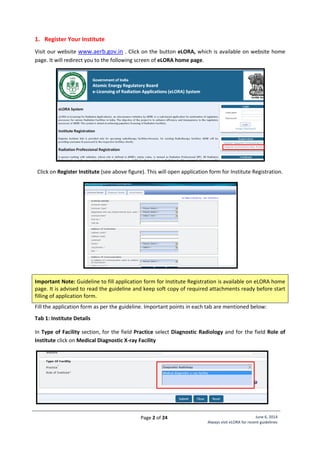
It is mandatory for all users of medical diagnostic x-ray equipments to obtain Licence for Operation
from AERB as per Atomic Energy (Radiation Protection) Rules 2004.
To facilitate online submission of applications for regulatory consents (Licence/Registration/RSO
approval, etc) and establish channel of communication with AERB for other regulatory requirements,
AERB has launched Diagnostic Radiology module in its e-governance application e-LORA (e-Licensing of
Radiation Applications) System. All diagnostic x-ray equipment user Institutes are required to use
eLORA for obtaining operating Licence from AERB.
Page 2 of 24 June 6, 2014
Always visit eLORA for recent guidelines
1. Register Your Institute
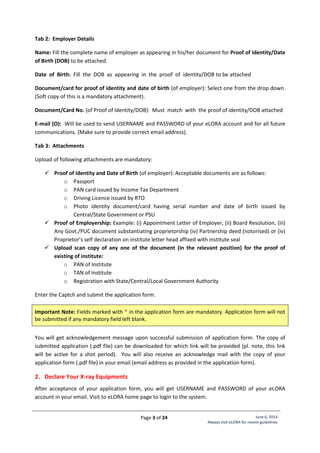
Visit our website www.aerb.gov.in . Click on the button eLORA, which is available on website home
page. It will redirect you to the following screen of eLORA home page.
Click on Register Institute (see above figure). This will open application form for Institute Registration.
Important Note: Guideline to fill application form for Institute Registration is available on eLORA home
page. It is advised to read the guideline and keep soft copy of required attachments ready before start
filling of application form.
Fill the application form as per the guideline. Important points in each tab are mentioned below:
Tab 1: Institute Details
In Type of Facility section, for the field Practice select Diagnostic Radiology and for the field Role of
Institute click on Medical Diagnostic X-ray Facility
Page 3 of 24 June 6, 2014
Always visit eLORA for recent guidelines
Tab 2: Employer Details
Name: Fill the complete name of employer as appearing in his/her document for Proof of Identity/Date
of Birth (DOB) to be attached.
Date of Birth: Fill the DOB as appearing in the proof of identity/DOB to be attached
Document/card for proof of identity and date of birth (of employer): Select one from the drop down.
(Soft copy of this is a mandatory attachment).
Document/Card No. (of Proof of Identity/DOB): Must match with the proof of identity/DOB attached
E-mail (O): Will be used to send USERNAME and PASSWORD of your eLORA account and for all future
communications. (Make sure to provide correct email address).
Tab 3: Attachments
Upload of following attachments are mandatory:
 Proof of Identity and Date of Birth (of employer): Acceptable documents are as follows:
o Passport
o PAN card issued by Income Tax Department
o Driving Licence issued by RTO
o Photo identity document/card having serial number and date of birth issued by
Central/State Government or PSU
 Proof of Employership: Example: (i) Appointment Letter of Employer, (ii) Board Resolution, (iii)
Any Govt./PUC document substantiating proprietorship (iv) Partnership deed (notorised) or (iv)
Proprietor’s self declaration on institute letter head affixed with institute seal
 Upload scan copy of any one of the document (in the relevant position) for the proof of
existing of institute:
o PAN of Institute
o TAN of Institute
o Registration with State/Central/Local Government Authority
Enter the Captch and submit the application form.
Important Note: Fields marked with * in the application form are mandatory. Application form will not
be submitted if any mandatory field left blank.
You will get acknowledgement message upon successful submission of application form. The copy of
submitted application (.pdf file) can be downloaded for which link will be provided (pl. note, this link
will be active for a shot period). You will also receive an acknowledge mail with the copy of your
application form (.pdf file) in your email (email address as provided in the application form).
2. Declare Your X-ray Equipments
After acceptance of your application form, you will get USERNAME and PASSWORD of your eLORA
account in your email. Visit to eLORA home page to login to the system.
Page 4 of 24 June 6, 2014
Always visit eLORA for recent guidelines
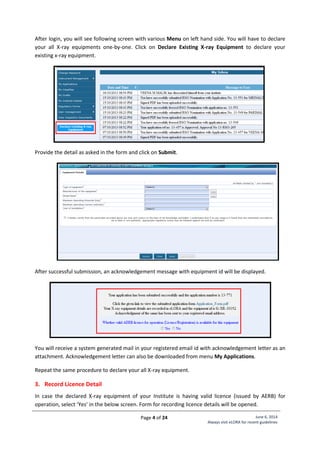
After login, you will see following screen with various Menu on left hand side. You will have to declare
your all X-ray equipments one-by-one. Click on Declare Existing X-ray Equipment to declare your
existing x-ray equipment.
Provide the detail as asked in the form and click on Submit.
After successful submission, an acknowledgement message with equipment id will be displayed.
You will receive a system generated mail in your registered email id with acknowledgement letter as an
attachment. Acknowledgement letter can also be downloaded from menu My Applications.
Repeat the same procedure to declare your all X-ray equipment.
3. Record Licence Detail
In case the declared X-ray equipment of your Institute is having valid licence (issued by AERB) for
operation, select ‘Yes’ in the below screen. Form for recording licence details will be opened.
Page 5 of 24 June 6, 2014
Always visit eLORA for recent guidelines
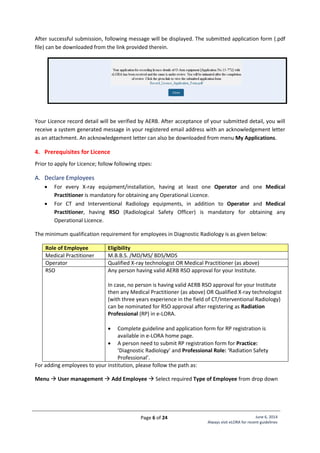
Otherwise, the form for recording licence detail can be accessed by clicking on menu Record Licence for
Operation of X-ray Equipment (as shown below)
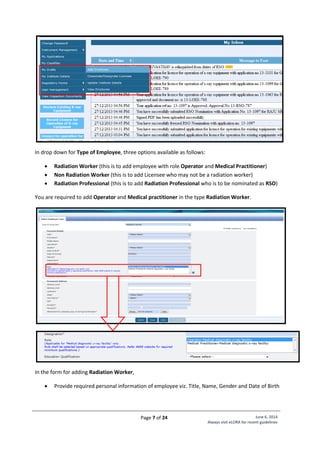
This will open form as shown below:
Provide following required details and submit the form:
 Equipment Id: To be selected from provided List (all your declared equipments will appear
here)
 Reference number of licence for operation: as appearing on AERB licence/registration
 Issuance date: as appearing on AERB licence/registration
 Expiry date: as appearing on AERB licence/registration
 Upload copy of Licence for operation: Browse and upload scanned copy of AERB
licence/registration
Page 6 of 24 June 6, 2014
Always visit eLORA for recent guidelines
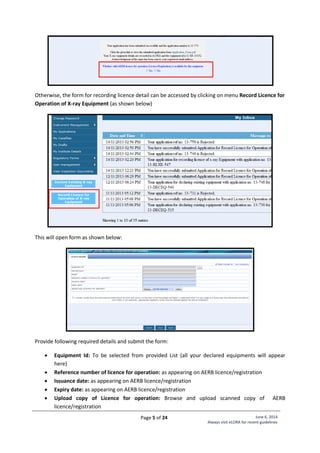
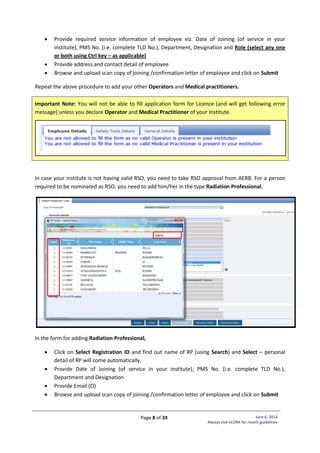
After successful submission, following message will be displayed. The submitted application form (.pdf
file) can be downloaded from the link provided therein.
Your Licence record detail will be verified by AERB. After acceptance of your submitted detail, you will
receive a system generated message in your registered email address with an acknowledgement letter
as an attachment. An acknowledgement letter can also be downloaded from menu My Applications.
4. Prerequisites for Licence
Prior to apply for Licence; follow following stpes:
A. Declare Employees
 For every X-ray equipment/installation, having at least one Operator and one Medical
Practitioner is mandatory for obtaining any Operational Licence.
 For CT and Interventional Radiology equipments, in addition to Operator and Medical
Practitioner, having RSO (Radiological Safety Officer) is mandatory for obtaining any
Operational Licence.
The minimum qualification requirement for employees in Diagnostic Radiology is as given below:
Role of Employee Eligibility
Medical Practitioner M.B.B.S. /MD/MS/ BDS/MDS
Operator Qualified X-ray technologist OR Medical Practitioner (as above)
RSO Any person having valid AERB RSO approval for your Institute.
In case, no person is having valid AERB RSO approval for your Institute
then any Medical Practitioner (as above) OR Qualified X-ray technologist
(with three years experience in the field of CT/Interventional Radiology)
can be nominated for RSO approval after registering as Radiation
Professional (RP) in e-LORA.
 Complete guideline and application form for RP registration is
available in e-LORA home page.
 A person need to submit RP registration form for Practice:
‘Diagnostic Radiology’ and Professional Role: ‘Radiation Safety
Professional’.
For adding employees to your institution, please follow the path as:
Menu  User management  Add Employee  Select required Type of Employee from drop down
Page 7 of 24 June 6, 2014
Always visit eLORA for recent guidelines
In drop down for Type of Employee, three options available as follows:
 Radiation Worker (this is to add employee with role Operator and Medical Practitioner)
 Non Radiation Worker (this is to add Licensee who may not be a radiation worker)
 Radiation Professional (this is to add Radiation Professional who is to be nominated as RSO)
You are required to add Operator and Medical practitioner in the type Radiation Worker.
In the form for adding Radiation Worker,
 Provide required personal information of employee viz. Title, Name, Gender and Date of Birth
Page 8 of 24 June 6, 2014
Always visit eLORA for recent guidelines
 Provide required service information of employee viz. Date of Joining (of service in your
institute), PMS No. (i.e. complete TLD No.), Department, Designation and Role (select any one
or both using Ctrl key – as applicable)
 Provide address and contact detail of employee
 Browse and upload scan copy of joining /confirmation letter of employee and click on Submit
Repeat the above procedure to add your other Operators and Medical practitioners.
Important Note: You will not be able to fill application form for Licence (and will get following error
message) unless you declare Operator and Medical Practitioner of your Institute.
In case your institute is not having valid RSO, you need to take RSO approval from AERB. For a person
required to be nominated as RSO, you need to add him/her in the type Radiation Professional.
In the form for adding Radiation Professional,
 Click on Select Registration ID and find out name of RP (using Search) and Select – personal
detail of RP will come automatically.
 Provide Date of Joining (of service in your institute), PMS No. (i.e. complete TLD No.),
Department and Designation
 Provide Email (O)
 Browse and upload scan copy of joining /confirmation letter of employee and click on Submit
Page 9 of 24 June 6, 2014
Always visit eLORA for recent guidelines
Important Note: Radiation Professional can subsequently be nominated for the approval of Radiological
Safety Officer (RSO). Process of RSO nomination explained in Sr. No.: C
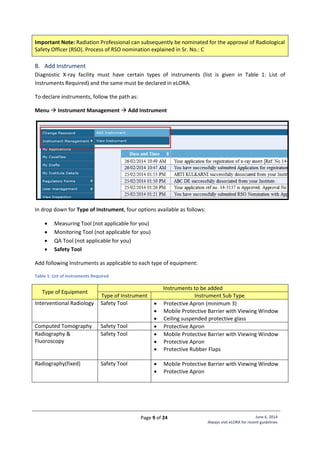
B. Add Instrument
Diagnostic X-ray facility must have certain types of instruments (list is given in Table 1: List of
Instruments Required) and the same must be declared in eLORA.
To declare instruments, follow the path as:
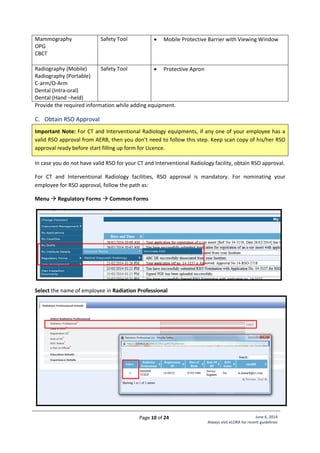
Menu  Instrument Management  Add Instrument
In drop down for Type of Instrument, four options available as follows:
 Measuring Tool (not applicable for you)
 Monitoring Tool (not applicable for you)
 QA Tool (not applicable for you)
 Safety Tool
Add following Instruments as applicable to each type of equipment:
Table 1: List of Instruments Required
Type of Equipment
Instruments to be added
Type of Instrument Instrument Sub Type
Interventional Radiology Safety Tool  Protective Apron (minimum 3)
 Mobile Protective Barrier with Viewing Window
 Ceiling suspended protective glass
Computed Tomography Safety Tool  Protective Apron
Radiography &
Fluoroscopy
Safety Tool  Mobile Protective Barrier with Viewing Window
 Protective Apron
 Protective Rubber Flaps
Radiography(fixed) Safety Tool  Mobile Protective Barrier with Viewing Window
 Protective Apron
Page 10 of 24 June 6, 2014
Always visit eLORA for recent guidelines
Mammography
OPG
CBCT
Safety Tool  Mobile Protective Barrier with Viewing Window
Radiography (Mobile)
Radiography (Portable)
C-arm/O-Arm
Dental (Intra-oral)
Dental (Hand –held)
Safety Tool  Protective Apron
Provide the required information while adding equipment.
C. Obtain RSO Approval
Important Note: For CT and Interventional Radiology equipments, if any one of your employee has a
valid RSO approval from AERB, then you don’t need to follow this step. Keep scan copy of his/her RSO
approval ready before start filling up form for Licence.
In case you do not have valid RSO for your CT and Interventional Radiology facility, obtain RSO approval.
For CT and Interventional Radiology facilities, RSO approval is mandatory. For nominating your
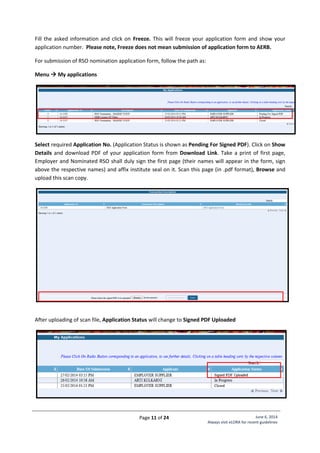
employee for RSO approval, follow the path as:
Menu  Regulatory Forms  Common Forms
Select the name of employee in Radiation Professional
Page 11 of 24 June 6, 2014
Always visit eLORA for recent guidelines
Fill the asked information and click on Freeze. This will freeze your application form and show your
application number. Please note, Freeze does not mean submission of application form to AERB.
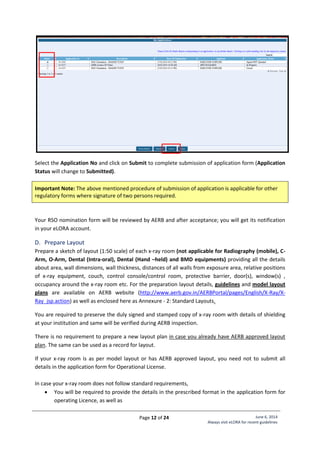
For submission of RSO nomination application form, follow the path as:
Menu  My applications
Select required Application No. (Application Status is shown as Pending For Signed PDF). Click on Show
Details and download PDF of your application form from Download Link. Take a print of first page,
Employer and Nominated RSO shall duly sign the first page (their names will appear in the form, sign
above the respective names) and affix institute seal on it. Scan this page (in .pdf format), Browse and
upload this scan copy.
After uploading of scan file, Application Status will change to Signed PDF Uploaded
Page 12 of 24 June 6, 2014
Always visit eLORA for recent guidelines
Select the Application No and click on Submit to complete submission of application form (Application
Status will change to Submitted).
Important Note: The above mentioned procedure of submission of application is applicable for other
regulatory forms where signature of two persons required.
Your RSO nomination form will be reviewed by AERB and after acceptance; you will get its notification
in your eLORA account.
D. Prepare Layout
Prepare a sketch of layout (1:50 scale) of each x-ray room (not applicable for Radiography (mobile), C-
Arm, O-Arm, Dental (Intra-oral), Dental (Hand –held) and BMD equipments) providing all the details
about area, wall dimensions, wall thickness, distances of all walls from exposure area, relative positions
of x-ray equipment, couch, control console/control room, protective barrier, door(s), window(s) ,
occupancy around the x-ray room etc. For the preparation layout details, guidelines and model layout
plans are available on AERB website (http://www.aerb.gov.in/AERBPortal/pages/English/X-Ray/X-
Ray_jsp.action) as well as enclosed here as Annexure - 2: Standard Layouts.
You are required to preserve the duly signed and stamped copy of x-ray room with details of shielding
at your institution and same will be verified during AERB inspection.
There is no requirement to prepare a new layout plan in case you already have AERB approved layout
plan. The same can be used as a record for layout.
If your x-ray room is as per model layout or has AERB approved layout, you need not to submit all
details in the application form for Operational License.
In case your x-ray room does not follow standard requirements,
 You will be required to provide the details in the prescribed format in the application form for
operating Licence, as well as
Page 13 of 24 June 6, 2014
Always visit eLORA for recent guidelines
 You will have to get radiation survey done from supplier of equipment or authorized agencies as
per prescribed format as given in application form for operating Licence.
Important Note: While submitting Operational Licence application form for CT and Interventional
Radiology equipment, you will be asked to upload scan copy of duly signed and stamped layout plan.
E. Quality Assurance
Prior to apply for licence for operation of existing x-ray equipment, conduct its Quality Assurance (QA)
as per AERB prescribed format. The Quality Assurance (QA) formats are available on AERB website
(http://www.aerb.gov.in/AERBPortal/pages/English/X-Ray/XRAYmanfform_jsp.action).
Important Note: While submitting Operational Licence application form for CT and Interventional
Radiology equipment, you will be asked to upload scan copy of duly signed and stamped QA.
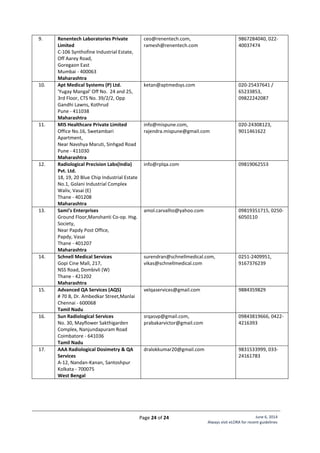
List of AERB Authorized Agencies for QA Services is enclosed as Annexure - 3: List of QA Agencies
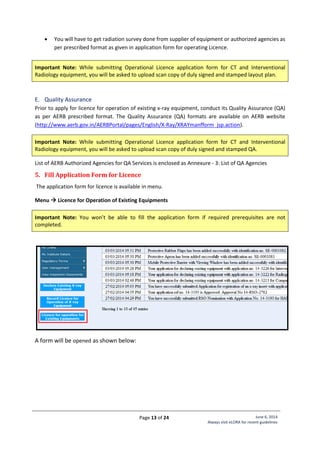
5. Fill Application Form for Licence
The application form for licence is available in menu.
Menu  Licence for Operation of Existing Equipments
Important Note: You won’t be able to fill the application form if required prerequisites are not
completed.
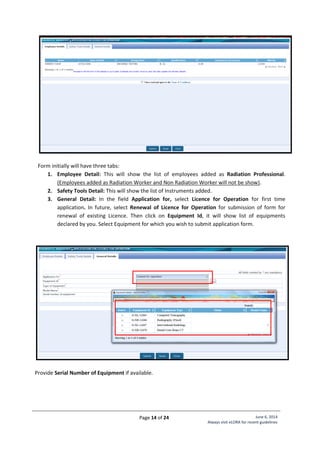
A form will be opened as shown below:
Page 14 of 24 June 6, 2014
Always visit eLORA for recent guidelines
Form initially will have three tabs:
1. Employee Detail: This will show the list of employees added as Radiation Professional.
(Employees added as Radiation Worker and Non Radiation Worker will not be show).
2. Safety Tools Detail: This will show the list of Instruments added.
3. General Detail: In the field Application for, select Licence for Operation for first time
application. In future, select Renewal of Licence for Operation for submission of form for
renewal of existing Licence. Then click on Equipment Id, it will show list of equipments
declared by you. Select Equipment for which you wish to submit application form.
Provide Serial Number of Equipment if available.
Page 15 of 24 June 6, 2014
Always visit eLORA for recent guidelines
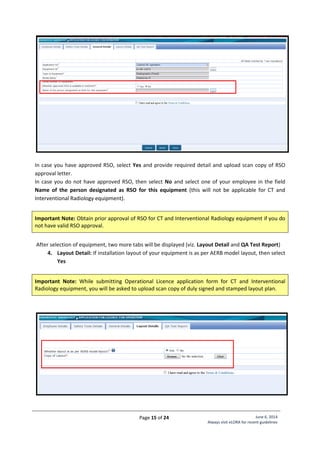
In case you have approved RSO, select Yes and provide required detail and upload scan copy of RSO
approval letter.
In case you do not have approved RSO, then select No and select one of your employee in the field
Name of the person designated as RSO for this equipment (this will not be applicable for CT and
Interventional Radiology equipment).
Important Note: Obtain prior approval of RSO for CT and Interventional Radiology equipment if you do
not have valid RSO approval.
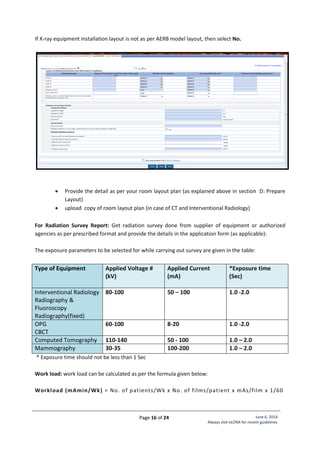
After selection of equipment, two more tabs will be displayed (viz. Layout Detail and QA Test Report)
4. Layout Detail: If installation layout of your equipment is as per AERB model layout, then select
Yes
Important Note: While submitting Operational Licence application form for CT and Interventional
Radiology equipment, you will be asked to upload scan copy of duly signed and stamped layout plan.
Page 16 of 24 June 6, 2014
Always visit eLORA for recent guidelines
If X-ray equipment installation layout is not as per AERB model layout, then select No.
 Provide the detail as per your room layout plan (as explained above in section D: Prepare
Layout)
 upload copy of room layout plan (in case of CT and Interventional Radiology)
For Radiation Survey Report: Get radiation survey done from supplier of equipment or authorized
agencies as per prescribed format and provide the details in the application form (as applicable):
The exposure parameters to be selected for while carrying out survey are given in the table:
Type of Equipment Applied Voltage #
(kV)
Applied Current
(mA)
*Exposure time
(Sec)
Interventional Radiology
Radiography &
Fluoroscopy
Radiography(fixed)
80-100 50 – 100 1.0 -2.0
OPG
CBCT
60-100 8-20 1.0 -2.0
Computed Tomography 110-140 50 - 100 1.0 – 2.0
Mammography 30-35 100-200 1.0 – 2.0
* Exposure time should not be less than 1 Sec
Work load: work load can be calculated as per the formula given below:
Workload (mAmin/Wk) = No. of patients/Wk x No. of films/patient x mAs/film x 1/60
Page 17 of 24 June 6, 2014
Always visit eLORA for recent guidelines
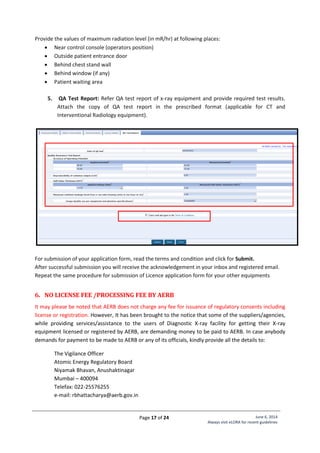
Provide the values of maximum radiation level (in mR/hr) at following places:
 Near control console (operators position)
 Outside patient entrance door
 Behind chest stand wall
 Behind window (if any)
 Patient waiting area
5. QA Test Report: Refer QA test report of x-ray equipment and provide required test results.
Attach the copy of QA test report in the prescribed format (applicable for CT and
Interventional Radiology equipment).
For submission of your application form, read the terms and condition and click for Submit.
After successful submission you will receive the acknowledgement in your inbox and registered email.
Repeat the same procedure for submission of Licence application form for your other equipments
6. NO LICENSE FEE /PROCESSING FEE BY AERB
It may please be noted that AERB does not charge any fee for issuance of regulatory consents including
license or registration. However, It has been brought to the notice that some of the suppliers/agencies,
while providing services/assistance to the users of Diagnostic X-ray facility for getting their X-ray
equipment licensed or registered by AERB, are demanding money to be paid to AERB. In case anybody
demands for payment to be made to AERB or any of its officials, kindly provide all the details to:
The Vigilance Officer
Atomic Energy Regulatory Board
Niyamak Bhavan, Anushaktinagar
Mumbai – 400094
Telefax: 022-25576255
e-mail: rbhattacharya@aerb.gov.in
Page 18 of 24 June 6, 2014
Always visit eLORA for recent guidelines
Annexure - 1: List of Personnel Monitoring Service (PMS) Providers
The following Accredited Laboratories provide TLD services in the respective states as mentioned
below:
Sr. No. State Name of Accredited Laboratory
1. Andhra Pradesh, Tamil Nadu,
Karnataka, Kerala, Puducherry,
Andaman and Nicobar and
Lakshdeep (Southern Region)
Avanttec Lab. Private Limited
31, Kamraj Street, Srinivasa Nagar, Padi, Chennai,
Tamil Nadu
Pin- 600050
Tel.: 044-26345288, 044-26630553/54/56
2. Maharashtra, Gujarat, Rajasthan,
Goa, Dadra and Nagar Haveli and
Diu (Western Region)
Renentech Lab. Private Limited
C-106, Synthofine Industrial Estate, Off Aarey Road,
Goregaon (E), Mumbai, Maharashtra
Pin- 490063
Tel.: 022-40037476
3. All other states in the Central,
Northern and North Eastern parts of
the country
Ultratech Lab. Private limited
Cloth Market, G.E. Road, kumhari, Bhilai, Durg,
Chhattisgarh
Pin- 490042
Tel.: 0788-3295166, 09981212431
4. All Defence institutions of country Defence Laboratory, Jodhpur
Page 19 of 24 June 6, 2014
Always visit eLORA for recent guidelines
Annexure - 2: Standard Layouts
Standard Layout of X-ray Installation
Legend:
1. Examination Table
2. Spot Film Device
3. Column Stand
4. X-ray Tube Head
7. Chest Stand
8. Control Unit
9. Mobile Protective Barrier
with lead glass viewing
window of 1.7 mm lead
equivalence
Name of Institute:
Complete Address
of Institute:
Make of X-ray
Equipment:
Model of X-ray
Equipment:
Signature of Head
of Institute:
[Seal of Institute]
Page 20 of 24 June 6, 2014
Always visit eLORA for recent guidelines
Standard Layout of CT Installation
Legend:
1. CT Gantry
2. Examination Table
3, 4. Control Unit
5. Viewing glass window of
100cm x 80cm of 2.0 mm
lead equivalence
Name of Institute:
Complete Address
of Institute:
Make of X-ray
Equipment:
Model of X-ray
Equipment:
Signature of Head
of Institute:
[Seal of Institute]
Page 21 of 24 June 6, 2014
Always visit eLORA for recent guidelines
Standard Layout of Interventional Radiology Installation
Legend:
1. C-arm
2. Examination Table
5. Fixed Radiation Shield
6,7,8. Control Unit
9. Viewing glass window of
120cm x 100cm of 2.0 mm
lead equivalence
Name of Institute:
Complete Address
of Institute:
Make of X-ray
Equipment:
Model of X-ray
Equipment:
Signature of Head
of Institute:
[Seal of Institute]
Page 22 of 24 June 6, 2014
Always visit eLORA for recent guidelines
Standard Layout of Mammography Installation
Legand:
1. Mammography Equipment
2. Control Unit with protective
barrier of 1.5 mm lead
equivalence
Name of Institute:
Complete Address
of Institute:
Make of X-ray
Equipment:
Model of X-ray
Equipment:
Signature of Head
of Institute:
[Seal of Institute]
Page 23 of 24 June 6, 2014
Always visit eLORA for recent guidelines
Annexure - 3: List of QA Agencies
QA Test results are required to be submitted for every X-ray equipment, which is normally provided by
the supplier at the time of installation of the equipment. In case of non-availability of QA report,
services of supplier/QA agency may be availed for the same. Prior to engaging the authorized QA
agency, quotations should be availed regarding their service charges as it may vary from agency to
agency.
List of AERB Authorized Agencies for QA Services (as on 9th
April 2014) is as follows:
Sr. No. QA Agency Email Contact Detail
1. Adithisri Radiation Services
18-5-281/6, Sapthagiri Nagar,
Tirupati
Chittoor - 517501
Andhra Pradesh
info@adithisri.com 09440270707, 0877-
2230055
2. Horizon Meditech Pvt. Ltd.,
J-3/1, First Floor (Behind Alaknanda
Market), Kalkaji
New Delhi - 110019
Delhi
gps.shekhawat@radiologyqa.in,
mahendra.bansal@radiologyqa.in
08800899361, 011-
41612370
3. X-Care
H4/41, Flat No. 201, Mahaveer
Enclave, Near Kalibadi
New Delhi - 110045
Delhi
xcareindia@gmail.com 09999060730,
09015523358
4. Biotek Solutions Pvt Ltd.
139, Ground Floor, 3rd Main,
Weavers Colony, Ganganagar
Bangalore - 560 032
Karnataka
jobin.abraham@bioteksolutions.in,
jajil.kumar@bioteksolutions.in
080-23634737,
09845076156,
9845476156
5. TBS India Telematic and Biomedical
Services Pvt. Ltd.,
2nd Floor, 'C' Wing, Mittal Towers,
No.6, M. G. Road,
Bangalore - 560001
Karnataka
chelva@tbs-india.com, amar@tbs-
india.com
9900236901, 080-
25590943
6. Hiya Medical Systems
Plot No. 008, Bldg. A-5, Yogi Nagar,
Situated Yogidham Co-Op. Hsg.
Society Ltd., Eksar Road, Borivali (w)
Mumbai - 400091
Maharashtra
hiya.medisys@gmail.com 09819366760, 022-
28966882
7. Omega Biomedical Services
Oasis Industrial Estate,
Unit No.28, Vakola Masjid,
Santacruz
Mumbai - 400055
Maharashtra
omegabiomedicalservices@gmail.com 022-26652932,
9833170025
8. PM Dimensions Pvt. Ltd.
B-807, Ashok Towers, Dr. S. S. Rao
Road, Opp. Mahatma Gandhi
Hospital, Parel
Mumbai - 400012
Maharashtra
makarand.rajadhyaksha@pmdimension
s.com,
gowthaman.gunasekaran@pmdimensio
ns.com
022-67349813,
09821197855,
7738144840 , 022-
42951855
Page 24 of 24 June 6, 2014
Always visit eLORA for recent guidelines
9. Renentech Laboratories Private
Limited
C-106 Synthofine Industrial Estate,
Off Aarey Road,
Goregaon East
Mumbai - 400063
Maharashtra
ceo@renentech.com,
ramesh@renentech.com
9867284040, 022-
40037474
10. Apt Medical Systems (P) Ltd.
'Yugay Mangal' Off No. 24 and 25,
3rd Floor, CTS No. 39/2/2, Opp
Gandhi Lawns, Kothrud
Pune - 411038
Maharashtra
ketan@aptmedsys.com 020-25437641 /
65233853,
09822242087
11. MIS Healthcare Private Limited
Office No.16, Swetambari
Apartment,
Near Navshya Maruti, Sinhgad Road
Pune - 411030
Maharashtra
info@mispune.com,
rajendra.mispune@gmail.com
020-24308123,
9011461622
12. Radiological Precision Labs(India)
Pvt. Ltd.
18, 19, 20 Blue Chip Industrial Estate
No.1, Golani Industrial Complex
Waliv, Vasai (E)
Thane - 401208
Maharashtra
info@rplqa.com 09819062553
13. Sami’s Enterprises
Ground Floor,Manshanti Co-op. Hsg.
Society,
Near Papdy Post Office,
Papdy, Vasai
Thane - 401207
Maharashtra
amol.carvalho@yahoo.com 09819351715, 0250-
6050110
14. Schnell Medical Services
Gopi Cine Mall, 217,
NSS Road, Dombivli (W)
Thane - 421202
Maharashtra
surendran@schnellmedical.com,
vikas@schnellmedical.com
0251-2409951,
9167376239
15. Advanced QA Services (AQS)
# 70 B, Dr. Ambedkar Street,Manlai
Chennai - 600068
Tamil Nadu
velqaservices@gmail.com 9884359829
16. Sun Radiological Services
No. 30, Mayflower Sakthigarden
Complex, Nanjundapuram Road
Coimbatore - 641036
Tamil Nadu
srqasvp@gmail.com,
prabakarvictor@gmail.com
09843819666, 0422-
4216393
17. AAA Radiological Dosimetry & QA
Services
A-12, Nandan-Kanan, Santoshpur
Kolkata - 700075
West Bengal
dralokkumar20@gmail.com 9831533999, 033-
24161783
Thanks
For more information and obtaining AERB licence,
visit: - www.aerb.gov.in and click on eLORA

Guidelines for applying AERB Licence.

  • 1.
    Quality Improvement Programme-Gujarat Guidelines for Applying for Licence of Diagnostic Radiology X-ray Equipment’s through eLORA System Dr J L Meena State Quality Assurance Medical Officer Commissioner of Health, Medical Service & Medical Education Department of Health & Family Welfare Government of Gujarat, India Email:- drjlmeena@gmail.com Web: - www.gujhealth.gov.in/quality-assurance-program.htm
  • 2.
    Page 1 of24 June 6, 2014 Always visit eLORA for recent guidelines Guidelines for Applying for Licence of Diagnostic Radiology X-ray Equipments through eLORA System Contents 1. Register Your Institute..........................................................................................................................2 2. Declare Your X-ray Equipments............................................................................................................3 3. Record Licence Detail ...........................................................................................................................4 4. Prerequisites for Licence ......................................................................................................................6 A. Declare Employees ...........................................................................................................................6 B. Add Instrument.................................................................................................................................9 C. Obtain RSO Approval......................................................................................................................10 D. Prepare Layout ...............................................................................................................................12 E. Quality Assurance...........................................................................................................................13 5. Fill Application Form for Licence ........................................................................................................13 6. NO LICENSE FEE /PROCESSING FEE BY AERB......................................................................................17 Annexure - 1: List of Personnel Monitoring Service (PMS) Providers ........................................................18 Annexure - 2: Standard Layouts .................................................................................................................19 Standard Layout of X-ray Installation.................................................................................................19 Standard Layout of CT Installation .....................................................................................................20 Standard Layout of Interventional Radiology Installation..................................................................21 Standard Layout of Mammography Installation.................................................................................22 Annexure - 3: List of QA Agencies ..............................................................................................................23 It is mandatory for all users of medical diagnostic x-ray equipments to obtain Licence for Operation from AERB as per Atomic Energy (Radiation Protection) Rules 2004. To facilitate online submission of applications for regulatory consents (Licence/Registration/RSO approval, etc) and establish channel of communication with AERB for other regulatory requirements, AERB has launched Diagnostic Radiology module in its e-governance application e-LORA (e-Licensing of Radiation Applications) System. All diagnostic x-ray equipment user Institutes are required to use eLORA for obtaining operating Licence from AERB.
  • 3.
    Page 2 of24 June 6, 2014 Always visit eLORA for recent guidelines 1. Register Your Institute Visit our website www.aerb.gov.in . Click on the button eLORA, which is available on website home page. It will redirect you to the following screen of eLORA home page. Click on Register Institute (see above figure). This will open application form for Institute Registration. Important Note: Guideline to fill application form for Institute Registration is available on eLORA home page. It is advised to read the guideline and keep soft copy of required attachments ready before start filling of application form. Fill the application form as per the guideline. Important points in each tab are mentioned below: Tab 1: Institute Details In Type of Facility section, for the field Practice select Diagnostic Radiology and for the field Role of Institute click on Medical Diagnostic X-ray Facility
  • 4.
    Page 3 of24 June 6, 2014 Always visit eLORA for recent guidelines Tab 2: Employer Details Name: Fill the complete name of employer as appearing in his/her document for Proof of Identity/Date of Birth (DOB) to be attached. Date of Birth: Fill the DOB as appearing in the proof of identity/DOB to be attached Document/card for proof of identity and date of birth (of employer): Select one from the drop down. (Soft copy of this is a mandatory attachment). Document/Card No. (of Proof of Identity/DOB): Must match with the proof of identity/DOB attached E-mail (O): Will be used to send USERNAME and PASSWORD of your eLORA account and for all future communications. (Make sure to provide correct email address). Tab 3: Attachments Upload of following attachments are mandatory:  Proof of Identity and Date of Birth (of employer): Acceptable documents are as follows: o Passport o PAN card issued by Income Tax Department o Driving Licence issued by RTO o Photo identity document/card having serial number and date of birth issued by Central/State Government or PSU  Proof of Employership: Example: (i) Appointment Letter of Employer, (ii) Board Resolution, (iii) Any Govt./PUC document substantiating proprietorship (iv) Partnership deed (notorised) or (iv) Proprietor’s self declaration on institute letter head affixed with institute seal  Upload scan copy of any one of the document (in the relevant position) for the proof of existing of institute: o PAN of Institute o TAN of Institute o Registration with State/Central/Local Government Authority Enter the Captch and submit the application form. Important Note: Fields marked with * in the application form are mandatory. Application form will not be submitted if any mandatory field left blank. You will get acknowledgement message upon successful submission of application form. The copy of submitted application (.pdf file) can be downloaded for which link will be provided (pl. note, this link will be active for a shot period). You will also receive an acknowledge mail with the copy of your application form (.pdf file) in your email (email address as provided in the application form). 2. Declare Your X-ray Equipments After acceptance of your application form, you will get USERNAME and PASSWORD of your eLORA account in your email. Visit to eLORA home page to login to the system.
  • 5.
    Page 4 of24 June 6, 2014 Always visit eLORA for recent guidelines After login, you will see following screen with various Menu on left hand side. You will have to declare your all X-ray equipments one-by-one. Click on Declare Existing X-ray Equipment to declare your existing x-ray equipment. Provide the detail as asked in the form and click on Submit. After successful submission, an acknowledgement message with equipment id will be displayed. You will receive a system generated mail in your registered email id with acknowledgement letter as an attachment. Acknowledgement letter can also be downloaded from menu My Applications. Repeat the same procedure to declare your all X-ray equipment. 3. Record Licence Detail In case the declared X-ray equipment of your Institute is having valid licence (issued by AERB) for operation, select ‘Yes’ in the below screen. Form for recording licence details will be opened.
  • 6.
    Page 5 of24 June 6, 2014 Always visit eLORA for recent guidelines Otherwise, the form for recording licence detail can be accessed by clicking on menu Record Licence for Operation of X-ray Equipment (as shown below) This will open form as shown below: Provide following required details and submit the form:  Equipment Id: To be selected from provided List (all your declared equipments will appear here)  Reference number of licence for operation: as appearing on AERB licence/registration  Issuance date: as appearing on AERB licence/registration  Expiry date: as appearing on AERB licence/registration  Upload copy of Licence for operation: Browse and upload scanned copy of AERB licence/registration
  • 7.
    Page 6 of24 June 6, 2014 Always visit eLORA for recent guidelines After successful submission, following message will be displayed. The submitted application form (.pdf file) can be downloaded from the link provided therein. Your Licence record detail will be verified by AERB. After acceptance of your submitted detail, you will receive a system generated message in your registered email address with an acknowledgement letter as an attachment. An acknowledgement letter can also be downloaded from menu My Applications. 4. Prerequisites for Licence Prior to apply for Licence; follow following stpes: A. Declare Employees  For every X-ray equipment/installation, having at least one Operator and one Medical Practitioner is mandatory for obtaining any Operational Licence.  For CT and Interventional Radiology equipments, in addition to Operator and Medical Practitioner, having RSO (Radiological Safety Officer) is mandatory for obtaining any Operational Licence. The minimum qualification requirement for employees in Diagnostic Radiology is as given below: Role of Employee Eligibility Medical Practitioner M.B.B.S. /MD/MS/ BDS/MDS Operator Qualified X-ray technologist OR Medical Practitioner (as above) RSO Any person having valid AERB RSO approval for your Institute. In case, no person is having valid AERB RSO approval for your Institute then any Medical Practitioner (as above) OR Qualified X-ray technologist (with three years experience in the field of CT/Interventional Radiology) can be nominated for RSO approval after registering as Radiation Professional (RP) in e-LORA.  Complete guideline and application form for RP registration is available in e-LORA home page.  A person need to submit RP registration form for Practice: ‘Diagnostic Radiology’ and Professional Role: ‘Radiation Safety Professional’. For adding employees to your institution, please follow the path as: Menu  User management  Add Employee  Select required Type of Employee from drop down
  • 8.
    Page 7 of24 June 6, 2014 Always visit eLORA for recent guidelines In drop down for Type of Employee, three options available as follows:  Radiation Worker (this is to add employee with role Operator and Medical Practitioner)  Non Radiation Worker (this is to add Licensee who may not be a radiation worker)  Radiation Professional (this is to add Radiation Professional who is to be nominated as RSO) You are required to add Operator and Medical practitioner in the type Radiation Worker. In the form for adding Radiation Worker,  Provide required personal information of employee viz. Title, Name, Gender and Date of Birth
  • 9.
    Page 8 of24 June 6, 2014 Always visit eLORA for recent guidelines  Provide required service information of employee viz. Date of Joining (of service in your institute), PMS No. (i.e. complete TLD No.), Department, Designation and Role (select any one or both using Ctrl key – as applicable)  Provide address and contact detail of employee  Browse and upload scan copy of joining /confirmation letter of employee and click on Submit Repeat the above procedure to add your other Operators and Medical practitioners. Important Note: You will not be able to fill application form for Licence (and will get following error message) unless you declare Operator and Medical Practitioner of your Institute. In case your institute is not having valid RSO, you need to take RSO approval from AERB. For a person required to be nominated as RSO, you need to add him/her in the type Radiation Professional. In the form for adding Radiation Professional,  Click on Select Registration ID and find out name of RP (using Search) and Select – personal detail of RP will come automatically.  Provide Date of Joining (of service in your institute), PMS No. (i.e. complete TLD No.), Department and Designation  Provide Email (O)  Browse and upload scan copy of joining /confirmation letter of employee and click on Submit
  • 10.
    Page 9 of24 June 6, 2014 Always visit eLORA for recent guidelines Important Note: Radiation Professional can subsequently be nominated for the approval of Radiological Safety Officer (RSO). Process of RSO nomination explained in Sr. No.: C B. Add Instrument Diagnostic X-ray facility must have certain types of instruments (list is given in Table 1: List of Instruments Required) and the same must be declared in eLORA. To declare instruments, follow the path as: Menu  Instrument Management  Add Instrument In drop down for Type of Instrument, four options available as follows:  Measuring Tool (not applicable for you)  Monitoring Tool (not applicable for you)  QA Tool (not applicable for you)  Safety Tool Add following Instruments as applicable to each type of equipment: Table 1: List of Instruments Required Type of Equipment Instruments to be added Type of Instrument Instrument Sub Type Interventional Radiology Safety Tool  Protective Apron (minimum 3)  Mobile Protective Barrier with Viewing Window  Ceiling suspended protective glass Computed Tomography Safety Tool  Protective Apron Radiography & Fluoroscopy Safety Tool  Mobile Protective Barrier with Viewing Window  Protective Apron  Protective Rubber Flaps Radiography(fixed) Safety Tool  Mobile Protective Barrier with Viewing Window  Protective Apron
  • 11.
    Page 10 of24 June 6, 2014 Always visit eLORA for recent guidelines Mammography OPG CBCT Safety Tool  Mobile Protective Barrier with Viewing Window Radiography (Mobile) Radiography (Portable) C-arm/O-Arm Dental (Intra-oral) Dental (Hand –held) Safety Tool  Protective Apron Provide the required information while adding equipment. C. Obtain RSO Approval Important Note: For CT and Interventional Radiology equipments, if any one of your employee has a valid RSO approval from AERB, then you don’t need to follow this step. Keep scan copy of his/her RSO approval ready before start filling up form for Licence. In case you do not have valid RSO for your CT and Interventional Radiology facility, obtain RSO approval. For CT and Interventional Radiology facilities, RSO approval is mandatory. For nominating your employee for RSO approval, follow the path as: Menu  Regulatory Forms  Common Forms Select the name of employee in Radiation Professional
  • 12.
    Page 11 of24 June 6, 2014 Always visit eLORA for recent guidelines Fill the asked information and click on Freeze. This will freeze your application form and show your application number. Please note, Freeze does not mean submission of application form to AERB. For submission of RSO nomination application form, follow the path as: Menu  My applications Select required Application No. (Application Status is shown as Pending For Signed PDF). Click on Show Details and download PDF of your application form from Download Link. Take a print of first page, Employer and Nominated RSO shall duly sign the first page (their names will appear in the form, sign above the respective names) and affix institute seal on it. Scan this page (in .pdf format), Browse and upload this scan copy. After uploading of scan file, Application Status will change to Signed PDF Uploaded
  • 13.
    Page 12 of24 June 6, 2014 Always visit eLORA for recent guidelines Select the Application No and click on Submit to complete submission of application form (Application Status will change to Submitted). Important Note: The above mentioned procedure of submission of application is applicable for other regulatory forms where signature of two persons required. Your RSO nomination form will be reviewed by AERB and after acceptance; you will get its notification in your eLORA account. D. Prepare Layout Prepare a sketch of layout (1:50 scale) of each x-ray room (not applicable for Radiography (mobile), C- Arm, O-Arm, Dental (Intra-oral), Dental (Hand –held) and BMD equipments) providing all the details about area, wall dimensions, wall thickness, distances of all walls from exposure area, relative positions of x-ray equipment, couch, control console/control room, protective barrier, door(s), window(s) , occupancy around the x-ray room etc. For the preparation layout details, guidelines and model layout plans are available on AERB website (http://www.aerb.gov.in/AERBPortal/pages/English/X-Ray/X- Ray_jsp.action) as well as enclosed here as Annexure - 2: Standard Layouts. You are required to preserve the duly signed and stamped copy of x-ray room with details of shielding at your institution and same will be verified during AERB inspection. There is no requirement to prepare a new layout plan in case you already have AERB approved layout plan. The same can be used as a record for layout. If your x-ray room is as per model layout or has AERB approved layout, you need not to submit all details in the application form for Operational License. In case your x-ray room does not follow standard requirements,  You will be required to provide the details in the prescribed format in the application form for operating Licence, as well as
  • 14.
    Page 13 of24 June 6, 2014 Always visit eLORA for recent guidelines  You will have to get radiation survey done from supplier of equipment or authorized agencies as per prescribed format as given in application form for operating Licence. Important Note: While submitting Operational Licence application form for CT and Interventional Radiology equipment, you will be asked to upload scan copy of duly signed and stamped layout plan. E. Quality Assurance Prior to apply for licence for operation of existing x-ray equipment, conduct its Quality Assurance (QA) as per AERB prescribed format. The Quality Assurance (QA) formats are available on AERB website (http://www.aerb.gov.in/AERBPortal/pages/English/X-Ray/XRAYmanfform_jsp.action). Important Note: While submitting Operational Licence application form for CT and Interventional Radiology equipment, you will be asked to upload scan copy of duly signed and stamped QA. List of AERB Authorized Agencies for QA Services is enclosed as Annexure - 3: List of QA Agencies 5. Fill Application Form for Licence The application form for licence is available in menu. Menu  Licence for Operation of Existing Equipments Important Note: You won’t be able to fill the application form if required prerequisites are not completed. A form will be opened as shown below:
  • 15.
    Page 14 of24 June 6, 2014 Always visit eLORA for recent guidelines Form initially will have three tabs: 1. Employee Detail: This will show the list of employees added as Radiation Professional. (Employees added as Radiation Worker and Non Radiation Worker will not be show). 2. Safety Tools Detail: This will show the list of Instruments added. 3. General Detail: In the field Application for, select Licence for Operation for first time application. In future, select Renewal of Licence for Operation for submission of form for renewal of existing Licence. Then click on Equipment Id, it will show list of equipments declared by you. Select Equipment for which you wish to submit application form. Provide Serial Number of Equipment if available.
  • 16.
    Page 15 of24 June 6, 2014 Always visit eLORA for recent guidelines In case you have approved RSO, select Yes and provide required detail and upload scan copy of RSO approval letter. In case you do not have approved RSO, then select No and select one of your employee in the field Name of the person designated as RSO for this equipment (this will not be applicable for CT and Interventional Radiology equipment). Important Note: Obtain prior approval of RSO for CT and Interventional Radiology equipment if you do not have valid RSO approval. After selection of equipment, two more tabs will be displayed (viz. Layout Detail and QA Test Report) 4. Layout Detail: If installation layout of your equipment is as per AERB model layout, then select Yes Important Note: While submitting Operational Licence application form for CT and Interventional Radiology equipment, you will be asked to upload scan copy of duly signed and stamped layout plan.
  • 17.
    Page 16 of24 June 6, 2014 Always visit eLORA for recent guidelines If X-ray equipment installation layout is not as per AERB model layout, then select No.  Provide the detail as per your room layout plan (as explained above in section D: Prepare Layout)  upload copy of room layout plan (in case of CT and Interventional Radiology) For Radiation Survey Report: Get radiation survey done from supplier of equipment or authorized agencies as per prescribed format and provide the details in the application form (as applicable): The exposure parameters to be selected for while carrying out survey are given in the table: Type of Equipment Applied Voltage # (kV) Applied Current (mA) *Exposure time (Sec) Interventional Radiology Radiography & Fluoroscopy Radiography(fixed) 80-100 50 – 100 1.0 -2.0 OPG CBCT 60-100 8-20 1.0 -2.0 Computed Tomography 110-140 50 - 100 1.0 – 2.0 Mammography 30-35 100-200 1.0 – 2.0 * Exposure time should not be less than 1 Sec Work load: work load can be calculated as per the formula given below: Workload (mAmin/Wk) = No. of patients/Wk x No. of films/patient x mAs/film x 1/60
  • 18.
    Page 17 of24 June 6, 2014 Always visit eLORA for recent guidelines Provide the values of maximum radiation level (in mR/hr) at following places:  Near control console (operators position)  Outside patient entrance door  Behind chest stand wall  Behind window (if any)  Patient waiting area 5. QA Test Report: Refer QA test report of x-ray equipment and provide required test results. Attach the copy of QA test report in the prescribed format (applicable for CT and Interventional Radiology equipment). For submission of your application form, read the terms and condition and click for Submit. After successful submission you will receive the acknowledgement in your inbox and registered email. Repeat the same procedure for submission of Licence application form for your other equipments 6. NO LICENSE FEE /PROCESSING FEE BY AERB It may please be noted that AERB does not charge any fee for issuance of regulatory consents including license or registration. However, It has been brought to the notice that some of the suppliers/agencies, while providing services/assistance to the users of Diagnostic X-ray facility for getting their X-ray equipment licensed or registered by AERB, are demanding money to be paid to AERB. In case anybody demands for payment to be made to AERB or any of its officials, kindly provide all the details to: The Vigilance Officer Atomic Energy Regulatory Board Niyamak Bhavan, Anushaktinagar Mumbai – 400094 Telefax: 022-25576255 e-mail: rbhattacharya@aerb.gov.in
  • 19.
    Page 18 of24 June 6, 2014 Always visit eLORA for recent guidelines Annexure - 1: List of Personnel Monitoring Service (PMS) Providers The following Accredited Laboratories provide TLD services in the respective states as mentioned below: Sr. No. State Name of Accredited Laboratory 1. Andhra Pradesh, Tamil Nadu, Karnataka, Kerala, Puducherry, Andaman and Nicobar and Lakshdeep (Southern Region) Avanttec Lab. Private Limited 31, Kamraj Street, Srinivasa Nagar, Padi, Chennai, Tamil Nadu Pin- 600050 Tel.: 044-26345288, 044-26630553/54/56 2. Maharashtra, Gujarat, Rajasthan, Goa, Dadra and Nagar Haveli and Diu (Western Region) Renentech Lab. Private Limited C-106, Synthofine Industrial Estate, Off Aarey Road, Goregaon (E), Mumbai, Maharashtra Pin- 490063 Tel.: 022-40037476 3. All other states in the Central, Northern and North Eastern parts of the country Ultratech Lab. Private limited Cloth Market, G.E. Road, kumhari, Bhilai, Durg, Chhattisgarh Pin- 490042 Tel.: 0788-3295166, 09981212431 4. All Defence institutions of country Defence Laboratory, Jodhpur
  • 20.
    Page 19 of24 June 6, 2014 Always visit eLORA for recent guidelines Annexure - 2: Standard Layouts Standard Layout of X-ray Installation Legend: 1. Examination Table 2. Spot Film Device 3. Column Stand 4. X-ray Tube Head 7. Chest Stand 8. Control Unit 9. Mobile Protective Barrier with lead glass viewing window of 1.7 mm lead equivalence Name of Institute: Complete Address of Institute: Make of X-ray Equipment: Model of X-ray Equipment: Signature of Head of Institute: [Seal of Institute]
  • 21.
    Page 20 of24 June 6, 2014 Always visit eLORA for recent guidelines Standard Layout of CT Installation Legend: 1. CT Gantry 2. Examination Table 3, 4. Control Unit 5. Viewing glass window of 100cm x 80cm of 2.0 mm lead equivalence Name of Institute: Complete Address of Institute: Make of X-ray Equipment: Model of X-ray Equipment: Signature of Head of Institute: [Seal of Institute]
  • 22.
    Page 21 of24 June 6, 2014 Always visit eLORA for recent guidelines Standard Layout of Interventional Radiology Installation Legend: 1. C-arm 2. Examination Table 5. Fixed Radiation Shield 6,7,8. Control Unit 9. Viewing glass window of 120cm x 100cm of 2.0 mm lead equivalence Name of Institute: Complete Address of Institute: Make of X-ray Equipment: Model of X-ray Equipment: Signature of Head of Institute: [Seal of Institute]
  • 23.
    Page 22 of24 June 6, 2014 Always visit eLORA for recent guidelines Standard Layout of Mammography Installation Legand: 1. Mammography Equipment 2. Control Unit with protective barrier of 1.5 mm lead equivalence Name of Institute: Complete Address of Institute: Make of X-ray Equipment: Model of X-ray Equipment: Signature of Head of Institute: [Seal of Institute]
  • 24.
    Page 23 of24 June 6, 2014 Always visit eLORA for recent guidelines Annexure - 3: List of QA Agencies QA Test results are required to be submitted for every X-ray equipment, which is normally provided by the supplier at the time of installation of the equipment. In case of non-availability of QA report, services of supplier/QA agency may be availed for the same. Prior to engaging the authorized QA agency, quotations should be availed regarding their service charges as it may vary from agency to agency. List of AERB Authorized Agencies for QA Services (as on 9th April 2014) is as follows: Sr. No. QA Agency Email Contact Detail 1. Adithisri Radiation Services 18-5-281/6, Sapthagiri Nagar, Tirupati Chittoor - 517501 Andhra Pradesh info@adithisri.com 09440270707, 0877- 2230055 2. Horizon Meditech Pvt. Ltd., J-3/1, First Floor (Behind Alaknanda Market), Kalkaji New Delhi - 110019 Delhi gps.shekhawat@radiologyqa.in, mahendra.bansal@radiologyqa.in 08800899361, 011- 41612370 3. X-Care H4/41, Flat No. 201, Mahaveer Enclave, Near Kalibadi New Delhi - 110045 Delhi xcareindia@gmail.com 09999060730, 09015523358 4. Biotek Solutions Pvt Ltd. 139, Ground Floor, 3rd Main, Weavers Colony, Ganganagar Bangalore - 560 032 Karnataka jobin.abraham@bioteksolutions.in, jajil.kumar@bioteksolutions.in 080-23634737, 09845076156, 9845476156 5. TBS India Telematic and Biomedical Services Pvt. Ltd., 2nd Floor, 'C' Wing, Mittal Towers, No.6, M. G. Road, Bangalore - 560001 Karnataka chelva@tbs-india.com, amar@tbs- india.com 9900236901, 080- 25590943 6. Hiya Medical Systems Plot No. 008, Bldg. A-5, Yogi Nagar, Situated Yogidham Co-Op. Hsg. Society Ltd., Eksar Road, Borivali (w) Mumbai - 400091 Maharashtra hiya.medisys@gmail.com 09819366760, 022- 28966882 7. Omega Biomedical Services Oasis Industrial Estate, Unit No.28, Vakola Masjid, Santacruz Mumbai - 400055 Maharashtra omegabiomedicalservices@gmail.com 022-26652932, 9833170025 8. PM Dimensions Pvt. Ltd. B-807, Ashok Towers, Dr. S. S. Rao Road, Opp. Mahatma Gandhi Hospital, Parel Mumbai - 400012 Maharashtra makarand.rajadhyaksha@pmdimension s.com, gowthaman.gunasekaran@pmdimensio ns.com 022-67349813, 09821197855, 7738144840 , 022- 42951855
  • 25.
    Page 24 of24 June 6, 2014 Always visit eLORA for recent guidelines 9. Renentech Laboratories Private Limited C-106 Synthofine Industrial Estate, Off Aarey Road, Goregaon East Mumbai - 400063 Maharashtra ceo@renentech.com, ramesh@renentech.com 9867284040, 022- 40037474 10. Apt Medical Systems (P) Ltd. 'Yugay Mangal' Off No. 24 and 25, 3rd Floor, CTS No. 39/2/2, Opp Gandhi Lawns, Kothrud Pune - 411038 Maharashtra ketan@aptmedsys.com 020-25437641 / 65233853, 09822242087 11. MIS Healthcare Private Limited Office No.16, Swetambari Apartment, Near Navshya Maruti, Sinhgad Road Pune - 411030 Maharashtra info@mispune.com, rajendra.mispune@gmail.com 020-24308123, 9011461622 12. Radiological Precision Labs(India) Pvt. Ltd. 18, 19, 20 Blue Chip Industrial Estate No.1, Golani Industrial Complex Waliv, Vasai (E) Thane - 401208 Maharashtra info@rplqa.com 09819062553 13. Sami’s Enterprises Ground Floor,Manshanti Co-op. Hsg. Society, Near Papdy Post Office, Papdy, Vasai Thane - 401207 Maharashtra amol.carvalho@yahoo.com 09819351715, 0250- 6050110 14. Schnell Medical Services Gopi Cine Mall, 217, NSS Road, Dombivli (W) Thane - 421202 Maharashtra surendran@schnellmedical.com, vikas@schnellmedical.com 0251-2409951, 9167376239 15. Advanced QA Services (AQS) # 70 B, Dr. Ambedkar Street,Manlai Chennai - 600068 Tamil Nadu velqaservices@gmail.com 9884359829 16. Sun Radiological Services No. 30, Mayflower Sakthigarden Complex, Nanjundapuram Road Coimbatore - 641036 Tamil Nadu srqasvp@gmail.com, prabakarvictor@gmail.com 09843819666, 0422- 4216393 17. AAA Radiological Dosimetry & QA Services A-12, Nandan-Kanan, Santoshpur Kolkata - 700075 West Bengal dralokkumar20@gmail.com 9831533999, 033- 24161783
  • 26.
    Thanks For more informationand obtaining AERB licence, visit: - www.aerb.gov.in and click on eLORA