1. Citrix Netscaler VPX
This section details the design decisions for the Citrix Netscaler VPX.

1.1 Summary
The Citrix NetScaler product line optimizes delivery of applications and desktops over the
Internet and private networks. The NetScaler product is an application switch that performs
application-specific traffic analysis to intelligently distribute, optimize, and secure Layer 4 Layer 7 (L4-L7) network traffic for web applications. The NetScaler feature set can be broadly
categorized as consisting of switching features, security and protection features, and serverfarm optimization features. The Citrix NetScaler VPX product is a virtual NetScaler appliance
that can be hosted on Citrix XenServer or VMware virtualization platforms. A NetScaler virtual
appliance supports all the features of a physical NetScaler, except interface-related events and
tagged VLANs. GuideIT requirements for the Netscaler role are as follows:
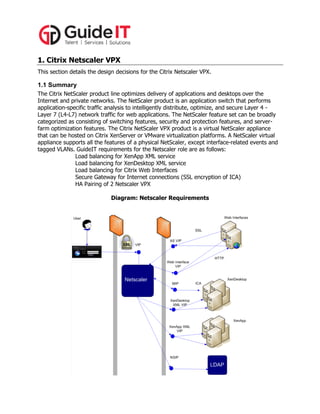
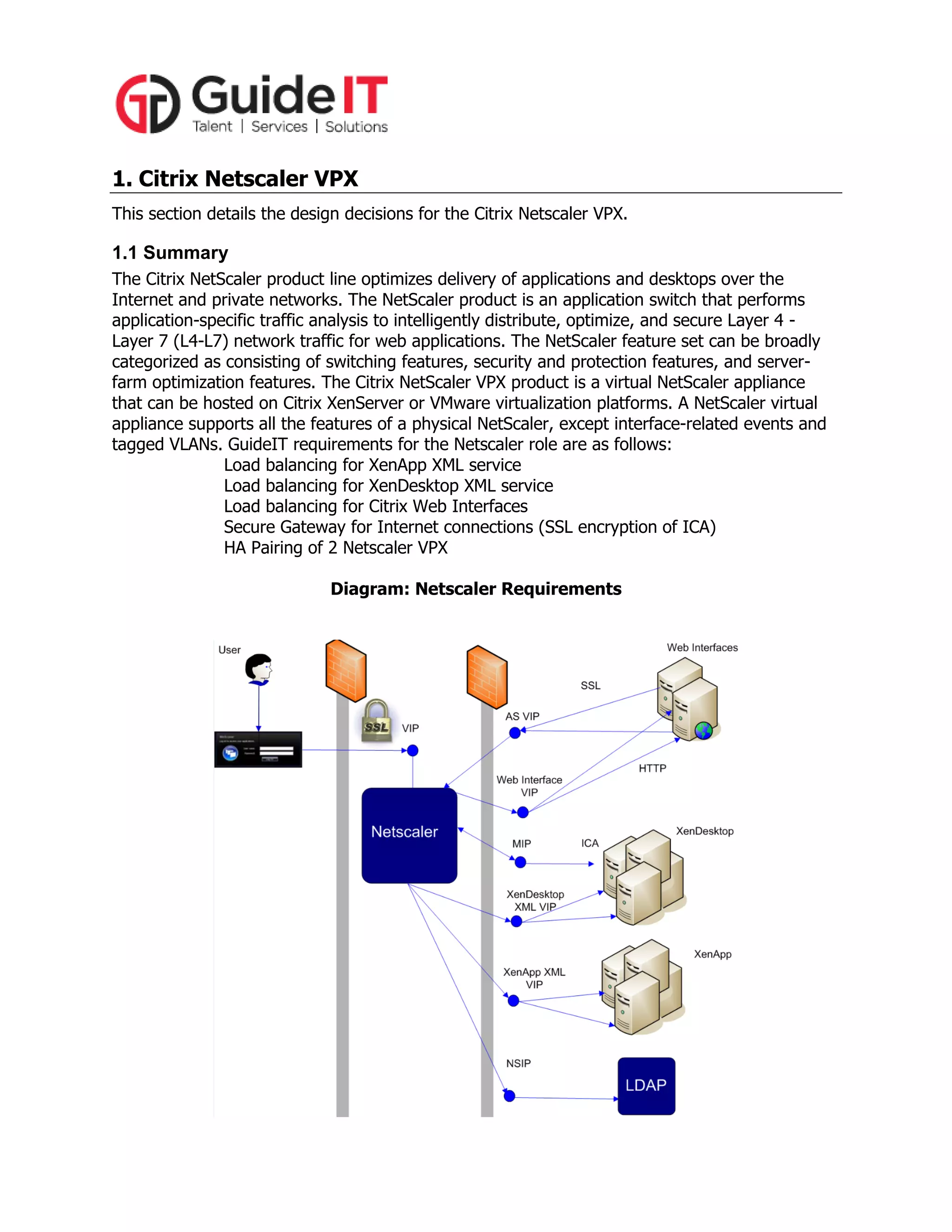
Load balancing for XenApp XML service
Load balancing for XenDesktop XML service
Load balancing for Citrix Web Interfaces
Secure Gateway for Internet connections (SSL encryption of ICA)
HA Pairing of 2 Netscaler VPX
Diagram: Netscaler Requirements
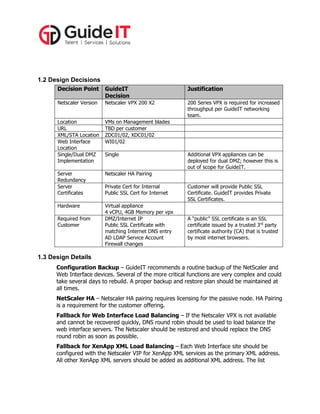
1.2 Design Decisions
Decision Point

GuideIT
Decision

Justification

Netscaler Version

Netscaler VPX 200 X2

200 Series VPX is required for increased
throughput per GuideIT networking
team.

Location
URL
XML/STA Location
Web Interface
Location
Single/Dual DMZ
Implementation

VMs on Management blades
TBD per customer
ZDC01/02, XDC01/02
WI01/02

Server
Redundancy
Server
Certificates

Netscaler HA Pairing

Hardware

Virtual appliance
4 vCPU, 4GB Memory per vpx
DMZ/Internet IP
Public SSL Certificate with
matching Internet DNS entry
AD LDAP Service Account
Firewall changes

Required from
Customer

Single

Private Cert for Internal
Public SSL Cert for Internet

Additional VPX appliances can be
deployed for dual DMZ; however this is
out of scope for GuideIT.

Customer will provide Public SSL
Certificate. GuideIT provides Private
SSL Certificates.

A “public” SSL certificate is an SSL
certificate issued by a trusted 3rd party
certificate authority (CA) that is trusted
by most internet browsers.

1.3 Design Details
Configuration Backup – GuideIT recommends a routine backup of the NetScaler and
Web Interface devices. Several of the more critical functions are very complex and could
take several days to rebuild. A proper backup and restore plan should be maintained at
all times.
NetScaler HA – Netscaler HA pairing requires licensing for the passive node. HA Pairing
is a requirement for the customer offering.
Fallback for Web Interface Load Balancing – If the Netscaler VPX is not available
and cannot be recovered quickly, DNS round robin should be used to load balance the
web interface servers. The Netscaler should be restored and should replace the DNS
round robin as soon as possible.
Fallback for XenApp XML Load Balancing – Each Web Interface site should be
configured with the Netscaler VIP for XenApp XML services as the primary XML address.
All other XenApp XML servers should be added as additional XML address. The list
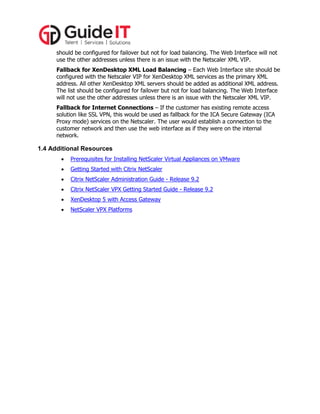
should be configured for failover but not for load balancing. The Web Interface will not
use the other addresses unless there is an issue with the Netscaler XML VIP.
Fallback for XenDesktop XML Load Balancing – Each Web Interface site should be
configured with the Netscaler VIP for XenDesktop XML services as the primary XML
address. All other XenDesktop XML servers should be added as additional XML address.
The list should be configured for failover but not for load balancing. The Web Interface
will not use the other addresses unless there is an issue with the Netscaler XML VIP.
Fallback for Internet Connections – If the customer has existing remote access
solution like SSL VPN, this would be used as fallback for the ICA Secure Gateway (ICA
Proxy mode) services on the Netscaler. The user would establish a connection to the
customer network and then use the web interface as if they were on the internal
network.

1.4 Additional Resources


Prerequisites for Installing NetScaler Virtual Appliances on VMware



Getting Started with Citrix NetScaler



Citrix NetScaler Administration Guide - Release 9.2



Citrix NetScaler VPX Getting Started Guide - Release 9.2



XenDesktop 5 with Access Gateway



NetScaler VPX Platforms

GuideIT Delivery Design - Netscaler

  • 1.
    1. Citrix NetscalerVPX This section details the design decisions for the Citrix Netscaler VPX. 1.1 Summary The Citrix NetScaler product line optimizes delivery of applications and desktops over the Internet and private networks. The NetScaler product is an application switch that performs application-specific traffic analysis to intelligently distribute, optimize, and secure Layer 4 Layer 7 (L4-L7) network traffic for web applications. The NetScaler feature set can be broadly categorized as consisting of switching features, security and protection features, and serverfarm optimization features. The Citrix NetScaler VPX product is a virtual NetScaler appliance that can be hosted on Citrix XenServer or VMware virtualization platforms. A NetScaler virtual appliance supports all the features of a physical NetScaler, except interface-related events and tagged VLANs. GuideIT requirements for the Netscaler role are as follows: Load balancing for XenApp XML service Load balancing for XenDesktop XML service Load balancing for Citrix Web Interfaces Secure Gateway for Internet connections (SSL encryption of ICA) HA Pairing of 2 Netscaler VPX Diagram: Netscaler Requirements
  • 2.
    1.2 Design Decisions DecisionPoint GuideIT Decision Justification Netscaler Version Netscaler VPX 200 X2 200 Series VPX is required for increased throughput per GuideIT networking team. Location URL XML/STA Location Web Interface Location Single/Dual DMZ Implementation VMs on Management blades TBD per customer ZDC01/02, XDC01/02 WI01/02 Server Redundancy Server Certificates Netscaler HA Pairing Hardware Virtual appliance 4 vCPU, 4GB Memory per vpx DMZ/Internet IP Public SSL Certificate with matching Internet DNS entry AD LDAP Service Account Firewall changes Required from Customer Single Private Cert for Internal Public SSL Cert for Internet Additional VPX appliances can be deployed for dual DMZ; however this is out of scope for GuideIT. Customer will provide Public SSL Certificate. GuideIT provides Private SSL Certificates. A “public” SSL certificate is an SSL certificate issued by a trusted 3rd party certificate authority (CA) that is trusted by most internet browsers. 1.3 Design Details Configuration Backup – GuideIT recommends a routine backup of the NetScaler and Web Interface devices. Several of the more critical functions are very complex and could take several days to rebuild. A proper backup and restore plan should be maintained at all times. NetScaler HA – Netscaler HA pairing requires licensing for the passive node. HA Pairing is a requirement for the customer offering. Fallback for Web Interface Load Balancing – If the Netscaler VPX is not available and cannot be recovered quickly, DNS round robin should be used to load balance the web interface servers. The Netscaler should be restored and should replace the DNS round robin as soon as possible. Fallback for XenApp XML Load Balancing – Each Web Interface site should be configured with the Netscaler VIP for XenApp XML services as the primary XML address. All other XenApp XML servers should be added as additional XML address. The list
  • 3.
    should be configuredfor failover but not for load balancing. The Web Interface will not use the other addresses unless there is an issue with the Netscaler XML VIP. Fallback for XenDesktop XML Load Balancing – Each Web Interface site should be configured with the Netscaler VIP for XenDesktop XML services as the primary XML address. All other XenDesktop XML servers should be added as additional XML address. The list should be configured for failover but not for load balancing. The Web Interface will not use the other addresses unless there is an issue with the Netscaler XML VIP. Fallback for Internet Connections – If the customer has existing remote access solution like SSL VPN, this would be used as fallback for the ICA Secure Gateway (ICA Proxy mode) services on the Netscaler. The user would establish a connection to the customer network and then use the web interface as if they were on the internal network. 1.4 Additional Resources  Prerequisites for Installing NetScaler Virtual Appliances on VMware  Getting Started with Citrix NetScaler  Citrix NetScaler Administration Guide - Release 9.2  Citrix NetScaler VPX Getting Started Guide - Release 9.2  XenDesktop 5 with Access Gateway  NetScaler VPX Platforms