XenServer 6.1

November 2012

Christian Ferber
Sr. Systems Engineer Cloud Infrastructure
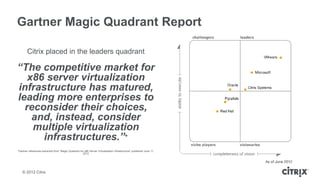
Gartner Magic Quadrant Report

       Citrix placed in the leaders quadrant

“The competitive market for
   x86 server virtualization
infrastructure has matured,
leading more enterprises to
  reconsider their choices,
    and, instead, consider
    multiple virtualization
      infrastructures.”*
*Gartner references extracted from “Magic Quadrant for x86 Server Virtualization Infrastructure” published June 11,
                                                     2012


    © 2012 Citrix
Customer Example: 1&1 Internet
• Leading global Web Hosting provider
 ᵒ 5 data centers with 70,000 servers in Europe and USA
 ᵒ Over 11 million customers on paid services
 ᵒ Manage over 18 million domain names
• Searching for best solution for its public cloud offering,
  Dynamic Cloud Server
• XenServer chosen for cloud platform due to:
 ᵒ   product maturity
 ᵒ   open source code-base
 ᵒ   flexible pricing model
 ᵒ   Citrix worldwide support and services
• Looking at other Citrix offerings
 ᵒ Evaluating Citrix CloudPlatform for cloud orchestration layer
 © 2012 Citrix
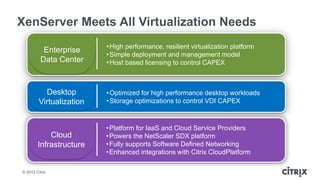
XenServer Meets All Virtualization Needs
                          • High performance, resilient virtualization platform
           Enterprise
                          • Simple deployment and management model
          Data Center     • Host based licensing to control CAPEX


           Desktop        • Optimized for high performance desktop workloads
         Virtualization   • Storage optimizations to control VDI CAPEX


                          • Platform for IaaS and Cloud Service Providers
            Cloud         • Powers the NetScaler SDX platform
        Infrastructure    • Fully supports Software Defined Networking
                          • Enhanced integrations with Citrix CloudPlatform

© 2012 Citrix
XenServer
Optimized Hypervisor for Enterprise, Desktops
and Cloud
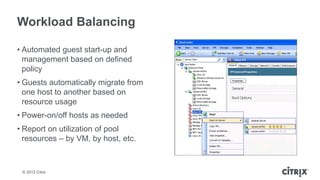
Workload Balancing

• Automated guest start-up and
  management based on defined
  policy
• Guests automatically migrate from
  one host to another based on
  resource usage
• Power-on/off hosts as needed
• Report on utilization of pool
  resources – by VM, by host, etc.


 © 2012 Citrix
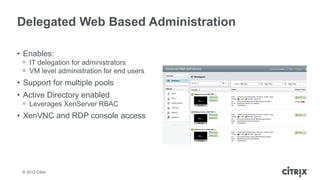
Delegated Web Based Administration

• Enables:
 ᵒ IT delegation for administrators
 ᵒ VM level administration for end users
• Support for multiple pools
• Active Directory enabled
 ᵒ Leverages XenServer RBAC
• XenVNC and RDP console access


 © 2012 Citrix
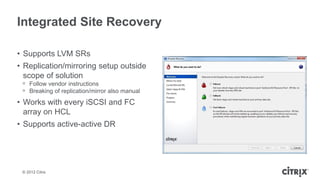
Integrated Site Recovery

• Supports LVM SRs
• Replication/mirroring setup outside
  scope of solution
 ᵒ Follow vendor instructions
 ᵒ Breaking of replication/mirror also manual
• Works with every iSCSI and FC
  array on HCL
• Supports active-active DR


 © 2012 Citrix
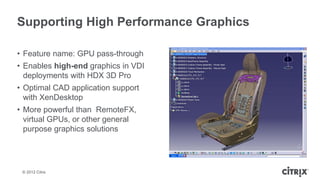
Supporting High Performance Graphics

• Feature name: GPU pass-through
• Enables high-end graphics in VDI
  deployments with HDX 3D Pro
• Optimal CAD application support
  with XenDesktop
• More powerful than RemoteFX,
  virtual GPUs, or other general
  purpose graphics solutions


 © 2012 Citrix
Controlling Shared Storage Costs – IntelliCache

• Caching of XenDesktop 5 images
• Leverages local storage
• Reduce IOPS on shared storage
• Supported since XenServer 5.6 SP2


 © 2012 Citrix
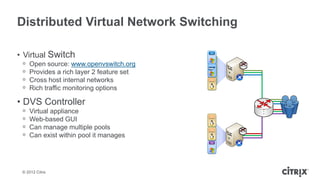
Distributed Virtual Network Switching

• Virtual Switch                           VM


 ᵒ   Open source: www.openvswitch.org
 ᵒ   Provides a rich layer 2 feature set
 ᵒ   Cross host internal networks          VM


 ᵒ   Rich traffic monitoring options

• DVS Controller
 ᵒ   Virtual appliance
 ᵒ
                                           VM
     Web-based GUI
 ᵒ   Can manage multiple pools             VM

 ᵒ   Can exist within pool it manages
                                           VM


 © 2012 Citrix
XenServer 6.1 News
Updated Guest support

• Ubuntu 12.04
• CentOS 5.7, 6.0, 6.1, 6.2
• Red Hat Enterprise Linux 5.7, 6.1, 6.2
• Oracle Enterprise Linux 5.7, 6.1, 6.2
• Windows 8 / 2012 experimental


 © 2012 Citrix
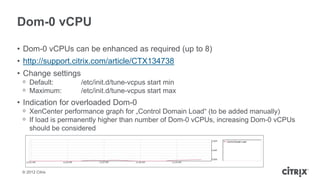
Dom-0 vCPU

• Dom-0 vCPUs can be enhanced as required (up to 8)
• http://support.citrix.com/article/CTX134738
• Change settings
 ᵒ Default:         /etc/init.d/tune-vcpus start min
 ᵒ Maximum:         /etc/init.d/tune-vcpus start max
• Indication for overloaded Dom-0
 ᵒ XenCenter performance graph for „Control Domain Load“ (to be added manually)
 ᵒ If load is permanently higher than number of Dom-0 vCPUs, increasing Dom-0 vCPUs
   should be considered


 © 2012 Citrix
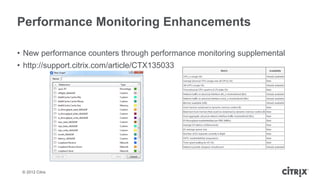
Performance Monitoring Enhancements

• New performance counters through performance monitoring supplemental
• http://support.citrix.com/article/CTX135033


 © 2012 Citrix
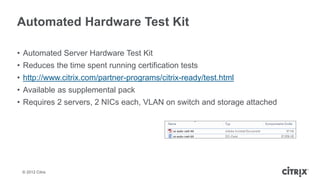
Automated Hardware Test Kit

• Automated Server Hardware Test Kit
• Reduces the time spent running certification tests
• http://www.citrix.com/partner-programs/citrix-ready/test.html
• Available as supplemental pack
• Requires 2 servers, 2 NICs each, VLAN on switch and storage attached


 © 2012 Citrix
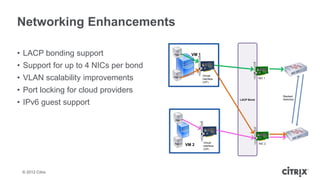
Networking Enhancements

• LACP bonding support                App 1      VM 1


• Support for up to 4 NICs per bond
• VLAN scalability improvements       App 2             Virtual
                                                        interface
                                                        (VIF)
                                                                                     NIC 1


• Port locking for cloud providers
                                                                                             Stacked

• IPv6 guest support
                                                                         LACP Bond           Switches


                                       App 1


                                                            VM traffic


                                      App 2             Virtual                      NIC 2
                                               VM 2     interface
                                                        (VIF)


 © 2012 Citrix
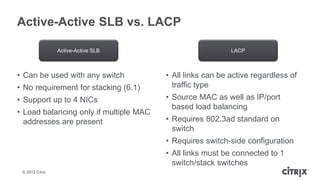
Active-Active SLB vs. LACP

                 Active-Active SLB                         LACP


• Can be used with any switch           • All links can be active regardless of
• No requirement for stacking (6.1)       traffic type
• Support up to 4 NICs                  • Source MAC as well as IP/port
                                          based load balancing
• Load balancing only if multiple MAC
  addresses are present                 • Requires 802.3ad standard on
                                          switch
                                        • Requires switch-side configuration
                                        • All links must be connected to 1
                                          switch/stack switches
 © 2012 Citrix
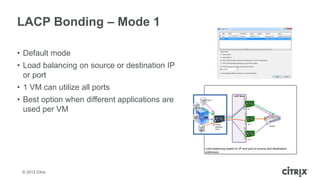
LACP Bonding – Mode 1

• Default mode
• Load balancing on source or destination IP
  or port
• 1 VM can utilize all ports
• Best option when different applications are
  used per VM


 © 2012 Citrix
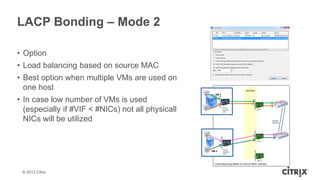
LACP Bonding – Mode 2

• Option
• Load balancing based on source MAC
• Best option when multiple VMs are used on
  one host
• In case low number of VMs is used
  (especially if #VIF < #NICs) not all physicall
  NICs will be utilized


 © 2012 Citrix
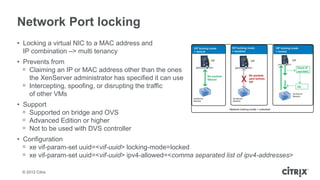
Network Port locking
• Locking a virtual NIC to a MAC address and
  IP combination –> multi tenancy
• Prevents from
  ᵒ Claiming an IP or MAC address other than the ones
    the XenServer administrator has specified it can use
  ᵒ Intercepting, spoofing, or disrupting the traffic
    of other VMs
• Support
  ᵒ Supported on bridge and OVS
  ᵒ Advanced Edition or higher
  ᵒ Not to be used with DVS controller
• Configuration
  ᵒ xe vif-param-set uuid=<vif-uuid> locking-mode=locked
  ᵒ xe vif-param-set uuid=<vif-uuid> ipv4-allowed=<comma separated list of ipv4-addresses>

 © 2012 Citrix
Storage Enhancements
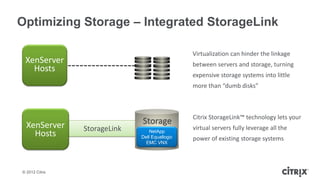
Optimizing Storage – Integrated StorageLink

                                                Virtualization can hinder the linkage
 XenServer                                      between servers and storage, turning
   Hosts
                                                expensive storage systems into little
                                                more than “dumb disks”


                                                Citrix StorageLink™ technology lets your
  XenServer                   Storage
                StorageLink                     virtual servers fully leverage all the
    Hosts                         NetApp
                              Dell Equallogic   power of existing storage systems
                                EMC VNX


© 2012 Citrix
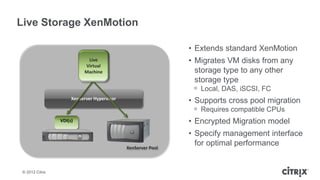
Live Storage XenMotion

                                                              • Extends standard XenMotion
                            Live                              • Migrates VM disks from any
                           Virtual
                           Machine                              storage type to any other
                                                                storage type
                                                               ᵒ Local, DAS, iSCSI, FC
                      XenServer Hypervisor
                                                              • Supports cross pool migration
                                                               ᵒ Requires compatible CPUs
                 VDI(s)                                       • Encrypted Migration model
                                                              • Specify management interface
                                             XenServer Pool
                                                                for optimal performance


 © 2012 Citrix
XenServer Conversion
Manager
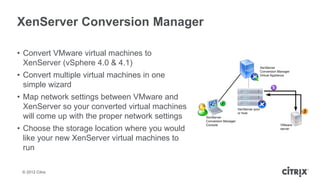
XenServer Conversion Manager

• Convert VMware virtual machines to
  XenServer (vSphere 4.0 & 4.1)
• Convert multiple virtual machines in one
  simple wizard
• Map network settings between VMware and
  XenServer so your converted virtual machines
  will come up with the proper network settings
• Choose the storage location where you would
  like your new XenServer virtual machines to
  run

 © 2012 Citrix
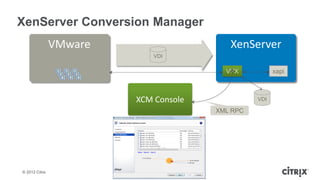
XenServer Conversion Manager
                VMware                    XenServer
                             VDI

                                         VPX           xapi


                         XCM Console             VDI

                                       XML RPC


© 2012 Citrix
XenServer Pricing and
Packaging
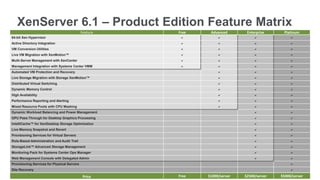
XenServer 6.1 – Product Edition Feature Matrix
                                             Feature   Free    Advanced       Enterprise     Platinum
64-bit Xen Hypervisor                                   a          a              a              a
Active Directory Integration                            a          a              a              a
VM Conversion Utilities                                 a          a              a              a
Live VM Migration with XenMotion™                       a          a              a              a
Multi-Server Management with XenCenter                  a          a              a              a
Management Integration with Systems Center VMM          a          a              a              a
Automated VM Protection and Recovery                               a              a              a
Live Storage Migration with Storage XenMotion™                     a              a              a
Distributed Virtual Switching                                      a              a              a
Dynamic Memory Control                                             a              a              a
High Availability                                                  a              a              a
Performance Reporting and Alerting                                 a              a              a
Mixed Resource Pools with CPU Masking                              a              a              a
Dynamic Workload Balancing and Power Management                                   a              a
GPU Pass-Through for Desktop Graphics Processing                                  a              a
IntelliCache™ for XenDesktop Storage Optimization                                 a              a
Live Memory Snapshot and Revert                                                   a              a
Provisioning Services for Virtual Servers                                         a              a
Role-Based Administration and Audit Trail                                         a              a
StorageLink™ Advanced Storage Management                                          a              a
Monitoring Pack for Systems Center Ops Manager                                    a              a
Web Management Console with Delegated Admin                                       a              a
Provisioning Services for Physical Servers                                                       a
Site Recovery                                                                                    a
       © 2012 Citrix
                                              Price    Free   $1000/server   $2500/server   $5000/server
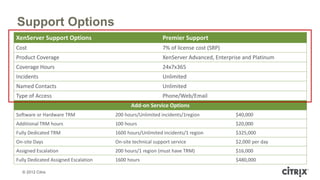
Support Options
XenServer Support Options                                   Premier Support
Cost                                                        7% of license cost (SRP)
Product Coverage                                            XenServer Advanced, Enterprise and Platinum
Coverage Hours                                              24x7x365
Incidents                                                   Unlimited
Named Contacts                                              Unlimited
Type of Access                                              Phone/Web/Email
                                             Add-on Service Options
Software or Hardware TRM              200 hours/Unlimited incidents/1region             $40,000
Additional TRM hours                  100 hours                                         $20,000
Fully Dedicated TRM                   1600 hours/Unlimited incidents/1 region           $325,000
On-site Days                          On-site technical support service                 $2,000 per day
Assigned Escalation                   200 hours/1 region (must have TRM)                $16,000
Fully Dedicated Assigned Escalation   1600 hours                                        $480,000

  © 2012 Citrix
Work better. Live better.

Christian ferver xen server_6.1_overview

  • 1.
    XenServer 6.1 November 2012 ChristianFerber Sr. Systems Engineer Cloud Infrastructure
  • 2.
    Gartner Magic QuadrantReport Citrix placed in the leaders quadrant “The competitive market for x86 server virtualization infrastructure has matured, leading more enterprises to reconsider their choices, and, instead, consider multiple virtualization infrastructures.”* *Gartner references extracted from “Magic Quadrant for x86 Server Virtualization Infrastructure” published June 11, 2012 © 2012 Citrix
  • 3.
    Customer Example: 1&1Internet • Leading global Web Hosting provider ᵒ 5 data centers with 70,000 servers in Europe and USA ᵒ Over 11 million customers on paid services ᵒ Manage over 18 million domain names • Searching for best solution for its public cloud offering, Dynamic Cloud Server • XenServer chosen for cloud platform due to: ᵒ product maturity ᵒ open source code-base ᵒ flexible pricing model ᵒ Citrix worldwide support and services • Looking at other Citrix offerings ᵒ Evaluating Citrix CloudPlatform for cloud orchestration layer © 2012 Citrix
  • 4.
    XenServer Meets AllVirtualization Needs • High performance, resilient virtualization platform Enterprise • Simple deployment and management model Data Center • Host based licensing to control CAPEX Desktop • Optimized for high performance desktop workloads Virtualization • Storage optimizations to control VDI CAPEX • Platform for IaaS and Cloud Service Providers Cloud • Powers the NetScaler SDX platform Infrastructure • Fully supports Software Defined Networking • Enhanced integrations with Citrix CloudPlatform © 2012 Citrix
  • 5.
    XenServer Optimized Hypervisor forEnterprise, Desktops and Cloud
  • 6.
    Workload Balancing • Automatedguest start-up and management based on defined policy • Guests automatically migrate from one host to another based on resource usage • Power-on/off hosts as needed • Report on utilization of pool resources – by VM, by host, etc. © 2012 Citrix
  • 7.
    Delegated Web BasedAdministration • Enables: ᵒ IT delegation for administrators ᵒ VM level administration for end users • Support for multiple pools • Active Directory enabled ᵒ Leverages XenServer RBAC • XenVNC and RDP console access © 2012 Citrix
  • 8.
    Integrated Site Recovery •Supports LVM SRs • Replication/mirroring setup outside scope of solution ᵒ Follow vendor instructions ᵒ Breaking of replication/mirror also manual • Works with every iSCSI and FC array on HCL • Supports active-active DR © 2012 Citrix
  • 9.
    Supporting High PerformanceGraphics • Feature name: GPU pass-through • Enables high-end graphics in VDI deployments with HDX 3D Pro • Optimal CAD application support with XenDesktop • More powerful than RemoteFX, virtual GPUs, or other general purpose graphics solutions © 2012 Citrix
  • 10.
    Controlling Shared StorageCosts – IntelliCache • Caching of XenDesktop 5 images • Leverages local storage • Reduce IOPS on shared storage • Supported since XenServer 5.6 SP2 © 2012 Citrix
  • 11.
    Distributed Virtual NetworkSwitching • Virtual Switch VM ᵒ Open source: www.openvswitch.org ᵒ Provides a rich layer 2 feature set ᵒ Cross host internal networks VM ᵒ Rich traffic monitoring options • DVS Controller ᵒ Virtual appliance ᵒ VM Web-based GUI ᵒ Can manage multiple pools VM ᵒ Can exist within pool it manages VM © 2012 Citrix
  • 12.
  • 13.
    Updated Guest support •Ubuntu 12.04 • CentOS 5.7, 6.0, 6.1, 6.2 • Red Hat Enterprise Linux 5.7, 6.1, 6.2 • Oracle Enterprise Linux 5.7, 6.1, 6.2 • Windows 8 / 2012 experimental © 2012 Citrix
  • 14.
    Dom-0 vCPU • Dom-0vCPUs can be enhanced as required (up to 8) • http://support.citrix.com/article/CTX134738 • Change settings ᵒ Default: /etc/init.d/tune-vcpus start min ᵒ Maximum: /etc/init.d/tune-vcpus start max • Indication for overloaded Dom-0 ᵒ XenCenter performance graph for „Control Domain Load“ (to be added manually) ᵒ If load is permanently higher than number of Dom-0 vCPUs, increasing Dom-0 vCPUs should be considered © 2012 Citrix
  • 15.
    Performance Monitoring Enhancements •New performance counters through performance monitoring supplemental • http://support.citrix.com/article/CTX135033 © 2012 Citrix
  • 16.
    Automated Hardware TestKit • Automated Server Hardware Test Kit • Reduces the time spent running certification tests • http://www.citrix.com/partner-programs/citrix-ready/test.html • Available as supplemental pack • Requires 2 servers, 2 NICs each, VLAN on switch and storage attached © 2012 Citrix
  • 17.
  • 18.
    Networking Enhancements • LACPbonding support App 1 VM 1 • Support for up to 4 NICs per bond • VLAN scalability improvements App 2 Virtual interface (VIF) NIC 1 • Port locking for cloud providers Stacked • IPv6 guest support LACP Bond Switches App 1 VM traffic App 2 Virtual NIC 2 VM 2 interface (VIF) © 2012 Citrix
  • 19.
    Active-Active SLB vs.LACP Active-Active SLB LACP • Can be used with any switch • All links can be active regardless of • No requirement for stacking (6.1) traffic type • Support up to 4 NICs • Source MAC as well as IP/port based load balancing • Load balancing only if multiple MAC addresses are present • Requires 802.3ad standard on switch • Requires switch-side configuration • All links must be connected to 1 switch/stack switches © 2012 Citrix
  • 20.
    LACP Bonding –Mode 1 • Default mode • Load balancing on source or destination IP or port • 1 VM can utilize all ports • Best option when different applications are used per VM © 2012 Citrix
  • 21.
    LACP Bonding –Mode 2 • Option • Load balancing based on source MAC • Best option when multiple VMs are used on one host • In case low number of VMs is used (especially if #VIF < #NICs) not all physicall NICs will be utilized © 2012 Citrix
  • 22.
    Network Port locking •Locking a virtual NIC to a MAC address and IP combination –> multi tenancy • Prevents from ᵒ Claiming an IP or MAC address other than the ones the XenServer administrator has specified it can use ᵒ Intercepting, spoofing, or disrupting the traffic of other VMs • Support ᵒ Supported on bridge and OVS ᵒ Advanced Edition or higher ᵒ Not to be used with DVS controller • Configuration ᵒ xe vif-param-set uuid=<vif-uuid> locking-mode=locked ᵒ xe vif-param-set uuid=<vif-uuid> ipv4-allowed=<comma separated list of ipv4-addresses> © 2012 Citrix
  • 23.
  • 24.
    Optimizing Storage –Integrated StorageLink Virtualization can hinder the linkage XenServer between servers and storage, turning Hosts expensive storage systems into little more than “dumb disks” Citrix StorageLink™ technology lets your XenServer Storage StorageLink virtual servers fully leverage all the Hosts NetApp Dell Equallogic power of existing storage systems EMC VNX © 2012 Citrix
  • 25.
    Live Storage XenMotion • Extends standard XenMotion Live • Migrates VM disks from any Virtual Machine storage type to any other storage type ᵒ Local, DAS, iSCSI, FC XenServer Hypervisor • Supports cross pool migration ᵒ Requires compatible CPUs VDI(s) • Encrypted Migration model • Specify management interface XenServer Pool for optimal performance © 2012 Citrix
  • 26.
  • 27.
    XenServer Conversion Manager •Convert VMware virtual machines to XenServer (vSphere 4.0 & 4.1) • Convert multiple virtual machines in one simple wizard • Map network settings between VMware and XenServer so your converted virtual machines will come up with the proper network settings • Choose the storage location where you would like your new XenServer virtual machines to run © 2012 Citrix
  • 28.
    XenServer Conversion Manager VMware XenServer VDI VPX xapi XCM Console VDI XML RPC © 2012 Citrix
  • 29.
  • 30.
    XenServer 6.1 –Product Edition Feature Matrix Feature Free Advanced Enterprise Platinum 64-bit Xen Hypervisor a a a a Active Directory Integration a a a a VM Conversion Utilities a a a a Live VM Migration with XenMotion™ a a a a Multi-Server Management with XenCenter a a a a Management Integration with Systems Center VMM a a a a Automated VM Protection and Recovery a a a Live Storage Migration with Storage XenMotion™ a a a Distributed Virtual Switching a a a Dynamic Memory Control a a a High Availability a a a Performance Reporting and Alerting a a a Mixed Resource Pools with CPU Masking a a a Dynamic Workload Balancing and Power Management a a GPU Pass-Through for Desktop Graphics Processing a a IntelliCache™ for XenDesktop Storage Optimization a a Live Memory Snapshot and Revert a a Provisioning Services for Virtual Servers a a Role-Based Administration and Audit Trail a a StorageLink™ Advanced Storage Management a a Monitoring Pack for Systems Center Ops Manager a a Web Management Console with Delegated Admin a a Provisioning Services for Physical Servers a Site Recovery a © 2012 Citrix Price Free $1000/server $2500/server $5000/server
  • 31.
    Support Options XenServer SupportOptions Premier Support Cost 7% of license cost (SRP) Product Coverage XenServer Advanced, Enterprise and Platinum Coverage Hours 24x7x365 Incidents Unlimited Named Contacts Unlimited Type of Access Phone/Web/Email Add-on Service Options Software or Hardware TRM 200 hours/Unlimited incidents/1region $40,000 Additional TRM hours 100 hours $20,000 Fully Dedicated TRM 1600 hours/Unlimited incidents/1 region $325,000 On-site Days On-site technical support service $2,000 per day Assigned Escalation 200 hours/1 region (must have TRM) $16,000 Fully Dedicated Assigned Escalation 1600 hours $480,000 © 2012 Citrix
  • 32.