Presented by :
Dibyadip Das
Dnyaneshwar Magar
February 20, 2014

Grid Computing

1
What Grid Computing is
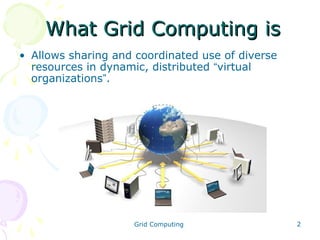
• Allows sharing and coordinated use of diverse
resources in dynamic, distributed “virtual
organizations”.

Grid Computing

2
Electrical Power Grid Analogy
Electrical power grid
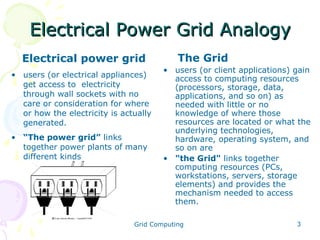
• users (or electrical appliances)
get access to electricity
through wall sockets with no
care or consideration for where
or how the electricity is actually
generated.
• “The power grid” links
together power plants of many
different kinds

The Grid
• users (or client applications) gain
access to computing resources
(processors, storage, data,
applications, and so on) as
needed with little or no
knowledge of where those
resources are located or what the
underlying technologies,
hardware, operating system, and
so on are
• "the Grid" links together
computing resources (PCs,
workstations, servers, storage
elements) and provides the
mechanism needed to access
them.

Grid Computing

3
Why need Grid Computing?
• Core networking technology now accelerates at a
much faster rate than advances in microprocessor
speeds
• Exploiting under utilized resources
• Parallel CPU capacity
• Virtual resources and virtual organizations for
collaboration
• Access to additional resources

Grid Computing

4
Who needs Grid Computing?
• Not just computer scientists…
• scientists “hit the wall” when faced with
situations:
– The amount of data they need is huge and the data is
stored in different institutions.
– The amount of similar calculations the scientist has to
do is huge.

• Other areas:
–
–
–
–
–

Government
Business
Education
Industrial design
……
Grid Computing

5
Types of resources
• Computation
• Storage
• Communications
• Software and licenses
• Special equipment, capacities,
architectures, and policies

Grid Computing

6
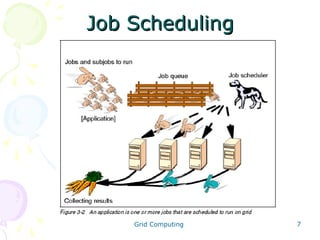
Job Scheduling

Grid Computing

7
Security
• Access policy - What is shared? Who is
allowed to share? When can sharing occur?
• Authentication - How do you identify a
user or resource?
• Authorization -How do you determine
whether a certain operation is consistent
with the rules?
Grid Computing

8
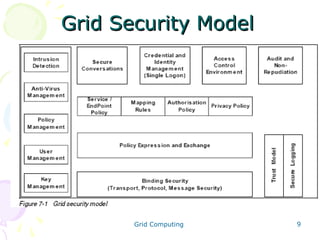
Grid Security Model

Grid Computing

9
Grid User Roles

---A User’s Perspective

• Enrolling and installing grid software
• Logging onto the grid
• Queries and submitting jobs
• Data configuration
• Monitoring progress and recovery
• Reserving resources
Grid Computing

10
Grid User Roles

---An Administrator’s Perspective
• Planning
• Installation
• Managing enrollment of donors and
users
• Certificate authority
• Resource management
• Data sharing
Grid Computing

11
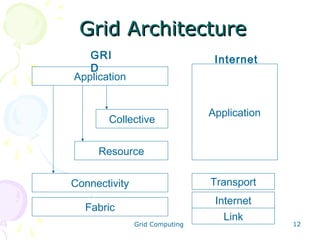
Grid Architecture
GRI
D
Application

Internet

Collective

Application

Resource
Connectivity

Transport

Fabric

Internet
Link

Grid Computing

12
Grid Architecture
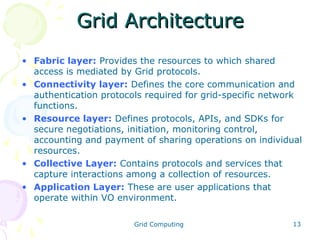
• Fabric layer: Provides the resources to which shared
access is mediated by Grid protocols.
• Connectivity layer: Defines the core communication and
authentication protocols required for grid-specific network
functions.
• Resource layer: Defines protocols, APIs, and SDKs for
secure negotiations, initiation, monitoring control,
accounting and payment of sharing operations on individual
resources.
• Collective Layer: Contains protocols and services that
capture interactions among a collection of resources.
• Application Layer: These are user applications that
operate within VO environment.
Grid Computing

13
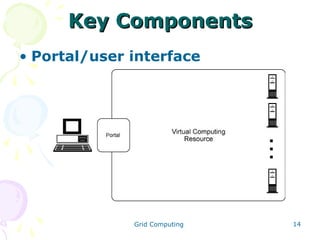
Key Components
• Portal/user interface

Grid Computing

14
Grid Portal
• Provides uniform access to the grid resources. For
example, capabilities for Grid Computing resource
authentication, remote resource access,
scheduling capabilities, and monitoring status
information.

Grid Computing

15
Key Components
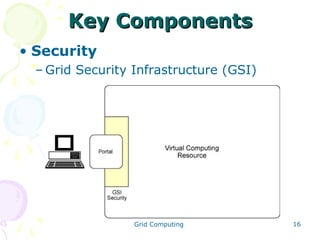
• Security
– Grid Security Infrastructure (GSI)

Grid Computing

16
Key Components
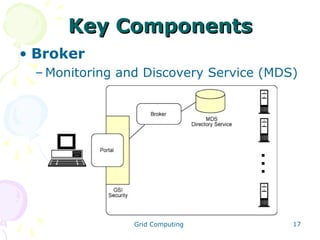
• Broker
– Monitoring and Discovery Service (MDS)

Grid Computing

17
Broker
• It provides pairing services between the
service requester and the service provider.
• This pairing enables the selection of best
available resources from the service provider
for the execution of a specific task

Grid Computing

18
Key Components
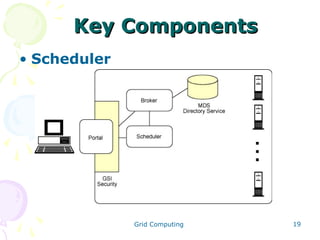
• Scheduler

Grid Computing

19
Scheduler
• Schedulers are types of applications
responsible for the management of jobs.
• Allocation of resources needed for any specific
job.
• Partitioning of jobs to schedule parallel
execution of tasks, data management

Grid Computing

20
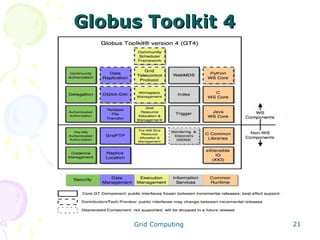
Globus Toolkit 4

Grid Computing

21
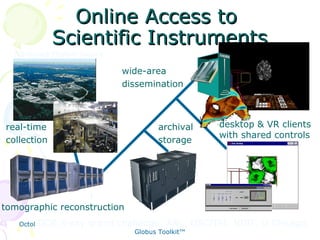
Online Access to
Scientific Instruments
Advanced Photon Source

wide-area
dissemination

real-time
collection

archival
storage

desktop & VR clients
with shared controls

tomographic reconstruction
DOE X-ray
October 12, 2001

grand Intro to Grid ComputingUSC/ISI, NIST, U.Chicago
challenge: ANL, and
22
Globus Toolkit™
Applications
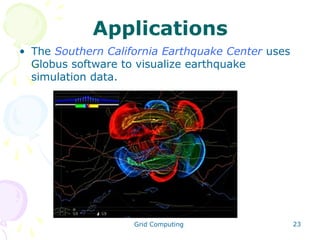
• The Southern California Earthquake Center uses
Globus software to visualize earthquake
simulation data.

Grid Computing

23
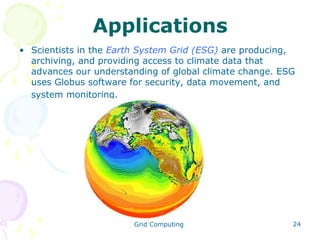
Applications
• Scientists in the Earth System Grid (ESG) are producing,
archiving, and providing access to climate data that
advances our understanding of global climate change. ESG
uses Globus software for security, data movement, and
system monitoring.

Grid Computing

24
Applications
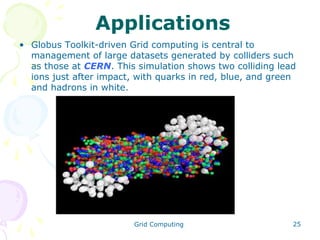
• Globus Toolkit-driven Grid computing is central to
management of large datasets generated by colliders such
as those at CERN. This simulation shows two colliding lead
ions just after impact, with quarks in red, blue, and green
and hadrons in white.

Grid Computing

25
Prospect of Grid computing
• The Grid aims ultimately to turn the global
network of computers into one vast
computational resource.
• Related to many areas in computer science
• Being developed by hundreds of researchers and
software engineers around the world.
• Still “work in process”
• Potentially revolutionary.

Grid Computing

26
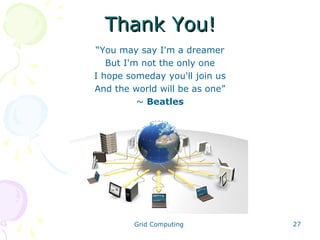
Thank You!
“You may say I'm a dreamer
But I'm not the only one
I hope someday you'll join us
And the world will be as one”
~ Beatles

Grid Computing

27

Grid Computing - Collection of computer resources from multiple locations

  • 1.
    Presented by : DibyadipDas Dnyaneshwar Magar February 20, 2014 Grid Computing 1
  • 2.
    What Grid Computingis • Allows sharing and coordinated use of diverse resources in dynamic, distributed “virtual organizations”. Grid Computing 2
  • 3.
    Electrical Power GridAnalogy Electrical power grid • users (or electrical appliances) get access to electricity through wall sockets with no care or consideration for where or how the electricity is actually generated. • “The power grid” links together power plants of many different kinds The Grid • users (or client applications) gain access to computing resources (processors, storage, data, applications, and so on) as needed with little or no knowledge of where those resources are located or what the underlying technologies, hardware, operating system, and so on are • "the Grid" links together computing resources (PCs, workstations, servers, storage elements) and provides the mechanism needed to access them. Grid Computing 3
  • 4.
    Why need GridComputing? • Core networking technology now accelerates at a much faster rate than advances in microprocessor speeds • Exploiting under utilized resources • Parallel CPU capacity • Virtual resources and virtual organizations for collaboration • Access to additional resources Grid Computing 4
  • 5.
    Who needs GridComputing? • Not just computer scientists… • scientists “hit the wall” when faced with situations: – The amount of data they need is huge and the data is stored in different institutions. – The amount of similar calculations the scientist has to do is huge. • Other areas: – – – – – Government Business Education Industrial design …… Grid Computing 5
  • 6.
    Types of resources •Computation • Storage • Communications • Software and licenses • Special equipment, capacities, architectures, and policies Grid Computing 6
  • 7.
  • 8.
    Security • Access policy- What is shared? Who is allowed to share? When can sharing occur? • Authentication - How do you identify a user or resource? • Authorization -How do you determine whether a certain operation is consistent with the rules? Grid Computing 8
  • 9.
  • 10.
    Grid User Roles ---AUser’s Perspective • Enrolling and installing grid software • Logging onto the grid • Queries and submitting jobs • Data configuration • Monitoring progress and recovery • Reserving resources Grid Computing 10
  • 11.
    Grid User Roles ---AnAdministrator’s Perspective • Planning • Installation • Managing enrollment of donors and users • Certificate authority • Resource management • Data sharing Grid Computing 11
  • 12.
  • 13.
    Grid Architecture • Fabriclayer: Provides the resources to which shared access is mediated by Grid protocols. • Connectivity layer: Defines the core communication and authentication protocols required for grid-specific network functions. • Resource layer: Defines protocols, APIs, and SDKs for secure negotiations, initiation, monitoring control, accounting and payment of sharing operations on individual resources. • Collective Layer: Contains protocols and services that capture interactions among a collection of resources. • Application Layer: These are user applications that operate within VO environment. Grid Computing 13
  • 14.
    Key Components • Portal/userinterface Grid Computing 14
  • 15.
    Grid Portal • Providesuniform access to the grid resources. For example, capabilities for Grid Computing resource authentication, remote resource access, scheduling capabilities, and monitoring status information. Grid Computing 15
  • 16.
    Key Components • Security –Grid Security Infrastructure (GSI) Grid Computing 16
  • 17.
    Key Components • Broker –Monitoring and Discovery Service (MDS) Grid Computing 17
  • 18.
    Broker • It providespairing services between the service requester and the service provider. • This pairing enables the selection of best available resources from the service provider for the execution of a specific task Grid Computing 18
  • 19.
  • 20.
    Scheduler • Schedulers aretypes of applications responsible for the management of jobs. • Allocation of resources needed for any specific job. • Partitioning of jobs to schedule parallel execution of tasks, data management Grid Computing 20
  • 21.
  • 22.
    Online Access to ScientificInstruments Advanced Photon Source wide-area dissemination real-time collection archival storage desktop & VR clients with shared controls tomographic reconstruction DOE X-ray October 12, 2001 grand Intro to Grid ComputingUSC/ISI, NIST, U.Chicago challenge: ANL, and 22 Globus Toolkit™
  • 23.
    Applications • The SouthernCalifornia Earthquake Center uses Globus software to visualize earthquake simulation data. Grid Computing 23
  • 24.
    Applications • Scientists inthe Earth System Grid (ESG) are producing, archiving, and providing access to climate data that advances our understanding of global climate change. ESG uses Globus software for security, data movement, and system monitoring. Grid Computing 24
  • 25.
    Applications • Globus Toolkit-drivenGrid computing is central to management of large datasets generated by colliders such as those at CERN. This simulation shows two colliding lead ions just after impact, with quarks in red, blue, and green and hadrons in white. Grid Computing 25
  • 26.
    Prospect of Gridcomputing • The Grid aims ultimately to turn the global network of computers into one vast computational resource. • Related to many areas in computer science • Being developed by hundreds of researchers and software engineers around the world. • Still “work in process” • Potentially revolutionary. Grid Computing 26
  • 27.
    Thank You! “You maysay I'm a dreamer But I'm not the only one I hope someday you'll join us And the world will be as one” ~ Beatles Grid Computing 27