Grassroots Organizing: From the Living Room to Your iPhone   Molly Nichelson American College of Cardiology 2400 N Street, NW Washington, D.C. 20037 Email:  [email_address] Phone: (202) 375-6470 Twitter:  @Cardiology DM# 363587
Items of Discussion Twitter What is it? (quick crash course) Twitter applications How the ACC uses Twitter Facebook What is it? How ACC uses it How I use it for my work account
Twitter
What is Twitter? twitter.com Web-based SMS message system Think text messaging 140 characters Public / Private message setting People ‘follow’ your tweets / messages And you can ‘follow’ their tweets / messages
Setting Up Your Twitter Account Pick a user name Short & concise Fill out your biography Include your / your company’s name Contact information Make sure you upload a photo
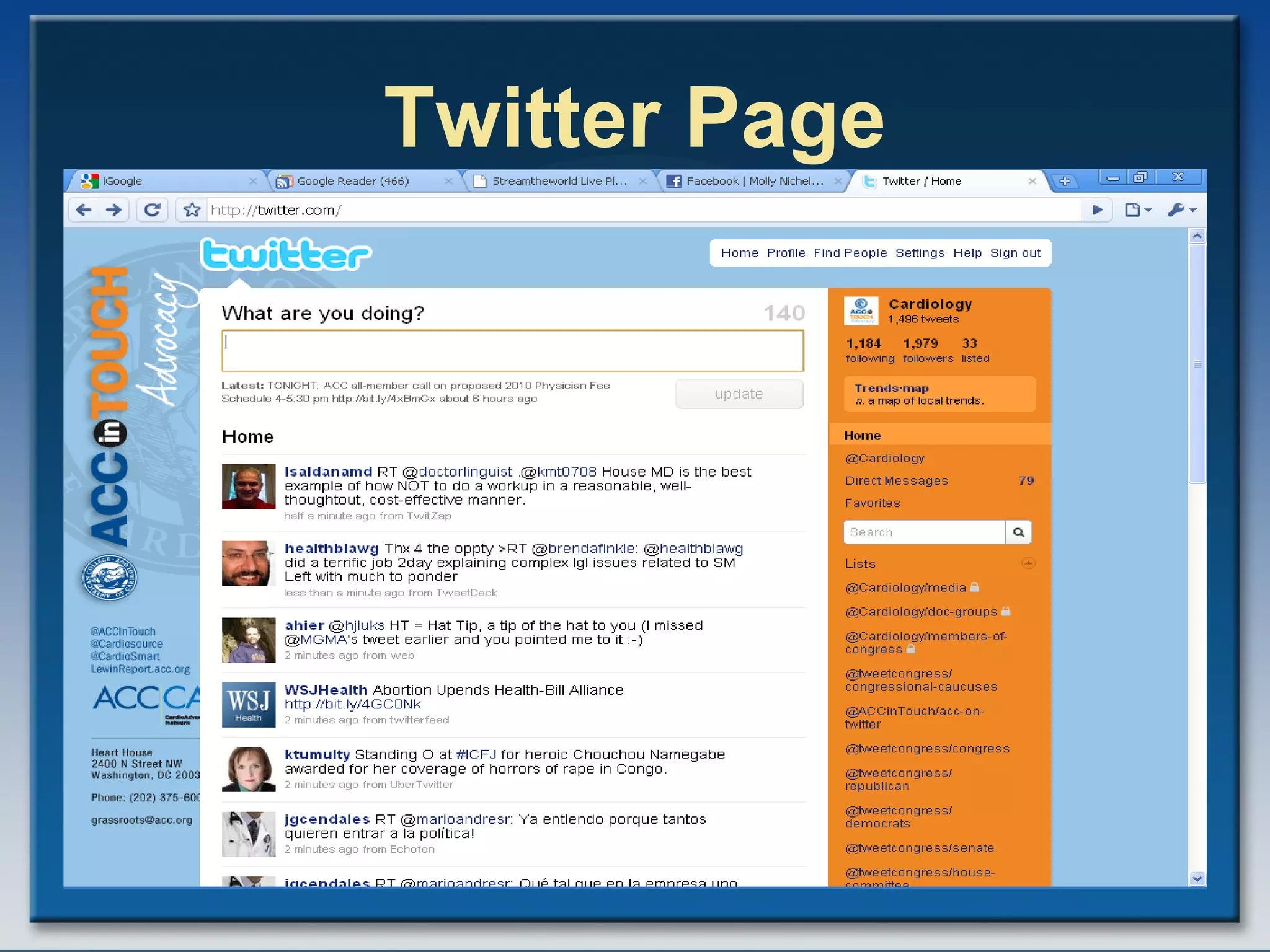
Twitter Page
Finding People on Twitter Poach other people’s followers, via lists or followers Best way Read their tweets before you follow Search what people are tweeting (words & hashtags) & follow them http:// search.twitter.com
Twitter – Followers   twitter.com /cardiology
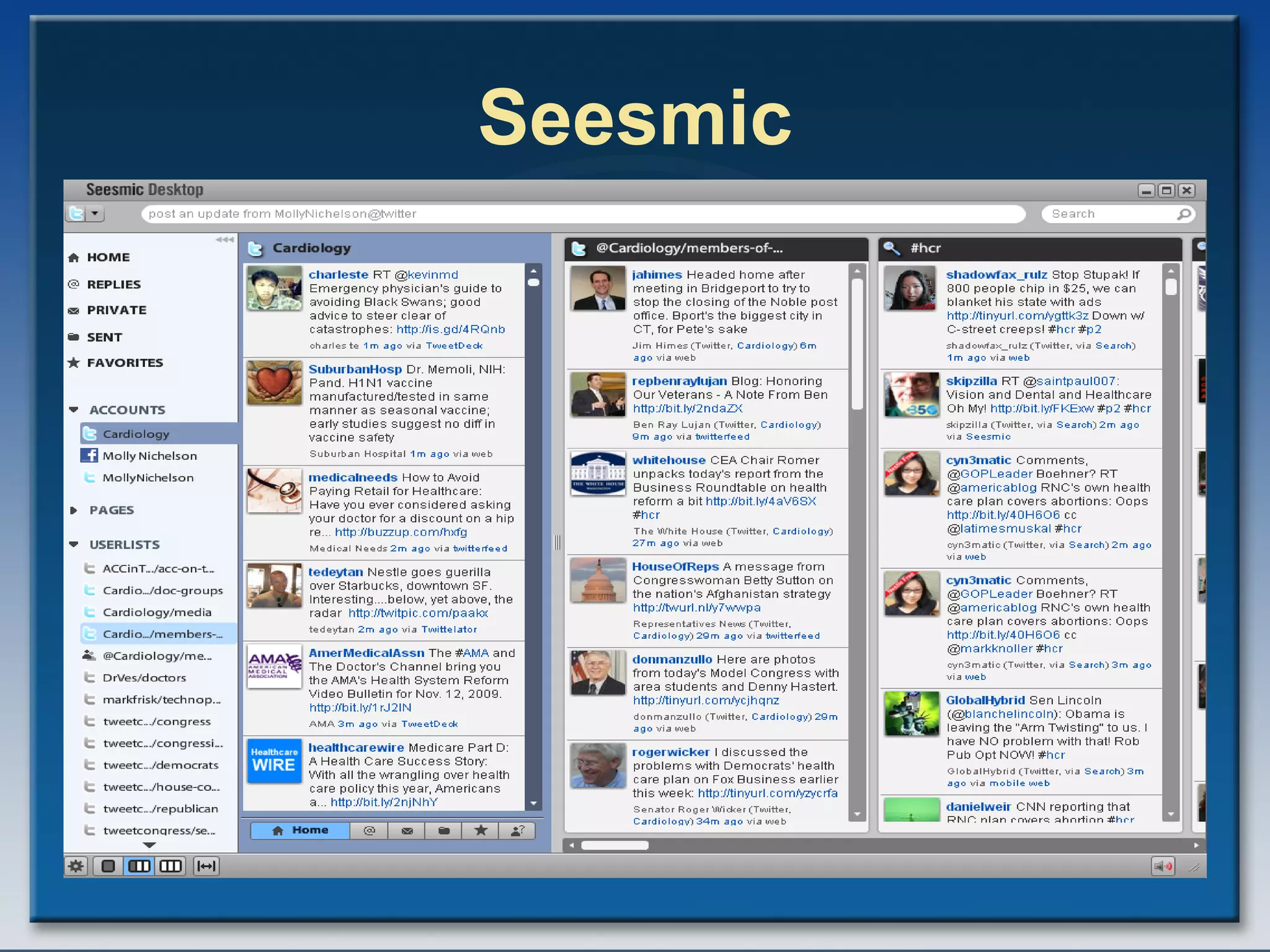
Twitter Applications Sending Your Tweets: Computer Tweetdeck:  http:// tweetdeck.com /beta/   Seesmic:  http:// desktop.seesmic.com /   Hootsuite:  http:// www.hootsuite.com Blackberry  UberTwitter:  http:// ubertwitter.com /   iPhone Tweetie:  http://www.atebits.com/tweetie-iphone /
Seesmic
Twitter Applications Feeding your RSS feeds to Your Twitter Account: Ping.fm –  http://ping.fm   Tweetlater –  http:// tweetlater.com Hootsuite  --  http://hootsuite.com
Twitter Terminology: Hashtag Use a hashtag (#) before a word in a post allows you to tag that post for that word This allows your word to be more readily searched Can help bring you new followers and help you find more followers
Example -- #HCR http:// search.twitter.com
Reading Up on Twitter Social Media Websites http://mashable.com/ http:// www.smartbrief.com / http:// www.twitip.com / http:// www.readwriteweb.com / http:// www.chrisbrogan.com / http://social-media-university- global.org / http:// beth.typepad.com /  (for non-profits)
Reading Up on Twitter ePolitics Websites http://techpresident.com/ http:// personaldemocracy.com / http:// tweetcongress.org http:// twitterroom.thehill.com / http:// www.epolitics.com / http:// www.nextgov.com /
Best Practices & Advice Test out Twitter with your own account before doing one for work Make it private if you have to Test it with friends & coworkers Get familiar with the Twitter applications Like iPhone apps, there are *many* of them, and they change often
Best Practices & Advice Know that you WILL make mistakes You will NOT have full control Use your own voice Don’t turn your Twitter account in to an RSS feed Be a HUMAN behind your account Give something of value to your audience Coupons, advice, articles, thanks
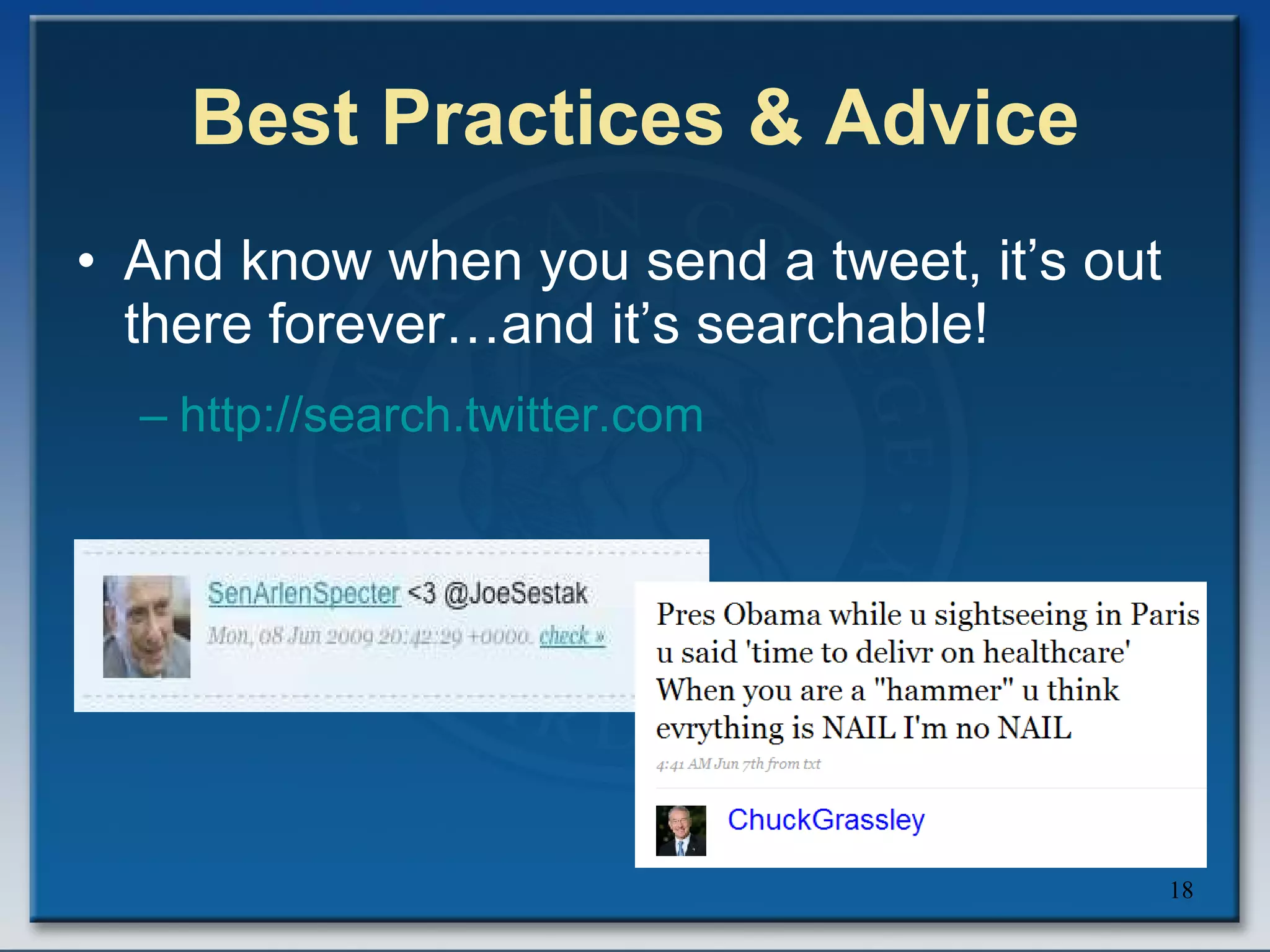
Best Practices & Advice And know when you send a tweet, it’s out there forever…and it’s searchable! http:// search.twitter.com
Best Practices & Advice Following & Followers Be judicious, but don’t be a snob either Don’t get freaked out by who’s following you If someone is wacky, block them And did I mention there are reporters on Twitter…and they may follow you?  http:// journalistsontwitter.wetpaint.com /
Best Practices & Advice Monitor, Monitor, Monitor! Don’t throw stuff out and then don’t react; monitor your account and who’s following you Have an RSS feed on your #hashmarks & company’s name http:// search.twitter.com See what’s popular on Twitter Trending topics
American College of Cardiology’s Advocacy Department & Twitter
How We Started Created account in Oct. 2007  Was excited about the grassroots potential, but didn’t know the technology Way to get to busy members Connect with other healthcare leaders Started with my own account Took me 6 months – 1 year to feel comfortable
How We Started Attended the Public Affairs Council Meeting in 2009 & learned more about social media Now had the gumption to talk to boss & big boss about it They have a lot of trust me in me, but didn’t know a lot about the technology Said to go ahead with Twitter
How We Started Annual Meeting 2009 Sat down with Communications folks Started Twittering in late February 2009 Literally two weeks before annual meeting we met Social Media Strategy Policy @ the ACC Still a work in progress Now have a some parameters but we work closely with Communications on this.
How We Use Twitter Send news articles Show that we’re on top of the health system reform debate Members Media Other healthcare groups RSS feed CEO’s blog (Lewin Report)
How We Use Twitter Highlight member and advocacy achievements Interact with members of Congress http:// tweetcongress.org Still teaching our members about Twitter Have included our link in alerts
Facebook
What is Facebook? Think of an online yearbook, only you can update it instantly You can post web links, photos, videos Friends can post notes to your site (if you have the proper permissions) People can respond to your links Who’s on it? Public officials, your colleagues, your members / employees It aint for kids anymore!
Setting Up Your Work  Facebook Account Fill out your biography Include your / your company’s name Contact information Make sure you upload a photo Search for people you know and poach them off of your friends
Work Facebook Page
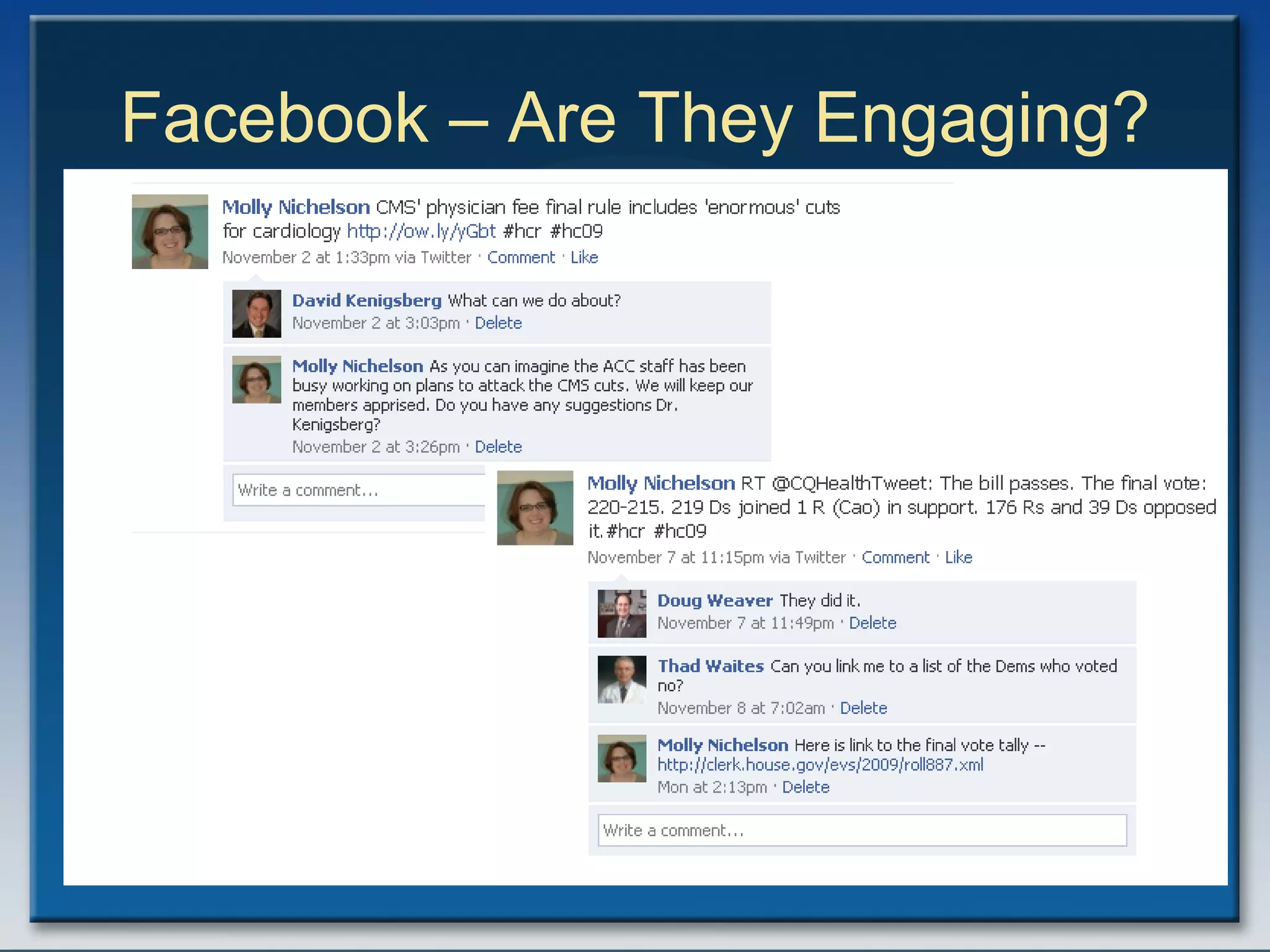
Facebook – Are They Engaging?
Facebook Events
ACC Facebook Page
Best Practices & Advice Finding People Take the time to find those members of Congress on Facebook Find out about townhalls, look at their videos…get intel! Find out if you have members / employees on Facebook Run your email address book in Facebook. You’ll be surprised who’s on
Best Practices & Advice Monitor, Monitor, Monitor! Don’t throw stuff out and then don’t react; monitor your account and who’s following you See what other people are posting and post it to your page
Best Practices & Advice Make it interesting! Feed your Twitter account to Facebook Gets them interested in Twitter & hits them with stuff that they may not see via email Share events, links and semi-personal stuff about yourself Helps your members / employees connect with you & this helps your grassroots efforts!
Best Practices & Advice Make it interesting! Get yourself a Flip Video camera, record, and put it on your site Tag people in photos Post articles that may be some-what off topic to show that there is a real human, and not an RSS feed behind it.
American College of Cardiology’s Advocacy Department & Facebook
How We Started Created account ACC page & work Facebook account earlier this year Communications Department was a bit hesitant that I created my own page. Communications now manages the ACC page; I manage my own account
Any questions?

Grassroorts Forum Presentation

  • 1.
    Grassroots Organizing: Fromthe Living Room to Your iPhone Molly Nichelson American College of Cardiology 2400 N Street, NW Washington, D.C. 20037 Email: [email_address] Phone: (202) 375-6470 Twitter: @Cardiology DM# 363587
  • 2.
    Items of DiscussionTwitter What is it? (quick crash course) Twitter applications How the ACC uses Twitter Facebook What is it? How ACC uses it How I use it for my work account
  • 3.
  • 4.
    What is Twitter?twitter.com Web-based SMS message system Think text messaging 140 characters Public / Private message setting People ‘follow’ your tweets / messages And you can ‘follow’ their tweets / messages
  • 5.
    Setting Up YourTwitter Account Pick a user name Short & concise Fill out your biography Include your / your company’s name Contact information Make sure you upload a photo
  • 6.
  • 7.
    Finding People onTwitter Poach other people’s followers, via lists or followers Best way Read their tweets before you follow Search what people are tweeting (words & hashtags) & follow them http:// search.twitter.com
  • 8.
    Twitter – Followers twitter.com /cardiology
  • 9.
    Twitter Applications SendingYour Tweets: Computer Tweetdeck: http:// tweetdeck.com /beta/ Seesmic: http:// desktop.seesmic.com / Hootsuite: http:// www.hootsuite.com Blackberry UberTwitter: http:// ubertwitter.com / iPhone Tweetie: http://www.atebits.com/tweetie-iphone /
  • 10.
  • 11.
    Twitter Applications Feedingyour RSS feeds to Your Twitter Account: Ping.fm – http://ping.fm Tweetlater – http:// tweetlater.com Hootsuite -- http://hootsuite.com
  • 12.
    Twitter Terminology: HashtagUse a hashtag (#) before a word in a post allows you to tag that post for that word This allows your word to be more readily searched Can help bring you new followers and help you find more followers
  • 13.
    Example -- #HCRhttp:// search.twitter.com
  • 14.
    Reading Up onTwitter Social Media Websites http://mashable.com/ http:// www.smartbrief.com / http:// www.twitip.com / http:// www.readwriteweb.com / http:// www.chrisbrogan.com / http://social-media-university- global.org / http:// beth.typepad.com / (for non-profits)
  • 15.
    Reading Up onTwitter ePolitics Websites http://techpresident.com/ http:// personaldemocracy.com / http:// tweetcongress.org http:// twitterroom.thehill.com / http:// www.epolitics.com / http:// www.nextgov.com /
  • 16.
    Best Practices &Advice Test out Twitter with your own account before doing one for work Make it private if you have to Test it with friends & coworkers Get familiar with the Twitter applications Like iPhone apps, there are *many* of them, and they change often
  • 17.
    Best Practices &Advice Know that you WILL make mistakes You will NOT have full control Use your own voice Don’t turn your Twitter account in to an RSS feed Be a HUMAN behind your account Give something of value to your audience Coupons, advice, articles, thanks
  • 18.
    Best Practices &Advice And know when you send a tweet, it’s out there forever…and it’s searchable! http:// search.twitter.com
  • 19.
    Best Practices &Advice Following & Followers Be judicious, but don’t be a snob either Don’t get freaked out by who’s following you If someone is wacky, block them And did I mention there are reporters on Twitter…and they may follow you? http:// journalistsontwitter.wetpaint.com /
  • 20.
    Best Practices &Advice Monitor, Monitor, Monitor! Don’t throw stuff out and then don’t react; monitor your account and who’s following you Have an RSS feed on your #hashmarks & company’s name http:// search.twitter.com See what’s popular on Twitter Trending topics
  • 21.
    American College ofCardiology’s Advocacy Department & Twitter
  • 22.
    How We StartedCreated account in Oct. 2007 Was excited about the grassroots potential, but didn’t know the technology Way to get to busy members Connect with other healthcare leaders Started with my own account Took me 6 months – 1 year to feel comfortable
  • 23.
    How We StartedAttended the Public Affairs Council Meeting in 2009 & learned more about social media Now had the gumption to talk to boss & big boss about it They have a lot of trust me in me, but didn’t know a lot about the technology Said to go ahead with Twitter
  • 24.
    How We StartedAnnual Meeting 2009 Sat down with Communications folks Started Twittering in late February 2009 Literally two weeks before annual meeting we met Social Media Strategy Policy @ the ACC Still a work in progress Now have a some parameters but we work closely with Communications on this.
  • 25.
    How We UseTwitter Send news articles Show that we’re on top of the health system reform debate Members Media Other healthcare groups RSS feed CEO’s blog (Lewin Report)
  • 26.
    How We UseTwitter Highlight member and advocacy achievements Interact with members of Congress http:// tweetcongress.org Still teaching our members about Twitter Have included our link in alerts
  • 27.
  • 28.
    What is Facebook?Think of an online yearbook, only you can update it instantly You can post web links, photos, videos Friends can post notes to your site (if you have the proper permissions) People can respond to your links Who’s on it? Public officials, your colleagues, your members / employees It aint for kids anymore!
  • 29.
    Setting Up YourWork Facebook Account Fill out your biography Include your / your company’s name Contact information Make sure you upload a photo Search for people you know and poach them off of your friends
  • 30.
  • 31.
    Facebook – AreThey Engaging?
  • 32.
  • 33.
  • 34.
    Best Practices &Advice Finding People Take the time to find those members of Congress on Facebook Find out about townhalls, look at their videos…get intel! Find out if you have members / employees on Facebook Run your email address book in Facebook. You’ll be surprised who’s on
  • 35.
    Best Practices &Advice Monitor, Monitor, Monitor! Don’t throw stuff out and then don’t react; monitor your account and who’s following you See what other people are posting and post it to your page
  • 36.
    Best Practices &Advice Make it interesting! Feed your Twitter account to Facebook Gets them interested in Twitter & hits them with stuff that they may not see via email Share events, links and semi-personal stuff about yourself Helps your members / employees connect with you & this helps your grassroots efforts!
  • 37.
    Best Practices &Advice Make it interesting! Get yourself a Flip Video camera, record, and put it on your site Tag people in photos Post articles that may be some-what off topic to show that there is a real human, and not an RSS feed behind it.
  • 38.
    American College ofCardiology’s Advocacy Department & Facebook
  • 39.
    How We StartedCreated account ACC page & work Facebook account earlier this year Communications Department was a bit hesitant that I created my own page. Communications now manages the ACC page; I manage my own account
  • 40.

Editor's Notes

  • #6 Short & concise as your name will use up the 140 characters in your message People look at the bios and pictures – want to know you’re not a spammer.
  • #8 More on the hashtags later
  • #10 Click through links.
  • #12 Show Hoot Suite & Twitter acocunt
  • #13 You can make up your own hashtag. Search for it on Hashtags.org & Twitter search.
  • #30 Short & concise as your name will use up the 140 characters in your message People look at the bios and pictures – want to know you’re not a spammer.