Untangling Web 2.0Get Started in Social Media Without Losing Your WayChristine Cupaiuolo | Oct. 21, 2009 Chicago Women In Publishing
What is Social Media?Social Media supports the human need for social interaction with technology, transforming broadcast media monologues (one to many) into social media dialogues (many to many).    - Wikipediahttp://en.wikipedia.org/wiki/Social_media
How is it Different?Before Here’s what I’m doing (*have you checked out my website?)Hire me?  (or, for NPO’s: give us money?)AfterHere’s what I’m doing (continually share your work, stories, photos – interactive, fun!)Here are the resultsHere’s what it means to you (by the way, don’t we know someone in common?)
Social Media Helps You To …Manage your personal brand – you are your own mediaFocus on relationships with current – and potential – colleaguesShare information: Educate others about your work or your organization and learn from othersBuild a more meaningful community
Got It. Where Do I Start?***** The 5 W’s *****Why am I doing this*identify purposeWho am I trying to reach *identify current & potential contacts, constituents, audience membersWhere do I want to do it *which services are right for me? – ask: where are my peeps?What am I going to do there*depends on goals and type of serviceWhen am I going to do it*what’s a realistic schedule for updating and responding?
What Else Should I Consider?Do I have the time to invest in building connections and community – and the patience to stick with itCan I handle working with emerging technologies – or find someone who can Am I willing to let go of some editorial controlDo I have an exit strategy
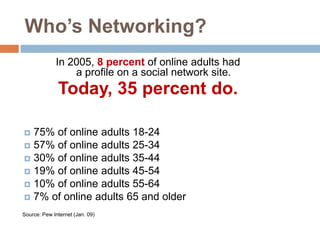
Who’s Networking?In 2005, 8 percent of online adults had a profile on a social network site. Today, 35 percent do.75% of online adults 18-2457% of online adults 25-3430% of online adults 35-4419% of online adults 45-5410% of online adults 55-647% of online adults 65 and olderSource: Pew Internet (Jan. 09)
Have You Heard of This Thing Called Facebook?2003: Company Founded2005: 5.5 million active users2009: 300 million active usersLet’s repeat! 2005: 5.5 million active users2009: 300 million active users*Fastest growing demographic age 55 and olderSource: Facebook
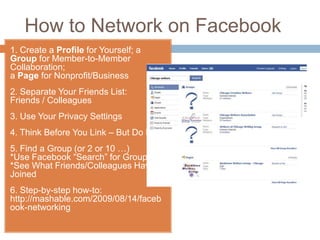
How to Network on Facebook1. Create a Profile for Yourself; a Group for Member-to-Member Collaboration; a Page for Nonprofit/Business2. Separate Your Friends List: Friends / Colleagues 3. Use Your Privacy Settings4. Think Before You Link – But Do Link5. Find a Group (or 2 or 10 …) *Use Facebook “Search” for Groups *See What Friends/Colleagues Have Joined6. Step-by-step how-to: http://mashable.com/2009/08/14/facebook-networking
Facebook Set-Up for NPO’sBuild out with RSS feeds; donate button; contact info; volunteer info; website/other social media links; testimonials; photos; videos.Communicate with friends and fans — if someone leaves a message on your “wall,” thank that person publicly. For set-up tips and advice on raising money and awareness, visit: http://www.facebook.com/nonprofits http://www.facebook.com/FacebookPageshttp://www.diosacommunications.com/facebookbestpractices.htm
Career Builder Survey: June 2009http://www.reuters.com/article/pressRelease/idUS114180+19-Aug-2009+PRN20090819Why Employers Hired Candidates After Screening OnlineProfile provided a good feel for the candidate's personality and fit – 50%Profile supported candidate's professional qualifications - 39%Candidate was creative - 38% Candidate showed solid communication skills - 35%Candidate was well-rounded – 33% Other people posted good references about the candidate - 19%Candidate received awards and accolades - 15%Why Employers Disregarded Candidates After Screening OnlineCandidate posted provocative or inappropriate photographs or information – 53%Candidate posted content about them drinking or using drugs – 44%Candidate bad-mouthed their previous employer, co-workers or clients – 35% Candidate showed poor communication skills – 29% Candidate made discriminatory comments – 26% Candidate lied about qualifications – 24%Candidate shared confidential information from previous employer – 20%
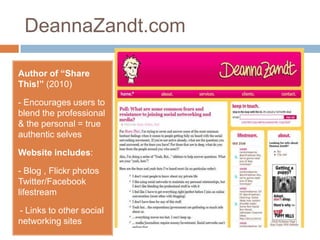
DeannaZandt.comAuthor of “Share This!” (2010) - Encourages users to blend the professional & the personal = true authentic selvesWebsite includes:- Blog , Flickr photos Twitter/Facebooklifestream- Links to other social networking sitesWho’s Linked on LinkedIn?	Company Founded: 2003Members Today: 50 million (Reached Oct. 14 – Congratulations, LinkedIn!)“When LinkedIn launched in 2003, it took 477 days — almost a year and four months — to reach our first million members. This last million took only 12 days” 			– Jeff Wienerhttp://blog.linkedin.com
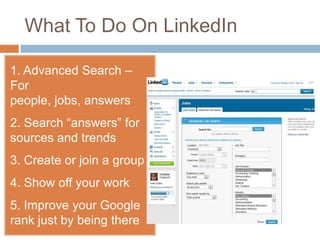
What To Do On LinkedIn	1. Advanced Search – For people, jobs, answers2. Search “answers” for sources and trends3. Create or join a group4. Show off your work 5. Improve your Google rank just by being there
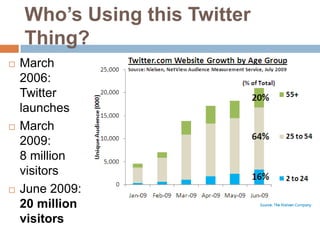
Who’s Using this Twitter Thing?March 2006: Twitter launches March 2009: 8 million  visitorsJune 2009:20 million visitors
I only have 140 characters. What do I say?Be Yourself : Authenticity MattersShare Your ExpertiseReply & Retweet: Twitter is a two-way conversationQuality Over Quantity“Ambient Awareness” – Clive Thompson
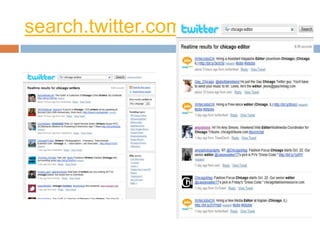
search.twitter.com
Who Do I Follow?Search Twitter for people and organizations you know: http://search.twitter.comTry …Twellow: http://www.twellow.comNearby Tweets: http://nearbytweets.comTweet Congress: http://tweetcongress.orgTwitter Packs: http://twitterpacks.pbworks.com/Non-ProfitsFor nonprofit news & tips, follow http://twitter.com/nonprofitorgs
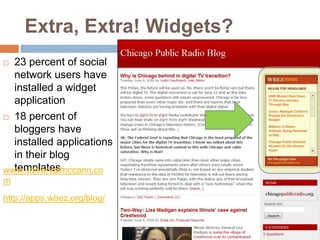
Extra, Extra! Widgets?23 percent of social network users have installed a widget application18 percent of bloggers have installed applications in their blog templateshttp://apps.wbez.org/blog/www.universalmccann.com
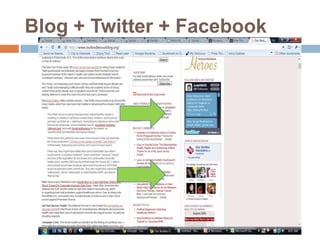
Blog + Twitter + Facebook
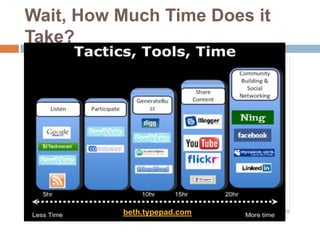
Wait, How Much Time Does it Take?beth.typepad.com
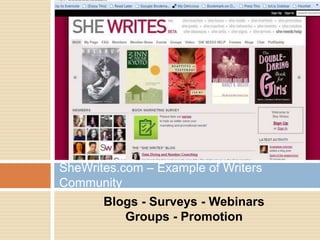
Blogs - Surveys - Webinars Groups - PromotionSheWrites.com Writers Community (Ning)
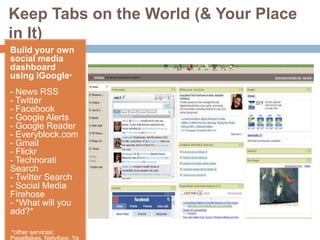
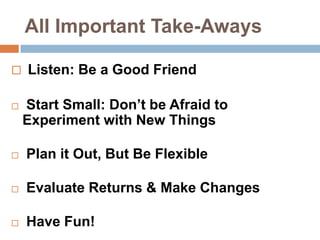
Keep Tabs on the World (& Your Place in It)Build your own  social media dashboard using iGoogle*- News RSS- Twitter- Facebook- Google Alerts - Google Reader- Everyblock.com- Gmail- Flickr- Technorati Search- Twitter Search- Social Media Firehose- *What will you add?**other services: Pageflakes, Netvibes, YahooAll Important Take-AwaysListen: Be a Good FriendStart Small: Don’t be Afraid to Experiment with New ThingsPlan it Out, But Be FlexibleEvaluate Returns & Make ChangesHave Fun!
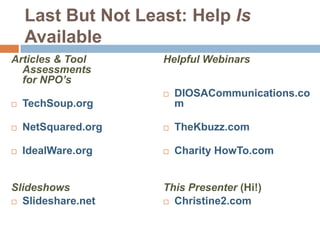
Last But Not Least: Help Is AvailableArticles & Tool Assessments for NPO’sTechSoup.orgNetSquared.orgIdealWare.orgSlideshowsSlideshare.netHelpful Webinars DIOSACommunications.comTheKbuzz.comCharity HowTo.comThis Presenter (Hi!) Christine2.com
Untangling Web 2.0
Untangling Web 2.0

Untangling Web 2.0

  • 1.
    Untangling Web 2.0GetStarted in Social Media Without Losing Your WayChristine Cupaiuolo | Oct. 21, 2009 Chicago Women In Publishing
  • 2.
    What is SocialMedia?Social Media supports the human need for social interaction with technology, transforming broadcast media monologues (one to many) into social media dialogues (many to many). - Wikipediahttp://en.wikipedia.org/wiki/Social_media
  • 4.
    How is itDifferent?Before Here’s what I’m doing (*have you checked out my website?)Hire me? (or, for NPO’s: give us money?)AfterHere’s what I’m doing (continually share your work, stories, photos – interactive, fun!)Here are the resultsHere’s what it means to you (by the way, don’t we know someone in common?)
  • 5.
    Social Media HelpsYou To …Manage your personal brand – you are your own mediaFocus on relationships with current – and potential – colleaguesShare information: Educate others about your work or your organization and learn from othersBuild a more meaningful community
  • 6.
    Got It. WhereDo I Start?***** The 5 W’s *****Why am I doing this*identify purposeWho am I trying to reach *identify current & potential contacts, constituents, audience membersWhere do I want to do it *which services are right for me? – ask: where are my peeps?What am I going to do there*depends on goals and type of serviceWhen am I going to do it*what’s a realistic schedule for updating and responding?
  • 7.
    What Else ShouldI Consider?Do I have the time to invest in building connections and community – and the patience to stick with itCan I handle working with emerging technologies – or find someone who can Am I willing to let go of some editorial controlDo I have an exit strategy
  • 8.
    Who’s Networking?In 2005,8 percent of online adults had a profile on a social network site. Today, 35 percent do.75% of online adults 18-2457% of online adults 25-3430% of online adults 35-4419% of online adults 45-5410% of online adults 55-647% of online adults 65 and olderSource: Pew Internet (Jan. 09)
  • 9.
    Have You Heardof This Thing Called Facebook?2003: Company Founded2005: 5.5 million active users2009: 300 million active usersLet’s repeat! 2005: 5.5 million active users2009: 300 million active users*Fastest growing demographic age 55 and olderSource: Facebook
  • 10.
    How to Networkon Facebook1. Create a Profile for Yourself; a Group for Member-to-Member Collaboration; a Page for Nonprofit/Business2. Separate Your Friends List: Friends / Colleagues 3. Use Your Privacy Settings4. Think Before You Link – But Do Link5. Find a Group (or 2 or 10 …) *Use Facebook “Search” for Groups *See What Friends/Colleagues Have Joined6. Step-by-step how-to: http://mashable.com/2009/08/14/facebook-networking
  • 11.
    Facebook Set-Up forNPO’sBuild out with RSS feeds; donate button; contact info; volunteer info; website/other social media links; testimonials; photos; videos.Communicate with friends and fans — if someone leaves a message on your “wall,” thank that person publicly. For set-up tips and advice on raising money and awareness, visit: http://www.facebook.com/nonprofits http://www.facebook.com/FacebookPageshttp://www.diosacommunications.com/facebookbestpractices.htm
  • 12.
    Career Builder Survey:June 2009http://www.reuters.com/article/pressRelease/idUS114180+19-Aug-2009+PRN20090819Why Employers Hired Candidates After Screening OnlineProfile provided a good feel for the candidate's personality and fit – 50%Profile supported candidate's professional qualifications - 39%Candidate was creative - 38% Candidate showed solid communication skills - 35%Candidate was well-rounded – 33% Other people posted good references about the candidate - 19%Candidate received awards and accolades - 15%Why Employers Disregarded Candidates After Screening OnlineCandidate posted provocative or inappropriate photographs or information – 53%Candidate posted content about them drinking or using drugs – 44%Candidate bad-mouthed their previous employer, co-workers or clients – 35% Candidate showed poor communication skills – 29% Candidate made discriminatory comments – 26% Candidate lied about qualifications – 24%Candidate shared confidential information from previous employer – 20%
  • 13.
    DeannaZandt.comAuthor of “ShareThis!” (2010) - Encourages users to blend the professional & the personal = true authentic selvesWebsite includes:- Blog , Flickr photos Twitter/Facebooklifestream- Links to other social networking sitesWho’s Linked on LinkedIn? Company Founded: 2003Members Today: 50 million (Reached Oct. 14 – Congratulations, LinkedIn!)“When LinkedIn launched in 2003, it took 477 days — almost a year and four months — to reach our first million members. This last million took only 12 days” – Jeff Wienerhttp://blog.linkedin.com
  • 14.
    What To DoOn LinkedIn 1. Advanced Search – For people, jobs, answers2. Search “answers” for sources and trends3. Create or join a group4. Show off your work 5. Improve your Google rank just by being there
  • 15.
    Who’s Using thisTwitter Thing?March 2006: Twitter launches March 2009: 8 million visitorsJune 2009:20 million visitors
  • 16.
    I only have140 characters. What do I say?Be Yourself : Authenticity MattersShare Your ExpertiseReply & Retweet: Twitter is a two-way conversationQuality Over Quantity“Ambient Awareness” – Clive Thompson
  • 17.
  • 18.
    Who Do IFollow?Search Twitter for people and organizations you know: http://search.twitter.comTry …Twellow: http://www.twellow.comNearby Tweets: http://nearbytweets.comTweet Congress: http://tweetcongress.orgTwitter Packs: http://twitterpacks.pbworks.com/Non-ProfitsFor nonprofit news & tips, follow http://twitter.com/nonprofitorgs
  • 19.
    Extra, Extra! Widgets?23percent of social network users have installed a widget application18 percent of bloggers have installed applications in their blog templateshttp://apps.wbez.org/blog/www.universalmccann.com
  • 20.
    Blog + Twitter+ Facebook
  • 21.
    Wait, How MuchTime Does it Take?beth.typepad.com
  • 22.
    Blogs - Surveys- Webinars Groups - PromotionSheWrites.com Writers Community (Ning)
  • 23.
    Keep Tabs onthe World (& Your Place in It)Build your own social media dashboard using iGoogle*- News RSS- Twitter- Facebook- Google Alerts - Google Reader- Everyblock.com- Gmail- Flickr- Technorati Search- Twitter Search- Social Media Firehose- *What will you add?**other services: Pageflakes, Netvibes, YahooAll Important Take-AwaysListen: Be a Good FriendStart Small: Don’t be Afraid to Experiment with New ThingsPlan it Out, But Be FlexibleEvaluate Returns & Make ChangesHave Fun!
  • 24.
    Last But NotLeast: Help Is AvailableArticles & Tool Assessments for NPO’sTechSoup.orgNetSquared.orgIdealWare.orgSlideshowsSlideshare.netHelpful Webinars DIOSACommunications.comTheKbuzz.comCharity HowTo.comThis Presenter (Hi!) Christine2.com

Editor's Notes

  • #9 More than 120 million users log on to Facebook at least once each dayMore than two-thirds of Facebook users are outside of collegeThe fastest growing demographic is 35 years old and older
  • #12 . Add RSS feeds from your site and a “donate now” button. Benefits include SEO from Google since pages are searchable.– Add contact form, easy way to volunteer or donate, link to website, testimonials from people your organization has helped and videos.- Publicize fundraising through status updates- Add the “causes” application- Provide regular updatesBuy social ads -- only pay per click, not per impression, and can customize ads to reach users who fit a specific profile– Interact with constituents — if someone leaves a message on your “wall,” thank that person publicly.– Be yourself (authenticity matters!)