

Gradle
Enterprise Build Tool
Hello !!
I am Deepak Shevani
- Work for Flipkart Supply Chain team
- Interests : RESTful APIs, Reactive Apps
- Contact : shevanideepak@gmail.com
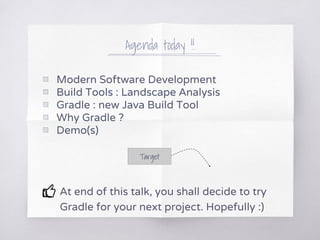
Agenda today !!
▧ Modern Software Development
▧ Build Tools : Landscape Analysis
▧ Gradle : new Java Build Tool
▧ Why Gradle ?
▧ Demo(s)
At end of this talk, you shall decide to try
Gradle for your next project. Hopefully :)
Target
Traditional Software Development ??
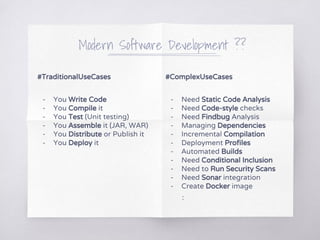
#TraditionalUseCases
- You Write Code
- You Compile it
- You Test (Unit testing)
- You Assemble it
- You Distribute or Publish it
- You Deploy it
Modern Software Development ??
#ComplexUseCases
- Need Static Code Analysis
- Need Code-style checks
- Need Findbug Analysis
- Managing Dependencies
- Incremental Compilation
- Deployment Profiles
- Automated Builds
- Need Conditional Inclusion
- Need to Run Security Scans
- Need Sonar integration
- Create Docker image
:
#TraditionalUseCases
- You Write Code
- You Compile it
- You Test (Unit testing)
- You Assemble it (JAR, WAR)
- You Distribute or Publish it
- You Deploy it
Modern Software Development ??
#ComplexUseCases
- Need Static Code Analysis
- Need Code-style checks
- Need Findbug Analysis
- Managing Dependencies
- Incremental Compilation
- Deployment Profiles
- Automated Builds
- Need Conditional Inclusion
- Need to Run Security Scans
- Need Sonar integration
- Create Docker image
:
#TraditionalUseCases
- You Write Code
- You Compile it
- You Test (Unit testing)
- You Assemble it
- You Distribute or Publish it
- You Deploy it
#BuildTools
- Help in Automation
- Repeatable Builds
- Predictable Behavior
Name the build tools you know
Image taken from https://karussell.wordpress.com/2009/09/29/evolution-of-build-systems/
Focus on Java Build Tools
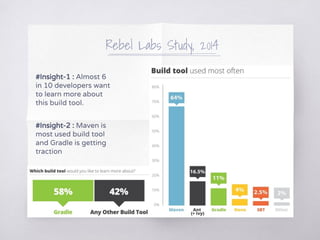
Rebel Labs Study, 2014
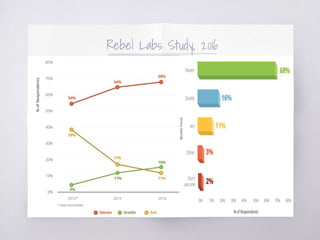
#Insight-1 : Almost 6
in 10 developers want
to learn more about
this build tool.
#Insight-2 : Maven is
most used build tool
and Gradle is getting
traction
Rebel Labs Study, 2016
Why Gradle ??
Groovy
Powerful & Groovy
based expressive DSL
instead of XML
Flexible
Has flexible conventions
unlike rigid conventions
in Maven
Extensible
Plugins in Gradle add
tasks, conventions and
sensible defaults
Faster
Reduced startup time
and build time using
Gradle daemons
Scalable
Incremental builds and
support for distributed
test execution
Robust
Robust and powerful
dependency management
& reproducible builds
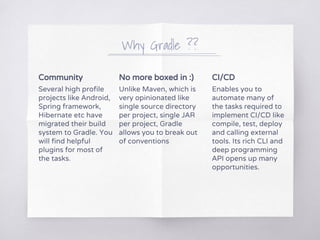
Community
Several high profile
projects like Android,
Spring framework,
Hibernate etc have
migrated their build
system to Gradle. You
will find helpful
plugins for most of
the tasks.
No more boxed in :)
Unlike Maven, which is
very opinionated like
single source directory
per project, single JAR
per project, Gradle
allows you to break out
of conventions
CI/CD
Enables you to
automate many of
the tasks required to
implement CI/CD like
compile, test, deploy
and calling external
tools. Its rich CLI and
deep programming
API opens up many
opportunities.
Why Gradle ??
Pre-requisites
- Java JDK
- JRE
Installation
System Variables
- JAVA_HOME
- PATH
Un-packing
- Download
- Unpack
Check !!
- gradle -version
- gradle --help
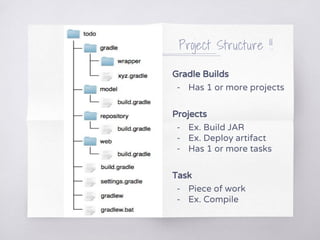
Project Structure !!
Gradle Builds
- Has 1 or more projects
Projects
- Ex. Build JAR
- Ex. Deploy artifact
- Has 1 or more tasks
Task
- Piece of work
- Ex. Compile
<project xmlns="http://maven.apache.org/POM/4.0.0"
xmlns:xsi="http://www.w3.org/2001/XMLSchema-instance"
xsi:schemaLocation="http://maven.apache.org/POM/4.0.0
http://maven.apache.org/maven-v4_0_0.xsd">
<modelVersion>4.0.0</modelVersion>
<groupId>com.lspe.demo</groupId>
<artifactId>demo</artifactId>
<packaging>jar</packaging>
<version>1.0-SNAPSHOT</version>
<name>demo</name>
<url>http://maven.apache.org</url>
<dependencies>
<dependency>
<groupId>junit</groupId>
<artifactId>junit</artifactId>
<version>3.8.1</version>
<scope>test</scope>
</dependency>
</dependencies>
</project>
Build Script or build.gradle
apply plugin: 'java'
group = ‘com.lspe.demo’
archivesBaseName = ‘demo’
version = ‘1.0-SNAPSHOT’
repositories {
mavenCentral()
}
dependencies {
testCompile group: 'junit', name: 'junit', version: '3.8.1'
}
Maven Gradle
Note : Gradle builds the complete dependency
graph before any task is executed
Initialization Configuration Execution
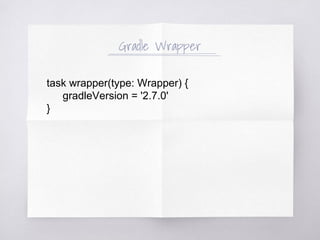
Gradle Wrapper
task wrapper(type: Wrapper) {
gradleVersion = '2.7.0'
}
subprojects {
dependencies {
compile ‘org.twitter4j:twitter4j-core:2.2.4’
}
task copyCommonResources(type : Copy) {
from project(‘:twitter4j’).file(‘common-resources’)
into compileJava.destinationDir
}
jar.dependsOn copyCommonResources
}
Copy Resources
subprojects {
dependencies {
compile ‘org.twitter4j:twitter4j-core:2.2.4’
}
jar.doFirst {
copy {
from project(‘:twitter4j’).file(‘common-resources’)
into compileJava.destinationDir
}
}
}
Option 1 Option 2
test {
useJunit()
use TestNG()
jvmArgs [--‐Xmx512M]
include **/tests/special/**/*Test.class
exclude **/Old*Test.class
forkEvery = 30
maxParallelForks = Runtime.runtime.availableProcessors()}
}
// Multiple Source Directories
sourceSets.main.java.srcDirs = [ src/main/java, srcAdditional/main/java ]
sourceSets.main.java.srcDirs srcAdditionalTwo/main/java
// Multiple Test Source Directories
sourceSets.test.java.srcDirs = [ src/test/java, srcAdditional/test/java ]
sourceSets.test.java.srcDirs srcAdditionalTwo/test/java
Gradle is flexible & knows Testing
DEMO
Show me code !!
References
▧ https://docs.gradle.org/current/dsl/index.html
▧ https://zeroturnaround.com/rebellabs/java-tools-and-tech
nologies-landscape-2016/
▧ https://plumbr.eu/blog/java/how-many-java-developers-i
n-the-world
▧ http://zeroturnaround.com/rebellabs/java-build-tools-part
-2-a-decision-makers-comparison-of-maven-gradle-and-a
nt-ivy/
Thanks !!
You were a wonderful audience
Any questions?
You can find me at
@deepak_shevani
shevanideepak@gmail.com

Enterprise build tool gradle