


Using Docker andVagrant
Within a GitHub Pull RequestWorkflow
Who Am I?
E. Camden Fisher
Sr. DevOps Engineer, NorthPage
https://github.com/fishnix
https://twitter.com/fishnix
https://www.linkedin.com/in/fishnix
The GitHub Pull RequestWorkflow
An Overview
NorthPage GitHub Workflow
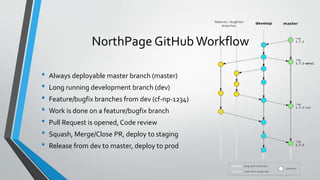
• Always deployable master branch (master)
• Long running development branch (dev)
• Feature/bugfix branches from dev (cf-np-1234)
• Work is done on a feature/bugfix branch
• Pull Request is opened, Code review
• Squash, Merge/Close PR, deploy to staging
• Release from dev to master, deploy to prod
Benefits of GitHub Workflow
• Everyone gets eyes on code being added to the product
• Web based process – review anywhere/anytime
• Bugs are caught before things get deployed
• Latest development version is always in our Staging environment
• It’s a learning opportunity
Challenges with GitHub Workflow
• Work in progress on your own feature branch means you must:
• Stop working, commit or stash, checkout, build, reset database, etc., or
• Maintain a separate repository used for PR review including a special assembly profile to
avoid port collisions, set different database, etc.
• Barrier causes less review to happen, less testing to happen, fewer bugs caught
• Delays merging features/bugfixes
• Environment looks a lot like local development, but not much like production
Vagrant
An Overview
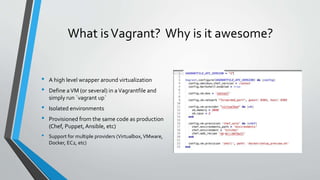
What isVagrant? Why is it awesome?
• A high level wrapper around virtualization
• Define aVM (or several) in aVagrantfile and
simply run `vagrant up`
• Isolated environments
• Provisioned from the same code as production
(Chef, Puppet,Ansible, etc)
• Support for multiple providers (Virtualbox,VMware,
Docker, EC2, etc)
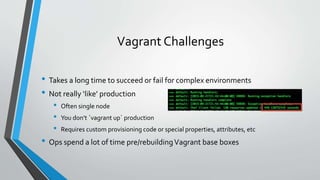
Vagrant Challenges
• Takes a long time to succeed or fail for complex environments
• Not really ‘like’ production
• Often single node
• You don’t `vagrant up` production
• Requires custom provisioning code or special properties, attributes, etc
• Ops spend a lot of time pre/rebuildingVagrant base boxes
An Overview
What is Docker? (tl;dr)
A collection of tools to package, deliver and manage the lifecycle of (LXC*)
containers.
Uh… cool, what’s a container?
• OS level virtualization
• LXC, Jails, Zones, etc
• Containers can only be run on hosts with the same kernel
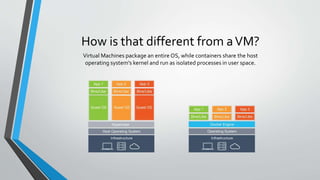
How is that different from aVM?
Virtual Machines package an entire OS, while containers share the host
operating system’s kernel and run as isolated processes in user space.
What’s Inside Docker?
• Images
• Containers
What’s Inside Docker: Images
• Read-only template used to create containers
• Created from a Dockerfile with `docker build`
• Composed of metadata + filesystem layers
• Analogous toVMwareTemplate, AmazonAMI, etc
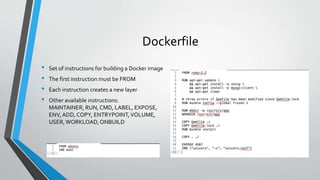
Dockerfile
• Set of instructions for building a Docker image
• The first instruction must be FROM
• Each instruction creates a new layer
• Other available instructions:
MAINTAINER, RUN, CMD, LABEL, EXPOSE,
ENV, ADD, COPY, ENTRYPOINT,VOLUME,
USER,WORKLOAD,ONBUILD
What’s Inside Docker: Containers
• The run component of Docker
• Can be started, stopped, moved, deleted
• Can be linked together
• Can share volumes with each other or the Docker host
• Can expose ports to each other or the Docker host
• One process per container
• `docker run`, docker start`, `docker stop`, `docker rm`, etc
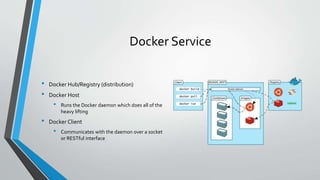
Docker Service
• Docker Hub/Registry (distribution)
• Docker Host
• Runs the Docker daemon which does all of the
heavy lifting
• Docker Client
• Communicates with the daemon over a socket
or RESTful interface
Docker Registry
• Repositories of Docker images
• ie. fishnix/preview:TAG
hub.northpage.com/preview:TAG
• Public or Private
• Provides an HTTP API
• Images are pushed with `docker push`
NorthPage PreviewTool
Adding more awesome to our GitHub Pull Request Workflow
Preview:What we wanted.
• A way to review pull requests without interrupting work in progress
• An environment that looks more like production
• Ability to do end-to-end testing, not just green/red code diffs
• A simple web interface
• To share it if possible
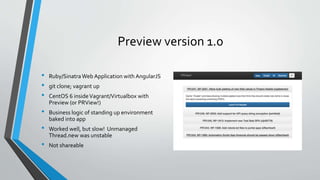
Preview version 1.0
• Ruby/SinatraWeb Application with AngularJS
• git clone; vagrant up
• CentOS 6 insideVagrant/Virtualbox with
Preview (or PRView!)
• Business logic of standing up environment
baked into app
• Worked well, but slow! Unmanaged
Thread.new was unstable
• Not shareable
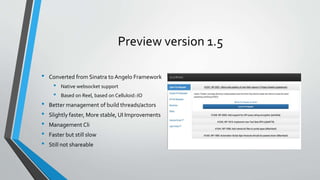
Preview version 1.5
• Converted from Sinatra to Angelo Framework
• Native websocket support
• Based on Reel, based on Celluloid::IO
• Better management of build threads/actors
• Slightly faster, More stable, UI Improvements
• Management Cli
• Faster but still slow
• Still not shareable
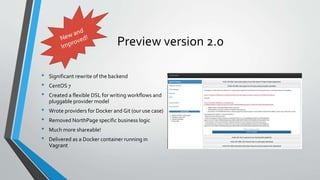
Preview version 2.0
• Significant rewrite of the backend
• CentOS 7
• Created a flexible DSL for writing workflows and
pluggable provider model
• Wrote providers for Docker and Git (our use case)
• Removed NorthPage specific business logic
• Much more shareable!
• Delivered as a Docker container running in
Vagrant
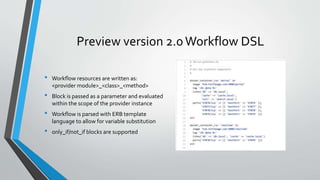
Preview version 2.0Workflow DSL
• Workflow resources are written as:
<provider module>_<class>_<method>
• Block is passed as a parameter and evaluated
within the scope of the provider instance
• Workflow is parsed with ERB template
language to allow for variable substitution
• only_if/not_if blocks are supported
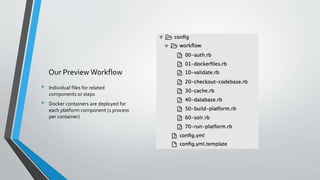
Our Preview Workflow
• Individual files for related
components or steps
• Docker containers are deployed for
each platform component (1 process
per container)
How do we build our Docker images
• On every commit to GitHub:
• Jenkins builds the platform components and assembles them
• Jenkins builds docker images containing:
• trimmed, sanitized and patched version of our production database
• non-indexed instance of solr
• indexed instance of solr
• each of the platform components (portal, realtime, search-indexer, *automation agent)
• Jenkins tags the built images with the SHA of the git commit
• Jenkins pushes those images into our private docker registry
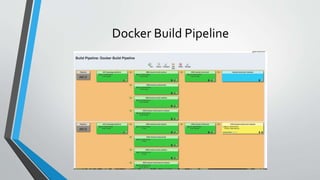
Docker Build Pipeline
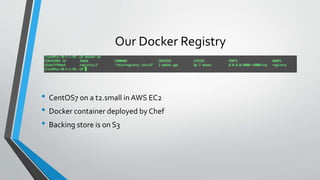
Our Docker Registry
• CentOS7 on a t2.small in AWS EC2
• Docker container deployed by Chef
• Backing store is on S3
Challenges with Preview v2.0
• A lot of moving parts in Jenkins workflow. Helped by:
• Naginator Plugin: reschedules failed jobs
• Parameterized Trigger plugin
• BuildTimeout plugin
• Build Pipeline plugin
• ChatOps HipChat room notifies on build failures
• Docker is moving fast
• Internets are more critical
• Naming is hard: prview, np-prview, PRView, PReView, np-preview, Preview
Payback
• Tremendous efficiency gains
• Increased code quality
• Rapid onboarding, platform familiarity
• Ability to demo new features, reproduce bugs
Questions?
camden@northpage.com
https://twitter.com/fishnix
https://www.linkedin.com/in/fishnix

CT Software Developers Meetup: Using Docker and Vagrant Within A GitHub Pull Request Workflow

  • 1.
    Using Docker andVagrant Withina GitHub Pull RequestWorkflow
  • 2.
    Who Am I? E.Camden Fisher Sr. DevOps Engineer, NorthPage https://github.com/fishnix https://twitter.com/fishnix https://www.linkedin.com/in/fishnix
  • 3.
    The GitHub PullRequestWorkflow An Overview
  • 4.
    NorthPage GitHub Workflow •Always deployable master branch (master) • Long running development branch (dev) • Feature/bugfix branches from dev (cf-np-1234) • Work is done on a feature/bugfix branch • Pull Request is opened, Code review • Squash, Merge/Close PR, deploy to staging • Release from dev to master, deploy to prod
  • 5.
    Benefits of GitHubWorkflow • Everyone gets eyes on code being added to the product • Web based process – review anywhere/anytime • Bugs are caught before things get deployed • Latest development version is always in our Staging environment • It’s a learning opportunity
  • 6.
    Challenges with GitHubWorkflow • Work in progress on your own feature branch means you must: • Stop working, commit or stash, checkout, build, reset database, etc., or • Maintain a separate repository used for PR review including a special assembly profile to avoid port collisions, set different database, etc. • Barrier causes less review to happen, less testing to happen, fewer bugs caught • Delays merging features/bugfixes • Environment looks a lot like local development, but not much like production
  • 7.
  • 8.
    What isVagrant? Whyis it awesome? • A high level wrapper around virtualization • Define aVM (or several) in aVagrantfile and simply run `vagrant up` • Isolated environments • Provisioned from the same code as production (Chef, Puppet,Ansible, etc) • Support for multiple providers (Virtualbox,VMware, Docker, EC2, etc)
  • 9.
    Vagrant Challenges • Takesa long time to succeed or fail for complex environments • Not really ‘like’ production • Often single node • You don’t `vagrant up` production • Requires custom provisioning code or special properties, attributes, etc • Ops spend a lot of time pre/rebuildingVagrant base boxes
  • 10.
  • 11.
    What is Docker?(tl;dr) A collection of tools to package, deliver and manage the lifecycle of (LXC*) containers.
  • 12.
    Uh… cool, what’sa container? • OS level virtualization • LXC, Jails, Zones, etc • Containers can only be run on hosts with the same kernel
  • 13.
    How is thatdifferent from aVM? Virtual Machines package an entire OS, while containers share the host operating system’s kernel and run as isolated processes in user space.
  • 14.
    What’s Inside Docker? •Images • Containers
  • 15.
    What’s Inside Docker:Images • Read-only template used to create containers • Created from a Dockerfile with `docker build` • Composed of metadata + filesystem layers • Analogous toVMwareTemplate, AmazonAMI, etc
  • 16.
    Dockerfile • Set ofinstructions for building a Docker image • The first instruction must be FROM • Each instruction creates a new layer • Other available instructions: MAINTAINER, RUN, CMD, LABEL, EXPOSE, ENV, ADD, COPY, ENTRYPOINT,VOLUME, USER,WORKLOAD,ONBUILD
  • 17.
    What’s Inside Docker:Containers • The run component of Docker • Can be started, stopped, moved, deleted • Can be linked together • Can share volumes with each other or the Docker host • Can expose ports to each other or the Docker host • One process per container • `docker run`, docker start`, `docker stop`, `docker rm`, etc
  • 18.
    Docker Service • DockerHub/Registry (distribution) • Docker Host • Runs the Docker daemon which does all of the heavy lifting • Docker Client • Communicates with the daemon over a socket or RESTful interface
  • 19.
    Docker Registry • Repositoriesof Docker images • ie. fishnix/preview:TAG hub.northpage.com/preview:TAG • Public or Private • Provides an HTTP API • Images are pushed with `docker push`
  • 20.
    NorthPage PreviewTool Adding moreawesome to our GitHub Pull Request Workflow
  • 21.
    Preview:What we wanted. •A way to review pull requests without interrupting work in progress • An environment that looks more like production • Ability to do end-to-end testing, not just green/red code diffs • A simple web interface • To share it if possible
  • 22.
    Preview version 1.0 •Ruby/SinatraWeb Application with AngularJS • git clone; vagrant up • CentOS 6 insideVagrant/Virtualbox with Preview (or PRView!) • Business logic of standing up environment baked into app • Worked well, but slow! Unmanaged Thread.new was unstable • Not shareable
  • 23.
    Preview version 1.5 •Converted from Sinatra to Angelo Framework • Native websocket support • Based on Reel, based on Celluloid::IO • Better management of build threads/actors • Slightly faster, More stable, UI Improvements • Management Cli • Faster but still slow • Still not shareable
  • 24.
    Preview version 2.0 •Significant rewrite of the backend • CentOS 7 • Created a flexible DSL for writing workflows and pluggable provider model • Wrote providers for Docker and Git (our use case) • Removed NorthPage specific business logic • Much more shareable! • Delivered as a Docker container running in Vagrant
  • 25.
    Preview version 2.0WorkflowDSL • Workflow resources are written as: <provider module>_<class>_<method> • Block is passed as a parameter and evaluated within the scope of the provider instance • Workflow is parsed with ERB template language to allow for variable substitution • only_if/not_if blocks are supported
  • 26.
    Our Preview Workflow •Individual files for related components or steps • Docker containers are deployed for each platform component (1 process per container)
  • 27.
    How do webuild our Docker images • On every commit to GitHub: • Jenkins builds the platform components and assembles them • Jenkins builds docker images containing: • trimmed, sanitized and patched version of our production database • non-indexed instance of solr • indexed instance of solr • each of the platform components (portal, realtime, search-indexer, *automation agent) • Jenkins tags the built images with the SHA of the git commit • Jenkins pushes those images into our private docker registry
  • 28.
  • 29.
    Our Docker Registry •CentOS7 on a t2.small in AWS EC2 • Docker container deployed by Chef • Backing store is on S3
  • 30.
    Challenges with Previewv2.0 • A lot of moving parts in Jenkins workflow. Helped by: • Naginator Plugin: reschedules failed jobs • Parameterized Trigger plugin • BuildTimeout plugin • Build Pipeline plugin • ChatOps HipChat room notifies on build failures • Docker is moving fast • Internets are more critical • Naming is hard: prview, np-prview, PRView, PReView, np-preview, Preview
  • 31.
    Payback • Tremendous efficiencygains • Increased code quality • Rapid onboarding, platform familiarity • Ability to demo new features, reproduce bugs
  • 33.