Google Ads
Campaign Approach
Project Overview
Key Aspects
Marketing Objective
KPI
Project Overview
A paid marketing campaign will be run using Google Ads,
formerly known as Google AdWords.
The goal is to have people enroll in Udacity’s Front End
Framework Course, (click on Link), through utilization of a
Google Ads campaign.
Why Google Ads? (Please skip if you know of Google Ads)
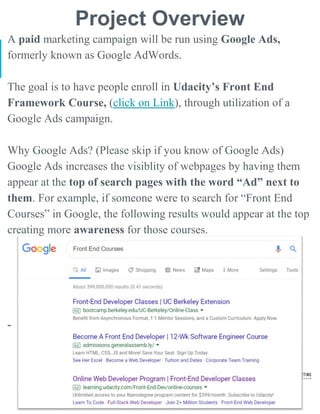
Google Ads increases the visiblity of webpages by having them
appear at the top of search pages with the word “Ad” next to
them. For example, if someone were to search for “Front End
Courses” in Google, the following results would appear at the top
creating more awareness for those courses.
-
Key Aspects of Projects
● Usage of Google Ads to promote enrollment of an online
course with combination of a multi-variate test
● Analysis using Google Ads Keyword Planner to optimize
which keywords to use to use by examining:
○ Average Monthly Searches
○ Competiton for Search Keyword Terms
○ Cost Per Click Range
● Selection of 20+ keywords per Ad Group based on analysis
● Creation of two Ad Groups and two Ad Copies per group
○ Pre-made Landing Page
○ Headline, Description, and other parts of Ad targeting customer persona
● Running of live Search Engine Marketing campaign for 5 days
on Google on both desktop and mobile platforms
● Live monitoring of campaign and optimization of keywords, Ad
Copies, and other factors during the campaign to improve
conversions (student enrollment)
● Analysis of Campaign, Ad Group, Ads, keywords, and overall
return on investment (ROI) of campaign
● Recommendations for future Google Ad campaigns based on
analysis of results and lessons learned
Campaign Approach
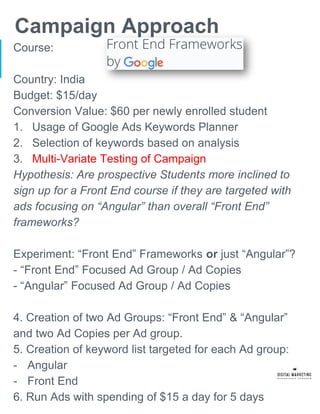
Course:
Country: India
Budget: $15/day
Conversion Value: $60 per newly enrolled student
1. Usage of Google Ads Keywords Planner
2. Selection of keywords based on analysis
3. Multi-Variate Testing of Campaign
Hypothesis: Are prospective Students more inclined to
sign up for a Front End course if they are targeted with
ads focusing on “Angular” than overall “Front End”
frameworks?
Experiment: “Front End” Frameworks or just “Angular”?
- “Front End” Focused Ad Group / Ad Copies
- “Angular” Focused Ad Group / Ad Copies
4. Creation of two Ad Groups: “Front End” & “Angular”
and two Ad Copies per Ad group.
5. Creation of keyword list targeted for each Ad group:
- Angular
- Front End
6. Run Ads with spending of $15 a day for 5 days
Marketing Objective & KPI
The marketing objective will be to be get at least 10
unique people enrolled into the Udacity Front End
Frameworks Course. The Search Engine Marketing
Campaign will utilize the following:
- Google Ads Platform
- Four Unique Google Ads
- Campaign Budget set to $15 per day
- Promotion period of 5 days.
Key Performance Indicators:
- Impressions – How many times were the Ads seen?
- Clicks – How many times were the Ad links pressed,
directing the person to the course landing page?
- Conversions – How many people signed up
(enrolled) for the course after clicking the Ad links?
Campaign Overview
Ad Groups
Ads
Keywords
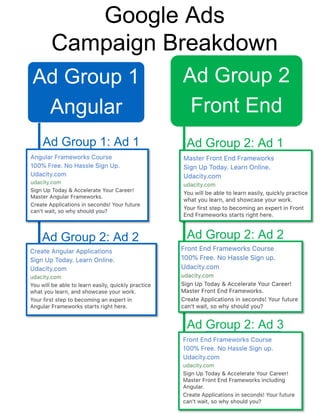
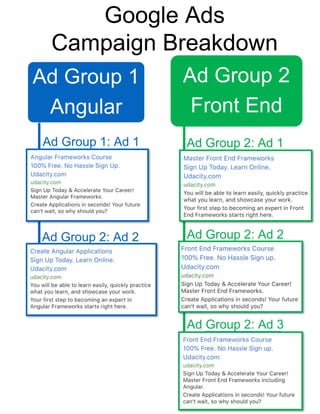
Ad Group 1
Angular
Ad 1
Ad 2
Ad Group 2
Front End
Ad 1
Ad 2
Ad 3
Google Ads
Campaign Breakdown
Ad Group 1: Ad 1
Ad Group 2: Ad 2
Ad Group 2: Ad 1
Ad Group 2: Ad 2
Ad Group 2: Ad 3
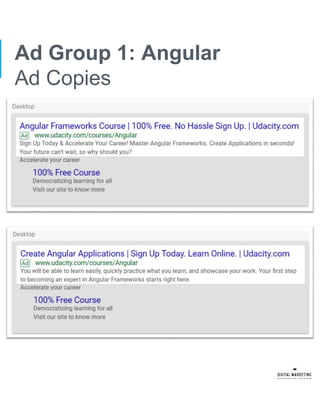
Ad Group 1: Angular
Ad Copies
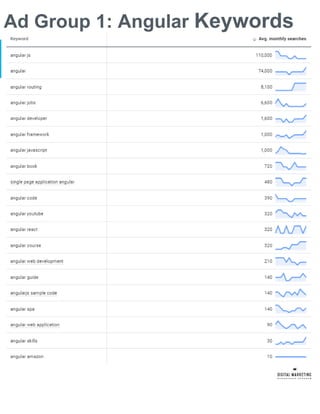
Ad Group 1: Angular Keywords
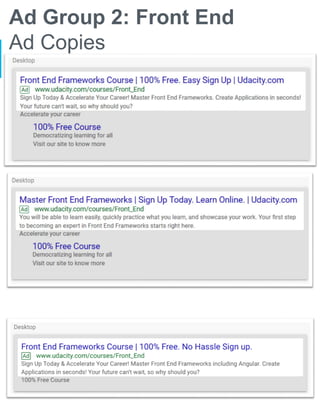
Ad Group 2: Front End
Ad Copies
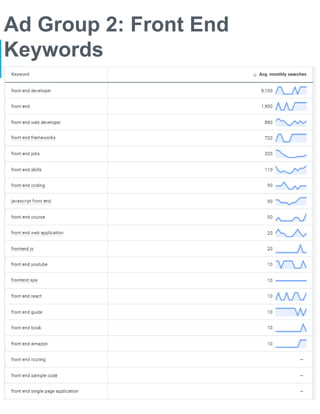
Ad Group 2: Front End
Keywords
Mid-Campaign Modifications | Results
Campaign, Ad Group,
and Ad Level Changes.
Changes 1
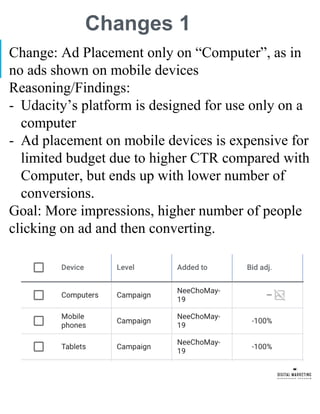
Change: Ad Placement only on “Computer”, as in
no ads shown on mobile devices
Reasoning/Findings:
- Udacity’s platform is designed for use only on a
computer
- Ad placement on mobile devices is expensive for
limited budget due to higher CTR compared with
Computer, but ends up with lower number of
conversions.
Goal: More impressions, higher number of people
clicking on ad and then converting.
Change 2
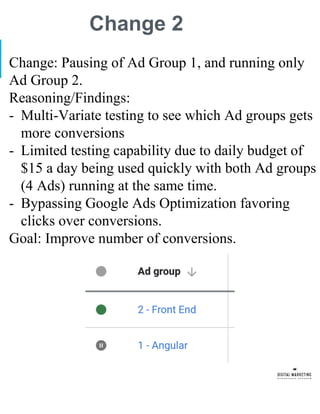
Change: Pausing of Ad Group 1, and running only
Ad Group 2.
Reasoning/Findings:
- Multi-Variate testing to see which Ad groups gets
more conversions
- Limited testing capability due to daily budget of
$15 a day being used quickly with both Ad groups
(4 Ads) running at the same time.
- Bypassing Google Ads Optimization favoring
clicks over conversions.
Goal: Improve number of conversions.
Change 3
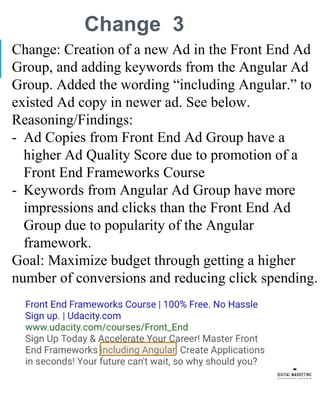
Change: Creation of a new Ad in the Front End Ad
Group, and adding keywords from the Angular Ad
Group. Added the wording “including Angular.” to
existed Ad copy in newer ad. See below.
Reasoning/Findings:
- Ad Copies from Front End Ad Group have a
higher Ad Quality Score due to promotion of a
Front End Frameworks Course
- Keywords from Angular Ad Group have more
impressions and clicks than the Front End Ad
Group due to popularity of the Angular
framework.
Goal: Maximize budget through getting a higher
number of conversions and reducing click spending.
Results from Change 1 - 3
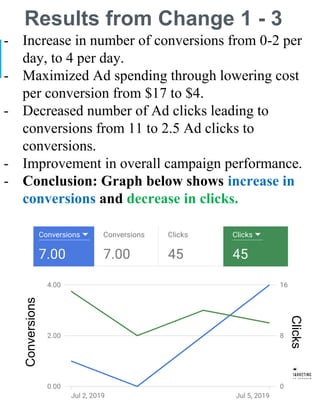
- Increase in number of conversions from 0-2 per
day, to 4 per day.
- Maximized Ad spending through lowering cost
per conversion from $17 to $4.
- Decreased number of Ad clicks leading to
conversions from 11 to 2.5 Ad clicks to
conversions.
- Improvement in overall campaign performance.
- Conclusion: Graph below shows increase in
conversions and decrease in clicks.
Conversions
Clicks
Change 4
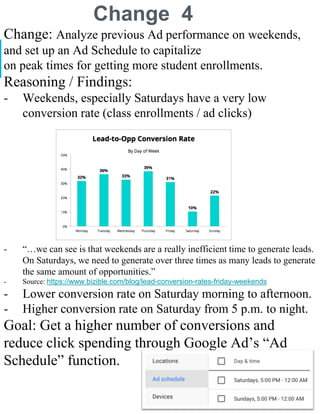
Change: Analyze previous Ad performance on weekends,
and set up an Ad Schedule to capitalize
on peak times for getting more student enrollments.
Reasoning / Findings:
- Weekends, especially Saturdays have a very low
conversion rate (class enrollments / ad clicks)
- “…we can see is that weekends are a really inefficient time to generate leads.
On Saturdays, we need to generate over three times as many leads to generate
the same amount of opportunities.”
- Source: https://www.bizible.com/blog/lead-conversion-rates-friday-weekends
- Lower conversion rate on Saturday morning to afternoon.
- Higher conversion rate on Saturday from 5 p.m. to night.
Goal: Get a higher number of conversions and
reduce click spending through Google Ad’s “Ad
Schedule” function.
Results from Change 4
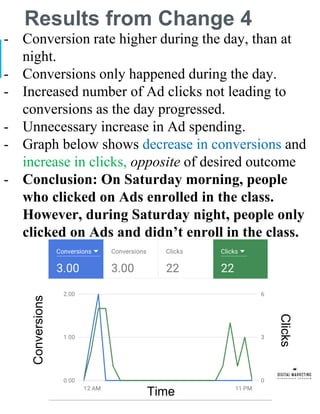
- Conversion rate higher during the day, than at
night.
- Conversions only happened during the day.
- Increased number of Ad clicks not leading to
conversions as the day progressed.
- Unnecessary increase in Ad spending.
- Graph below shows decrease in conversions and
increase in clicks, opposite of desired outcome
- Conclusion: On Saturday morning, people
who clicked on Ads enrolled in the class.
However, during Saturday night, people only
clicked on Ads and didn’t enroll in the class.
Conversions
Clicks
Time
Campaign Evaluation
Results, Analysis and
Recommendations
Ad Group 1
Angular
Ad 1
Ad 2
Ad Group 2
Front End
Ad 1
Ad 2
Ad 3
Google Ads
Campaign Breakdown
Ad Group 1: Ad 1
Ad Group 2: Ad 2
Ad Group 2: Ad 1
Ad Group 2: Ad 2
Ad Group 2: Ad 3
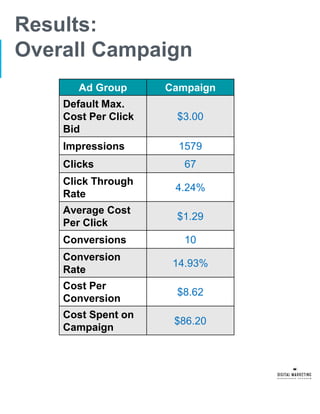
Results:
Overall Campaign
Ad Group Campaign
Default Max.
Cost Per Click
Bid
$3.00
Impressions 1579
Clicks 67
Click Through
Rate
4.24%
Average Cost
Per Click
$1.29
Conversions 10
Conversion
Rate
14.93%
Cost Per
Conversion
$8.62
Cost Spent on
Campaign
$86.20
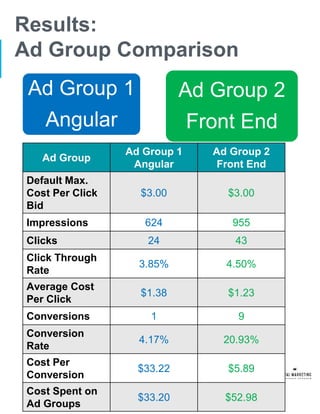
Results:
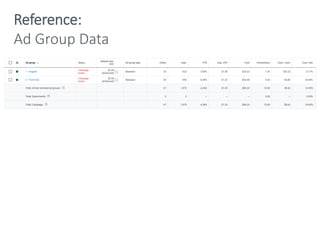
Ad Group Comparison
Ad Group
Ad Group 1
Angular
Ad Group 2
Front End
Default Max.
Cost Per Click
Bid
$3.00 $3.00
Impressions 624 955
Clicks 24 43
Click Through
Rate
3.85% 4.50%
Average Cost
Per Click
$1.38 $1.23
Conversions 1 9
Conversion
Rate
4.17% 20.93%
Cost Per
Conversion
$33.22 $5.89
Cost Spent on
Ad Groups
$33.20 $52.98
Ad Group 1
Angular
Ad Group 2
Front End
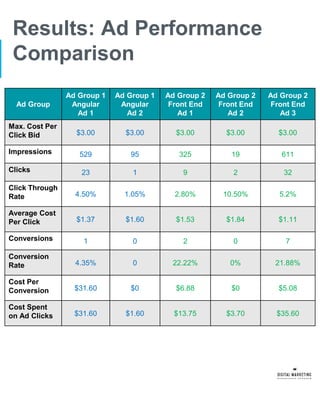
Results: Ad Performance
Comparison
Ad Group
Ad Group 1
Angular
Ad 1
Ad Group 1
Angular
Ad 2
Ad Group 2
Front End
Ad 1
Ad Group 2
Front End
Ad 2
Ad Group 2
Front End
Ad 3
Max. Cost Per
Click Bid $3.00 $3.00 $3.00 $3.00 $3.00
Impressions 529 95 325 19 611
Clicks 23 1 9 2 32
Click Through
Rate 4.50% 1.05% 2.80% 10.50% 5.2%
Average Cost
Per Click $1.37 $1.60 $1.53 $1.84 $1.11
Conversions 1 0 2 0 7
Conversion
Rate 4.35% 0 22.22% 0% 21.88%
Cost Per
Conversion $31.60 $0 $6.88 $0 $5.08
Cost Spent
on Ad Clicks $31.60 $1.60 $13.75 $3.70 $35.60
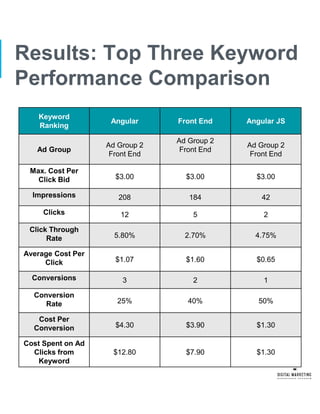
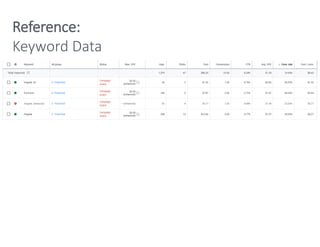
Results: Top Three Keyword
Performance Comparison
Keyword
Ranking
Angular Front End Angular JS
Ad Group
Ad Group 2
Front End
Ad Group 2
Front End
Ad Group 2
Front End
Max. Cost Per
Click Bid $3.00 $3.00 $3.00
Impressions 208 184 42
Clicks 12 5 2
Click Through
Rate 5.80% 2.70% 4.75%
Average Cost Per
Click $1.07 $1.60 $0.65
Conversions 3 2 1
Conversion
Rate 25% 40% 50%
Cost Per
Conversion $4.30 $3.90 $1.30
Cost Spent on Ad
Clicks from
Keyword
$12.80 $7.90 $1.30
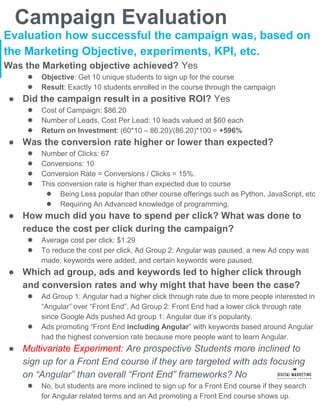
Campaign Evaluation
Evaluation how successful the campaign was, based on
the Marketing Objective, experiments, KPI, etc.
Was the Marketing objective achieved? Yes
● Objective: Get 10 unique students to sign up for the course
● Result: Exactly 10 students enrolled in the course through the campaign
● Did the campaign result in a positive ROI? Yes
● Cost of Campaign: $86.20
● Number of Leads, Cost Per Lead: 10 leads valued at $60 each
● Return on Investment: (60*10 – 86.20)/(86.20)*100 = +596%
● Was the conversion rate higher or lower than expected?
● Number of Clicks: 67
● Conversions: 10
● Conversion Rate = Conversions / Clicks = 15%.
● This conversion rate is higher than expected due to course
● Being Less popular than other course offerings such as Python, JavaScript, etc
● Requiring An Advanced knowledge of programming.
● How much did you have to spend per click? What was done to
reduce the cost per click during the campaign?
● Average cost per click: $1.29
● To reduce the cost per click, Ad Group 2: Angular was paused, a new Ad copy was
made, keywords were added, and certain keywords were paused.
● Which ad group, ads and keywords led to higher click through
and conversion rates and why might that have been the case?
● Ad Group 1: Angular had a higher click through rate due to more people interested in
“Angular” over “Front End”. Ad Group 2: Front End had a lower click through rate
since Google Ads pushed Ad group 1: Angular due it’s popularity.
● Ads promoting “Front End including Angular” with keywords based around Angular
had the highest conversion rate because more people want to learn Angular.
● Multivariate Experiment: Are prospective Students more inclined to
sign up for a Front End course if they are targeted with ads focusing
on “Angular” than overall “Front End” frameworks? No
● No, but students are more inclined to sign up for a Front End course if they search
for Angular related terms and an Ad promoting a Front End course shows up.
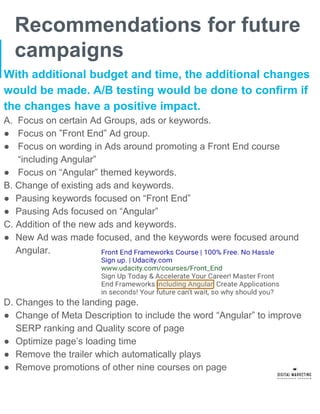
Recommendations for future
campaigns
With additional budget and time, the additional changes
would be made. A/B testing would be done to confirm if
the changes have a positive impact.
A. Focus on certain Ad Groups, ads or keywords.
● Focus on ”Front End” Ad group.
● Focus on wording in Ads around promoting a Front End course
“including Angular”
● Focus on “Angular” themed keywords.
B. Change of existing ads and keywords.
● Pausing keywords focused on “Front End”
● Pausing Ads focused on “Angular”
C. Addition of the new ads and keywords.
● New Ad was made focused, and the keywords were focused around
Angular.
D. Changes to the landing page.
● Change of Meta Description to include the word “Angular” to improve
SERP ranking and Quality score of page
● Optimize page’s loading time
● Remove the trailer which automatically plays
● Remove promotions of other nine courses on page
Appendix
Screenshots for
Reference
Reference:
Ad Group Data
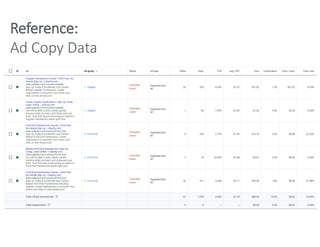
Reference:
Ad Copy Data
Reference:
Keyword Data

Google AdWords Search Engine Marketing Campaign

  • 2.
    Google Ads Campaign Approach ProjectOverview Key Aspects Marketing Objective KPI
  • 3.
    Project Overview A paidmarketing campaign will be run using Google Ads, formerly known as Google AdWords. The goal is to have people enroll in Udacity’s Front End Framework Course, (click on Link), through utilization of a Google Ads campaign. Why Google Ads? (Please skip if you know of Google Ads) Google Ads increases the visiblity of webpages by having them appear at the top of search pages with the word “Ad” next to them. For example, if someone were to search for “Front End Courses” in Google, the following results would appear at the top creating more awareness for those courses. -
  • 4.
    Key Aspects ofProjects ● Usage of Google Ads to promote enrollment of an online course with combination of a multi-variate test ● Analysis using Google Ads Keyword Planner to optimize which keywords to use to use by examining: ○ Average Monthly Searches ○ Competiton for Search Keyword Terms ○ Cost Per Click Range ● Selection of 20+ keywords per Ad Group based on analysis ● Creation of two Ad Groups and two Ad Copies per group ○ Pre-made Landing Page ○ Headline, Description, and other parts of Ad targeting customer persona ● Running of live Search Engine Marketing campaign for 5 days on Google on both desktop and mobile platforms ● Live monitoring of campaign and optimization of keywords, Ad Copies, and other factors during the campaign to improve conversions (student enrollment) ● Analysis of Campaign, Ad Group, Ads, keywords, and overall return on investment (ROI) of campaign ● Recommendations for future Google Ad campaigns based on analysis of results and lessons learned
  • 5.
    Campaign Approach Course: Country: India Budget:$15/day Conversion Value: $60 per newly enrolled student 1. Usage of Google Ads Keywords Planner 2. Selection of keywords based on analysis 3. Multi-Variate Testing of Campaign Hypothesis: Are prospective Students more inclined to sign up for a Front End course if they are targeted with ads focusing on “Angular” than overall “Front End” frameworks? Experiment: “Front End” Frameworks or just “Angular”? - “Front End” Focused Ad Group / Ad Copies - “Angular” Focused Ad Group / Ad Copies 4. Creation of two Ad Groups: “Front End” & “Angular” and two Ad Copies per Ad group. 5. Creation of keyword list targeted for each Ad group: - Angular - Front End 6. Run Ads with spending of $15 a day for 5 days
  • 6.
    Marketing Objective &KPI The marketing objective will be to be get at least 10 unique people enrolled into the Udacity Front End Frameworks Course. The Search Engine Marketing Campaign will utilize the following: - Google Ads Platform - Four Unique Google Ads - Campaign Budget set to $15 per day - Promotion period of 5 days. Key Performance Indicators: - Impressions – How many times were the Ads seen? - Clicks – How many times were the Ad links pressed, directing the person to the course landing page? - Conversions – How many people signed up (enrolled) for the course after clicking the Ad links?
  • 7.
  • 8.
    Ad Group 1 Angular Ad1 Ad 2 Ad Group 2 Front End Ad 1 Ad 2 Ad 3 Google Ads Campaign Breakdown Ad Group 1: Ad 1 Ad Group 2: Ad 2 Ad Group 2: Ad 1 Ad Group 2: Ad 2 Ad Group 2: Ad 3
  • 9.
    Ad Group 1:Angular Ad Copies
  • 10.
    Ad Group 1:Angular Keywords
  • 11.
    Ad Group 2:Front End Ad Copies
  • 12.
    Ad Group 2:Front End Keywords
  • 13.
    Mid-Campaign Modifications |Results Campaign, Ad Group, and Ad Level Changes.
  • 14.
    Changes 1 Change: AdPlacement only on “Computer”, as in no ads shown on mobile devices Reasoning/Findings: - Udacity’s platform is designed for use only on a computer - Ad placement on mobile devices is expensive for limited budget due to higher CTR compared with Computer, but ends up with lower number of conversions. Goal: More impressions, higher number of people clicking on ad and then converting.
  • 15.
    Change 2 Change: Pausingof Ad Group 1, and running only Ad Group 2. Reasoning/Findings: - Multi-Variate testing to see which Ad groups gets more conversions - Limited testing capability due to daily budget of $15 a day being used quickly with both Ad groups (4 Ads) running at the same time. - Bypassing Google Ads Optimization favoring clicks over conversions. Goal: Improve number of conversions.
  • 16.
    Change 3 Change: Creationof a new Ad in the Front End Ad Group, and adding keywords from the Angular Ad Group. Added the wording “including Angular.” to existed Ad copy in newer ad. See below. Reasoning/Findings: - Ad Copies from Front End Ad Group have a higher Ad Quality Score due to promotion of a Front End Frameworks Course - Keywords from Angular Ad Group have more impressions and clicks than the Front End Ad Group due to popularity of the Angular framework. Goal: Maximize budget through getting a higher number of conversions and reducing click spending.
  • 17.
    Results from Change1 - 3 - Increase in number of conversions from 0-2 per day, to 4 per day. - Maximized Ad spending through lowering cost per conversion from $17 to $4. - Decreased number of Ad clicks leading to conversions from 11 to 2.5 Ad clicks to conversions. - Improvement in overall campaign performance. - Conclusion: Graph below shows increase in conversions and decrease in clicks. Conversions Clicks
  • 18.
    Change 4 Change: Analyzeprevious Ad performance on weekends, and set up an Ad Schedule to capitalize on peak times for getting more student enrollments. Reasoning / Findings: - Weekends, especially Saturdays have a very low conversion rate (class enrollments / ad clicks) - “…we can see is that weekends are a really inefficient time to generate leads. On Saturdays, we need to generate over three times as many leads to generate the same amount of opportunities.” - Source: https://www.bizible.com/blog/lead-conversion-rates-friday-weekends - Lower conversion rate on Saturday morning to afternoon. - Higher conversion rate on Saturday from 5 p.m. to night. Goal: Get a higher number of conversions and reduce click spending through Google Ad’s “Ad Schedule” function.
  • 19.
    Results from Change4 - Conversion rate higher during the day, than at night. - Conversions only happened during the day. - Increased number of Ad clicks not leading to conversions as the day progressed. - Unnecessary increase in Ad spending. - Graph below shows decrease in conversions and increase in clicks, opposite of desired outcome - Conclusion: On Saturday morning, people who clicked on Ads enrolled in the class. However, during Saturday night, people only clicked on Ads and didn’t enroll in the class. Conversions Clicks Time
  • 20.
  • 21.
    Ad Group 1 Angular Ad1 Ad 2 Ad Group 2 Front End Ad 1 Ad 2 Ad 3 Google Ads Campaign Breakdown Ad Group 1: Ad 1 Ad Group 2: Ad 2 Ad Group 2: Ad 1 Ad Group 2: Ad 2 Ad Group 2: Ad 3
  • 22.
    Results: Overall Campaign Ad GroupCampaign Default Max. Cost Per Click Bid $3.00 Impressions 1579 Clicks 67 Click Through Rate 4.24% Average Cost Per Click $1.29 Conversions 10 Conversion Rate 14.93% Cost Per Conversion $8.62 Cost Spent on Campaign $86.20
  • 23.
    Results: Ad Group Comparison AdGroup Ad Group 1 Angular Ad Group 2 Front End Default Max. Cost Per Click Bid $3.00 $3.00 Impressions 624 955 Clicks 24 43 Click Through Rate 3.85% 4.50% Average Cost Per Click $1.38 $1.23 Conversions 1 9 Conversion Rate 4.17% 20.93% Cost Per Conversion $33.22 $5.89 Cost Spent on Ad Groups $33.20 $52.98 Ad Group 1 Angular Ad Group 2 Front End
  • 24.
    Results: Ad Performance Comparison AdGroup Ad Group 1 Angular Ad 1 Ad Group 1 Angular Ad 2 Ad Group 2 Front End Ad 1 Ad Group 2 Front End Ad 2 Ad Group 2 Front End Ad 3 Max. Cost Per Click Bid $3.00 $3.00 $3.00 $3.00 $3.00 Impressions 529 95 325 19 611 Clicks 23 1 9 2 32 Click Through Rate 4.50% 1.05% 2.80% 10.50% 5.2% Average Cost Per Click $1.37 $1.60 $1.53 $1.84 $1.11 Conversions 1 0 2 0 7 Conversion Rate 4.35% 0 22.22% 0% 21.88% Cost Per Conversion $31.60 $0 $6.88 $0 $5.08 Cost Spent on Ad Clicks $31.60 $1.60 $13.75 $3.70 $35.60
  • 25.
    Results: Top ThreeKeyword Performance Comparison Keyword Ranking Angular Front End Angular JS Ad Group Ad Group 2 Front End Ad Group 2 Front End Ad Group 2 Front End Max. Cost Per Click Bid $3.00 $3.00 $3.00 Impressions 208 184 42 Clicks 12 5 2 Click Through Rate 5.80% 2.70% 4.75% Average Cost Per Click $1.07 $1.60 $0.65 Conversions 3 2 1 Conversion Rate 25% 40% 50% Cost Per Conversion $4.30 $3.90 $1.30 Cost Spent on Ad Clicks from Keyword $12.80 $7.90 $1.30
  • 26.
    Campaign Evaluation Evaluation howsuccessful the campaign was, based on the Marketing Objective, experiments, KPI, etc. Was the Marketing objective achieved? Yes ● Objective: Get 10 unique students to sign up for the course ● Result: Exactly 10 students enrolled in the course through the campaign ● Did the campaign result in a positive ROI? Yes ● Cost of Campaign: $86.20 ● Number of Leads, Cost Per Lead: 10 leads valued at $60 each ● Return on Investment: (60*10 – 86.20)/(86.20)*100 = +596% ● Was the conversion rate higher or lower than expected? ● Number of Clicks: 67 ● Conversions: 10 ● Conversion Rate = Conversions / Clicks = 15%. ● This conversion rate is higher than expected due to course ● Being Less popular than other course offerings such as Python, JavaScript, etc ● Requiring An Advanced knowledge of programming. ● How much did you have to spend per click? What was done to reduce the cost per click during the campaign? ● Average cost per click: $1.29 ● To reduce the cost per click, Ad Group 2: Angular was paused, a new Ad copy was made, keywords were added, and certain keywords were paused. ● Which ad group, ads and keywords led to higher click through and conversion rates and why might that have been the case? ● Ad Group 1: Angular had a higher click through rate due to more people interested in “Angular” over “Front End”. Ad Group 2: Front End had a lower click through rate since Google Ads pushed Ad group 1: Angular due it’s popularity. ● Ads promoting “Front End including Angular” with keywords based around Angular had the highest conversion rate because more people want to learn Angular. ● Multivariate Experiment: Are prospective Students more inclined to sign up for a Front End course if they are targeted with ads focusing on “Angular” than overall “Front End” frameworks? No ● No, but students are more inclined to sign up for a Front End course if they search for Angular related terms and an Ad promoting a Front End course shows up.
  • 27.
    Recommendations for future campaigns Withadditional budget and time, the additional changes would be made. A/B testing would be done to confirm if the changes have a positive impact. A. Focus on certain Ad Groups, ads or keywords. ● Focus on ”Front End” Ad group. ● Focus on wording in Ads around promoting a Front End course “including Angular” ● Focus on “Angular” themed keywords. B. Change of existing ads and keywords. ● Pausing keywords focused on “Front End” ● Pausing Ads focused on “Angular” C. Addition of the new ads and keywords. ● New Ad was made focused, and the keywords were focused around Angular. D. Changes to the landing page. ● Change of Meta Description to include the word “Angular” to improve SERP ranking and Quality score of page ● Optimize page’s loading time ● Remove the trailer which automatically plays ● Remove promotions of other nine courses on page
  • 28.
  • 29.
  • 30.
  • 31.