Global E-business and Collaboration
Decision Support System (DSS)
Units 2 and 6
 Business processes:
Flows of material, information, knowledge
Sets of activities, steps
May be tied to functional area or be cross-
functional
 Businesses: Can be seen as collection of
business processes
 Business processes may be assets or
liabilities
Business Processes and Information Systems
 Examples of functional business processes
 Manufacturing and production
Assembling the product
 Sales and marketing
Identifying customers
 Finance and accounting
Creating financial statements
 Human resources
Hiring employees
Business Processes and Information Systems
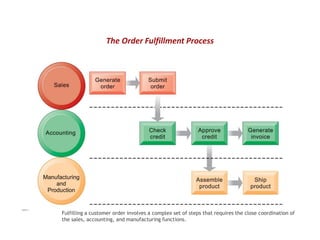
Fulfilling a customer order involves a complex set of steps that requires the close coordination of
the sales, accounting, and manufacturing functions.
FIGURE 2-1
The Order Fulfillment Process
 Information technology enhances business
processes by:
 Increasing efficiency of existing processes
Automating steps that were manual
 Enabling entirely new processes
Change flow of information
Replace sequential steps with parallel steps
Eliminate delays in decision making
Support new business models
Business Processes and Information Systems
 Transaction processing systems
Serve operational managers and staff
Perform and record daily routine transactions
necessary to conduct business
Examples: sales order entry, payroll, shipping
Allow managers to monitor status of operations
and relations with external environment
Serve predefined, structured goals and decision
making
Types of Information Systems
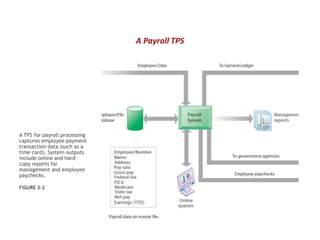
A TPS for payroll processing
captures employee payment
transaction data (such as a
time card). System outputs
include online and hard-
copy reports for
management and employee
paychecks.
FIGURE 2-2
A Payroll TPS
 Data entry: - To be processed transaction data must be entered first into the
system.
 Data validation: - It ensures the accuracy and reliability of data by comparing
actual data with predetermined standards or known results.
 Processing & revalidation: - Once the accuracy & reliability of data are validated,
the data are ready for processing.
 Storage: - Processed data must be carefully and properly stored for future use.
 Output generation: - Once data have been input, validated, processed,
revalidated and stored, they can be communicated to decision makers in two
ways:
 Documents & reports: - are a popular output method; e.g.: invoices,
paychecks, purchase invoices, job orders etc.
 Forms: screens or panels: - Purchase order forms, application window etc.
 Query support: - This is the last process that allows users to access data &
information that may otherwise not be readily available. For example; a sales
manager may query the system for the damaged items in given store.
Steps in Processing a Transaction
 A TPS records internal and external transactions for a
company. It is repository of data that is frequently accessed by
other systems.
 It performs routine, repetitive tasks. It is mostly used by LLM
(lower level management) to make operational decisions.
 Transactions can be recorded in batch mode or online. In
batch mode, the files are updated periodically; in online
mode, each transaction is recorded as it occurs.
 There are six steps for processing a transaction as mentioned
above.
Characteristics of TPS
Business intelligence
 Data and software tools for organizing and analyzing data
 Used to help managers and users make improved
decisions
Business intelligence systems
 Management information systems
 Decision support systems
 Executive support systems
Types of Information Systems
Management information systems
Serve middle management
Provide reports on firm’s current
performance, based on data from TPS
Provide answers to routine questions with
predefined procedure for answering them
Typically have little analytic capability
Types of Information Systems
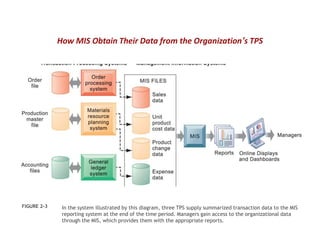
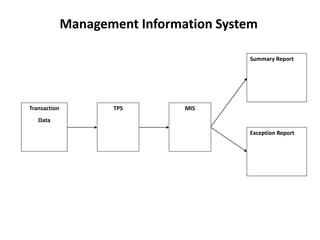
In the system illustrated by this diagram, three TPS supply summarized transaction data to the MIS
reporting system at the end of the time period. Managers gain access to the organizational data
through the MIS, which provides them with the appropriate reports.
FIGURE 2-3
How MIS Obtain Their Data from the Organization’s TPS
Management Information System
Transaction
Data
TPS MIS
Exception Report
Summary Report
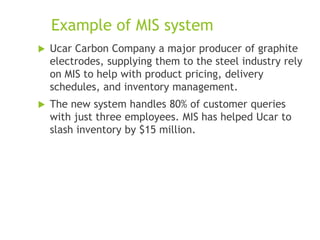
Example of MIS system
 Ucar Carbon Company a major producer of graphite
electrodes, supplying them to the steel industry rely
on MIS to help with product pricing, delivery
schedules, and inventory management.
 The new system handles 80% of customer queries
with just three employees. MIS has helped Ucar to
slash inventory by $15 million.
Summary Report
A report that accumulates data
from several transactions and
presents the results in a
condensed form.
Exception Report
A report that outlines any
deviations between actual output
and expected output.
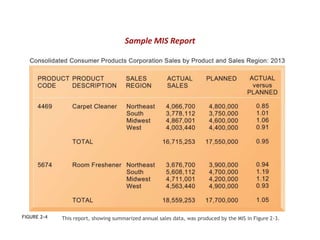
This report, showing summarized annual sales data, was produced by the MIS in Figure 2-3.
FIGURE 2-4
Sample MIS Report
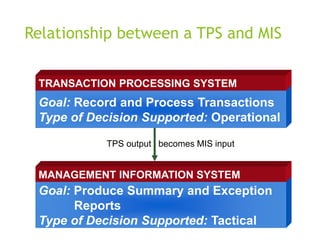
Relationship between a TPS and MIS
Goal: Record and Process Transactions
Type of Decision Supported: Operational
TRANSACTION PROCESSING SYSTEM
Goal: Produce Summary and Exception
Reports
Type of Decision Supported: Tactical
MANAGEMENT INFORMATION SYSTEM
TPS output becomes MIS input
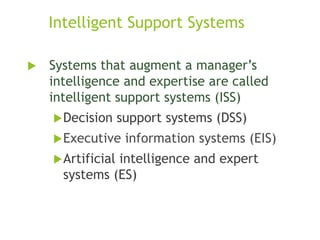
Intelligent Support Systems
 Systems that augment a manager’s
intelligence and expertise are called
intelligent support systems (ISS)
Decision support systems (DSS)
Executive information systems (EIS)
Artificial intelligence and expert
systems (ES)
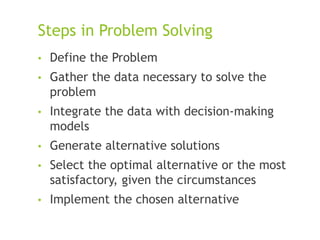
Steps in Problem Solving
• Define the Problem
• Gather the data necessary to solve the
problem
• Integrate the data with decision-making
models
• Generate alternative solutions
• Select the optimal alternative or the most
satisfactory, given the circumstances
• Implement the chosen alternative
Problems solving challenges – real world scenario
 Overabundance of data
 Complex and dynamic business environment in
which business conditions and situations change
rapidly, making unexpected and challenging
problems an everyday occurrence in the lives of
many top managers.
 DSS and EIS can alleviate these problems.
Decision Support Systems
A set of interactive software
programs that provide managers
with data, tools, and models to
make semistructured decisions.
Characteristics of DSS
 Solves semistructured and unstructured
problems
 Integrate data with decision making models
 Supports a wide variety of decision making
processes and styles
 Facilitates decision making under dynamic
conditions
 Helps provide answers to ad hoc queries
Three types of Problems
 Independent Problems: Solutions are independent of
other problems. To find the best solution to the
given problem
 Interrelated Problems: Solutions are interrelated. To
find the best solution to the entire set. Usually
require team effort.
 Organizational Problems: Problems that affect the
entire organization. Requires team effort.
 A DSS is an ideal candidate for interrelated and
inter-organizational problems. Foreg; the goal of
Pepsi to increase the sales of Diet Pepsi by 5% is
interrelated problem
Applications of DSS
 Forecasting, Demand Management
 Abbott Labs produces and markets some
2,000 products uses DSS for sales
forecasting, pricing analysis, tracking of
promotion results and product analysis
 Intel uses a DSS to evaluate prospective
suppliers against company criteria. Manager
changes criteria, check the effect of the
change on supplier ranking.
Applications of DSS Contd
 An international firm, one of the largest
retailers of jewelry merchandise uses DSS to
determine the best locations for its stores.
 This DSS compares the graphics of a
potential location with the demographics of
other company-owned stores.
 Other applications of DSS include corporate
planning, developing effective advertising
strategies and pricing policies, determining
an optimal product mix and handling
investment portfolios.
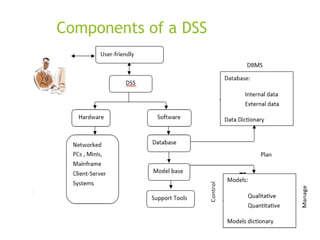
Components of a Decision Support System
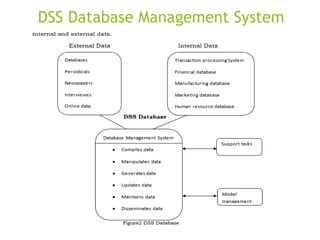
 Database management system (DBMS)
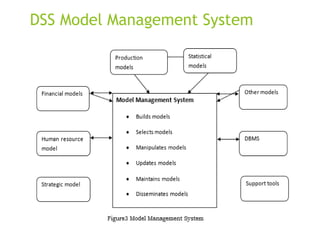
 Model management system
 Support tools
Components of a DSS
DSS Database Management System
10-29
DSS Model Management System
10-30
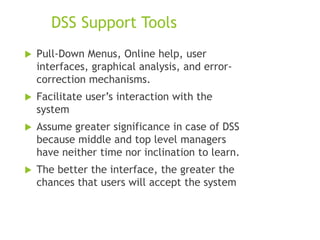
DSS Support Tools
 Pull-Down Menus, Online help, user
interfaces, graphical analysis, and error-
correction mechanisms.
 Facilitate user’s interaction with the
system
 Assume greater significance in case of DSS
because middle and top level managers
have neither time nor inclination to learn.
 The better the interface, the greater the
chances that users will accept the system
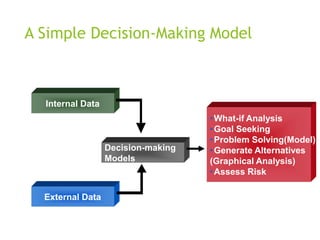
A Simple Decision-Making Model
Internal Data
External Data
Decision-making
Models
•What-if Analysis
•Goal Seeking
•Problem Solving(Model)
•Generate Alternatives
(Graphical Analysis)
•Assess Risk
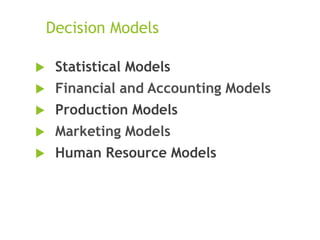
Decision Models
 Statistical Models
 Financial and Accounting Models
 Production Models
 Marketing Models
 Human Resource Models
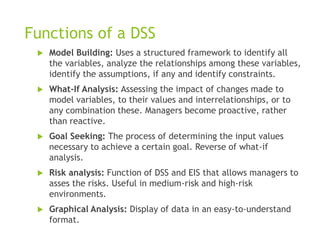
Functions of a DSS
 Model Building: Uses a structured framework to identify all
the variables, analyze the relationships among these variables,
identify the assumptions, if any and identify constraints.
 What-If Analysis: Assessing the impact of changes made to
model variables, to their values and interrelationships, or to
any combination these. Managers become proactive, rather
than reactive.
 Goal Seeking: The process of determining the input values
necessary to achieve a certain goal. Reverse of what-if
analysis.
 Risk analysis: Function of DSS and EIS that allows managers to
asses the risks. Useful in medium-risk and high-risk
environments.
 Graphical Analysis: Display of data in an easy-to-understand
format.
Group Decision Support Systems (GDSS)
Computer-based systems that
enhance group decision making
and improve the flow of
information among group
members.
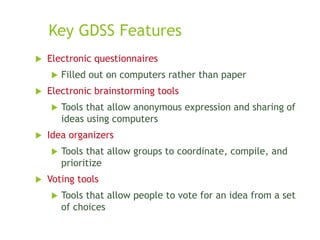
Key GDSS Features
 Electronic questionnaires
 Filled out on computers rather than paper
 Electronic brainstorming tools
 Tools that allow anonymous expression and sharing of
ideas using computers
 Idea organizers
 Tools that allow groups to coordinate, compile, and
prioritize
 Voting tools
 Tools that allow people to vote for an idea from a set
of choices
Kinds of GDSS
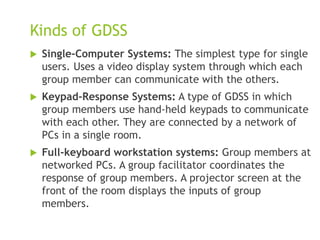
 Single-Computer Systems: The simplest type for single
users. Uses a video display system through which each
group member can communicate with the others.
 Keypad-Response Systems: A type of GDSS in which
group members use hand-held keypads to communicate
with each other. They are connected by a network of
PCs in a single room.
 Full-keyboard workstation systems: Group members at
networked PCs. A group facilitator coordinates the
response of group members. A projector screen at the
front of the room displays the inputs of group
members.
Advantages of GDSS
 It fosters an environment that is conducive to decision
making
 It greatly enhances the efficiency of group meetings.
No one has to wait to be heard because everyone talks
at the same time. No cross talk among group
members.
 The system has good organizational memory. It
instantaneously captures all ideas, which reduces the
need for documentation and risk of losing or
misinterpreting ideas.

Global e-Business and Decision Support System.pptx

  • 1.
    Global E-business andCollaboration Decision Support System (DSS) Units 2 and 6
  • 2.
     Business processes: Flowsof material, information, knowledge Sets of activities, steps May be tied to functional area or be cross- functional  Businesses: Can be seen as collection of business processes  Business processes may be assets or liabilities Business Processes and Information Systems
  • 3.
     Examples offunctional business processes  Manufacturing and production Assembling the product  Sales and marketing Identifying customers  Finance and accounting Creating financial statements  Human resources Hiring employees Business Processes and Information Systems
  • 4.
    Fulfilling a customerorder involves a complex set of steps that requires the close coordination of the sales, accounting, and manufacturing functions. FIGURE 2-1 The Order Fulfillment Process
  • 5.
     Information technologyenhances business processes by:  Increasing efficiency of existing processes Automating steps that were manual  Enabling entirely new processes Change flow of information Replace sequential steps with parallel steps Eliminate delays in decision making Support new business models Business Processes and Information Systems
  • 6.
     Transaction processingsystems Serve operational managers and staff Perform and record daily routine transactions necessary to conduct business Examples: sales order entry, payroll, shipping Allow managers to monitor status of operations and relations with external environment Serve predefined, structured goals and decision making Types of Information Systems
  • 7.
    A TPS forpayroll processing captures employee payment transaction data (such as a time card). System outputs include online and hard- copy reports for management and employee paychecks. FIGURE 2-2 A Payroll TPS
  • 8.
     Data entry:- To be processed transaction data must be entered first into the system.  Data validation: - It ensures the accuracy and reliability of data by comparing actual data with predetermined standards or known results.  Processing & revalidation: - Once the accuracy & reliability of data are validated, the data are ready for processing.  Storage: - Processed data must be carefully and properly stored for future use.  Output generation: - Once data have been input, validated, processed, revalidated and stored, they can be communicated to decision makers in two ways:  Documents & reports: - are a popular output method; e.g.: invoices, paychecks, purchase invoices, job orders etc.  Forms: screens or panels: - Purchase order forms, application window etc.  Query support: - This is the last process that allows users to access data & information that may otherwise not be readily available. For example; a sales manager may query the system for the damaged items in given store. Steps in Processing a Transaction
  • 9.
     A TPSrecords internal and external transactions for a company. It is repository of data that is frequently accessed by other systems.  It performs routine, repetitive tasks. It is mostly used by LLM (lower level management) to make operational decisions.  Transactions can be recorded in batch mode or online. In batch mode, the files are updated periodically; in online mode, each transaction is recorded as it occurs.  There are six steps for processing a transaction as mentioned above. Characteristics of TPS
  • 10.
    Business intelligence  Dataand software tools for organizing and analyzing data  Used to help managers and users make improved decisions Business intelligence systems  Management information systems  Decision support systems  Executive support systems Types of Information Systems
  • 11.
    Management information systems Servemiddle management Provide reports on firm’s current performance, based on data from TPS Provide answers to routine questions with predefined procedure for answering them Typically have little analytic capability Types of Information Systems
  • 12.
    In the systemillustrated by this diagram, three TPS supply summarized transaction data to the MIS reporting system at the end of the time period. Managers gain access to the organizational data through the MIS, which provides them with the appropriate reports. FIGURE 2-3 How MIS Obtain Their Data from the Organization’s TPS
  • 13.
    Management Information System Transaction Data TPSMIS Exception Report Summary Report
  • 14.
    Example of MISsystem  Ucar Carbon Company a major producer of graphite electrodes, supplying them to the steel industry rely on MIS to help with product pricing, delivery schedules, and inventory management.  The new system handles 80% of customer queries with just three employees. MIS has helped Ucar to slash inventory by $15 million.
  • 15.
    Summary Report A reportthat accumulates data from several transactions and presents the results in a condensed form.
  • 16.
    Exception Report A reportthat outlines any deviations between actual output and expected output.
  • 17.
    This report, showingsummarized annual sales data, was produced by the MIS in Figure 2-3. FIGURE 2-4 Sample MIS Report
  • 18.
    Relationship between aTPS and MIS Goal: Record and Process Transactions Type of Decision Supported: Operational TRANSACTION PROCESSING SYSTEM Goal: Produce Summary and Exception Reports Type of Decision Supported: Tactical MANAGEMENT INFORMATION SYSTEM TPS output becomes MIS input
  • 19.
    Intelligent Support Systems Systems that augment a manager’s intelligence and expertise are called intelligent support systems (ISS) Decision support systems (DSS) Executive information systems (EIS) Artificial intelligence and expert systems (ES)
  • 20.
    Steps in ProblemSolving • Define the Problem • Gather the data necessary to solve the problem • Integrate the data with decision-making models • Generate alternative solutions • Select the optimal alternative or the most satisfactory, given the circumstances • Implement the chosen alternative
  • 21.
    Problems solving challenges– real world scenario  Overabundance of data  Complex and dynamic business environment in which business conditions and situations change rapidly, making unexpected and challenging problems an everyday occurrence in the lives of many top managers.  DSS and EIS can alleviate these problems.
  • 22.
    Decision Support Systems Aset of interactive software programs that provide managers with data, tools, and models to make semistructured decisions.
  • 23.
    Characteristics of DSS Solves semistructured and unstructured problems  Integrate data with decision making models  Supports a wide variety of decision making processes and styles  Facilitates decision making under dynamic conditions  Helps provide answers to ad hoc queries
  • 24.
    Three types ofProblems  Independent Problems: Solutions are independent of other problems. To find the best solution to the given problem  Interrelated Problems: Solutions are interrelated. To find the best solution to the entire set. Usually require team effort.  Organizational Problems: Problems that affect the entire organization. Requires team effort.  A DSS is an ideal candidate for interrelated and inter-organizational problems. Foreg; the goal of Pepsi to increase the sales of Diet Pepsi by 5% is interrelated problem
  • 25.
    Applications of DSS Forecasting, Demand Management  Abbott Labs produces and markets some 2,000 products uses DSS for sales forecasting, pricing analysis, tracking of promotion results and product analysis  Intel uses a DSS to evaluate prospective suppliers against company criteria. Manager changes criteria, check the effect of the change on supplier ranking.
  • 26.
    Applications of DSSContd  An international firm, one of the largest retailers of jewelry merchandise uses DSS to determine the best locations for its stores.  This DSS compares the graphics of a potential location with the demographics of other company-owned stores.  Other applications of DSS include corporate planning, developing effective advertising strategies and pricing policies, determining an optimal product mix and handling investment portfolios.
  • 27.
    Components of aDecision Support System  Database management system (DBMS)  Model management system  Support tools
  • 28.
  • 29.
  • 30.
  • 31.
    DSS Support Tools Pull-Down Menus, Online help, user interfaces, graphical analysis, and error- correction mechanisms.  Facilitate user’s interaction with the system  Assume greater significance in case of DSS because middle and top level managers have neither time nor inclination to learn.  The better the interface, the greater the chances that users will accept the system
  • 32.
    A Simple Decision-MakingModel Internal Data External Data Decision-making Models •What-if Analysis •Goal Seeking •Problem Solving(Model) •Generate Alternatives (Graphical Analysis) •Assess Risk
  • 33.
    Decision Models  StatisticalModels  Financial and Accounting Models  Production Models  Marketing Models  Human Resource Models
  • 34.
    Functions of aDSS  Model Building: Uses a structured framework to identify all the variables, analyze the relationships among these variables, identify the assumptions, if any and identify constraints.  What-If Analysis: Assessing the impact of changes made to model variables, to their values and interrelationships, or to any combination these. Managers become proactive, rather than reactive.  Goal Seeking: The process of determining the input values necessary to achieve a certain goal. Reverse of what-if analysis.  Risk analysis: Function of DSS and EIS that allows managers to asses the risks. Useful in medium-risk and high-risk environments.  Graphical Analysis: Display of data in an easy-to-understand format.
  • 35.
    Group Decision SupportSystems (GDSS) Computer-based systems that enhance group decision making and improve the flow of information among group members.
  • 36.
    Key GDSS Features Electronic questionnaires  Filled out on computers rather than paper  Electronic brainstorming tools  Tools that allow anonymous expression and sharing of ideas using computers  Idea organizers  Tools that allow groups to coordinate, compile, and prioritize  Voting tools  Tools that allow people to vote for an idea from a set of choices
  • 37.
    Kinds of GDSS Single-Computer Systems: The simplest type for single users. Uses a video display system through which each group member can communicate with the others.  Keypad-Response Systems: A type of GDSS in which group members use hand-held keypads to communicate with each other. They are connected by a network of PCs in a single room.  Full-keyboard workstation systems: Group members at networked PCs. A group facilitator coordinates the response of group members. A projector screen at the front of the room displays the inputs of group members.
  • 38.
    Advantages of GDSS It fosters an environment that is conducive to decision making  It greatly enhances the efficiency of group meetings. No one has to wait to be heard because everyone talks at the same time. No cross talk among group members.  The system has good organizational memory. It instantaneously captures all ideas, which reduces the need for documentation and risk of losing or misinterpreting ideas.

Editor's Notes

  • #3 Business processes are at the heart of every business. Ask students if they can give any examples of business processes that they come in contact with everyday. This could include anything from ordering a hamburger at McDonalds, to applying for a driver’s license at the DMV. Emphasize that studying a firm’s business processes is an excellent way to learn a great deal about how that business actually works. How could a business process be a liability? Think of some dysfunctional business processes or ask the students to come up with some really poor business process.
  • #4 Other examples include checking the product for quality (manufacturing and production), selling the product (sales and marketing), paying creditors (finance and accounting), and evaluating job performance (human resources). You could ask students to contribute other examples of business processes and describe which of the four types they are.
  • #5 Emphasize that each rectangle represents one part of the larger business process of order fulfillment. Notice that this business process spans several different functional areas of the business from sales (orders), to accounting, and to manufacturing. Important business processes typically span several different functional areas or divisions in a business.
  • #6 Examples of entirely new business processes made possible by information technology are downloading a song from iTunes or buying a book or e-book from Amazon. You might also mention the Amazon book reader Kindle which is continuously connected to the Internet and allows customers to download books and pay for them using Amazon’s one-click purchase method. Ask students if they can name any other business processes that have been transformed in the last year years.
  • #7 The purpose of these systems is to answer routine questions about the flow of transactions through the organization. These systems are a necessity for any business.
  • #8 Note that the outputs of the payroll system are useful not only within the company to managers, but also to regulatory agencies and other entities relying on the accuracy of the reported data.
  • #9 The purpose of these systems is to answer routine questions about the flow of transactions through the organization. These systems are a necessity for any business.
  • #10 The purpose of these systems is to answer routine questions about the flow of transactions through the organization. These systems are a necessity for any business.
  • #11 This slide emphasizes the relationship between the class of software called “business intelligence” and the decision-support systems used by middle and senior management, DSS and ESS. Business intelligence is a type of software used in analyzing data.
  • #12 Emphasize to students that management information systems is a specific category of information systems for middle management. It has the same name, but a very different meaning from the term introduced in Chapter 1 (the study of information systems in business and management). In other words, the study of management information systems involves looking at all the systems used in business. An MIS system is a specific type of an IS. It’s easy to get the two confused.
  • #13 Emphasize the relationship between TPS and MIS here. MIS receive data from an organization’s TPS systems and create outputs that management can use to make strategic decisions.
  • #18 This graphic represents the “reports” portion of the Figure 2-3. Emphasize this to students, perhaps referencing that slide again to drive home that point. Students may not understand the decimals in the “ACTUAL versus PLANNED” category, where anything above 1.00 represents more sales than planned and anything less represents a disappointing result of fewer sales than planned.