What is cyber
security ?
Cybersecurity is the
protection of internet-
connected systems
including Hardware,
software and Data from
cyber attacks.
 The key concept of cyber security ?
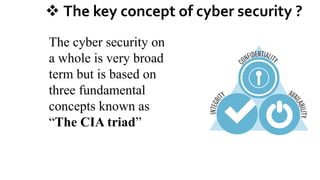
The cyber security on
a whole is very broad
term but is based on
three fundamental
concepts known as
“The CIA triad”
Three fundamental principal of cyber
security
Confidentiality
Integrity
Availability
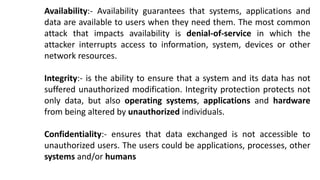
Availability:- Availability guarantees that systems, applications and
data are available to users when they need them. The most common
attack that impacts availability is denial-of-service in which the
attacker interrupts access to information, system, devices or other
network resources.
Integrity:- is the ability to ensure that a system and its data has not
suffered unauthorized modification. Integrity protection protects not
only data, but also operating systems, applications and hardware
from being altered by unauthorized individuals.
Confidentiality:- ensures that data exchanged is not accessible to
unauthorized users. The users could be applications, processes, other
systems and/or humans
What are cyberThreats?
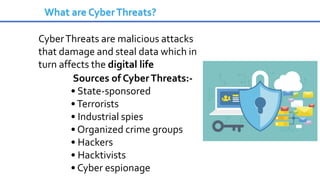
What are CyberThreats?
CyberThreats are malicious attacks
that damage and steal data which in
turn affects the digital life
Sources of CyberThreats:-
• State-sponsored
•Terrorists
• Industrial spies
• Organized crime groups
• Hackers
• Hacktivists
• Cyber espionage
Types of CyberThreats
• Phishing attack
• SQL Injection threat
• Man-in-the-middle attack
• Malware
• Zero-day attack
• Cross-site-scripting
• Advanced persistent threats
• Password attack
• Drive by attack
Types of cyberThreats
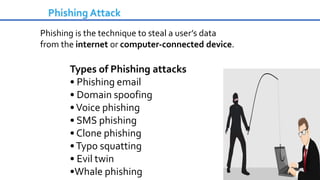
Phishing Attack
Phishing is the technique to steal a user’s data
from the internet or computer-connected device.
Types of Phishing attacks
• Phishing email
• Domain spoofing
•Voice phishing
• SMS phishing
• Clone phishing
•Typo squatting
• Evil twin
•Whale phishing
Phishing Attack
Ways to prevent Phishing attack
• Know what a phishing scam looks like
• Don’t click on a random link
• Get free anti-phishing add-ons
• Don’t give your information to an unsecured site
• Change passwords regularly
• install firewall
SQL injection threat
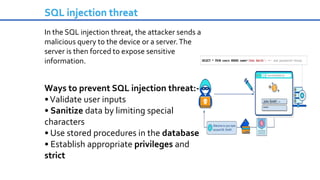
In the SQL injection threat, the attacker sends a
malicious query to the device or a server.The
server is then forced to expose sensitive
information.
Ways to prevent SQL injection threat:-
•Validate user inputs
• Sanitize data by limiting special
characters
• Use stored procedures in the database
• Establish appropriate privileges and
strict
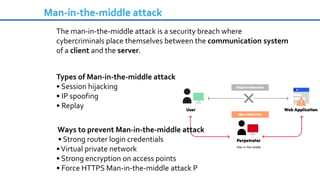
Man-in-the-middle attack
The man-in-the-middle attack is a security breach where
cybercriminals place themselves between the communication system
of a client and the server.
Types of Man-in-the-middle attack
• Session hijacking
• IP spoofing
• Replay
Ways to prevent Man-in-the-middle attack
• Strong router login credentials
•Virtual private network
• Strong encryption on access points
• Force HTTPS Man-in-the-middle attack P
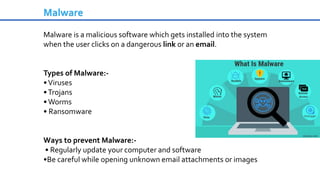
Malware is a malicious software which gets installed into the system
when the user clicks on a dangerous link or an email.
Types of Malware:-
•Viruses
•Trojans
•Worms
• Ransomware
Ways to prevent Malware:-
• Regularly update your computer and software
•Be careful while opening unknown email attachments or images
Malware
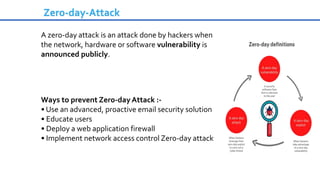
Zero-day-Attack
A zero-day attack is an attack done by hackers when
the network, hardware or software vulnerability is
announced publicly.
Ways to prevent Zero-day Attack :-
• Use an advanced, proactive email security solution
• Educate users
• Deploy a web application firewall
• Implement network access control Zero-day attack
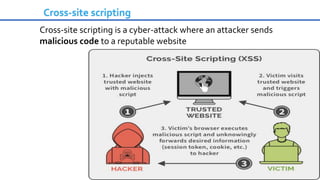
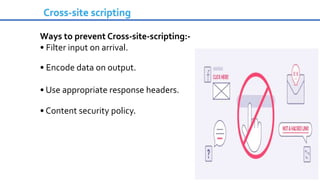
Cross-site scripting
Cross-site scripting is a cyber-attack where an attacker sends
malicious code to a reputable website
Cross-site scripting
Ways to prevent Cross-site-scripting:-
• Filter input on arrival.
• Encode data on output.
• Use appropriate response headers.
• Content security policy.
An advanced persistent threat occurs when an attacker
gains unauthorized access to a system or network and
remains undetected for a long duration.
Ways to prevent Advanced persistent threats:-
• Install a firewall
• Enable a web application firewall
• Install an antivirus
• Implement intrusion prevention systems
• Create a sandboxing environment
• Install aVPN
Advanced persistent threat
Password attacks
Password attack is an attempt to steal passwords
from a user.
Two common techniques used to get user’s
password :-
• Brute-force guessing
• Dictionary attackWays to prevent Password attack
• Use strong password
• Multi-factor authentication
Few other types of cyber threats
• Drive by attack
• Denial of service
• Distributed denial of service
• Eavesdropping attack
• AI-powered attack
Cyber threat intelligence is the
amount of data that becomes
cyber threat information that is
collected, evaluated in the context
of its source, and analyzed
through rigorous and firm
tradecraft techniques by the
industry experts.
Cyber threats and intelligence
Social Engineering and Identity Theft
How to avoid being a victim
Scott Teipe – CISSP, CISM
Manager of Information Security
Identity Theft Statistics
• One of the most common cybercrimes worldwide!
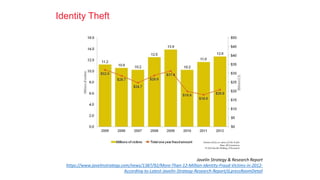
The 2013 Identity Fraud Report released by Javelin
Strategy & Research indicates:
In 2012 identity fraud incidents increased by
more than one million victims.
Fraudsters stole more than $21 billion, the
highest amount since 2009.
12.6 million victims in the United States in 2012.
1 new victim every 3 seconds!!!
Identity Theft
Javelin Strategy & Research Report
https://www.javelinstrategy.com/news/1387/92/More-Than-12-Million-Identity-Fraud-Victims-in-2012-
According-to-Latest-Javelin-Strategy-Research-Report/d,pressRoomDetail
Identity Theft
Once your personal data is obtained, it can be used to:
• Apply for a job
• Charge utilities
• File for bankruptcy
• File fraudulent tax returns
• Open new accounts on your name
• Commit a crime or get into legal trouble
• Drain your checking account and savings
• Go on a spending spree, purchase a car, appliances, services, etc.
Social Engineering
• Social Engineering - New term for an old
problem: being scammed.
• Exploit Human Nature Weakness
• Desire to Help
• Fear of Authority
• Use of logic(mask a small lie within a
series of true statements)
• Exploit necessities and desires (money,
sex, free services/entertainment, etc.)
• Technical and Non Technical
• Phone, email, trash, face to face
• Target: Your personal information or third
party information for which you have
access.
Social Engineering Techniques
• Phishing and Spearphishing: Phishing is a type of social engineering attack often used to
steal user data, including login credentials and credit card numbers. Spear phishing is a more
sophisticated and elaborate version of phishing.
• Dumpster Diving
• Be aware of what you throw in the trash. Someone’s trash is someone else’s treasure.
Dumpster diving is looking for treasure in someone else's trash. In the world of information
technology (IT), dumpster diving is a technique used to retrieve information that could be used
to carry out an attack or gain access to a computer network from disposed items.
• Shoulder surfing
• Always check to ensure nobody is peeking over your shoulder when entering security
credentials (PIN, Password, etc). A shoulder surfing attack describes a situation
where the attacker can physically view the device screen and keypad to obtain
personal information. It is one of the few attack methods requiring the attacker to be
physically close to the victim to succeed.
Some of these techniques allow the attacker to bypass security controls (passwords,
firewalls, etc)
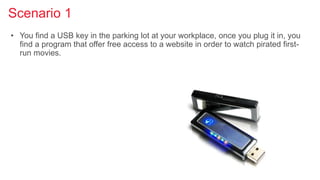
Scenario 1
• You find a USB key in the parking lot at your workplace, once you plug it in, you
find a program that offer free access to a website in order to watch pirated first-
run movies.
Scenario 2
• You work in IT support and receive a phone call. The person on the other side of
the line claims to be the new VP of the company and has forgotten his/her
security credentials (pin/password) and asks you to reset their password.
Strategy
• Awareness and Common Sense
• If its too good to be true…
• Discipline and Education
• If in doubt, look for confirmation
• Efficient use of defensive
technologies
• Proper use, storage and disposal of
your information
Technology Defense Mechanisms
• Security in depth: Multiple overlapping defenses
• Remember there is no single solution that protects 100% against an attack
• Proactive vs. Reactive
• Firewall, Antivirus, System Patches
• Most Modern operating systems have user friendly security features built-in
• Passwords security
• Data disposal
Action Center
• Windows 7/8
• Antivirus:
• Win8: Windows Defender
• Win7: Windows security essentials
• Firewall: Windows Firewall
• Patch Management: Windows Update
• Other features:
• Data Privacy/Protection (BitLocker Win7/8)
• Antiphishing (Win8 Windows SmartScreen)
• Family Safety (Win 8)
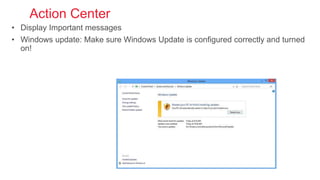
Action Center
• Display Important messages
• Windows update: Make sure Windows Update is configured correctly and turned
on!
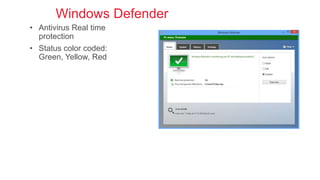
Windows Defender
• Antivirus Real time
protection
• Status color coded:
Green, Yellow, Red
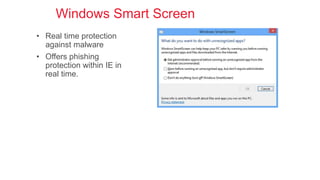
Windows Smart Screen
• Real time protection
against malware
• Offers phishing
protection within IE in
real time.
Password Security
• Length: 16 or more characters
• Complexity
• Avoid Dictionary words and personally identifiable information
• Change the order - use numbers, symbols then letters.
• Human nature is to use a capital letter then lower case then
numbers and symbols to form a password. Hacking programs
know this!
• Use password generators
• https://www.grc.com/passwords.htm
• http://passwordsgenerator.net/
• Too many passwords? Try a password manager
• Free Password Manager – Keepass
• http://keepass.info/
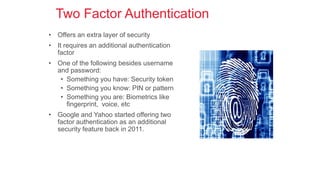
Two Factor Authentication
• Offers an extra layer of security
• It requires an additional authentication
factor
• One of the following besides username
and password:
• Something you have: Security token
• Something you know: PIN or pattern
• Something you are: Biometrics like
fingerprint, voice, etc
• Google and Yahoo started offering two
factor authentication as an additional
security feature back in 2011.
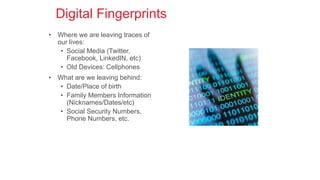
Digital Fingerprints
• Where we are leaving traces of
our lives:
• Social Media (Twitter,
Facebook, LinkedIN, etc)
• Old Devices: Cellphones
• What are we leaving behind:
• Date/Place of birth
• Family Members Information
(Nicknames/Dates/etc)
• Social Security Numbers,
Phone Numbers, etc.
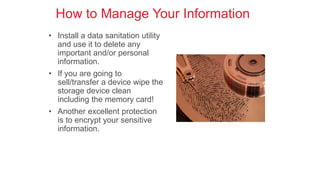
How to Manage Your Information
• Install a data sanitation utility
and use it to delete any
important and/or personal
information.
• If you are going to
sell/transfer a device wipe the
storage device clean
including the memory card!
• Another excellent protection
is to encrypt your sensitive
information.
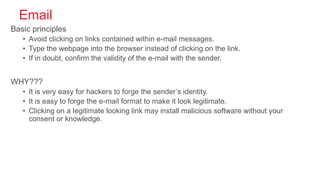
Email
Basic principles
• Avoid clicking on links contained within e-mail messages.
• Type the webpage into the browser instead of clicking on the link.
• If in doubt, confirm the validity of the e-mail with the sender.
WHY???
• It is very easy for hackers to forge the sender’s identity.
• It is easy to forge the e-mail format to make it look legitimate.
• Clicking on a legitimate looking link may install malicious software without your
consent or knowledge.
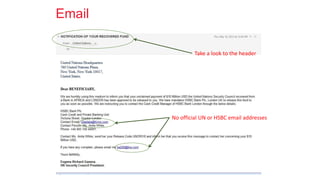
Email
No official UN or HSBC email addresses
Take a look to the header
Internet Browsing
• Most vulnerabilities require you to click on something within the website to
activate the vulnerability and cause your computer to crash or become very slow.
• Websites make it difficult to choose the right place to click. Often times, buttons
are just images coaxing you to perform an action such as clicking on a link
embedded in an image.
• Critical: keep your browser and computer updated with the latest versions and
patches!!!
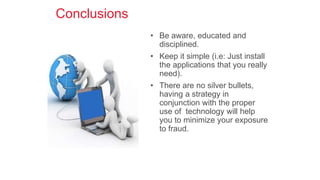
Conclusions
• Be aware, educated and
disciplined.
• Keep it simple (i.e: Just install
the applications that you really
need).
• There are no silver bullets,
having a strategy in
conjunction with the proper
use of technology will help
you to minimize your exposure
to fraud.
Online Privacy and Protection
Online Privacy describes the protection of personal data when using the
internet and online platforms.
Common online Privacy Threats
• Weak, Reused Passwords
• Social Media
• Mobile Apps
• IOT Devices
Protecting Online Privacy
Steps that could be taken to protect data are:
• Use strong, Unique Passwords
• Delete and Opt-Out
• Stop handling over personal information
• Use a VPN
• Advocate for stronger Legislation
Protecting Personal Information and Data
Steps that could be taken to protect data are:
• Secure the devices in use
• Secure all the accounts
• Peer-to-Peer File Sharing
• Protect the Home Network
• Report Identity Theft

Cyber Security and Data Privacy in Information Systems.pptx

  • 1.
  • 2.
    Cybersecurity is the protectionof internet- connected systems including Hardware, software and Data from cyber attacks.
  • 3.
     The keyconcept of cyber security ? The cyber security on a whole is very broad term but is based on three fundamental concepts known as “The CIA triad”
  • 4.
    Three fundamental principalof cyber security Confidentiality Integrity Availability
  • 5.
    Availability:- Availability guaranteesthat systems, applications and data are available to users when they need them. The most common attack that impacts availability is denial-of-service in which the attacker interrupts access to information, system, devices or other network resources. Integrity:- is the ability to ensure that a system and its data has not suffered unauthorized modification. Integrity protection protects not only data, but also operating systems, applications and hardware from being altered by unauthorized individuals. Confidentiality:- ensures that data exchanged is not accessible to unauthorized users. The users could be applications, processes, other systems and/or humans
  • 6.
  • 7.
    What are CyberThreats? CyberThreatsare malicious attacks that damage and steal data which in turn affects the digital life Sources of CyberThreats:- • State-sponsored •Terrorists • Industrial spies • Organized crime groups • Hackers • Hacktivists • Cyber espionage
  • 8.
  • 9.
    • Phishing attack •SQL Injection threat • Man-in-the-middle attack • Malware • Zero-day attack • Cross-site-scripting • Advanced persistent threats • Password attack • Drive by attack Types of cyberThreats
  • 10.
    Phishing Attack Phishing isthe technique to steal a user’s data from the internet or computer-connected device. Types of Phishing attacks • Phishing email • Domain spoofing •Voice phishing • SMS phishing • Clone phishing •Typo squatting • Evil twin •Whale phishing
  • 11.
    Phishing Attack Ways toprevent Phishing attack • Know what a phishing scam looks like • Don’t click on a random link • Get free anti-phishing add-ons • Don’t give your information to an unsecured site • Change passwords regularly • install firewall
  • 12.
    SQL injection threat Inthe SQL injection threat, the attacker sends a malicious query to the device or a server.The server is then forced to expose sensitive information. Ways to prevent SQL injection threat:- •Validate user inputs • Sanitize data by limiting special characters • Use stored procedures in the database • Establish appropriate privileges and strict
  • 13.
    Man-in-the-middle attack The man-in-the-middleattack is a security breach where cybercriminals place themselves between the communication system of a client and the server. Types of Man-in-the-middle attack • Session hijacking • IP spoofing • Replay Ways to prevent Man-in-the-middle attack • Strong router login credentials •Virtual private network • Strong encryption on access points • Force HTTPS Man-in-the-middle attack P
  • 14.
    Malware is amalicious software which gets installed into the system when the user clicks on a dangerous link or an email. Types of Malware:- •Viruses •Trojans •Worms • Ransomware Ways to prevent Malware:- • Regularly update your computer and software •Be careful while opening unknown email attachments or images Malware
  • 15.
    Zero-day-Attack A zero-day attackis an attack done by hackers when the network, hardware or software vulnerability is announced publicly. Ways to prevent Zero-day Attack :- • Use an advanced, proactive email security solution • Educate users • Deploy a web application firewall • Implement network access control Zero-day attack
  • 16.
    Cross-site scripting Cross-site scriptingis a cyber-attack where an attacker sends malicious code to a reputable website
  • 17.
    Cross-site scripting Ways toprevent Cross-site-scripting:- • Filter input on arrival. • Encode data on output. • Use appropriate response headers. • Content security policy.
  • 18.
    An advanced persistentthreat occurs when an attacker gains unauthorized access to a system or network and remains undetected for a long duration. Ways to prevent Advanced persistent threats:- • Install a firewall • Enable a web application firewall • Install an antivirus • Implement intrusion prevention systems • Create a sandboxing environment • Install aVPN Advanced persistent threat
  • 19.
    Password attacks Password attackis an attempt to steal passwords from a user. Two common techniques used to get user’s password :- • Brute-force guessing • Dictionary attackWays to prevent Password attack • Use strong password • Multi-factor authentication
  • 20.
    Few other typesof cyber threats • Drive by attack • Denial of service • Distributed denial of service • Eavesdropping attack • AI-powered attack
  • 21.
    Cyber threat intelligenceis the amount of data that becomes cyber threat information that is collected, evaluated in the context of its source, and analyzed through rigorous and firm tradecraft techniques by the industry experts. Cyber threats and intelligence
  • 22.
    Social Engineering andIdentity Theft How to avoid being a victim Scott Teipe – CISSP, CISM Manager of Information Security
  • 23.
    Identity Theft Statistics •One of the most common cybercrimes worldwide! The 2013 Identity Fraud Report released by Javelin Strategy & Research indicates: In 2012 identity fraud incidents increased by more than one million victims. Fraudsters stole more than $21 billion, the highest amount since 2009. 12.6 million victims in the United States in 2012. 1 new victim every 3 seconds!!!
  • 24.
    Identity Theft Javelin Strategy& Research Report https://www.javelinstrategy.com/news/1387/92/More-Than-12-Million-Identity-Fraud-Victims-in-2012- According-to-Latest-Javelin-Strategy-Research-Report/d,pressRoomDetail
  • 25.
    Identity Theft Once yourpersonal data is obtained, it can be used to: • Apply for a job • Charge utilities • File for bankruptcy • File fraudulent tax returns • Open new accounts on your name • Commit a crime or get into legal trouble • Drain your checking account and savings • Go on a spending spree, purchase a car, appliances, services, etc.
  • 26.
    Social Engineering • SocialEngineering - New term for an old problem: being scammed. • Exploit Human Nature Weakness • Desire to Help • Fear of Authority • Use of logic(mask a small lie within a series of true statements) • Exploit necessities and desires (money, sex, free services/entertainment, etc.) • Technical and Non Technical • Phone, email, trash, face to face • Target: Your personal information or third party information for which you have access.
  • 27.
    Social Engineering Techniques •Phishing and Spearphishing: Phishing is a type of social engineering attack often used to steal user data, including login credentials and credit card numbers. Spear phishing is a more sophisticated and elaborate version of phishing. • Dumpster Diving • Be aware of what you throw in the trash. Someone’s trash is someone else’s treasure. Dumpster diving is looking for treasure in someone else's trash. In the world of information technology (IT), dumpster diving is a technique used to retrieve information that could be used to carry out an attack or gain access to a computer network from disposed items. • Shoulder surfing • Always check to ensure nobody is peeking over your shoulder when entering security credentials (PIN, Password, etc). A shoulder surfing attack describes a situation where the attacker can physically view the device screen and keypad to obtain personal information. It is one of the few attack methods requiring the attacker to be physically close to the victim to succeed. Some of these techniques allow the attacker to bypass security controls (passwords, firewalls, etc)
  • 28.
    Scenario 1 • Youfind a USB key in the parking lot at your workplace, once you plug it in, you find a program that offer free access to a website in order to watch pirated first- run movies.
  • 29.
    Scenario 2 • Youwork in IT support and receive a phone call. The person on the other side of the line claims to be the new VP of the company and has forgotten his/her security credentials (pin/password) and asks you to reset their password.
  • 30.
    Strategy • Awareness andCommon Sense • If its too good to be true… • Discipline and Education • If in doubt, look for confirmation • Efficient use of defensive technologies • Proper use, storage and disposal of your information
  • 31.
    Technology Defense Mechanisms •Security in depth: Multiple overlapping defenses • Remember there is no single solution that protects 100% against an attack • Proactive vs. Reactive • Firewall, Antivirus, System Patches • Most Modern operating systems have user friendly security features built-in • Passwords security • Data disposal
  • 32.
    Action Center • Windows7/8 • Antivirus: • Win8: Windows Defender • Win7: Windows security essentials • Firewall: Windows Firewall • Patch Management: Windows Update • Other features: • Data Privacy/Protection (BitLocker Win7/8) • Antiphishing (Win8 Windows SmartScreen) • Family Safety (Win 8)
  • 33.
    Action Center • DisplayImportant messages • Windows update: Make sure Windows Update is configured correctly and turned on!
  • 34.
    Windows Defender • AntivirusReal time protection • Status color coded: Green, Yellow, Red
  • 35.
    Windows Smart Screen •Real time protection against malware • Offers phishing protection within IE in real time.
  • 36.
    Password Security • Length:16 or more characters • Complexity • Avoid Dictionary words and personally identifiable information • Change the order - use numbers, symbols then letters. • Human nature is to use a capital letter then lower case then numbers and symbols to form a password. Hacking programs know this! • Use password generators • https://www.grc.com/passwords.htm • http://passwordsgenerator.net/ • Too many passwords? Try a password manager • Free Password Manager – Keepass • http://keepass.info/
  • 37.
    Two Factor Authentication •Offers an extra layer of security • It requires an additional authentication factor • One of the following besides username and password: • Something you have: Security token • Something you know: PIN or pattern • Something you are: Biometrics like fingerprint, voice, etc • Google and Yahoo started offering two factor authentication as an additional security feature back in 2011.
  • 38.
    Digital Fingerprints • Wherewe are leaving traces of our lives: • Social Media (Twitter, Facebook, LinkedIN, etc) • Old Devices: Cellphones • What are we leaving behind: • Date/Place of birth • Family Members Information (Nicknames/Dates/etc) • Social Security Numbers, Phone Numbers, etc.
  • 39.
    How to ManageYour Information • Install a data sanitation utility and use it to delete any important and/or personal information. • If you are going to sell/transfer a device wipe the storage device clean including the memory card! • Another excellent protection is to encrypt your sensitive information.
  • 40.
    Email Basic principles • Avoidclicking on links contained within e-mail messages. • Type the webpage into the browser instead of clicking on the link. • If in doubt, confirm the validity of the e-mail with the sender. WHY??? • It is very easy for hackers to forge the sender’s identity. • It is easy to forge the e-mail format to make it look legitimate. • Clicking on a legitimate looking link may install malicious software without your consent or knowledge.
  • 41.
    Email No official UNor HSBC email addresses Take a look to the header
  • 42.
    Internet Browsing • Mostvulnerabilities require you to click on something within the website to activate the vulnerability and cause your computer to crash or become very slow. • Websites make it difficult to choose the right place to click. Often times, buttons are just images coaxing you to perform an action such as clicking on a link embedded in an image. • Critical: keep your browser and computer updated with the latest versions and patches!!!
  • 43.
    Conclusions • Be aware,educated and disciplined. • Keep it simple (i.e: Just install the applications that you really need). • There are no silver bullets, having a strategy in conjunction with the proper use of technology will help you to minimize your exposure to fraud.
  • 44.
    Online Privacy andProtection Online Privacy describes the protection of personal data when using the internet and online platforms. Common online Privacy Threats • Weak, Reused Passwords • Social Media • Mobile Apps • IOT Devices
  • 45.
    Protecting Online Privacy Stepsthat could be taken to protect data are: • Use strong, Unique Passwords • Delete and Opt-Out • Stop handling over personal information • Use a VPN • Advocate for stronger Legislation
  • 46.
    Protecting Personal Informationand Data Steps that could be taken to protect data are: • Secure the devices in use • Secure all the accounts • Peer-to-Peer File Sharing • Protect the Home Network • Report Identity Theft