Git
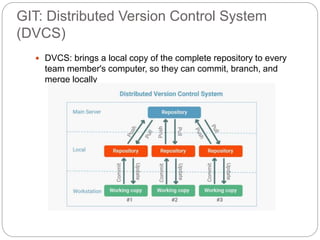
GIT: Distributed Version Control System
(DVCS)
 DVCS: brings a local copy of the complete repository to every
team member's computer, so they can commit, branch, and
merge locally
How we can use GIT
Command Line Interface (CLI)
 Install GIT on MAC (Bash Terminal)
or WINDOWS (Bash + Command
Line):
 Allows users to use GIT commands
from CLI
GitHub
 Git repository hosting service, with
additional features such as a wikis
and basic task management tools
for every project
 While Git is a command line tool,
GitHub provides a Web-based
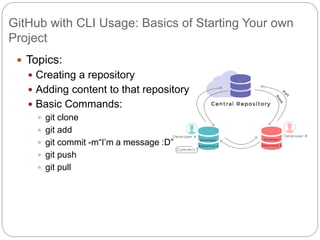
GitHub with CLI Usage: Basics of Starting Your own
Project
 Topics:
 Creating a repository
 Adding content to that repository
 Basic Commands:
 git clone
 git add
 git commit -m“I’m a message :D”
 git push
 git pull
Staging Environment and
Commit
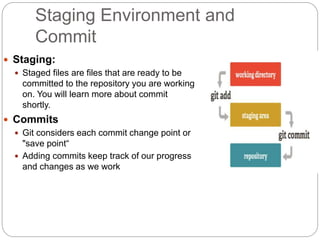
 Staging:
 Staged files are files that are ready to be
committed to the repository you are working
on. You will learn more about commit
shortly.
 Commits
 Git considers each commit change point or
"save point“
 Adding commits keep track of our progress
and changes as we work
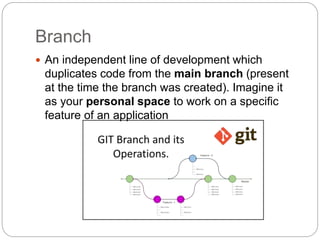
Branch
 An independent line of development which
duplicates code from the main branch (present
at the time the branch was created). Imagine it
as your personal space to work on a specific
feature of an application
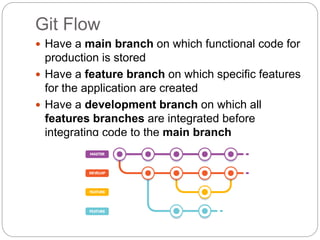
Git Flow
 Have a main branch on which functional code for
production is stored
 Have a feature branch on which specific features
for the application are created
 Have a development branch on which all
features branches are integrated before
integrating code to the main branch
Creating branches and Integrating to Main
 Topic
 Creating a new branch
 Adding changed to the new branch
 Merging those changes with main:
 git log
 git merge
 git rebase
 git merge –squash
 git pull origin main
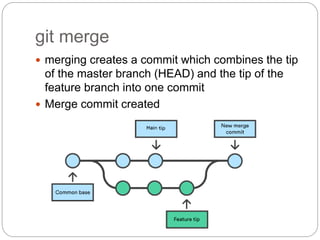
git merge
 merging creates a commit which combines the tip
of the master branch (HEAD) and the tip of the
feature branch into one commit
 Merge commit created
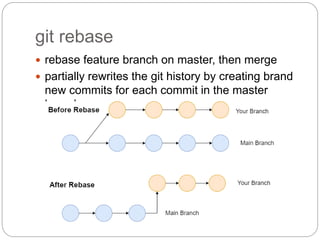
git rebase
 rebase feature branch on master, then merge
 partially rewrites the git history by creating brand
new commits for each commit in the master
branch
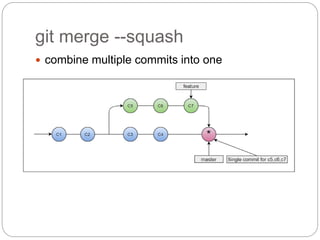
git merge --squash
 combine multiple commits into one
Contributing: Forking and Pull
Requests
 Forking:
 Creating a copy of the code on your machine
 Creating a pull request so you can begin to
contribute

Git.pptx

  • 1.
  • 2.
    GIT: Distributed VersionControl System (DVCS)  DVCS: brings a local copy of the complete repository to every team member's computer, so they can commit, branch, and merge locally
  • 3.
    How we canuse GIT Command Line Interface (CLI)  Install GIT on MAC (Bash Terminal) or WINDOWS (Bash + Command Line):  Allows users to use GIT commands from CLI GitHub  Git repository hosting service, with additional features such as a wikis and basic task management tools for every project  While Git is a command line tool, GitHub provides a Web-based
  • 4.
    GitHub with CLIUsage: Basics of Starting Your own Project  Topics:  Creating a repository  Adding content to that repository  Basic Commands:  git clone  git add  git commit -m“I’m a message :D”  git push  git pull
  • 5.
    Staging Environment and Commit Staging:  Staged files are files that are ready to be committed to the repository you are working on. You will learn more about commit shortly.  Commits  Git considers each commit change point or "save point“  Adding commits keep track of our progress and changes as we work
  • 6.
    Branch  An independentline of development which duplicates code from the main branch (present at the time the branch was created). Imagine it as your personal space to work on a specific feature of an application
  • 7.
    Git Flow  Havea main branch on which functional code for production is stored  Have a feature branch on which specific features for the application are created  Have a development branch on which all features branches are integrated before integrating code to the main branch
  • 8.
    Creating branches andIntegrating to Main  Topic  Creating a new branch  Adding changed to the new branch  Merging those changes with main:  git log  git merge  git rebase  git merge –squash  git pull origin main
  • 9.
    git merge  mergingcreates a commit which combines the tip of the master branch (HEAD) and the tip of the feature branch into one commit  Merge commit created
  • 10.
    git rebase  rebasefeature branch on master, then merge  partially rewrites the git history by creating brand new commits for each commit in the master branch
  • 11.
    git merge --squash combine multiple commits into one
  • 12.
    Contributing: Forking andPull Requests  Forking:  Creating a copy of the code on your machine  Creating a pull request so you can begin to contribute

Editor's Notes

  • #4 Dowloading GIT Mac or Windows: https://www.youtube.com/watch?v=F02LEVYEmQw Making GitHub Account: https://github.com/