React Fundamentals
In addition to some full-stack development!
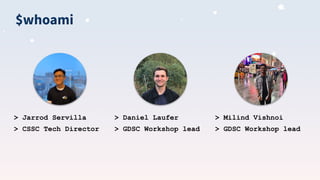
$whoami
> Jarrod Servilla
> CSSC Tech Director
> Daniel Laufer
> GDSC Workshop lead
> Milind Vishnoi
> GDSC Workshop lead
What youʼll learn
● What is React?
● What is JSX?
● Creating reusable react components
● Dynamic rendering
● Component lifecycle
● React hooks & why we use them
● Full stack development fundamentals
● Networking protocol basics (http)
youʼll create your own full
stack app!
and most importantly...
(kind of)
important resources
source code: https://github.com/utm-cssc/full-stack-react-workshop
gdsc workshops: https://github.com/Daniel-Laufer/GDSC-UTM-Workshops
cssc site: https://cssc.utm.utoronto.ca/
if you’re coding along with us:
● an ide (vscode)
● node.js
● docker
What is React?
● a declarative, component-based
front-end javascript library developed
by Facebook
● enables developers to build modern,
sleek, fast applications with a modular
infrastructure
● react is by far the most popular front-end
javascript library/framework!
Who uses React?
And soooooooo many more!
Why should you use react?
● can organize parts of the UI into components that can be easily
reused
● users can interact with the website without refreshing it
○ Ex. dynamically rendering search results from a search query
● you want to make use of its rich ecosystem and large community
support
○ if you search “how do I do X with react”, odds are there will be many
relevant search results
○ there are tons of react libraries for you to use. For example:
react-spring allows you to add sophisticated, good-looking animations
into your apps
○ users can share their own components with the community by creating
packages
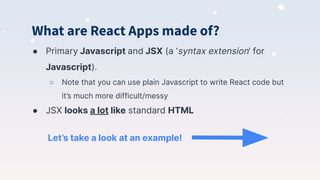
What are React Apps made of?
● Primary Javascript and JSX (a ‘syntax extension’ for
Javascript).
○ Note that you can use plain Javascript to write React code but
it’s much more difficult/messy
● JSX looks a lot like standard HTML
Let’s take a look at an example!
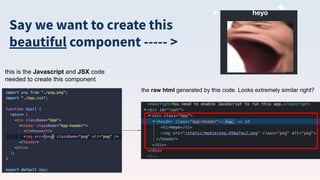
Say we want to create this
beautiful component ----- >
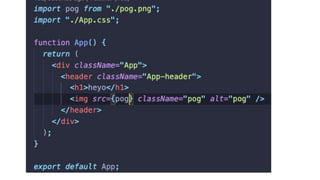
this is the Javascript and JSX code
needed to create this component
the raw html generated by this code. Looks extremely similar right?
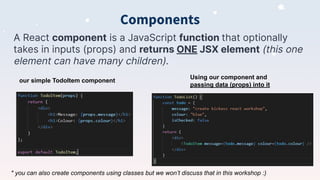
Components
A React component is a JavaScript function that optionally
takes in inputs (props) and returns ONE JSX element (this one
element can have many children).
our simple TodoItem component
Using our component and
passing data (props) into it
* you can also create components using classes but we won’t discuss that in this workshop :)
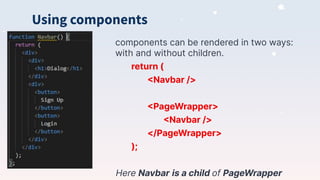
Using components
components can be rendered in two ways:
with and without children.
return (
<Navbar />
<PageWrapper>
<Navbar />
</PageWrapper>
);
Here Navbar is a child of PageWrapper
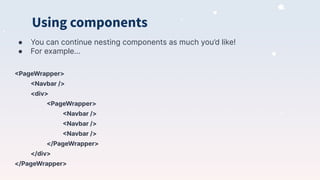
Using components
● You can continue nesting components as much you’d like!
● For example...
<PageWrapper>
<Navbar />
<div>
<PageWrapper>
<Navbar />
<Navbar />
<Navbar />
</PageWrapper>
</div>
</PageWrapper>
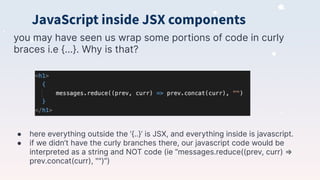
JavaScript inside JSX components
you may have seen us wrap some portions of code in curly
braces i.e {...}. Why is that?
● here everything outside the ‘{..}’ is JSX, and everything inside is javascript.
● if we didn’t have the curly branches there, our javascript code would be
interpreted as a string and NOT code (ie “messages.reduce((prev, curr) ⇒
prev.concat(curr), "")”)
Before we get into coding, letʼs take a
look at some interesting JavaScript
syntax you will see Jarrod use
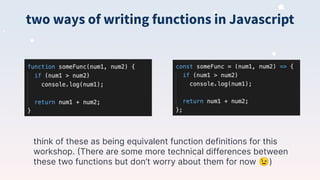
two ways of writing functions in Javascript
think of these as being equivalent function definitions for this
workshop. (There are some more technical differences between
these two functions but don’t worry about them for now 😉)
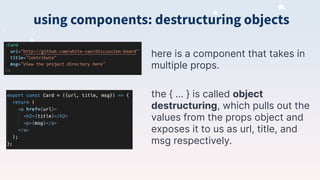
using components: destructuring objects
here is a component that takes in
multiple props.
the { … } is called object
destructuring, which pulls out the
values from the props object and
exposes it to us as url, title, and
msg respectively.
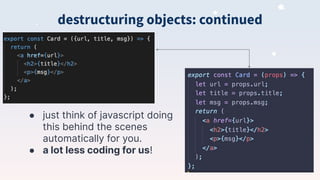
● just think of javascript doing
this behind the scenes
automatically for you.
● a lot less coding for us!
destructuring objects: continued
Time to Code!
Dynamic rendering
how do we render based on input?
Dynamic rendering
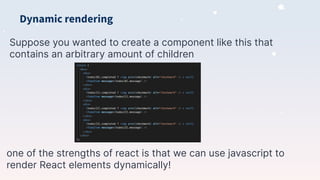
Suppose you wanted to create a component like this that
contains an arbitrary amount of children
one of the strengths of react is that we can use javascript to
render React elements dynamically!
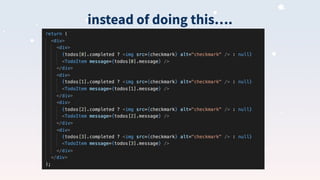
instead of doing this….
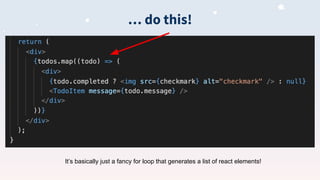
… do this!
It’s basically just a fancy for loop that generates a list of react elements!
Time to Code!
lifecycle + hooks
updating the view after modifications occur
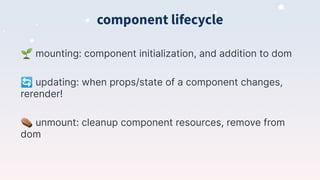
component lifecycle
🌱 mounting: component initialization, and addition to dom
🔄 updating: when props/state of a component changes,
rerender!
⚰ unmount: cleanup component resources, remove from
dom
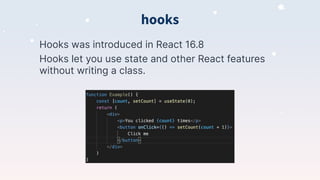
hooks
Hooks was introduced in React 16.8
Hooks let you use state and other React features
without writing a class.
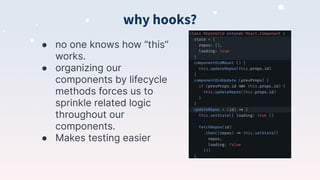
why hooks?
● no one knows how “this”
works.
● organizing our
components by lifecycle
methods forces us to
sprinkle related logic
throughout our
components.
● Makes testing easier
useState
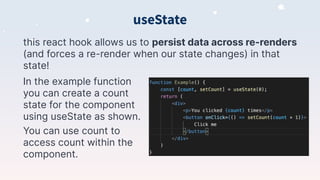
this react hook allows us to persist data across re-renders
(and forces a re-render when our state changes) in that
state!
In the example function
you can create a count
state for the component
using useState as shown.
You can use count to
access count within the
component.
useEffect
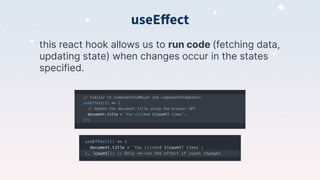
this react hook allows us to run code (fetching data,
updating state) when changes occur in the states
specified.
useEffect as componentDidMount
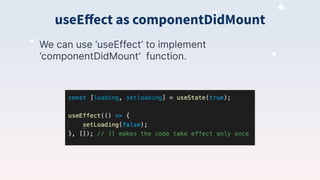
We can use ‘useEffect’ to implement
‘componentDidMount’ function.
useEffect as componentWillUnmount
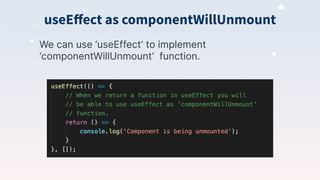
We can use ‘useEffect’ to implement
‘componentWillUnmount’ function.
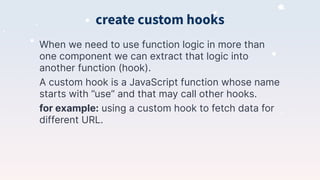
create custom hooks
When we need to use function logic in more than
one component we can extract that logic into
another function (hook).
A custom hook is a JavaScript function whose name
starts with ”use” and that may call other hooks.
for example: using a custom hook to fetch data for
different URL.
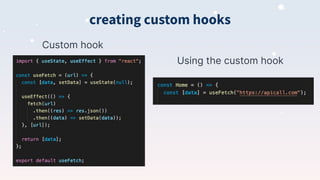
creating custom hooks
Custom hook
Using the custom hook
Time to Code!
full stack apps
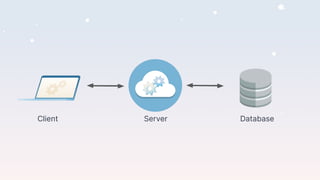
how do we persist data?
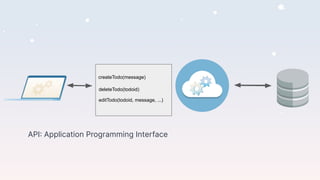
Client Server Database
API: Application Programming Interface
createTodo(message)
deleteTodo(todoid)
editTodo(todoid, message, ...)
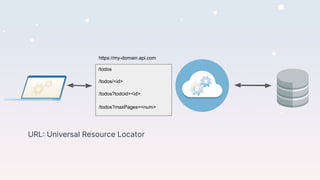
URL: Universal Resource Locator
/todos
/todos/<id>
/todos?todoid=<id>
/todos?maxPages=<num>
https://my-domain.api.com
HTTP: Hypertext Transfer Protocol
/todos/<id> [GET]
/todos/<id> [DEL]
/todos?todoid=<id> [GET]
/todos?maxPages=<num>
https://my-domain.api.com
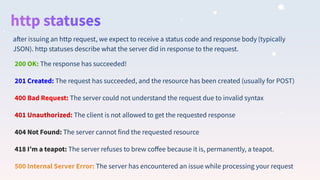
200 OK: The response has succeeded!
201 Created: The request has succeeded, and the resource has been created (usually for POST)
400 Bad Request: The server could not understand the request due to invalid syntax
401 Unauthorized: The client is not allowed to get the requested response
404 Not Found: The server cannot find the requested resource
418 Iʼm a teapot: The server refuses to brew coffee because it is, permanently, a teapot.
500 Internal Server Error: The server has encountered an issue while processing your request
after issuing an http request, we expect to receive a status code and response body (typically
JSON). http statuses describe what the server did in response to the request.
api integration
connecting our frontend to our backend
Time to Code!
Thank you!
Any questions?

Full Stack React Workshop [CSSC x GDSC]

  • 1.
    React Fundamentals In additionto some full-stack development!
  • 2.
    $whoami > Jarrod Servilla >CSSC Tech Director > Daniel Laufer > GDSC Workshop lead > Milind Vishnoi > GDSC Workshop lead
  • 3.
    What youʼll learn ●What is React? ● What is JSX? ● Creating reusable react components ● Dynamic rendering ● Component lifecycle ● React hooks & why we use them ● Full stack development fundamentals ● Networking protocol basics (http)
  • 4.
    youʼll create yourown full stack app! and most importantly... (kind of)
  • 5.
    important resources source code:https://github.com/utm-cssc/full-stack-react-workshop gdsc workshops: https://github.com/Daniel-Laufer/GDSC-UTM-Workshops cssc site: https://cssc.utm.utoronto.ca/ if you’re coding along with us: ● an ide (vscode) ● node.js ● docker
  • 6.
    What is React? ●a declarative, component-based front-end javascript library developed by Facebook ● enables developers to build modern, sleek, fast applications with a modular infrastructure ● react is by far the most popular front-end javascript library/framework!
  • 7.
    Who uses React? Andsoooooooo many more!
  • 8.
    Why should youuse react? ● can organize parts of the UI into components that can be easily reused ● users can interact with the website without refreshing it ○ Ex. dynamically rendering search results from a search query ● you want to make use of its rich ecosystem and large community support ○ if you search “how do I do X with react”, odds are there will be many relevant search results ○ there are tons of react libraries for you to use. For example: react-spring allows you to add sophisticated, good-looking animations into your apps ○ users can share their own components with the community by creating packages
  • 9.
    What are ReactApps made of? ● Primary Javascript and JSX (a ‘syntax extension’ for Javascript). ○ Note that you can use plain Javascript to write React code but it’s much more difficult/messy ● JSX looks a lot like standard HTML Let’s take a look at an example!
  • 10.
    Say we wantto create this beautiful component ----- > this is the Javascript and JSX code needed to create this component the raw html generated by this code. Looks extremely similar right?
  • 12.
    Components A React componentis a JavaScript function that optionally takes in inputs (props) and returns ONE JSX element (this one element can have many children). our simple TodoItem component Using our component and passing data (props) into it * you can also create components using classes but we won’t discuss that in this workshop :)
  • 13.
    Using components components canbe rendered in two ways: with and without children. return ( <Navbar /> <PageWrapper> <Navbar /> </PageWrapper> ); Here Navbar is a child of PageWrapper
  • 14.
    Using components ● Youcan continue nesting components as much you’d like! ● For example... <PageWrapper> <Navbar /> <div> <PageWrapper> <Navbar /> <Navbar /> <Navbar /> </PageWrapper> </div> </PageWrapper>
  • 15.
    JavaScript inside JSXcomponents you may have seen us wrap some portions of code in curly braces i.e {...}. Why is that? ● here everything outside the ‘{..}’ is JSX, and everything inside is javascript. ● if we didn’t have the curly branches there, our javascript code would be interpreted as a string and NOT code (ie “messages.reduce((prev, curr) ⇒ prev.concat(curr), "")”)
  • 16.
    Before we getinto coding, letʼs take a look at some interesting JavaScript syntax you will see Jarrod use
  • 17.
    two ways ofwriting functions in Javascript think of these as being equivalent function definitions for this workshop. (There are some more technical differences between these two functions but don’t worry about them for now 😉)
  • 18.
    using components: destructuringobjects here is a component that takes in multiple props. the { … } is called object destructuring, which pulls out the values from the props object and exposes it to us as url, title, and msg respectively.
  • 19.
    ● just thinkof javascript doing this behind the scenes automatically for you. ● a lot less coding for us! destructuring objects: continued
  • 20.
  • 21.
    Dynamic rendering how dowe render based on input?
  • 22.
    Dynamic rendering Suppose youwanted to create a component like this that contains an arbitrary amount of children one of the strengths of react is that we can use javascript to render React elements dynamically!
  • 23.
  • 24.
    … do this! It’sbasically just a fancy for loop that generates a list of react elements!
  • 25.
  • 26.
    lifecycle + hooks updatingthe view after modifications occur
  • 27.
    component lifecycle 🌱 mounting:component initialization, and addition to dom 🔄 updating: when props/state of a component changes, rerender! ⚰ unmount: cleanup component resources, remove from dom
  • 28.
    hooks Hooks was introducedin React 16.8 Hooks let you use state and other React features without writing a class.
  • 29.
    why hooks? ● noone knows how “this” works. ● organizing our components by lifecycle methods forces us to sprinkle related logic throughout our components. ● Makes testing easier
  • 30.
    useState this react hookallows us to persist data across re-renders (and forces a re-render when our state changes) in that state! In the example function you can create a count state for the component using useState as shown. You can use count to access count within the component.
  • 31.
    useEffect this react hookallows us to run code (fetching data, updating state) when changes occur in the states specified.
  • 32.
    useEffect as componentDidMount Wecan use ‘useEffect’ to implement ‘componentDidMount’ function.
  • 33.
    useEffect as componentWillUnmount Wecan use ‘useEffect’ to implement ‘componentWillUnmount’ function.
  • 34.
    create custom hooks Whenwe need to use function logic in more than one component we can extract that logic into another function (hook). A custom hook is a JavaScript function whose name starts with ”use” and that may call other hooks. for example: using a custom hook to fetch data for different URL.
  • 35.
    creating custom hooks Customhook Using the custom hook
  • 36.
  • 37.
    full stack apps howdo we persist data?
  • 38.
  • 39.
    API: Application ProgrammingInterface createTodo(message) deleteTodo(todoid) editTodo(todoid, message, ...)
  • 40.
    URL: Universal ResourceLocator /todos /todos/<id> /todos?todoid=<id> /todos?maxPages=<num> https://my-domain.api.com
  • 41.
    HTTP: Hypertext TransferProtocol /todos/<id> [GET] /todos/<id> [DEL] /todos?todoid=<id> [GET] /todos?maxPages=<num> https://my-domain.api.com
  • 42.
    200 OK: Theresponse has succeeded! 201 Created: The request has succeeded, and the resource has been created (usually for POST) 400 Bad Request: The server could not understand the request due to invalid syntax 401 Unauthorized: The client is not allowed to get the requested response 404 Not Found: The server cannot find the requested resource 418 Iʼm a teapot: The server refuses to brew coffee because it is, permanently, a teapot. 500 Internal Server Error: The server has encountered an issue while processing your request after issuing an http request, we expect to receive a status code and response body (typically JSON). http statuses describe what the server did in response to the request.
  • 43.
    api integration connecting ourfrontend to our backend
  • 44.
  • 45.