

CI/CD
Continuous Integration &
Continuous Development
Self Introduction
Farhan Naufal
Ghani
Padalarang, Kab.
Bandung Barat
DevOps at GITS
Indonesia
Let’s know about me
Introduction
CI/CD
What is CI ?
● Continuous Integration in Indonesia means
● “Integrate” your code into automated process continuously
What is CD ?
Its can be ....
Continuous Delivery
-> Give the result to User or Anyone?
Continuous Deployment
-> Run my apps and share it
I call it ...
Continuous
Development
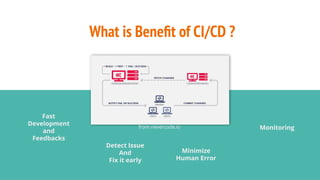
What is Benefit of CI/CD ?
Fast
Development
and
Feedbacks
Detect Issue
And
Fix it early
Minimize
Human Error
from nevercode.io Monitoring
Tools Integration for CI/CD
ETC ...
Introduction
Gitlab CI/CD and Runner
Gitlab CI/CD
● “Continuous Integration is
built-in to GitLab”
● Fully integrated with GitLab
https://about.gitlab.com/product/continuous-integration/
What is Gitlab Runner?
● Agent Gitlab CI installed on PC/Laptop or Server
● Container for run your CI
● Written in GO
● Configuration CI using .gitlab-ci.yml with YAML
You can see at : https://docs.gitlab.com/ee/ci/yaml/
Why Gitlab Runner?
● Multi-platform: Linux, OSX, Windows, Docker and etc ..
● Parallel builds
● Realtime logging
● Container Registry
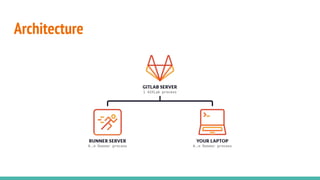
Architecture
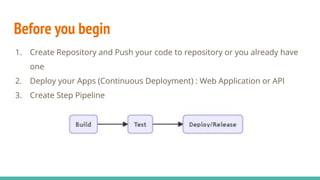
Before you begin
1. Create Repository and Push your code to repository or you already have
one
2. Deploy your Apps (Continuous Deployment) : Web Application or API
3. Create Step Pipeline
Before you begin
4. Create Step Procedure based on Pipeline you build
Example Build in VueJS:
$ npm install
$ npm run build
Example Test in VueJS:
$ npm run test:unit
Example Gitlab CI/CD using VueJS
● Using :
○ Linux Ubuntu 18.04 (Production)
○ Windows (Local Laptop)
● Web Server :
○ NGINX (Production)
○ XAMPP Apache (Local Laptop)
● Depedency :
○ Nodejs ver 10.X.X
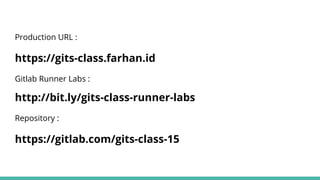
Production URL :
https://gits-class.farhan.id
Gitlab Runner Labs :
http://bit.ly/gits-class-runner-labs
Repository :
https://gitlab.com/gits-class-15
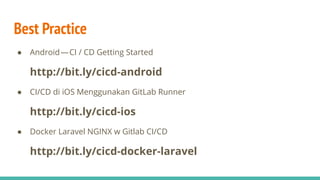
Best Practice
● Android — CI / CD Getting Started
http://bit.ly/cicd-android
● CI/CD di iOS Menggunakan GitLab Runner
http://bit.ly/cicd-ios
● Docker Laravel NGINX w Gitlab CI/CD
http://bit.ly/cicd-docker-laravel
Production URL :
https://gits-class.farhan.id
Gitlab Runner Labs :
http://bit.ly/gits-class-runner-labs
Repository :
https://gitlab.com/gits-class-15
Thank You
Don’t forget to give us feedbacks
http://bit.ly/GITSClass16

GITS Class #16: CI/CD (Continuous Integration & Continuous Deployment) with GitLab Runner

  • 1.
  • 2.
    Self Introduction Farhan Naufal Ghani Padalarang,Kab. Bandung Barat DevOps at GITS Indonesia Let’s know about me
  • 3.
  • 4.
    What is CI? ● Continuous Integration in Indonesia means ● “Integrate” your code into automated process continuously
  • 5.
    What is CD? Its can be .... Continuous Delivery -> Give the result to User or Anyone? Continuous Deployment -> Run my apps and share it I call it ... Continuous Development
  • 6.
    What is Benefitof CI/CD ? Fast Development and Feedbacks Detect Issue And Fix it early Minimize Human Error from nevercode.io Monitoring
  • 7.
    Tools Integration forCI/CD ETC ...
  • 8.
  • 9.
    Gitlab CI/CD ● “ContinuousIntegration is built-in to GitLab” ● Fully integrated with GitLab https://about.gitlab.com/product/continuous-integration/
  • 10.
    What is GitlabRunner? ● Agent Gitlab CI installed on PC/Laptop or Server ● Container for run your CI ● Written in GO ● Configuration CI using .gitlab-ci.yml with YAML You can see at : https://docs.gitlab.com/ee/ci/yaml/
  • 11.
    Why Gitlab Runner? ●Multi-platform: Linux, OSX, Windows, Docker and etc .. ● Parallel builds ● Realtime logging ● Container Registry
  • 12.
  • 13.
    Before you begin 1.Create Repository and Push your code to repository or you already have one 2. Deploy your Apps (Continuous Deployment) : Web Application or API 3. Create Step Pipeline
  • 14.
    Before you begin 4.Create Step Procedure based on Pipeline you build Example Build in VueJS: $ npm install $ npm run build Example Test in VueJS: $ npm run test:unit
  • 15.
    Example Gitlab CI/CDusing VueJS ● Using : ○ Linux Ubuntu 18.04 (Production) ○ Windows (Local Laptop) ● Web Server : ○ NGINX (Production) ○ XAMPP Apache (Local Laptop) ● Depedency : ○ Nodejs ver 10.X.X Production URL : https://gits-class.farhan.id Gitlab Runner Labs : http://bit.ly/gits-class-runner-labs Repository : https://gitlab.com/gits-class-15
  • 16.
    Best Practice ● Android — CI/ CD Getting Started http://bit.ly/cicd-android ● CI/CD di iOS Menggunakan GitLab Runner http://bit.ly/cicd-ios ● Docker Laravel NGINX w Gitlab CI/CD http://bit.ly/cicd-docker-laravel
  • 17.
    Production URL : https://gits-class.farhan.id GitlabRunner Labs : http://bit.ly/gits-class-runner-labs Repository : https://gitlab.com/gits-class-15
  • 18.
    Thank You Don’t forgetto give us feedbacks http://bit.ly/GITSClass16