Git with Bitbucket
      Sumin Byeon
       SmarTrek
Bitbucket

• Hosting site for Git and Mercurial
  repositories
• Not to be confused with a version control
  system
• Not a necessity, but good to have for more
  effective collaboration
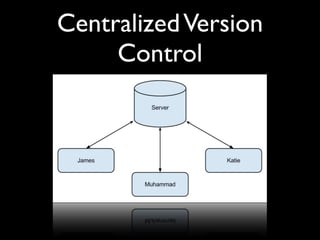
Centralized Version
     Control
Centralized Version
        Control
• Subversion, CVS, etc.
• Everything goes to the server; users
  commit changes to the sever, checkout the
  latest revision from the server.
• No direct exchange between developers
Distributed Version
      Control
Distributed Version
         Control
• Git, Mercurial, Bazaar, etc.
• Each copy of repository is identical and
  self-sufficient
• No need for a central server, but one may
  choose to have one
• Developers may directly exchange
  changesets over Wi-Fi at a local coffee shop
Git
•   Distributed version control system
•   Super fast
•   Space efficient
•   Independent of network access or a central
    server
•   Superior branching and merging mechanism
•   Various protection devices against corruption
Benefits
•   Bitbucket is completely free if you have a .edu
    email address

•   Since Git does not requires a central server, we
    can even work in an airplane
    •   Slave-driver-type supervisors (e.g., Dr. Chiu) will love this


•   Given the nature of our development team, we
    can’t fully take advantage of all the benefits of Git,
    but we use it mainly for its speed and ease of
    branching and merging.
Workflow
•   Git does not impose any particular workflow,
    but this is the usual workflow for our
    Android repository.
•   Pull
•   Branch and merge
•   Commit changes
•   Push
What To Store
• Source code
• Binary resources (e.g., images, sounds, etc.)
• Build scripts
• Documents (e.g., README, LICENSE)
• Unit tests
• Anything that constitutes a project
What Not To Store
• Anything that can be synthesized
 • Compiled binary, automatically generated
     code (e.g., R.java for Android)
• Personal preference configuration files
• .gitignore file contains a list of files that will
  be ignored by Git
Branches And Tags
• Branch is basically a reference to a
  particular commit
  • Automatically updated whenever a
    commit is made to that branch
• Tag marks a particular commit
 • May be moved manually
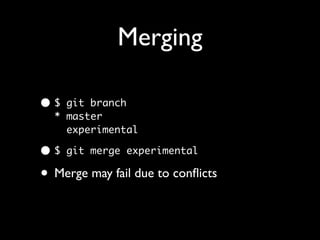
Merging

•$  git branch
  * master
    experimental

•$   git merge experimental

• Merge may fail due to conflicts
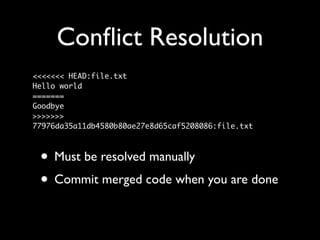
Conflict Resolution
<<<<<<< HEAD:file.txt
Hello world
=======
Goodbye
>>>>>>>
77976da35a11db4580b80ae27e8d65caf5208086:file.txt


 • Must be resolved manually
 • Commit merged code when you are done
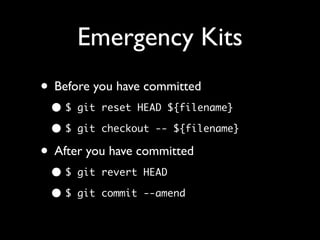
Emergency Kits
• Before you have committed
 •$   git reset HEAD ${filename}

 •$   git checkout -- ${filename}

• After you have committed
 •$   git revert HEAD

 •$   git commit --amend
Questions?

Git with bitbucket

  • 1.
    Git with Bitbucket Sumin Byeon SmarTrek
  • 2.
    Bitbucket • Hosting sitefor Git and Mercurial repositories • Not to be confused with a version control system • Not a necessity, but good to have for more effective collaboration
  • 3.
  • 4.
    Centralized Version Control • Subversion, CVS, etc. • Everything goes to the server; users commit changes to the sever, checkout the latest revision from the server. • No direct exchange between developers
  • 5.
  • 6.
    Distributed Version Control • Git, Mercurial, Bazaar, etc. • Each copy of repository is identical and self-sufficient • No need for a central server, but one may choose to have one • Developers may directly exchange changesets over Wi-Fi at a local coffee shop
  • 7.
    Git • Distributed version control system • Super fast • Space efficient • Independent of network access or a central server • Superior branching and merging mechanism • Various protection devices against corruption
  • 8.
    Benefits • Bitbucket is completely free if you have a .edu email address • Since Git does not requires a central server, we can even work in an airplane • Slave-driver-type supervisors (e.g., Dr. Chiu) will love this • Given the nature of our development team, we can’t fully take advantage of all the benefits of Git, but we use it mainly for its speed and ease of branching and merging.
  • 9.
    Workflow • Git does not impose any particular workflow, but this is the usual workflow for our Android repository. • Pull • Branch and merge • Commit changes • Push
  • 10.
    What To Store •Source code • Binary resources (e.g., images, sounds, etc.) • Build scripts • Documents (e.g., README, LICENSE) • Unit tests • Anything that constitutes a project
  • 11.
    What Not ToStore • Anything that can be synthesized • Compiled binary, automatically generated code (e.g., R.java for Android) • Personal preference configuration files • .gitignore file contains a list of files that will be ignored by Git
  • 12.
    Branches And Tags •Branch is basically a reference to a particular commit • Automatically updated whenever a commit is made to that branch • Tag marks a particular commit • May be moved manually
  • 13.
    Merging •$ gitbranch * master experimental •$ git merge experimental • Merge may fail due to conflicts
  • 14.
    Conflict Resolution <<<<<<< HEAD:file.txt Helloworld ======= Goodbye >>>>>>> 77976da35a11db4580b80ae27e8d65caf5208086:file.txt • Must be resolved manually • Commit merged code when you are done
  • 15.
    Emergency Kits • Beforeyou have committed •$ git reset HEAD ${filename} •$ git checkout -- ${filename} • After you have committed •$ git revert HEAD •$ git commit --amend
  • 16.