Introduction to
Git(BitBucket) , Continuous Integration
(Bamboo) & Confluence
By,
Parag Gajbhiye
(Our software helps your team track, collaborate, code, and ship products –
smarter and faster : Atlassian)
Git
A distributed version control system
Version control (or revision control, or
source control) is all about managing
multiple versions of documents, programs,
web sites, etc.
Bitbucket : Git and Mercurial Hosting For
Teams
Bitbucket
●
Unlimited Private Repositories
●
Work as a Team
●
JIRA Integration : Link every commit to a
JIRA
●
Fork, Code, Pull
●
Key Integrations : JIRA, Crucible,
Bamboo, Jenkins, and more!
Why version control?
● For working by yourself:
• Gives you a “time machine” for going back to
earlier versions
• Gives you great support for different versions
(standalone, web app, etc.) of the same basic
project
● For working with others:
Greatly simplifies concurrent work, merging
changes
The repository
● Your top-level working directory contains everything
about your project
● The working directory probably contains many
subdirectories—source code, binaries, documentation,
data files, etc.
● One of these subdirectories, named .git, is your
repository
• At any time, you can take a “snapshot” of everything
(or selected things) in your project directory, and put
it in your repository
• This “snapshot” is called a commit object
Commit objects do not require huge amounts of memory
You can work as much as you like in your working
directory, but the repository isn’t updated until you commit
something
Working with others
All repositories are equal, but it is convenient to have one
central repository in the cloud
● Here’s what you normally do:
• Download the current HEAD from the central repository
• Make your changes
• Commit your changes to your local repository
• Check to make sure someone else on your team hasn’t
updated the central repository since you got it
• Upload your changes to the central repository
● If the central repository has changed since you got it:
• It is your responsibility to merge your two versions
This is a strong incentive to commit and upload often!
Git can often do this for you, if there aren’t incompatible changes
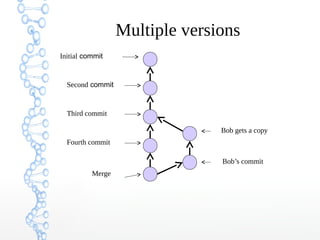
Multiple versions
Initial commit
Second commit
Third commit
Bob gets a copy
Fourth commit
Merge
Bob’s commit
Keeping it simple
If you:
• Make sure you are current with the central repository
• Make some improvements to your code
• Update the central repository before anyone else does
• Then you don’t have to worry about resolving conflicts or working
with multiple branches
All the complexity in git comes from dealing with these
Therefore:
Make sure you are up-to-date before starting to work
Commit and update the central repository frequently
If you need help: https://help.github.com/
Continuous Integration (Bamboo)
Continuous Integration is a software
development practice where members of a
team integrate their work frequently, usually
each person integrates at least daily - leading
to multiple integrations per day. Each
integration is verified by an automated build
(including test) to detect integration errors as
quickly as possible.“
What is “integration” ?
● At a minimum:
• Gather latest source together
• Compile
• Execute tests
• Verify success
How often is continuously?
➔ As frequently as possible
➔ More like once per hour than once per day
➔ Before leaving at the end of the day
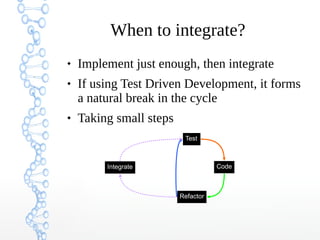
When to integrate?
 Implement just enough, then integrate
 If using Test Driven Development, it forms
a natural break in the cycle
 Taking small steps
Code
Refactor
Integrate
Test
Why?
 Increased automation
 Don’t repeat yourself - automate to increase
speed and to make less mistakes
 Regular feedback
 For the integrator : “Did that work?”
 For the rest of the team : “Is the build OK?”
 Reduces Risk overall
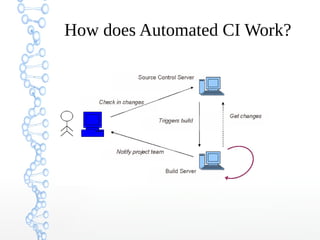
Automated CI
 Automated Continuous Integration Server
 CruiseControl, CruiseControl.NET,
TeamCity, Bamboo, etc.
 Detects changes in source control
 Launches integration build
 Publishes results
How does Automated CI Work?
Why use Automated CI?
 Makes integration easy
 Guarantees integration happens
 Better feedback options
 Encourages test automation
 Immediate Feedback is Key
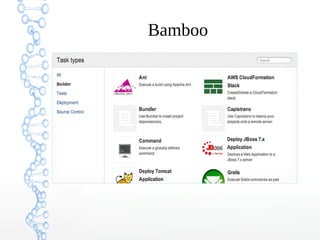
Bamboo
Confluence
Give your team one place to share, find, and
collaborate on information they need to get
work done.
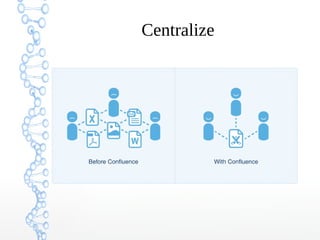
Centralize
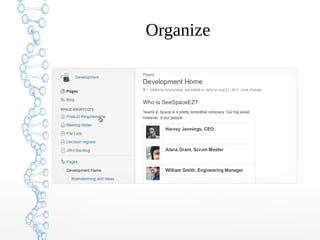
Organize
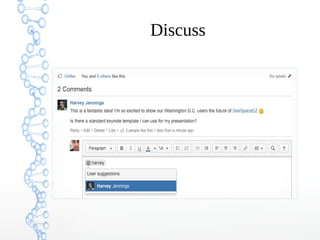
Discuss
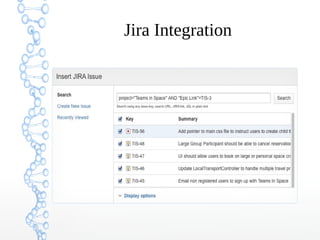
Jira Integration
Introduction to Git(BitBucket) , Continuous Integration (Bamboo) & Confluence

Introduction to Git(BitBucket) , Continuous Integration (Bamboo) & Confluence

  • 1.
    Introduction to Git(BitBucket) ,Continuous Integration (Bamboo) & Confluence By, Parag Gajbhiye (Our software helps your team track, collaborate, code, and ship products – smarter and faster : Atlassian)
  • 2.
    Git A distributed versioncontrol system Version control (or revision control, or source control) is all about managing multiple versions of documents, programs, web sites, etc. Bitbucket : Git and Mercurial Hosting For Teams
  • 3.
    Bitbucket ● Unlimited Private Repositories ● Workas a Team ● JIRA Integration : Link every commit to a JIRA ● Fork, Code, Pull ● Key Integrations : JIRA, Crucible, Bamboo, Jenkins, and more!
  • 4.
    Why version control? ●For working by yourself: • Gives you a “time machine” for going back to earlier versions • Gives you great support for different versions (standalone, web app, etc.) of the same basic project ● For working with others: Greatly simplifies concurrent work, merging changes
  • 5.
    The repository ● Yourtop-level working directory contains everything about your project ● The working directory probably contains many subdirectories—source code, binaries, documentation, data files, etc. ● One of these subdirectories, named .git, is your repository • At any time, you can take a “snapshot” of everything (or selected things) in your project directory, and put it in your repository • This “snapshot” is called a commit object Commit objects do not require huge amounts of memory You can work as much as you like in your working directory, but the repository isn’t updated until you commit something
  • 6.
    Working with others Allrepositories are equal, but it is convenient to have one central repository in the cloud ● Here’s what you normally do: • Download the current HEAD from the central repository • Make your changes • Commit your changes to your local repository • Check to make sure someone else on your team hasn’t updated the central repository since you got it • Upload your changes to the central repository ● If the central repository has changed since you got it: • It is your responsibility to merge your two versions This is a strong incentive to commit and upload often! Git can often do this for you, if there aren’t incompatible changes
  • 7.
    Multiple versions Initial commit Secondcommit Third commit Bob gets a copy Fourth commit Merge Bob’s commit
  • 8.
    Keeping it simple Ifyou: • Make sure you are current with the central repository • Make some improvements to your code • Update the central repository before anyone else does • Then you don’t have to worry about resolving conflicts or working with multiple branches All the complexity in git comes from dealing with these Therefore: Make sure you are up-to-date before starting to work Commit and update the central repository frequently If you need help: https://help.github.com/
  • 9.
    Continuous Integration (Bamboo) ContinuousIntegration is a software development practice where members of a team integrate their work frequently, usually each person integrates at least daily - leading to multiple integrations per day. Each integration is verified by an automated build (including test) to detect integration errors as quickly as possible.“
  • 10.
    What is “integration”? ● At a minimum: • Gather latest source together • Compile • Execute tests • Verify success
  • 11.
    How often iscontinuously? ➔ As frequently as possible ➔ More like once per hour than once per day ➔ Before leaving at the end of the day
  • 12.
    When to integrate? Implement just enough, then integrate  If using Test Driven Development, it forms a natural break in the cycle  Taking small steps Code Refactor Integrate Test
  • 13.
    Why?  Increased automation Don’t repeat yourself - automate to increase speed and to make less mistakes  Regular feedback  For the integrator : “Did that work?”  For the rest of the team : “Is the build OK?”  Reduces Risk overall
  • 14.
    Automated CI  AutomatedContinuous Integration Server  CruiseControl, CruiseControl.NET, TeamCity, Bamboo, etc.  Detects changes in source control  Launches integration build  Publishes results
  • 15.
  • 16.
    Why use AutomatedCI?  Makes integration easy  Guarantees integration happens  Better feedback options  Encourages test automation  Immediate Feedback is Key
  • 17.
  • 18.
    Confluence Give your teamone place to share, find, and collaborate on information they need to get work done.
  • 19.
  • 20.
  • 21.
  • 22.