
-- GHCi --
More Awesome
Than You (I?) Thought
Richard Minerich
Senior Researcher at Bayard Rock
@Rickasaurus
Noob Answers for
Noob Questions
How do I allow multi-line definitions?
Wrap it in “:{ … :}” or “:set +m”
Why doesn’t it show the type of my result?
“:set +t” will enable type info.
Why won’t my Haskell code execute in GHCi?
GHCi uses the monad “let” syntax.
How do I specify the type of something?
Follow it with “:: type” (e.g x = 5 :: Int)
Setup for this talk
Sublime Text 2 with
- SublimeHaskell
- SublimeREPL (head)
- Tabs to Spaces on
Haskell Platform (2012.4.0.0) with
aeson, haskell-src-exts, haddock,
ghc-mod, stylish-haskell, haskell-docs
SublimeREPL
SublimeREPL (as of last week) will now:
- Intelligently remove extra whitespace in
front of nested functions
- Prepends “let “ to functions sent to the REPL
and indents the remainder (as needed)
- Automatically wraps multi-line functions with
the new block syntax :{ .. :}
Haskell for Scripting
-- script.hs --
#!/usr/bin/env runhaskell
main = putStrLn “Hello, or something…”
On Windows:
runhaskell script.hs
On Posix:
./script.hs
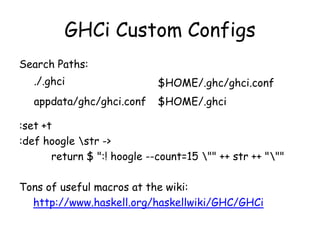
GHCi Custom Configs
Search Paths:
:set +t
:def hoogle str ->
return $ ":! hoogle --count=15 "" ++ str ++ """
Tons of useful macros at the wiki:
http://www.haskell.org/haskellwiki/GHC/GHCi
./.ghci $HOME/.ghc/ghci.conf
appdata/ghc/ghci.conf $HOME/.ghci
Play with Language Flags
{-# LANGUAGE NoMonomorphismRestriction #-}
Vs.
:set –XNoMonomorphismRestriction
Vs.
(in latest Haskell Platform)
:seti –XNoMonomorphismRestriction
Loading Modules
By default module Dir.Module is Dir/Module.hs
:load Dir.Module Load compiled if exists
:load *Dir.Module Load interpreted forced
:reload Reloads target set
:show modules List loaded modules
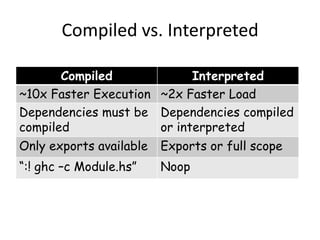
Compiled vs. Interpreted
Compiled Interpreted
~10x Faster Execution ~2x Faster Load
Dependencies must be
compiled
Dependencies compiled
or interpreted
Only exports available Exports or full scope
“:! ghc –c Module.hs” Noop
Controlling GHCi Scope
:show imports
Shows what’s in scope
:module – Dir1.Module1 …
Remove “./Dir1/Module1.hs” from scope
:module + Dir1.Module1 *Dir2.Module2 …
Open exports from “./Dir1/Module1.hs”
Open full scope from “./Dir2/Module2.hs”
Standard import syntax applies as well
Your Eyes and Ears
:browse Module - Shows a module’s exports
:browse *Module – Shows full Module scope
:show bindings – List bound variables with type
:type <expr> - Type information for an expr
:info <name> - Extended information
:print <id> - Print without forced evaluation
:force <id> - Print with forced evaluation
GHCi Funny Business
GHCi is a monad, monad syntax applies (kind of)
Bindings go away after “:load” or “:reload”
Type defaults (are strange)
It’s thunks all the way down
“print” vs “:print” vs “:sprint” vs “:force”
Things to know about Debugging
All the standard stuff:
- Breakpoints, Break on Exception, Stepping
And some fancy stuff:
- Time Travel, Subexpression Breakpoints
But, some oddities (coming from other langs):
- Scope, Execution Ordering, :Print Breakpoints
Review: Debugging Basics
:set stop :list
:break [<id>] or [<module?> <line?> <col?>]
:show breaks
:delete <breakpoint_id|*>
:step <expr?> / :steplocal / :stepmodule
:abandon / :continue
:print <id> / :force <id>
Review: Time Travel Wizardry
:trace <expr>
:hist <num?>
:back / :forward
:show context
:set –fbreak-on-exception
:set –fbreak-on-error
_result / _exception
How the heck do I trace?
Remember, Haskell is lazy. So be thoughtful:
- Break inside, near the end
- Leverage assertions with error
(import Control.Exception (assert))
- Give BangPatterns a go
- Debug from a secondary .hs file
- Implement conditional breakpoints
That was just the tip of the iceburg, see the
Docs and Wiki for MUCH more information.

GHCi: More Awesome Than You Thought

  • 1.
    -- GHCi -- MoreAwesome Than You (I?) Thought Richard Minerich Senior Researcher at Bayard Rock @Rickasaurus
  • 2.
    Noob Answers for NoobQuestions How do I allow multi-line definitions? Wrap it in “:{ … :}” or “:set +m” Why doesn’t it show the type of my result? “:set +t” will enable type info. Why won’t my Haskell code execute in GHCi? GHCi uses the monad “let” syntax. How do I specify the type of something? Follow it with “:: type” (e.g x = 5 :: Int)
  • 3.
    Setup for thistalk Sublime Text 2 with - SublimeHaskell - SublimeREPL (head) - Tabs to Spaces on Haskell Platform (2012.4.0.0) with aeson, haskell-src-exts, haddock, ghc-mod, stylish-haskell, haskell-docs
  • 4.
    SublimeREPL SublimeREPL (as oflast week) will now: - Intelligently remove extra whitespace in front of nested functions - Prepends “let “ to functions sent to the REPL and indents the remainder (as needed) - Automatically wraps multi-line functions with the new block syntax :{ .. :}
  • 5.
    Haskell for Scripting --script.hs -- #!/usr/bin/env runhaskell main = putStrLn “Hello, or something…” On Windows: runhaskell script.hs On Posix: ./script.hs
  • 6.
    GHCi Custom Configs SearchPaths: :set +t :def hoogle str -> return $ ":! hoogle --count=15 "" ++ str ++ """ Tons of useful macros at the wiki: http://www.haskell.org/haskellwiki/GHC/GHCi ./.ghci $HOME/.ghc/ghci.conf appdata/ghc/ghci.conf $HOME/.ghci
  • 7.
    Play with LanguageFlags {-# LANGUAGE NoMonomorphismRestriction #-} Vs. :set –XNoMonomorphismRestriction Vs. (in latest Haskell Platform) :seti –XNoMonomorphismRestriction
  • 8.
    Loading Modules By defaultmodule Dir.Module is Dir/Module.hs :load Dir.Module Load compiled if exists :load *Dir.Module Load interpreted forced :reload Reloads target set :show modules List loaded modules
  • 9.
    Compiled vs. Interpreted CompiledInterpreted ~10x Faster Execution ~2x Faster Load Dependencies must be compiled Dependencies compiled or interpreted Only exports available Exports or full scope “:! ghc –c Module.hs” Noop
  • 10.
    Controlling GHCi Scope :showimports Shows what’s in scope :module – Dir1.Module1 … Remove “./Dir1/Module1.hs” from scope :module + Dir1.Module1 *Dir2.Module2 … Open exports from “./Dir1/Module1.hs” Open full scope from “./Dir2/Module2.hs” Standard import syntax applies as well
  • 11.
    Your Eyes andEars :browse Module - Shows a module’s exports :browse *Module – Shows full Module scope :show bindings – List bound variables with type :type <expr> - Type information for an expr :info <name> - Extended information :print <id> - Print without forced evaluation :force <id> - Print with forced evaluation
  • 12.
    GHCi Funny Business GHCiis a monad, monad syntax applies (kind of) Bindings go away after “:load” or “:reload” Type defaults (are strange) It’s thunks all the way down “print” vs “:print” vs “:sprint” vs “:force”
  • 13.
    Things to knowabout Debugging All the standard stuff: - Breakpoints, Break on Exception, Stepping And some fancy stuff: - Time Travel, Subexpression Breakpoints But, some oddities (coming from other langs): - Scope, Execution Ordering, :Print Breakpoints
  • 14.
    Review: Debugging Basics :setstop :list :break [<id>] or [<module?> <line?> <col?>] :show breaks :delete <breakpoint_id|*> :step <expr?> / :steplocal / :stepmodule :abandon / :continue :print <id> / :force <id>
  • 15.
    Review: Time TravelWizardry :trace <expr> :hist <num?> :back / :forward :show context :set –fbreak-on-exception :set –fbreak-on-error _result / _exception
  • 16.
    How the heckdo I trace? Remember, Haskell is lazy. So be thoughtful: - Break inside, near the end - Leverage assertions with error (import Control.Exception (assert)) - Give BangPatterns a go - Debug from a secondary .hs file - Implement conditional breakpoints
  • 17.
    That was justthe tip of the iceburg, see the Docs and Wiki for MUCH more information.

Editor's Notes

  • #2 Comic Sans and Powerpoint!A beginner talk, from the perspective of someone trying to learn haskellI’m going to talk a lot about the things that I found difficult, and some of the tricks I’ve discovered. Please raise your hand if you have a better workaround and we’ll bring you the mic
  • #3 Multiline mode seems like the best if you don’t have a fancy IDE, but I’d rather just highlight and goThe lack of type info bugged me a lot at first. Most ML languages show type and result by default.The different syntax for GHCi was extremely frustrating when I was starting out.I found this out on stackoverflow of all places. It doesn’t seem to be in the docs anywhere.
  • #4 Fixed up
  • #5 I added this because I hated not being able to just highlight and execute things in the REPL (a standard feature of most ML languages)Started trying to write haskell with nested functions to execute in the replThen added the wrapping syntax so I didn’t need to leave on the multi-line syntax (it’s annoying)Finally, it occurred to me that I could simply prepend let and indent You can disable any of these features independently*show it*Future: Type sigs, more than one function at a time
  • #6 Haskell scripts seem great for mutli-platform targets.
  • #7 Because haskell is so configurable, it’s probably best to keep a separate .ghci per projectput the :set +m and :set +t to be auto run hereWe could do a whole talk on pimping your GHCi, but for now let’s focus on how to use it, for more examples check out the wiki
  • #8 Monomorphism Restriction: Cannot overload a function unless you provide an explicit type sigNote that some things can’t be unset, such as this particular flag
  • #9 Modules can be loaded in either compiled or interpreted mode. Compiled modules can only depend on other compiled, so for now we’ll be loaded everything interpreted.
  • #10 Moral of the story, if you’re new and just fiddling around you should probably just stick with interpreted
  • #11 Modules can be loaded in either compiled or interpreted mode. Compiled modules can only depend on other compiled, so for now we’ll be loaded everything interpreted.
  • #12 Info usually does the right thing for what you’re looking atPrint will show you the types of the unevaluated thunksForce will show you the result
  • #13 1) Monads, but with type declarations and lots of special commands?2) Because the bindings will frequently disappear on you, it seems best to work with a temporary file outside of the repl3) You may find yourself needing to use type annotations4) A haskell thing, not ghci, but you may find yourself hitting a breakpoint in the process of debugging (especially recursive functions)5) You can hit breakpoints with the print command or force
  • #14 Most of the oddities stem from laziness.
  • #15 With breakpoints you can target just about anywhere, be it the name or a specific character in a fileStep sets implicit breakpoints everywhere, steplocal just within the current scope, and stepmodule just within the current module
  • #16 fbreak-on-exception will break on any exception fbreak-on-error will break on uncaught exceptions
  • #17 I’ve found that getting a trace where I want it can be somewhat difficult.