INTRODUCTION TO
CYTHON
John
Saturday, December 21, 2013
Overview
• a superset of the Python language which give
high-level, OO functional, and dynamic
programming.
• The source code translate to optimized C/C++
code and compiled as Python extension
modules.
• One word, Cython is Python with C data
types.
Installing Cython
• Pythonxy already include Cython.
• Use easy_install or pip install Cython from
PYPI.
$ python easy_install.py Cython
$ pip install Cython
First example: Building a Cython
module “hello”
hello.pyx
def say_hello_to(name):
print (“Hello %s!” %
name)

setup.py
from distutils.core import setup
from distutils.extension import Extension
from Cython.Distutils import build_ext
ext_modules = [Extension("hello",
["hello.pyx"])]

Run command line build the module
$ python setup.py build_ext --inplace
--compiler=mingw32 --inplace
# How to run the function:
>>> from hello import say_hello_to
>>> say_hello_to(“John”)
Hello John

setup(
name = 'Hello world app',
cmdclass = {'build_ext': build_ext},
ext_modules = ext_modules
)
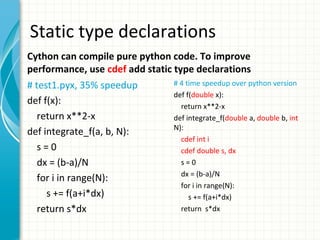
Static type declarations
Cython can compile pure python code. To improve
performance, use cdef add static type declarations
# test1.pyx, 35% speedup
def f(x):
return x**2-x
def integrate_f(a, b, N):
s=0
dx = (b-a)/N
for i in range(N):
s += f(a+i*dx)
return s*dx

# 4 time speedup over python version
def f(double x):
return x**2-x
def integrate_f(double a, double b, int
N):
cdef int i
cdef double s, dx
s=0
dx = (b-a)/N
for i in range(N):
s += f(a+i*dx)
return s*dx
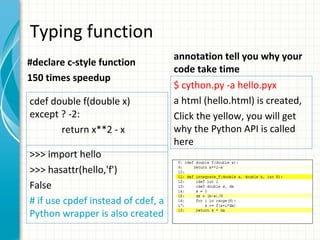
Typing function
#declare c-style function
150 times speedup
cdef double f(double x)
except ? -2:
return x**2 - x
>>> import hello
>>> hasattr(hello,'f')
False
# if use cpdef instead of cdef, a
Python wrapper is also created

annotation tell you why your
code take time
$ cython.py -a hello.pyx
a html (hello.html) is created,
Click the yellow, you will get
why the Python API is called
here
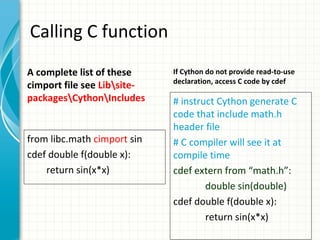
Calling C function
A complete list of these
cimport file see LibsitepackagesCythonIncludes

from libc.math cimport sin
cdef double f(double x):
return sin(x*x)

If Cython do not provide read-to-use
declaration, access C code by cdef

# instruct Cython generate C
code that include math.h
header file
# C compiler will see it at
compile time
cdef extern from “math.h”:
double sin(double)
cdef double f(double x):
return sin(x*x)
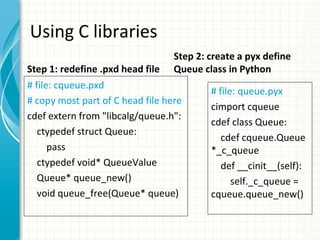
Using C libraries
Step 1: redefine .pxd head file

Step 2: create a pyx define
Queue class in Python

# file: cqueue.pxd
# copy most part of C head file here
cdef extern from "libcalg/queue.h":
ctypedef struct Queue:
pass
ctypedef void* QueueValue
Queue* queue_new()
void queue_free(Queue* queue)

# file: queue.pyx
cimport cqueue
cdef class Queue:
cdef cqueue.Queue
*_c_queue
def __cinit__(self):
self._c_queue =
cqueue.queue_new()
Using C libraries - cont
or step 3.2: include the lib in
step 3.1: change the setup.py
the option
$ CFLAGS="change
I/usr/local/otherdir/calg/include" 
ext_modules =
[Extension("queue
LDFLAGS="", ["queue.pyx"])]
L/usr/local/otherdir/calg/lib"  python
setup.py build_ext -i
to
ext_modules =
[ Extension("queu
e", ["queue.pyx"],
libraries=["calg"]) ]

calg lib see Simon Howard, C Algorithms library,
http://c-algorithms.sourceforge.net/
Using C++ in Cython
• Brief overview of C++ support in Cython(Cython
v0.13)
– C++ objects can now be dynamically allocated
with new and del keywords.
– C++ objects can be stack-allocated.
– C++ classes can be declared with the new
keyword cppclass.
– Templated classes are supported.
– Overloaded functions are supported.
– Overloading of C++ operators (such as operator+,
operator[],...) is supported.
Review of this Slides
1. introduce the Cython
2. How to install Cython
3. An example show how to compile a Cython
project
4. Optimize the pure Python code with Cython
5. Call C function in Python code
6. Use C library in Python code

Introduction to cython

  • 1.
  • 2.
    Overview • a supersetof the Python language which give high-level, OO functional, and dynamic programming. • The source code translate to optimized C/C++ code and compiled as Python extension modules. • One word, Cython is Python with C data types.
  • 3.
    Installing Cython • Pythonxyalready include Cython. • Use easy_install or pip install Cython from PYPI. $ python easy_install.py Cython $ pip install Cython
  • 4.
    First example: Buildinga Cython module “hello” hello.pyx def say_hello_to(name): print (“Hello %s!” % name) setup.py from distutils.core import setup from distutils.extension import Extension from Cython.Distutils import build_ext ext_modules = [Extension("hello", ["hello.pyx"])] Run command line build the module $ python setup.py build_ext --inplace --compiler=mingw32 --inplace # How to run the function: >>> from hello import say_hello_to >>> say_hello_to(“John”) Hello John setup( name = 'Hello world app', cmdclass = {'build_ext': build_ext}, ext_modules = ext_modules )
  • 5.
    Static type declarations Cythoncan compile pure python code. To improve performance, use cdef add static type declarations # test1.pyx, 35% speedup def f(x): return x**2-x def integrate_f(a, b, N): s=0 dx = (b-a)/N for i in range(N): s += f(a+i*dx) return s*dx # 4 time speedup over python version def f(double x): return x**2-x def integrate_f(double a, double b, int N): cdef int i cdef double s, dx s=0 dx = (b-a)/N for i in range(N): s += f(a+i*dx) return s*dx
  • 6.
    Typing function #declare c-stylefunction 150 times speedup cdef double f(double x) except ? -2: return x**2 - x >>> import hello >>> hasattr(hello,'f') False # if use cpdef instead of cdef, a Python wrapper is also created annotation tell you why your code take time $ cython.py -a hello.pyx a html (hello.html) is created, Click the yellow, you will get why the Python API is called here
  • 7.
    Calling C function Acomplete list of these cimport file see LibsitepackagesCythonIncludes from libc.math cimport sin cdef double f(double x): return sin(x*x) If Cython do not provide read-to-use declaration, access C code by cdef # instruct Cython generate C code that include math.h header file # C compiler will see it at compile time cdef extern from “math.h”: double sin(double) cdef double f(double x): return sin(x*x)
  • 8.
    Using C libraries Step1: redefine .pxd head file Step 2: create a pyx define Queue class in Python # file: cqueue.pxd # copy most part of C head file here cdef extern from "libcalg/queue.h": ctypedef struct Queue: pass ctypedef void* QueueValue Queue* queue_new() void queue_free(Queue* queue) # file: queue.pyx cimport cqueue cdef class Queue: cdef cqueue.Queue *_c_queue def __cinit__(self): self._c_queue = cqueue.queue_new()
  • 9.
    Using C libraries- cont or step 3.2: include the lib in step 3.1: change the setup.py the option $ CFLAGS="change I/usr/local/otherdir/calg/include" ext_modules = [Extension("queue LDFLAGS="", ["queue.pyx"])] L/usr/local/otherdir/calg/lib" python setup.py build_ext -i to ext_modules = [ Extension("queu e", ["queue.pyx"], libraries=["calg"]) ] calg lib see Simon Howard, C Algorithms library, http://c-algorithms.sourceforge.net/
  • 10.
    Using C++ inCython • Brief overview of C++ support in Cython(Cython v0.13) – C++ objects can now be dynamically allocated with new and del keywords. – C++ objects can be stack-allocated. – C++ classes can be declared with the new keyword cppclass. – Templated classes are supported. – Overloaded functions are supported. – Overloading of C++ operators (such as operator+, operator[],...) is supported.
  • 11.
    Review of thisSlides 1. introduce the Cython 2. How to install Cython 3. An example show how to compile a Cython project 4. Optimize the pure Python code with Cython 5. Call C function in Python code 6. Use C library in Python code