Introduction to OS X development with Cocoa … and how web developers  can cheat George Brocklehurst http://georgebrock.com  @georgebrock on Twitter
Before we start… Have you done any… HTML? Javascript? PHP? Any object oriented programming? C?
What is Cocoa? Framework for Mac OS X and iPhone Heavily MVC focused Usually written in Objective-C Can also be written in Python or Ruby
Getting Started You will need: Apple’s Xcode Tools Available from: http://developer.apple.com/technology/xcode.html Your OS X install DVDs
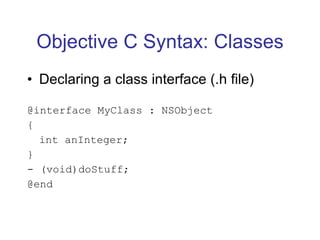
Objective C Syntax: Classes Declaring a class interface (.h file) @interface MyClass : NSObject { int anInteger; } - (void)doStuff; @end
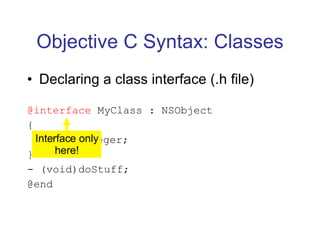
Objective C Syntax: Classes Declaring a class interface (.h file) @interface  MyClass : NSObject { int anInteger; } - (void)doStuff; @end Interface only here!
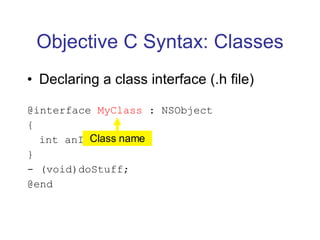
Objective C Syntax: Classes Declaring a class interface (.h file) @interface  MyClass  : NSObject { int anInteger; } - (void)doStuff; @end Class name
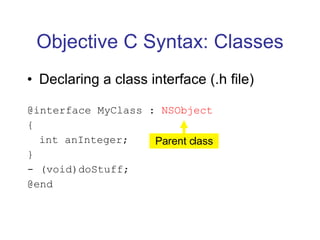
Objective C Syntax: Classes Declaring a class interface (.h file) @interface MyClass :  NSObject { int anInteger; } - (void)doStuff; @end Parent class
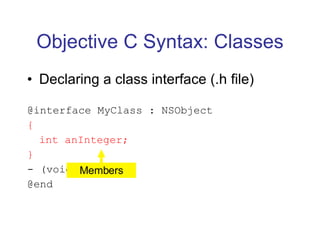
Objective C Syntax: Classes Declaring a class interface (.h file) @interface MyClass : NSObject { int anInteger; } - (void)doStuff; @end Members
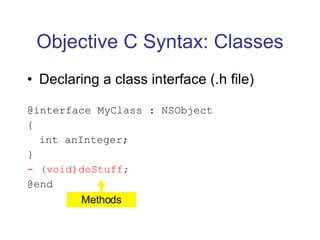
Objective C Syntax: Classes Declaring a class interface (.h file) @interface MyClass : NSObject { int anInteger; } - (void)doStuff; @end Methods
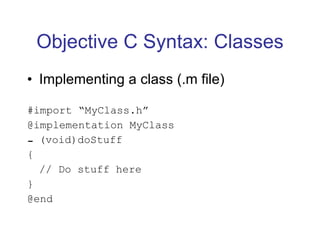
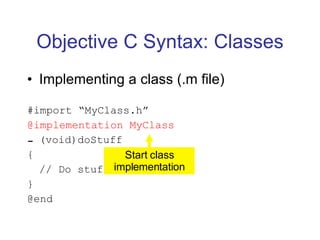
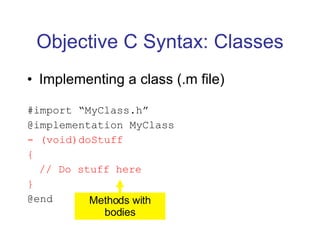
Objective C Syntax: Classes Implementing a class (.m file) #import “MyClass.h” @implementation MyClass (void)doStuff { // Do stuff here } @end
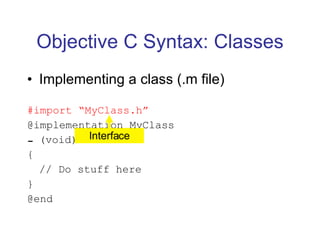
Objective C Syntax: Classes Implementing a class (.m file) #import “MyClass.h” @implementation MyClass (void)doStuff { // Do stuff here } @end Interface
Objective C Syntax: Classes Implementing a class (.m file) #import “MyClass.h” @implementation MyClass (void)doStuff { // Do stuff here } @end Start class implementation
Objective C Syntax: Classes Implementing a class (.m file) #import “MyClass.h” @implementation MyClass - (void)doStuff { // Do stuff here } @end Methods with bodies
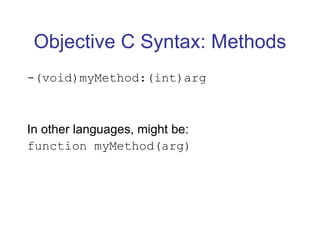
Objective C Syntax: Methods -(void)myMethod:(int)arg In other languages, might be: function myMethod(arg)
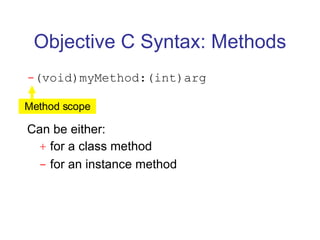
Objective C Syntax: Methods - (void)myMethod:(int)arg Can be either: +  for a class method -  for an instance method Method scope
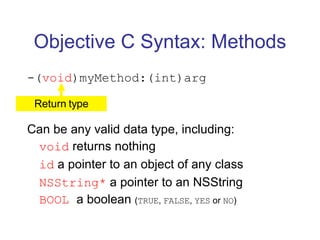
Objective C Syntax: Methods -( void )myMethod:(int)arg Can be any valid data type, including: void  returns nothing id  a pointer to an object of any class NSString*  a pointer to an NSString BOOL  a boolean  ( TRUE ,  FALSE ,  YES  or  NO ) Return type
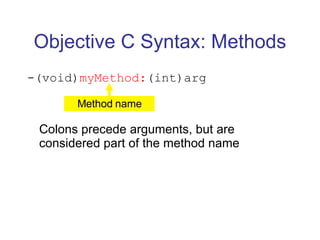
Objective C Syntax: Methods -(void) myMethod: (int)arg Colons precede arguments, but are considered part of the method name Method name
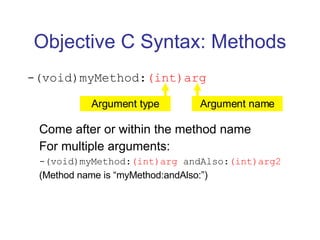
Objective C Syntax: Methods -(void)myMethod: (int)arg Come after or within the method name For multiple arguments: -(void)myMethod: (int)arg  andAlso: (int)arg2 (Method name is “myMethod:andAlso:”) Argument type Argument name
Objective C Syntax: Methods -(void)myMethod:(int)arg1  andAlso:(int)arg2; How to call this method: [myObject myMethod:10 andAlso:20]; In other languages this might be: myObject->myMethod(10, 20);  //or myObject.myMethod(10, 20);
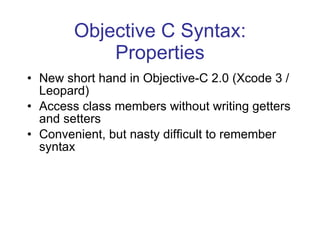
Objective C Syntax: Properties New short hand in Objective-C 2.0 (Xcode 3 / Leopard) Access class members without writing getters and setters Convenient, but nasty difficult to remember syntax
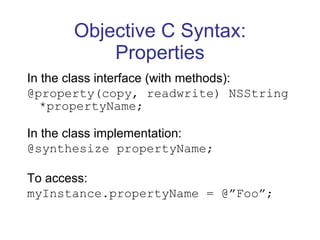
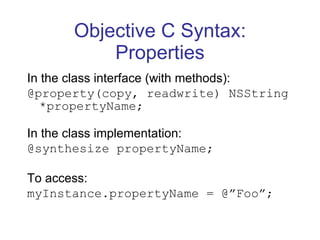
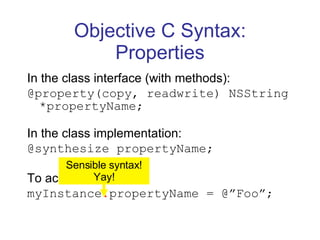
Objective C Syntax: Properties In the class interface (with methods): @property(copy, readwrite) NSString *propertyName; In the class implementation: @synthesize propertyName; To access: myInstance.propertyName = @”Foo”;
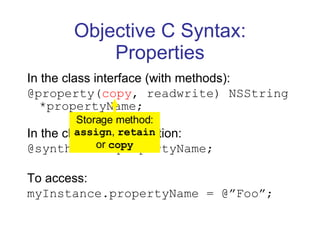
Objective C Syntax: Properties In the class interface (with methods): @property( copy , readwrite) NSString *propertyName; In the class implementation: @synthesize propertyName; To access: myInstance.propertyName = @”Foo”; Storage method:  assign ,  retain  or  copy
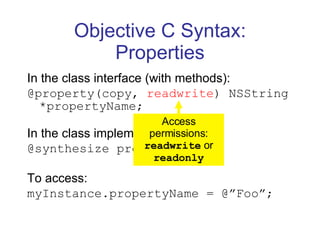
Objective C Syntax: Properties In the class interface (with methods): @property(copy,  readwrite ) NSString *propertyName; In the class implementation: @synthesize propertyName; To access: myInstance.propertyName = @”Foo”; Access permissions:  readwrite  or  readonly
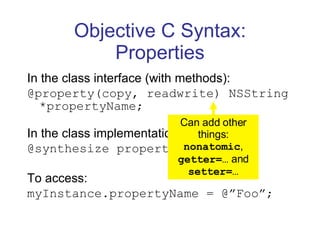
Objective C Syntax: Properties In the class interface (with methods): @property(copy, readwrite) NSString *propertyName; In the class implementation: @synthesize propertyName; To access: myInstance.propertyName = @”Foo”; Can add other things:  nonatomic ,  getter=…  and  setter=…
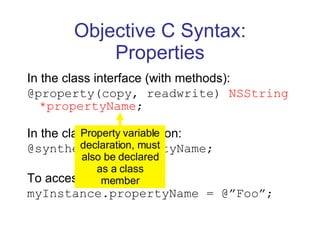
Objective C Syntax: Properties In the class interface (with methods): @property(copy, readwrite)  NSString *propertyName ; In the class implementation: @synthesize propertyName; To access: myInstance.propertyName = @”Foo”; Property variable declaration, must also be declared as a class member
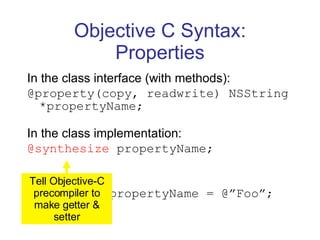
Objective C Syntax: Properties In the class interface (with methods): @property(copy, readwrite) NSString *propertyName; In the class implementation: @synthesize  propertyName; To access: myInstance.propertyName = @”Foo”; Tell Objective-C precompiler to make getter & setter
Objective C Syntax: Properties In the class interface (with methods): @property(copy, readwrite) NSString *propertyName; In the class implementation: @synthesize propertyName; To access: myInstance.propertyName = @”Foo”;
Objective C Syntax: Properties In the class interface (with methods): @property(copy, readwrite) NSString *propertyName; In the class implementation: @synthesize propertyName; To access: myInstance . propertyName = @”Foo”; Sensible syntax! Yay!
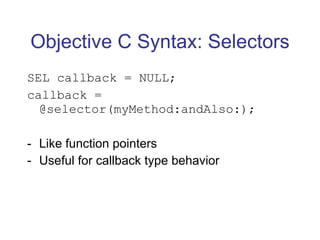
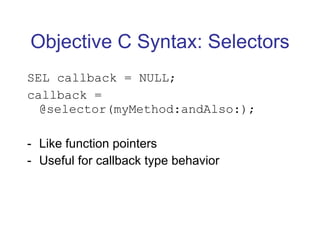
Objective C Syntax: Selectors SEL callback = NULL; callback = @selector(myMethod:andAlso:); Like function pointers Useful for callback type behavior
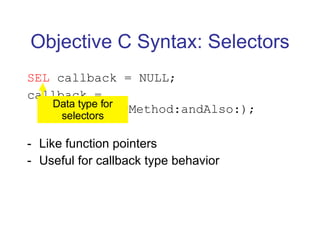
Objective C Syntax: Selectors SEL  callback = NULL; callback = @selector(myMethod:andAlso:); Like function pointers Useful for callback type behavior Data type for selectors
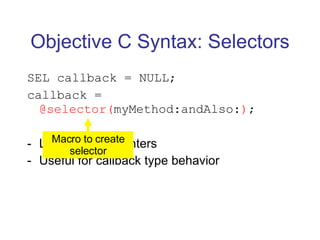
Objective C Syntax: Selectors SEL callback = NULL; callback =  @selector( myMethod:andAlso: ) ; Like function pointers Useful for callback type behavior Macro to create selector
Objective C Syntax: Selectors SEL callback = NULL; callback = @selector(myMethod:andAlso:); Like function pointers Useful for callback type behavior
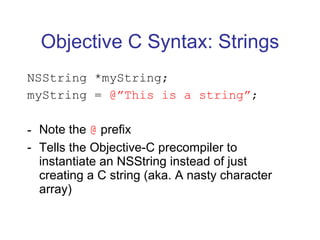
Objective C Syntax: Strings NSString *myString; myString =  @”This is a string” ; Note the  @  prefix Tells the Objective-C precompiler to instantiate an NSString instead of just creating a C string (aka. A nasty character array)
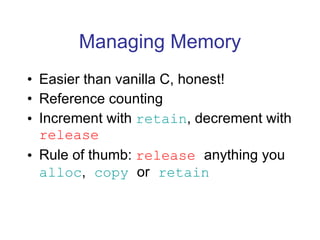
Managing Memory Easier than vanilla C, honest! Reference counting Increment with  retain , decrement with  release Rule of thumb:  release   anything you  alloc ,   copy   or   retain
Managing Memory: Example NSString *str; str = [NSString  alloc ];  //1 [str  retain ];  //2 [str  release ];  //1 [str  release ], str = nil; //0
Managing Memory: Autorelease [str autorelease]; This will automatically release an object when it’s finished with Another rule of thumb: [NSThing thingWith:…] returns an autoreleased instance [[NSThing alloc] initWith:…]   needs manually releasing
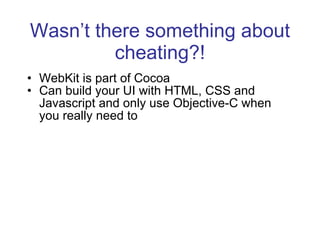
Wasn’t there something about cheating?! WebKit is part of Cocoa Can build your UI with HTML, CSS and Javascript and only use Objective-C when you really need to
Demo
I Can Haz Questions?
K, Thx, Bai! George Brocklehurst http://georgebrock.com @georgebrock on Twitter

Cocoa for Web Developers

  • 1.
    Introduction to OSX development with Cocoa … and how web developers can cheat George Brocklehurst http://georgebrock.com @georgebrock on Twitter
  • 2.
    Before we start…Have you done any… HTML? Javascript? PHP? Any object oriented programming? C?
  • 3.
    What is Cocoa?Framework for Mac OS X and iPhone Heavily MVC focused Usually written in Objective-C Can also be written in Python or Ruby
  • 4.
    Getting Started Youwill need: Apple’s Xcode Tools Available from: http://developer.apple.com/technology/xcode.html Your OS X install DVDs
  • 5.
    Objective C Syntax:Classes Declaring a class interface (.h file) @interface MyClass : NSObject { int anInteger; } - (void)doStuff; @end
  • 6.
    Objective C Syntax:Classes Declaring a class interface (.h file) @interface MyClass : NSObject { int anInteger; } - (void)doStuff; @end Interface only here!
  • 7.
    Objective C Syntax:Classes Declaring a class interface (.h file) @interface MyClass : NSObject { int anInteger; } - (void)doStuff; @end Class name
  • 8.
    Objective C Syntax:Classes Declaring a class interface (.h file) @interface MyClass : NSObject { int anInteger; } - (void)doStuff; @end Parent class
  • 9.
    Objective C Syntax:Classes Declaring a class interface (.h file) @interface MyClass : NSObject { int anInteger; } - (void)doStuff; @end Members
  • 10.
    Objective C Syntax:Classes Declaring a class interface (.h file) @interface MyClass : NSObject { int anInteger; } - (void)doStuff; @end Methods
  • 11.
    Objective C Syntax:Classes Implementing a class (.m file) #import “MyClass.h” @implementation MyClass (void)doStuff { // Do stuff here } @end
  • 12.
    Objective C Syntax:Classes Implementing a class (.m file) #import “MyClass.h” @implementation MyClass (void)doStuff { // Do stuff here } @end Interface
  • 13.
    Objective C Syntax:Classes Implementing a class (.m file) #import “MyClass.h” @implementation MyClass (void)doStuff { // Do stuff here } @end Start class implementation
  • 14.
    Objective C Syntax:Classes Implementing a class (.m file) #import “MyClass.h” @implementation MyClass - (void)doStuff { // Do stuff here } @end Methods with bodies
  • 15.
    Objective C Syntax:Methods -(void)myMethod:(int)arg In other languages, might be: function myMethod(arg)
  • 16.
    Objective C Syntax:Methods - (void)myMethod:(int)arg Can be either: + for a class method - for an instance method Method scope
  • 17.
    Objective C Syntax:Methods -( void )myMethod:(int)arg Can be any valid data type, including: void returns nothing id a pointer to an object of any class NSString* a pointer to an NSString BOOL a boolean ( TRUE , FALSE , YES or NO ) Return type
  • 18.
    Objective C Syntax:Methods -(void) myMethod: (int)arg Colons precede arguments, but are considered part of the method name Method name
  • 19.
    Objective C Syntax:Methods -(void)myMethod: (int)arg Come after or within the method name For multiple arguments: -(void)myMethod: (int)arg andAlso: (int)arg2 (Method name is “myMethod:andAlso:”) Argument type Argument name
  • 20.
    Objective C Syntax:Methods -(void)myMethod:(int)arg1 andAlso:(int)arg2; How to call this method: [myObject myMethod:10 andAlso:20]; In other languages this might be: myObject->myMethod(10, 20); //or myObject.myMethod(10, 20);
  • 21.
    Objective C Syntax:Properties New short hand in Objective-C 2.0 (Xcode 3 / Leopard) Access class members without writing getters and setters Convenient, but nasty difficult to remember syntax
  • 22.
    Objective C Syntax:Properties In the class interface (with methods): @property(copy, readwrite) NSString *propertyName; In the class implementation: @synthesize propertyName; To access: myInstance.propertyName = @”Foo”;
  • 23.
    Objective C Syntax:Properties In the class interface (with methods): @property( copy , readwrite) NSString *propertyName; In the class implementation: @synthesize propertyName; To access: myInstance.propertyName = @”Foo”; Storage method: assign , retain or copy
  • 24.
    Objective C Syntax:Properties In the class interface (with methods): @property(copy, readwrite ) NSString *propertyName; In the class implementation: @synthesize propertyName; To access: myInstance.propertyName = @”Foo”; Access permissions: readwrite or readonly
  • 25.
    Objective C Syntax:Properties In the class interface (with methods): @property(copy, readwrite) NSString *propertyName; In the class implementation: @synthesize propertyName; To access: myInstance.propertyName = @”Foo”; Can add other things: nonatomic , getter=… and setter=…
  • 26.
    Objective C Syntax:Properties In the class interface (with methods): @property(copy, readwrite) NSString *propertyName ; In the class implementation: @synthesize propertyName; To access: myInstance.propertyName = @”Foo”; Property variable declaration, must also be declared as a class member
  • 27.
    Objective C Syntax:Properties In the class interface (with methods): @property(copy, readwrite) NSString *propertyName; In the class implementation: @synthesize propertyName; To access: myInstance.propertyName = @”Foo”; Tell Objective-C precompiler to make getter & setter
  • 28.
    Objective C Syntax:Properties In the class interface (with methods): @property(copy, readwrite) NSString *propertyName; In the class implementation: @synthesize propertyName; To access: myInstance.propertyName = @”Foo”;
  • 29.
    Objective C Syntax:Properties In the class interface (with methods): @property(copy, readwrite) NSString *propertyName; In the class implementation: @synthesize propertyName; To access: myInstance . propertyName = @”Foo”; Sensible syntax! Yay!
  • 30.
    Objective C Syntax:Selectors SEL callback = NULL; callback = @selector(myMethod:andAlso:); Like function pointers Useful for callback type behavior
  • 31.
    Objective C Syntax:Selectors SEL callback = NULL; callback = @selector(myMethod:andAlso:); Like function pointers Useful for callback type behavior Data type for selectors
  • 32.
    Objective C Syntax:Selectors SEL callback = NULL; callback = @selector( myMethod:andAlso: ) ; Like function pointers Useful for callback type behavior Macro to create selector
  • 33.
    Objective C Syntax:Selectors SEL callback = NULL; callback = @selector(myMethod:andAlso:); Like function pointers Useful for callback type behavior
  • 34.
    Objective C Syntax:Strings NSString *myString; myString = @”This is a string” ; Note the @ prefix Tells the Objective-C precompiler to instantiate an NSString instead of just creating a C string (aka. A nasty character array)
  • 35.
    Managing Memory Easierthan vanilla C, honest! Reference counting Increment with retain , decrement with release Rule of thumb: release anything you alloc , copy or retain
  • 36.
    Managing Memory: ExampleNSString *str; str = [NSString alloc ]; //1 [str retain ]; //2 [str release ]; //1 [str release ], str = nil; //0
  • 37.
    Managing Memory: Autorelease[str autorelease]; This will automatically release an object when it’s finished with Another rule of thumb: [NSThing thingWith:…] returns an autoreleased instance [[NSThing alloc] initWith:…] needs manually releasing
  • 38.
    Wasn’t there somethingabout cheating?! WebKit is part of Cocoa Can build your UI with HTML, CSS and Javascript and only use Objective-C when you really need to
  • 39.
  • 40.
    I Can HazQuestions?
  • 41.
    K, Thx, Bai!George Brocklehurst http://georgebrock.com @georgebrock on Twitter