Library ResearchMethods and Databases
Library Research as ResearchBegins with a questionWhat resources are available to study about . . . ?Solves a problemIn order to study . . . , I need to find . . .Requires skillsSpecialized techniquesSpecialized resourcesLeads to a discovery
The ChallengeAsk a question
Find sources of information
Acquire the sources
Examine their content
Read; take notes
Analyze what you find
Outline, write, re-read, write,
Answer the question
Reasoned, defensible
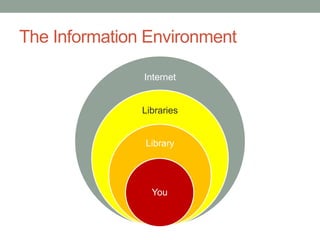
Present resultsThe Information Environment
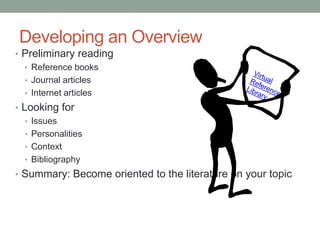
Developing an OverviewPreliminary readingReference booksJournal articlesInternet articlesLooking forIssuesPersonalitiesContextBibliographySummary: Become oriented to the literature on your topicVirtual Reference Library
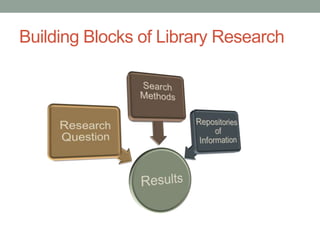
Building Blocks of Library Research
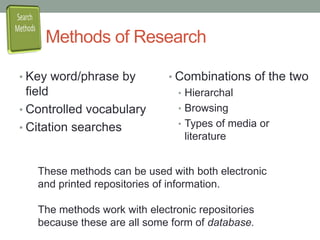
Methods of ResearchKey word/phrase by fieldControlled vocabularyCitation searchesCombinations of the twoHierarchalBrowsingTypes of media or   literatureThese methods can be used with both electronic and printed repositories of information. The methods work with electronic repositories because these are all some form of database.
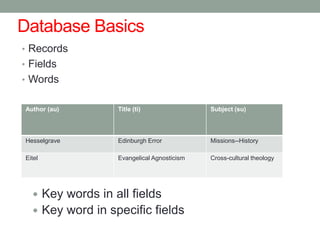
Database BasicsRecordsFieldsWordsKey words in all fields
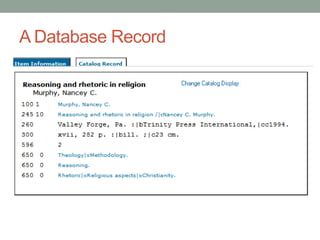
Key word in specific fieldsA Database Record
Searching with KeywordsKeywords are usually nouns or are phrases that include nounsIslamic fundamentalismMuslim fundamentalistsKeywords can also be proper namesOsama Ben Laden (person)Afghanistan (place)Iraq war (historical event)
Choosing KeywordsTerms you knowPeoplePlacesEventsWords and phrases that describe your topicTerms you learnOther personsVariations in nameBroader context of eventBuzz words, colloquialismsJargon, clichésWords found often in titlesWords found in reading
Combining KeywordsBoolean searchesAND narrows a searchOR combines synonyms (broadens a search)NOT excludes words from a search (narrows a search)( ) changes order of operation (think algebraic equations)Proximity searches“enclose in quotes”With (w) or adj (adjacent)Truncation symbols? or * Pre-coordinated subject terms
PrinciplesofKeywordSearchingThink about the terms you will useOR broadens a searchUsed to find synonymsAND and NOT narrow a searchUse NOT exclude terms, dates, etc. The more concepts you link with AND or NOT, the fewer  results you will haveKeyword searches promise “high return, low precision”More about keyword searching
Searching with Controlled VocabularyDefinition
One word or phrase used consciously and repeatedly to describe a cluster of synonyms related to a topic
Some strengths
Finds material on common subject despite variations in descriptive language
One title can have multiple subject headings
Follows set patterns of construction
Widely used throughout North America
Some weaknesses
Requires human judgment
Terms chosen are not always those in common useExamplesLuke’s Case for ChristianityApologetics—Early church, ca 30-600Bible. N.T. Luke—Theology	Habits of the Mind: Intellectual Life as a Christian CallingThought and thinking—Religious aspects—ChristianityIntellect—Religious aspects--Christianity
Epistemology: Becoming Intellectually VirtuousKnowledge, Theory of (Religion)Christianity—TheologyWrestling with the Word: Christian Preaching from the Hebrew BibleBible. O.T.—Homiletical usePreachingThe Act of Bible Reading: A Multi-disciplinary Approach to Biblical InterpretationBible—HermeneuticsBible—Reading
Reading with a Passion: Rhetoric, Autobiography, and the American West in the Gospel of JohnBible. N.T. John—Criticism, interpretation, etc.Reader-response criticismStaley, Jeffrey Lloyd, 1951-  . The Art of Biblical HistoryBible—HermeneuticsBible—HistoriographyHistory (Theology)Christianity—Essence, genius, nature

Library research methods

  • 1.
  • 2.
    Library Research asResearchBegins with a questionWhat resources are available to study about . . . ?Solves a problemIn order to study . . . , I need to find . . .Requires skillsSpecialized techniquesSpecialized resourcesLeads to a discovery
  • 3.
  • 4.
    Find sources ofinformation
  • 5.
  • 6.
  • 7.
  • 8.
  • 9.
  • 10.
  • 11.
  • 12.
  • 13.
    Developing an OverviewPreliminaryreadingReference booksJournal articlesInternet articlesLooking forIssuesPersonalitiesContextBibliographySummary: Become oriented to the literature on your topicVirtual Reference Library
  • 14.
    Building Blocks ofLibrary Research
  • 15.
    Methods of ResearchKeyword/phrase by fieldControlled vocabularyCitation searchesCombinations of the twoHierarchalBrowsingTypes of media or literatureThese methods can be used with both electronic and printed repositories of information. The methods work with electronic repositories because these are all some form of database.
  • 16.
  • 17.
    Key word inspecific fieldsA Database Record
  • 18.
    Searching with KeywordsKeywordsare usually nouns or are phrases that include nounsIslamic fundamentalismMuslim fundamentalistsKeywords can also be proper namesOsama Ben Laden (person)Afghanistan (place)Iraq war (historical event)
  • 19.
    Choosing KeywordsTerms youknowPeoplePlacesEventsWords and phrases that describe your topicTerms you learnOther personsVariations in nameBroader context of eventBuzz words, colloquialismsJargon, clichésWords found often in titlesWords found in reading
  • 20.
    Combining KeywordsBoolean searchesANDnarrows a searchOR combines synonyms (broadens a search)NOT excludes words from a search (narrows a search)( ) changes order of operation (think algebraic equations)Proximity searches“enclose in quotes”With (w) or adj (adjacent)Truncation symbols? or * Pre-coordinated subject terms
  • 21.
    PrinciplesofKeywordSearchingThink about theterms you will useOR broadens a searchUsed to find synonymsAND and NOT narrow a searchUse NOT exclude terms, dates, etc. The more concepts you link with AND or NOT, the fewer results you will haveKeyword searches promise “high return, low precision”More about keyword searching
  • 22.
    Searching with ControlledVocabularyDefinition
  • 23.
    One word orphrase used consciously and repeatedly to describe a cluster of synonyms related to a topic
  • 24.
  • 25.
    Finds material oncommon subject despite variations in descriptive language
  • 26.
    One title canhave multiple subject headings
  • 27.
    Follows set patternsof construction
  • 28.
  • 29.
  • 30.
  • 31.
    Terms chosen arenot always those in common useExamplesLuke’s Case for ChristianityApologetics—Early church, ca 30-600Bible. N.T. Luke—Theology Habits of the Mind: Intellectual Life as a Christian CallingThought and thinking—Religious aspects—ChristianityIntellect—Religious aspects--Christianity
  • 32.
    Epistemology: Becoming IntellectuallyVirtuousKnowledge, Theory of (Religion)Christianity—TheologyWrestling with the Word: Christian Preaching from the Hebrew BibleBible. O.T.—Homiletical usePreachingThe Act of Bible Reading: A Multi-disciplinary Approach to Biblical InterpretationBible—HermeneuticsBible—Reading
  • 33.
    Reading with aPassion: Rhetoric, Autobiography, and the American West in the Gospel of JohnBible. N.T. John—Criticism, interpretation, etc.Reader-response criticismStaley, Jeffrey Lloyd, 1951- . The Art of Biblical HistoryBible—HermeneuticsBible—HistoriographyHistory (Theology)Christianity—Essence, genius, nature

Editor's Notes

  • #4 Your task is take what you know and then build a bibliography so you can later study (read) what others have learned from their research or experience. This way you will expand what you know and, at some point, learn what you and others do not know, so that you make a “contribution to the field.”Incidentally, research is simply reading, note taking, and writing. There is not much glamour to it; computers can help, but cannot substitute for these basics.
  • #5 As you begin your search for resources, remember that you are surrounded by information. At the center is you yourself: what you can recall of what you have learned and experienced, and (for our purposes) your personal library. In the United States, virtually everyone has access to an institutional library, whether at school, in the community, or even in prison. Somewhere close by, there is a library you can call “my library.”Third, in the United States, there are networks of libraries, from the local area, to the state, to the region, and throughout the U.S. (and Canada).Fourth you have the internet—not as a tool for physical exchange of information, but as repository of accessible information.
  • #6 Preliminary reading is important for library research, just as it is for other types of research. One difference is that in addition to “finding a place in the conversation,” you are also looking for clues that will help you find further information: persons, historical and social context, books, articles. You view several full text reference books at http://access.gale.com/ebooks/txshracd2553/The password from off-campus is ‘texas’.You can also connect through the Knowledge Portal by clicking on Virtual Reference Library.
  • #7 Having a clear research question gives direction and helps insure that your searches have the desired results. Understanding and using a variety of search methods builds confidence in your results.Identifying the appropriate repositories of information (i.e., databases) saves you time.
  • #8 Although these methods are often applied to electronic resources, such as journal databases and library catalogs, can also be applied to printed sources.When you scan a book’s index or table of contents you are searching for information within book using key words and phrases.When you are “chasing footnotes” or gleaning resources from a book or article’s bibliography, you are doing citation searches.Printed indexes, such as New Testament Abstracts, add information to individual records in a standardized form to help keep sources together based on common characteristics: Bible book or verse, author, etc. Controlled vocabulary is was developed for use in the library card catalogs; standard forms of author’s names, uniform titles, and standardized subject headings are all examples of controlled vocabulary.
  • #10 This is an example of an unformatted database record from the SWBTS library catalog. The “card” is a record. Each line is a field; in this type of databases, fields can also have subfields. The data is the information within the fields and sub-fields. The blue fields contain meta data. The other information comes from the book itself
  • #11 (See also Badke, 25-34)Keywords can also be phrases: think keywords or key phrases
  • #12 An advantage to keyword searching is that you are not limited to a “controlled vocabulary.” In fact, you can think of keyword searches as “uncontrolled vocabulary searches.” Basically any string of text, including numbers and foreign words, can be used in keyword searching. Title is a hyperlink to UW website that explains problems with choosing words as key words.
  • #13 The power of key word searching is that you can combine terms yourself as you create your search.What are pre-coordinated subject terms? Many controlled vocabulary terms have already been combined, or act as combined headings when placed with a subheading. In such cases, two broad terms have been combined to form a single narrower term, e.g., Religion and Television; or Baptists—Texas.
  • #14 Here are five “rules of thumb” to remember about keyword searches.1. Give some thought to the terms you are going to use. Do not rely just on the first words that come to mind.2. Use OR to combine words and phrases that function like synonyms. EbscoHost lets you combine searches you have already completed. Therefore you search for many terms related to one concept and then combine the results with a second concept to improve precision and return.3. AND is the usual default operator in database searching. This means that when you entering words in a text box, you are searching for the combination of words unless you specify OR or NOT. As you might guess, NOT is the opposite of AND, yet has the same effect on a search. Sometimes it is useful to narrow a concept by excluding terms.4. Since you are combining terms, each term you add with an AND or NOT further restricts the search. If you have several terms connected by these two operators, and have few results, do the search again omitting one of the words.5. “Return” refers to the quantity of search results; “precision” refers to the quality of search results. Experienced searchers strive for a good balance of the two by their choice of words to use and their choice of logical operators to use.Click on blue for some good advice from the librarians at the University of Washington.
  • #15 The definition may not be the best available. How does Mann define “controlled vocabulary”?Authors and publishers use a wide range of vocabulary as titles; this show another reason why you “cannot judge a book by its cover [or title page].” 2) Subject headings can also serve as a broad summary of the book’s contents. However, most book records are assigned only two of three of the broad headings to indicate the content of the book. 3) The pattern of construction has been the subject of attention in the library literature, so it is obviously not an easy matter to explain or learn. One pattern you will often see is that when you have a noun phrase, the noun comes first, followed by the adjective. Another is that when you have two nouns in a heading, the one with broadest meaning (or most commonly used) comes first. Why would these be considered logical? 3.a.) For seminary studies, another valuable feature of set patterns of construction is the consistent ways books and parts of the Bible, personal names, and geographical places are treated—these are patterns that you can, and should, learn (and that we should teach). 4) Libraries in the U.S. and Canada practice “shared cataloging.” This means that almost all libraries use one set of terms as their “controlled vocabulary” and that the headings chosen by the first library to catalog the book are the headings that most other libraries will use, too. Because of the Library of Congress’s “Cataloging in Publication” program, which dates from the early 1970s, staff at the LC will assign the headings. Sidebar: CIP is cooperative arrangement between LC and publishers; the publishers send to LC the galley proofs prior to final publications. This is why you will often find the cataloging information printed in the book itself or information in WorldCat or the LC online catalog before the book is on the market. Weaknesses, which do not outweigh the strengths, are mostly related to the fact that this process is an “art,” not a science. The process requires human judgment which is influenced by a large number of factors [what are some you would you guess?]. It is also an expensive process—especially for the Library of Congress and the U.S. taxpayers. The leadership at the Library of Congress is seriously considering abandoning the practice in favor of computer generated lists based on keywords. Do you think this is a good idea? For one view see Thomas Mann’s recent article "Research at Risk“. 2) a second weakness is that the terms listed in the controlled vocabulary are not always those that are in common use, either because of the way they are constructed or because of how the language has changed. LC will update the headings, but few libraries will make changes to their catalog. Also, just as those who assign the headings need an understanding of the subject area, those who use make the best use of the headings need to an understanding how the headings are created and applied.
  • #16 The next few screens show headings used for some of the books in my office library. Notice the vocabulary, the patterns. When looking at individual titles it is easier to see the weaknesses. When looking at the headings in a library catalog, it is easier to see the strengths. The first part heading is the “main heading”; the second and third parts are “sub-” and “sub-sub-” headings. What observations can you make about the sub (and sub-sub) headings?
  • #17 Remember that the headings were originally, and still primarily, developed for the Library of Congress’s holdings. For a seminary library, the term ‘Preaching’ by itself is usually too broad to be helpful for its users. However, for the Library of Congress, it would be adequate.
  • #18 The use of Staley as a personal subject heading may be an error. The book is not his autobiography but is based on his research based on autobiographies written by pioneers, etc. in the settlement of the western United States. How does the use the single main heading “Bible” differ from the use of the single main heading “Bible. N.T. John”?
  • #19 Here we are introduced to the adjective ‘Biblical’ as part of a heading—as well as the omission of explicit reference to the Bible in a heading for a book about a part of the Bible.
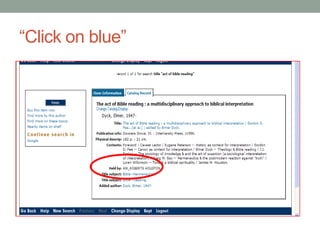
  • #20 In my opinion the most important point to remember about using controlled vocabulary in library or journal database is “click on blue.” This is short-hand for the older version “if you know one book or article on your topic, see which subject headings have been assigned to it, and then use those headings to find other books with those same headings.In computer catalogs, these subject headings are hyperlinks that take you to a list of items that have been assigned that heading.
  • #21 I have circled the subject terms. Notice that author and title are also hyperlinked. This lets you find other books by the same author or other editions of the same work. Technically, authors’ names are another form of controlled vocabulary since librarians also use standard forms of a name to insure uniformity and uniqueness.
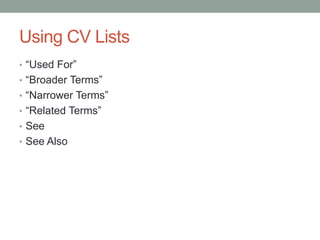
  • #22 Controlled vocabulary lists have an internal structure to show the relationship to other terms in the list. These will sometimes be incorporated into the search results.Used For and See both refer you from a term not on the controlled vocabulary list to a term that is on the controlled vocabulary list. Broader Terms refer to other terms on the list that are considered broader than the one you used.Narrower Terms refer to other terms in the list that are narrower than the one you used.Related Terms refer to other terms in the list considered similar to the one you used.See Also usually refers to broader, narrower, or related terms in addition to the one you use.
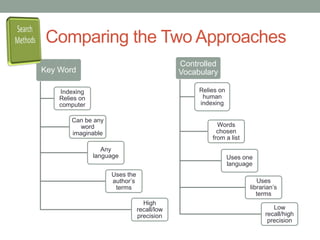
  • #23 These two lists review why using both approaches when searching for information is to your advantage, compared to using one or the other.High recall is librarianese for a search that has a large number of results. Low recall describes a search with few results.High precision means that most of the search results are precisely what you are looking for. Low precision means only a few of the results are relevant.By practice, and by using several search terms, some can achieve high precision/high recall or high precision/low recall. Most of use are content with high recall/low precision and then sort through the results manually, making selections with our brain instead of with someone else’s computer program.
  • #25 Information comes in a variety of formats: printed books, popular magazines, newspapers, peer reviewed journal articles, dissertations and theses, lectures and documentaries recorded on DVDs—to name a few. Library catalogs and larger databases, such as EbscoHost and WorldCat do not limit their contents to one particular format. Instead they add a descriptive term that distinguishes the different formats from each other. Usually “media type” is given as an option on the advanced search page.Some information is better suited for some media types than it is for others. Newspapers: current and past events and related opinion columns; local information, trends, etc.Popular magazines: current and past events, photos (usually copyrighted), opinion columns, overview of current topics or issues. Most popular magazines are written for a specific market or audience, e.g., Christianity Today is written for those interested in evangelical Christianity.Peer reviewed articles in journals are written for specialists and have been recommended for publication by experts in the subject.Dissertations deal with one topic in depth, surveying the background and providing an extensive bibliography.Web pages can be almost anything, published by anyone. Prefer sites that have domains such as .gov, .edu., .ac, .org, .net over the .com domain.
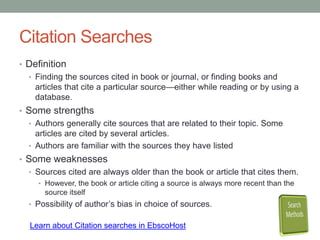
  • #26 Use this search technique to complement key word or controlled vocabulary searches.
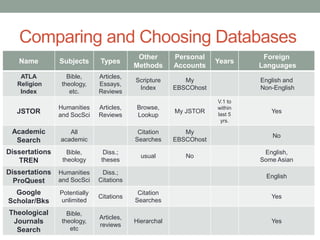
  • #27 This is the type of information you need to learn about the databases you will use often. The following pages can help you fill in the blanks.