Information
Retrieval &
Evaluation (1)
Planning & Running an Information Search
Research is not just
academic
 Finding a phone number


 Ordering a takeaway


 Selecting a broadband provider


 Joining a gym
Information-seeking

Think about a time recently when you were
looking for information.
 How did you identify that you needed
  information?
 What did you do to find the information
  you required (if you were successful!)?
 When did you stop looking?
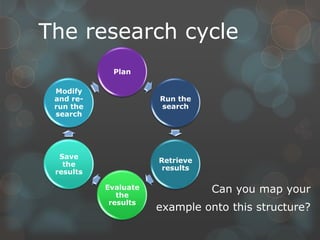
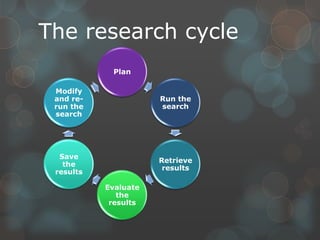
The research cycle
            Plan

 Modify
 and re-              Run the
 run the              search
 search


  Save
                      Retrieve
   the
                       results
 results

           Evaluate
              the
                                 Can you map your
            results
                      example onto this structure?
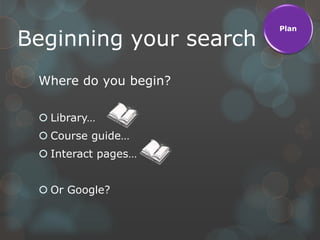
Plan

Beginning your search
 Where do you begin?

  Library…
  Course guide…
  Interact pages…


  Or Google?
Plan

  Planning a search
 What is your research question?
  How else could you ask it?
  Could it be broken down to smaller questions?
  Does the question‟s verb inform your
   approach?


 What level and quality of information is needed?


 Do you need up-to-date or historical sources?
Plan

 Information sources
Anywhere you find information can be called a
source. But some sources are not as reliable as
others.


Match the information sources to their
strengths and weaknesses.


Think about how these strengths can be used
for an assignment, and what you could do to
compensate for the weaknesses.
Plan

  Unreliable sources
 Anonymous authors
 Bias in information provided
 Unsupported or out-of-date information
 Heavy usage of non-academic style
 Populist or sensational focus


 This applies to magazines as well as
  certain websites…
Plan

Planning your search

Devise a search plan for the topic using
what has been discussed in this session. You
can use the grid provided or create your own
layout.
Run the

 Searching sources
                                      search


                                      Retrieve
                                       results

Searching online and with databases


 Search operators („Boolean‟)
 “Phrase searching”
 Advanced search options
Run the

Searching sources
                                          search


Browse-searching of collected             Retrieve
                                           results
materials


 Dewey classes and library collections
 Subject headings
 Interact page
Run the

      Searching sources
                                                                  search


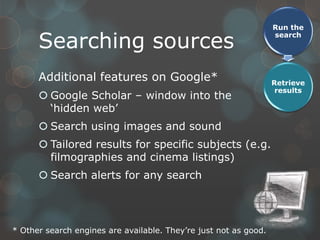
      Additional features on Google*                              Retrieve
                                                                   results
       Google Scholar – window into the
        „hidden web‟
       Search using images and sound
       Tailored results for specific subjects (e.g.
        filmographies and cinema listings)
       Search alerts for any search


* Other search engines are available. They‟re just not as good.
Run the

 Sorting results
                                                search


No quick answer, but the following help:
                                                Retrieve
 „Sort by date‟ brings up-to-date               results

  information to the top of the search list
 „Sort by relevancy‟ will order the results
  according to what the program thinks you
  want using complex „learning‟ algorithms.
 „Sort by availability‟ removes inaccessible
  sources from the search list, reducing
  wasted time trying to access them.
Common retrieval                                           Run the
                                                             search

  problems
 I‟ve got 5m results - information overload!
                                                             Retrieve
    your search is too broad. Filter, sort or start again    results
 I‟ve got no results!
    Your search is too narrow. Re-calibrate your filters and
     try broader or alternate terms
 I‟ve found something which looks good, but can‟t
  get to read it!
    If it is an SNC library item, reserve it
    If you found it using Google, check our subscriptions
    Check if you could read it with walk-in access at the local
     universities
    It may involve extra work, but a key source can make
     the difference between a good grade and a great one!
The research cycle
            Plan

 Modify
 and re-              Run the
 run the              search
 search


  Save
                      Retrieve
   the
                       results
 results

           Evaluate
              the
            results

S5 - ’Powerpoint-style’ presentation example

  • 1.
    Information Retrieval & Evaluation (1) Planning& Running an Information Search
  • 2.
    Research is notjust academic  Finding a phone number  Ordering a takeaway  Selecting a broadband provider  Joining a gym
  • 3.
    Information-seeking Think about atime recently when you were looking for information.  How did you identify that you needed information?  What did you do to find the information you required (if you were successful!)?  When did you stop looking?
  • 4.
    The research cycle Plan Modify and re- Run the run the search search Save Retrieve the results results Evaluate the Can you map your results example onto this structure?
  • 5.
    Plan Beginning your search Where do you begin?  Library…  Course guide…  Interact pages…  Or Google?
  • 6.
    Plan Planninga search  What is your research question? How else could you ask it? Could it be broken down to smaller questions? Does the question‟s verb inform your approach?  What level and quality of information is needed?  Do you need up-to-date or historical sources?
  • 7.
    Plan Information sources Anywhereyou find information can be called a source. But some sources are not as reliable as others. Match the information sources to their strengths and weaknesses. Think about how these strengths can be used for an assignment, and what you could do to compensate for the weaknesses.
  • 8.
    Plan Unreliablesources  Anonymous authors  Bias in information provided  Unsupported or out-of-date information  Heavy usage of non-academic style  Populist or sensational focus  This applies to magazines as well as certain websites…
  • 9.
    Plan Planning your search Devisea search plan for the topic using what has been discussed in this session. You can use the grid provided or create your own layout.
  • 10.
    Run the Searchingsources search Retrieve results Searching online and with databases  Search operators („Boolean‟)  “Phrase searching”  Advanced search options
  • 11.
    Run the Searching sources search Browse-searching of collected Retrieve results materials  Dewey classes and library collections  Subject headings  Interact page
  • 12.
    Run the Searching sources search Additional features on Google* Retrieve results  Google Scholar – window into the „hidden web‟  Search using images and sound  Tailored results for specific subjects (e.g. filmographies and cinema listings)  Search alerts for any search * Other search engines are available. They‟re just not as good.
  • 13.
    Run the Sortingresults search No quick answer, but the following help: Retrieve  „Sort by date‟ brings up-to-date results information to the top of the search list  „Sort by relevancy‟ will order the results according to what the program thinks you want using complex „learning‟ algorithms.  „Sort by availability‟ removes inaccessible sources from the search list, reducing wasted time trying to access them.
  • 14.
    Common retrieval Run the search problems  I‟ve got 5m results - information overload! Retrieve  your search is too broad. Filter, sort or start again results  I‟ve got no results!  Your search is too narrow. Re-calibrate your filters and try broader or alternate terms  I‟ve found something which looks good, but can‟t get to read it!  If it is an SNC library item, reserve it  If you found it using Google, check our subscriptions  Check if you could read it with walk-in access at the local universities  It may involve extra work, but a key source can make the difference between a good grade and a great one!
  • 15.
    The research cycle Plan Modify and re- Run the run the search search Save Retrieve the results results Evaluate the results

Editor's Notes

  • #4 Exercise – 2 minute scribble
  • #5 Feedback opportunity – key learning point that Research needs to continue beyond first answer found
  • #6 Link 1 – library catalogue (3 min demo)Link 2 – LLRC E-Res [Interact] (3 min demo, discussing access route and key resources)
  • #8 Link – matching exercise (student volunteer, 3mins)
  • #9 Link – SNC wikipedia page (out-of-date, inaccurate, poorly supported by evidence)
  • #10 Exercise – 5 minutes, possibly more
  • #11 Left link –Youtube video on databases (2.5 mins)Right link – variety of results from different databases (1.5 mins click-through & explain)
  • #13 Link – Youtube video – Google’s pitfalls and appropriate use (3.25 mins)Another (increasingly-common) downside is ‘filter bubbles’*, especially when logged in to Google or on a machine you have used a lot and consequently is a cookie-monster. * Term coined by Eli Pariser. Posits that Google identifies what you're interested in and adjusts the results you see along these lines, meaning that you see more of what you like and less of what you don't. This can mislead you regarding the breadth of information available as contrary-but-important information is pushed further down the results list. (Adapted from BRADLEY, P., 2012. DuckDuckGo. http://philbradley.typepad.com/phil_bradleys_weblog/2012/10/duckduckgo-attacks-googles-filter-bubble.html, [accessed 29/10/12])