V1.0
GETTING THINGS DONE
Explained in 5 Min
— Summary —
★ How to Be Uber-Productive
★ Intro to Productivity Philosophy ‘GTD’
What you’ll learn
★ ‘Getting Things Done’ by David Allen
Sources
StartupGeist.com
By Danny Holtschke
Startup, Zen & Productivity Freak
A productivity system helps to
make better decisions.
V1.0
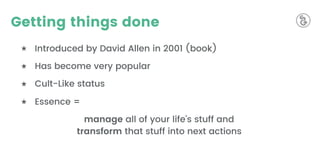
Getting things done
★ Introduced by David Allen in 2001 (book)
★ Has become very popular
★ Cult-Like status
★ Essence =
manage all of your life’s stuff and
transform that stuff into next actions
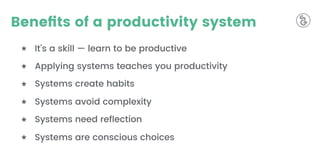
Benefits of a productivity system
★ It’s a skill — learn to be productive
★ Applying systems teaches you productivity
★ Systems create habits
★ Systems avoid complexity
★ Systems need reflection
★ Systems are conscious choices
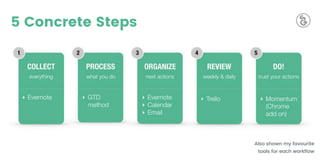
5 Concrete Steps
Also shown my favourite
tools for each workflow
#1: CAPTURE
The goal is to keep
nothing on your mind.
V1.0
#1: Capture & collect
Three success factors for capturing well
★ get it all of your head
★ minimize capture locations
★ empty capture tools regularly
#2: PROCESS
What is the next action?
V1.0
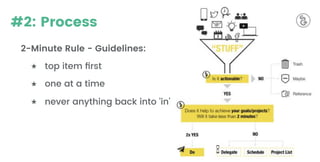
#2: Process
2-Minute Rule - Guidelines:
★ top item first
★ one at a time
★ never anything back into ‘in'
#3: ORGANIZE
How to remember a next action?
V1.0
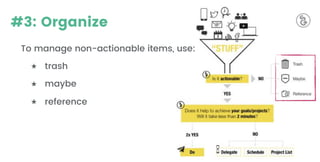
#3: Organize
To manage non-actionable items, use:
★ trash
★ maybe
★ reference
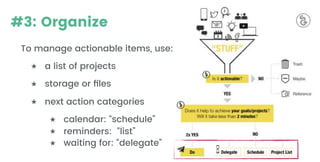
#3: Organize
To manage actionable items, use:
★ a list of projects
★ storage or files
★ next action categories
★ calendar: “schedule”
★ reminders: “list”
★ waiting for: “delegate”
#4: REVIEW
The weekly review is the
most important ‘next action’.
V1.0
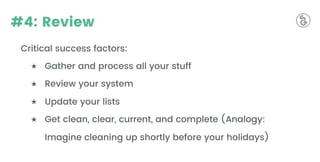
#4: Review
Critical success factors:
★ Gather and process all your stuff
★ Review your system
★ Update your lists
★ Get clean, clear, current, and complete (Analogy:
Imagine cleaning up shortly before your holidays)
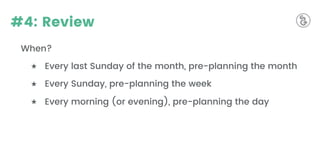
#4: Review
When?
★ Every last Sunday of the month, pre-planning the month
★ Every Sunday, pre-planning the week
★ Every morning (or evening), pre-planning the day
#5: DO
At this point, you should always
know what your next action is.
V1.0
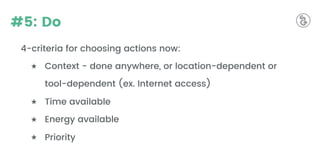
#5: Do
4-criteria for choosing actions now:
★ Context - done anywhere, or location-dependent or
tool-dependent (ex. Internet access)
★ Time available
★ Energy available
★ Priority
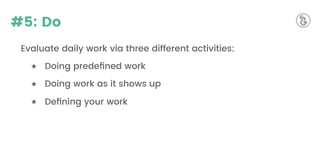
#5: Do
Evaluate daily work via three different activities:
★ Doing predefined work
★ Doing work as it shows up
★ Defining your work
V1.0
What’s your experience?
Have you implemented GTD once, but didn't use it
consistently? Why? What is holding you back?
Send me an email
Digital Essentials - Double
Your Productivity & Focus
Video Course based on GTD*
Stay tuned for
* The Ultimate Personal Productivity System from David Allen

Getting Things Done (GTD) by David Allen

  • 1.
    V1.0 GETTING THINGS DONE Explainedin 5 Min — Summary —
  • 2.
    ★ How toBe Uber-Productive ★ Intro to Productivity Philosophy ‘GTD’ What you’ll learn ★ ‘Getting Things Done’ by David Allen Sources
  • 3.
  • 4.
    A productivity systemhelps to make better decisions. V1.0
  • 5.
    Getting things done ★Introduced by David Allen in 2001 (book) ★ Has become very popular ★ Cult-Like status ★ Essence = manage all of your life’s stuff and transform that stuff into next actions
  • 6.
    Benefits of aproductivity system ★ It’s a skill — learn to be productive ★ Applying systems teaches you productivity ★ Systems create habits ★ Systems avoid complexity ★ Systems need reflection ★ Systems are conscious choices
  • 7.
    5 Concrete Steps Alsoshown my favourite tools for each workflow
  • 8.
    #1: CAPTURE The goalis to keep nothing on your mind. V1.0
  • 9.
    #1: Capture &collect Three success factors for capturing well ★ get it all of your head ★ minimize capture locations ★ empty capture tools regularly
  • 10.
    #2: PROCESS What isthe next action? V1.0
  • 11.
    #2: Process 2-Minute Rule- Guidelines: ★ top item first ★ one at a time ★ never anything back into ‘in'
  • 12.
    #3: ORGANIZE How toremember a next action? V1.0
  • 13.
    #3: Organize To managenon-actionable items, use: ★ trash ★ maybe ★ reference
  • 14.
    #3: Organize To manageactionable items, use: ★ a list of projects ★ storage or files ★ next action categories ★ calendar: “schedule” ★ reminders: “list” ★ waiting for: “delegate”
  • 15.
    #4: REVIEW The weeklyreview is the most important ‘next action’. V1.0
  • 16.
    #4: Review Critical successfactors: ★ Gather and process all your stuff ★ Review your system ★ Update your lists ★ Get clean, clear, current, and complete (Analogy: Imagine cleaning up shortly before your holidays)
  • 17.
    #4: Review When? ★ Everylast Sunday of the month, pre-planning the month ★ Every Sunday, pre-planning the week ★ Every morning (or evening), pre-planning the day
  • 18.
    #5: DO At thispoint, you should always know what your next action is. V1.0
  • 19.
    #5: Do 4-criteria forchoosing actions now: ★ Context - done anywhere, or location-dependent or tool-dependent (ex. Internet access) ★ Time available ★ Energy available ★ Priority
  • 20.
    #5: Do Evaluate dailywork via three different activities: ★ Doing predefined work ★ Doing work as it shows up ★ Defining your work
  • 21.
    V1.0 What’s your experience? Haveyou implemented GTD once, but didn't use it consistently? Why? What is holding you back? Send me an email
  • 22.
    Digital Essentials -Double Your Productivity & Focus Video Course based on GTD* Stay tuned for * The Ultimate Personal Productivity System from David Allen