LIBRARY RESEARCH SKILLS IN
ENGINEERING
Seminaris de recerca
March 2019
Some questions
I want to read an article, I googled it,
but was asked to pay $$$. What’s up?!
I need articles on PID controllers,
I tried looking in the catalogue,
but only found books. Are there no articles?
I have a lot of bibliographic references
but I never find what I need :-(
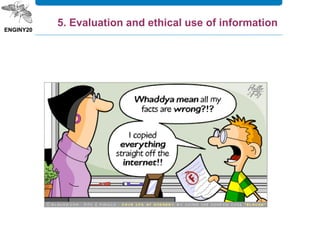
Can I use an image which I googled
for my academic work?
Some questions
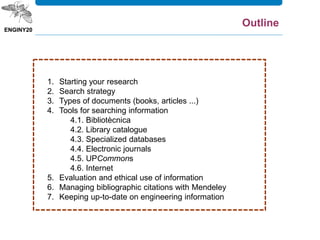
1. Starting your research
2. Search strategy
3. Types of documents (books, articles ...)
4. Tools for searching information
4.1. Bibliotècnica
4.2. Library catalogue
4.3. Specialized databases
4.4. Electronic journals
4.5. UPCommons
4.6. Internet
5. Evaluation and ethical use of information
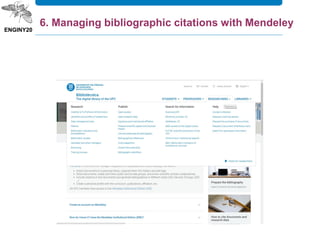
6. Managing bibliographic citations with Mendeley
7. Keeping up-to-date on engineering information
Outline
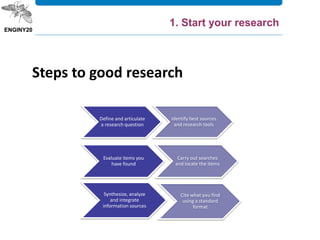
1. Start your research
Steps to good research
Define and articulate
a research question
Identify best sources
and research tools
Evaluate items you
have found
Carry out searches
and locate the items
Synthesize, analyze
and integrate
information sources
Cite what you find
using a standard
format
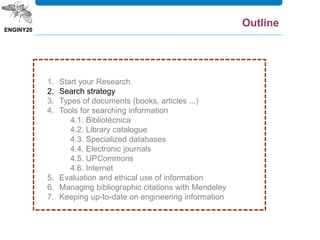
1. Start your Research
2. Search strategy
3. Types of documents (books, articles ...)
4. Tools for searching information
4.1. Bibliotècnica
4.2. Library catalogue
4.3. Specialized databases
4.4. Electronic journals
4.5. UPCommons
4.6. Internet
5. Evaluation and ethical use of information
6. Managing bibliographic citations with Mendeley
7. Keeping up-to-date on engineering information
Outline
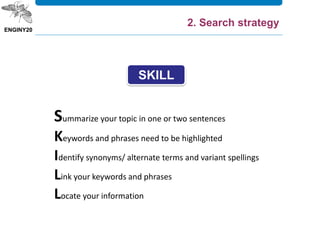
Summarize your topic in one or two sentences
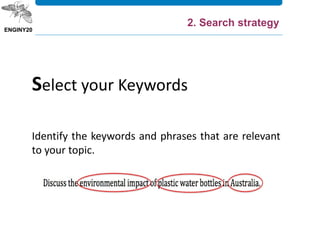
Keywords and phrases need to be highlighted
Identify synonyms/ alternate terms and variant spellings
Link your keywords and phrases
Locate your information
SKILL
2. Search strategy
Summarise your topic in one or two sentences.
Summarize your topic
2. Search strategy
Identify the keywords and phrases that are relevant
to your topic.
Select your Keywords
2. Search strategy
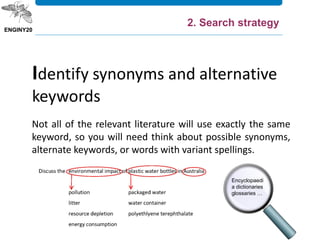
Not all of the relevant literature will use exactly the same
keyword, so you will need think about possible synonyms,
alternate keywords, or words with variant spellings.
Identify synonyms and alternative
keywords
Encyclopaedi
a dictionaries
glossaries …
2. Search strategy
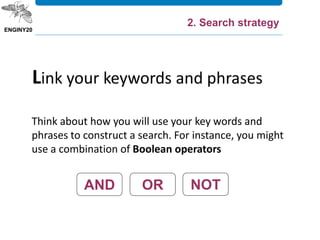
Think about how you will use your key words and
phrases to construct a search. For instance, you might
use a combination of Boolean operators
Link your keywords and phrases
2. Search strategy
AND OR NOT
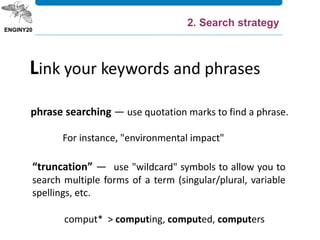
phrase searching — use quotation marks to find a phrase.
For instance, "environmental impact"
Link your keywords and phrases
“truncation” — use "wildcard" symbols to allow you to
search multiple forms of a term (singular/plural, variable
spellings, etc.
comput* > computing, computed, computers
2. Search strategy
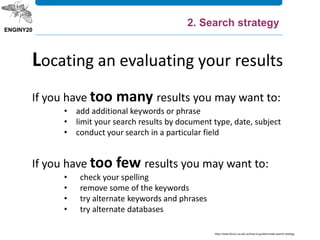
If you have too many results you may want to:
• add additional keywords or phrase
• limit your search results by document type, date, subject
• conduct your search in a particular field
If you have too few results you may want to:
• check your spelling
• remove some of the keywords
• try alternate keywords and phrases
• try alternate databases
Locating an evaluating your results
https://www.library.uq.edu.au/how-to-guides/create-search-strategy
2. Search strategy
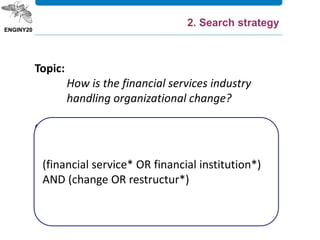
Topic:
How is the financial services industry
handling organizational change?
Concepts:
financial services
change
Synonyms:
financial institutions
restructur*
(financial service* OR financial institution*)
AND (change OR restructur*)
2. Search strategy
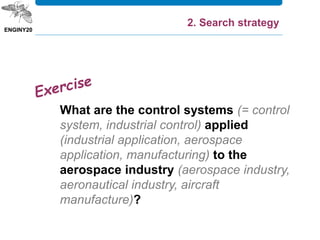
What are the control systems (= control
system, industrial control) applied
(industrial application, aerospace
application, manufacturing) to the
aerospace industry (aerospace industry,
aeronautical industry, aircraft
manufacture)?
2. Search strategy
1. Start your Research
2. Search strategy
3. Types of documents (books, articles ...)
4. Tools for searching information
4.1. Bibliotècnica
4.2. Library catalogue
4.3. Specialized databases
4.4. Electronic journals
4.5. UPCommons
4.6. Internet
5. Evaluation and ethical use of information
6. Managing bibliographic citations with Mendeley
7. Keeping up-to-date on engineering information
Outline
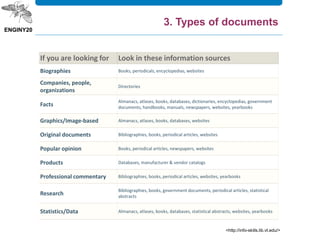
If you are looking for Look in these information sources
Biographies Books, periodicals, encyclopedias, websites
Companies, people,
organizations
Directories
Facts
Almanacs, atlases, books, databases, dictionaries, encyclopedias, government
documents, handbooks, manuals, newspapers, websites, yearbooks
Graphics/Image-based Almanacs, atlases, books, databases, websites
Original documents Bibliographies, books, periodical articles, websites
Popular opinion Books, periodical articles, newspapers, websites
Products Databases, manufacturer & vendor catalogs
Professional commentary Bibliographies, books, periodical articles, websites, yearbooks
Research
Bibliographies, books, government documents, periodical articles, statistical
abstracts
Statistics/Data Almanacs, atlases, books, databases, statistical abstracts, websites, yearbooks
<http://info-skills.lib.vt.edu/>
3. Types of documents
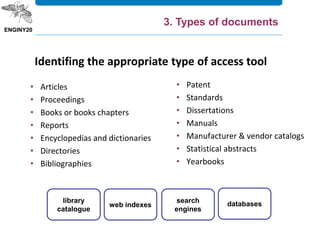
• Articles
• Proceedings
• Books or books chapters
• Reports
• Encyclopedias and dictionaries
• Directories
• Bibliographies
• Patent
• Standards
• Dissertations
• Manuals
• Manufacturer & vendor catalogs
• Statistical abstracts
• Yearbooks
Identifing the appropriate type of access tool
library
catalogue
web indexes
search
engines
databases
3. Types of documents
1. Start your Research
2. Search strategy
3. Types of documents (books, articles ...)
4. Tools for searching information
4.1. Bibliotècnica
4.2. Library catalogue
4.3. Specialized databases
4.4. Electronic journals
4.5. UPCommons
4.6. Internet
5. Evaluation and ethical use of information
6. Managing bibliographic citations with Mendeley
7. Keeping up-to-date on engineering information
Outline
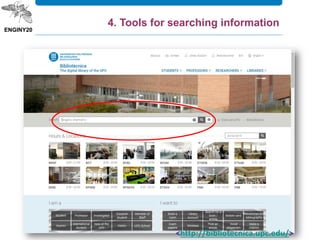
<http://bibliotecnica.upc.edu/>
4. Tools for searching information
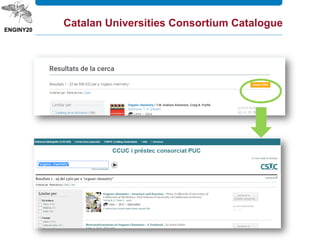
Catalan Universities Consortium Catalogue
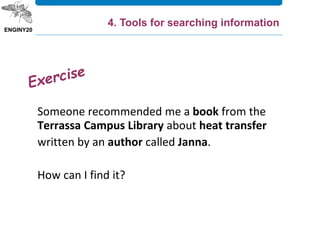
Someone recommended me a book from the
Terrassa Campus Library about heat transfer
written by an author called Janna.
How can I find it?
4. Tools for searching information
w can I find it?
And how can I find this?
Malaval, P., Béaroya, C., Aflalo, J. Aerospace
marketing management : a handbook for the entire
value chain. Management for professionals.
Heidelberg [etc.] : Springer, cop. 2014. ISBN 978-3-
319-01354-1
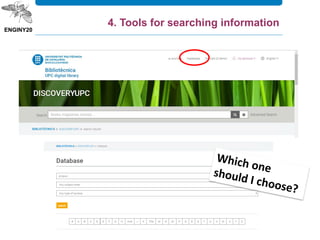
DiscoveryUPC
A database may contain: Citations
Citation & Abstracts
Full Text
4. Tools for searching information
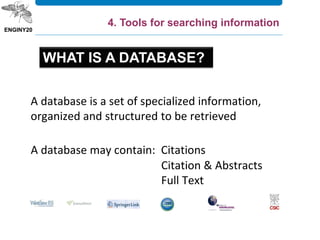
A database is a set of specialized information,
organized and structured to be retrieved
WHAT IS A DATABASE?
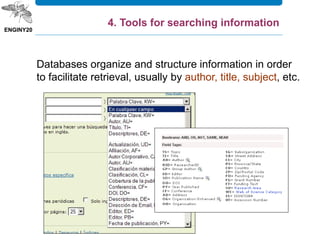
Databases organize and structure information in order
to facilitate retrieval, usually by author, title, subject, etc.
4. Tools for searching information
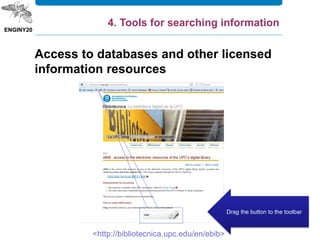
<http://bibliotecnica.upc.edu/en/ebib>
Drag the button to the toolbar
Access to databases and other licensed
information resources
4. Tools for searching information
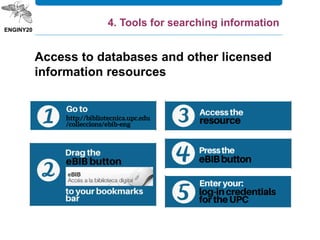
Access to databases and other licensed
information resources
Scopus is the largest abstract and citation database of peer-reviewed
literature: scientific journals, books and conference proceedings.
Delivering a comprehensive overview of the world's research output in
the fields of science, technology, medicine, social sciences, and arts and
humanities, Scopus features smart tools to track, analyze and visualize
research.
Scopus (Elsevier)
4. Tools for searching information
SCOPUS
I am looking for recent
articles on human factors
in helicopter accidents
4. Tools for searching information
On Engineering Village platform, Compendex (Engineering Index)
provides international coverage of engineering and applied science
literature in over 5000 journals, conference proceedings, and technical
reports.
The broad subject areas of engineering and applied science are
comprehensively represented. Coverage includes nuclear technology,
bioengineering, transportation, chemical and process engineering, light
and optical technology, agricultural engineering and food technology,
computers and data processing, applied physics, electronics and
communications, control, civil, mechanical, materials, petroleum,
aerospace and automotive engineering as well as narrower subtopics
within all these and other major engineering fields.
Compendex / Inspec
4. Tools for searching information
It contains material published mainly by the Institute of Electrical
and Electronics Engineers (IEEE) and other partner
publishers. IEEE Xplore provides web access to more than 4.5-
million documents from publications in computer science,
electrical engineering, electronics and allied fields.
IEEE Xplore
4. Tools for searching information
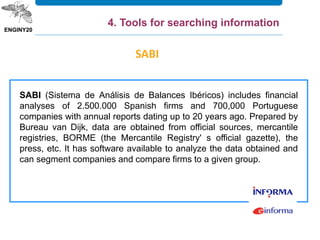
SABI (Sistema de Análisis de Balances Ibéricos) includes financial
analyses of 2.500.000 Spanish firms and 700,000 Portuguese
companies with annual reports dating up to 20 years ago. Prepared by
Bureau van Dijk, data are obtained from official sources, mercantile
registries, BORME (the Mercantile Registry' s official gazette), the
press, etc. It has software available to analyze the data obtained and
can segment companies and compare firms to a given group.
SABI
4. Tools for searching information
SABI allows you to carry out different financial and credit
functions, including:
• You would be able to set up a permanent file of your customers
and suppliers in order to track their financial progress according
to the criteria you are interested in.
• You would be able to make credit analyses adapted to each
particular case.
• Prepare periodic reports according to your own design.
• Position a company with regard to its competitors.
• Identify candidates for company acquisitions, mergers or
associations.
• Receive input for the development of internal rating provision.
http://www.informa.es/en/soluciones-financieras/sabi
4. Tools for searching information
Factiva is a business information and research tool owned by Dow
Jones & Company. Factiva aggregates content from both licensed and
free sources, and provides organizations with search, alerting,
dissemination, and other information management capabilities. Factiva
products provide access to more than 32,000 sources (such as
newspapers, journals, magazines, television and radio transcripts,
photos, etc.) from nearly every country worldwide in 28 languages,
including more than 600 continuously updated newswires.
FACTIVA
4. Tools for searching information
Bibliographic databases
FACTIVA
I am looking for
information about the
pollination with drones
ÍnDICEs-CSIC
The ÍnDICEs-CSIC bibliographic database covers the Spanish
scientific production published in Spain from the 70s up to date. It
mostly includes articles from scientific journals, but also a
selection of congress and conference proceedings, serials,
compilations, reports and monographies about social sciences,
humanities and technology.
4. Tools for searching information
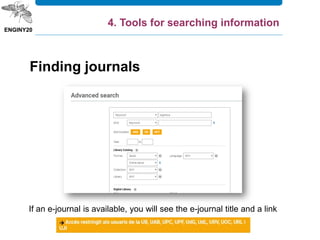
Finding journals
If an e-journal is available, you will see the e-journal title and a link
4. Tools for searching information
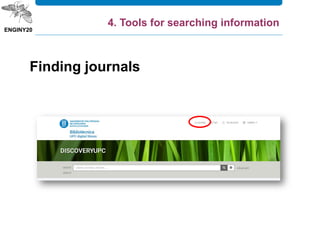
Finding journals
4. Tools for searching information
Barjis, Joseph; Fosso Wamba, Samuel. Organizational
and business impacts of RFID technology. Business
Process Management Journal, 2010, vol. 16, núm. 6, p.
897-903
4. Tools for searching information
Guzmán Cuevas, Joaquín J.; Martínez Román, Juan
Antonio. Tipología de la innovación y perfiles
empresariales: una aplicación empírica. Economía
Industrial, 2008, núm. 368, p. 59-77
UPCommons is the gateway that provides open access
to the knowledge of UPC. It is formed by the group of
UPC open institutional repositories and its aim is to
guarantee the safeguarding of the material produced
by lecturers and researchers at the University,
maximizing their visibility and, consequently, increasing
its impact on education and research worldwide.
4. Tools for searching information
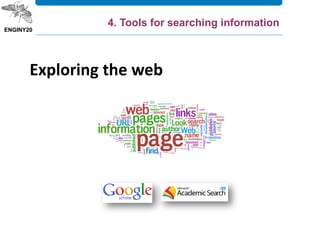
Exploring the web
4. Tools for searching information
1. Start your Research
2. Search strategy
3. Types of documents (books, articles ...)
4. Tools for searching information
4.1. Bibliotècnica
4.2. Library catalogue
4.3. Specialized databases
4.4. Electronic journals
4.5. UPCommons
4.6. Internet
5. Evaluation and ethical use of information
6. Managing bibliographic citations with Mendeley
7. Keeping up-to-date on engineering information
Outline
5. Evaluation and ethical use of information
Citation and plagiarism
Bear in mind to cite the sources you have used to support the
arguments of your work.
Faithfully reproduce the texts or images indicating the author and
the source from where you took it, whether from a book, a booklet,
a Web page, etc.
If you do not do this, you would be plagiarizing.
5. Evaluation and ethical use of information
Plagiarism
Plagiarism is understood to be the reproduction of a
substantial content of another work pretending it to be one's
own.
Therefore:
• Create your own arguments; don't simply "copy-paste“
• Indicate fragments from other works that you are quoting
between inverted commas ("") and remember to indicate
the source and author (bibliographical reference).
• Paraphrase
5. Evaluation and ethical use of information
5%
25%
42%
83%
19% 15%
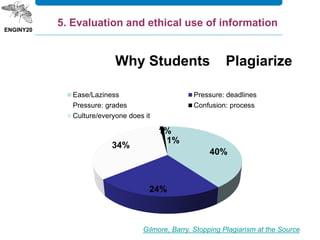
Gilmore, Barry. Stopping Plagiarism at the Source
40%
24%
34%
1%
1%
Why Students Plagiarize
Ease/Laziness Pressure: deadlines
Pressure: grades Confusion: process
Culture/everyone does it
5. Evaluation and ethical use of information
• Direct quotes.
• Paraphrasing or summarizing.
• Information which may be common knowledge
but still unfamiliar to your reader.
• Not just books or articles should be cited.
• Whenever you are not sure if something should
be cited.
5. Evaluation and ethical use of information
WHEN TO CITE
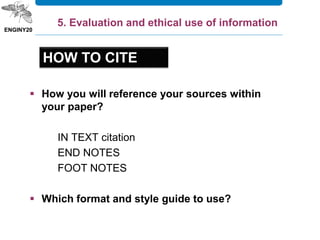
 How you will reference your sources within
your paper?
IN TEXT citation
END NOTES
FOOT NOTES
 Which format and style guide to use?
HOW TO CITE
5. Evaluation and ethical use of information
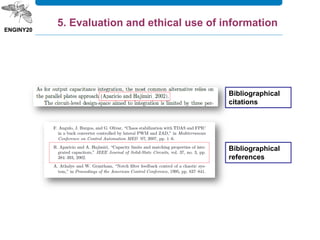
Bibliographical
citations
Bibliographical
references
5. Evaluation and ethical use of information
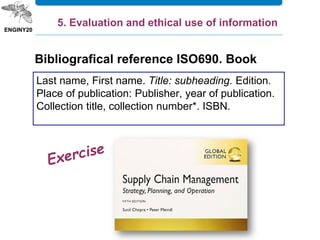
Last name, First name. Title: subheading. Edition.
Place of publication: Publisher, year of publication.
Collection title, collection number*. ISBN.
5. Evaluation and ethical use of information
Bibliografical reference ISO690. Book
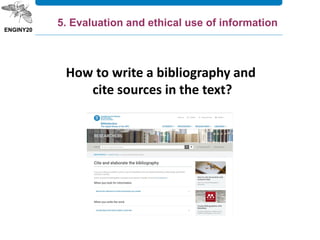
How to write a bibliography and
cite sources in the text?
5. Evaluation and ethical use of information
Calvo Fernández, S. / Reinares Lara, P. (2001). Comunicación en Internet:
Estrategias de márketing y comunicación interactiva. Ed. Paraninfo
Clark, Josh. Diseño y usabilidad de aplicaciones para iPhone. Madrid: Anaya
Multimedia, 2011. ISBN 97-8844151-034-0
Brian McConnell, Alexander Tolley. A Design for a Reusable Water-Based
Spacecraft Known as the Spacecoach. Cham : Springer International
Publishing : Imprint: Springer, 2016. ISBN 9783319226774
Nielsen, Jacob. Usability inspection methods. Paper presented at: Conference
companion on Human factors in computing systems. Human Factors in
Computing Systems. Nova York: ACM, 2004. p. 413-414
Reed, M., ed. Organic food and agriculture [online]: new trends and
developments in the social sciences. Rikeja: InTech, 2012. Accessed 12
January 2015. ISBN 97-8953307-764-2. Available at:
<http://dx.doi.org/10.5772/1526>.
5. Evaluation and ethical use of information
1. Start your Research
2. Search strategy
3. Types of documents (books, articles ...)
4. Tools for searching information
4.1. Bibliotècnica
4.2. Library catalogue
4.3. Specialized databases
4.4. Electronic journals
4.5. UPCommons
4.6. Internet
5. Evaluation and ethical use of information
6. Managing bibliographic citations with Mendeley
7. Keeping up-to-date on engineering information
Outline
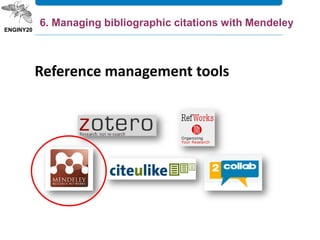
Reference management tools
6. Managing bibliographic citations with Mendeley
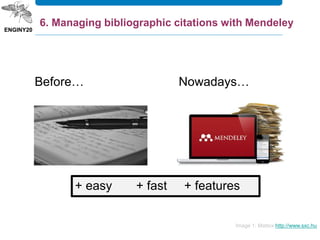
Before… Nowadays…
Image 1: Mattox http://www.sxc.hu
+ easy + fast + features
6. Managing bibliographic citations with Mendeley
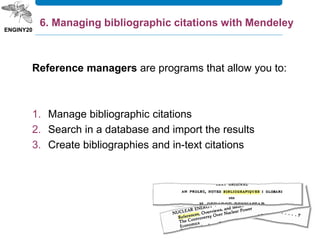
Reference managers are programs that allow you to:
1. Manage bibliographic citations
2. Search in a database and import the results
3. Create bibliographies and in-text citations
6. Managing bibliographic citations with Mendeley
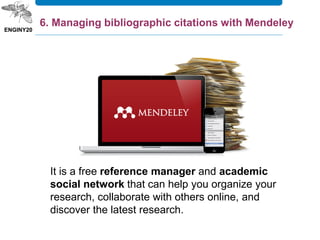
It is a free reference manager and academic
social network that can help you organize your
research, collaborate with others online, and
discover the latest research.
6. Managing bibliographic citations with Mendeley
Mendeley – what’s it for?
 Import documents to your personal library and organize
them through tags and folders.
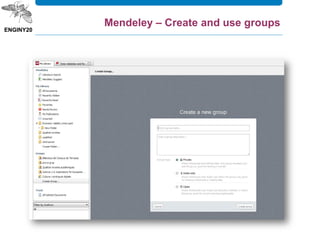
 Share your research: create public & private groups,
share documents, collaborative work in academic articles
review or following groups.
 Include citations to Word documents and generate
bibliographies.
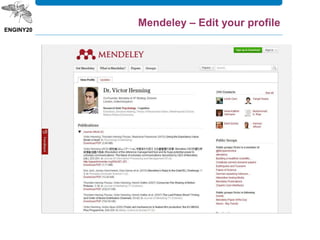
 Create a profile with your curriculum, publications,
affiliation, etc.
6. Managing bibliographic citations with Mendeley
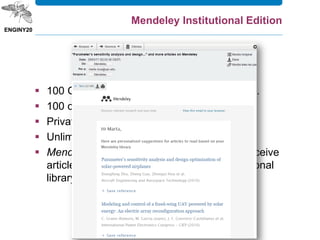
Mendeley Institutional Edition
 100 GB of storage space for individual users.
 100 collaborators.
 Private groups up to 25 members.
 Unlimited number of private groups.
 Mendeley suggest in the desktop utility to receive
article recommendations based in your personal
library.
How to obtain these advantages?
 You need to have an UPC email address in your
Mendeley Profile (if it is not an UPC address,
click on your name > Settings & Privacy to
change the address)
 You need to be a member of the UPC group
“Universitat Politecnica de Catalunya“
Mendeley Institutional Edition
6. Managing bibliographic citations with Mendeley
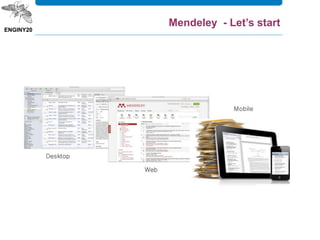
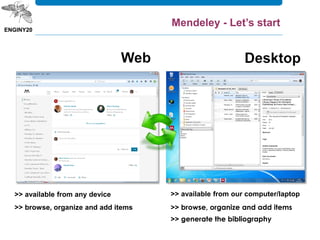
Mendeley - Let’s start
>> available from our computer/laptop
>> browse, organize and add items
>> generate the bibliography
>> available from any device
>> browse, organize and add items
Mendeley - Let’s start
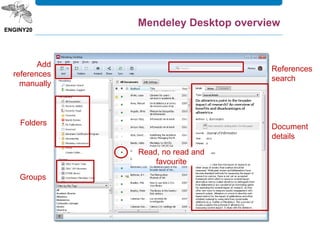
Document
details
Folders
Read, no read and
favourite
Add
references
manually
References
search
Groups
Mendeley Desktop overview
Mendeley - Let’s start
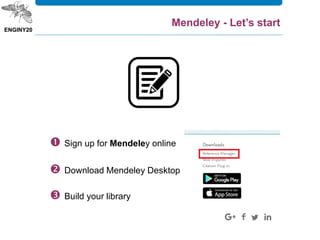
 Sign up for Mendeley online
 Download Mendeley Desktop
 Build your library
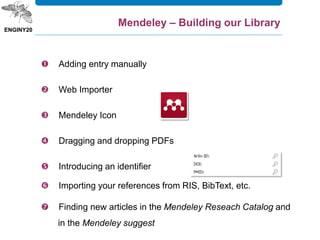
 Adding entry manually
 Web Importer
 Mendeley Icon
 Dragging and dropping PDFs
 Introducing an identifier
 Importing your references from RIS, BibText, etc.
 Finding new articles in the Mendeley Reseach Catalog and
in the Mendeley suggest
Mendeley – Building our Library
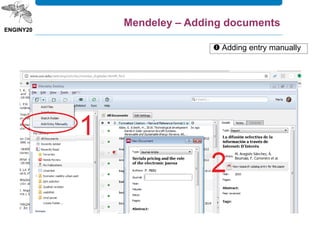
 Adding entry manually
Mendeley – Adding documents
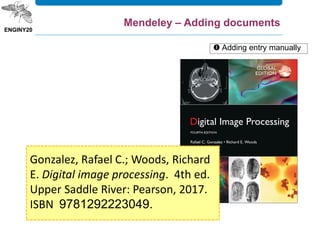
Gonzalez, Rafael C.; Woods, Richard
E. Digital image processing. 4th ed.
Upper Saddle River: Pearson, 2017.
ISBN 9781292223049.
 Adding entry manually
Mendeley – Adding documents
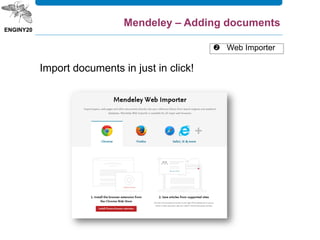
Import documents in just in click!
 Web Importer
Mendeley – Adding documents
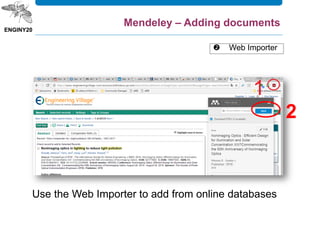
Use the Web Importer to add from online databases
2
 Web Importer
Mendeley – Adding documents
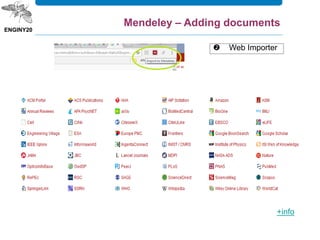
 Web Importer
Mendeley – Adding documents
+info
Let’s try Web Importer
10 items from Scopus
Mendeley – Adding documents
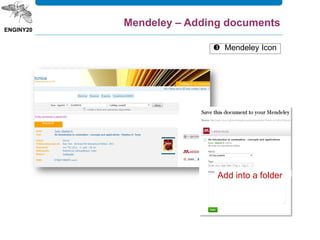
 Mendeley Icon
Add into a folder
Mendeley – Adding documents
Let’s to try Mendeley icon
2 items from Discovery UPC
Mendeley – Adding documents
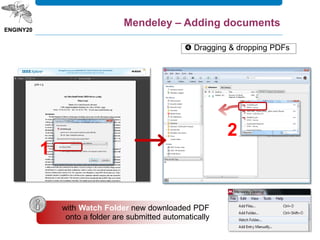
 Dragging & dropping PDFs
Mendeley – Adding documents
with Watch Folder new downloaded PDF
onto a folder are submitted automatically
1
2
Let’s try dragging and
dropping a PDF
Mendeley – Adding documents
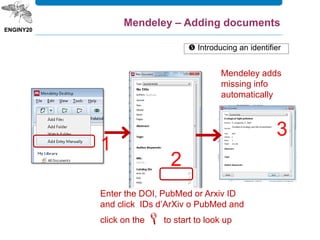
 Introducing an identifier
Mendeley – Adding documents
Mendeley adds
missing info
automatically
Enter the DOI, PubMed or Arxiv ID
and click IDs d’ArXiv o PubMed and
click on the  to start to look up
1
2
3
Let’s try searching for a
document by its identifier
Mendeley – Adding documents
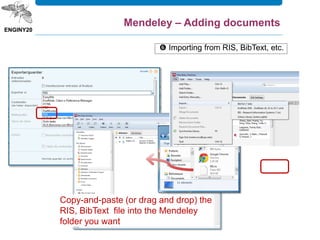
 Importing from RIS, BibText, etc.
Mendeley – Adding documents
Copy-and-paste (or drag and drop) the
RIS, BibText file into the Mendeley
folder you want
Let’s try importing a document
with RIS format
5 items from Materials Science &
Engineering Database
Mendeley – Adding documents
Let’s try creating a folder and
checking for duplicates
Mendeley – Adding documents
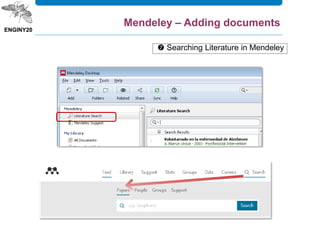
 Searching Literature in Mendeley
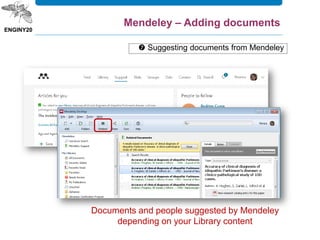
Documents and people suggested by Mendeley
depending on your Library content
 Suggesting documents from Mendeley
Mendeley – Adding documents
Don’t forget SINCHRONIZE
Mendeley – Adding documents
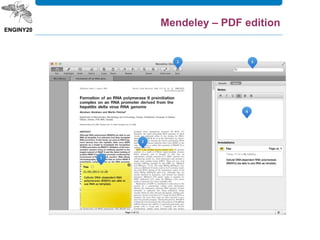
Mendeley – PDF edition
Mendeley – Edit your profile
Mendeley – Create and use groups
Let’s try creating a private
group and inviting two
classmates
Mendeley – Adding documents
The Citation Plugin allows you to quickly
and easily cite materials that you’ve
added to your Mendeley library - as well
as generating a full bibliography of the
materials you’ve referenced in the paper.
Install it from mendeley Desktop: Tools –
Install … Plugin
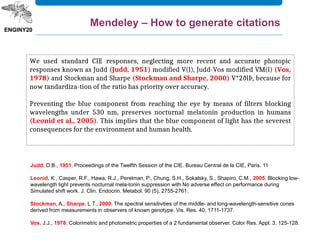
Mendeley – How to generate citations
We used standard CIE responses, neglecting more recent and accurate photopic
responses known as Judd (Judd, 1951) modified V(l), Judd-Vos modified VM(l) (Vos,
1978) and Stockman and Sharpe (Stockman and Sharpe, 2000) V*2ðlÞ, because for
now tandardiza-tion of the ratio has priority over accuracy.
Preventing the blue component from reaching the eye by means of filters blocking
wavelengths under 530 nm, preserves nocturnal melatonin production in humans
(Leonid et al., 2005). This implies that the blue component of light has the severest
consequences for the environment and human health.
Judd, D.B., 1951. Proceedings of the Twelfth Session of the CIE. Bureau Central de la CIE, Paris. 11
Leonid, K., Casper, R.F., Hawa, R.J., Perelman, P., Chung, S.H., Sokalsky, S., Shapiro, C.M., 2005. Blocking low-
wavelength light prevents nocturnal mela-tonin suppression with No adverse effect on performance during
Simulated shift work. J. Clin. Endocrin. Metabol. 90 (5), 2755-2761.
Stockman, A., Sharpe, L.T., 2000. The spectral sensitivities of the middle- and long-wavelength-sensitive cones
derived from measurements in observers of known genotype. Vis. Res. 40, 1711-1737.
Vos, J.J., 1978. Colorimetric and photometric properties of a 2 fundamental observer. Color Res. Appl. 3, 125-128.
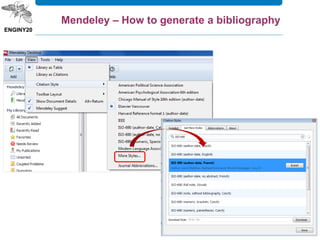
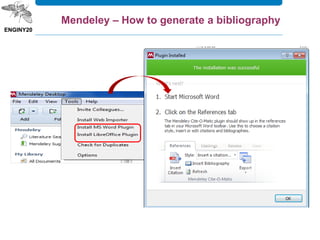
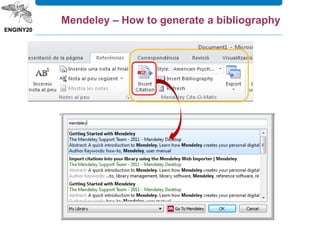
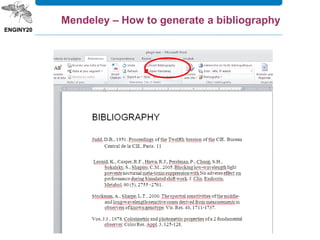
Mendeley – How to generate a bibliography
and… if I have any doubts about
intellectual property rights ?
5. Evaluation and ethical use of information
1. Start your Research
2. Search strategy
3. Types of documents (books, articles ...)
4. Tools for searching information
4.1. Bibliotècnica
4.2. Library Catalogue
4.3. Specialized Databases
4.4. Electronic journals
4.5. UPCommons
4.6. Internet
5. Evaluation and ethical use of information
6. Managing bibliographic citations with Mendeley
7. Keeping up-to-date on engineering information
Outline
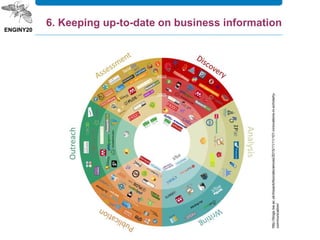
http://blogs.lse.ac.uk/impactofsocialsciences/2015/11/11/101-innovations-in-scholarly-
communication/
6. Keeping up-to-date on business information
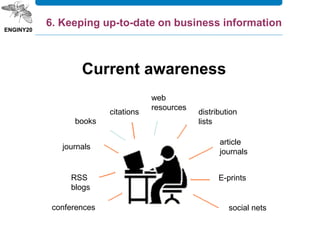
RSS
blogs
conferences
journals
books
distribution
lists
6. Keeping up-to-date on business information
article
journals
E-prints
social nets
Current awareness
citations
web
resources
6. Keeping up-to-date on business information
Source: InfoSphère
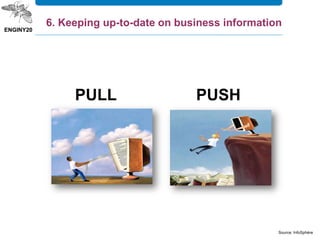
PULL PUSH
6. Keeping up-to-date on business information6. Keeping up-to-date on business information
Source: http://www.bnpadvisors.com/information-overload-clinic/
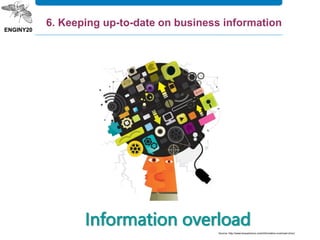
Information overload
6. Keeping up-to-date on business information
Marta Roca Lefler
marta.roca@upc.edu

Library research skills in engineering

  • 1.
    LIBRARY RESEARCH SKILLSIN ENGINEERING Seminaris de recerca March 2019
  • 2.
    Some questions I wantto read an article, I googled it, but was asked to pay $$$. What’s up?! I need articles on PID controllers, I tried looking in the catalogue, but only found books. Are there no articles?
  • 3.
    I have alot of bibliographic references but I never find what I need :-( Can I use an image which I googled for my academic work? Some questions
  • 4.
    1. Starting yourresearch 2. Search strategy 3. Types of documents (books, articles ...) 4. Tools for searching information 4.1. Bibliotècnica 4.2. Library catalogue 4.3. Specialized databases 4.4. Electronic journals 4.5. UPCommons 4.6. Internet 5. Evaluation and ethical use of information 6. Managing bibliographic citations with Mendeley 7. Keeping up-to-date on engineering information Outline
  • 5.
    1. Start yourresearch Steps to good research Define and articulate a research question Identify best sources and research tools Evaluate items you have found Carry out searches and locate the items Synthesize, analyze and integrate information sources Cite what you find using a standard format
  • 6.
    1. Start yourResearch 2. Search strategy 3. Types of documents (books, articles ...) 4. Tools for searching information 4.1. Bibliotècnica 4.2. Library catalogue 4.3. Specialized databases 4.4. Electronic journals 4.5. UPCommons 4.6. Internet 5. Evaluation and ethical use of information 6. Managing bibliographic citations with Mendeley 7. Keeping up-to-date on engineering information Outline
  • 7.
    Summarize your topicin one or two sentences Keywords and phrases need to be highlighted Identify synonyms/ alternate terms and variant spellings Link your keywords and phrases Locate your information SKILL 2. Search strategy
  • 8.
    Summarise your topicin one or two sentences. Summarize your topic 2. Search strategy
  • 9.
    Identify the keywordsand phrases that are relevant to your topic. Select your Keywords 2. Search strategy
  • 10.
    Not all ofthe relevant literature will use exactly the same keyword, so you will need think about possible synonyms, alternate keywords, or words with variant spellings. Identify synonyms and alternative keywords Encyclopaedi a dictionaries glossaries … 2. Search strategy
  • 11.
    Think about howyou will use your key words and phrases to construct a search. For instance, you might use a combination of Boolean operators Link your keywords and phrases 2. Search strategy AND OR NOT
  • 12.
    phrase searching —use quotation marks to find a phrase. For instance, "environmental impact" Link your keywords and phrases “truncation” — use "wildcard" symbols to allow you to search multiple forms of a term (singular/plural, variable spellings, etc. comput* > computing, computed, computers 2. Search strategy
  • 13.
    If you havetoo many results you may want to: • add additional keywords or phrase • limit your search results by document type, date, subject • conduct your search in a particular field If you have too few results you may want to: • check your spelling • remove some of the keywords • try alternate keywords and phrases • try alternate databases Locating an evaluating your results https://www.library.uq.edu.au/how-to-guides/create-search-strategy 2. Search strategy
  • 14.
    Topic: How is thefinancial services industry handling organizational change? Concepts: financial services change Synonyms: financial institutions restructur* (financial service* OR financial institution*) AND (change OR restructur*) 2. Search strategy
  • 15.
    What are thecontrol systems (= control system, industrial control) applied (industrial application, aerospace application, manufacturing) to the aerospace industry (aerospace industry, aeronautical industry, aircraft manufacture)? 2. Search strategy
  • 16.
    1. Start yourResearch 2. Search strategy 3. Types of documents (books, articles ...) 4. Tools for searching information 4.1. Bibliotècnica 4.2. Library catalogue 4.3. Specialized databases 4.4. Electronic journals 4.5. UPCommons 4.6. Internet 5. Evaluation and ethical use of information 6. Managing bibliographic citations with Mendeley 7. Keeping up-to-date on engineering information Outline
  • 17.
    If you arelooking for Look in these information sources Biographies Books, periodicals, encyclopedias, websites Companies, people, organizations Directories Facts Almanacs, atlases, books, databases, dictionaries, encyclopedias, government documents, handbooks, manuals, newspapers, websites, yearbooks Graphics/Image-based Almanacs, atlases, books, databases, websites Original documents Bibliographies, books, periodical articles, websites Popular opinion Books, periodical articles, newspapers, websites Products Databases, manufacturer & vendor catalogs Professional commentary Bibliographies, books, periodical articles, websites, yearbooks Research Bibliographies, books, government documents, periodical articles, statistical abstracts Statistics/Data Almanacs, atlases, books, databases, statistical abstracts, websites, yearbooks <http://info-skills.lib.vt.edu/> 3. Types of documents
  • 18.
    • Articles • Proceedings •Books or books chapters • Reports • Encyclopedias and dictionaries • Directories • Bibliographies • Patent • Standards • Dissertations • Manuals • Manufacturer & vendor catalogs • Statistical abstracts • Yearbooks Identifing the appropriate type of access tool library catalogue web indexes search engines databases 3. Types of documents
  • 19.
    1. Start yourResearch 2. Search strategy 3. Types of documents (books, articles ...) 4. Tools for searching information 4.1. Bibliotècnica 4.2. Library catalogue 4.3. Specialized databases 4.4. Electronic journals 4.5. UPCommons 4.6. Internet 5. Evaluation and ethical use of information 6. Managing bibliographic citations with Mendeley 7. Keeping up-to-date on engineering information Outline
  • 20.
  • 21.
  • 22.
    Someone recommended mea book from the Terrassa Campus Library about heat transfer written by an author called Janna. How can I find it? 4. Tools for searching information
  • 23.
    w can Ifind it? And how can I find this? Malaval, P., Béaroya, C., Aflalo, J. Aerospace marketing management : a handbook for the entire value chain. Management for professionals. Heidelberg [etc.] : Springer, cop. 2014. ISBN 978-3- 319-01354-1 DiscoveryUPC
  • 24.
    A database maycontain: Citations Citation & Abstracts Full Text 4. Tools for searching information A database is a set of specialized information, organized and structured to be retrieved WHAT IS A DATABASE?
  • 25.
    Databases organize andstructure information in order to facilitate retrieval, usually by author, title, subject, etc. 4. Tools for searching information
  • 26.
    4. Tools forsearching information
  • 27.
    <http://bibliotecnica.upc.edu/en/ebib> Drag the buttonto the toolbar Access to databases and other licensed information resources 4. Tools for searching information
  • 28.
    4. Tools forsearching information Access to databases and other licensed information resources
  • 29.
    Scopus is thelargest abstract and citation database of peer-reviewed literature: scientific journals, books and conference proceedings. Delivering a comprehensive overview of the world's research output in the fields of science, technology, medicine, social sciences, and arts and humanities, Scopus features smart tools to track, analyze and visualize research. Scopus (Elsevier) 4. Tools for searching information
  • 30.
    SCOPUS I am lookingfor recent articles on human factors in helicopter accidents 4. Tools for searching information
  • 31.
    On Engineering Villageplatform, Compendex (Engineering Index) provides international coverage of engineering and applied science literature in over 5000 journals, conference proceedings, and technical reports. The broad subject areas of engineering and applied science are comprehensively represented. Coverage includes nuclear technology, bioengineering, transportation, chemical and process engineering, light and optical technology, agricultural engineering and food technology, computers and data processing, applied physics, electronics and communications, control, civil, mechanical, materials, petroleum, aerospace and automotive engineering as well as narrower subtopics within all these and other major engineering fields. Compendex / Inspec 4. Tools for searching information
  • 32.
    It contains materialpublished mainly by the Institute of Electrical and Electronics Engineers (IEEE) and other partner publishers. IEEE Xplore provides web access to more than 4.5- million documents from publications in computer science, electrical engineering, electronics and allied fields. IEEE Xplore 4. Tools for searching information
  • 33.
    SABI (Sistema deAnálisis de Balances Ibéricos) includes financial analyses of 2.500.000 Spanish firms and 700,000 Portuguese companies with annual reports dating up to 20 years ago. Prepared by Bureau van Dijk, data are obtained from official sources, mercantile registries, BORME (the Mercantile Registry' s official gazette), the press, etc. It has software available to analyze the data obtained and can segment companies and compare firms to a given group. SABI 4. Tools for searching information
  • 34.
    SABI allows youto carry out different financial and credit functions, including: • You would be able to set up a permanent file of your customers and suppliers in order to track their financial progress according to the criteria you are interested in. • You would be able to make credit analyses adapted to each particular case. • Prepare periodic reports according to your own design. • Position a company with regard to its competitors. • Identify candidates for company acquisitions, mergers or associations. • Receive input for the development of internal rating provision. http://www.informa.es/en/soluciones-financieras/sabi 4. Tools for searching information
  • 35.
    Factiva is abusiness information and research tool owned by Dow Jones & Company. Factiva aggregates content from both licensed and free sources, and provides organizations with search, alerting, dissemination, and other information management capabilities. Factiva products provide access to more than 32,000 sources (such as newspapers, journals, magazines, television and radio transcripts, photos, etc.) from nearly every country worldwide in 28 languages, including more than 600 continuously updated newswires. FACTIVA 4. Tools for searching information
  • 36.
    Bibliographic databases FACTIVA I amlooking for information about the pollination with drones
  • 37.
    ÍnDICEs-CSIC The ÍnDICEs-CSIC bibliographicdatabase covers the Spanish scientific production published in Spain from the 70s up to date. It mostly includes articles from scientific journals, but also a selection of congress and conference proceedings, serials, compilations, reports and monographies about social sciences, humanities and technology. 4. Tools for searching information
  • 38.
    Finding journals If ane-journal is available, you will see the e-journal title and a link 4. Tools for searching information
  • 39.
    Finding journals 4. Toolsfor searching information
  • 40.
    Barjis, Joseph; FossoWamba, Samuel. Organizational and business impacts of RFID technology. Business Process Management Journal, 2010, vol. 16, núm. 6, p. 897-903 4. Tools for searching information Guzmán Cuevas, Joaquín J.; Martínez Román, Juan Antonio. Tipología de la innovación y perfiles empresariales: una aplicación empírica. Economía Industrial, 2008, núm. 368, p. 59-77
  • 41.
    UPCommons is thegateway that provides open access to the knowledge of UPC. It is formed by the group of UPC open institutional repositories and its aim is to guarantee the safeguarding of the material produced by lecturers and researchers at the University, maximizing their visibility and, consequently, increasing its impact on education and research worldwide. 4. Tools for searching information
  • 42.
    Exploring the web 4.Tools for searching information
  • 43.
    1. Start yourResearch 2. Search strategy 3. Types of documents (books, articles ...) 4. Tools for searching information 4.1. Bibliotècnica 4.2. Library catalogue 4.3. Specialized databases 4.4. Electronic journals 4.5. UPCommons 4.6. Internet 5. Evaluation and ethical use of information 6. Managing bibliographic citations with Mendeley 7. Keeping up-to-date on engineering information Outline
  • 44.
    5. Evaluation andethical use of information
  • 45.
    Citation and plagiarism Bearin mind to cite the sources you have used to support the arguments of your work. Faithfully reproduce the texts or images indicating the author and the source from where you took it, whether from a book, a booklet, a Web page, etc. If you do not do this, you would be plagiarizing. 5. Evaluation and ethical use of information
  • 46.
    Plagiarism Plagiarism is understoodto be the reproduction of a substantial content of another work pretending it to be one's own. Therefore: • Create your own arguments; don't simply "copy-paste“ • Indicate fragments from other works that you are quoting between inverted commas ("") and remember to indicate the source and author (bibliographical reference). • Paraphrase 5. Evaluation and ethical use of information
  • 47.
    5% 25% 42% 83% 19% 15% Gilmore, Barry.Stopping Plagiarism at the Source 40% 24% 34% 1% 1% Why Students Plagiarize Ease/Laziness Pressure: deadlines Pressure: grades Confusion: process Culture/everyone does it 5. Evaluation and ethical use of information
  • 48.
    • Direct quotes. •Paraphrasing or summarizing. • Information which may be common knowledge but still unfamiliar to your reader. • Not just books or articles should be cited. • Whenever you are not sure if something should be cited. 5. Evaluation and ethical use of information WHEN TO CITE
  • 49.
     How youwill reference your sources within your paper? IN TEXT citation END NOTES FOOT NOTES  Which format and style guide to use? HOW TO CITE 5. Evaluation and ethical use of information
  • 50.
  • 51.
    Last name, Firstname. Title: subheading. Edition. Place of publication: Publisher, year of publication. Collection title, collection number*. ISBN. 5. Evaluation and ethical use of information Bibliografical reference ISO690. Book
  • 52.
    How to writea bibliography and cite sources in the text? 5. Evaluation and ethical use of information
  • 53.
    Calvo Fernández, S./ Reinares Lara, P. (2001). Comunicación en Internet: Estrategias de márketing y comunicación interactiva. Ed. Paraninfo Clark, Josh. Diseño y usabilidad de aplicaciones para iPhone. Madrid: Anaya Multimedia, 2011. ISBN 97-8844151-034-0 Brian McConnell, Alexander Tolley. A Design for a Reusable Water-Based Spacecraft Known as the Spacecoach. Cham : Springer International Publishing : Imprint: Springer, 2016. ISBN 9783319226774 Nielsen, Jacob. Usability inspection methods. Paper presented at: Conference companion on Human factors in computing systems. Human Factors in Computing Systems. Nova York: ACM, 2004. p. 413-414 Reed, M., ed. Organic food and agriculture [online]: new trends and developments in the social sciences. Rikeja: InTech, 2012. Accessed 12 January 2015. ISBN 97-8953307-764-2. Available at: <http://dx.doi.org/10.5772/1526>. 5. Evaluation and ethical use of information
  • 54.
    1. Start yourResearch 2. Search strategy 3. Types of documents (books, articles ...) 4. Tools for searching information 4.1. Bibliotècnica 4.2. Library catalogue 4.3. Specialized databases 4.4. Electronic journals 4.5. UPCommons 4.6. Internet 5. Evaluation and ethical use of information 6. Managing bibliographic citations with Mendeley 7. Keeping up-to-date on engineering information Outline
  • 55.
    Reference management tools 6.Managing bibliographic citations with Mendeley
  • 56.
    Before… Nowadays… Image 1:Mattox http://www.sxc.hu + easy + fast + features 6. Managing bibliographic citations with Mendeley
  • 57.
    Reference managers areprograms that allow you to: 1. Manage bibliographic citations 2. Search in a database and import the results 3. Create bibliographies and in-text citations 6. Managing bibliographic citations with Mendeley
  • 58.
    It is afree reference manager and academic social network that can help you organize your research, collaborate with others online, and discover the latest research. 6. Managing bibliographic citations with Mendeley
  • 59.
    Mendeley – what’sit for?  Import documents to your personal library and organize them through tags and folders.  Share your research: create public & private groups, share documents, collaborative work in academic articles review or following groups.  Include citations to Word documents and generate bibliographies.  Create a profile with your curriculum, publications, affiliation, etc. 6. Managing bibliographic citations with Mendeley
  • 60.
    Mendeley Institutional Edition 100 GB of storage space for individual users.  100 collaborators.  Private groups up to 25 members.  Unlimited number of private groups.  Mendeley suggest in the desktop utility to receive article recommendations based in your personal library.
  • 61.
    How to obtainthese advantages?  You need to have an UPC email address in your Mendeley Profile (if it is not an UPC address, click on your name > Settings & Privacy to change the address)  You need to be a member of the UPC group “Universitat Politecnica de Catalunya“ Mendeley Institutional Edition
  • 62.
    6. Managing bibliographiccitations with Mendeley
  • 63.
  • 64.
    >> available fromour computer/laptop >> browse, organize and add items >> generate the bibliography >> available from any device >> browse, organize and add items Mendeley - Let’s start
  • 65.
    Document details Folders Read, no readand favourite Add references manually References search Groups Mendeley Desktop overview
  • 66.
    Mendeley - Let’sstart  Sign up for Mendeley online  Download Mendeley Desktop  Build your library
  • 67.
     Adding entrymanually  Web Importer  Mendeley Icon  Dragging and dropping PDFs  Introducing an identifier  Importing your references from RIS, BibText, etc.  Finding new articles in the Mendeley Reseach Catalog and in the Mendeley suggest Mendeley – Building our Library
  • 68.
     Adding entrymanually Mendeley – Adding documents
  • 69.
    Gonzalez, Rafael C.;Woods, Richard E. Digital image processing. 4th ed. Upper Saddle River: Pearson, 2017. ISBN 9781292223049.  Adding entry manually Mendeley – Adding documents
  • 70.
    Import documents injust in click!  Web Importer Mendeley – Adding documents
  • 71.
    Use the WebImporter to add from online databases 2  Web Importer Mendeley – Adding documents
  • 72.
     Web Importer Mendeley– Adding documents +info
  • 73.
    Let’s try WebImporter 10 items from Scopus Mendeley – Adding documents
  • 74.
     Mendeley Icon Addinto a folder Mendeley – Adding documents
  • 75.
    Let’s to tryMendeley icon 2 items from Discovery UPC Mendeley – Adding documents
  • 76.
     Dragging &dropping PDFs Mendeley – Adding documents with Watch Folder new downloaded PDF onto a folder are submitted automatically 1 2
  • 77.
    Let’s try draggingand dropping a PDF Mendeley – Adding documents
  • 78.
     Introducing anidentifier Mendeley – Adding documents Mendeley adds missing info automatically Enter the DOI, PubMed or Arxiv ID and click IDs d’ArXiv o PubMed and click on the  to start to look up 1 2 3
  • 79.
    Let’s try searchingfor a document by its identifier Mendeley – Adding documents
  • 80.
     Importing fromRIS, BibText, etc. Mendeley – Adding documents Copy-and-paste (or drag and drop) the RIS, BibText file into the Mendeley folder you want
  • 81.
    Let’s try importinga document with RIS format 5 items from Materials Science & Engineering Database Mendeley – Adding documents
  • 82.
    Let’s try creatinga folder and checking for duplicates Mendeley – Adding documents
  • 83.
    Mendeley – Addingdocuments  Searching Literature in Mendeley
  • 84.
    Documents and peoplesuggested by Mendeley depending on your Library content  Suggesting documents from Mendeley Mendeley – Adding documents
  • 85.
  • 86.
  • 87.
    Mendeley – Edityour profile
  • 88.
    Mendeley – Createand use groups
  • 89.
    Let’s try creatinga private group and inviting two classmates Mendeley – Adding documents
  • 90.
    The Citation Pluginallows you to quickly and easily cite materials that you’ve added to your Mendeley library - as well as generating a full bibliography of the materials you’ve referenced in the paper. Install it from mendeley Desktop: Tools – Install … Plugin Mendeley – How to generate citations
  • 91.
    Mendeley – Howto generate citations We used standard CIE responses, neglecting more recent and accurate photopic responses known as Judd (Judd, 1951) modified V(l), Judd-Vos modified VM(l) (Vos, 1978) and Stockman and Sharpe (Stockman and Sharpe, 2000) V*2ðlÞ, because for now tandardiza-tion of the ratio has priority over accuracy. Preventing the blue component from reaching the eye by means of filters blocking wavelengths under 530 nm, preserves nocturnal melatonin production in humans (Leonid et al., 2005). This implies that the blue component of light has the severest consequences for the environment and human health. Judd, D.B., 1951. Proceedings of the Twelfth Session of the CIE. Bureau Central de la CIE, Paris. 11 Leonid, K., Casper, R.F., Hawa, R.J., Perelman, P., Chung, S.H., Sokalsky, S., Shapiro, C.M., 2005. Blocking low- wavelength light prevents nocturnal mela-tonin suppression with No adverse effect on performance during Simulated shift work. J. Clin. Endocrin. Metabol. 90 (5), 2755-2761. Stockman, A., Sharpe, L.T., 2000. The spectral sensitivities of the middle- and long-wavelength-sensitive cones derived from measurements in observers of known genotype. Vis. Res. 40, 1711-1737. Vos, J.J., 1978. Colorimetric and photometric properties of a 2 fundamental observer. Color Res. Appl. 3, 125-128.
  • 92.
    Mendeley – Howto generate a bibliography
  • 93.
    Mendeley – Howto generate a bibliography
  • 94.
    Mendeley – Howto generate a bibliography
  • 95.
    Mendeley – Howto generate a bibliography
  • 96.
    and… if Ihave any doubts about intellectual property rights ? 5. Evaluation and ethical use of information
  • 97.
    1. Start yourResearch 2. Search strategy 3. Types of documents (books, articles ...) 4. Tools for searching information 4.1. Bibliotècnica 4.2. Library Catalogue 4.3. Specialized Databases 4.4. Electronic journals 4.5. UPCommons 4.6. Internet 5. Evaluation and ethical use of information 6. Managing bibliographic citations with Mendeley 7. Keeping up-to-date on engineering information Outline
  • 98.
  • 99.
    RSS blogs conferences journals books distribution lists 6. Keeping up-to-dateon business information article journals E-prints social nets Current awareness citations web resources 6. Keeping up-to-date on business information
  • 100.
    Source: InfoSphère PULL PUSH 6.Keeping up-to-date on business information6. Keeping up-to-date on business information
  • 101.
  • 102.
    6. Keeping up-to-dateon business information
  • 103.