Generating SPSS training materials
in StatJR
Professor William Browne
Video 1 Interoperating with SPSS
• StatJR is a software system that can interoperate
with other statistical software.
• For example there is a StatJR template to fit a
regression in many packages including SPSS.
• SPSS is often used for training in the social
sciences.
• We have extended StatJR’s functionality so that it
can automatically create ‘bespoke’ SPSS training
materials.
Video 1 Interoperating with SPSS
• StatJR is a software system that can interoperate
with other statistical software.
• For example there is a StatJR template to fit a
regression in many packages including SPSS.
• SPSS is often used for training in the social
sciences.
• We have extended StatJR’s functionality so that it
can automatically create ‘bespoke’ SPSS training
materials.
British Academy training eBooks grant
Using Statistical E-books to teach undergraduate
students quantitative methods and statistical software
(Browne, Charlton and Washbrook)
Inspired by:
• Previous work developing Stat-JR, e-books and SAAs to
help researchers analyse their own statistical data
• Concerns about the shortage of quantitatively-skilled UK
social science graduates that prompted the Q-Step
programme
The basic idea
• To produce a set of (static) training materials
that guide a student through the
implementation of basic statistical techniques
on an example dataset in the SPSS software
• To provide teachers with a tool that allows
them to QUICKLY customise the materials to
their own discipline-specific data example(s)
– Sociology, politics, geography, childhood studies,
social policy, social anthropology, area studies…
The end product – what the student
gets
13 sets of practical exercises (pdfs) with 3
components
1. Takes student through a particular statistical
concept in detail, and how to implement it in
SPSS, using a specific data example
(learning component)
2. A worksheet that asks the student to try out
their knowledge by applying the techniques to
a second dataset or set of variables (practice
component)
3. Solutions to the worksheet (self-evaluation
component)
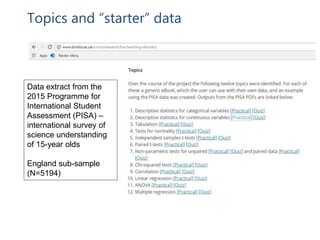
Topics and “starter” data
Data extract from the
2015 Programme for
International Student
Assessment (PISA) –
international survey of
science understanding
of 15-year olds
England sub-sample
(N=5194)
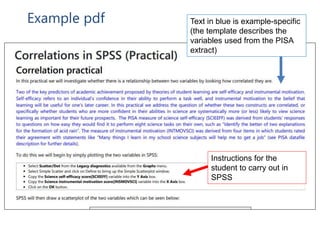
Example pdf
Instructions for the
student to carry out in
SPSS
Text in blue is example-specific
(the template describes the
variables used from the PISA
extract)
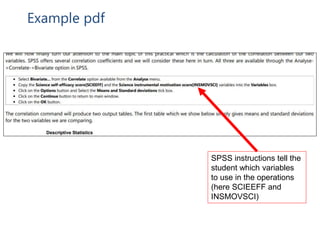
Example pdf
SPSS instructions tell the
student which variables
to use in the operations
(here SCIEEFF and
INSMOVSCI)
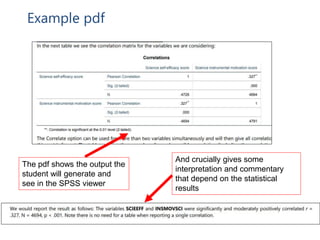
Example pdf
The pdf shows the output the
student will generate and
see in the SPSS viewer
And crucially gives some
interpretation and commentary
that depend on the statistical
results
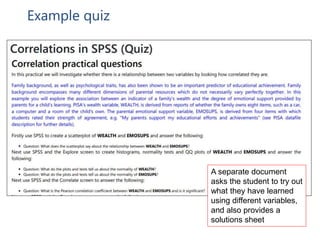
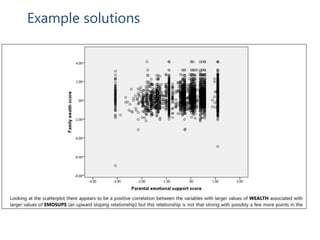
Example quiz
A separate document
asks the student to try out
what they have learned
using different variables,
and also provides a
solutions sheet
Example solutions
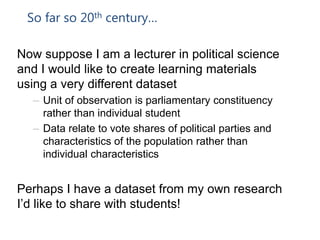
So far so 20th century…
Now suppose I am a lecturer in political science
and I would like to create learning materials
using a very different dataset
– Unit of observation is parliamentary constituency
rather than individual student
– Data relate to vote shares of political parties and
characteristics of the population rather than
individual characteristics
Perhaps I have a dataset from my own research
I’d like to share with students!
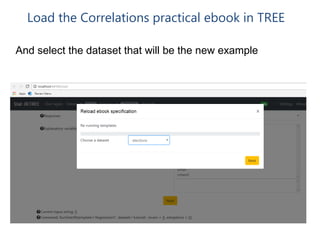
Load the Correlations practical ebook in TREE
And select the dataset that will be the new example
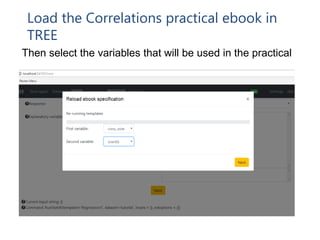
Load the Correlations practical ebook in
TREE
Then select the variables that will be used in the practical
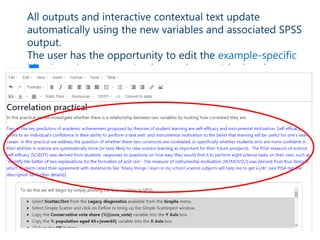
All outputs and interactive contextual text update
automatically using the new variables and associated SPSS
output.
The user has the opportunity to edit the example-specific
blue introductory text (and any other text) by hand
• The package can output C++ code that can then be
taken away by software developers and modified.
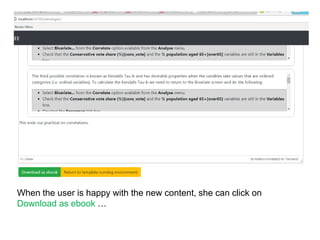
When the user is happy with the new content, she can click on
Download as ebook …
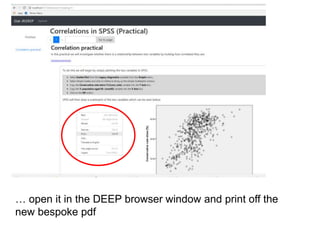
… open it in the DEEP browser window and print off the
new bespoke pdf
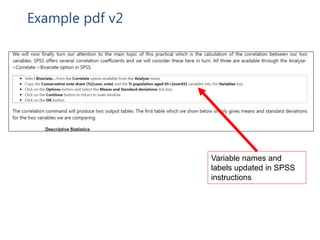
Example pdf v2
• E-STAT offers
multiple chains so
that we can use
multiple chain
diagnostics to aid
convergence
checking.
• Graphics are in svg
format so scale
nicely.
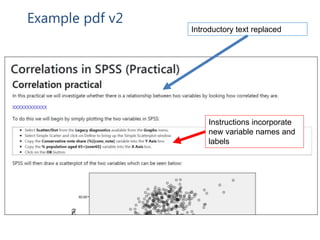
Introductory text replaced
Instructions incorporate
new variable names and
labels
Example pdf v2
Variable names and
labels updated in SPSS
instructions
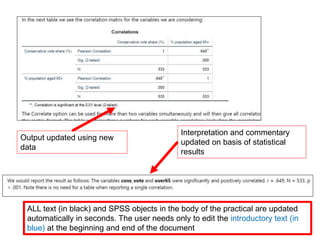
Output updated using new
data
Interpretation and commentary
updated on basis of statistical
results
ALL text (in black) and SPSS objects in the body of the practical are updated
automatically in seconds. The user needs only to edit the introductory text (in
blue) at the beginning and end of the document
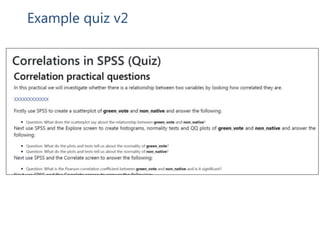
Example quiz v2
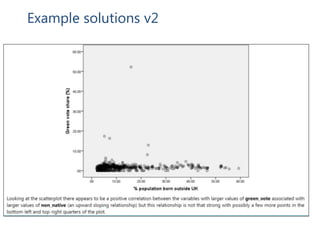
Example solutions v2
Finding out more
• The hardcopy materials mentioned in this talk can be
found at http://www.bristol.ac.uk/cmm/research/ba-
teaching-ebooks/
• The teaching eBooks that can create examples with
your own datasets are available at
http://www.bristol.ac.uk/cmm/software/statjr/downloa
ds/
• More general StatJR information is available at
http://www.bristol.ac.uk/cmm/software/statjr/
Useful websites for further information
• www.understandingsociety.ac.uk (a
‘biosocial’ resource)
• www.closer.ac.uk (UK longitudinal
studies)
• www.ukdataservice.ac.uk (access data)
• www.metadac.ac.uk (genetics data)
• www.ncrm.ac.uk (training and
information)

Generating SPSS training materials in StatJR

  • 1.
    Generating SPSS trainingmaterials in StatJR Professor William Browne
  • 2.
    Video 1 Interoperatingwith SPSS • StatJR is a software system that can interoperate with other statistical software. • For example there is a StatJR template to fit a regression in many packages including SPSS. • SPSS is often used for training in the social sciences. • We have extended StatJR’s functionality so that it can automatically create ‘bespoke’ SPSS training materials.
  • 3.
    Video 1 Interoperatingwith SPSS • StatJR is a software system that can interoperate with other statistical software. • For example there is a StatJR template to fit a regression in many packages including SPSS. • SPSS is often used for training in the social sciences. • We have extended StatJR’s functionality so that it can automatically create ‘bespoke’ SPSS training materials.
  • 4.
    British Academy trainingeBooks grant Using Statistical E-books to teach undergraduate students quantitative methods and statistical software (Browne, Charlton and Washbrook) Inspired by: • Previous work developing Stat-JR, e-books and SAAs to help researchers analyse their own statistical data • Concerns about the shortage of quantitatively-skilled UK social science graduates that prompted the Q-Step programme
  • 5.
    The basic idea •To produce a set of (static) training materials that guide a student through the implementation of basic statistical techniques on an example dataset in the SPSS software • To provide teachers with a tool that allows them to QUICKLY customise the materials to their own discipline-specific data example(s) – Sociology, politics, geography, childhood studies, social policy, social anthropology, area studies…
  • 6.
    The end product– what the student gets 13 sets of practical exercises (pdfs) with 3 components 1. Takes student through a particular statistical concept in detail, and how to implement it in SPSS, using a specific data example (learning component) 2. A worksheet that asks the student to try out their knowledge by applying the techniques to a second dataset or set of variables (practice component) 3. Solutions to the worksheet (self-evaluation component)
  • 7.
    Topics and “starter”data Data extract from the 2015 Programme for International Student Assessment (PISA) – international survey of science understanding of 15-year olds England sub-sample (N=5194)
  • 8.
    Example pdf Instructions forthe student to carry out in SPSS Text in blue is example-specific (the template describes the variables used from the PISA extract)
  • 9.
    Example pdf SPSS instructionstell the student which variables to use in the operations (here SCIEEFF and INSMOVSCI)
  • 10.
    Example pdf The pdfshows the output the student will generate and see in the SPSS viewer And crucially gives some interpretation and commentary that depend on the statistical results
  • 11.
    Example quiz A separatedocument asks the student to try out what they have learned using different variables, and also provides a solutions sheet
  • 12.
  • 13.
    So far so20th century… Now suppose I am a lecturer in political science and I would like to create learning materials using a very different dataset – Unit of observation is parliamentary constituency rather than individual student – Data relate to vote shares of political parties and characteristics of the population rather than individual characteristics Perhaps I have a dataset from my own research I’d like to share with students!
  • 14.
    Load the Correlationspractical ebook in TREE And select the dataset that will be the new example
  • 15.
    Load the Correlationspractical ebook in TREE Then select the variables that will be used in the practical
  • 16.
    All outputs andinteractive contextual text update automatically using the new variables and associated SPSS output. The user has the opportunity to edit the example-specific blue introductory text (and any other text) by hand • The package can output C++ code that can then be taken away by software developers and modified.
  • 17.
    When the useris happy with the new content, she can click on Download as ebook …
  • 18.
    … open itin the DEEP browser window and print off the new bespoke pdf
  • 19.
    Example pdf v2 •E-STAT offers multiple chains so that we can use multiple chain diagnostics to aid convergence checking. • Graphics are in svg format so scale nicely. Introductory text replaced Instructions incorporate new variable names and labels
  • 20.
    Example pdf v2 Variablenames and labels updated in SPSS instructions
  • 21.
    Output updated usingnew data Interpretation and commentary updated on basis of statistical results ALL text (in black) and SPSS objects in the body of the practical are updated automatically in seconds. The user needs only to edit the introductory text (in blue) at the beginning and end of the document
  • 22.
  • 23.
  • 24.
    Finding out more •The hardcopy materials mentioned in this talk can be found at http://www.bristol.ac.uk/cmm/research/ba- teaching-ebooks/ • The teaching eBooks that can create examples with your own datasets are available at http://www.bristol.ac.uk/cmm/software/statjr/downloa ds/ • More general StatJR information is available at http://www.bristol.ac.uk/cmm/software/statjr/
  • 25.
    Useful websites forfurther information • www.understandingsociety.ac.uk (a ‘biosocial’ resource) • www.closer.ac.uk (UK longitudinal studies) • www.ukdataservice.ac.uk (access data) • www.metadac.ac.uk (genetics data) • www.ncrm.ac.uk (training and information)