Control Charts
Training Slides
02/19/01
Control Charts
 Definition:
- A statistical tool to determine if a process is in
control.
History of Control Charts
 Developed in 1920’s
 By Dr. Walter A. Shewhart
 Shewhart worked for Bell Telephone Labs
Two Types of Control Charts
 Variable Control Charts
 Attribute Control Charts
Variable Control Charts
 Deal with items that can be measured .
 Examples
1) Weight
2) Height
3) Speed
4) Volume
Types of Variable Control
Charts
 X-Bar chart
 R chart
 MA chart
Variable Control Charts
 X chart: deals with a average value in a process
 R chart: takes into count the range of the values
 MA chart: take into count the moving average of a
process
Attribute Control Charts
 Control charts that factor in the quality attributes of a
process to determine if the process is performing in or
out of control.
Types of Attribute Control
Charts
 P chart
 C Chart
 U Chart
Attribute Control Charts
 P Chart: a chart of the percent defective in each sample
set.
 C chart: a chart of the number of defects per unit in
each sample set.
 U chart: a chart of the average number of defects in
each sample set.
Reasons for using Control
Charts
 Improve productivity
 Make defects visible
 Determine what process adjustments need to be made
 Determine if process is “in” or “out of control
Real World Use of Control
Charts
 Example from “Managing Quality” by Foster.
 The Sampson company develops special
equipment for the United States Armed
Forces. They need to use control charts to
insure that they are producing a product
that conforms to the proper specifications.
Sampson needs to produce high tech and
top of the line products, daily so they
must have a process that is capable to
reduce the risks of defects.
How Will Using Control Charts help your
Company?
 Possible Goals when using Control Charts in your
Company:
 Line reengineering
 Increased Employee motivation
 Continually improve of your process
 Increased profits
 Zero defects
Control Chart Key Terms
 Out of Control: the process may not performing
correctly
 In Control: the process may be performing correctly
 UCL: upper control limit
 LCL: lower control limit
 Average value: average
Process is OUT of control if:
 One or multiple points outside the control limits
 Eight points in a row above the average value
 Multiple points in a row near the control limits
Process is IN control if:
 The sample points fall between the control limits
 There are no major trends forming, i.e.. The points
vary, both above and below the average value.
Calculating Major Lines in a
Control Chart
 Average Value: take the average of
the sample data
 UCL: Multiply the Standard
deviation by three. Then add that
value to the Average Value.
 LCL: Multiply the Standard deviation
by three. Then subtract that value
from the Average Value.
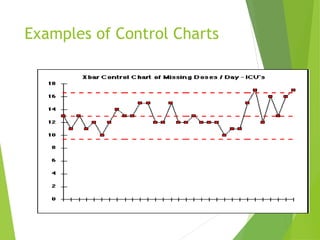
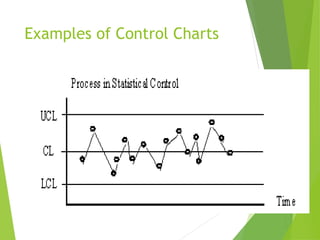
Examples of Control Charts
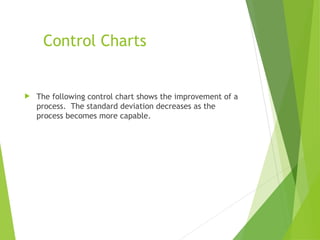
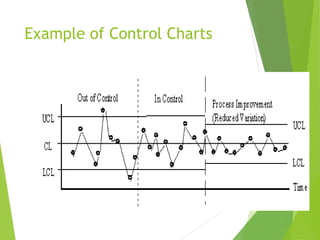
Control Charts
 The following control chart shows the improvement of a
process. The standard deviation decreases as the
process becomes more capable.
Example of Control Charts
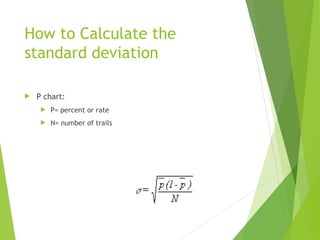
How to Calculate the
standard deviation
 P chart:
 P= percent or rate
 N= number of trails
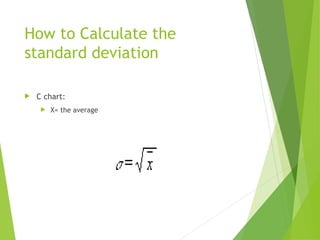
How to Calculate the
standard deviation
 C chart:
 X= the average
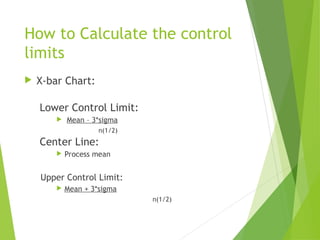
How to Calculate the control
limits
 X-bar Chart:
Lower Control Limit:
 Mean – 3*sigma
n(1/2)
Center Line:
 Process mean
Upper Control Limit:
 Mean + 3*sigma
n(1/2)
How to Calculate the control
limits
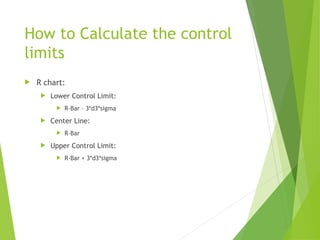
 R chart:
 Lower Control Limit:
 R-Bar – 3*d3*sigma
 Center Line:
 R-Bar
 Upper Control Limit:
 R-Bar + 3*d3*sigma
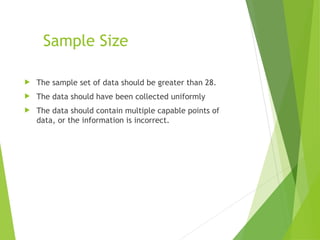
Sample Size
 The sample set of data should be greater than 28.
 The data should have been collected uniformly
 The data should contain multiple capable points of
data, or the information is incorrect.
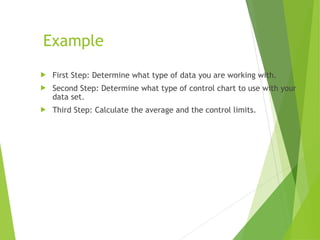
Example
 First Step: Determine what type of data you are working with.
 Second Step: Determine what type of control chart to use with your
data set.
 Third Step: Calculate the average and the control limits.
Example
 The following slides contain data and questions for your
practice with control charts. Please take the process
step by step and look back to previous slides for help.
Problem
 You have gathered a sample set of
data for your company. The data is
in the form of percents. Your
company wants your
recommendation, is the process in
control.
 What type of control chart should
you use? (Variable or Attribute)
Problem
 What type of specific control chart should you use with
that type of sample set? (X-bar, R-chart, MA-chart, P-
chart, R-chart, or U-chart)
Problem
 Now that you have determined the control chart to use,
you have to calculate the average and standard
deviation. Use the data on the following slide. Take
notice to the amount of sample data. (n>28)
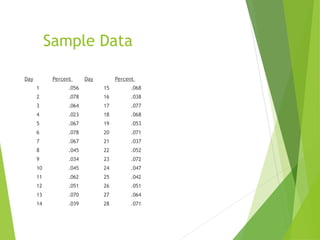
Sample Data
Day Percent Day Percent
1 .056 15 .068
2 .078 16 .038
3 .064 17 .077
4 .023 18 .068
5 .067 19 .053
6 .078 20 .071
7 .067 21 .037
8 .045 22 .052
9 .034 23 .072
10 .045 24 .047
11 .062 25 .042
12 .051 26 .051
13 .070 27 .064
14 .039 28 .071
 Now that you have calculated the three important lines for the control
chart, plot the data and determine if the process is capable. (i.e. The
data falls mostly inside the UCL, and the LCL)
Example
Final Step
 Make a recommendation to your company.
 The process is capable
 The process is not capable
 The following errors were found.
 The process needs improvement
 The variations are normal in the system and we must accept
them.
Control Charts Review
 What have we learned?
 Control Charts are a useful way to determine the
capability of a process.
 The different types of control charts.
 How to calculate the control limits for a control chart.
Works Cited
“Control Charts as a tool in SQC.” Internet.
http://deming.eng.clemson.edu/pub/tutorials/qctools/ccmain1.htm. 31
January 2001.
Foster, S. Thomas. Managing Quality. Upper Saddle River: Prentice Hall, Inc.
2001.
“Generating and Using Control Charts.” Internet.
http://www.hanford.gov/safety/upp/spc.htm. 31 January 2001.
“Quality and Statistical Process Control.” Internet.
http://www.systma.com/tqmtools/ctlchtprinciples.html. 12 February 2001.
“Statistical Thinking Tools-Control Charts for the Average.” Internet.
http://www.robertluttman.com/yms/Week5/page6.htm. 12 February 2001.

G-ControlChart5dsjjsbshjjjhshjdjsnds.ppt

  • 1.
  • 2.
    Control Charts  Definition: -A statistical tool to determine if a process is in control.
  • 3.
    History of ControlCharts  Developed in 1920’s  By Dr. Walter A. Shewhart  Shewhart worked for Bell Telephone Labs
  • 4.
    Two Types ofControl Charts  Variable Control Charts  Attribute Control Charts
  • 5.
    Variable Control Charts Deal with items that can be measured .  Examples 1) Weight 2) Height 3) Speed 4) Volume
  • 6.
    Types of VariableControl Charts  X-Bar chart  R chart  MA chart
  • 7.
    Variable Control Charts X chart: deals with a average value in a process  R chart: takes into count the range of the values  MA chart: take into count the moving average of a process
  • 8.
    Attribute Control Charts Control charts that factor in the quality attributes of a process to determine if the process is performing in or out of control.
  • 9.
    Types of AttributeControl Charts  P chart  C Chart  U Chart
  • 10.
    Attribute Control Charts P Chart: a chart of the percent defective in each sample set.  C chart: a chart of the number of defects per unit in each sample set.  U chart: a chart of the average number of defects in each sample set.
  • 11.
    Reasons for usingControl Charts  Improve productivity  Make defects visible  Determine what process adjustments need to be made  Determine if process is “in” or “out of control
  • 12.
    Real World Useof Control Charts  Example from “Managing Quality” by Foster.  The Sampson company develops special equipment for the United States Armed Forces. They need to use control charts to insure that they are producing a product that conforms to the proper specifications. Sampson needs to produce high tech and top of the line products, daily so they must have a process that is capable to reduce the risks of defects.
  • 13.
    How Will UsingControl Charts help your Company?  Possible Goals when using Control Charts in your Company:  Line reengineering  Increased Employee motivation  Continually improve of your process  Increased profits  Zero defects
  • 14.
    Control Chart KeyTerms  Out of Control: the process may not performing correctly  In Control: the process may be performing correctly  UCL: upper control limit  LCL: lower control limit  Average value: average
  • 15.
    Process is OUTof control if:  One or multiple points outside the control limits  Eight points in a row above the average value  Multiple points in a row near the control limits
  • 16.
    Process is INcontrol if:  The sample points fall between the control limits  There are no major trends forming, i.e.. The points vary, both above and below the average value.
  • 17.
    Calculating Major Linesin a Control Chart  Average Value: take the average of the sample data  UCL: Multiply the Standard deviation by three. Then add that value to the Average Value.  LCL: Multiply the Standard deviation by three. Then subtract that value from the Average Value.
  • 18.
  • 19.
  • 20.
    Control Charts  Thefollowing control chart shows the improvement of a process. The standard deviation decreases as the process becomes more capable.
  • 21.
  • 22.
    How to Calculatethe standard deviation  P chart:  P= percent or rate  N= number of trails
  • 23.
    How to Calculatethe standard deviation  C chart:  X= the average
  • 24.
    How to Calculatethe control limits  X-bar Chart: Lower Control Limit:  Mean – 3*sigma n(1/2) Center Line:  Process mean Upper Control Limit:  Mean + 3*sigma n(1/2)
  • 25.
    How to Calculatethe control limits  R chart:  Lower Control Limit:  R-Bar – 3*d3*sigma  Center Line:  R-Bar  Upper Control Limit:  R-Bar + 3*d3*sigma
  • 26.
    Sample Size  Thesample set of data should be greater than 28.  The data should have been collected uniformly  The data should contain multiple capable points of data, or the information is incorrect.
  • 27.
    Example  First Step:Determine what type of data you are working with.  Second Step: Determine what type of control chart to use with your data set.  Third Step: Calculate the average and the control limits.
  • 28.
    Example  The followingslides contain data and questions for your practice with control charts. Please take the process step by step and look back to previous slides for help.
  • 29.
    Problem  You havegathered a sample set of data for your company. The data is in the form of percents. Your company wants your recommendation, is the process in control.  What type of control chart should you use? (Variable or Attribute)
  • 30.
    Problem  What typeof specific control chart should you use with that type of sample set? (X-bar, R-chart, MA-chart, P- chart, R-chart, or U-chart)
  • 31.
    Problem  Now thatyou have determined the control chart to use, you have to calculate the average and standard deviation. Use the data on the following slide. Take notice to the amount of sample data. (n>28)
  • 32.
    Sample Data Day PercentDay Percent 1 .056 15 .068 2 .078 16 .038 3 .064 17 .077 4 .023 18 .068 5 .067 19 .053 6 .078 20 .071 7 .067 21 .037 8 .045 22 .052 9 .034 23 .072 10 .045 24 .047 11 .062 25 .042 12 .051 26 .051 13 .070 27 .064 14 .039 28 .071
  • 33.
     Now thatyou have calculated the three important lines for the control chart, plot the data and determine if the process is capable. (i.e. The data falls mostly inside the UCL, and the LCL) Example
  • 34.
    Final Step  Makea recommendation to your company.  The process is capable  The process is not capable  The following errors were found.  The process needs improvement  The variations are normal in the system and we must accept them.
  • 35.
    Control Charts Review What have we learned?  Control Charts are a useful way to determine the capability of a process.  The different types of control charts.  How to calculate the control limits for a control chart.
  • 36.
    Works Cited “Control Chartsas a tool in SQC.” Internet. http://deming.eng.clemson.edu/pub/tutorials/qctools/ccmain1.htm. 31 January 2001. Foster, S. Thomas. Managing Quality. Upper Saddle River: Prentice Hall, Inc. 2001. “Generating and Using Control Charts.” Internet. http://www.hanford.gov/safety/upp/spc.htm. 31 January 2001. “Quality and Statistical Process Control.” Internet. http://www.systma.com/tqmtools/ctlchtprinciples.html. 12 February 2001. “Statistical Thinking Tools-Control Charts for the Average.” Internet. http://www.robertluttman.com/yms/Week5/page6.htm. 12 February 2001.

Editor's Notes

  • #2 A simple basic definition that can be built on to service your company’s needs.
  • #3 http://deming.eng.clemson.edu/pub/tutorials/qctools/ccmain1.htm#History “Dr. Shewhart developed the control charts as an statistical approach to the study of manufacturing process variation for the purpose of improving the economic effectiveness of the process. These methods are based on continuous monitoring of process variation.”
  • #4 These are the main to types of control charts. Each type has several specific charts that deal with a specific sample set of data.
  • #5 Use variable charts should be used whenever the data is something that is measured. The data should be for example the weight of a piece of candy.
  • #6 The main types of variable control charts are listed above.
  • #7 These are the definitions of the specific types of variable control charts. This will help in determining what type of chart to use when you are collecting sample data.
  • #8 Definition of attribute control charts. Tests the quality of the specific attributes of a product.
  • #9 The main types of attribute control charts are listed above.
  • #10 The definitions of the attribute control charts, help in determining the correct chart to use given a sample set of data.
  • #11 Control charts can be a huge asset to a company if used correctly. The reason for using control charts are clear, they will help your company improve.
  • #12 Real world example of a company that uses control charts to sell products to the United States. The products must be defect free to save lives.
  • #13 Brainstorming Activity: This is to help your employees realize the need to improve. The goal with control charts is basically three fold: Reduce Defects Improve processes Improve productivity
  • #14 This is just a list of key terms that one should know and understand to create a control chart and understand its results.
  • #15 There are other extreme examples of when a control charts is out of control but these are the main three that you should focus one.
  • #16 If your process is currently in control continue to monitor it to insure that productivity remains at a high level to produce good quality products.
  • #17 The control chart basically consists of three main lines. The center of mean line, and then the two control limits. This lines are called the Upper Control Limit, and the Lower Control Limit. They both can be shortened (UCL,and LCL).
  • #18 http://www.robertluttman.com/vms/Week5/page6.htm Statistical Thinking Tools-Control Charts for the Average Date:February 12, 2001 Bob Luttman, Robert Luttman & Associates Example of a control chart that has points outside the UCL. This process may need to be reworked. The problem is becoming worse, you can see that the data is consistently above the mean towards the end of the data.
  • #19 Processes and Process Variability, Date accessed: Feb 12, 2001 http://www.sytsma.com/tqmtools/ctlchtprinciples.html Example of a process that is in-control.
  • #20 Process improvement.
  • #21 Processes and Process Variability, Date accessed: Feb 12, 2001 http://www.sytsma.com/tqmtools/ctlchtprinciples.html The control chart above shows the improvements that a firm made in their process to improve quality.
  • #22 Formula for computing the standard deviation for a P-chart.
  • #23 The control limits can be computed by multiplying the standard deviation by +/- 3.
  • #24 The procedure to calculate the upper and lower control limits for a X-Bar chart. Follow the formula provided, your should remember to make sure that you are using a sample size greater than 28. http://www.statlets.com/usermanual/sect7_3.htm 7.3 Control Charts for Variables Date Accessed: February 13, 2001
  • #25 Building a R-chart. The slide helps in computing the three main lines in the chart. http://www.statlets.com/usermanual/sect7_3.htm 7.3 Control Charts for Variables Date Accessed: February 13, 2001
  • #26 The most important thing to remember when constructing a control chart is to have a sample set greater than 28. If your set is smaller that 28 you may not be able to represent a large enough portion of data to get accurate results.
  • #27 Follow the steps to insure that the control chart will produce the outcome that you are looking for. A control chart is useless if the wrong chart is used for the wrong type of data.
  • #28 Practice designing a chart. Use the steps outlined in slide show.
  • #29 You should use a Attribute control chart because the data is in percent form.
  • #30 After determining that the sample set should use a attribute control chart? Determine the correct type of chart to use in creating a control chart. (p-chart) Because it is the percent defect or errors of a sample set.
  • #31 Reinforcing the idea that you sample set must be greater than 28.
  • #32 First: Notice the sample size Second: Calculate the mean (.056786) Third: Use the mean to calculate the control limits (UCL: .07442 ), (LCL: .03914) ) Plot the points and determine if you process is capable: I would say that this process is pretty much capable, only a few points are outside the control limits
  • #33 Determine if your process is capable by looking at your results and determining if your process needs changes.
  • #34 What to do after you design the chart and look at the results. Make the chart work for you. Like it help your company improve quality.
  • #35 Summary, the control chart can greatly improve your company’s profits and process capability.