BIOS, UEFI & POST
2
• Basic Input Output System (BIOS)
• Power On Self Test (POST)
• Unified Extensible Firmware Interface (UEFI)
• Complementary Metal-Oxide-Semiconductor (CMOS)
• CMOS Chip
• CMOS Battery
• What we can do from BIOS/UEFI interface
• Operating System Installation Method
EXAM
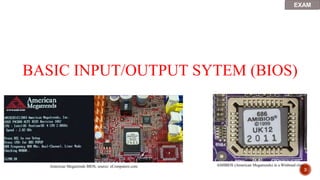
BASIC INPUT/OUTPUT SYTEM (BIOS)
3
AMIBIOS (American Megatrends) in a Winbond chip
American Megatrends BIOS, source: eComputerz.com
EXAM
4
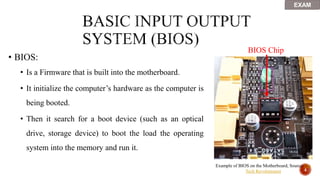
• BIOS:
• Is a Firmware that is built into the motherboard.
• It initialize the computer’s hardware as the computer is
being booted.
• Then it search for a boot device (such as an optical
drive, storage device) to boot the load the operating
system into the memory and run it.
Example of BIOS on the Motherboard, Source The
Tech Revolutionist
BIOS Chip
EXAM
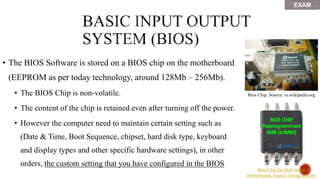
• The BIOS Software is stored on a BIOS chip on the motherboard
(EEPROM as per today technology, around 128Mb – 256Mb).
• The BIOS Chip is non-volatile.
• The content of the chip is retained even after turning off the power.
• However the computer need to maintain certain setting such as
(Date & Time, Boot Sequence, chipset, hard disk type, keyboard
and display types and other specific hardware settings), in other
orders, the custom setting that you have configured in the BIOS
Bios Chip, Source: ru.wikipedia.org
Bios Chip for Dell Vostro
motherboard, Source: lelong.com.my
EXAM
Award Legacy BIOS Interface, Source: Wikipedia.com
Legacy BIOS Interface, Source: UUkeys
EXAM
CMOS Chip / CMOS RAM
7
EXAM
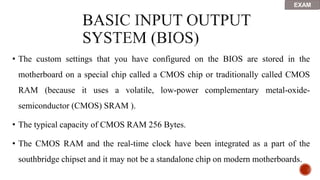
• The custom settings that you have configured on the BIOS are stored in the
motherboard on a special chip called a CMOS chip or traditionally called CMOS
RAM (because it uses a volatile, low-power complementary metal-oxide-
semiconductor (CMOS) SRAM ).
• The typical capacity of CMOS RAM 256 Bytes.
• The CMOS RAM and the real-time clock have been integrated as a part of the
southbridge chipset and it may not be a standalone chip on modern motherboards.
EXAM
• Unlike the BIOS chip which is non-volatile, the
CMOS chip is volatile, meaning, it needs constant
power to maintain its content or settings.
• In order for the CMOS to maintain its settings while
the computer is turned off, it uses a battery, known
as, CMOS battery.
CMOS RAM
EXAM
CMOS BATTERY
10
• The CMOS battery is:
• A Small Button lithium coin cell battery (CR2032), 3 Volts
• Can be seen on the surface of the motherboard, basically it
is the same type of battery that is being used on wrist
watches.
• If the battery is removed then is reattached, the BIOS will
reset back to its default settings from the manufacturer and
erase any customs settings that you have configured.
Example of CMOS 3V Battery
EXAM
• The CMOS battery is:
• The memory battery has an estimated life of 3 years when
power supply unit (PSU) is unplugged or when the PSU
power switch is turned off. The longer you computer
remained off, the faster that CMOS battery is going to be
drained out.
• This battery type, contrary to popular belief, is not
rechargeable and trying to do so may result in an explosion. Example of CMOS 3V Battery
EXAM
Difference between BIOS & CMOS:
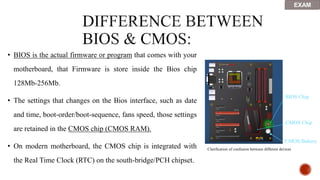
• BIOS is the actual firmware or program that comes with your
motherboard, that Firmware is store inside the Bios chip
128Mb-256Mb.
• The settings that changes on the Bios interface, such as date
and time, boot-order/boot-sequence, fans speed, those settings
are retained in the CMOS chip (CMOS RAM).
• On modern motherboard, the CMOS chip is integrated with
the Real Time Clock (RTC) on the south-bridge/PCH chipset.
BIOS Chip
CMOS Chip
CMOS Battery
Clarification of confusion between different devices
EXAM
• Dual BIOS:
• Recently, some motherboard feature
dual BIOS chips, so in case one of the
BIOS software is corrupted, the other
one can act as a back-up as a good
working version that actually allow the
system to boot Operating system.
• Usually there is a physical switch or
jumper that allow the user to switch
between the two BIOS Chips that hold
different BIOS software versions. DUAL BIOS EEPROM Chip on the
motherboard. Source: TechPowerUp
EXAM
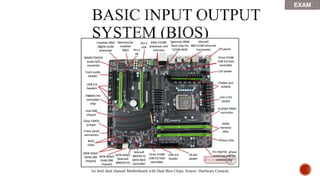
An Intel dual channel Motherboard with Dual Bios Chips, Source: Hardware Canucks
EXAM
Power On Self Test (POST)
17
• When you turn on your computer, it performs what we call a
Power On Self Test (POST)
• Which it run by the BIOS.
• It test the computer to check that all the requirement are met and the
hardware is working correctly before starting the operating system.
EXAM
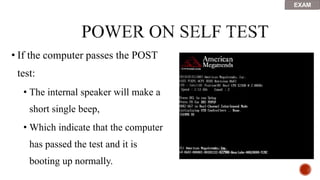
• If the computer passes the POST
test:
• The internal speaker will make a
short single beep,
• Which indicate that the computer
has passed the test and it is
booting up normally.
EXAM
 The results of the POST may be displayed on a panel that is part of the device,
output to an external device, or stored for future retrieval by a diagnostic tool.
 Since a self-test might detect that the system's usual human-readable display is
non-functional, an indicator lamp or a speaker may be provided to show error
codes as a sequence of flashes or beeps.
 In addition to running tests, the POST process may also set the initial state of
the device from firmware
• However if there is no beep, or multiple beeps, then that mean that
the computer has failed the test and something is wrong, and the
computer need troubleshooting to find out what the problem is.
• The computer will generate a beep code to help you pinpoint the
problem
• Refer to the manufacturer documentation to find a list of beep codes
EXAM
Unified Extensible Firmware Interface (UEFI)
22
• Most of modern motherboards are chipped with the new type of
BIOS known as UEFI
Graphical User interface for both the legacy BIOS and Modern UEFI side by side
• Like BIOS, UEFI is installed at the time of manufacturing and is
the first program that runs when a computer is turned on.
• It checks to see what hardware components the computing device
has, wakes the components up and hands them over to the
operating system.
EXAM
• The new UEFI specification addresses several limitations of BIOS, including
• User friendly graphical user interface that support different colors and animation
• Restrictions on hard disk partition size (Bigger than 2TB)
• Amount of time the BIOS takes to perform its task
• Support Mouse and projectors
• Support for secure boot: which stops any digitally unsigned drivers from loading
and helps to stop malicious software, such as rootkits.
EXAM
What we can do from BIOS/UEFI interface
• Change the Boot sequence or Boot order.
• Enable and Disable motherboard connectors (USB2/3/3.1, SATA, Ethernet, Thunderbolt).
• Enable or Disable CPU based GPU (IGP).
• Monitor current component temperature, voltages and fan speed.
• Set-up and administrator password
• Update the UEFI or the BIOS (Flash the BIOS), check current version
• Overclock the Processor (Raise frequency)
• Overclock the memory (Enable XMP profile, raise frequency & reduce timing)
• Change the cooling profile and fans speed (silent, performance, etc.).
• Enable or disable sound controller, wired/wireless network controller/ Bluetooth controller
• Enable or disable Virtualization, Execute, secure boot, power beeps, RAID mode Wake On LAN feature.
• Check current hardware configuration and health status
• Etc.
Example of UEFI User friendly Interface
Windows Operating System Requirement,
upgrade path and installation methods
30
• Check OS System Requirement in term of CPU and DRAM
• Check OS Compatibility with the current version you have
• Download / or Buy a hard copy (DVD, Blu-ray) of the OS.
• Extract/capture your current OS’s license & serial number.
• Backup your data on a different physical disk.
32
Different Version of Windows Vista
33
Different Version of Windows 7
34
Different Version of Windows 8
BitLocker Hyper-V AppLocker
Domain
Member
Cortana
Remote
Desktop
Max x86
RAM
Max x64
RAM
Home No No No No Yes
Client
Only
4GB 128GB
Pro Yes Yes No Yes Yes
Client and
Host
4GB 2 TB
Enterprise Yes Yes Yes Yes
Yes,
except
LTSB
Client and
Host 4GB 2 TB
Education Yes Yes Yes Yes
Yes, with
1703
Client and
Host 4GB 2 TB
35
Different Version of Windows 10
36
Windows Vista Requirement
EXAM
37
Windows 7 Requirement
EXAM
38
Windows 8/8.1 Requirement
EXAM
39
Windows 10
Minimum requirement (x86)
Windows 10
Minimum requirement (x64)
Processor 1 gigahertz (GHz) or faster processor with support for PAE,
NX, and SSE2
RAM
1 (GB) for 32-bit 2 GB for 64-bit
Hard disk space
16 GB for 32-bit OS 20 GB for 64-bit OS
Graphics card
DirectX 9 or later with WDDM 1.0 driver
Display
800x600
Windows 10 Requirement
EXAM
40
• PAE:
• Gives 32-bit processors the ability to use more than 4 GB of physical
memory on capable versions of Windows, and is a prerequisite for NX.
• NX:
• Helps your processor guard the PC from attacks by malicious software.
• SSE2:
• Is a standard instruction set on processors that is increasingly used by
third-party apps and drivers.
EXTRA
41
• 32-bit vs. 64-bit
• Hardware drivers are specific to the OS version (32-bit / 64-bit)
• 32-bit OS cannot run 64-bit apps
• 64-bit OS can run both 32-bit and 64-bit apps
EXAM
WINDOWS UPGRADE PATH
42
EXAM
43
Windows Vista/7 Upgrade-Path
EXAM
44
Windows 8/8.1 Upgrade-Path
EXAM
45
Windows 10 Upgrade-Path
EXAM
Microsoft Windows installation methods
46
EXAM
47
• From a Bootable media (Optical disk, Flash drive)
• From an ISO image on a hypervisor (Oracle virtual box, VMware workstation)
• Via Windows Update from one version to another
• From a recovery partition
• Via network
Exam

BIOS__Power-On-Self-Test.pptx

  • 1.
  • 2.
    2 • Basic InputOutput System (BIOS) • Power On Self Test (POST) • Unified Extensible Firmware Interface (UEFI) • Complementary Metal-Oxide-Semiconductor (CMOS) • CMOS Chip • CMOS Battery • What we can do from BIOS/UEFI interface • Operating System Installation Method EXAM
  • 3.
    BASIC INPUT/OUTPUT SYTEM(BIOS) 3 AMIBIOS (American Megatrends) in a Winbond chip American Megatrends BIOS, source: eComputerz.com EXAM
  • 4.
    4 • BIOS: • Isa Firmware that is built into the motherboard. • It initialize the computer’s hardware as the computer is being booted. • Then it search for a boot device (such as an optical drive, storage device) to boot the load the operating system into the memory and run it. Example of BIOS on the Motherboard, Source The Tech Revolutionist BIOS Chip EXAM
  • 5.
    • The BIOSSoftware is stored on a BIOS chip on the motherboard (EEPROM as per today technology, around 128Mb – 256Mb). • The BIOS Chip is non-volatile. • The content of the chip is retained even after turning off the power. • However the computer need to maintain certain setting such as (Date & Time, Boot Sequence, chipset, hard disk type, keyboard and display types and other specific hardware settings), in other orders, the custom setting that you have configured in the BIOS Bios Chip, Source: ru.wikipedia.org Bios Chip for Dell Vostro motherboard, Source: lelong.com.my EXAM
  • 6.
    Award Legacy BIOSInterface, Source: Wikipedia.com Legacy BIOS Interface, Source: UUkeys EXAM
  • 7.
    CMOS Chip /CMOS RAM 7 EXAM
  • 8.
    • The customsettings that you have configured on the BIOS are stored in the motherboard on a special chip called a CMOS chip or traditionally called CMOS RAM (because it uses a volatile, low-power complementary metal-oxide- semiconductor (CMOS) SRAM ). • The typical capacity of CMOS RAM 256 Bytes. • The CMOS RAM and the real-time clock have been integrated as a part of the southbridge chipset and it may not be a standalone chip on modern motherboards. EXAM
  • 9.
    • Unlike theBIOS chip which is non-volatile, the CMOS chip is volatile, meaning, it needs constant power to maintain its content or settings. • In order for the CMOS to maintain its settings while the computer is turned off, it uses a battery, known as, CMOS battery. CMOS RAM EXAM
  • 10.
  • 11.
    • The CMOSbattery is: • A Small Button lithium coin cell battery (CR2032), 3 Volts • Can be seen on the surface of the motherboard, basically it is the same type of battery that is being used on wrist watches. • If the battery is removed then is reattached, the BIOS will reset back to its default settings from the manufacturer and erase any customs settings that you have configured. Example of CMOS 3V Battery EXAM
  • 12.
    • The CMOSbattery is: • The memory battery has an estimated life of 3 years when power supply unit (PSU) is unplugged or when the PSU power switch is turned off. The longer you computer remained off, the faster that CMOS battery is going to be drained out. • This battery type, contrary to popular belief, is not rechargeable and trying to do so may result in an explosion. Example of CMOS 3V Battery EXAM
  • 13.
  • 14.
    • BIOS isthe actual firmware or program that comes with your motherboard, that Firmware is store inside the Bios chip 128Mb-256Mb. • The settings that changes on the Bios interface, such as date and time, boot-order/boot-sequence, fans speed, those settings are retained in the CMOS chip (CMOS RAM). • On modern motherboard, the CMOS chip is integrated with the Real Time Clock (RTC) on the south-bridge/PCH chipset. BIOS Chip CMOS Chip CMOS Battery Clarification of confusion between different devices EXAM
  • 15.
    • Dual BIOS: •Recently, some motherboard feature dual BIOS chips, so in case one of the BIOS software is corrupted, the other one can act as a back-up as a good working version that actually allow the system to boot Operating system. • Usually there is a physical switch or jumper that allow the user to switch between the two BIOS Chips that hold different BIOS software versions. DUAL BIOS EEPROM Chip on the motherboard. Source: TechPowerUp EXAM
  • 16.
    An Intel dualchannel Motherboard with Dual Bios Chips, Source: Hardware Canucks EXAM
  • 17.
    Power On SelfTest (POST) 17
  • 18.
    • When youturn on your computer, it performs what we call a Power On Self Test (POST) • Which it run by the BIOS. • It test the computer to check that all the requirement are met and the hardware is working correctly before starting the operating system. EXAM
  • 19.
    • If thecomputer passes the POST test: • The internal speaker will make a short single beep, • Which indicate that the computer has passed the test and it is booting up normally. EXAM
  • 20.
     The resultsof the POST may be displayed on a panel that is part of the device, output to an external device, or stored for future retrieval by a diagnostic tool.  Since a self-test might detect that the system's usual human-readable display is non-functional, an indicator lamp or a speaker may be provided to show error codes as a sequence of flashes or beeps.  In addition to running tests, the POST process may also set the initial state of the device from firmware
  • 21.
    • However ifthere is no beep, or multiple beeps, then that mean that the computer has failed the test and something is wrong, and the computer need troubleshooting to find out what the problem is. • The computer will generate a beep code to help you pinpoint the problem • Refer to the manufacturer documentation to find a list of beep codes EXAM
  • 22.
    Unified Extensible FirmwareInterface (UEFI) 22
  • 23.
    • Most ofmodern motherboards are chipped with the new type of BIOS known as UEFI Graphical User interface for both the legacy BIOS and Modern UEFI side by side
  • 24.
    • Like BIOS,UEFI is installed at the time of manufacturing and is the first program that runs when a computer is turned on. • It checks to see what hardware components the computing device has, wakes the components up and hands them over to the operating system. EXAM
  • 25.
    • The newUEFI specification addresses several limitations of BIOS, including • User friendly graphical user interface that support different colors and animation • Restrictions on hard disk partition size (Bigger than 2TB) • Amount of time the BIOS takes to perform its task • Support Mouse and projectors • Support for secure boot: which stops any digitally unsigned drivers from loading and helps to stop malicious software, such as rootkits. EXAM
  • 26.
    What we cando from BIOS/UEFI interface
  • 27.
    • Change theBoot sequence or Boot order. • Enable and Disable motherboard connectors (USB2/3/3.1, SATA, Ethernet, Thunderbolt). • Enable or Disable CPU based GPU (IGP). • Monitor current component temperature, voltages and fan speed. • Set-up and administrator password • Update the UEFI or the BIOS (Flash the BIOS), check current version • Overclock the Processor (Raise frequency) • Overclock the memory (Enable XMP profile, raise frequency & reduce timing) • Change the cooling profile and fans speed (silent, performance, etc.). • Enable or disable sound controller, wired/wireless network controller/ Bluetooth controller • Enable or disable Virtualization, Execute, secure boot, power beeps, RAID mode Wake On LAN feature. • Check current hardware configuration and health status • Etc.
  • 29.
    Example of UEFIUser friendly Interface
  • 30.
    Windows Operating SystemRequirement, upgrade path and installation methods 30
  • 31.
    • Check OSSystem Requirement in term of CPU and DRAM • Check OS Compatibility with the current version you have • Download / or Buy a hard copy (DVD, Blu-ray) of the OS. • Extract/capture your current OS’s license & serial number. • Backup your data on a different physical disk.
  • 32.
  • 33.
  • 34.
  • 35.
    BitLocker Hyper-V AppLocker Domain Member Cortana Remote Desktop Maxx86 RAM Max x64 RAM Home No No No No Yes Client Only 4GB 128GB Pro Yes Yes No Yes Yes Client and Host 4GB 2 TB Enterprise Yes Yes Yes Yes Yes, except LTSB Client and Host 4GB 2 TB Education Yes Yes Yes Yes Yes, with 1703 Client and Host 4GB 2 TB 35 Different Version of Windows 10
  • 36.
  • 37.
  • 38.
  • 39.
    39 Windows 10 Minimum requirement(x86) Windows 10 Minimum requirement (x64) Processor 1 gigahertz (GHz) or faster processor with support for PAE, NX, and SSE2 RAM 1 (GB) for 32-bit 2 GB for 64-bit Hard disk space 16 GB for 32-bit OS 20 GB for 64-bit OS Graphics card DirectX 9 or later with WDDM 1.0 driver Display 800x600 Windows 10 Requirement EXAM
  • 40.
    40 • PAE: • Gives32-bit processors the ability to use more than 4 GB of physical memory on capable versions of Windows, and is a prerequisite for NX. • NX: • Helps your processor guard the PC from attacks by malicious software. • SSE2: • Is a standard instruction set on processors that is increasingly used by third-party apps and drivers. EXTRA
  • 41.
    41 • 32-bit vs.64-bit • Hardware drivers are specific to the OS version (32-bit / 64-bit) • 32-bit OS cannot run 64-bit apps • 64-bit OS can run both 32-bit and 64-bit apps EXAM
  • 42.
  • 43.
  • 44.
  • 45.
  • 46.
  • 47.
    47 • From aBootable media (Optical disk, Flash drive) • From an ISO image on a hypervisor (Oracle virtual box, VMware workstation) • Via Windows Update from one version to another • From a recovery partition • Via network Exam