
Fun
with
“Jenkins & Salesforce”
Who I am ?
● Abhinav Gupta
● Salesforce MVP & Architect.
● In love with Salesforce since
2008.
● Founder of Concretio Apps,
ISV and PDO Partner.
● t: @abhinavguptas
Agenda
Credits : http://www.jimcarreyonline.com/
Agenda - Real :-)
1. Overview of Jenkins & Force.com Migration
Tool.
2. Code versioning practices.
3. How could we improve ?
4. Automating the same via Jenkins
What is Jenkins
Credits: https://www.cloudbees.com/jenkins/about
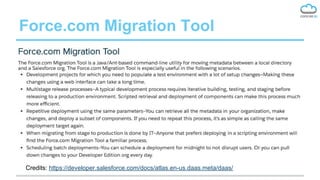
Force.com Migration Tool
Credits: https://developer.salesforce.com/docs/atlas.en-us.daas.meta/daas/
Code Versioning
Practices
How mostly devs do
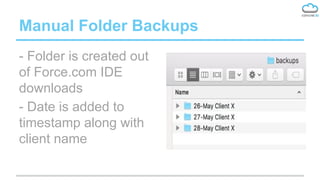
Manual Folder Backups
- Folder is created out
of Force.com IDE
downloads
- Date is added to
timestamp along with
client name
What’s the problem in it ?
- It sucks :(
- Not backed up on server/cloud/hosting
- No way for multiple devs to collaborate
- No easy way to figure out change log.
- It’s depressing and scares me a lot, really :-/
How it could be better ?
● Use Force.com Migration Tool
○ It will simplify metadata download
○ Mostly one line command, after build.xml setup
○ Requires least coding knowledge, mostly a simple
xml editing skill is required.
● Use GIT
○ Many git hostings i.e. github, bitbucket etc are
available
○ Can work well with Force.com migration tool.
Even Better World ?
● Use Jenkins !
○ Its free and open source
○ Openshift and other providers offer Free hostings.
○ It can work well with Force.com migration tool
○ It works like charm with GIT
○ Automate simple nightly code backups.
○ Once comfortable, use it like PRO, and do multi
org/sandbox strategy with your clients.
Live Demo
● A Simple nightly code back Job on Jenkins
● Auto checkout of required metadata
● Auto commit+push into GIT (bitbucket
private repo)
● Hosted for free on https://www.openshift.
com/
Jenkins Job
Overview
A simple job for metadata backup in GIT
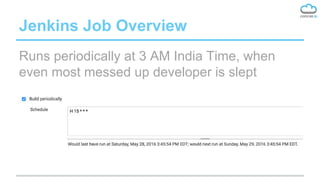
Jenkins Job Overview
Runs periodically at 3 AM India Time, when
even most messed up developer is slept
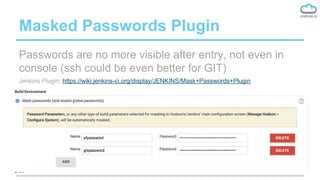
Masked Passwords Plugin
Passwords are no more visible after entry, not even in
console (ssh could be even better for GIT)
Jenkins Plugin: https://wiki.jenkins-ci.org/display/JENKINS/Mask+Passwords+Plugin
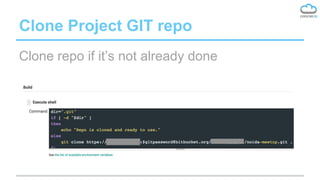
Clone Project GIT repo
Clone repo if it’s not already done
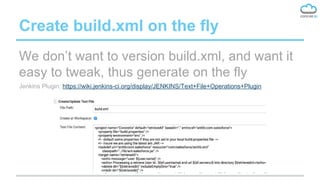
Create build.xml on the fly
We don’t want to version build.xml, and want it
easy to tweak, thus generate on the fly
Jenkins Plugin: https://wiki.jenkins-ci.org/display/JENKINS/Text+File+Operations+Plugin
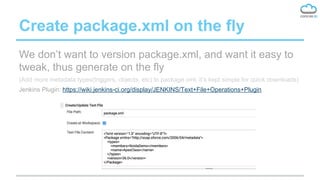
Create package.xml on the fly
We don’t want to version package.xml, and want it easy to
tweak, thus generate on the fly
(Add more metadata types(triggers, objects, etc) to package.xml, it’s kept simple for quick downloads)
Jenkins Plugin: https://wiki.jenkins-ci.org/display/JENKINS/Text+File+Operations+Plugin
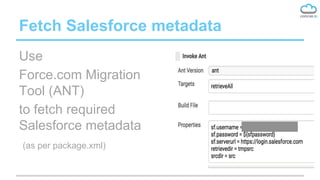
Fetch Salesforce metadata
Use
Force.com Migration
Tool (ANT)
to fetch required
Salesforce metadata
(as per package.xml)
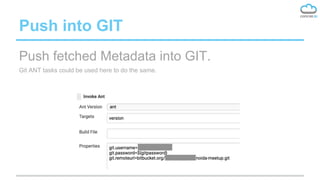
Push into GIT
Push fetched Metadata into GIT.
Git ANT tasks could be used here to do the same.
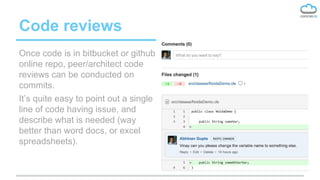
Code reviews
Once code is in bitbucket or github
online repo, peer/architect code
reviews can be conducted on
commits.
It’s quite easy to point out a single
line of code having issue, and
describe what is needed (way
better than word docs, or excel
spreadsheets).
Q & A
Thanks
Abhinav Gupta
t: @abhinavguptas

Fun with Jenkins & Salesforce

  • 1.
  • 2.
    Who I am? ● Abhinav Gupta ● Salesforce MVP & Architect. ● In love with Salesforce since 2008. ● Founder of Concretio Apps, ISV and PDO Partner. ● t: @abhinavguptas
  • 3.
  • 4.
    Agenda - Real:-) 1. Overview of Jenkins & Force.com Migration Tool. 2. Code versioning practices. 3. How could we improve ? 4. Automating the same via Jenkins
  • 5.
    What is Jenkins Credits:https://www.cloudbees.com/jenkins/about
  • 6.
    Force.com Migration Tool Credits:https://developer.salesforce.com/docs/atlas.en-us.daas.meta/daas/
  • 7.
  • 8.
    Manual Folder Backups -Folder is created out of Force.com IDE downloads - Date is added to timestamp along with client name
  • 9.
    What’s the problemin it ? - It sucks :( - Not backed up on server/cloud/hosting - No way for multiple devs to collaborate - No easy way to figure out change log. - It’s depressing and scares me a lot, really :-/
  • 10.
    How it couldbe better ? ● Use Force.com Migration Tool ○ It will simplify metadata download ○ Mostly one line command, after build.xml setup ○ Requires least coding knowledge, mostly a simple xml editing skill is required. ● Use GIT ○ Many git hostings i.e. github, bitbucket etc are available ○ Can work well with Force.com migration tool.
  • 11.
    Even Better World? ● Use Jenkins ! ○ Its free and open source ○ Openshift and other providers offer Free hostings. ○ It can work well with Force.com migration tool ○ It works like charm with GIT ○ Automate simple nightly code backups. ○ Once comfortable, use it like PRO, and do multi org/sandbox strategy with your clients.
  • 12.
    Live Demo ● ASimple nightly code back Job on Jenkins ● Auto checkout of required metadata ● Auto commit+push into GIT (bitbucket private repo) ● Hosted for free on https://www.openshift. com/
  • 13.
    Jenkins Job Overview A simplejob for metadata backup in GIT
  • 14.
    Jenkins Job Overview Runsperiodically at 3 AM India Time, when even most messed up developer is slept
  • 15.
    Masked Passwords Plugin Passwordsare no more visible after entry, not even in console (ssh could be even better for GIT) Jenkins Plugin: https://wiki.jenkins-ci.org/display/JENKINS/Mask+Passwords+Plugin
  • 16.
    Clone Project GITrepo Clone repo if it’s not already done
  • 17.
    Create build.xml onthe fly We don’t want to version build.xml, and want it easy to tweak, thus generate on the fly Jenkins Plugin: https://wiki.jenkins-ci.org/display/JENKINS/Text+File+Operations+Plugin
  • 18.
    Create package.xml onthe fly We don’t want to version package.xml, and want it easy to tweak, thus generate on the fly (Add more metadata types(triggers, objects, etc) to package.xml, it’s kept simple for quick downloads) Jenkins Plugin: https://wiki.jenkins-ci.org/display/JENKINS/Text+File+Operations+Plugin
  • 19.
    Fetch Salesforce metadata Use Force.comMigration Tool (ANT) to fetch required Salesforce metadata (as per package.xml)
  • 20.
    Push into GIT Pushfetched Metadata into GIT. Git ANT tasks could be used here to do the same.
  • 21.
    Code reviews Once codeis in bitbucket or github online repo, peer/architect code reviews can be conducted on commits. It’s quite easy to point out a single line of code having issue, and describe what is needed (way better than word docs, or excel spreadsheets).
  • 22.
    Q & A Thanks AbhinavGupta t: @abhinavguptas