Andrew Brandt, Jerome Russ & Teresa Garcia-Bovenmyer
Consultant, IT App Development | Specialist, IT App Development | Sr. Developer, IT Applications
branda3@nationwide.com | russj3@nationwide.com | garcit1@nationwide.com
@BrandtTech | @RussJdr | @Tgarciab
Utilizing SVN & Jenkins to Manage
Multi-line Development to Deployments
Forward-Looking Statements
Statement under the Private Securities Litigation Reform Act of 1995:
This presentation may contain forward-looking statements that involve risks, uncertainties, and assumptions. If any such uncertainties materialize or if any
of the assumptions proves incorrect, the results of salesforce.com, inc. could differ materially from the results expressed or implied by the forward-looking
statements we make. All statements other than statements of historical fact could be deemed forward-looking, including any projections of product or
service availability, subscriber growth, earnings, revenues, or other financial items and any statements regarding strategies or plans of management for
future operations, statements of belief, any statements concerning new, planned, or upgraded services or technology developments and customer contracts
or use of our services.
The risks and uncertainties referred to above include – but are not limited to – risks associated with developing and delivering new functionality for our
service, new products and services, our new business model, our past operating losses, possible fluctuations in our operating results and rate of growth,
interruptions or delays in our Web hosting, breach of our security measures, the outcome of any litigation, risks associated with completed and any possible
mergers and acquisitions, the immature market in which we operate, our relatively limited operating history, our ability to expand, retain, and motivate our
employees and manage our growth, new releases of our service and successful customer deployment, our limited history reselling non-salesforce.com
products, and utilization and selling to larger enterprise customers. Further information on potential factors that could affect the financial results of
salesforce.com, inc. is included in our annual report on Form 10-K for the most recent fiscal year and in our quarterly report on Form 10-Q for the most
recent fiscal quarter. These documents and others containing important disclosures are available on the SEC Filings section of the Investor Information
section of our Web site.
Any unreleased services or features referenced in this or other presentations, press releases or public statements are not currently available and may not
be delivered on time or at all. Customers who purchase our services should make the purchase decisions based upon features that are currently available.
Salesforce.com, inc. assumes no obligation and does not intend to update these forward-looking statements.
Nationwide P&C Agile
Team/Project Structures
Andrew Brandt
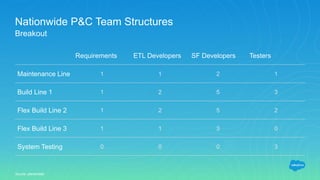
Nationwide P&C Team Structures
Requirements ETL Developers SF Developers Testers
Maintenance Line 1 1 2 1
Build Line 1 1 2 5 3
Flex Build Line 2 1 2 5 2
Flex Build Line 3 1 1 3 0
System Testing 0 0 0 3
Breakout
Source: placeholder
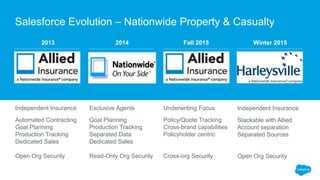
2013
Exclusive Agents
Goal Planning
Production Tracking
Separated Data
Dedicated Sales
Read-Only Org Security
Underwriting Focus
Policy/Quote Tracking
Cross-brand capabilities
Policyholder centric
Cross-org Security
Independent Insurance
Stackable with Allied
Account separation
Separated Sources
Open Org Security
2014 Fall 2015 Winter 2015
Independent Insurance
Automated Contracting
Goal Planning
Production Tracking
Dedicated Sales
Open Org Security
Salesforce Evolution – Nationwide Property & Casualty
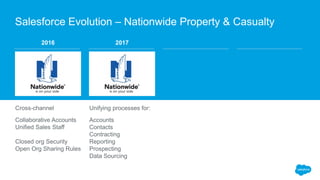
2016
Unifying processes for:
Accounts
Contacts
Contracting
Reporting
Prospecting
Data Sourcing
2017
Cross-channel
Collaborative Accounts
Unified Sales Staff
Closed org Security
Open Org Sharing Rules
Salesforce Evolution – Nationwide Property & Casualty
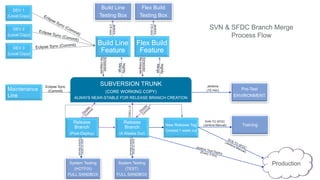
Nationwide P&C SVN
Branching Strategy
Andrew Brandt
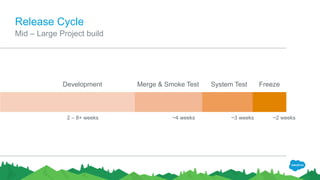
Release Cycle
Mid – Large Project build
Development Merge & Smoke Test System Test Freeze
2 – 8+ weeks ~4 weeks ~3 weeks ~2 weeks
DEV 1
(Local Copy)
DEV 2
(Local Copy)
DEV 3
(Local Copy)
Build Line
Testing Box
Flex Build
Testing Box
Btest
Box
Build Line
Feature
Flex Build
Feature
SUBVERSION TRUNK
(CORE WORKING COPY)
ALWAYS NEAR-STABLE FOR RELEASE BRANCH CREATION
Release
Branch
(Post-Deploy)
Release
Branch
(4 Weeks Out)
New Release Tag
Created 1 week out
Maintenance
Line
Pre-Test
ENVIRONMENT
Training
System Testing
(HOTFIX)
FULL SANDBOX
System Testing
(TEST)
FULL SANDBOX
Production
Jenkins
(15 min)
Eclipse Sync
(Commit)
Jenkins
(15min)
Jenkins
(15min)
Nightly
Merge
Nightly
Merge
Scheduled
Re-Integrate
Scheduled
Re-Integrate
SVN TO SFDC
(Jenkins Manual)
STFIXES
SVNTOSFDC
(JenkinsManual)
SVNTOSFDC
(JenkinsManual)
SVN & SFDC Branch Merge
Process Flow
Team-level Development
& Validation
Jerome Russ
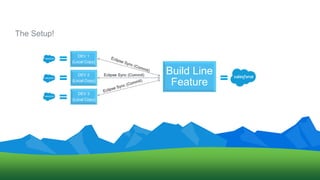
The Setup!
DEV 1
(Local Copy)
DEV 2
(Local Copy)
DEV 3
(Local Copy)
Build Line
Feature
Eclipse Sync (Commit)
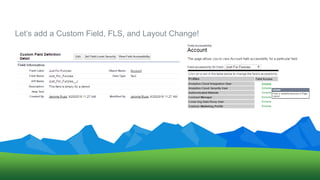
Let’s add a Custom Field, FLS, and Layout Change!
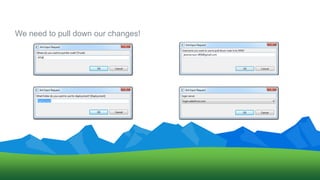
We need to pull down our changes!
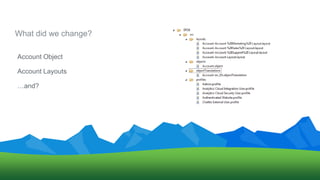
What did we change?
Account Object
Account Layouts
…and?
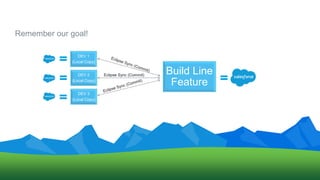
Remember our goal!
DEV 1
(Local Copy)
DEV 2
(Local Copy)
DEV 3
(Local Copy)
Build Line
Feature
Eclipse Sync (Commit)
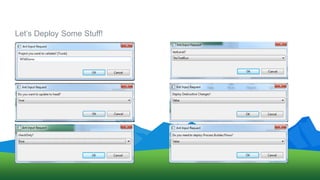
Let’s Deploy Some Stuff!
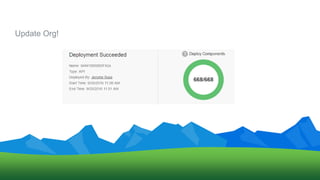
Update Org!
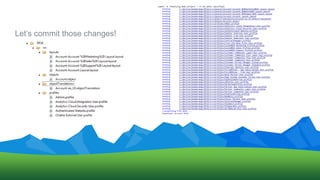
Let’s commit those changes!
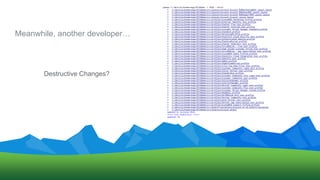
Meanwhile, another developer…
Destructive Changes?
Advantages of this approach:
Anybody can make the change in Salesforce
Work in progress is easily identified Project merges go smoother
Branch is always deployablePrinciples are technology agnostic
Add automated steps to deployments
Code Merge Processes
Teresa Garcia-Bovenmyer
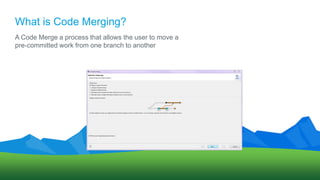
What is Code Merging?
A Code Merge a process that allows the user to move a
pre-committed work from one branch to another
Benefits of Code Merging
• Provides a greater span of
control over the content
you are merging into a
Branch
• Developer can Merge a
committed work into
multiple Branches
• Reduces overall effort for
the Developers/Line
• Helps to ensure that you
are not forgetting already
merged components
• Great way to Deploy entire
projects into a new branch
or a release branch
Downsides of Code Merging
• Eclipse comparisons are
done on a line # basis and
not a component basis
• Items will not always line up
• Manually resolving
conflicts can be tedious
• Have to make sure you are
only introducing your
changes
• Large Code Merges can be
very time consuming
• It is important to outline
what you will be merging
prior to a Large code
merge
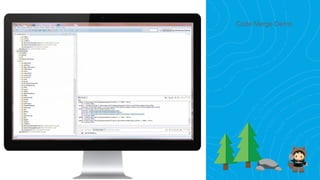
Code Merge Demo
System Testing
Strategy
Teresa Garcia-Bovenmyer
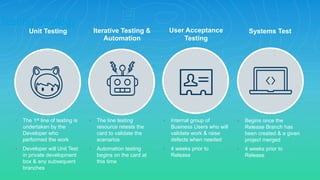
Unit Testing
• The line testing
resource retests the
card to validate the
scenarios
• Automation testing
begins on the card at
this time
• Internal group of
Business Users who will
validate work & raise
defects when needed
• 4 weeks prior to
Release
• Begins once the
Release Branch has
been created & a given
project merged
• 4 weeks prior to
Release
Iterative Testing &
Automation
User Acceptance
Testing
Systems Test
• The 1st line of testing is
undertaken by the
Developer who
performed the work
• Developer will Unit Test
in private development
box & any subsequent
branches
Testing Strategy
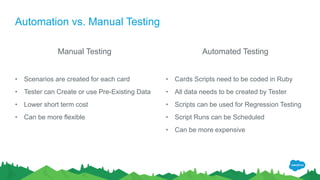
Automation vs. Manual Testing
Manual Testing
• Scenarios are created for each card
• Tester can Create or use Pre-Existing Data
• Lower short term cost
• Can be more flexible
Automated Testing
• Cards Scripts need to be coded in Ruby
• All data needs to be created by Tester
• Scripts can be used for Regression Testing
• Script Runs can be Scheduled
• Can be more expensive
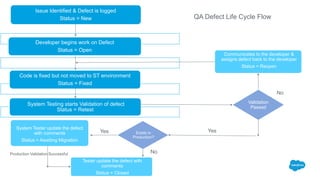
Issue Identified & Defect is logged
Status = New
Developer begins work on Defect
Status = Open
Code is fixed but not moved to ST environment
Status = Fixed
System Testing starts Validation of defect
Status = Retest
Validation
Passed
Exists in
Production?
System Tester update the defect
with comments
Status = Awaiting Migration
Communicates to the developer &
assigns defect back to the developer
Status = Reopen
Tester update the defect with
comments
Status = Closed
No
Yes
No
Yes
Production Validation Successful
QA Defect Life Cycle Flow
Deployment Strategy
Andrew Brandt
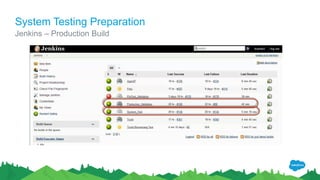
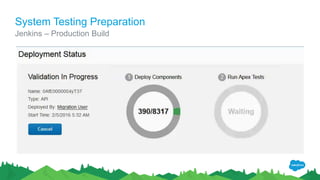
System Testing Preparation
Jenkins – Production Build
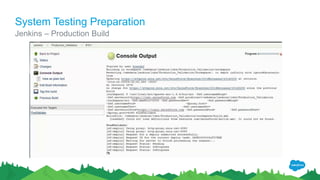
System Testing Preparation
Jenkins – Production Build
System Testing Preparation
Jenkins – Production Build
3-5 hours later……
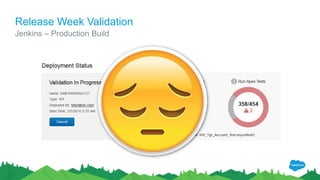
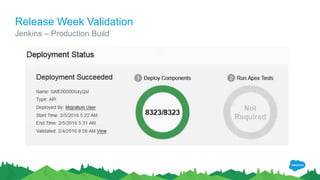
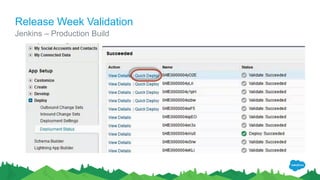
Release Week Validation
Jenkins – Production Build
Release Week Validation
Jenkins – Production Build
Release Day
Release Week Validation
Jenkins – Production Build
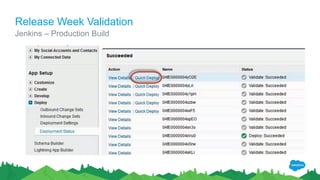
10 minutes later……
Release Week Validation
Jenkins – Production Build
Thank Y u

Utilizing SVN Jenkins to Manage Multi-line Development to Deployments

  • 1.
    Andrew Brandt, JeromeRuss & Teresa Garcia-Bovenmyer Consultant, IT App Development | Specialist, IT App Development | Sr. Developer, IT Applications branda3@nationwide.com | russj3@nationwide.com | garcit1@nationwide.com @BrandtTech | @RussJdr | @Tgarciab Utilizing SVN & Jenkins to Manage Multi-line Development to Deployments
  • 2.
    Forward-Looking Statements Statement underthe Private Securities Litigation Reform Act of 1995: This presentation may contain forward-looking statements that involve risks, uncertainties, and assumptions. If any such uncertainties materialize or if any of the assumptions proves incorrect, the results of salesforce.com, inc. could differ materially from the results expressed or implied by the forward-looking statements we make. All statements other than statements of historical fact could be deemed forward-looking, including any projections of product or service availability, subscriber growth, earnings, revenues, or other financial items and any statements regarding strategies or plans of management for future operations, statements of belief, any statements concerning new, planned, or upgraded services or technology developments and customer contracts or use of our services. The risks and uncertainties referred to above include – but are not limited to – risks associated with developing and delivering new functionality for our service, new products and services, our new business model, our past operating losses, possible fluctuations in our operating results and rate of growth, interruptions or delays in our Web hosting, breach of our security measures, the outcome of any litigation, risks associated with completed and any possible mergers and acquisitions, the immature market in which we operate, our relatively limited operating history, our ability to expand, retain, and motivate our employees and manage our growth, new releases of our service and successful customer deployment, our limited history reselling non-salesforce.com products, and utilization and selling to larger enterprise customers. Further information on potential factors that could affect the financial results of salesforce.com, inc. is included in our annual report on Form 10-K for the most recent fiscal year and in our quarterly report on Form 10-Q for the most recent fiscal quarter. These documents and others containing important disclosures are available on the SEC Filings section of the Investor Information section of our Web site. Any unreleased services or features referenced in this or other presentations, press releases or public statements are not currently available and may not be delivered on time or at all. Customers who purchase our services should make the purchase decisions based upon features that are currently available. Salesforce.com, inc. assumes no obligation and does not intend to update these forward-looking statements.
  • 3.
    Nationwide P&C Agile Team/ProjectStructures Andrew Brandt
  • 4.
    Nationwide P&C TeamStructures Requirements ETL Developers SF Developers Testers Maintenance Line 1 1 2 1 Build Line 1 1 2 5 3 Flex Build Line 2 1 2 5 2 Flex Build Line 3 1 1 3 0 System Testing 0 0 0 3 Breakout Source: placeholder
  • 5.
    2013 Exclusive Agents Goal Planning ProductionTracking Separated Data Dedicated Sales Read-Only Org Security Underwriting Focus Policy/Quote Tracking Cross-brand capabilities Policyholder centric Cross-org Security Independent Insurance Stackable with Allied Account separation Separated Sources Open Org Security 2014 Fall 2015 Winter 2015 Independent Insurance Automated Contracting Goal Planning Production Tracking Dedicated Sales Open Org Security Salesforce Evolution – Nationwide Property & Casualty
  • 6.
    2016 Unifying processes for: Accounts Contacts Contracting Reporting Prospecting DataSourcing 2017 Cross-channel Collaborative Accounts Unified Sales Staff Closed org Security Open Org Sharing Rules Salesforce Evolution – Nationwide Property & Casualty
  • 7.
    Nationwide P&C SVN BranchingStrategy Andrew Brandt
  • 8.
    Release Cycle Mid –Large Project build Development Merge & Smoke Test System Test Freeze 2 – 8+ weeks ~4 weeks ~3 weeks ~2 weeks
  • 9.
    DEV 1 (Local Copy) DEV2 (Local Copy) DEV 3 (Local Copy) Build Line Testing Box Flex Build Testing Box Btest Box Build Line Feature Flex Build Feature SUBVERSION TRUNK (CORE WORKING COPY) ALWAYS NEAR-STABLE FOR RELEASE BRANCH CREATION Release Branch (Post-Deploy) Release Branch (4 Weeks Out) New Release Tag Created 1 week out Maintenance Line Pre-Test ENVIRONMENT Training System Testing (HOTFIX) FULL SANDBOX System Testing (TEST) FULL SANDBOX Production Jenkins (15 min) Eclipse Sync (Commit) Jenkins (15min) Jenkins (15min) Nightly Merge Nightly Merge Scheduled Re-Integrate Scheduled Re-Integrate SVN TO SFDC (Jenkins Manual) STFIXES SVNTOSFDC (JenkinsManual) SVNTOSFDC (JenkinsManual) SVN & SFDC Branch Merge Process Flow
  • 10.
  • 11.
    The Setup! DEV 1 (LocalCopy) DEV 2 (Local Copy) DEV 3 (Local Copy) Build Line Feature Eclipse Sync (Commit)
  • 12.
    Let’s add aCustom Field, FLS, and Layout Change!
  • 13.
    We need topull down our changes!
  • 14.
    What did wechange? Account Object Account Layouts …and?
  • 15.
    Remember our goal! DEV1 (Local Copy) DEV 2 (Local Copy) DEV 3 (Local Copy) Build Line Feature Eclipse Sync (Commit)
  • 16.
  • 17.
  • 18.
  • 19.
  • 20.
    Advantages of thisapproach: Anybody can make the change in Salesforce Work in progress is easily identified Project merges go smoother Branch is always deployablePrinciples are technology agnostic Add automated steps to deployments
  • 21.
  • 22.
    What is CodeMerging? A Code Merge a process that allows the user to move a pre-committed work from one branch to another
  • 23.
    Benefits of CodeMerging • Provides a greater span of control over the content you are merging into a Branch • Developer can Merge a committed work into multiple Branches • Reduces overall effort for the Developers/Line • Helps to ensure that you are not forgetting already merged components • Great way to Deploy entire projects into a new branch or a release branch
  • 24.
    Downsides of CodeMerging • Eclipse comparisons are done on a line # basis and not a component basis • Items will not always line up • Manually resolving conflicts can be tedious • Have to make sure you are only introducing your changes • Large Code Merges can be very time consuming • It is important to outline what you will be merging prior to a Large code merge
  • 25.
  • 26.
  • 27.
    Unit Testing • Theline testing resource retests the card to validate the scenarios • Automation testing begins on the card at this time • Internal group of Business Users who will validate work & raise defects when needed • 4 weeks prior to Release • Begins once the Release Branch has been created & a given project merged • 4 weeks prior to Release Iterative Testing & Automation User Acceptance Testing Systems Test • The 1st line of testing is undertaken by the Developer who performed the work • Developer will Unit Test in private development box & any subsequent branches Testing Strategy
  • 28.
    Automation vs. ManualTesting Manual Testing • Scenarios are created for each card • Tester can Create or use Pre-Existing Data • Lower short term cost • Can be more flexible Automated Testing • Cards Scripts need to be coded in Ruby • All data needs to be created by Tester • Scripts can be used for Regression Testing • Script Runs can be Scheduled • Can be more expensive
  • 29.
    Issue Identified &Defect is logged Status = New Developer begins work on Defect Status = Open Code is fixed but not moved to ST environment Status = Fixed System Testing starts Validation of defect Status = Retest Validation Passed Exists in Production? System Tester update the defect with comments Status = Awaiting Migration Communicates to the developer & assigns defect back to the developer Status = Reopen Tester update the defect with comments Status = Closed No Yes No Yes Production Validation Successful QA Defect Life Cycle Flow
  • 30.
  • 31.
  • 32.
  • 33.
  • 34.
  • 35.
    Release Week Validation Jenkins– Production Build
  • 36.
    Release Week Validation Jenkins– Production Build
  • 37.
  • 38.
    Release Week Validation Jenkins– Production Build
  • 39.
  • 40.
    Release Week Validation Jenkins– Production Build
  • 41.