1
CI from scratch with Jenkins
Borislav Traykov
2 Confidential and proprietary information of Verint Systems Inc. © All rights reserved worldwide2
Well …
Why is this guy going to talk to us about Jenkins?
3 Confidential and proprietary information of Verint Systems Inc. © All rights reserved worldwide3
Because
+Experience with Continuous Build + Test + Deploy using TFS &
Octopus Deploy (2013-2015)
+Captain of a Jenkins system, that is servicing the needs of 15 dev
teams since 2016. Started from scratch.
+Got 500+ jobs for Continuous Building, Continuous Testing и
Continuous Deployment
+Drive to provide clarity and reusability
4 Confidential and proprietary information of Verint Systems Inc. © All rights reserved worldwide4
… and initial expectations for added value
How to start with Jenkins?
5 Confidential and proprietary information of Verint Systems Inc. © All rights reserved worldwide5
How to start with Jenkins (psychological)
+Time and energy for communication
+Clarity of execution
+Expose opportunity for repeatability
+Identifying (and communicating) issues
+Taking into account external factors
+Code is code, even if it’s a script.
Even if it’s a “simple” shell script
6 Confidential and proprietary information of Verint Systems Inc. © All rights reserved worldwide6
How to start with Jenkins (technical)
+Jobs/Pipelines
+Command line interfaces
+Plugins
+Jenkins management
+Control flow
7
Tips and good practices
+Read documentation, blog posts and articles
+______
+Read and write log messages. Preserve them!
+Ensure enough repetitions are successful to prove readiness
+Reserve time and energy for unforeseen circumstances
8
Blue Ocean
Pipeline
9
Docker
+For primary/master – experiment with functionality
+For nodes/slaves – describe and preserve functional definitions.
“Servers are cattle, not pets”
10 Confidential and proprietary information of Verint Systems Inc. © All rights reserved worldwide10
Cost of running a Jenkins server or system
+PERCEIVED performance
+ Availability of resources – memory, storage and network
+ Authentication & Authorization
+ Changes to existing functionality
+ Updates to the equipment
+ Server configuration
11
Plugins!
12 Confidential and proprietary information of Verint Systems Inc. © All rights reserved worldwide12
Control flow plugins (job-to-job)
1. Parametrized Trigger plugin
2. Rebuild plugin
3. Build Blocker plugin
4. Extended Choice Parameter plugin
5. Extensible Choice Parameter plugin
6. Global Variable String Parameter plugin
7. Copy Artifact plugin
8. Hidden Parameter plugin
9. Config File Provider plugin
10.Matrix Project plugin
13 Confidential and proprietary information of Verint Systems Inc. © All rights reserved worldwide13
Control flow plugins (jobs step flow)
1. Conditional BuildStep plugin
2. Text-finder plugin
14 Confidential and proprietary information of Verint Systems Inc. © All rights reserved worldwide14
Plugins for additional job functionality
1. EnvInject plugin
2. Workspace Cleanup plugin
3. HTML publisher plugin
4. Build Name Setter plugin
5. JUnit plugin
6. Ant plugin
7. Gradle plugin
8. SonarQube Scanner plugin
9. Credentials Binding plugin
10.Performance plugin
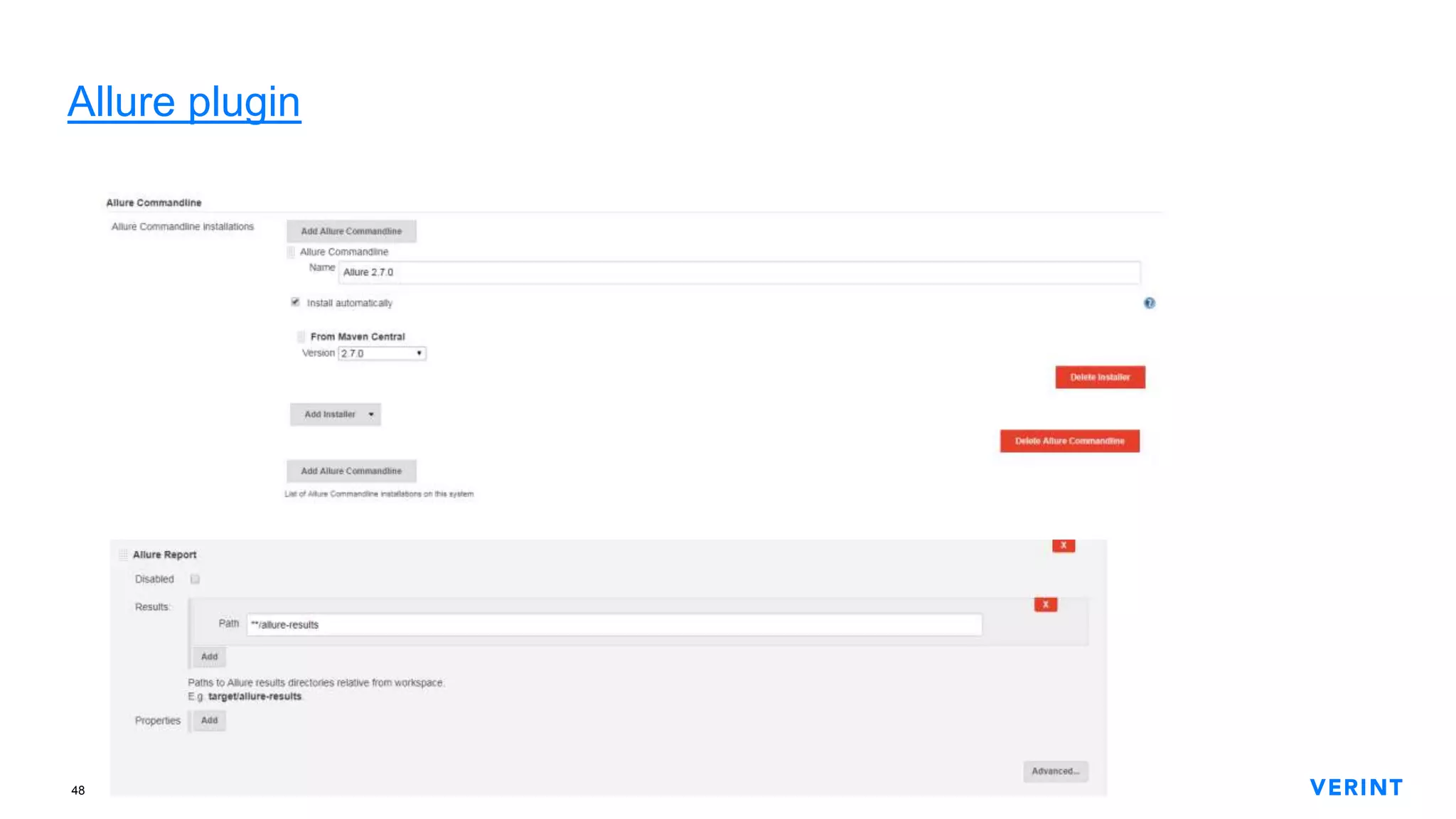
11.Allure plugin
12.Powershell plugin
15 Confidential and proprietary information of Verint Systems Inc. © All rights reserved worldwide15
Extensions for job capabilities
1. Git plugin
2. Subversion plugin
3. Timestampler plugin
4. Build Keeper plugin
5. Build timeout plugin
6. Discard Old Build plugin
7. Maven Project plugin
16 Confidential and proprietary information of Verint Systems Inc. © All rights reserved worldwide16
Management & Administration plugins
1. CloudBees Folders plugin
2. Martix Authorization Strategy plugin
3. Credentials plugin
4. Job Configuration history plugin
5. Build Trigger Badge plugin
6. Disk Usage plugin
7. Active Directory plugin
8. Bitbucket plugin
9. Windows Slaves plugin
17 Confidential and proprietary information of Verint Systems Inc. © All rights reserved worldwide17
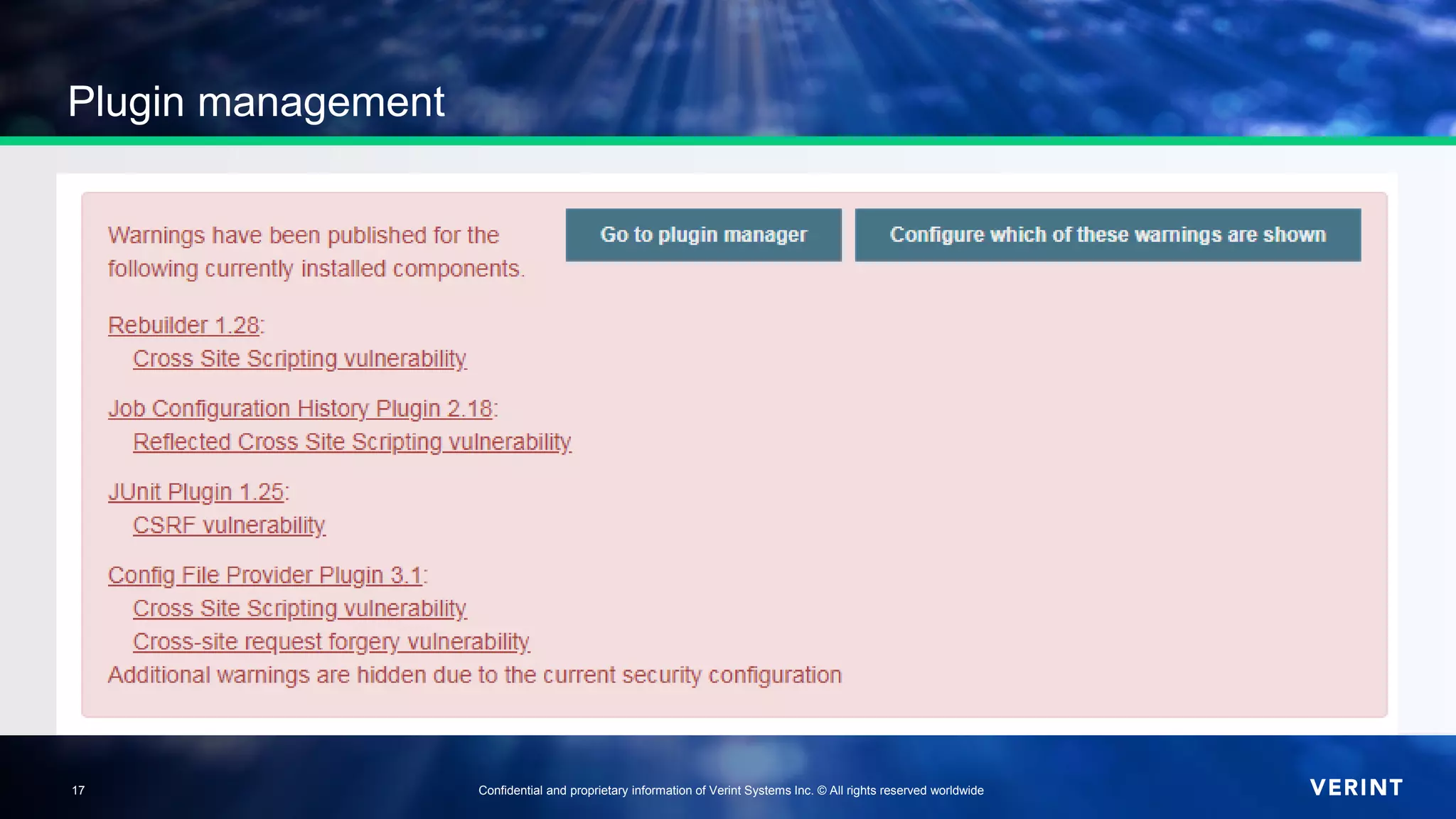
Plugin management
18 Confidential and proprietary information of Verint Systems Inc. © All rights reserved worldwide18
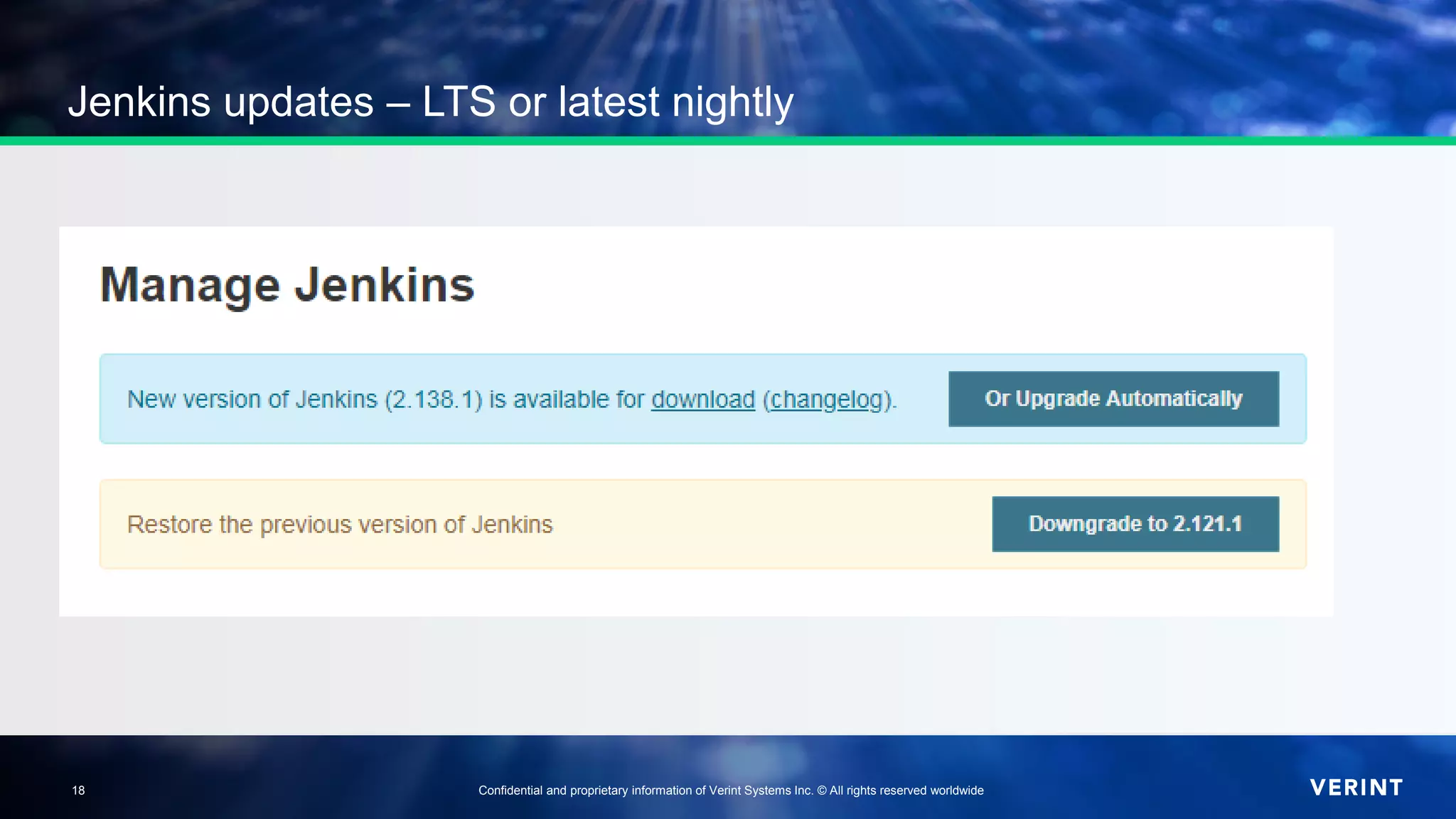
Jenkins updates – LTS or latest nightly
19
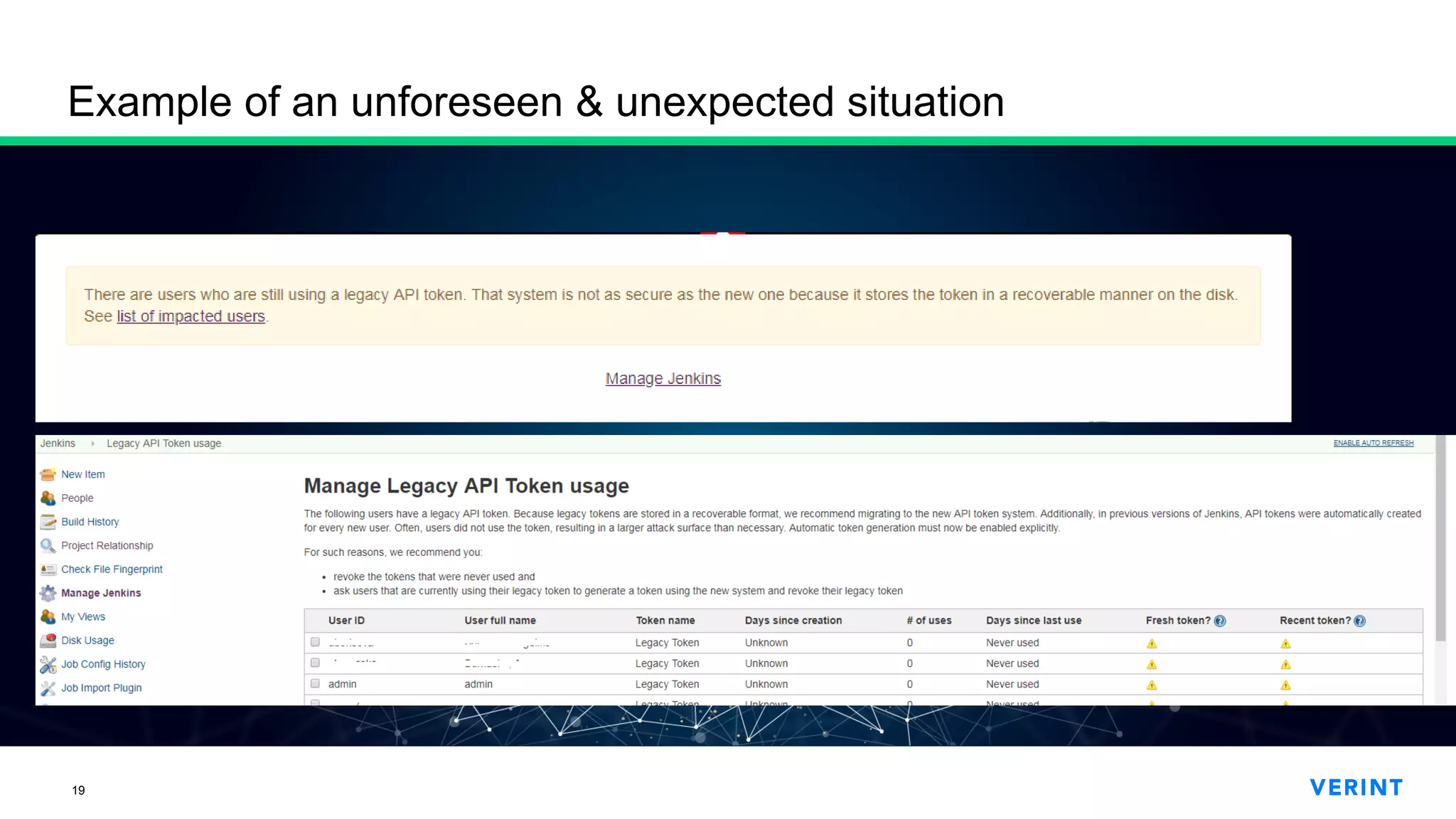
Example of an unforeseen & unexpected situation
20
21
Let the questions begin!
22
Thank you!
@turbobobi
https://cis.verint.com/careers/locations/bg/
borislav.t.traykovborislavtraykov
23
Actionable
Intelligence
for a
Safer World
Thank you!
Велики спасибi!
დიდი მადლობა!
¡Muchas gracias!
Dziękuję Ci bardzo!
Благодаря!
cis.verint.com
24
Plugins again!
25
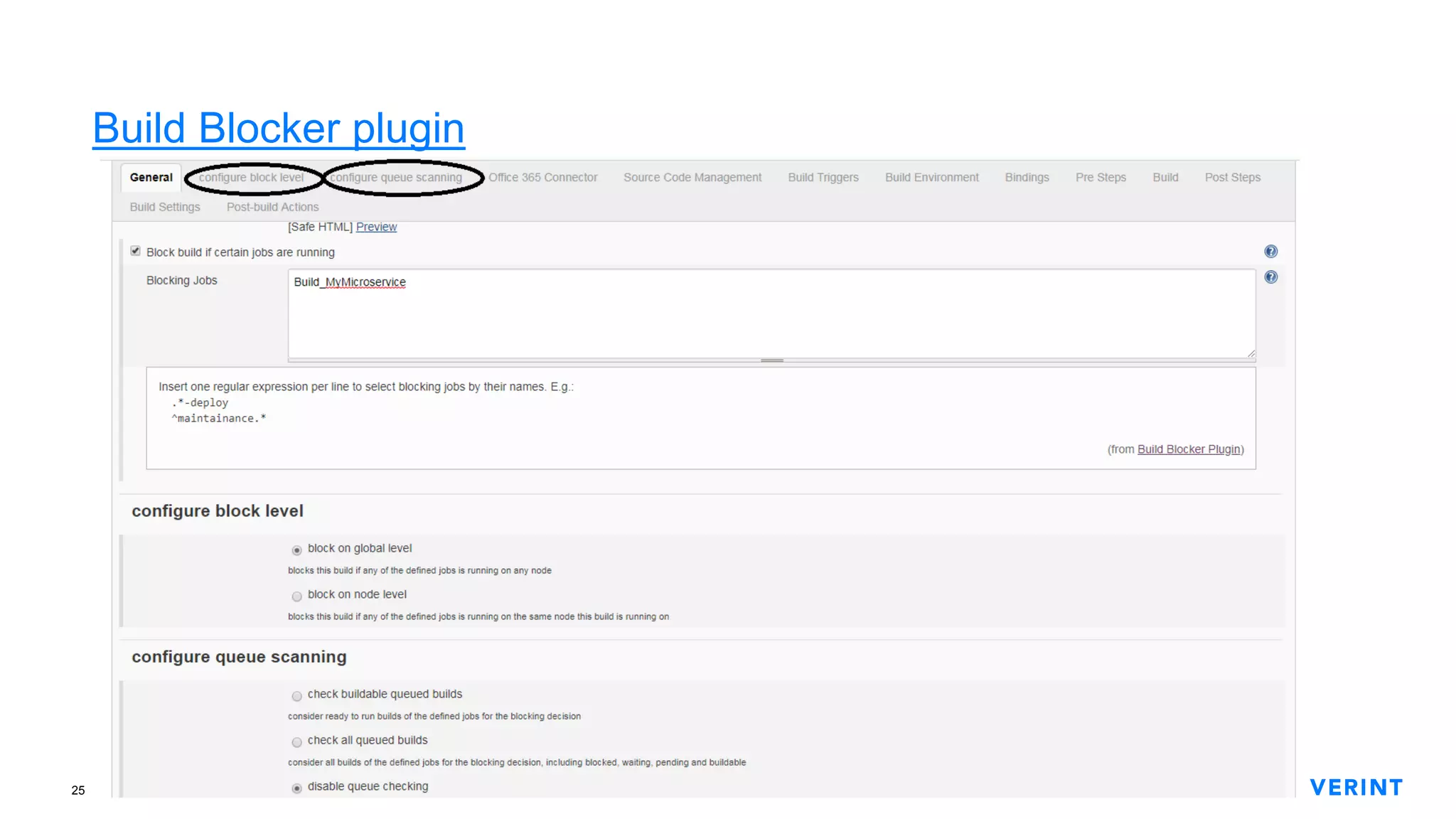
Build Blocker plugin
26
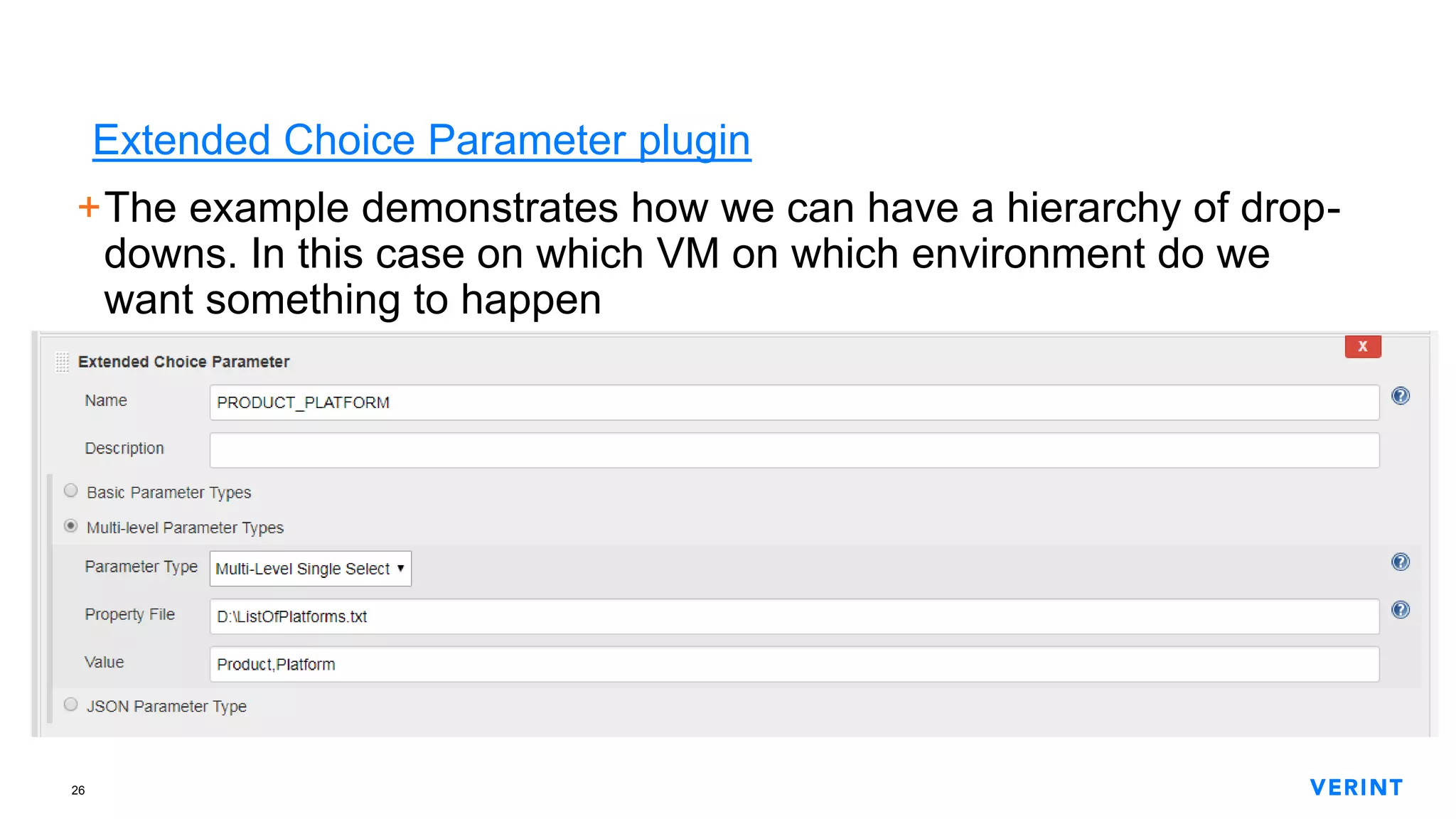
Extended Choice Parameter plugin
+The example demonstrates how we can have a hierarchy of drop-
downs. In this case on which VM on which environment do we
want something to happen
27
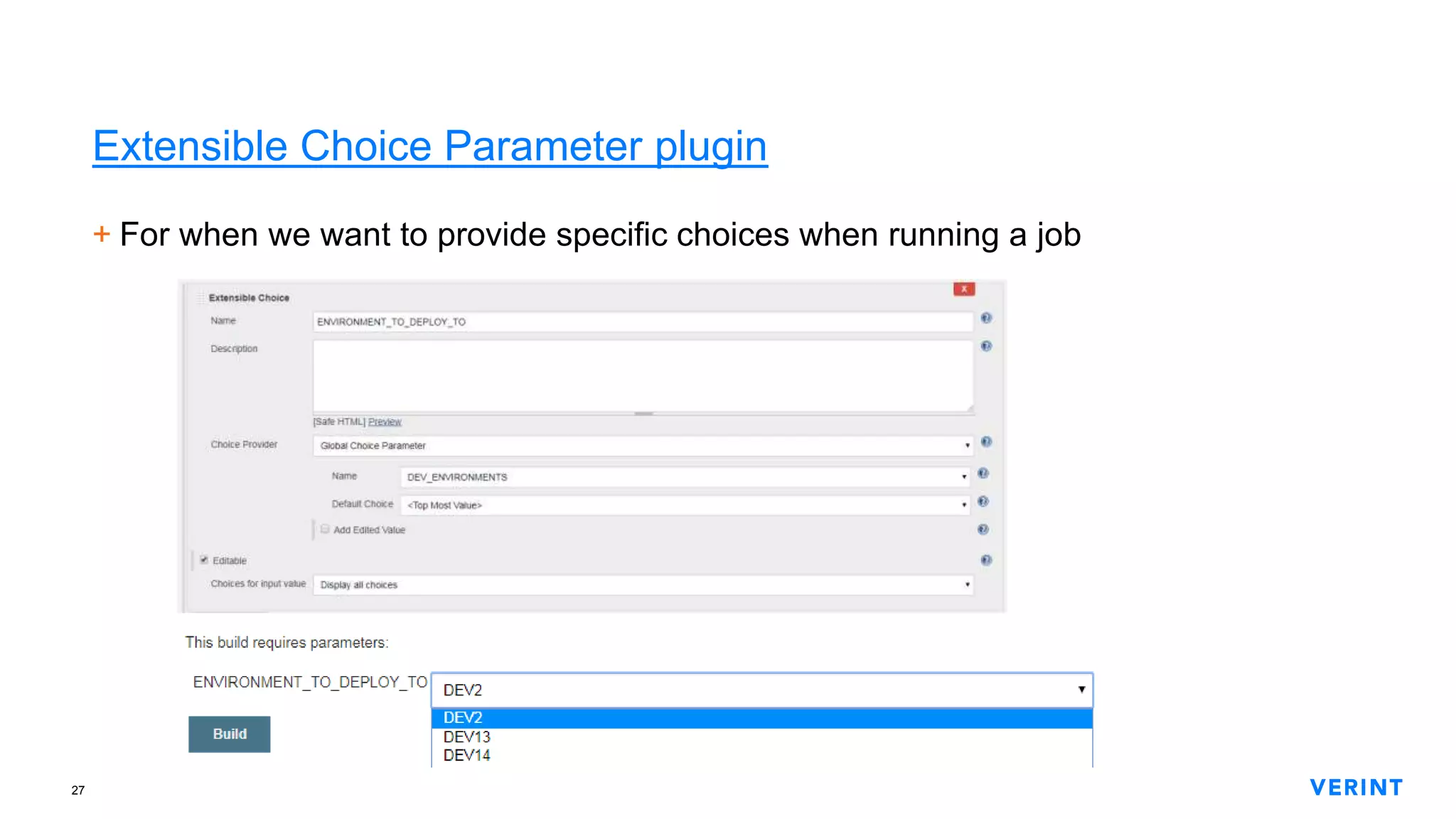
Extensible Choice Parameter plugin
+ For when we want to provide specific choices when running a job
28
Global Variable String Parameter plugin
+The documentation is good enough – just take a look. 
We are using this plugin so that we can have global environment
variables for all Jenkins machines and jobs.
These variables are set only by Jenkins administrators so there is little
chance that they will disappear or someone would change them by
mistake.
29
Hidden Parameter plugin
+We use it when a given job can be executed either manuall or in an
automated way.
+The idea here is to have an input parameter which is not something
that a person needs to know about or set when executing the job.
30
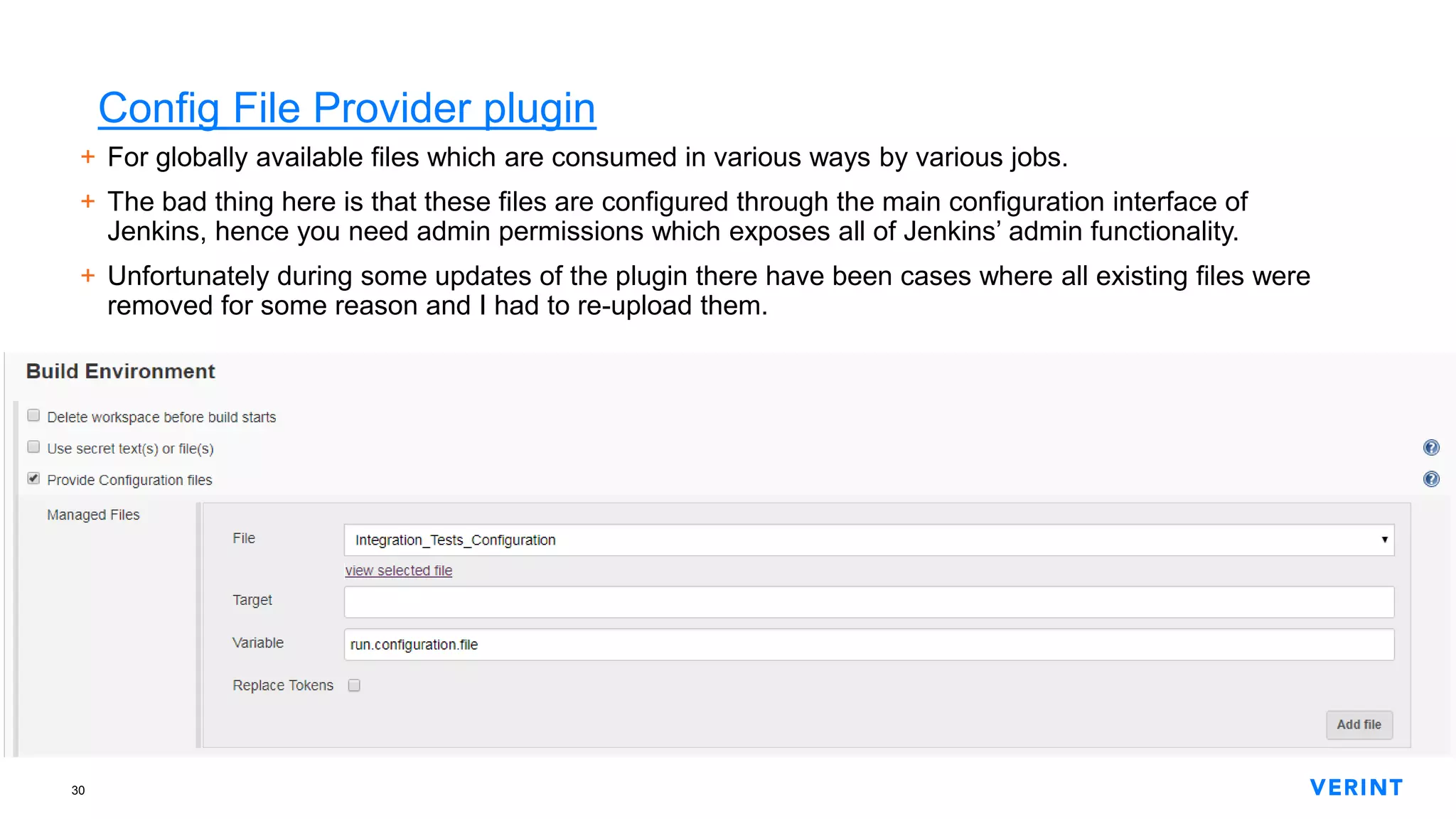
Config File Provider plugin
+ For globally available files which are consumed in various ways by various jobs.
+ The bad thing here is that these files are configured through the main configuration interface of
Jenkins, hence you need admin permissions which exposes all of Jenkins’ admin functionality.
+ Unfortunately during some updates of the plugin there have been cases where all existing files were
removed for some reason and I had to re-upload them.
31
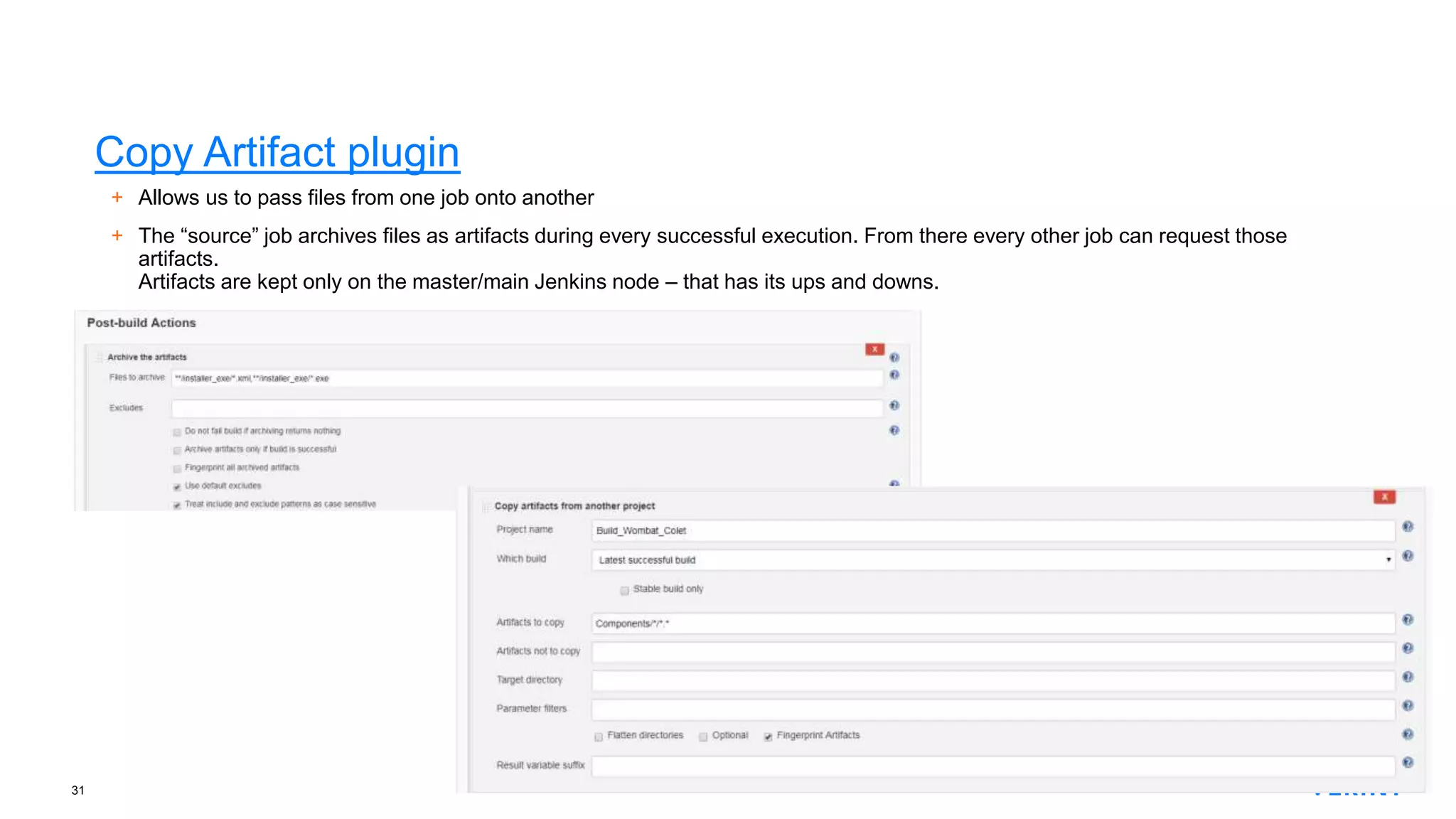
Copy Artifact plugin
+ Allows us to pass files from one job onto another
+ The “source” job archives files as artifacts during every successful execution. From there every other job can request those
artifacts.
Artifacts are kept only on the master/main Jenkins node – that has its ups and downs.
32
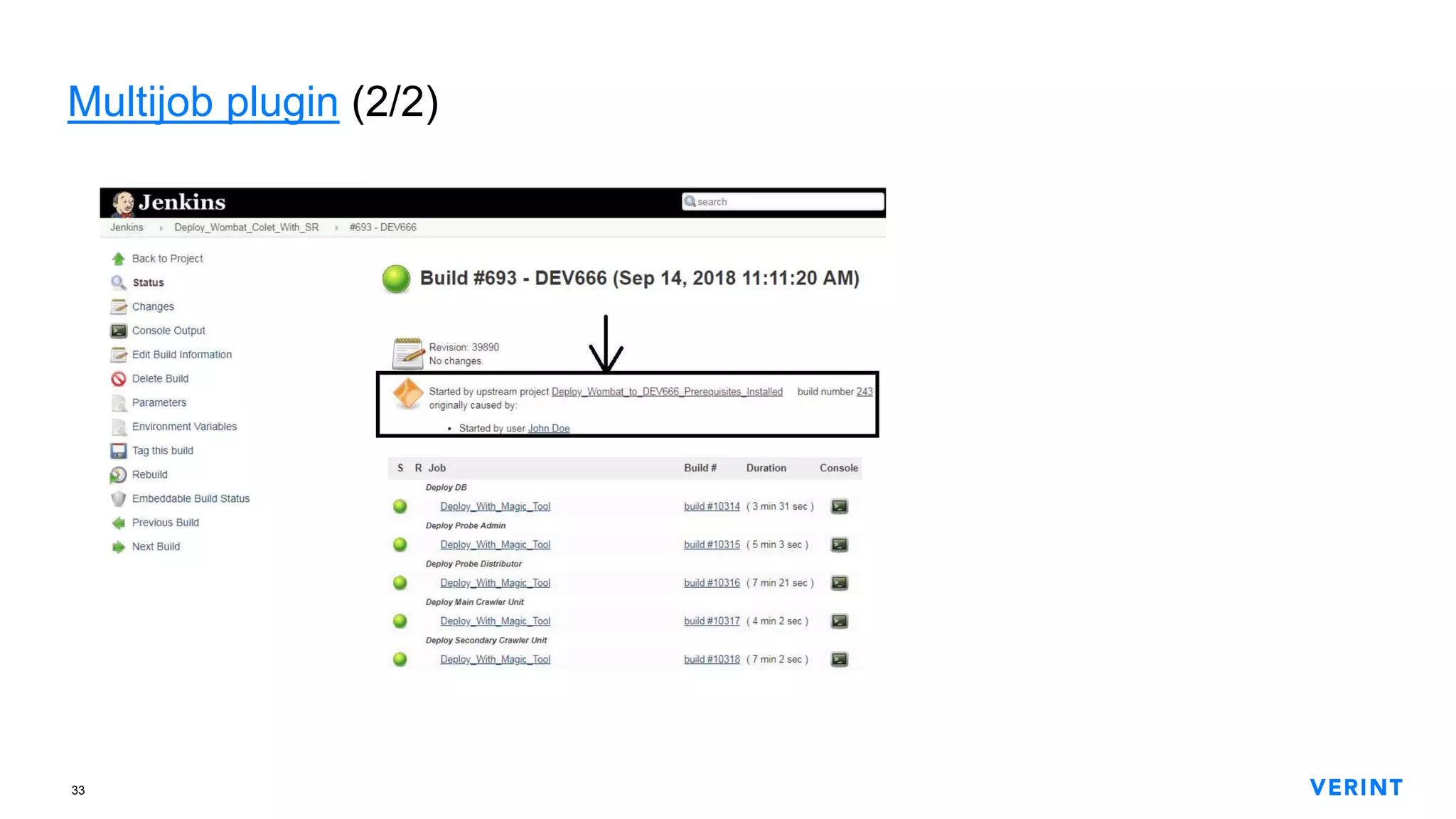
Multijob plugin (1/2)
+Allows us to organize the sequence of executing other jobs –
including other multi-jobs – as well as regular job steps. Thus we
can describe a complex process which is broken down to discrete
(and potentially reusable) atoms.
With a multijob we can execute small and reusable jobs which –
thanks to input parameters, for example – perform different
operations.
Example is on the next slide.
We are using this approach for our automated product deployment.
33
Multijob plugin (2/2)
34
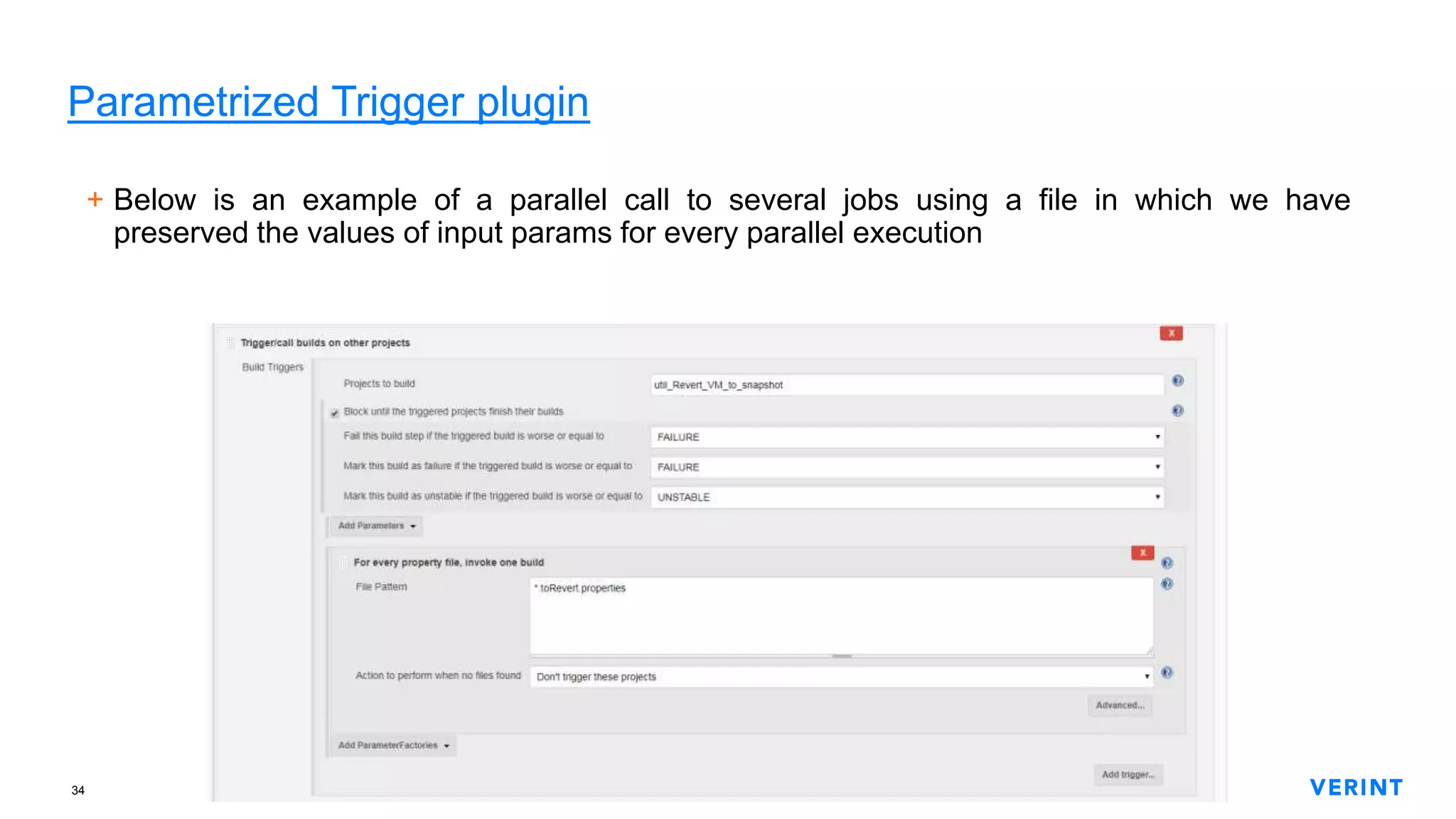
Parametrized Trigger plugin
+ Below is an example of a parallel call to several jobs using a file in which we have
preserved the values of input params for every parallel execution
35
Rebuild plugin
+Allows us to re-run a specific job execution – with the same input
parameters
Any other context variables (such as global ones) are still “live”
+Gotcha: If you re-run a job execution which was triggered by an
SCM change, the re-run will also be marked to have the same
trigger. This is a glitch in the integration with the Build Trigger Badge
plugin
36
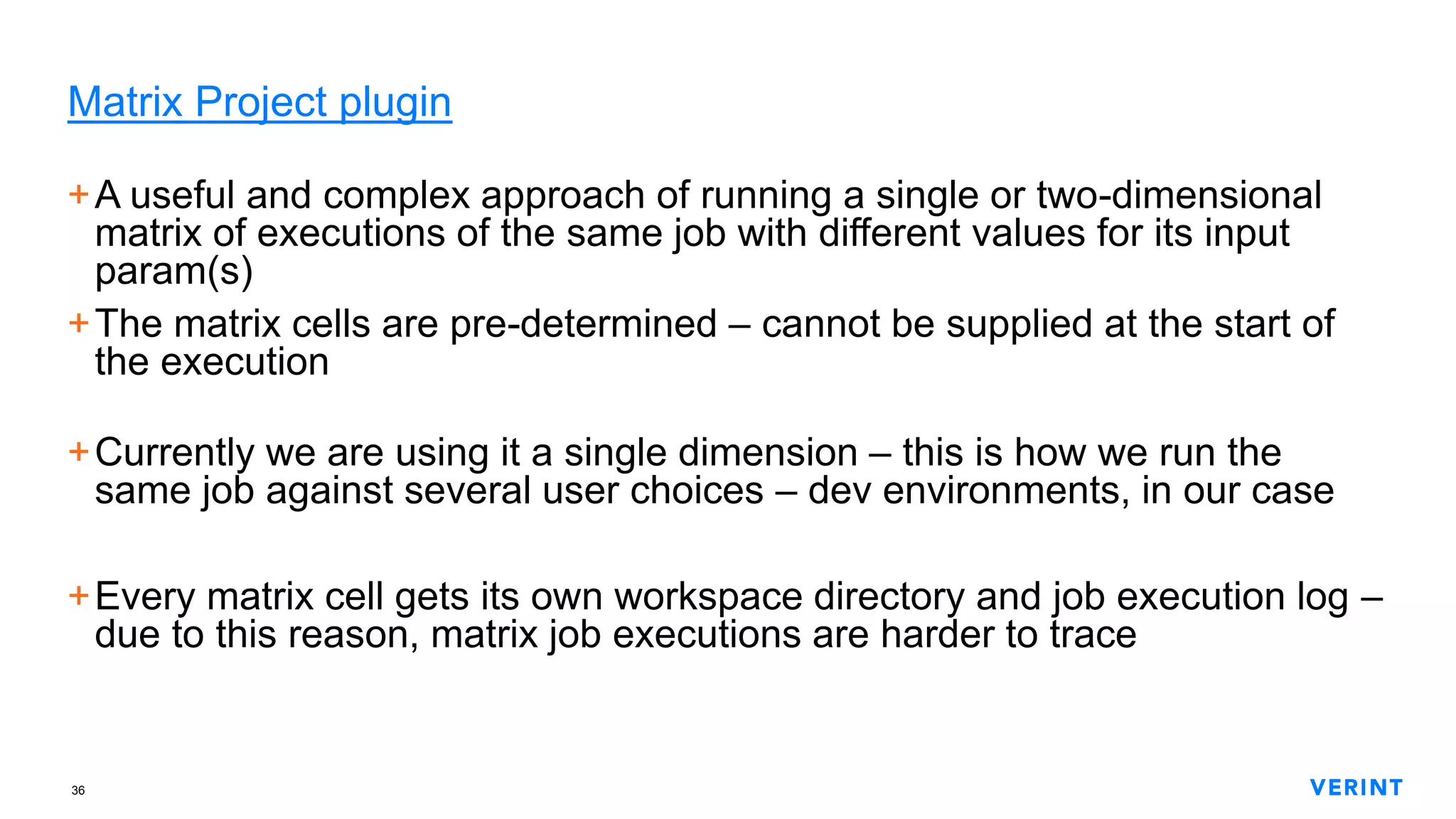
Matrix Project plugin
+A useful and complex approach of running a single or two-dimensional
matrix of executions of the same job with different values for its input
param(s)
+The matrix cells are pre-determined – cannot be supplied at the start of
the execution
+Currently we are using it a single dimension – this is how we run the
same job against several user choices – dev environments, in our case
+Every matrix cell gets its own workspace directory and job execution log –
due to this reason, matrix job executions are harder to trace
37
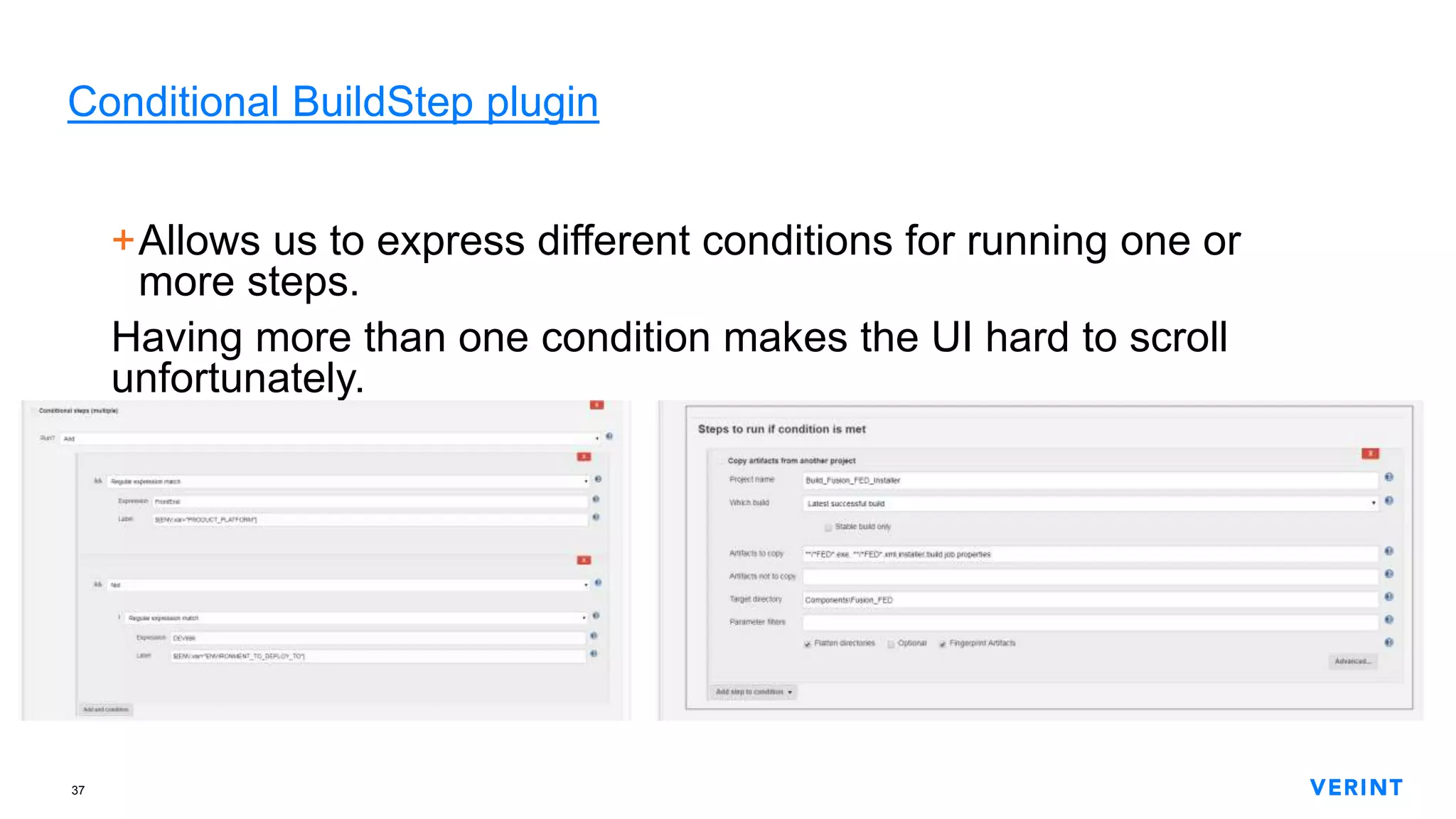
Conditional BuildStep plugin
+Allows us to express different conditions for running one or
more steps.
Having more than one condition makes the UI hard to scroll
unfortunately.
38
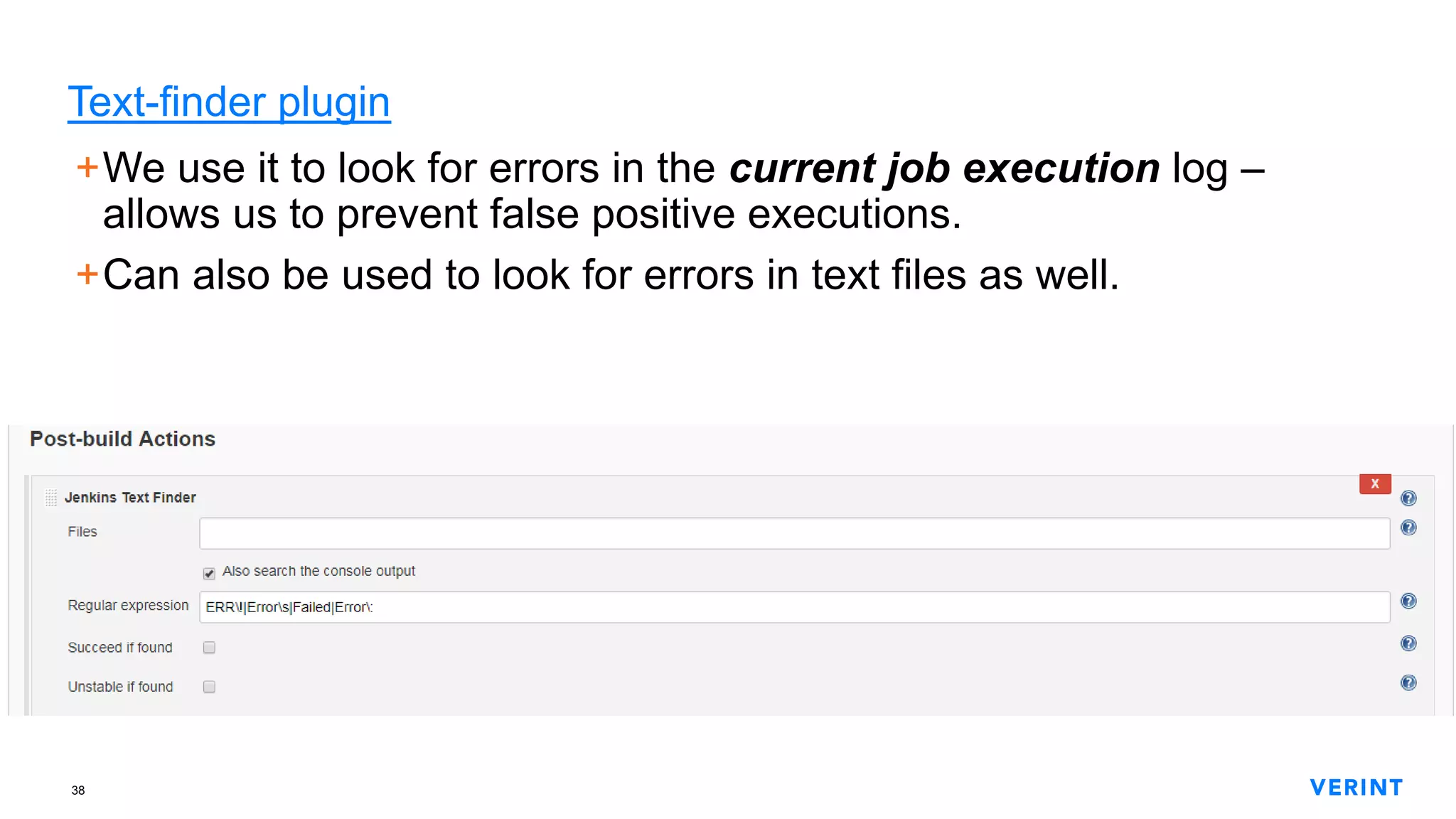
Text-finder plugin
+We use it to look for errors in the current job execution log –
allows us to prevent false positive executions.
+Can also be used to look for errors in text files as well.
39
EnvInject plugin
+Enables the injection of variables – global to the current execution.
+This is how we express job-specific environment context that all job
steps and invoked tools will use
+It’s interesting to note that a lot of other plugins are using EnvInject
internally
40
Workspace Cleanup plugin
+Blessing from the gods! Allows us to remove parts of or the entire
workspace directory of the job before and/or after starting a new
execution.
+It’s worth mentioning that you can have a Boolean condition to
determine if workspace cleanup will occur or not
+There is an async mode – by default – which allows the next job
execution not to wait for the cleanup of the previous one.
The workspace of the old execution is renamed and deleted
asynchronously.
41
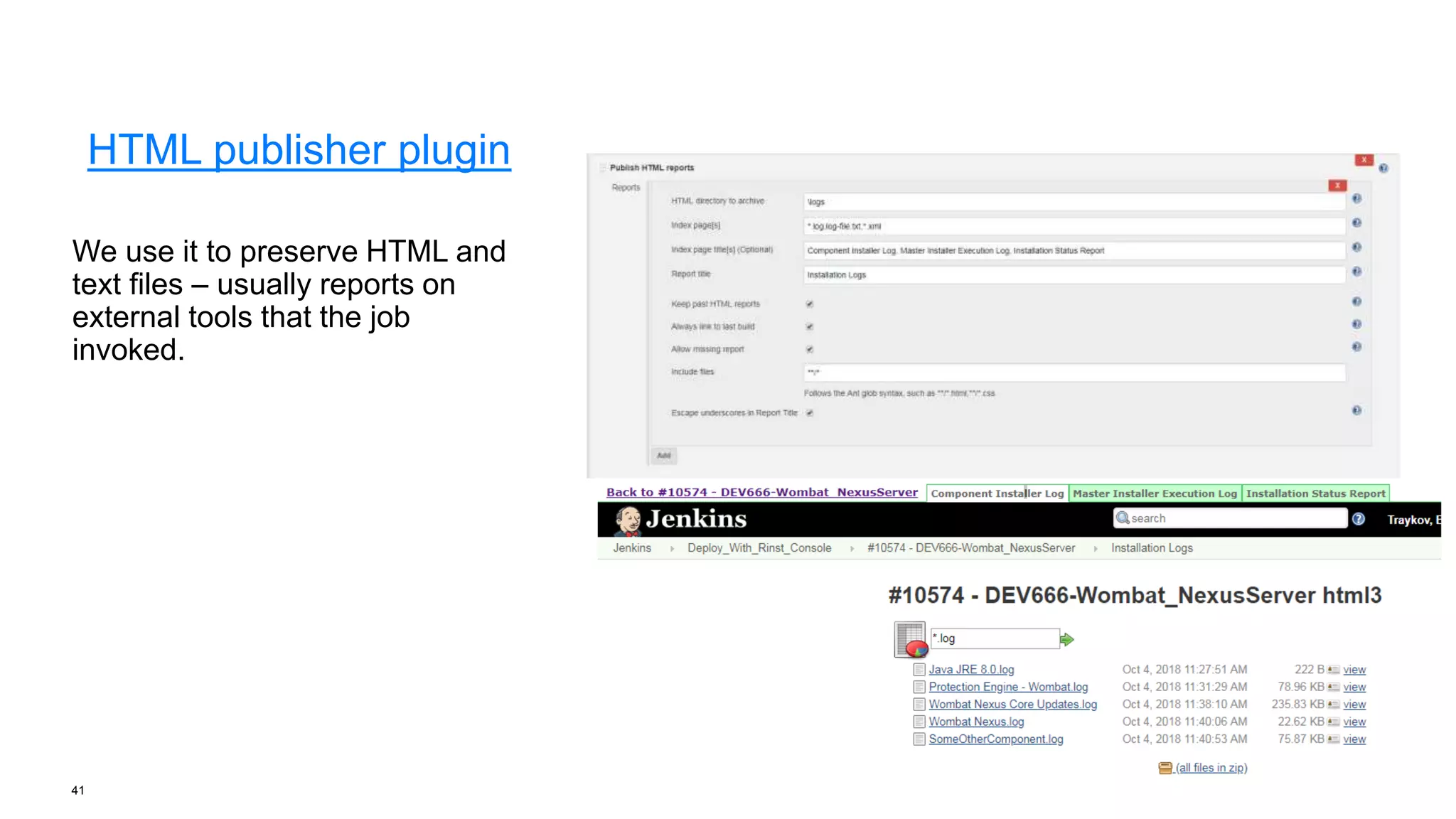
HTML publisher plugin
We use it to preserve HTML and
text files – usually reports on
external tools that the job
invoked.
42
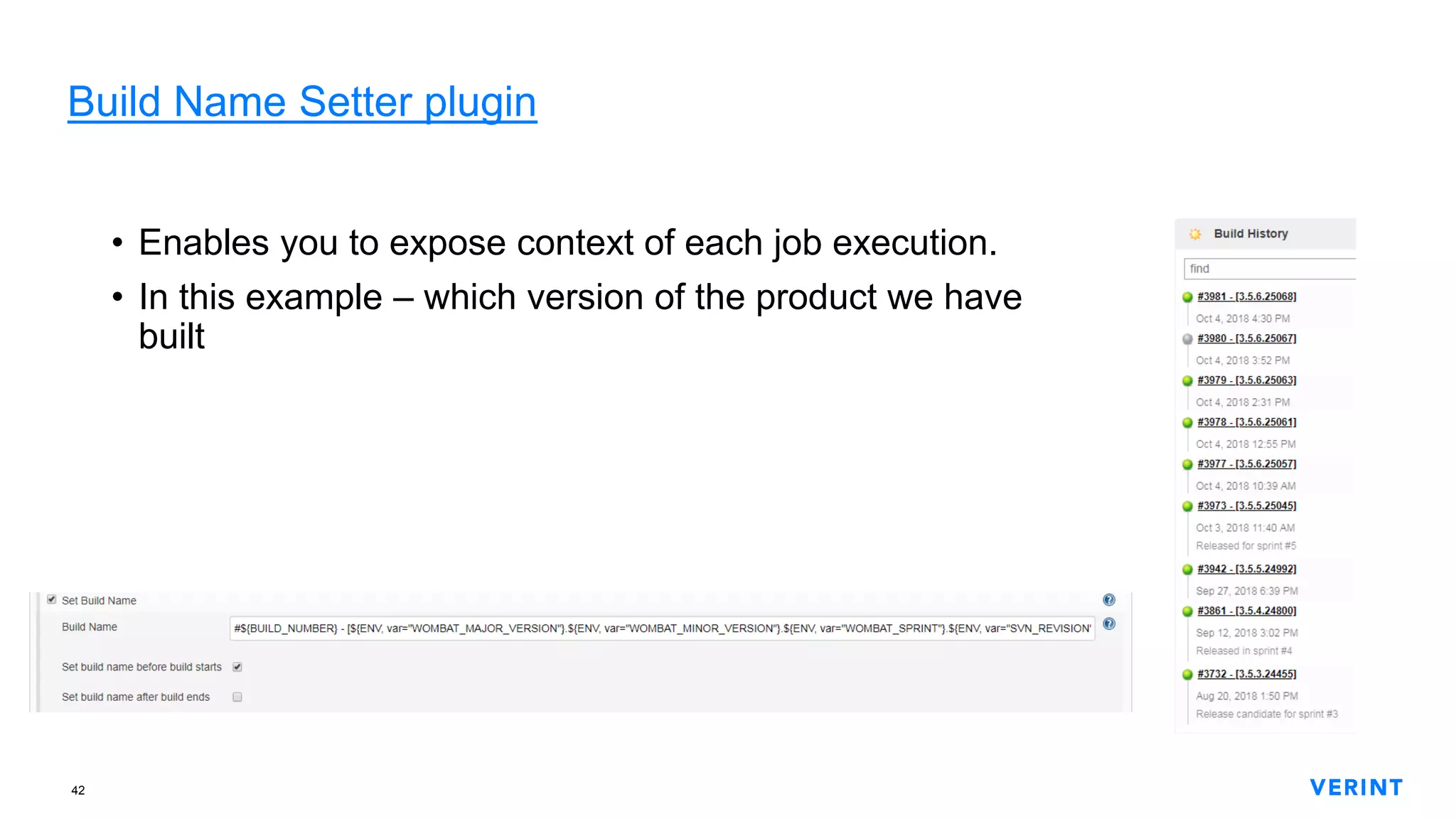
Build Name Setter plugin
• Enables you to expose context of each job execution.
• In this example – which version of the product we have
built
43
JUnit plugin
+Jenkins has a single built-in way of parsing test reports – JUnit’s
lame XML format. It’s lame because it’s not described anywhere and
so people are forced to reverse-engineer it and produce an XSD
schema for JUnit reports.
Why should I care? Because I don’t need to use JUnit to produce a
test report chart – I can simply output my results in the Junit’s test
report format and BAM! I get a chart!
44
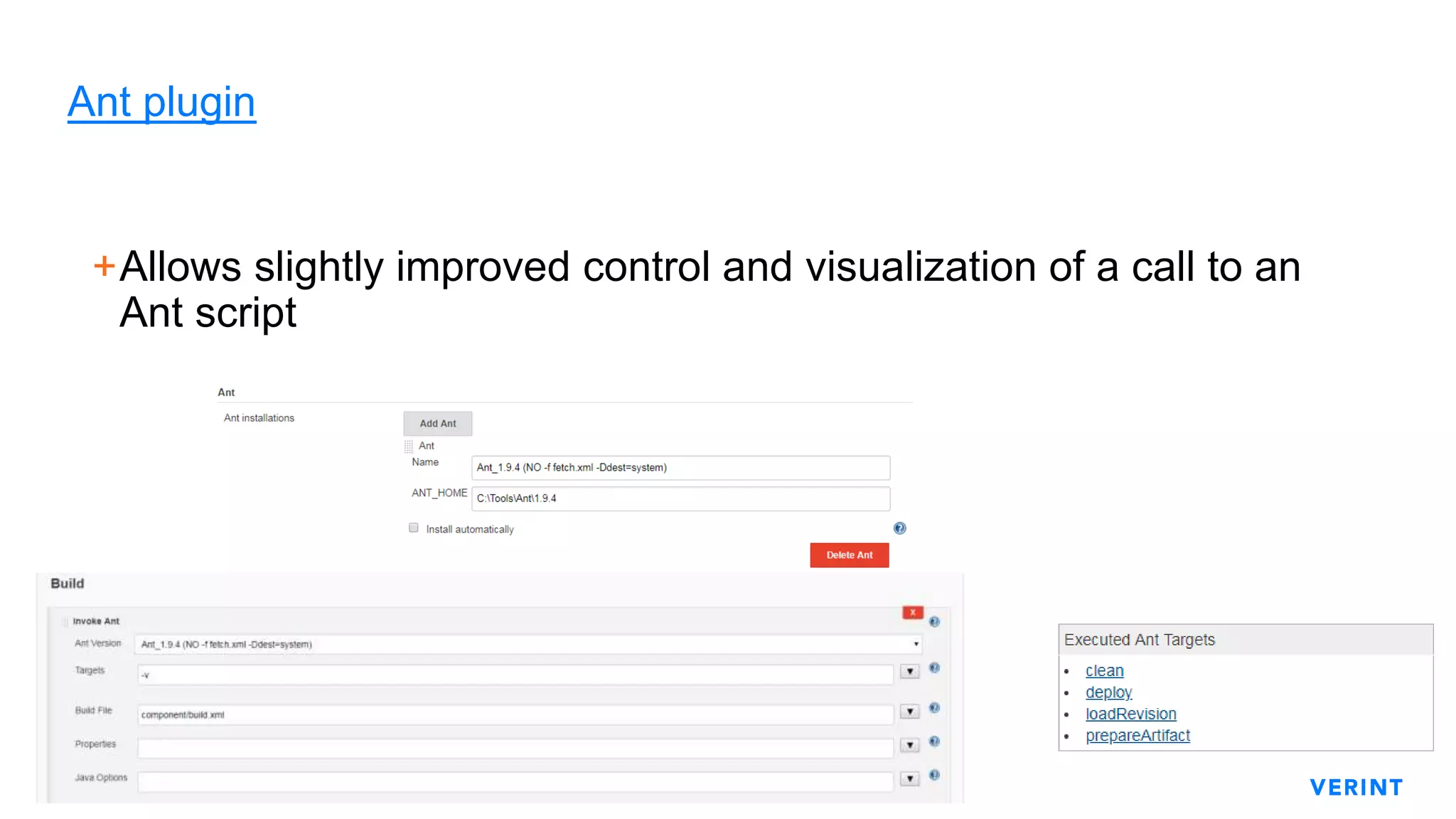
Ant plugin
+Allows slightly improved control and visualization of a call to an
Ant script
45
Gradle plugin
+Analogous to the Ant plugin. This one gives you more refined
control through the UI.
46
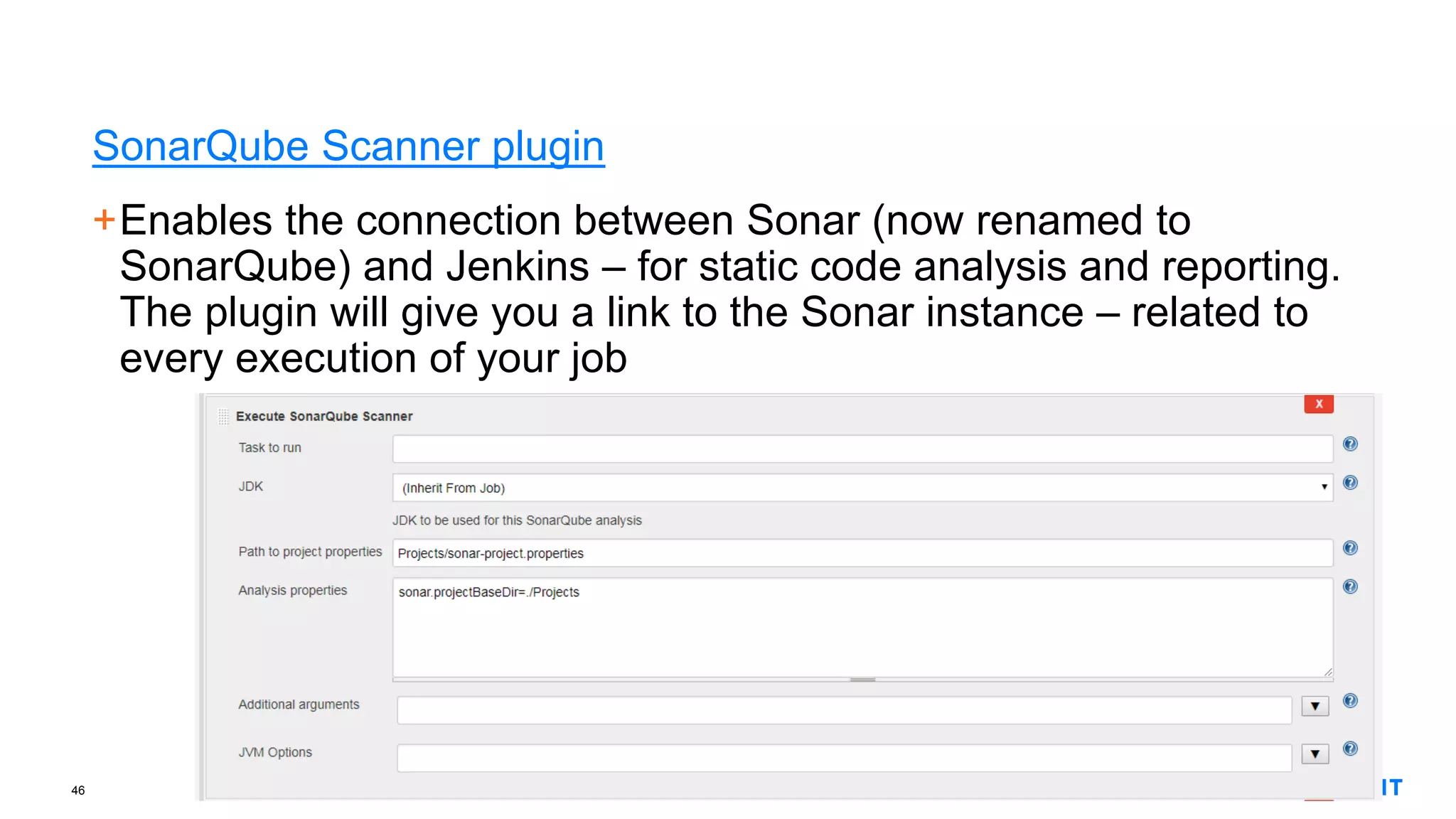
SonarQube Scanner plugin
+Enables the connection between Sonar (now renamed to
SonarQube) and Jenkins – for static code analysis and reporting.
The plugin will give you a link to the Sonar instance – related to
every execution of your job
47
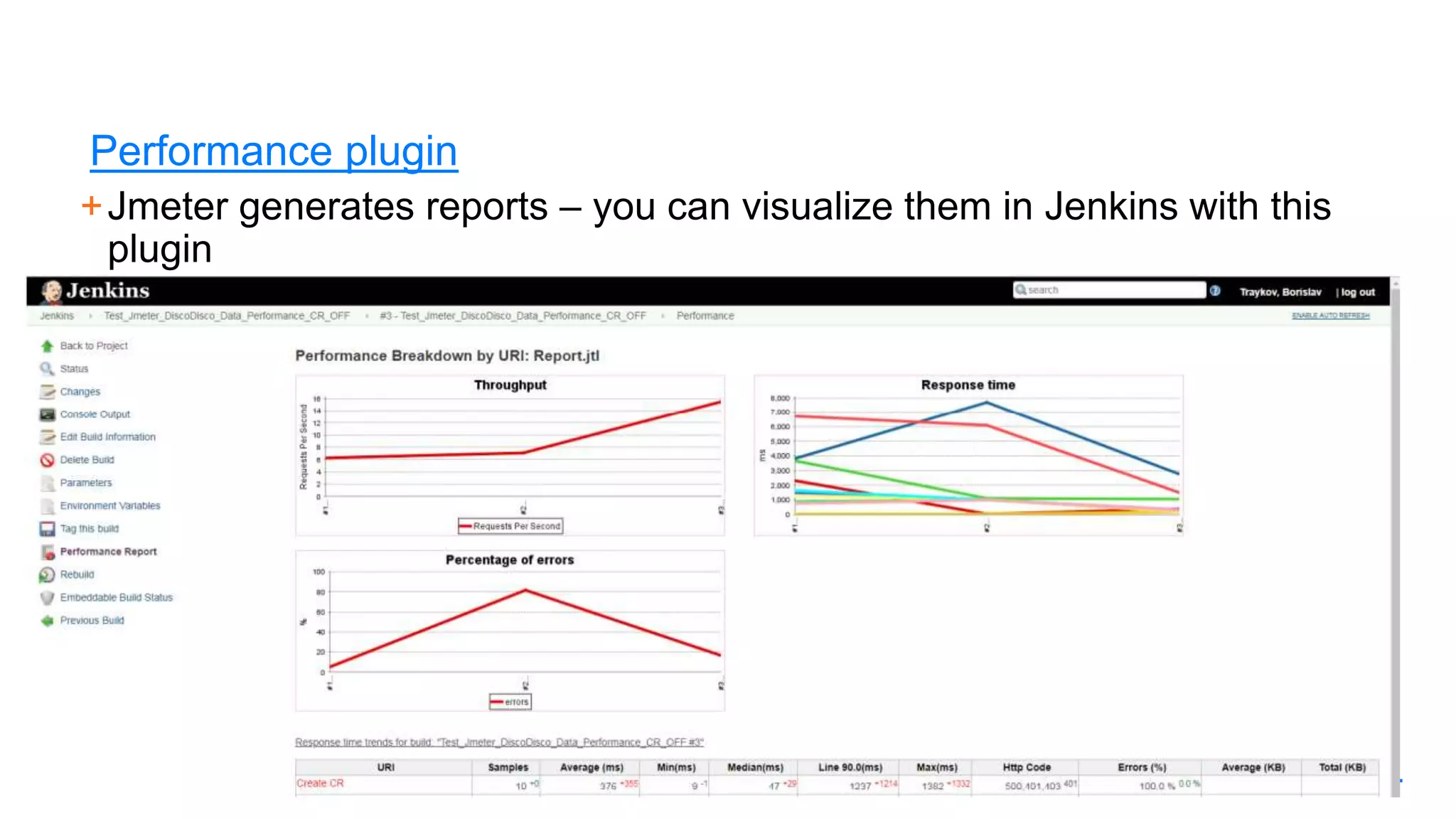
Performance plugin
+Jmeter generates reports – you can visualize them in Jenkins with this
plugin
48
Allure plugin
49
Powershell plugin
+Allows us to execute Powershell scripts in the same way as we
would bash or batch scripts.
+Using Powershell on Windows is extremely powerful!
50
Git plugin
+Gives git-related capabilities to Jenkins. Not just cloning, but also
environment variables – like the current branch and commit hash.
+Additional cloning behaviors that we use:
− Shallow clone – because if a job clones A FULL COPY of the full git repo
even when we really need just the latest/head
− Specifying which branch or tag, or commit we want to clone
51
Subversion plugin
+Analogous to the Git plugin
It’s worth mentioning that SVN and git are alike in some aspects. 
That’s important to keep in mind if a customer of your is using SVN –
yes, this can still happen in 2020
52
Timestampler plugin
+Plain simple and very useful!
Prepends a timestamp to every line of your job execution log – starts
at 00:00
+We use it to determine and troubleshoot long execution times of
parts of a job – a plugin or a 3rd party tool
53
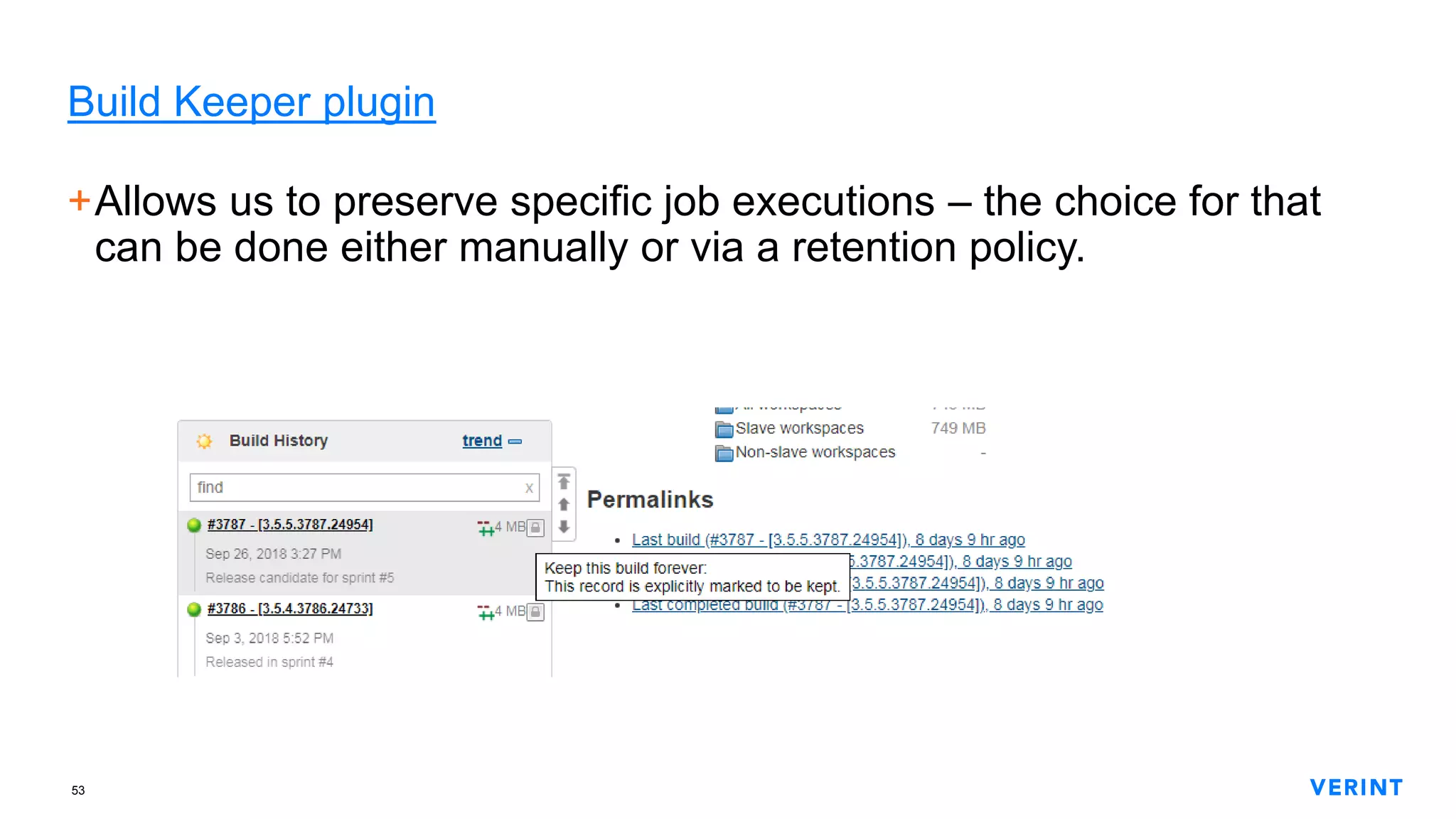
Build Keeper plugin
+Allows us to preserve specific job executions – the choice for that
can be done either manually or via a retention policy.
54
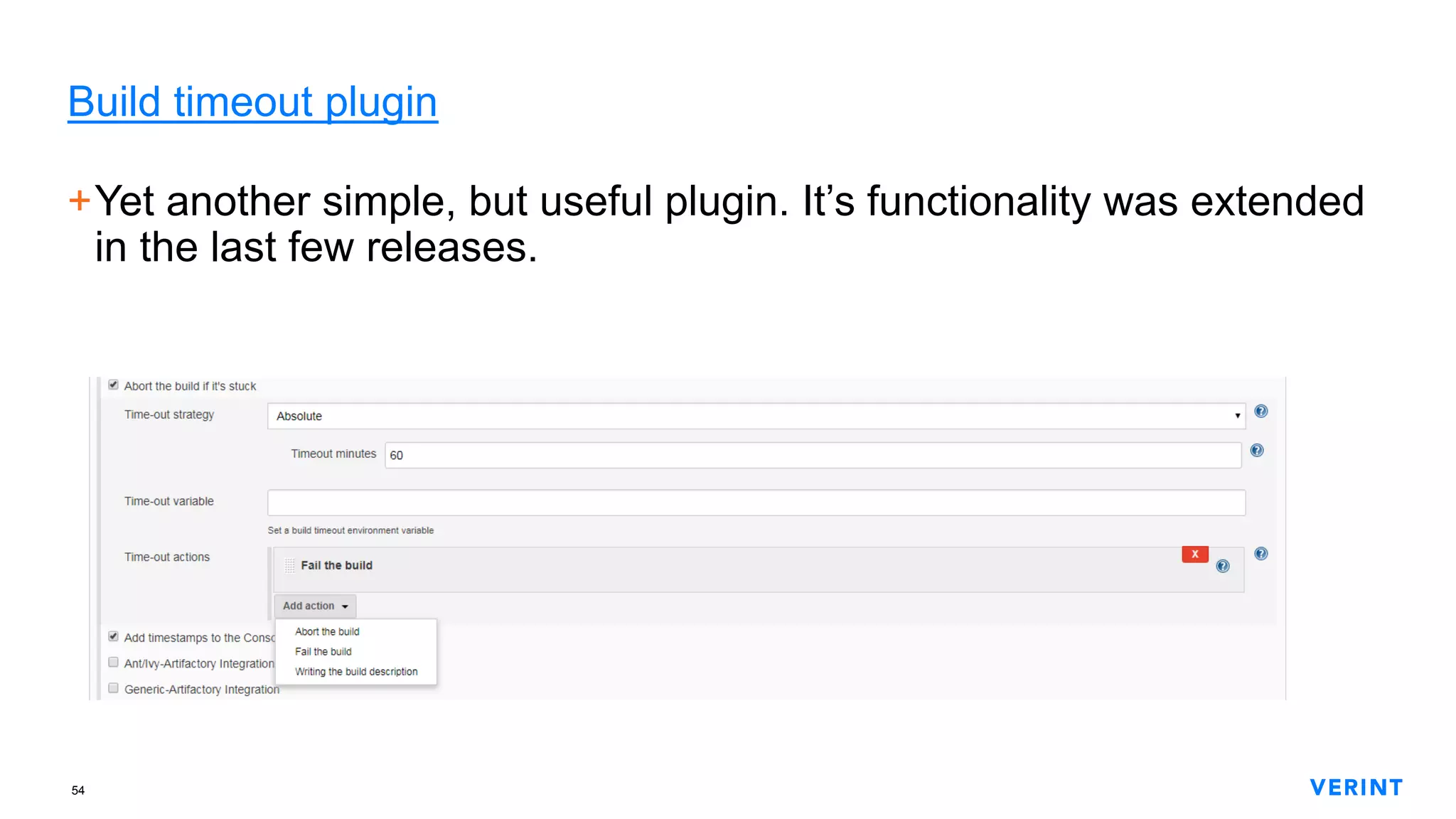
Build timeout plugin
+Yet another simple, but useful plugin. It’s functionality was extended
in the last few releases.
55
Discard Old Build plugin
+The primary plugin we use to remove old job executions using a
retention policy how long we want to preserve the job artifacts.
56
CloudBees Folders plugin
+One of the plugins that’s suggested during the initial Jenkins setup
+It provides order via actual directories
+The issue is that these directories and the jobs in them cannot be
filtered into views so jobs in folders can become hard to find and
visualize in a custom view.
+Such a folder is literally a pseudo-job – it can have specific
permission and it also has its own job-like config.xml
57
Martix Authorization Strategy plugin
+Enadles authorization delegation in a matrix fashion
+Allows for deep granularity of permissions
+I use the following strategy:
− Anonymous – has read-only access to everything except for the Jenkins
admin settings
− Administrators – full permissions
− Authenticated users – can do everything except for configuring Jenkins itself
58
Credentials Binding plugin
+ Enables the use of manually-created credentials as masked variables which we
can use in the steps of our jobs.
This enables us to handle passwords and security tokens and pass them
without visualizing them in the job execution log.
Also enables us to no longer hardcode passwords in our jobs
59
Credentials plugin
+Complex, yet well-described plugin with a 50-pages user manual …
not to mention the other 2 official manuals 
+This plugin is the foundation of the afore-mentioned credentials
binding plugin
60
Job Configuration history plugin
+Wonderful plugin! Gives us mini-”source control” for our jobs inside
Jenkins.
+Just like source control, you can see the history of changes and also
REVERT to a specific previous version
+It’s interesting to note that this plugin got extended to work for
pipeline jobs as well – regardless if they are based on a simple
Groovy script of a full-blown Jenkinsfile
61
Build Trigger Badge plugin
+A simple and very well-described plugin. We use it just as it’s
explained – to know what is the reason for each job execution.
+In the instances when a job is started manually we can actually see
which user was responsible – all you need to do is to hover over the
badge icon.
62
Disk Usage plugin
+One of the few plugins whose version is below 1.0 – it’s been at
version 0.28 since 2015
+Allows us to keep track of the disk usage of jobs’ workspace
directories, as well as the archived artifacts of those jobs.
63
Active Directory plugin и Windows Slaves plugin
+I am putting these two in a single slide because may be they will be
equally interesting to you.
+The Active Directory plugin is straight-forward – enables all Jenkins
users to use their Windows credentials to access Jenkins
+Windows Slaves plugin – allows us to have slave/node Jenkins
instances on Windows machines. Again, pretty straight-forward
64
Green Balls plugin
The creator of Jenkins (and Hudson) is Japanese – in his contry traffic
lights use blue light to signal “go” instead of blue light.
Due to this reason Jenkins shows us blue balls when a job finishes
successfully. Since managers feel good inside when they see the
color of money (ha, ha), having green balls instead is a much better
way of communicating successful executions.
65
Customize Build Now Label
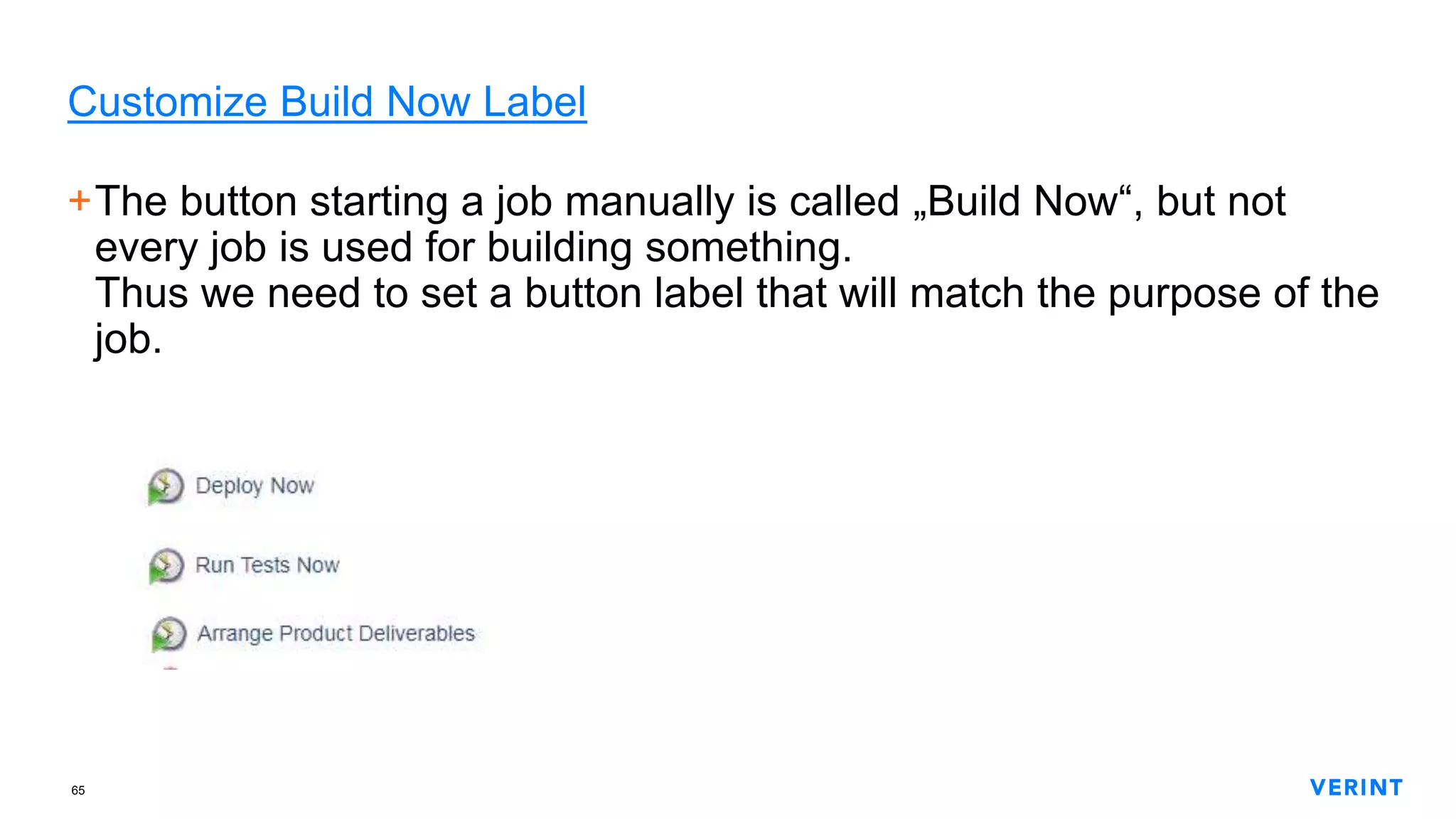
+The button starting a job manually is called „Build Now“, but not
every job is used for building something.
Thus we need to set a button label that will match the purpose of the
job.
66
View Job Filters plugin
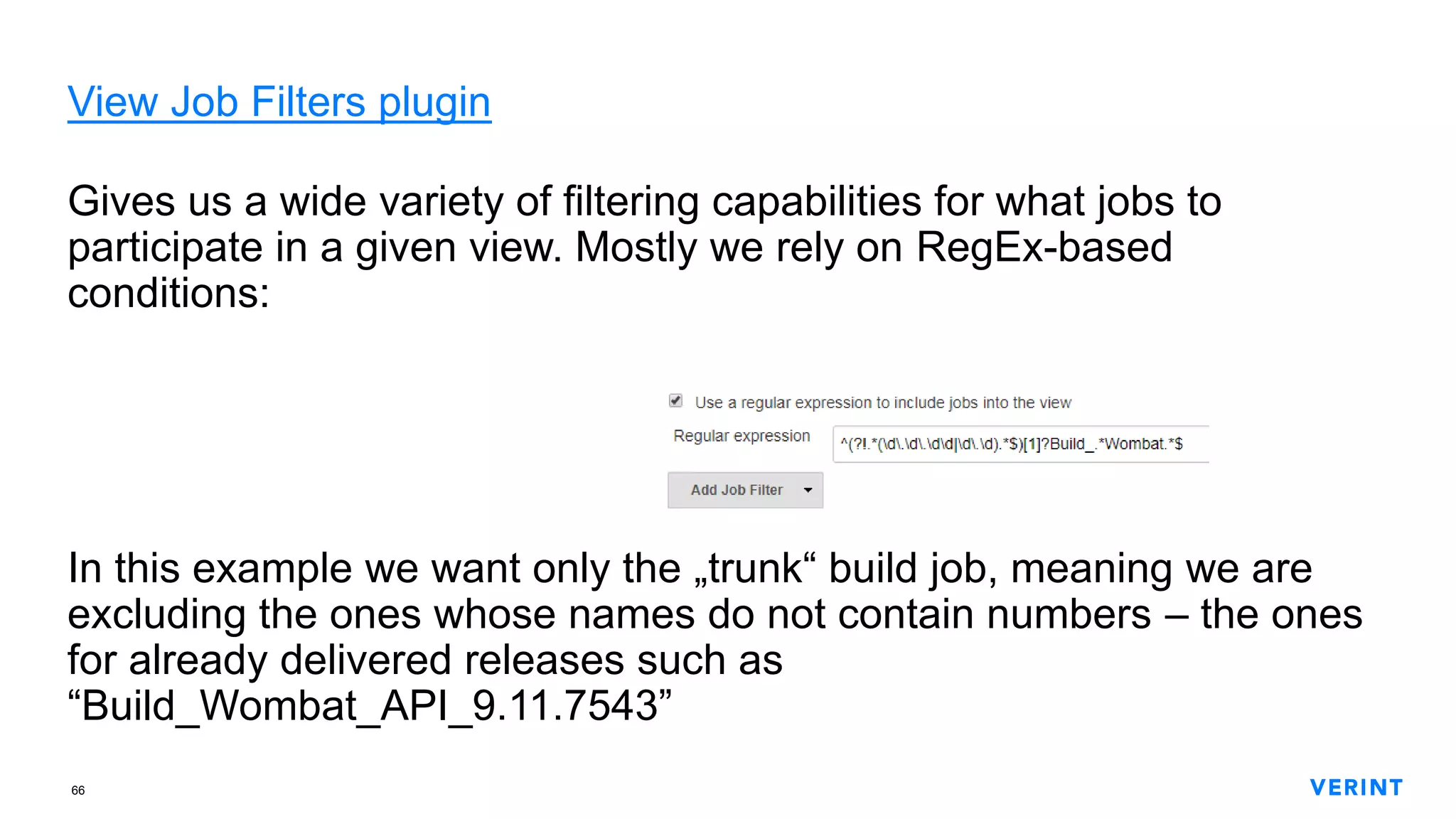
Gives us a wide variety of filtering capabilities for what jobs to
participate in a given view. Mostly we rely on RegEx-based
conditions:
In this example we want only the „trunk“ build job, meaning we are
excluding the ones whose names do not contain numbers – the ones
for already delivered releases such as
“Build_Wombat_API_9.11.7543”
67
Nested View plugin
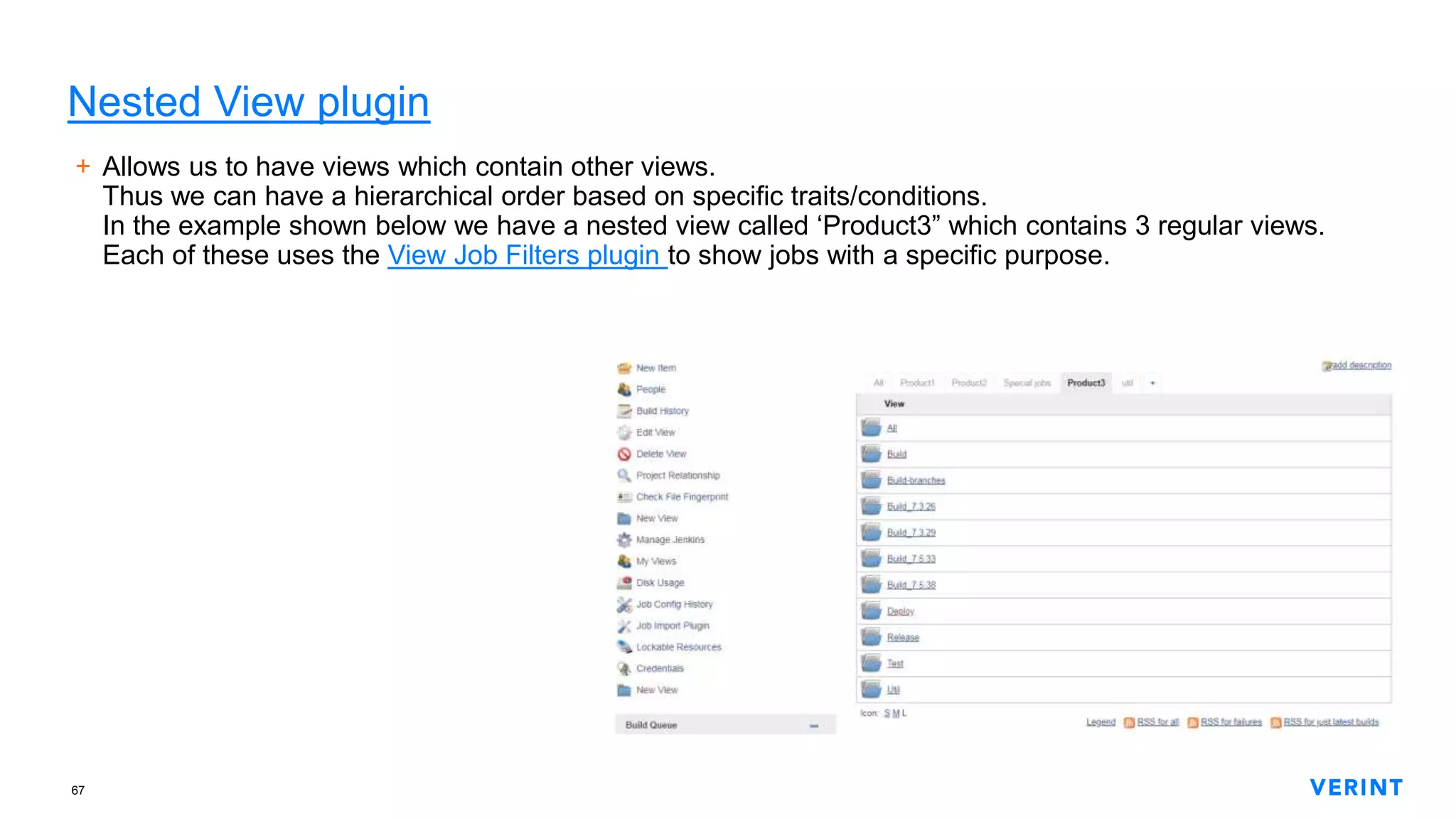
+ Allows us to have views which contain other views.
Thus we can have a hierarchical order based on specific traits/conditions.
In the example shown below we have a nested view called ‘Product3” which contains 3 regular views.
Each of these uses the View Job Filters plugin to show jobs with a specific purpose.
68
Summary Display plugin
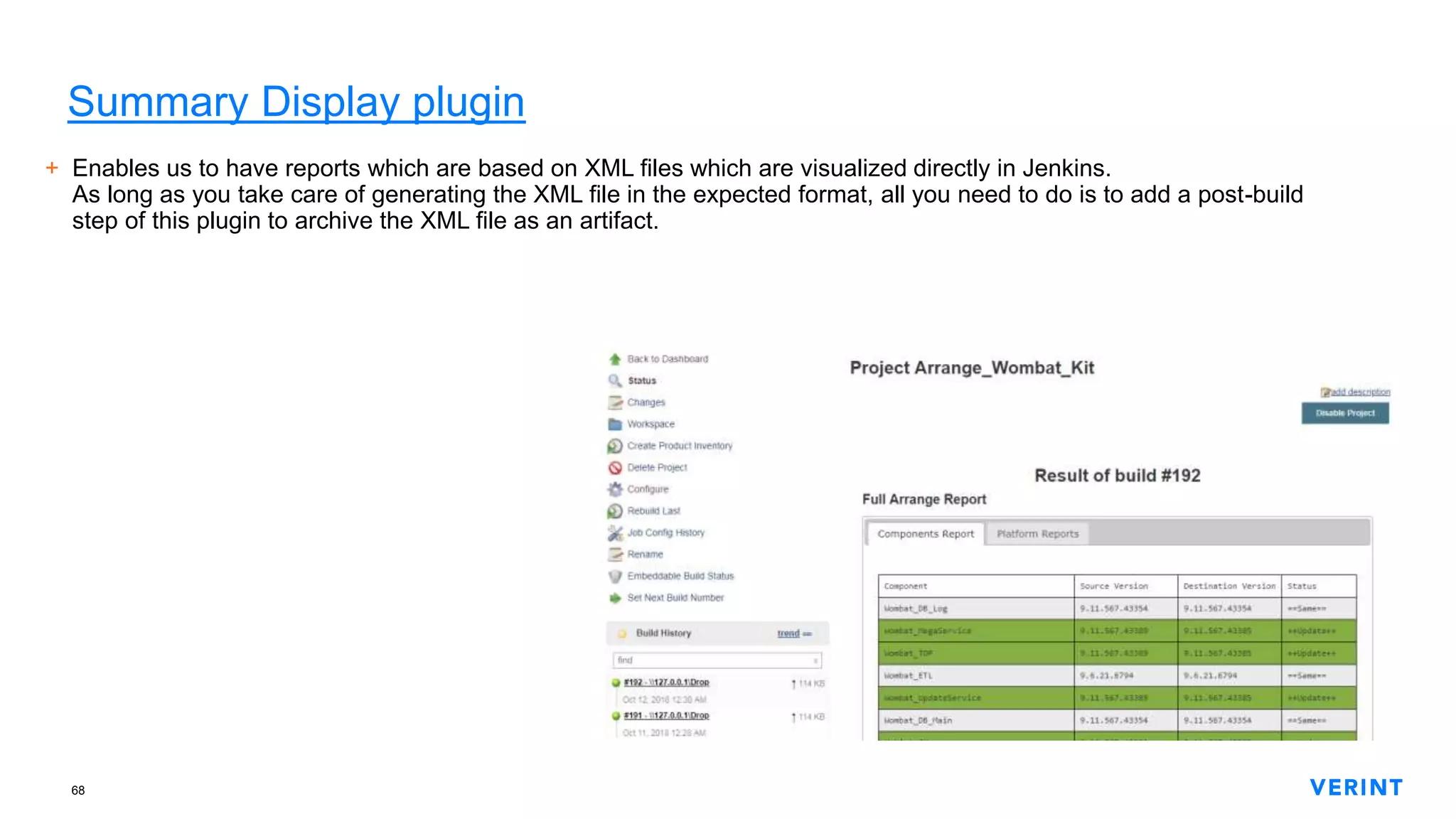
+ Enables us to have reports which are based on XML files which are visualized directly in Jenkins.
As long as you take care of generating the XML file in the expected format, all you need to do is to add a post-build
step of this plugin to archive the XML file as an artifact.

CI from scratch with Jenkins (EN)

  • 1.
    1 CI from scratchwith Jenkins Borislav Traykov
  • 2.
    2 Confidential andproprietary information of Verint Systems Inc. © All rights reserved worldwide2 Well … Why is this guy going to talk to us about Jenkins?
  • 3.
    3 Confidential andproprietary information of Verint Systems Inc. © All rights reserved worldwide3 Because +Experience with Continuous Build + Test + Deploy using TFS & Octopus Deploy (2013-2015) +Captain of a Jenkins system, that is servicing the needs of 15 dev teams since 2016. Started from scratch. +Got 500+ jobs for Continuous Building, Continuous Testing и Continuous Deployment +Drive to provide clarity and reusability
  • 4.
    4 Confidential andproprietary information of Verint Systems Inc. © All rights reserved worldwide4 … and initial expectations for added value How to start with Jenkins?
  • 5.
    5 Confidential andproprietary information of Verint Systems Inc. © All rights reserved worldwide5 How to start with Jenkins (psychological) +Time and energy for communication +Clarity of execution +Expose opportunity for repeatability +Identifying (and communicating) issues +Taking into account external factors +Code is code, even if it’s a script. Even if it’s a “simple” shell script
  • 6.
    6 Confidential andproprietary information of Verint Systems Inc. © All rights reserved worldwide6 How to start with Jenkins (technical) +Jobs/Pipelines +Command line interfaces +Plugins +Jenkins management +Control flow
  • 7.
    7 Tips and goodpractices +Read documentation, blog posts and articles +______ +Read and write log messages. Preserve them! +Ensure enough repetitions are successful to prove readiness +Reserve time and energy for unforeseen circumstances
  • 8.
  • 9.
    9 Docker +For primary/master –experiment with functionality +For nodes/slaves – describe and preserve functional definitions. “Servers are cattle, not pets”
  • 10.
    10 Confidential andproprietary information of Verint Systems Inc. © All rights reserved worldwide10 Cost of running a Jenkins server or system +PERCEIVED performance + Availability of resources – memory, storage and network + Authentication & Authorization + Changes to existing functionality + Updates to the equipment + Server configuration
  • 11.
  • 12.
    12 Confidential andproprietary information of Verint Systems Inc. © All rights reserved worldwide12 Control flow plugins (job-to-job) 1. Parametrized Trigger plugin 2. Rebuild plugin 3. Build Blocker plugin 4. Extended Choice Parameter plugin 5. Extensible Choice Parameter plugin 6. Global Variable String Parameter plugin 7. Copy Artifact plugin 8. Hidden Parameter plugin 9. Config File Provider plugin 10.Matrix Project plugin
  • 13.
    13 Confidential andproprietary information of Verint Systems Inc. © All rights reserved worldwide13 Control flow plugins (jobs step flow) 1. Conditional BuildStep plugin 2. Text-finder plugin
  • 14.
    14 Confidential andproprietary information of Verint Systems Inc. © All rights reserved worldwide14 Plugins for additional job functionality 1. EnvInject plugin 2. Workspace Cleanup plugin 3. HTML publisher plugin 4. Build Name Setter plugin 5. JUnit plugin 6. Ant plugin 7. Gradle plugin 8. SonarQube Scanner plugin 9. Credentials Binding plugin 10.Performance plugin 11.Allure plugin 12.Powershell plugin
  • 15.
    15 Confidential andproprietary information of Verint Systems Inc. © All rights reserved worldwide15 Extensions for job capabilities 1. Git plugin 2. Subversion plugin 3. Timestampler plugin 4. Build Keeper plugin 5. Build timeout plugin 6. Discard Old Build plugin 7. Maven Project plugin
  • 16.
    16 Confidential andproprietary information of Verint Systems Inc. © All rights reserved worldwide16 Management & Administration plugins 1. CloudBees Folders plugin 2. Martix Authorization Strategy plugin 3. Credentials plugin 4. Job Configuration history plugin 5. Build Trigger Badge plugin 6. Disk Usage plugin 7. Active Directory plugin 8. Bitbucket plugin 9. Windows Slaves plugin
  • 17.
    17 Confidential andproprietary information of Verint Systems Inc. © All rights reserved worldwide17 Plugin management
  • 18.
    18 Confidential andproprietary information of Verint Systems Inc. © All rights reserved worldwide18 Jenkins updates – LTS or latest nightly
  • 19.
    19 Example of anunforeseen & unexpected situation
  • 20.
  • 21.
  • 22.
  • 23.
    23 Actionable Intelligence for a Safer World Thankyou! Велики спасибi! დიდი მადლობა! ¡Muchas gracias! Dziękuję Ci bardzo! Благодаря! cis.verint.com
  • 24.
  • 25.
  • 26.
    26 Extended Choice Parameterplugin +The example demonstrates how we can have a hierarchy of drop- downs. In this case on which VM on which environment do we want something to happen
  • 27.
    27 Extensible Choice Parameterplugin + For when we want to provide specific choices when running a job
  • 28.
    28 Global Variable StringParameter plugin +The documentation is good enough – just take a look.  We are using this plugin so that we can have global environment variables for all Jenkins machines and jobs. These variables are set only by Jenkins administrators so there is little chance that they will disappear or someone would change them by mistake.
  • 29.
    29 Hidden Parameter plugin +Weuse it when a given job can be executed either manuall or in an automated way. +The idea here is to have an input parameter which is not something that a person needs to know about or set when executing the job.
  • 30.
    30 Config File Providerplugin + For globally available files which are consumed in various ways by various jobs. + The bad thing here is that these files are configured through the main configuration interface of Jenkins, hence you need admin permissions which exposes all of Jenkins’ admin functionality. + Unfortunately during some updates of the plugin there have been cases where all existing files were removed for some reason and I had to re-upload them.
  • 31.
    31 Copy Artifact plugin +Allows us to pass files from one job onto another + The “source” job archives files as artifacts during every successful execution. From there every other job can request those artifacts. Artifacts are kept only on the master/main Jenkins node – that has its ups and downs.
  • 32.
    32 Multijob plugin (1/2) +Allowsus to organize the sequence of executing other jobs – including other multi-jobs – as well as regular job steps. Thus we can describe a complex process which is broken down to discrete (and potentially reusable) atoms. With a multijob we can execute small and reusable jobs which – thanks to input parameters, for example – perform different operations. Example is on the next slide. We are using this approach for our automated product deployment.
  • 33.
  • 34.
    34 Parametrized Trigger plugin +Below is an example of a parallel call to several jobs using a file in which we have preserved the values of input params for every parallel execution
  • 35.
    35 Rebuild plugin +Allows usto re-run a specific job execution – with the same input parameters Any other context variables (such as global ones) are still “live” +Gotcha: If you re-run a job execution which was triggered by an SCM change, the re-run will also be marked to have the same trigger. This is a glitch in the integration with the Build Trigger Badge plugin
  • 36.
    36 Matrix Project plugin +Auseful and complex approach of running a single or two-dimensional matrix of executions of the same job with different values for its input param(s) +The matrix cells are pre-determined – cannot be supplied at the start of the execution +Currently we are using it a single dimension – this is how we run the same job against several user choices – dev environments, in our case +Every matrix cell gets its own workspace directory and job execution log – due to this reason, matrix job executions are harder to trace
  • 37.
    37 Conditional BuildStep plugin +Allowsus to express different conditions for running one or more steps. Having more than one condition makes the UI hard to scroll unfortunately.
  • 38.
    38 Text-finder plugin +We useit to look for errors in the current job execution log – allows us to prevent false positive executions. +Can also be used to look for errors in text files as well.
  • 39.
    39 EnvInject plugin +Enables theinjection of variables – global to the current execution. +This is how we express job-specific environment context that all job steps and invoked tools will use +It’s interesting to note that a lot of other plugins are using EnvInject internally
  • 40.
    40 Workspace Cleanup plugin +Blessingfrom the gods! Allows us to remove parts of or the entire workspace directory of the job before and/or after starting a new execution. +It’s worth mentioning that you can have a Boolean condition to determine if workspace cleanup will occur or not +There is an async mode – by default – which allows the next job execution not to wait for the cleanup of the previous one. The workspace of the old execution is renamed and deleted asynchronously.
  • 41.
    41 HTML publisher plugin Weuse it to preserve HTML and text files – usually reports on external tools that the job invoked.
  • 42.
    42 Build Name Setterplugin • Enables you to expose context of each job execution. • In this example – which version of the product we have built
  • 43.
    43 JUnit plugin +Jenkins hasa single built-in way of parsing test reports – JUnit’s lame XML format. It’s lame because it’s not described anywhere and so people are forced to reverse-engineer it and produce an XSD schema for JUnit reports. Why should I care? Because I don’t need to use JUnit to produce a test report chart – I can simply output my results in the Junit’s test report format and BAM! I get a chart!
  • 44.
    44 Ant plugin +Allows slightlyimproved control and visualization of a call to an Ant script
  • 45.
    45 Gradle plugin +Analogous tothe Ant plugin. This one gives you more refined control through the UI.
  • 46.
    46 SonarQube Scanner plugin +Enablesthe connection between Sonar (now renamed to SonarQube) and Jenkins – for static code analysis and reporting. The plugin will give you a link to the Sonar instance – related to every execution of your job
  • 47.
    47 Performance plugin +Jmeter generatesreports – you can visualize them in Jenkins with this plugin
  • 48.
  • 49.
    49 Powershell plugin +Allows usto execute Powershell scripts in the same way as we would bash or batch scripts. +Using Powershell on Windows is extremely powerful!
  • 50.
    50 Git plugin +Gives git-relatedcapabilities to Jenkins. Not just cloning, but also environment variables – like the current branch and commit hash. +Additional cloning behaviors that we use: − Shallow clone – because if a job clones A FULL COPY of the full git repo even when we really need just the latest/head − Specifying which branch or tag, or commit we want to clone
  • 51.
    51 Subversion plugin +Analogous tothe Git plugin It’s worth mentioning that SVN and git are alike in some aspects.  That’s important to keep in mind if a customer of your is using SVN – yes, this can still happen in 2020
  • 52.
    52 Timestampler plugin +Plain simpleand very useful! Prepends a timestamp to every line of your job execution log – starts at 00:00 +We use it to determine and troubleshoot long execution times of parts of a job – a plugin or a 3rd party tool
  • 53.
    53 Build Keeper plugin +Allowsus to preserve specific job executions – the choice for that can be done either manually or via a retention policy.
  • 54.
    54 Build timeout plugin +Yetanother simple, but useful plugin. It’s functionality was extended in the last few releases.
  • 55.
    55 Discard Old Buildplugin +The primary plugin we use to remove old job executions using a retention policy how long we want to preserve the job artifacts.
  • 56.
    56 CloudBees Folders plugin +Oneof the plugins that’s suggested during the initial Jenkins setup +It provides order via actual directories +The issue is that these directories and the jobs in them cannot be filtered into views so jobs in folders can become hard to find and visualize in a custom view. +Such a folder is literally a pseudo-job – it can have specific permission and it also has its own job-like config.xml
  • 57.
    57 Martix Authorization Strategyplugin +Enadles authorization delegation in a matrix fashion +Allows for deep granularity of permissions +I use the following strategy: − Anonymous – has read-only access to everything except for the Jenkins admin settings − Administrators – full permissions − Authenticated users – can do everything except for configuring Jenkins itself
  • 58.
    58 Credentials Binding plugin +Enables the use of manually-created credentials as masked variables which we can use in the steps of our jobs. This enables us to handle passwords and security tokens and pass them without visualizing them in the job execution log. Also enables us to no longer hardcode passwords in our jobs
  • 59.
    59 Credentials plugin +Complex, yetwell-described plugin with a 50-pages user manual … not to mention the other 2 official manuals  +This plugin is the foundation of the afore-mentioned credentials binding plugin
  • 60.
    60 Job Configuration historyplugin +Wonderful plugin! Gives us mini-”source control” for our jobs inside Jenkins. +Just like source control, you can see the history of changes and also REVERT to a specific previous version +It’s interesting to note that this plugin got extended to work for pipeline jobs as well – regardless if they are based on a simple Groovy script of a full-blown Jenkinsfile
  • 61.
    61 Build Trigger Badgeplugin +A simple and very well-described plugin. We use it just as it’s explained – to know what is the reason for each job execution. +In the instances when a job is started manually we can actually see which user was responsible – all you need to do is to hover over the badge icon.
  • 62.
    62 Disk Usage plugin +Oneof the few plugins whose version is below 1.0 – it’s been at version 0.28 since 2015 +Allows us to keep track of the disk usage of jobs’ workspace directories, as well as the archived artifacts of those jobs.
  • 63.
    63 Active Directory pluginи Windows Slaves plugin +I am putting these two in a single slide because may be they will be equally interesting to you. +The Active Directory plugin is straight-forward – enables all Jenkins users to use their Windows credentials to access Jenkins +Windows Slaves plugin – allows us to have slave/node Jenkins instances on Windows machines. Again, pretty straight-forward
  • 64.
    64 Green Balls plugin Thecreator of Jenkins (and Hudson) is Japanese – in his contry traffic lights use blue light to signal “go” instead of blue light. Due to this reason Jenkins shows us blue balls when a job finishes successfully. Since managers feel good inside when they see the color of money (ha, ha), having green balls instead is a much better way of communicating successful executions.
  • 65.
    65 Customize Build NowLabel +The button starting a job manually is called „Build Now“, but not every job is used for building something. Thus we need to set a button label that will match the purpose of the job.
  • 66.
    66 View Job Filtersplugin Gives us a wide variety of filtering capabilities for what jobs to participate in a given view. Mostly we rely on RegEx-based conditions: In this example we want only the „trunk“ build job, meaning we are excluding the ones whose names do not contain numbers – the ones for already delivered releases such as “Build_Wombat_API_9.11.7543”
  • 67.
    67 Nested View plugin +Allows us to have views which contain other views. Thus we can have a hierarchical order based on specific traits/conditions. In the example shown below we have a nested view called ‘Product3” which contains 3 regular views. Each of these uses the View Job Filters plugin to show jobs with a specific purpose.
  • 68.
    68 Summary Display plugin +Enables us to have reports which are based on XML files which are visualized directly in Jenkins. As long as you take care of generating the XML file in the expected format, all you need to do is to add a post-build step of this plugin to archive the XML file as an artifact.

Editor's Notes

  • #12 http://www.developsense.com/blog/2018/02/how-is-the-testing-going/ We must tell a story about the product and its status We must tell a story about the testing We must tell a story about how good the testing is
  • #25 http://www.developsense.com/blog/2018/02/how-is-the-testing-going/ We must tell a story about the product and its status We must tell a story about the testing We must tell a story about how good the testing is