CONTINUOUS INTEGRATION USING JENKINS
- Vinay Gopalkrishna
AGENDA
 Continuous Integration
 What is CI?
 Why we need CI?
 Best Practices
 Workflow
 Build Ingredients
 CI Server – Jenkins
 What is Jenkins?
 How Jenkins work?
 Plugins
 What Jenkins can do?
 Conclusion
 References
CI - DEFINED
 Continuous Integration is the practice, in software
engineering, of merging all developer working
copies with a shared mainline several times a day.
 CI is a software development practice where
members of a team integrate their work frequently,
usually each person integrates at least daily –
leading to multiple integrations per day. Each
integration is verified by an automated build
(including test) to detect integration errors as
quickly as possible. – Martin Flower
CI – WHAT DOES IT REALLY MEAN?
 At a regular frequency (ideally at every commit), the
system is :
 Integrated
 All changes up until that point are combined into the project
 Built
 The code is compiled into an executable or package
 Tested
 Automated Test suites are run
 Archived
 Versioned and stored so it can be distributed as is, if desired
 Deployed
 Loaded onto a system where the developers can interact with
it.
WHY WE NEED CI?
 Fixing bugs late is costly
 Lack of team cohesion
 “Your changes to bar are incompatible with mine. How
do we merge now?”
 “When did we decided to upgrade to version 2.0 of the
super library?”
 “I thought you fixed that 2 months ago!”
 Poor quality code base
 “We have 3 classes doing the same thing!!”
 “Everybody knows double checked locking is bad idea!”
 “Why can’t I just include Foo and not require all of the
other 13 libs? ”
WHY WE NEED CI? CONT…..
 Lack of project visibility
 “What do you mean the tests are failing? ”
 “What’s in the version 1.2.3 of the build”
 What’s our code coverage now?
 Lack of deployable software
 “It works on my machine!”
 “I need a new build to test with”
 “The boss|customer is coming, we need to demo
progress asap.”
BEST PRACTICES
 Maintain Code Repository
 Automate the build
 Everyone commits the baseline everyday
 Every commit (to baseline) should be built
 Keep the build fast
 Test in the clone of production environment
 Make it easy to get the test deliverables
 Everyone can see the results of the latest build
 Automate deployment
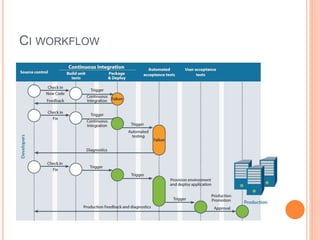
CI WORKFLOW
CI WORKFLOW
BUILD INGREDIENTS
 Compilation
 Ensures code actually compiles
 On every target platform
 Test execution
 Ensures product functions as expected
 Through repeatable testing
 Database integration
 Ensures DB and code is in sync
 Automates (re)creation of test data
BUILD INGREDIENTS SOME MORE
 Code inspection
 Ensures a healthy code base
 Identifies problems early
 Enforces best practices
 Automated deployment
 Products can be released anytime
 Continually demo-able state
 Eliminates “Works on my machine”
 Documentation generation
 Ensures document is current
 Removes burden from developers
 Produces build reports and metrics
CI SERVER - JENKINS
 It is an open source CI tool written in java.
 It is a server based system running in a servlet
container.
 It supports SCM tools including Accurev, CVS,
Subversion, Git, Mercurial, Perforce, Clearcase.
 It can execute Apache Ant and Apache maven
based projects.
 Builds can be started by various means, including
being triggered by commit in version control
system.
HOW JENKINS WORK - SETUP
 When setting up a project in Jenkins, out of the box
you have the general options
 Associating with a version control server
 Triggering builds
 Execution of shell scripts, bash scripts, Ant targets and
maven targets.
 Artifact archival
 Publish jUnit test results and javadocs
 Email Notifications
PLUGINS
 Jenkins plugin system can enable a wide range of
features including(but not certainly not limited to)
 SCM
 Testing
 Notifications
 Reporting
 Artifact saving
 Triggers
 External integration
 And most importantly – The CI game
 A points based game where developers compete against each
other to develop the most stable, well tested code
WHAT JENKINS CAN DO?
 Generate Test Reports
 Integrate with many different version control
systems
 Push to various artifact repositories
 Deploys directly to production or test environments
 Notify stakeholders of build status
CONCLUSION
 Continuous Integration is a necessity on complex
projects due to the benefits it provides regarding
early detection of problems.
 A good continuous build system should be flexible
enough to fit into pre-existing development
environments and provide all the features a team
expects from such a system.
 Jenkins, a continuous build system, can be an
integral part of any continuous integration system
due to its core feature set and extensibility through
a plugin system.
REFERENCES
 Continuous integration
 http://en.wikipedia.org/wiki/Continuous_integration
 http://java.dzone.com/articles/continuous-integration-
how-0
 Jenkins
 http://en.wikipedia.org/wiki/Jenkins_(software)
ANY QUESTIONS?

Continuous integration using jenkins

  • 1.
    CONTINUOUS INTEGRATION USINGJENKINS - Vinay Gopalkrishna
  • 2.
    AGENDA  Continuous Integration What is CI?  Why we need CI?  Best Practices  Workflow  Build Ingredients  CI Server – Jenkins  What is Jenkins?  How Jenkins work?  Plugins  What Jenkins can do?  Conclusion  References
  • 3.
    CI - DEFINED Continuous Integration is the practice, in software engineering, of merging all developer working copies with a shared mainline several times a day.  CI is a software development practice where members of a team integrate their work frequently, usually each person integrates at least daily – leading to multiple integrations per day. Each integration is verified by an automated build (including test) to detect integration errors as quickly as possible. – Martin Flower
  • 4.
    CI – WHATDOES IT REALLY MEAN?  At a regular frequency (ideally at every commit), the system is :  Integrated  All changes up until that point are combined into the project  Built  The code is compiled into an executable or package  Tested  Automated Test suites are run  Archived  Versioned and stored so it can be distributed as is, if desired  Deployed  Loaded onto a system where the developers can interact with it.
  • 5.
    WHY WE NEEDCI?  Fixing bugs late is costly  Lack of team cohesion  “Your changes to bar are incompatible with mine. How do we merge now?”  “When did we decided to upgrade to version 2.0 of the super library?”  “I thought you fixed that 2 months ago!”  Poor quality code base  “We have 3 classes doing the same thing!!”  “Everybody knows double checked locking is bad idea!”  “Why can’t I just include Foo and not require all of the other 13 libs? ”
  • 6.
    WHY WE NEEDCI? CONT…..  Lack of project visibility  “What do you mean the tests are failing? ”  “What’s in the version 1.2.3 of the build”  What’s our code coverage now?  Lack of deployable software  “It works on my machine!”  “I need a new build to test with”  “The boss|customer is coming, we need to demo progress asap.”
  • 7.
    BEST PRACTICES  MaintainCode Repository  Automate the build  Everyone commits the baseline everyday  Every commit (to baseline) should be built  Keep the build fast  Test in the clone of production environment  Make it easy to get the test deliverables  Everyone can see the results of the latest build  Automate deployment
  • 8.
  • 9.
  • 10.
    BUILD INGREDIENTS  Compilation Ensures code actually compiles  On every target platform  Test execution  Ensures product functions as expected  Through repeatable testing  Database integration  Ensures DB and code is in sync  Automates (re)creation of test data
  • 11.
    BUILD INGREDIENTS SOMEMORE  Code inspection  Ensures a healthy code base  Identifies problems early  Enforces best practices  Automated deployment  Products can be released anytime  Continually demo-able state  Eliminates “Works on my machine”  Documentation generation  Ensures document is current  Removes burden from developers  Produces build reports and metrics
  • 12.
    CI SERVER -JENKINS  It is an open source CI tool written in java.  It is a server based system running in a servlet container.  It supports SCM tools including Accurev, CVS, Subversion, Git, Mercurial, Perforce, Clearcase.  It can execute Apache Ant and Apache maven based projects.  Builds can be started by various means, including being triggered by commit in version control system.
  • 13.
    HOW JENKINS WORK- SETUP  When setting up a project in Jenkins, out of the box you have the general options  Associating with a version control server  Triggering builds  Execution of shell scripts, bash scripts, Ant targets and maven targets.  Artifact archival  Publish jUnit test results and javadocs  Email Notifications
  • 14.
    PLUGINS  Jenkins pluginsystem can enable a wide range of features including(but not certainly not limited to)  SCM  Testing  Notifications  Reporting  Artifact saving  Triggers  External integration  And most importantly – The CI game  A points based game where developers compete against each other to develop the most stable, well tested code
  • 15.
    WHAT JENKINS CANDO?  Generate Test Reports  Integrate with many different version control systems  Push to various artifact repositories  Deploys directly to production or test environments  Notify stakeholders of build status
  • 16.
    CONCLUSION  Continuous Integrationis a necessity on complex projects due to the benefits it provides regarding early detection of problems.  A good continuous build system should be flexible enough to fit into pre-existing development environments and provide all the features a team expects from such a system.  Jenkins, a continuous build system, can be an integral part of any continuous integration system due to its core feature set and extensibility through a plugin system.
  • 17.
    REFERENCES  Continuous integration http://en.wikipedia.org/wiki/Continuous_integration  http://java.dzone.com/articles/continuous-integration- how-0  Jenkins  http://en.wikipedia.org/wiki/Jenkins_(software)
  • 18.