Salesforce.com Team Development
Carlos Ramirez Martinez-Eiroa
Index


 Safe Harbor Statement
 Team Development Basics
 Continuous Integration
 Demo
 Non-packaged Development
 Package Development
 Non-packaged Gotchas
 Package Gotchas
 ANT Migration Tool
 Resources
 Q&A
Safe Harbor Statement


 We don’t have all the answers, but… it’s working!


 Also, no need to take notes:


http://www.soliantconsulting.com/blog/2013/03/salesforcecomforceco
m-team-development
Team Development Basics


 Version Control (SVN, Git, ...)


 Separate Development Environment for each Developer


 Unit Testing (Salesforce provides JUnit-like framework)


 Continuous Integration (Jenkins/Hudson, Bamboo, ...)
Team Development Process


1. One developer commits all code to a new repo from a project
   connected to the sandbox (1st commit)

2. Other developers in the team check out the project

3. Developers update their local project at the beginning of the day

4. Developers commit code to, and update from, the repo one or
   more times a day

Resource: http://www.soliantconsulting.com/blog/2013/03/working-
forcecom-ide-and-subversion-svn
Repo = Gospel

Developer Org = Scratch Paper
Continuous Integration
What does it do?


1. Pulls the code from the repo (from version control) on
   a scheduled basis

2. Runs all the automated tests

3. Deploys to a Test/UAT environment (ANT Migration
   Tool)

4. Notifies team (by email) if there was any issue
Advantages


 Developers don’t need to be running the tests manually
  every time they change code

 There is no need to manually deploy to a test/UAT org
  for other stakeholders to see the status of the project

 There is immediate feedback to the team if there is any
  issue with the code
Demo

SVN + Bamboo
Development
Scenarios


A. Non-Package Development

B. Package Development
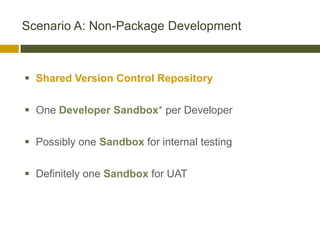
Scenario A: Non-Package Development


 Shared Version Control Repository

 One Developer Sandbox* per Developer

 Possibly one Sandbox for internal testing

 Definitely one Sandbox for UAT
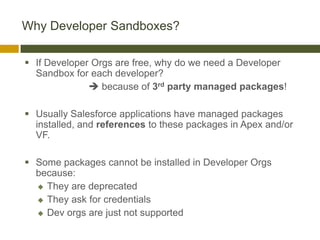
Why Developer Sandboxes?

 If Developer Orgs are free, why do we need a Developer
  Sandbox for each developer?
               because of 3rd party managed packages!

 Usually Salesforce applications have managed packages
  installed, and references to these packages in Apex and/or
  VF.

 Some packages cannot be installed in Developer Orgs
  because:
   They are deprecated

   They ask for credentials

   Dev orgs are just not supported
Main issue to address:

  Cost to purchase additional Developer Sandboxes

    Can we tell clients that this is a requirement*?

               *Only during development
Scenario B: Package Development


 Shared Version Control Repository

 One Developer Org per Developer - connected to repo

 One Partner Developer Org (20 accounts) for Testing/QA -
  connected to repo

 One Developer Org for Packaging - connected to repo

 Up to 4 different edition orgs for UAT - NOT connected to
  repo (deploy code as Managed Package)
Gotchas
Scenario A: Non-Package Gotchas


 All changes in production must be replicated in AT
  LEAST one developer Sandbox

  (they will be pulled from this one and add it to the repo)

 Refresh Sandbox only AFTER all changes have been
  deployed
Scenario B: Package Gotchas I


 Do NOT create the package until the end - creating a
  package will add the namespace prefix to all
  classes, fields, objects, etc.


 To avoid prefix issues (so that code can be deployed to
  multiple Developer Orgs):


     Do not use any prefix in Apex code (apex code will work
      with or without prefix)

     Use try-catch in Javascript calls from buttons (show)
Scenario B: Package Gotchas II


     Use try/catch in webservice calls (same as in
      JavaScript)

       Calls to methods annotated with @webservice
       from either JavaScript or from an external
       application need to use the prefix.

     To call Apex code from JavaScript in a VF page you
      can user $RemoteAction (will automatically
      resolve the namespace)
Namespace Prefix Substitution


Some of the issues mentioned above can be
automatically handled by this project:

    github.com/jordanbaucke/sfdc-namespace-prefix

Glorified search and replace.

Bamboo runs this script after checking out the code from
the repository, but before deploying it to the packaging
org.
Setup & Configuration
Ant Migration Tool


 Used by Jenkins or Bamboo

 Can be used from Force.com
  IDE, MavensMate, Command Line, ...

 Extension to Ant

 Allows you to automate deployment, running
  tests, ...
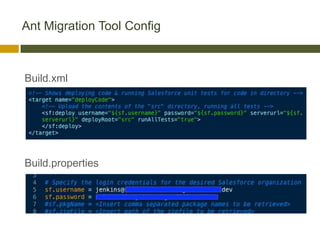
Ant Migration Tool Config


Build.xml


Build.properties
Resources
 Blog post:
  soliantconsulting.com/blog/2013/03/salesforcecomforcecom-team-
  development

 LinkedIn discussion:
  linkedin.com/groupAnswers?viewQuestionAndAnswers=&discussionI
  D=221804807&gid=142613

 SVN:         subversion.apache.org

 Git:         git-scm.com

 Jenkins:     jenkins-ci.org

 Bamboo:      atlassian.com/software/bamboo
Thank You!
Q&A

Team Development & Continuous Integration on the Salesforce Platform

  • 1.
  • 2.
    Index  Safe HarborStatement  Team Development Basics  Continuous Integration  Demo  Non-packaged Development  Package Development  Non-packaged Gotchas  Package Gotchas  ANT Migration Tool  Resources  Q&A
  • 3.
    Safe Harbor Statement We don’t have all the answers, but… it’s working!  Also, no need to take notes: http://www.soliantconsulting.com/blog/2013/03/salesforcecomforceco m-team-development
  • 4.
  • 5.
    Team Development Basics Version Control (SVN, Git, ...)  Separate Development Environment for each Developer  Unit Testing (Salesforce provides JUnit-like framework)  Continuous Integration (Jenkins/Hudson, Bamboo, ...)
  • 6.
    Team Development Process 1.One developer commits all code to a new repo from a project connected to the sandbox (1st commit) 2. Other developers in the team check out the project 3. Developers update their local project at the beginning of the day 4. Developers commit code to, and update from, the repo one or more times a day Resource: http://www.soliantconsulting.com/blog/2013/03/working- forcecom-ide-and-subversion-svn
  • 7.
    Repo = Gospel DeveloperOrg = Scratch Paper
  • 8.
  • 9.
    What does itdo? 1. Pulls the code from the repo (from version control) on a scheduled basis 2. Runs all the automated tests 3. Deploys to a Test/UAT environment (ANT Migration Tool) 4. Notifies team (by email) if there was any issue
  • 10.
    Advantages  Developers don’tneed to be running the tests manually every time they change code  There is no need to manually deploy to a test/UAT org for other stakeholders to see the status of the project  There is immediate feedback to the team if there is any issue with the code
  • 11.
  • 12.
  • 13.
  • 14.
    Scenario A: Non-PackageDevelopment  Shared Version Control Repository  One Developer Sandbox* per Developer  Possibly one Sandbox for internal testing  Definitely one Sandbox for UAT
  • 15.
    Why Developer Sandboxes? If Developer Orgs are free, why do we need a Developer Sandbox for each developer?  because of 3rd party managed packages!  Usually Salesforce applications have managed packages installed, and references to these packages in Apex and/or VF.  Some packages cannot be installed in Developer Orgs because:  They are deprecated  They ask for credentials  Dev orgs are just not supported
  • 16.
    Main issue toaddress: Cost to purchase additional Developer Sandboxes Can we tell clients that this is a requirement*? *Only during development
  • 17.
    Scenario B: PackageDevelopment  Shared Version Control Repository  One Developer Org per Developer - connected to repo  One Partner Developer Org (20 accounts) for Testing/QA - connected to repo  One Developer Org for Packaging - connected to repo  Up to 4 different edition orgs for UAT - NOT connected to repo (deploy code as Managed Package)
  • 18.
  • 19.
    Scenario A: Non-PackageGotchas  All changes in production must be replicated in AT LEAST one developer Sandbox (they will be pulled from this one and add it to the repo)  Refresh Sandbox only AFTER all changes have been deployed
  • 20.
    Scenario B: PackageGotchas I  Do NOT create the package until the end - creating a package will add the namespace prefix to all classes, fields, objects, etc.  To avoid prefix issues (so that code can be deployed to multiple Developer Orgs):  Do not use any prefix in Apex code (apex code will work with or without prefix)  Use try-catch in Javascript calls from buttons (show)
  • 21.
    Scenario B: PackageGotchas II  Use try/catch in webservice calls (same as in JavaScript) Calls to methods annotated with @webservice from either JavaScript or from an external application need to use the prefix.  To call Apex code from JavaScript in a VF page you can user $RemoteAction (will automatically resolve the namespace)
  • 22.
    Namespace Prefix Substitution Someof the issues mentioned above can be automatically handled by this project: github.com/jordanbaucke/sfdc-namespace-prefix Glorified search and replace. Bamboo runs this script after checking out the code from the repository, but before deploying it to the packaging org.
  • 23.
  • 24.
    Ant Migration Tool Used by Jenkins or Bamboo  Can be used from Force.com IDE, MavensMate, Command Line, ...  Extension to Ant  Allows you to automate deployment, running tests, ...
  • 25.
    Ant Migration ToolConfig Build.xml Build.properties
  • 26.
  • 27.
     Blog post: soliantconsulting.com/blog/2013/03/salesforcecomforcecom-team- development  LinkedIn discussion: linkedin.com/groupAnswers?viewQuestionAndAnswers=&discussionI D=221804807&gid=142613  SVN: subversion.apache.org  Git: git-scm.com  Jenkins: jenkins-ci.org  Bamboo: atlassian.com/software/bamboo
  • 28.
  • 29.

Editor's Notes

  • #12 1. Artie makes a change (see change in Artie's dev org) 2. Artie commits the change 3. Run Bamboo build 4. Carlos updates SVN 5. See change in Carlos' dev org 6. See change in Test/UAT org