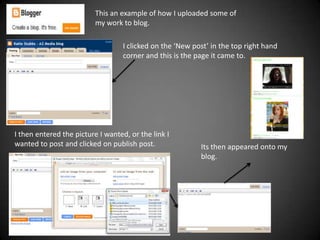
This an example of how I uploaded some of
                          my work to blog.

                                   I clicked on the ‘New post’ in the top right hand
                                   corner and this is the page it came to.


I then entered the picture I wanted, or the link I
wanted to post and clicked on publish post.                Its then appeared onto my
                                                           blog.
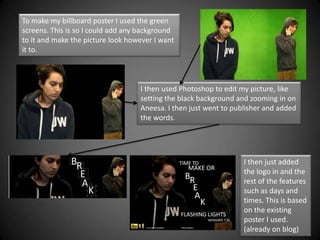
To make my billboard poster I used the green
screens. This is so I could add any background
to it and make the picture look however I want
it to.


                                   I then used Photoshop to edit my picture, like
                                   setting the black background and zooming in on
                                   Aneesa. I then just went to publisher and added
                                   the words.


                                                                  I then just added
                                                                  the logo in and the
                                                                  rest of the features
                                                                  such as days and
                                                                  times. This is based
                                                                  on the existing
                                                                  poster I used.
                                                                  (already on blog)
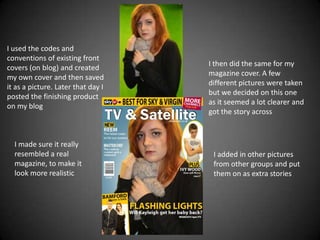
I used the codes and
conventions of existing front
                                    I then did the same for my
covers (on blog) and created
                                    magazine cover. A few
my own cover and then saved
                                    different pictures were taken
it as a picture. Later that day I
                                    but we decided on this one
posted the finishing product
                                    as it seemed a lot clearer and
on my blog
                                    got the story across


  I made sure it really
  resembled a real                   I added in other pictures
  magazine, to make it               from other groups and put
  look more realistic                them on as extra stories
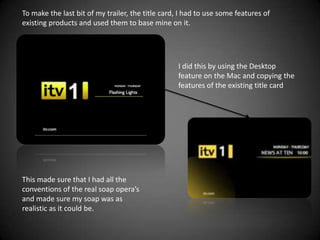
To make the last bit of my trailer, the title card, I had to use some features of
existing products and used them to base mine on it.


                                                   I did this by using the Desktop
                                                   feature on the Mac and copying the
                                                   features of the existing title card


This made sure that I had all the
conventions of the real soap opera’s
and made sure my soap was as
realistic as it could be.
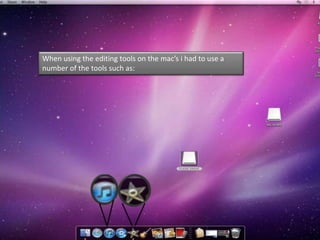
When using the editing tools on the mac’s i had to use a
number of the tools such as:
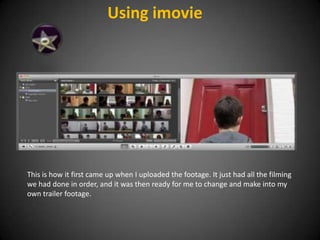
Using imovie


This is how it first came up when I uploaded the footage. It just had all the filming
we had done in order, and it was then ready for me to change and make into my
own trailer footage.
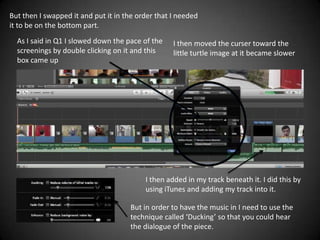
But then I swapped it and put it in the order that I needed
it to be on the bottom part.
  As I said in Q1 I slowed down the pace of the    I then moved the curser toward the
  screenings by double clicking on it and this     little turtle image at it became slower
  box came up


                                          I then added in my track beneath it. I did this by
                                          using iTunes and adding my track into it.

                                     But in order to have the music in I need to use the
                                     technique called ‘Ducking’ so that you could hear
                                     the dialogue of the piece.
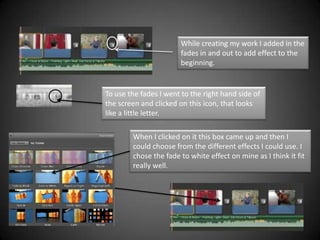
While creating my work I added in the
                       fades in and out to add effect to the
                       beginning.


To use the fades I went to the right hand side of
the screen and clicked on this icon, that looks
like a little letter.

        When I clicked on it this box came up and then I
        could choose from the different effects I could use. I
        chose the fade to white effect on mine as I think it fit
        really well.

Evaluation Q.4 continued

  • 1.
    This an exampleof how I uploaded some of my work to blog. I clicked on the ‘New post’ in the top right hand corner and this is the page it came to. I then entered the picture I wanted, or the link I wanted to post and clicked on publish post. Its then appeared onto my blog.
  • 2.
    To make mybillboard poster I used the green screens. This is so I could add any background to it and make the picture look however I want it to. I then used Photoshop to edit my picture, like setting the black background and zooming in on Aneesa. I then just went to publisher and added the words. I then just added the logo in and the rest of the features such as days and times. This is based on the existing poster I used. (already on blog)
  • 3.
    I used thecodes and conventions of existing front I then did the same for my covers (on blog) and created magazine cover. A few my own cover and then saved different pictures were taken it as a picture. Later that day I but we decided on this one posted the finishing product as it seemed a lot clearer and on my blog got the story across I made sure it really resembled a real I added in other pictures magazine, to make it from other groups and put look more realistic them on as extra stories
  • 4.
    To make thelast bit of my trailer, the title card, I had to use some features of existing products and used them to base mine on it. I did this by using the Desktop feature on the Mac and copying the features of the existing title card This made sure that I had all the conventions of the real soap opera’s and made sure my soap was as realistic as it could be.
  • 5.
    When using theediting tools on the mac’s i had to use a number of the tools such as:
  • 6.
    Using imovie This ishow it first came up when I uploaded the footage. It just had all the filming we had done in order, and it was then ready for me to change and make into my own trailer footage.
  • 7.
    But then Iswapped it and put it in the order that I needed it to be on the bottom part. As I said in Q1 I slowed down the pace of the I then moved the curser toward the screenings by double clicking on it and this little turtle image at it became slower box came up I then added in my track beneath it. I did this by using iTunes and adding my track into it. But in order to have the music in I need to use the technique called ‘Ducking’ so that you could hear the dialogue of the piece.
  • 8.
    While creating mywork I added in the fades in and out to add effect to the beginning. To use the fades I went to the right hand side of the screen and clicked on this icon, that looks like a little letter. When I clicked on it this box came up and then I could choose from the different effects I could use. I chose the fade to white effect on mine as I think it fit really well.