Guided By:-
Prof. Bhagyasri G. Patel
Prepared By:-
Dhruvin L. Bhalodiya (120840131021)
Akshay R. Panchal (120840131027)
Santosh M. Ladani (120840131053)
Tejraj G. Thakor (130843131018)
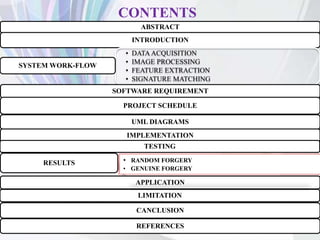
CONTENTS
ABSTRACT
INTRODUCTION
• DATA ACQUISITION
• IMAGE PROCESSING
• FEATURE EXTRACTION
• SIGNATURE MATCHING
SYSTEM WORK-FLOW
SOFTWARE REQUIREMENT
PROJECT SCHEDULE
UML DIAGRAMS
IMPLEMENTATION
TESTING
RESULTS
APPLICATION
LIMITATION
CANCLUSION
REFERENCES
• RANDOM FORGERY
• GENUINE FORGERY
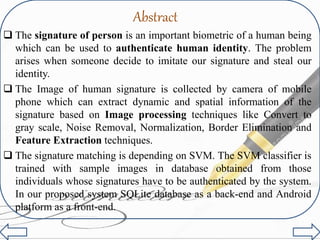
Abstract
 The signature of person is an important biometric of a human being
which can be used to authenticate human identity. The problem
arises when someone decide to imitate our signature and steal our
identity.
 The Image of human signature is collected by camera of mobile
phone which can extract dynamic and spatial information of the
signature based on Image processing techniques like Convert to
gray scale, Noise Removal, Normalization, Border Elimination and
Feature Extraction techniques.
 The signature matching is depending on SVM. The SVM classifier is
trained with sample images in database obtained from those
individuals whose signatures have to be authenticated by the system.
In our proposed system SQLite database as a back-end and Android
platform as a front-end.
INTRODUCTION
• Now days , many fraud things happens if any unknown
person wants to imitate person’s identity.
• If a person sign name of the checking account holder to
check without account holder’s permission, then this is
considered signature forgery.
• So signature Verification is essential in day-to - day life.
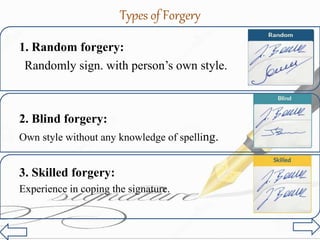
Types of Forgery
1. Random forgery:
2. Blind forgery:
Own style without any knowledge of spelling.
3. Skilled forgery:
Experience in coping the signature.
Randomly sign. with person’s own style.
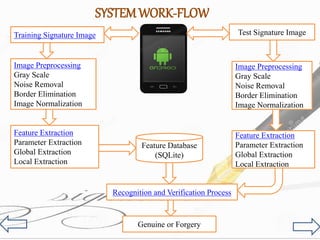
Training Signature Image
Image Preprocessing
Gray Scale
Noise Removal
Border Elimination
Image Normalization
Feature Extraction
Parameter Extraction
Global Extraction
Local Extraction
Feature Extraction
Parameter Extraction
Global Extraction
Local Extraction
Test Signature Image
Image Preprocessing
Gray Scale
Noise Removal
Border Elimination
Image Normalization
Recognition and Verification Process
Genuine or Forgery
Feature Database
(SQLite)
SYSTEMWORK-FLOW
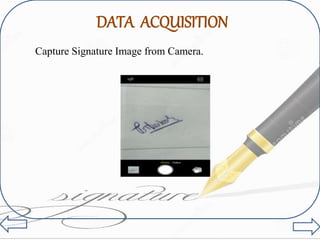
DATA ACQUISITION
Capture Signature Image from Camera.
Gray scale Conversion
Image smoothing
Color Image Gray Scale Image
Average Method: (R+G+B / 3).
Noise Removal
Images corrupted due to positive and negative
stemming from decoding errors or noisy channels.
Median filter
Color to Gray Scale Noise Removal Image
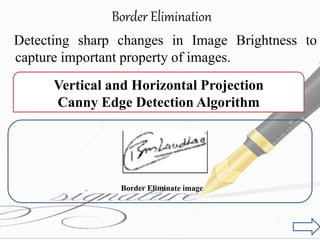
Border Elimination
Detecting sharp changes in Image Brightness to
capture important property of images.
Vertical and Horizontal Projection
Canny Edge Detection Algorithm
Border Eliminate image
image Normalization
Signature height and width may vary due to the
irregularities in the image scanning.
Normalized Image
Linear normalization of a grayscale image is
Features Extraction :
- Similar characteristics of images that accurately
retrieve features.
Parameter
Extraction
Global
Extraction
Local
Extraction
Types of Feature
Extraction
1. Parameter Extraction :-
I. Horizontal projection
II. Vertical projection
III. Center of gravity
IV. Height and Width
2. Global Extraction :-
I. Aspect ratio
II. Histogram.
3. Local Extraction:-
Properties of signatures image in specific part.
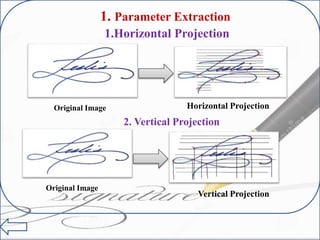
1. Parameter Extraction
Vertical Projection
1.Horizontal Projection
Horizontal ProjectionOriginal Image
Original Image
2. Vertical Projection
SOFTWARE REQUIREMENT
 Software Requirement :-
 Front End – Eclipse IDE(Android)
 Back End – SQLite Database
 Hardware Requirement :-
 Android Version 2.3.0(Ginegerbread)
 512 MB RAM
 2 Megapixel Camera
 1 GHz Processor
 Technology Requirement :-
 Eclipse IDE
 OpenCV for image processing
 SQLite Database
Work-Flow of Project
GRAPHICAL REPRESENTATION OF
WORK-FLOW PROJECT
1. USE-CASE DIAGRAM
User
Login
User_Name
Delete Sign_Image
Password
Upload Sign_Image
Intiatalize
Update Sign_Image
Global Feature
Camera
Image_Processing
Local Feature
Validation
Gallery
Matching
Feature Extract
Signature
Recognition
System
Conversion to
Gray Scale
Normalize
Tested Image Normal Image
<<include>>
<<include>>
<<extend>> <<extend>>
<<include>> <<include>>
<<extend>><<extend>>
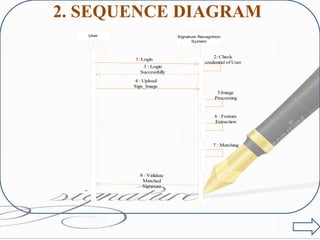
2. SEQUENCE DIAGRAM
User Signature Recognition
System
1: Login 2: Check
credential of User
3 : Login
Successfully
4 : Upload
Sign_Image
5:Image
Processing
6 : Feature
Extraction
7 : Matching
8 : Validate
Matched
Signature
3. ACTIVITY DIAGRAM
Login
Select Image
Login Failed
Image Processing
[From]
[From]
Camera
Gallery
I) For Login:-
II) IMAGE PROCESSING AND VERIFICATION
Image
Convert to Gray
Scale
Remove Noise
Normalize Image
Feature Extraction
Normal Image Tested Image
Signature Matching
Validation
If Noise
No Noise
Genuine Forger
If Match
No Match
Valid Not Valid
4. E- R DIAGRAM
5. DATA FLOW DIAGRAM(DFD)
• Level 0 (Context Level) :
Level 1 :
User
Application
Capture
Image
Image
Processing
Feature
Extraction
Open
Signature Image
Extracted By
Matching
Signature
Validate
Signature
Select Option1.0 1.1 1.3
1.41.51.6
Database
Signature
Match
Check
Validation
Process To
LEVEL 2 :
Image Noise from
Image
Gray Scale
Image
Normalization
Conversion
To
Remove
Normalize
Image By
Image
Processing
Process
2.0 2.1
2.2 2.3
2.4
Feature
Extraction
Local Feature
Global
Feature
Extract
3.0 3.1
3.2
6. CLASS DIAGRAM
IMPLEMENTATION
Capture Images
GRAY SCALE IMAGE
EDGE DETECTION IMAGE
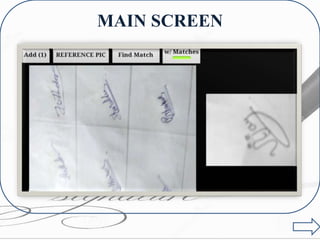
MAIN SCREEN
MATCH SIGNATURE
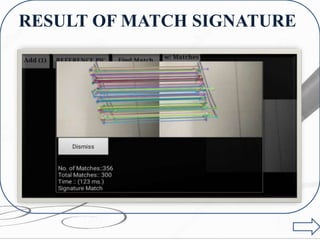
RESULT OF MATCH SIGNATURE
RESULT
APPLICATIONS OF SIGNATURE RECOGNITION
1. Banking
2. Passport verification system.
3.Provides authentication to a candidates in public
examination from their signatures.
LIMITATION
• Signature Image stored Temporarily.
• Matching of Signature image based on
dynamic Euclidian distance. So variation may
be possible.
REFERENCES
[1] Ashish Dhawan, Aditi R. Ganesan, “Handwritten Signature Verification”,
The University of Wisconsin.
[2] Brooks, F. (1995) The Mythical Man Month, Addison-Wesley.
[3] Dr. S. Adebayo Daramola, Prof. T. Samuel Ibiyemi, “Offline Signature Using Hidden
Markov Model(HMM)”, International Journal of Computer Application, Nigeria,
November-2010.
[4] K.A. Vala, N. P. Joshi, “A Survey on Offline Signature Recognition and Verification
Schemes”, International Journal of Advanced Research in Electrical, Electronics and
Instrumentation Engineering, Gujarat, India, March-2014.
[5] Madhuri Yadav, Alok Kumar, Tushar Patnaik, Bhupendra Kumar, “A Survey on Offline
Signature Verification”, International Journal of Engineering and Innovative Technology
(IJEIT), January-2013.
THANK
YOU…………
…

Fraud Detection Using Signature Recognition

  • 1.
    Guided By:- Prof. BhagyasriG. Patel Prepared By:- Dhruvin L. Bhalodiya (120840131021) Akshay R. Panchal (120840131027) Santosh M. Ladani (120840131053) Tejraj G. Thakor (130843131018)
  • 2.
    CONTENTS ABSTRACT INTRODUCTION • DATA ACQUISITION •IMAGE PROCESSING • FEATURE EXTRACTION • SIGNATURE MATCHING SYSTEM WORK-FLOW SOFTWARE REQUIREMENT PROJECT SCHEDULE UML DIAGRAMS IMPLEMENTATION TESTING RESULTS APPLICATION LIMITATION CANCLUSION REFERENCES • RANDOM FORGERY • GENUINE FORGERY
  • 3.
    Abstract  The signatureof person is an important biometric of a human being which can be used to authenticate human identity. The problem arises when someone decide to imitate our signature and steal our identity.  The Image of human signature is collected by camera of mobile phone which can extract dynamic and spatial information of the signature based on Image processing techniques like Convert to gray scale, Noise Removal, Normalization, Border Elimination and Feature Extraction techniques.  The signature matching is depending on SVM. The SVM classifier is trained with sample images in database obtained from those individuals whose signatures have to be authenticated by the system. In our proposed system SQLite database as a back-end and Android platform as a front-end.
  • 4.
    INTRODUCTION • Now days, many fraud things happens if any unknown person wants to imitate person’s identity. • If a person sign name of the checking account holder to check without account holder’s permission, then this is considered signature forgery. • So signature Verification is essential in day-to - day life.
  • 5.
    Types of Forgery 1.Random forgery: 2. Blind forgery: Own style without any knowledge of spelling. 3. Skilled forgery: Experience in coping the signature. Randomly sign. with person’s own style.
  • 6.
    Training Signature Image ImagePreprocessing Gray Scale Noise Removal Border Elimination Image Normalization Feature Extraction Parameter Extraction Global Extraction Local Extraction Feature Extraction Parameter Extraction Global Extraction Local Extraction Test Signature Image Image Preprocessing Gray Scale Noise Removal Border Elimination Image Normalization Recognition and Verification Process Genuine or Forgery Feature Database (SQLite) SYSTEMWORK-FLOW
  • 7.
  • 9.
    Gray scale Conversion Imagesmoothing Color Image Gray Scale Image Average Method: (R+G+B / 3).
  • 10.
    Noise Removal Images corrupteddue to positive and negative stemming from decoding errors or noisy channels. Median filter Color to Gray Scale Noise Removal Image
  • 11.
    Border Elimination Detecting sharpchanges in Image Brightness to capture important property of images. Vertical and Horizontal Projection Canny Edge Detection Algorithm Border Eliminate image
  • 12.
    image Normalization Signature heightand width may vary due to the irregularities in the image scanning. Normalized Image Linear normalization of a grayscale image is
  • 14.
    Features Extraction : -Similar characteristics of images that accurately retrieve features. Parameter Extraction Global Extraction Local Extraction Types of Feature Extraction
  • 15.
    1. Parameter Extraction:- I. Horizontal projection II. Vertical projection III. Center of gravity IV. Height and Width 2. Global Extraction :- I. Aspect ratio II. Histogram. 3. Local Extraction:- Properties of signatures image in specific part.
  • 16.
    1. Parameter Extraction VerticalProjection 1.Horizontal Projection Horizontal ProjectionOriginal Image Original Image 2. Vertical Projection
  • 17.
    SOFTWARE REQUIREMENT  SoftwareRequirement :-  Front End – Eclipse IDE(Android)  Back End – SQLite Database  Hardware Requirement :-  Android Version 2.3.0(Ginegerbread)  512 MB RAM  2 Megapixel Camera  1 GHz Processor  Technology Requirement :-  Eclipse IDE  OpenCV for image processing  SQLite Database
  • 18.
  • 19.
  • 21.
    1. USE-CASE DIAGRAM User Login User_Name DeleteSign_Image Password Upload Sign_Image Intiatalize Update Sign_Image Global Feature Camera Image_Processing Local Feature Validation Gallery Matching Feature Extract Signature Recognition System Conversion to Gray Scale Normalize Tested Image Normal Image <<include>> <<include>> <<extend>> <<extend>> <<include>> <<include>> <<extend>><<extend>> <<extend>><<extend>>
  • 22.
    2. SEQUENCE DIAGRAM UserSignature Recognition System 1: Login 2: Check credential of User 3 : Login Successfully 4 : Upload Sign_Image 5:Image Processing 6 : Feature Extraction 7 : Matching 8 : Validate Matched Signature
  • 23.
    3. ACTIVITY DIAGRAM Login SelectImage Login Failed Image Processing [From] [From] Camera Gallery I) For Login:-
  • 24.
    II) IMAGE PROCESSINGAND VERIFICATION Image Convert to Gray Scale Remove Noise Normalize Image Feature Extraction Normal Image Tested Image Signature Matching Validation If Noise No Noise Genuine Forger If Match No Match Valid Not Valid
  • 25.
    4. E- RDIAGRAM
  • 26.
    5. DATA FLOWDIAGRAM(DFD) • Level 0 (Context Level) :
  • 27.
    Level 1 : User Application Capture Image Image Processing Feature Extraction Open SignatureImage Extracted By Matching Signature Validate Signature Select Option1.0 1.1 1.3 1.41.51.6 Database Signature Match Check Validation Process To
  • 28.
    LEVEL 2 : ImageNoise from Image Gray Scale Image Normalization Conversion To Remove Normalize Image By Image Processing Process 2.0 2.1 2.2 2.3 2.4 Feature Extraction Local Feature Global Feature Extract 3.0 3.1 3.2
  • 29.
  • 30.
  • 31.
  • 32.
  • 33.
  • 34.
  • 35.
    RESULT OF MATCHSIGNATURE
  • 36.
  • 37.
    APPLICATIONS OF SIGNATURERECOGNITION 1. Banking 2. Passport verification system. 3.Provides authentication to a candidates in public examination from their signatures.
  • 38.
    LIMITATION • Signature Imagestored Temporarily. • Matching of Signature image based on dynamic Euclidian distance. So variation may be possible.
  • 39.
    REFERENCES [1] Ashish Dhawan,Aditi R. Ganesan, “Handwritten Signature Verification”, The University of Wisconsin. [2] Brooks, F. (1995) The Mythical Man Month, Addison-Wesley. [3] Dr. S. Adebayo Daramola, Prof. T. Samuel Ibiyemi, “Offline Signature Using Hidden Markov Model(HMM)”, International Journal of Computer Application, Nigeria, November-2010. [4] K.A. Vala, N. P. Joshi, “A Survey on Offline Signature Recognition and Verification Schemes”, International Journal of Advanced Research in Electrical, Electronics and Instrumentation Engineering, Gujarat, India, March-2014. [5] Madhuri Yadav, Alok Kumar, Tushar Patnaik, Bhupendra Kumar, “A Survey on Offline Signature Verification”, International Journal of Engineering and Innovative Technology (IJEIT), January-2013.
  • 40.

Editor's Notes

  • #7 On Image Processing step Click on that link……. At Slide no. 10 click on Back button. To resume proposed methodology… and click on Feature Extraction It goes at slide 13 … and in last stage of feature extraction click on back button to resume on proposed methodology and click on Recognition and verification process. It goes at Software Requirement stage and continue…………… process to next slide
  • #13 Go To Slide no 4….
  • #17 Go to slide 4…. Proposed methodology