Presented By: Muskan Gupta
Flyway : A Database
Version Management Tool
Lack of etiquette and manners is a huge turn off.
KnolX Etiquettes
Punctuality
Respect Knolx session timings, you
are requested not to join sessions
after a 5 minutes threshold post
the session start time.
Feedback
Make sure to submit a constructive
feedback for all sessions as it is
very helpful for the presenter.
Silent Mode
Keep your screen on mute if there
is nothing to say.
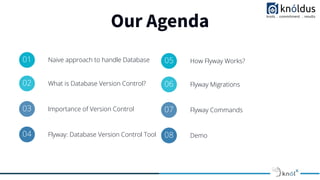
Our Agenda
01 Naive approach to handle Database
02 What is Database Version Control?
03 Importance of Version Control
04 Flyway: Database Version Control Tool
05 How Flyway Works?
06 Flyway Migrations
07 Flyway Commands
08 Demo
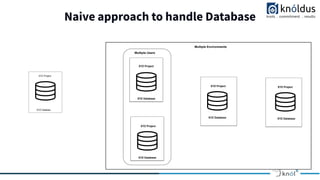
Naive approach to handle Database
XYZ Database
XYZ Project
XYZ Database
XYZ Project
XYZ Database
XYZ Project
XYZ Database
XYZ Project
XYZ Database
XYZ Project
XYZ Database
XYZ Project
XYZ Database
XYZ Project
XYZ Database
XYZ Project
XYZ Database
XYZ Project
XYZ Database
XYZ Project
XYZ Database
XYZ Project
XYZ Database
XYZ Project
Multiple Users
Multiple Environments
XYZ Databse
XYZ Project
Naive approach to handle Database
Problems with Naive approach -
● What state is the database in on this machine?
● Has this script already been applied or not?
● Has the quick fix in production been applied in test afterwards?
● How do you set up a new database instance?
What is Database Version Control?
● Database version control is similar to application version control.
● Keep the track of all the changes done to your database by all the team members.
● We need to store the Data Definition Language (DDL) code for a database in a version control system.
● Also it should maintain a history of all the changes done to the database.
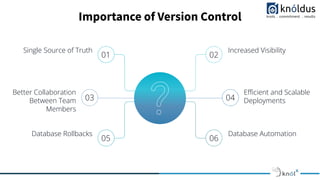
Importance of Version Control
03 04
Better Collaboration
Between Team
Members
Efficient and Scalable
Deployments
01 02
Single Source of Truth Increased Visibility
05 06
Database Rollbacks Database Automation
Flyway : Database Version Control Tool
● Version Control for your Database
● An Open Source tool for migration based database version control.
● It has a community as well as a teams version.
● Community Support is available for free version and Redgate Support is available for paid version.
● It provides multiple ways to use flyway. It has :
○ Command Line Client
○ API
○ Maven
○ Gradle
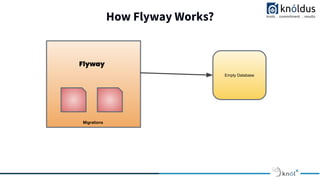
How Flyway Works?
Empty Database
Flyway
Migrations
How Flyway Works?
1. Try to locate schema history table.
A schema history table is a table that flyway uses to maintain the version. By having a look at the table flyway decides which
migrations need to be applied and which migrations have already been implemented.
2. If schema history table is not found flyway will create the table in primary/default schema.
3. After creation of table, it will try to locate all the migrations at the migration location provided in configuration.
4. According to the version it will apply the migrations one by one in incremental fashion
and update schema history table accordingly.
Flyway Migrations
In terms of Flyway all the changes to the database are temed as Migrations.
Migrations are of 2 types :
● Versioned migration
○ Regular Versioned Migration
○ Undo Migration
● Repeatable migrationf
Migrations can be written both in SQL and in Java.
Flyway automatically discovers migrations on the filesystem and on the Java classpath.
Within a single migration run, versioned migrations are applied first as per their version and repeatable migrations
are always applied last, after all versioned migrations have been executed. Repeatable migrations are applied in
the order of their description.
Versioned Migrations
From Flyway Documentation :
Versioned migrations have a version, a description and a checksum. The version must be unique. The description is purely
informative for you to be able to remember what each migration does. The checksum is there to detect accidental changes.
Versioned migrations are the most common type of migration. They are applied in order exactly once.
Versioned migrations are typically used for:
● Creating/altering/dropping tables/indexes/foreign keys/enums/UDTs/…
● Reference data updates
● User data corrections
Undo Migrations
From Flyway Documentation :
Undo migrations are the opposite of regular versioned migrations. An undo migration is responsible for undoing the effects of
the versioned migration with the same version. Undo migrations are optional and not required to run regular versioned
migrations.
Undo Migration seems nice but can break in practice.
Preferred way is to maintain backward compatibility between the DB and all the other versions of code.
Repeatable Migrations
From Flyway Documentation :
Repeatable migrations have a description and a checksum, but no version. Instead of being run just once, they are
(re-)applied every time their checksum changes.
They are typically used for
● (Re-)creating views/procedures/functions/packages/…
● Bulk reference data reinserts
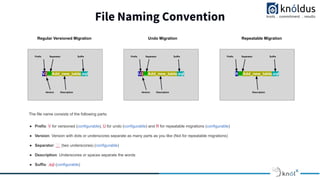
File Naming Convention
V2__Add_new_table.sql
Prefix Separator Suffix
Version Description
U2__Add_new_table.sql
Prefix Separator Suffix
Version Description
R__Add_new_table.sql
Prefix Separator Suffix
Description
Regular Versioned Migration Undo Migration Repeatable Migration
The file name consists of the following parts:
● Prefix: V for versioned (configurable), U for undo (configurable) and R for repeatable migrations (configurable)
● Version: Version with dots or underscores separate as many parts as you like (Not for repeatable migrations)
● Separator: __ (two underscores) (configurable)
● Description: Underscores or spaces separate the words
● Suffix: .sql (configurable)
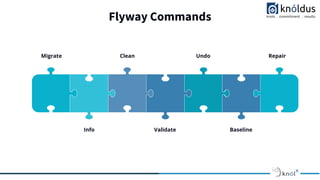
Flyway Commands
Migrate
Info
Clean
Validate
Undo
Baseline
Repair
Demo
Thank You !

Flyway _ A Database Version Management Tool

  • 1.
    Presented By: MuskanGupta Flyway : A Database Version Management Tool
  • 2.
    Lack of etiquetteand manners is a huge turn off. KnolX Etiquettes Punctuality Respect Knolx session timings, you are requested not to join sessions after a 5 minutes threshold post the session start time. Feedback Make sure to submit a constructive feedback for all sessions as it is very helpful for the presenter. Silent Mode Keep your screen on mute if there is nothing to say.
  • 3.
    Our Agenda 01 Naiveapproach to handle Database 02 What is Database Version Control? 03 Importance of Version Control 04 Flyway: Database Version Control Tool 05 How Flyway Works? 06 Flyway Migrations 07 Flyway Commands 08 Demo
  • 4.
    Naive approach tohandle Database XYZ Database XYZ Project XYZ Database XYZ Project XYZ Database XYZ Project XYZ Database XYZ Project XYZ Database XYZ Project XYZ Database XYZ Project XYZ Database XYZ Project XYZ Database XYZ Project XYZ Database XYZ Project XYZ Database XYZ Project XYZ Database XYZ Project XYZ Database XYZ Project Multiple Users Multiple Environments XYZ Databse XYZ Project
  • 5.
    Naive approach tohandle Database Problems with Naive approach - ● What state is the database in on this machine? ● Has this script already been applied or not? ● Has the quick fix in production been applied in test afterwards? ● How do you set up a new database instance?
  • 6.
    What is DatabaseVersion Control? ● Database version control is similar to application version control. ● Keep the track of all the changes done to your database by all the team members. ● We need to store the Data Definition Language (DDL) code for a database in a version control system. ● Also it should maintain a history of all the changes done to the database.
  • 7.
    Importance of VersionControl 03 04 Better Collaboration Between Team Members Efficient and Scalable Deployments 01 02 Single Source of Truth Increased Visibility 05 06 Database Rollbacks Database Automation
  • 8.
    Flyway : DatabaseVersion Control Tool ● Version Control for your Database ● An Open Source tool for migration based database version control. ● It has a community as well as a teams version. ● Community Support is available for free version and Redgate Support is available for paid version. ● It provides multiple ways to use flyway. It has : ○ Command Line Client ○ API ○ Maven ○ Gradle
  • 9.
    How Flyway Works? EmptyDatabase Flyway Migrations
  • 10.
    How Flyway Works? 1.Try to locate schema history table. A schema history table is a table that flyway uses to maintain the version. By having a look at the table flyway decides which migrations need to be applied and which migrations have already been implemented. 2. If schema history table is not found flyway will create the table in primary/default schema. 3. After creation of table, it will try to locate all the migrations at the migration location provided in configuration. 4. According to the version it will apply the migrations one by one in incremental fashion and update schema history table accordingly.
  • 11.
    Flyway Migrations In termsof Flyway all the changes to the database are temed as Migrations. Migrations are of 2 types : ● Versioned migration ○ Regular Versioned Migration ○ Undo Migration ● Repeatable migrationf Migrations can be written both in SQL and in Java. Flyway automatically discovers migrations on the filesystem and on the Java classpath. Within a single migration run, versioned migrations are applied first as per their version and repeatable migrations are always applied last, after all versioned migrations have been executed. Repeatable migrations are applied in the order of their description.
  • 12.
    Versioned Migrations From FlywayDocumentation : Versioned migrations have a version, a description and a checksum. The version must be unique. The description is purely informative for you to be able to remember what each migration does. The checksum is there to detect accidental changes. Versioned migrations are the most common type of migration. They are applied in order exactly once. Versioned migrations are typically used for: ● Creating/altering/dropping tables/indexes/foreign keys/enums/UDTs/… ● Reference data updates ● User data corrections
  • 13.
    Undo Migrations From FlywayDocumentation : Undo migrations are the opposite of regular versioned migrations. An undo migration is responsible for undoing the effects of the versioned migration with the same version. Undo migrations are optional and not required to run regular versioned migrations. Undo Migration seems nice but can break in practice. Preferred way is to maintain backward compatibility between the DB and all the other versions of code.
  • 14.
    Repeatable Migrations From FlywayDocumentation : Repeatable migrations have a description and a checksum, but no version. Instead of being run just once, they are (re-)applied every time their checksum changes. They are typically used for ● (Re-)creating views/procedures/functions/packages/… ● Bulk reference data reinserts
  • 15.
    File Naming Convention V2__Add_new_table.sql PrefixSeparator Suffix Version Description U2__Add_new_table.sql Prefix Separator Suffix Version Description R__Add_new_table.sql Prefix Separator Suffix Description Regular Versioned Migration Undo Migration Repeatable Migration The file name consists of the following parts: ● Prefix: V for versioned (configurable), U for undo (configurable) and R for repeatable migrations (configurable) ● Version: Version with dots or underscores separate as many parts as you like (Not for repeatable migrations) ● Separator: __ (two underscores) (configurable) ● Description: Underscores or spaces separate the words ● Suffix: .sql (configurable)
  • 16.
  • 17.
  • 18.