Schema Migration
(DB migration)
with Phinx
Hadi Ariawan
@hadiariawan
github.com/hadiariawan
What is Schema migration?
In software engineering, schema migration (also database migration, database change management)
refers to the management of incremental, reversible changes to relational database schemas.
A schema migration is performed on a database whenever it is necessary to update or revert that
database's schema to some newer or older version.
Have you ever face these situations?
● Developer A add several columns on table X, developer A commits and push the codes. Developer
B pulls the code and then the app breaks.
● Developer finishes the codes and forgot to give/email the sql alter script to DevOps/Sysadmin guy.
When DevOps deploy to production the app breaks.
● DevOps guy deploying more than 1 DB instances. Can you imagine how long it took to apply DB
changes if the instances are (for example) 10?
● …..
Why using Schema migration?
“The rule is simple. You should never tie database migrations to application deploys or vice versa. By
minimising dependencies you enable faster, easier and cleaner deployments.”
http://www.brunton-spall.co.uk/post/2014/05/06/database-migrations-done-right/
Benefits of using Schema Migration
● Separated application and database deployment.
● Ensured same DB structure through all the team member.
● Database versioning (keep track of DB structure changes).
● Easier to maintain incremental database changes.
Why Phinx?
https://phinx.org/
● Be portable amongst the most popular database vendors.
● Be PHP framework independent.
● Have a simple install process.
● Have an easy to use command-line operation.
● Integrate with various other PHP tools (Phing, PHPUnit) and web frameworks.
Why i choose phinx
● Familiar. Because it is written in PHP.
● Command line app. Easy to connect phinx to deployer tool.
● Supports most popular databases (MySQL, PostgreSQL, etc).
● Works independently/standalone. Multi platform and frameworks.
● Helpful for unit testing.
● Their documentation is easy to follow, easy to understand.
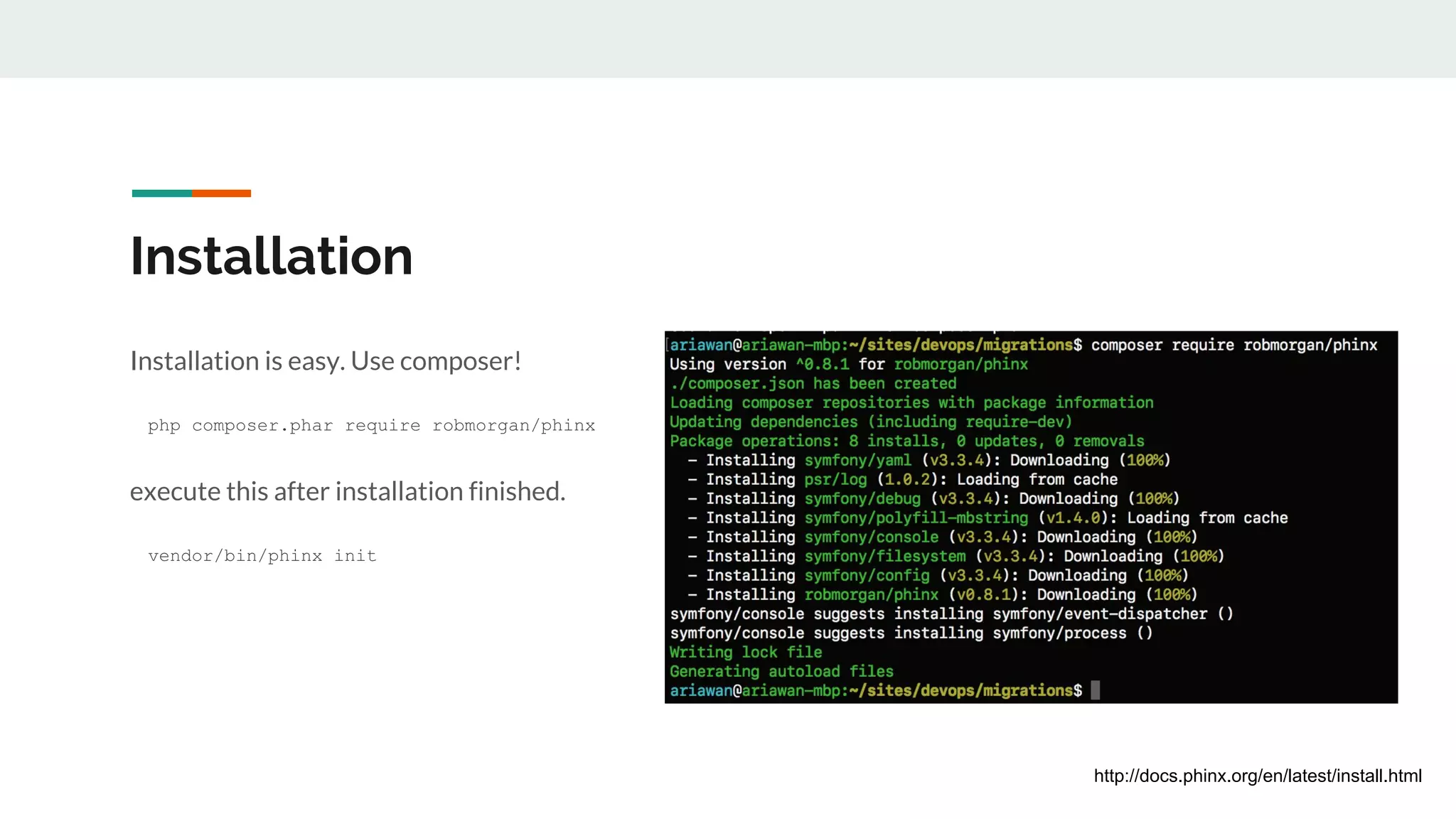
Installation
Installation is easy. Use composer!
php composer.phar require robmorgan/phinx
execute this after installation finished.
vendor/bin/phinx init
http://docs.phinx.org/en/latest/install.html
One thing Before Migrating
There should be a file named phinx.yml after you are done initialized your project.
Phinx.yml file contains your environments and database configurations.
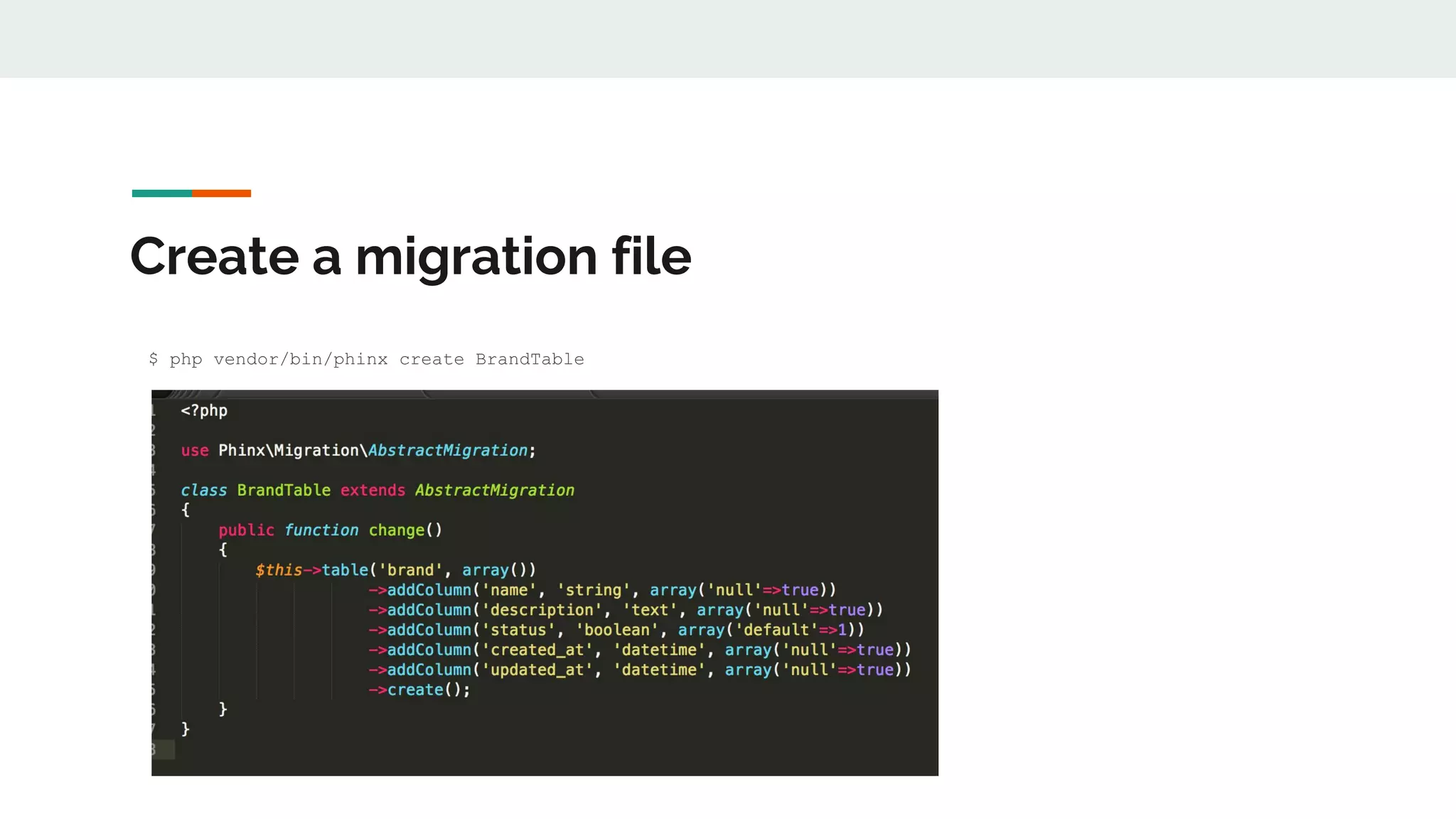
Create a migration file
$ php vendor/bin/phinx create BrandTable
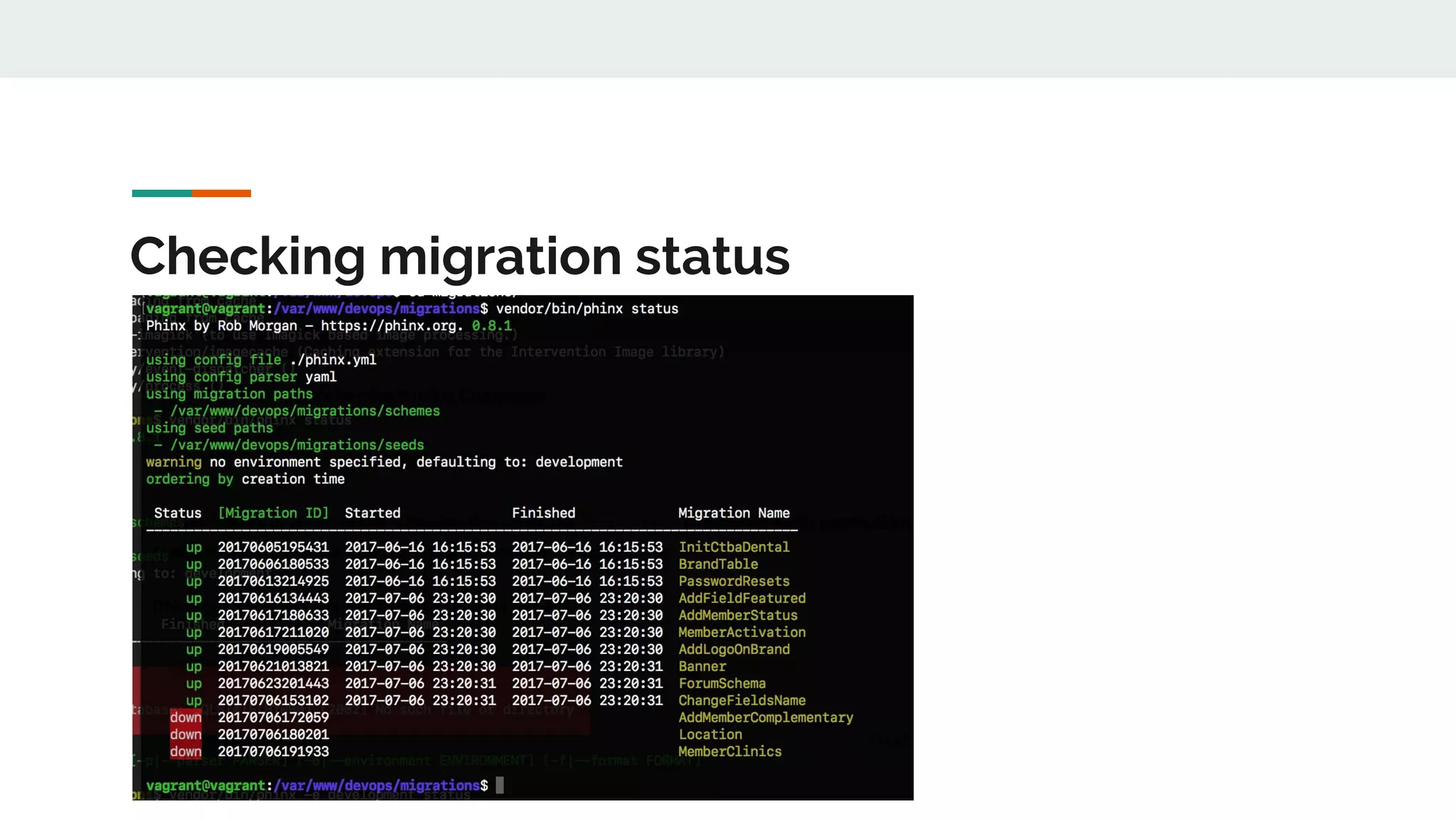
Checking migration status
Data types? Indexes? Foreign keys?
Check their documentation on this matters.
https://book.cakephp.org/3.0/en/phinx/migrations.html#working-with-columns
They are pretty straightforward and easy to follow.
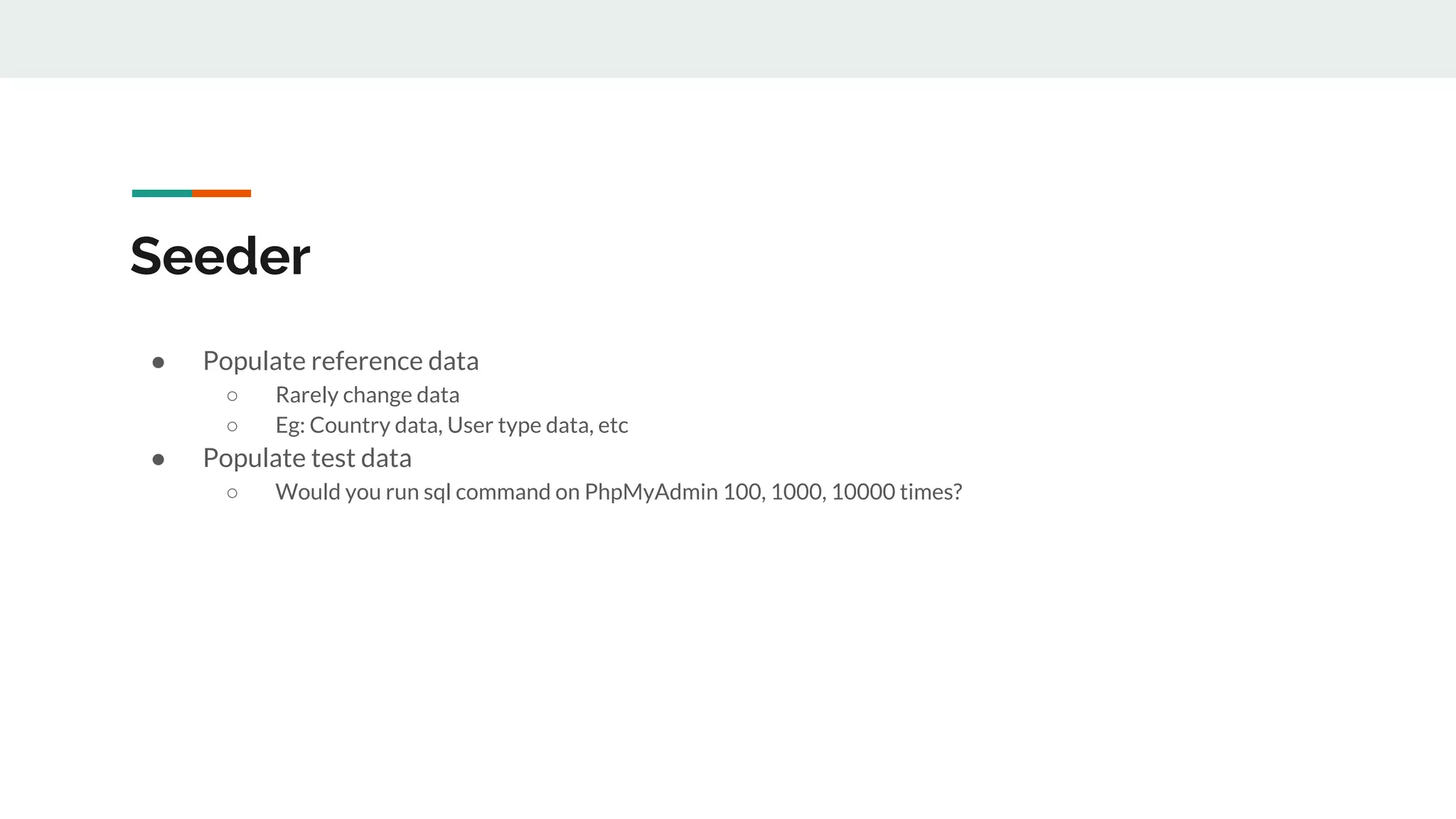
Seeder
● Populate reference data
○ Rarely change data
○ Eg: Country data, User type data, etc
● Populate test data
○ Would you run sql command on PhpMyAdmin 100, 1000, 10000 times?
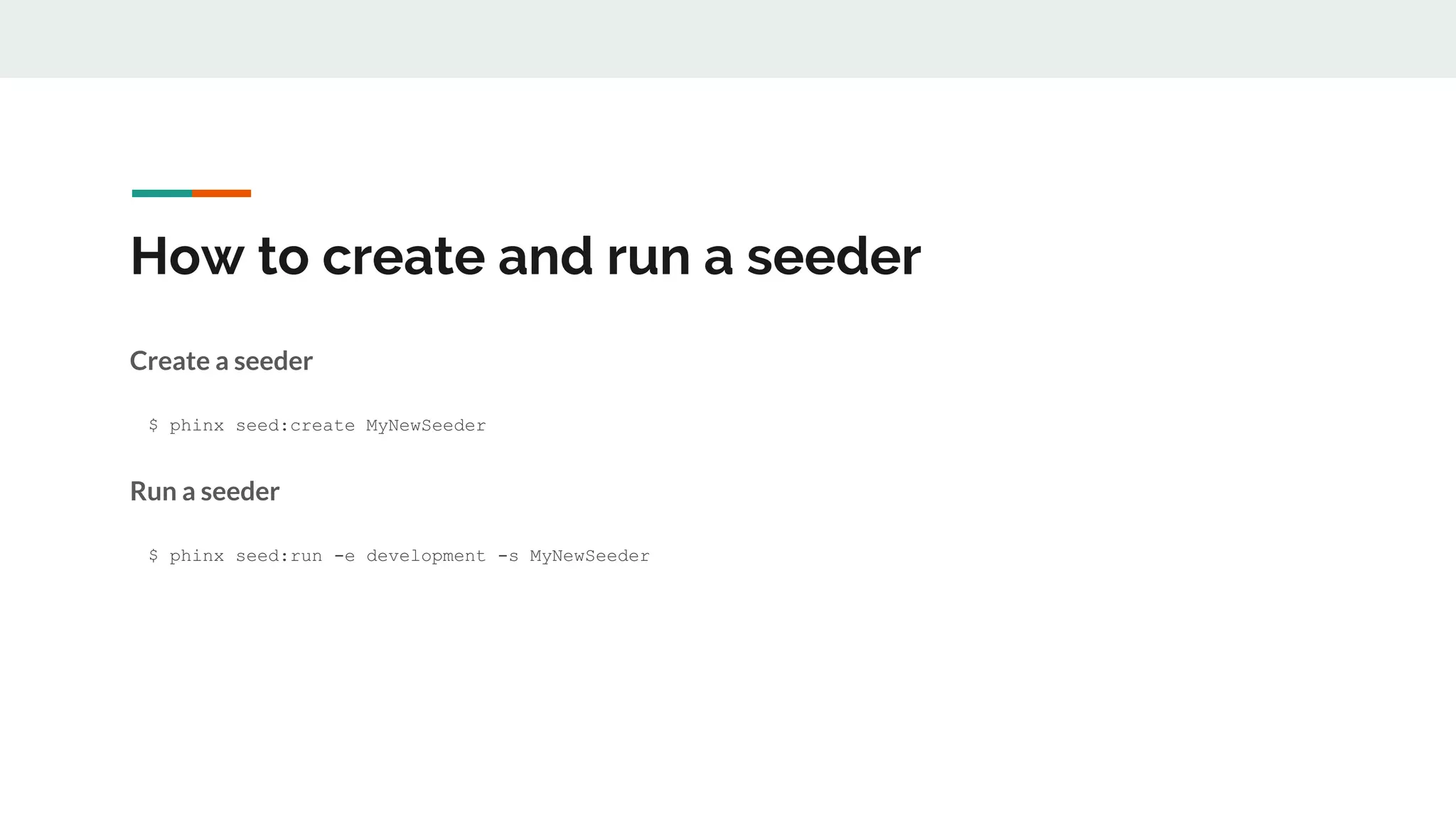
How to create and run a seeder
Create a seeder
$ phinx seed:create MyNewSeeder
Run a seeder
$ phinx seed:run -e development -s MyNewSeeder
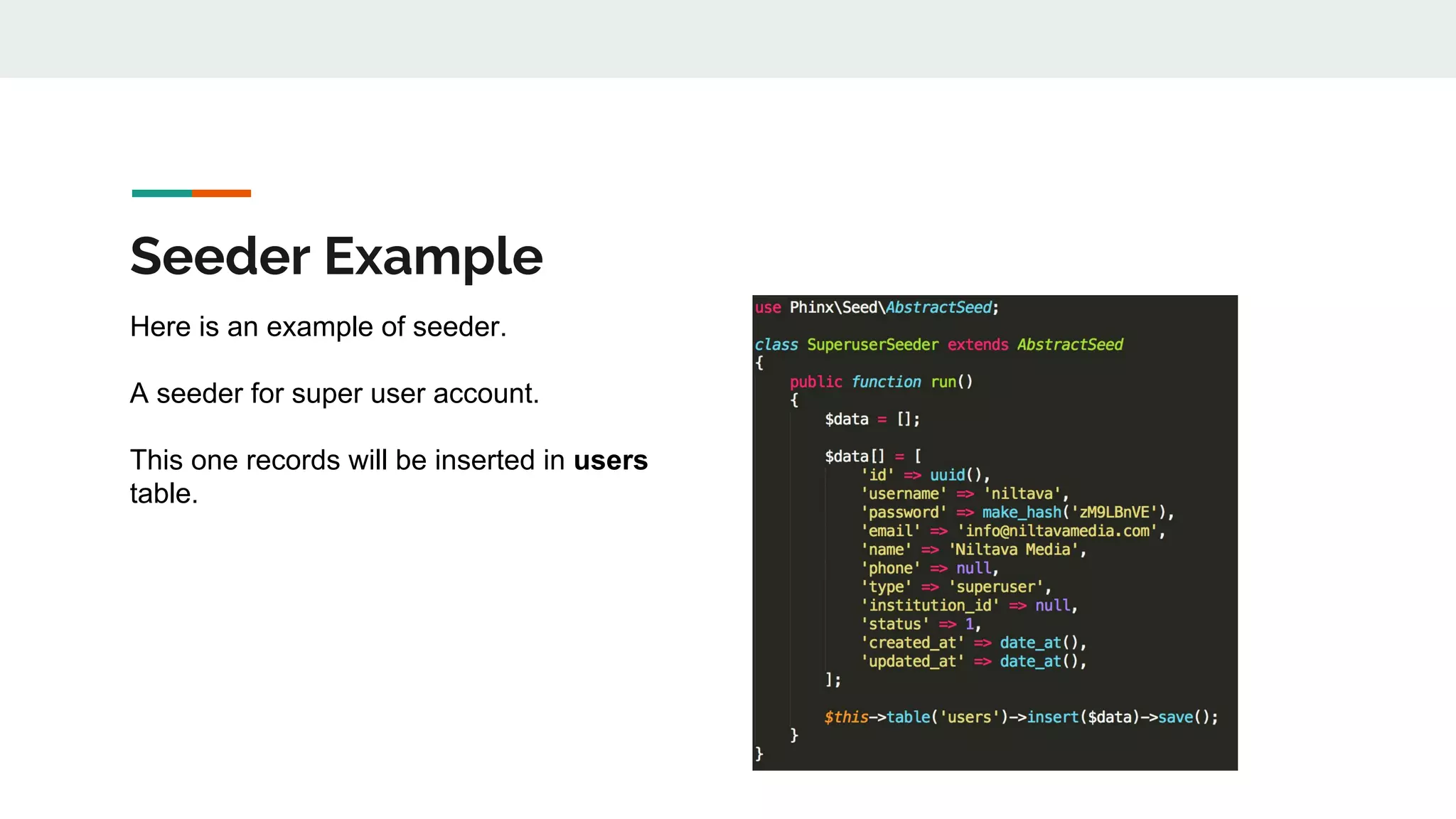
Seeder Example
Here is an example of seeder.
A seeder for super user account.
This one records will be inserted in users
table.
How to generate random data in your seeder?
Use Faker! (https://github.com/fzaninotto/Faker)
How to access DB in your seeder?
Often times you encounter cases that
need current data in database in order to
generate other data. This is how you it on
phinx.
Use these 2 methods
● fetchRow()
○ For single row
● fetchAll()
○ For multiple rows
https://book.cakephp.org/3.0/en/phinx/migrations.html#fetching-rows
Tips on using Phinx
● Read the documentation thoroughly.
● Write migration wisely. Only some method can be reversed.
● Store it in version control (git) and share it with your team/colleague.
Phinx joined CakePHP family on June 2017
https://bakery.cakephp.org/2017/06/23/welcoming-phinx-to-the-cakephp-family.html
That’s All!
Now you know how, what and why you should use schema migration, right?
“Get your database under control”
Hadi Ariawan
@hadiariawan
github.com/hadiariawan

Schema migration (DB migration) with Phinx

  • 1.
    Schema Migration (DB migration) withPhinx Hadi Ariawan @hadiariawan github.com/hadiariawan
  • 2.
    What is Schemamigration? In software engineering, schema migration (also database migration, database change management) refers to the management of incremental, reversible changes to relational database schemas. A schema migration is performed on a database whenever it is necessary to update or revert that database's schema to some newer or older version.
  • 3.
    Have you everface these situations? ● Developer A add several columns on table X, developer A commits and push the codes. Developer B pulls the code and then the app breaks. ● Developer finishes the codes and forgot to give/email the sql alter script to DevOps/Sysadmin guy. When DevOps deploy to production the app breaks. ● DevOps guy deploying more than 1 DB instances. Can you imagine how long it took to apply DB changes if the instances are (for example) 10? ● …..
  • 4.
    Why using Schemamigration? “The rule is simple. You should never tie database migrations to application deploys or vice versa. By minimising dependencies you enable faster, easier and cleaner deployments.” http://www.brunton-spall.co.uk/post/2014/05/06/database-migrations-done-right/
  • 5.
    Benefits of usingSchema Migration ● Separated application and database deployment. ● Ensured same DB structure through all the team member. ● Database versioning (keep track of DB structure changes). ● Easier to maintain incremental database changes.
  • 6.
    Why Phinx? https://phinx.org/ ● Beportable amongst the most popular database vendors. ● Be PHP framework independent. ● Have a simple install process. ● Have an easy to use command-line operation. ● Integrate with various other PHP tools (Phing, PHPUnit) and web frameworks.
  • 7.
    Why i choosephinx ● Familiar. Because it is written in PHP. ● Command line app. Easy to connect phinx to deployer tool. ● Supports most popular databases (MySQL, PostgreSQL, etc). ● Works independently/standalone. Multi platform and frameworks. ● Helpful for unit testing. ● Their documentation is easy to follow, easy to understand.
  • 8.
    Installation Installation is easy.Use composer! php composer.phar require robmorgan/phinx execute this after installation finished. vendor/bin/phinx init http://docs.phinx.org/en/latest/install.html
  • 9.
    One thing BeforeMigrating There should be a file named phinx.yml after you are done initialized your project. Phinx.yml file contains your environments and database configurations.
  • 10.
    Create a migrationfile $ php vendor/bin/phinx create BrandTable
  • 11.
  • 12.
    Data types? Indexes?Foreign keys? Check their documentation on this matters. https://book.cakephp.org/3.0/en/phinx/migrations.html#working-with-columns They are pretty straightforward and easy to follow.
  • 13.
    Seeder ● Populate referencedata ○ Rarely change data ○ Eg: Country data, User type data, etc ● Populate test data ○ Would you run sql command on PhpMyAdmin 100, 1000, 10000 times?
  • 14.
    How to createand run a seeder Create a seeder $ phinx seed:create MyNewSeeder Run a seeder $ phinx seed:run -e development -s MyNewSeeder
  • 15.
    Seeder Example Here isan example of seeder. A seeder for super user account. This one records will be inserted in users table.
  • 16.
    How to generaterandom data in your seeder? Use Faker! (https://github.com/fzaninotto/Faker)
  • 17.
    How to accessDB in your seeder? Often times you encounter cases that need current data in database in order to generate other data. This is how you it on phinx. Use these 2 methods ● fetchRow() ○ For single row ● fetchAll() ○ For multiple rows https://book.cakephp.org/3.0/en/phinx/migrations.html#fetching-rows
  • 18.
    Tips on usingPhinx ● Read the documentation thoroughly. ● Write migration wisely. Only some method can be reversed. ● Store it in version control (git) and share it with your team/colleague. Phinx joined CakePHP family on June 2017 https://bakery.cakephp.org/2017/06/23/welcoming-phinx-to-the-cakephp-family.html
  • 19.
    That’s All! Now youknow how, what and why you should use schema migration, right? “Get your database under control” Hadi Ariawan @hadiariawan github.com/hadiariawan