Source Code
Management:
History &
Overview
History of Version
Control Systems
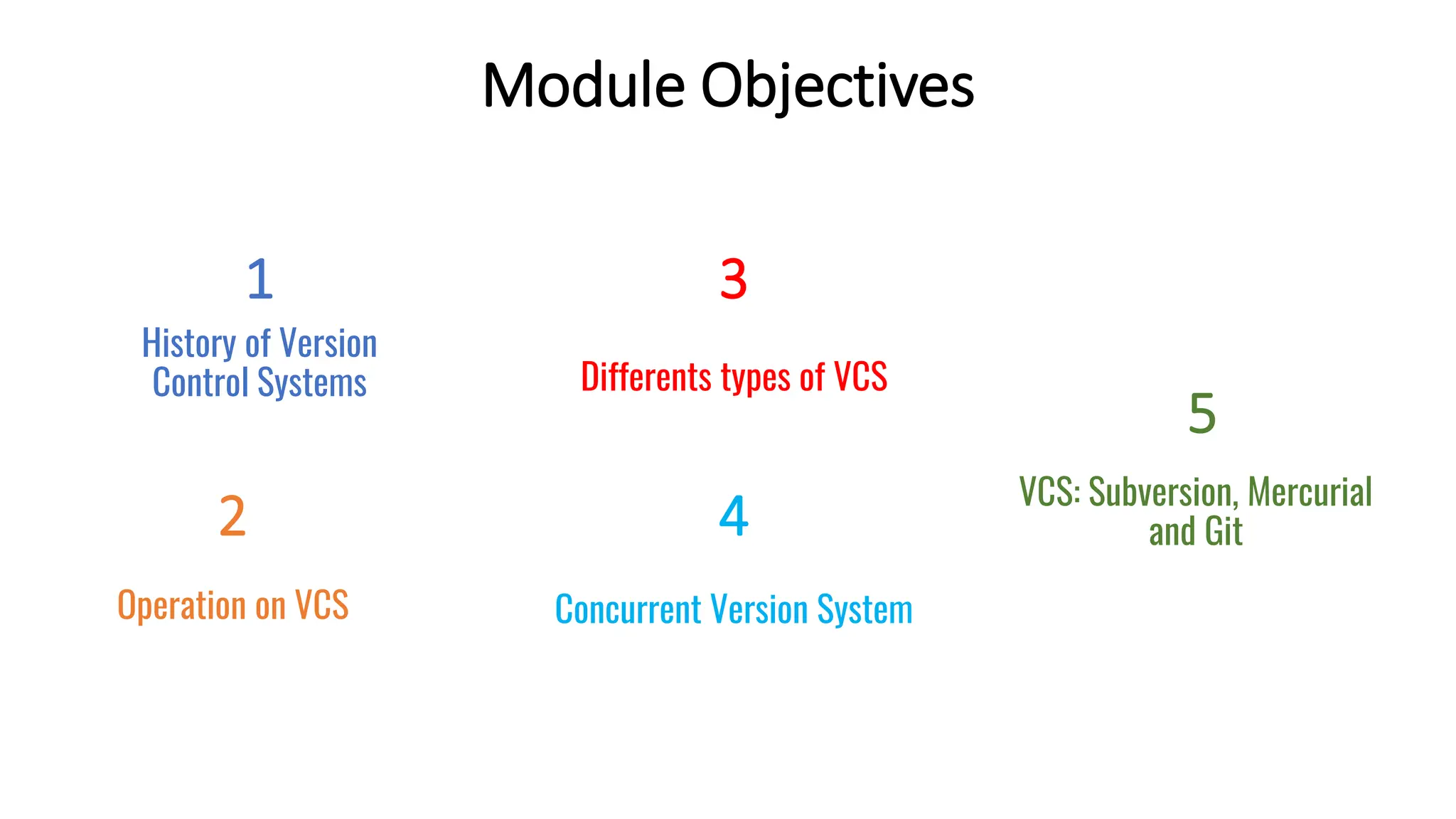
Module Objectives
1
Differents types of VCS
3
VCS: Subversion, Mercurial
and Git
5
Operation on VCS
2
Concurrent Version System
4
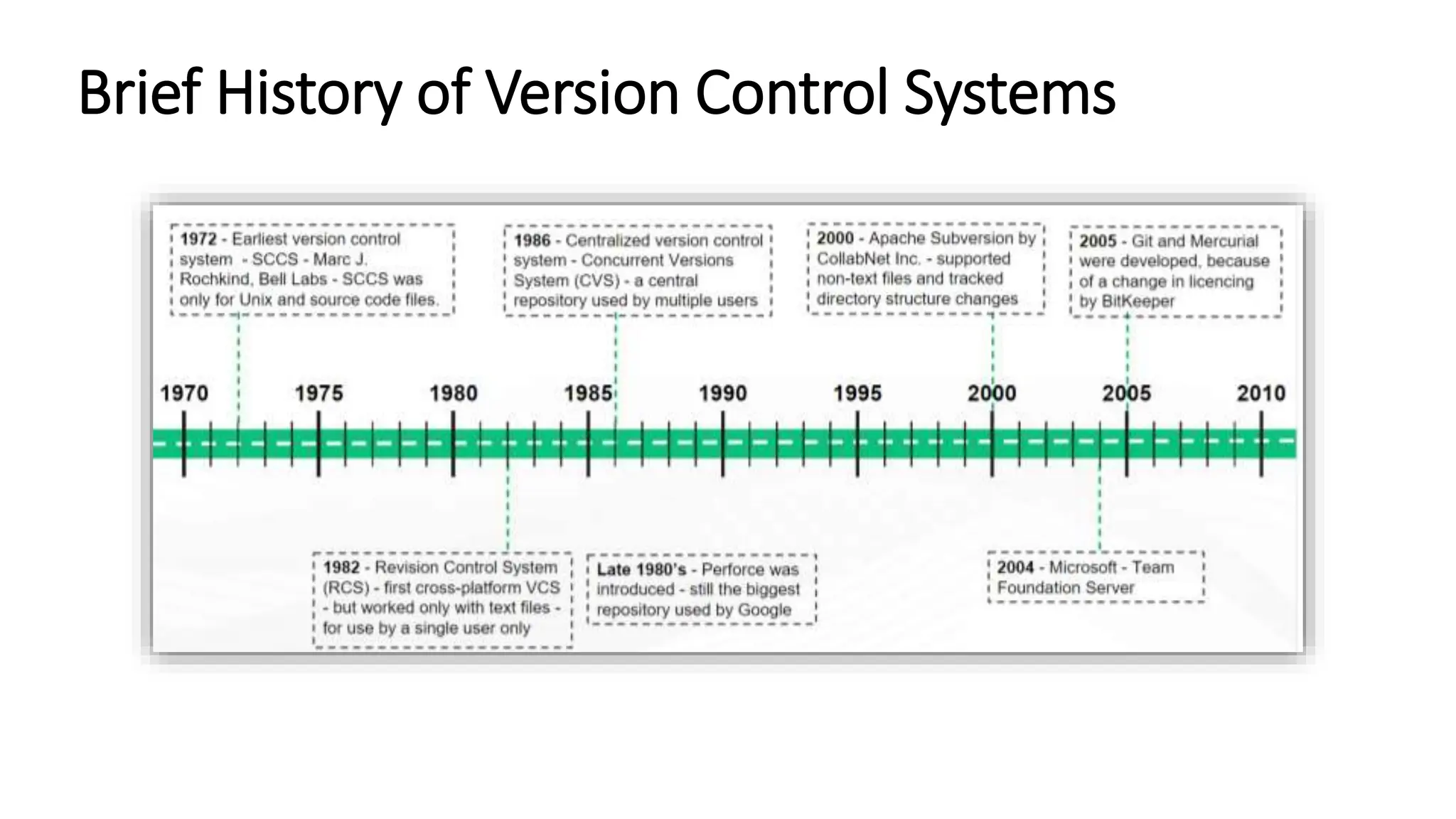
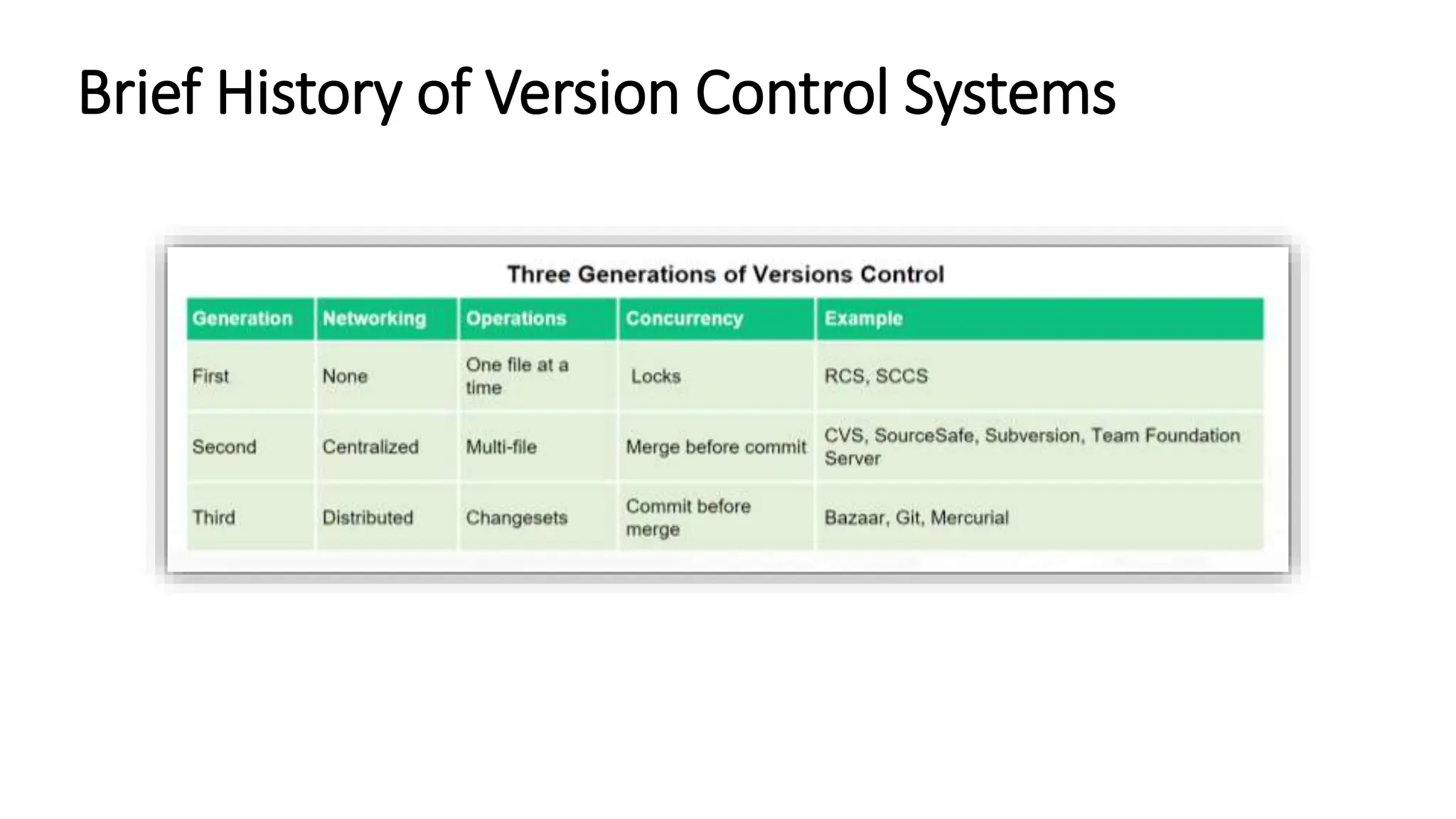
Brief History of Version Control Systems
Basic Operations in a VCS
 There are a set of basic operations performed in a VCS. These are as follows:
1. Create
2. Checkout
3. Commit and Update
4. Add, Edit and Delete
5. Rename and Move
6. Status, Diff and Revert
7. Log and Tag
8. Branch and Merge
9. Resolve and Lock
1. Create
• Create operation here refers to creating a new repository. A repository is a database where
all the edits or updates of the source code are stored.
• Repository keeps track of the tree, i.e., all the files and the layout of the directories in
which they are stored.
• A repository is a three-dimensional entity that exists in a continuum defined by
directories, file and time.
• While creating a new repository, we need to specify the name and the location in
which it has to be created.
2. Checkout
• The checkout operation is used to make a new working copy for a repository that already exists.
• A working copy is a snapshot of the repository used as a place to make changes. Though the
repository is shared by all the developers, the changes are made only to the working
directory first, and then merged with the repository.
• A working copy is a private space to a developer and changes made to this working copy will
not affect the rest of the team.
• The working copy is actually more than just a snapshot of the contents of the repository, but
also contains some metadata so that it can keep careful track of the state of things.
3. Commit and Update
• Commit operation is used to apply the modifications in the working copy to the repository as a
new changeset.
• The commit operation takes the pending changeset and uses it to create a new version of
the tree in the repository.
• The Update operation is used to update the working copy with respect to the repository.
• The Update is sort of like the mirror image of commit. Both operations are used to move
changes between the working copy and the repository.
• Commit goes from the working area to the repository. Update goes in the other direction.
4. Add, Edit and Delete
• Add operation is used to add a file or directory to the working copy that is not added to
version control yet, which has to be added to the repository.
• Edit operation is used to modify a file.
• Edit doesn’t directly involve the VCS, edits are actually made using the text editor or
the development environment and the VCS will notice the change and make the
modified file part of the pending changeset.
• Delete operation is used to delete a file or a directory.
• The delete operation will delete the working copy, but the actual deletion of the file in
the repository is added to the pending changeset.
5. Rename and Move
 Rename operation is used to change the name of a file or a directory.
 The operation is added to the pending changeset, but the item in the working copy
typically gets renamed immediately.
 Rename detection works well in practice, but in case if a file is both renamed and
modified, there is a chance the VCS will do the wrong thing.
 The Move operation is used to move a file or a directory from one location to the other.
 Some of the version control tools treat rename and move as the same operations, while others
keep them separate.
6. Status, Diff and Revert
• Status operation is used to list the modifications that have been made to the working copy.
• In other words, status shows what changes would be applied to the repository if it is
committed.
• Diff shows the details of the modifications that have been made to the working copy (status
shows the list alone, but not the details).
• A revert is used to undo the modifications that have been made to the working copy.
• A complete revert of the working copy will throw all your pending changes and return
the working copy to the way it was just after the checkout.
7. Log and Tag
• The log operation shows the history of changes to the repository.
• Log operation displays information such as who made the change and when and the
log message.
• Version control tools provide a way to mark a specific instant in the history of the repository
with a meaningful name, called the tag.
8. Branch and Merge
• Branch operation is used to create another line of development alongside the current
deployment.
• Branch operation is especially useful when a new version of the software is developed
and still the older version has to be kept separate.
• Merge operation is used to apply changes from one branch to another.
• Typically, merge operation is helpful when a branch is used to enable the development to
diverge, which later has to converge again, at least partially.
• Changes can be made in two branches manually, but merge operation makes the process
simple by automating this as much as possible.
9. Resolve and Lock
• Resolve operation is used to handle conflicts that arise from a merge operation.
• The resolve operation is used to help the user how to figure things out and to
inform the VCS about handling of conflicts.
• The lock operation is used to get exclusive rights during the modification of file.
• Not all version control tools include this feature. In some cases, it is provided,
but is intended to be rarely used.
Examples of Version Control Systems
Concurrent Version System (CVS)
• CVS stands for Concurrent Version System. It is a version control system that has been
developed in the public domain by many people beginning in 1986. Currently, CVS is
maintained by Cyclic Software.
• CVS is an open-source software configuration management utility designed to manage
different versions of the same software project in a specialized repository.
• Using CVS, you can record the history of your source files (normally text files, binary files are
handled with some restrictions). Instead of save every version of every file, CVS stores only
the differences between the versions.
• CVS also helps you if you are working in a group on the same project: CVS merges the work
when each developer has done its work.
Concurrent Version System (CVS)
• Moreover, CVS allows you to isolate changes onto a separate line of development, known
as a branch. When you change files on a branch, the changes do not appear on the main
trunk. Later you can move the changes from one branch to another branch (or the main
trunk) by merging.
• CVS manages different versions of the module so that if a future version encounters
some defects, a past version can be referenced and used.
Repository and Working Copy
• The CVS repository stores a complete copy of all the files and directories which are under
version control. Normally, you never access any of the files in the repository directly. Instead,
you use CVS commands to get your own copy of the files into a working directory, and then
work on that copy.
• CVS can access a repository by a variety of means. It might be on the local computer, or it
might be on a computer across the room or across the world. Using CVS with a remote
repository we talk about client/server operation. Several protocols are supported to connect
to the remote repository, e.g. rsh, password authentication, GSSAPI, kerberos.
• You can define several repositories if you have different development groups that work on
separate projects without sharing any code. All you have to do is to specify the appropriate
repository when you are starting the session.
Subversion (SVN)
• Subversion (SVN) is used for maintaining current and historical versions of projects.
• Subversion is an open source centralized version control system.
• It's licensed under Apache. It's also referred to as a software version and revisioning control
system.
• SVN is used to manage and track changes to code and assets across projects.
• Subversion used to be one of the most popular systems. But SVN’s popularity is waning.
However, there are still millions of lines stored in it. It even continues to be actively
maintained, albeit by a small open source community.
• A SVN repository is a collection of files complete with a full history of changes.
Subversion (SVN)
• Subversion uses a copy-modify-merge model meaning that you can add and edit files and
directories in your working copy like any other files on your system, but you should use
subversion commands for everything else such as svn copy and svn move instead of the
operating system commands.
How Does Subversion Work?
• SVN originally was designed as a command line interface. This means you would open your
Terminal and type text commands.
• For Subversion to work, the SVN setup needs two main elements:
• The server, which has all versions of all source files
• A local copy of the files, which is on your computer
• The files on your computer are called working files. These are the files in which each user
makes edits. Then, users commit their changes to the SVN server.
• Each time a user commits a change, SVN manages and records it by creating a new version.
Like most version control options, users typically work with the most recent version. But if an
older version is needed, you can revert to an earlier version.
How Does Subversion Work?
Subversion Tools
• TortoiseSVN is one of the most popular Subversion tools.
• Helix TeamHub for hosting subversion.
Features of Subversion
• Revision number apply globally to the repository compared to the individual file.
• The repository layout uses the following top-level directories:branches, site, tags, and trunk.
• branches - Contains branches used for continued development of a specific version,
experimental versions, or for developing features to be merged into the trunk or a
branch later.
• site - Contains the web site source code. Also contains it's own trunk directory.
• tags - Contains specific versions of the project. These tags are not to be revised.
• trunk - Contains the current source code.
• More recent versions of SVN have features such as merge tracking, that makes it comparable
to commercial VCS.
Limitations of Subversion
• Due to its centralized design, most operations dealing with state or history will require a direct
connection to the central server.
• The centralized repository server can be a single point of failure.
• Provides limited offline capabilities.
Mercurial
• It is an open source VCS, originally designed for large-scale projects, written in python and
developed as an alternative to BitKeeper.
• It was created with Matt Mackall in 2005, who served as its lead developer until late 2016.
• It is decentralized and aims to be fast, lightweight, portable and easy-to-use.
• It has been adopted by many organizations like: Facebook, W3C and Mozilla.
Features of Mercurial
• Mercurial is truly distributed, giving each developer a local copy of the entire development history.
This way it works independent of network access or a central server. Committing, branching and
merging are fast and cheap.
• Mercurial implementation and data structures are designed to be fast. You can generate diffs
between revisions, or jump back in time within seconds.
• Mercurial was written with platform independence in mind. Therefore most of Mercurial is written
in Python, with a small part in portable C for performance reasons. As a result, binary releases are
available on all major platforms.
Features of Mercurial
• The functionality of Mercurial can be increased with extensions, either by activating the official
ones which are shipped with Mercurial or downloading some from the wiki or by writing your own.
Extensions are written in Python and can change the workings of the basic commands, add new
commands and access all the core functions of Mercurial.
• Mercurial support a consistent command set in which most subversion users feel right at home.
Potentially dangerous actions are available via extensions you need to enable, so the basic interface
is easy to use, easy to learn and hard to break.
• Mercurial is free software licensed under the terms of the GNU General Public License Version 2
Git
• Git is a version control system designed to manage the teamwork done on a project. Git helps the
contributors to track the changes in files or projects and speed up the overall process.
• Git is an Open Source Distributed Version Control System. It is designed for:
• Speed
• Simplicity
• Fully Distributed
• Excellent support for parallel development, support for hundreds of parallel branches.
• Integrity
The making – History of Linux and Git
How Git stores revisions?
CVS Git
Advantages of Git

Slide set 7 (Source Code Management History Overview) - Copy.pptx

  • 1.
  • 2.
    History of Version ControlSystems Module Objectives 1 Differents types of VCS 3 VCS: Subversion, Mercurial and Git 5 Operation on VCS 2 Concurrent Version System 4
  • 3.
    Brief History ofVersion Control Systems
  • 4.
    Brief History ofVersion Control Systems
  • 5.
    Basic Operations ina VCS  There are a set of basic operations performed in a VCS. These are as follows: 1. Create 2. Checkout 3. Commit and Update 4. Add, Edit and Delete 5. Rename and Move 6. Status, Diff and Revert 7. Log and Tag 8. Branch and Merge 9. Resolve and Lock
  • 6.
    1. Create • Createoperation here refers to creating a new repository. A repository is a database where all the edits or updates of the source code are stored. • Repository keeps track of the tree, i.e., all the files and the layout of the directories in which they are stored. • A repository is a three-dimensional entity that exists in a continuum defined by directories, file and time. • While creating a new repository, we need to specify the name and the location in which it has to be created.
  • 7.
    2. Checkout • Thecheckout operation is used to make a new working copy for a repository that already exists. • A working copy is a snapshot of the repository used as a place to make changes. Though the repository is shared by all the developers, the changes are made only to the working directory first, and then merged with the repository. • A working copy is a private space to a developer and changes made to this working copy will not affect the rest of the team. • The working copy is actually more than just a snapshot of the contents of the repository, but also contains some metadata so that it can keep careful track of the state of things.
  • 8.
    3. Commit andUpdate • Commit operation is used to apply the modifications in the working copy to the repository as a new changeset. • The commit operation takes the pending changeset and uses it to create a new version of the tree in the repository. • The Update operation is used to update the working copy with respect to the repository. • The Update is sort of like the mirror image of commit. Both operations are used to move changes between the working copy and the repository. • Commit goes from the working area to the repository. Update goes in the other direction.
  • 9.
    4. Add, Editand Delete • Add operation is used to add a file or directory to the working copy that is not added to version control yet, which has to be added to the repository. • Edit operation is used to modify a file. • Edit doesn’t directly involve the VCS, edits are actually made using the text editor or the development environment and the VCS will notice the change and make the modified file part of the pending changeset. • Delete operation is used to delete a file or a directory. • The delete operation will delete the working copy, but the actual deletion of the file in the repository is added to the pending changeset.
  • 10.
    5. Rename andMove  Rename operation is used to change the name of a file or a directory.  The operation is added to the pending changeset, but the item in the working copy typically gets renamed immediately.  Rename detection works well in practice, but in case if a file is both renamed and modified, there is a chance the VCS will do the wrong thing.  The Move operation is used to move a file or a directory from one location to the other.  Some of the version control tools treat rename and move as the same operations, while others keep them separate.
  • 11.
    6. Status, Diffand Revert • Status operation is used to list the modifications that have been made to the working copy. • In other words, status shows what changes would be applied to the repository if it is committed. • Diff shows the details of the modifications that have been made to the working copy (status shows the list alone, but not the details). • A revert is used to undo the modifications that have been made to the working copy. • A complete revert of the working copy will throw all your pending changes and return the working copy to the way it was just after the checkout.
  • 12.
    7. Log andTag • The log operation shows the history of changes to the repository. • Log operation displays information such as who made the change and when and the log message. • Version control tools provide a way to mark a specific instant in the history of the repository with a meaningful name, called the tag.
  • 13.
    8. Branch andMerge • Branch operation is used to create another line of development alongside the current deployment. • Branch operation is especially useful when a new version of the software is developed and still the older version has to be kept separate. • Merge operation is used to apply changes from one branch to another. • Typically, merge operation is helpful when a branch is used to enable the development to diverge, which later has to converge again, at least partially. • Changes can be made in two branches manually, but merge operation makes the process simple by automating this as much as possible.
  • 14.
    9. Resolve andLock • Resolve operation is used to handle conflicts that arise from a merge operation. • The resolve operation is used to help the user how to figure things out and to inform the VCS about handling of conflicts. • The lock operation is used to get exclusive rights during the modification of file. • Not all version control tools include this feature. In some cases, it is provided, but is intended to be rarely used.
  • 15.
    Examples of VersionControl Systems
  • 16.
    Concurrent Version System(CVS) • CVS stands for Concurrent Version System. It is a version control system that has been developed in the public domain by many people beginning in 1986. Currently, CVS is maintained by Cyclic Software. • CVS is an open-source software configuration management utility designed to manage different versions of the same software project in a specialized repository. • Using CVS, you can record the history of your source files (normally text files, binary files are handled with some restrictions). Instead of save every version of every file, CVS stores only the differences between the versions. • CVS also helps you if you are working in a group on the same project: CVS merges the work when each developer has done its work.
  • 17.
    Concurrent Version System(CVS) • Moreover, CVS allows you to isolate changes onto a separate line of development, known as a branch. When you change files on a branch, the changes do not appear on the main trunk. Later you can move the changes from one branch to another branch (or the main trunk) by merging. • CVS manages different versions of the module so that if a future version encounters some defects, a past version can be referenced and used.
  • 18.
    Repository and WorkingCopy • The CVS repository stores a complete copy of all the files and directories which are under version control. Normally, you never access any of the files in the repository directly. Instead, you use CVS commands to get your own copy of the files into a working directory, and then work on that copy. • CVS can access a repository by a variety of means. It might be on the local computer, or it might be on a computer across the room or across the world. Using CVS with a remote repository we talk about client/server operation. Several protocols are supported to connect to the remote repository, e.g. rsh, password authentication, GSSAPI, kerberos. • You can define several repositories if you have different development groups that work on separate projects without sharing any code. All you have to do is to specify the appropriate repository when you are starting the session.
  • 19.
    Subversion (SVN) • Subversion(SVN) is used for maintaining current and historical versions of projects. • Subversion is an open source centralized version control system. • It's licensed under Apache. It's also referred to as a software version and revisioning control system. • SVN is used to manage and track changes to code and assets across projects. • Subversion used to be one of the most popular systems. But SVN’s popularity is waning. However, there are still millions of lines stored in it. It even continues to be actively maintained, albeit by a small open source community. • A SVN repository is a collection of files complete with a full history of changes.
  • 20.
    Subversion (SVN) • Subversionuses a copy-modify-merge model meaning that you can add and edit files and directories in your working copy like any other files on your system, but you should use subversion commands for everything else such as svn copy and svn move instead of the operating system commands.
  • 21.
    How Does SubversionWork? • SVN originally was designed as a command line interface. This means you would open your Terminal and type text commands. • For Subversion to work, the SVN setup needs two main elements: • The server, which has all versions of all source files • A local copy of the files, which is on your computer • The files on your computer are called working files. These are the files in which each user makes edits. Then, users commit their changes to the SVN server. • Each time a user commits a change, SVN manages and records it by creating a new version. Like most version control options, users typically work with the most recent version. But if an older version is needed, you can revert to an earlier version.
  • 22.
  • 23.
    Subversion Tools • TortoiseSVNis one of the most popular Subversion tools. • Helix TeamHub for hosting subversion.
  • 24.
    Features of Subversion •Revision number apply globally to the repository compared to the individual file. • The repository layout uses the following top-level directories:branches, site, tags, and trunk. • branches - Contains branches used for continued development of a specific version, experimental versions, or for developing features to be merged into the trunk or a branch later. • site - Contains the web site source code. Also contains it's own trunk directory. • tags - Contains specific versions of the project. These tags are not to be revised. • trunk - Contains the current source code. • More recent versions of SVN have features such as merge tracking, that makes it comparable to commercial VCS.
  • 25.
    Limitations of Subversion •Due to its centralized design, most operations dealing with state or history will require a direct connection to the central server. • The centralized repository server can be a single point of failure. • Provides limited offline capabilities.
  • 26.
    Mercurial • It isan open source VCS, originally designed for large-scale projects, written in python and developed as an alternative to BitKeeper. • It was created with Matt Mackall in 2005, who served as its lead developer until late 2016. • It is decentralized and aims to be fast, lightweight, portable and easy-to-use. • It has been adopted by many organizations like: Facebook, W3C and Mozilla.
  • 27.
    Features of Mercurial •Mercurial is truly distributed, giving each developer a local copy of the entire development history. This way it works independent of network access or a central server. Committing, branching and merging are fast and cheap. • Mercurial implementation and data structures are designed to be fast. You can generate diffs between revisions, or jump back in time within seconds. • Mercurial was written with platform independence in mind. Therefore most of Mercurial is written in Python, with a small part in portable C for performance reasons. As a result, binary releases are available on all major platforms.
  • 28.
    Features of Mercurial •The functionality of Mercurial can be increased with extensions, either by activating the official ones which are shipped with Mercurial or downloading some from the wiki or by writing your own. Extensions are written in Python and can change the workings of the basic commands, add new commands and access all the core functions of Mercurial. • Mercurial support a consistent command set in which most subversion users feel right at home. Potentially dangerous actions are available via extensions you need to enable, so the basic interface is easy to use, easy to learn and hard to break. • Mercurial is free software licensed under the terms of the GNU General Public License Version 2
  • 29.
    Git • Git isa version control system designed to manage the teamwork done on a project. Git helps the contributors to track the changes in files or projects and speed up the overall process. • Git is an Open Source Distributed Version Control System. It is designed for: • Speed • Simplicity • Fully Distributed • Excellent support for parallel development, support for hundreds of parallel branches. • Integrity
  • 30.
    The making –History of Linux and Git
  • 31.
    How Git storesrevisions? CVS Git
  • 32.