State Management with
NGXS in Angular
Presented By: Anuj Tomar & Devansh Kapoor
Lack of etiquette and manners is a huge turn off.
KnolX Etiquettes
 Punctuality
Join the session 5 minutes prior to the session start time. We start on
time and conclude on time!
 Feedback
Make sure to submit a constructive feedback for all sessions as it is very
helpful for the presenter.
 Silent Mode
Keep your mobile devices in silent mode, feel free to move out of session
in case you need to attend an urgent call.
 Avoid Disturbance
Avoid unwanted chit chat during the session.
1. Introduction
2. Why NGXS?
3. Core Concepts of NGXS
4. Demo
NGXS is a state management pattern + library for Angular. It
acts as a single source of truth for your application's state,
providing simple rules for predictable state mutations.
There are 4 major concepts to NGXS:
 Store: Global state container, action dispatcher and selector
 Actions: Class describing the action to take and its associated metadata
 State: Class definition of the state
 Selects: State slice selectors
Why use NGXS?
 Simple: NGXS tries to make things as simple and accessible as possible. There can be a lot of boilerplate code in
state management, thus a main goal of NGXS is to reduce boilerplate allowing you to do more things with less. It is
also not necessary to be super familiar with RxJs.
 Dependency Injection (DI): A core feature of Angular is dependency injection. It can be a very useful tool and
NGXS makes sure that users can use DI in their state management code. This means Angular services can be injected
into state classes making it easier to take advantage of more Angular features.
 Action Life Cycles: Actions in NGXS are asynchronous. This allows actions to have a life cycle, meaning we can now
listen for when a single action or a collection of actions is complete making complex workflows predictable. It is very
common to want to do something after an action is completed and NGXS makes it simple to do.
Building an application:
Setting up the project:
 Install NGXS:
npm install @ngxs/store --save
 Alternatively, you can run ng add @ngxs/store
 npm install @ngxs/devtools-plugin — save-dev
 ng add @ngxs/schematics
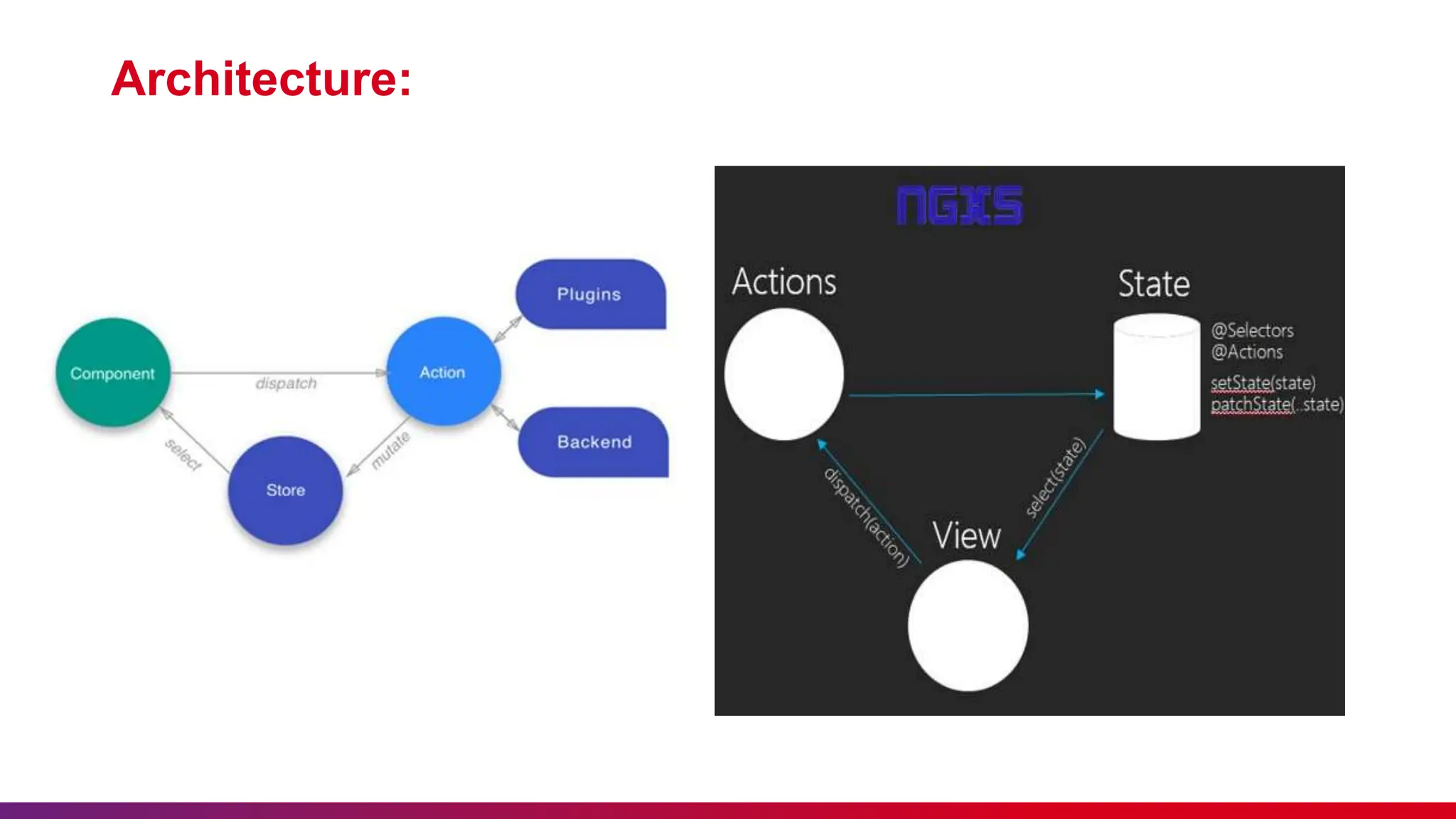
Architecture:
Actions
Actions can either be thought of
as a command which should
trigger something to happen, or
as the resulting event of
something that has already
happened.
State
States are classes that define
a state container.
Select
Selects are functions that slice
a specific portion of state from
the global state container.
In NGXS, there are two
methods to select state, we can
either call the select method on
the Store service or use the
@Select decorator.
Store
The store is a global state manager that dispatches actions your state containers listen to and provides a way to select
data slices out from the global state.
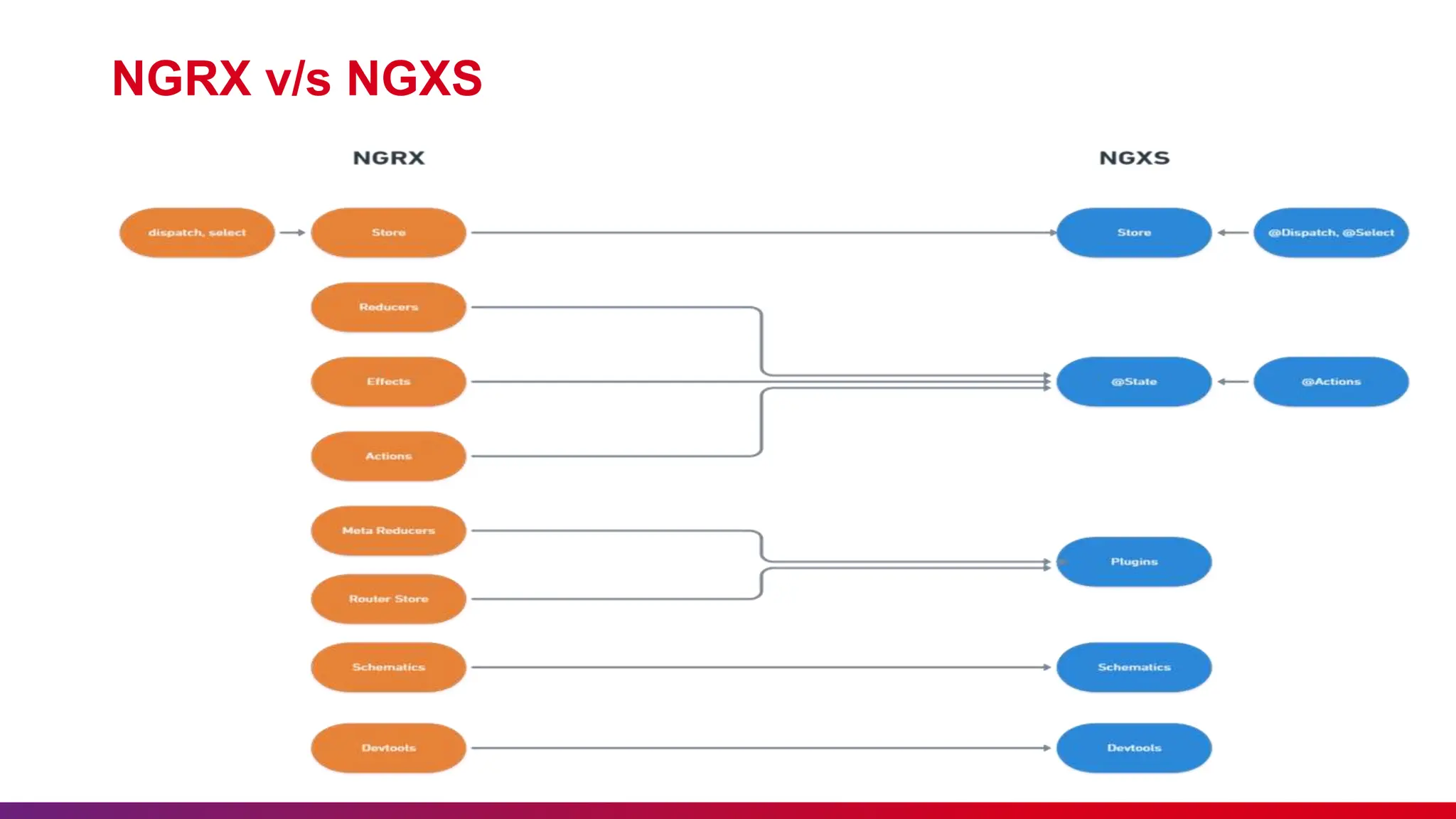
NGRX v/s NGXS
State Management with NGXS in Angular.pptx

State Management with NGXS in Angular.pptx

  • 1.
    State Management with NGXSin Angular Presented By: Anuj Tomar & Devansh Kapoor
  • 2.
    Lack of etiquetteand manners is a huge turn off. KnolX Etiquettes  Punctuality Join the session 5 minutes prior to the session start time. We start on time and conclude on time!  Feedback Make sure to submit a constructive feedback for all sessions as it is very helpful for the presenter.  Silent Mode Keep your mobile devices in silent mode, feel free to move out of session in case you need to attend an urgent call.  Avoid Disturbance Avoid unwanted chit chat during the session.
  • 3.
    1. Introduction 2. WhyNGXS? 3. Core Concepts of NGXS 4. Demo
  • 4.
    NGXS is astate management pattern + library for Angular. It acts as a single source of truth for your application's state, providing simple rules for predictable state mutations.
  • 5.
    There are 4major concepts to NGXS:  Store: Global state container, action dispatcher and selector  Actions: Class describing the action to take and its associated metadata  State: Class definition of the state  Selects: State slice selectors
  • 6.
    Why use NGXS? Simple: NGXS tries to make things as simple and accessible as possible. There can be a lot of boilerplate code in state management, thus a main goal of NGXS is to reduce boilerplate allowing you to do more things with less. It is also not necessary to be super familiar with RxJs.  Dependency Injection (DI): A core feature of Angular is dependency injection. It can be a very useful tool and NGXS makes sure that users can use DI in their state management code. This means Angular services can be injected into state classes making it easier to take advantage of more Angular features.  Action Life Cycles: Actions in NGXS are asynchronous. This allows actions to have a life cycle, meaning we can now listen for when a single action or a collection of actions is complete making complex workflows predictable. It is very common to want to do something after an action is completed and NGXS makes it simple to do.
  • 7.
    Building an application: Settingup the project:  Install NGXS: npm install @ngxs/store --save  Alternatively, you can run ng add @ngxs/store  npm install @ngxs/devtools-plugin — save-dev  ng add @ngxs/schematics
  • 8.
  • 9.
    Actions Actions can eitherbe thought of as a command which should trigger something to happen, or as the resulting event of something that has already happened. State States are classes that define a state container. Select Selects are functions that slice a specific portion of state from the global state container. In NGXS, there are two methods to select state, we can either call the select method on the Store service or use the @Select decorator. Store The store is a global state manager that dispatches actions your state containers listen to and provides a way to select data slices out from the global state.
  • 10.