Flowcharts
Mukesh N.Tekwani
IsmailYusuf College of
Arts, Science and Commerce,
Jogeshwari (East),
Mumbai
tekwani@email.com
Presented at the One DayWorkshop Organized by K.P.B. Hinduja College
of Commerce, University of Mumbai on the Semester-wise splitT.Y.B.Com
and S.Y.B.Com Computer papers on
July 20, 2013
What is a Flowchart?
 What is a flowchart?
◦ Graphical or pictorial representation of an
algorithm or problem solving process
 Flow?
◦ Indicates the flow of logic, or sequence of
steps.
◦ There is a ‘before’ step and an ‘after’ step
◦ Flow control is needed because programs are
not linear or top-to-down
Mukesh N.Tekwani20 July 2013 2
Why flowchart is useful?
 A picture is worth a thousand words
 Help in understanding complicated logic
 Language-independent and so easy to write
program in various languages
 Good tool for documentation
◦ Verbose syntax of certain languages is difficult to
understand; flowchart eliminates the need to know
syntax to understand the logic
Mukesh N.Tekwani20 July 2013 3
What can a Flowchart Represent?
 Sequential statements – assignment,
calculations, input & output
 Branching or Selection Statements – if-then,
if-then-else: using Decision Symbol
 Looping Statements – for, while loops
 Switch-Case statement (successive decision
symbols)
Mukesh N.Tekwani20 July 2013 4
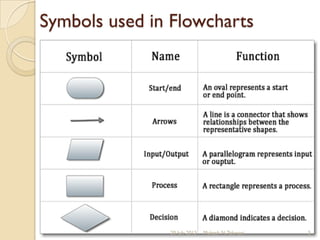
Symbols used in Flowcharts
Mukesh N.Tekwani20 July 2013 5
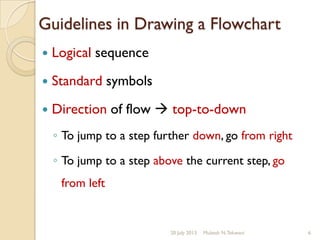
Guidelines in Drawing a Flowchart
 Logical sequence
 Standard symbols
 Direction of flow  top-to-down
◦ To jump to a step further down, go from right
◦ To jump to a step above the current step, go
from left
Mukesh N.Tekwani20 July 2013 6
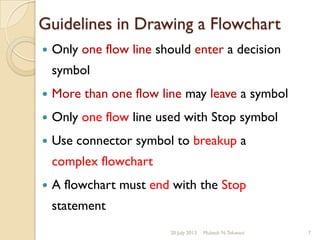
Guidelines in Drawing a Flowchart
 Only one flow line should enter a decision
symbol
 More than one flow line may leave a symbol
 Only one flow line used with Stop symbol
 Use connector symbol to breakup a
complex flowchart
 A flowchart must end with the Stop
statement
Mukesh N.Tekwani20 July 2013 7
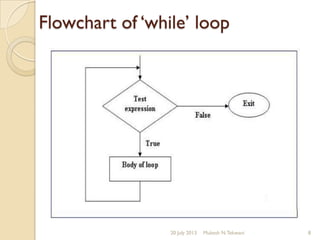
Flowchart of ‘while’ loop
Mukesh N.Tekwani20 July 2013 8
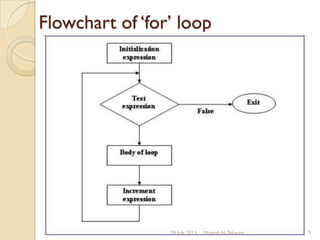
Flowchart of ‘for’ loop
Mukesh N.Tekwani20 July 2013 9
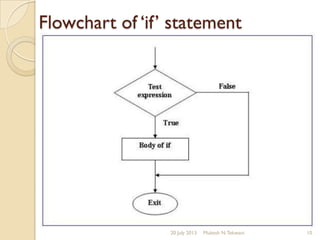
Flowchart of ‘if’ statement
Mukesh N.Tekwani20 July 2013 10
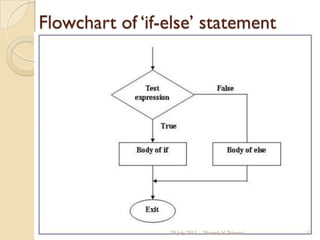
Flowchart of ‘if-else’ statement
Mukesh N.Tekwani20 July 2013 11
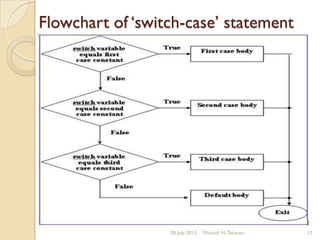
Flowchart of ‘switch-case’ statement
Mukesh N.Tekwani20 July 2013 12
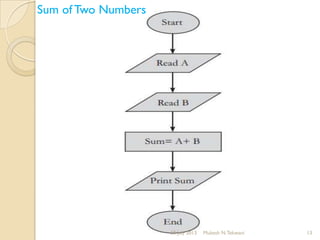
Sum of Two Numbers
Mukesh N.Tekwani20 July 2013 13
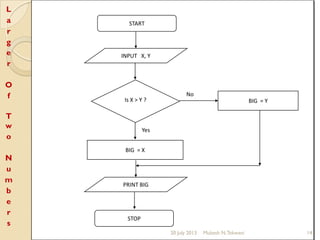
START
INPUT X, Y
Is X > Y ?
BIG = X
Yes
PRINT BIG
BIG = Y
STOP
No
L
a
r
g
e
r
O
f
T
w
o
N
u
m
b
e
r
s
Mukesh N.Tekwani20 July 2013 14
F
a
c
t
o
r
i
a
l
o
f
a
N
u
m
b
e
r
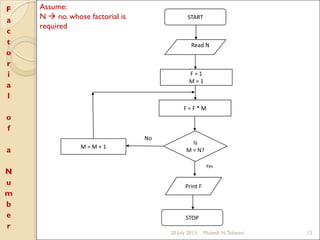
Yes
START
Read N
F = 1
M = 1
Is
M = N?
F = F * M
Print F
No
M = M + 1
STOP
Assume:
N  no. whose factorial is
required
Mukesh N.Tekwani20 July 2013 15
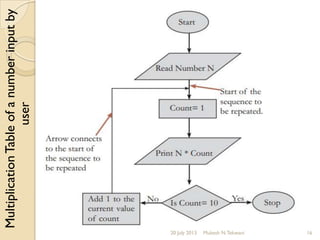
MultiplicationTableofanumberinputby
user
Mukesh N.Tekwani20 July 2013 16
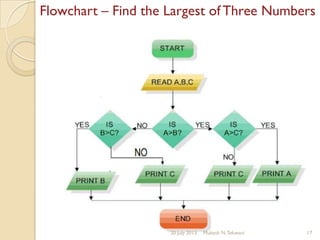
Flowchart – Find the Largest of Three Numbers
Mukesh N.Tekwani20 July 2013 17
Limitations of Flowcharts
 Complex – for lengthy algorithms, flowchart
can be very large  difficult to follow
 Time-consuming – drawing complex
flowcharts can be very time-consuming
 Modification – difficult to modify; redraw
entire flowchart
 Update – program update is easier; not so
for flowcharts  redraw flowchart !
Mukesh N.Tekwani20 July 2013 18
Exercise
 Design an algorithm and the corresponding
flowchart for finding the sum of the numbers
2, 4, 6, 8, …, n
 Draw a flowchart to read 100 numbers and
then display the sum
 Draw a flowchart to display all odd numbers
between 0 and 1000
 Draw a flowchart to find the sum of first 10
natural numbers and then display the sum
Mukesh N.Tekwani20 July 2013 19
Suggestions
 Algorithm  Flowchart  Program
 Use programs in C language to develop
questions on Algorithms and Flowcharts
Mukesh N.Tekwani20 July 2013 20
THANK YOU
STOP
Mukesh N.Tekwani20 July 2013 21

Flowcharts

  • 1.
    Flowcharts Mukesh N.Tekwani IsmailYusuf Collegeof Arts, Science and Commerce, Jogeshwari (East), Mumbai tekwani@email.com Presented at the One DayWorkshop Organized by K.P.B. Hinduja College of Commerce, University of Mumbai on the Semester-wise splitT.Y.B.Com and S.Y.B.Com Computer papers on July 20, 2013
  • 2.
    What is aFlowchart?  What is a flowchart? ◦ Graphical or pictorial representation of an algorithm or problem solving process  Flow? ◦ Indicates the flow of logic, or sequence of steps. ◦ There is a ‘before’ step and an ‘after’ step ◦ Flow control is needed because programs are not linear or top-to-down Mukesh N.Tekwani20 July 2013 2
  • 3.
    Why flowchart isuseful?  A picture is worth a thousand words  Help in understanding complicated logic  Language-independent and so easy to write program in various languages  Good tool for documentation ◦ Verbose syntax of certain languages is difficult to understand; flowchart eliminates the need to know syntax to understand the logic Mukesh N.Tekwani20 July 2013 3
  • 4.
    What can aFlowchart Represent?  Sequential statements – assignment, calculations, input & output  Branching or Selection Statements – if-then, if-then-else: using Decision Symbol  Looping Statements – for, while loops  Switch-Case statement (successive decision symbols) Mukesh N.Tekwani20 July 2013 4
  • 5.
    Symbols used inFlowcharts Mukesh N.Tekwani20 July 2013 5
  • 6.
    Guidelines in Drawinga Flowchart  Logical sequence  Standard symbols  Direction of flow  top-to-down ◦ To jump to a step further down, go from right ◦ To jump to a step above the current step, go from left Mukesh N.Tekwani20 July 2013 6
  • 7.
    Guidelines in Drawinga Flowchart  Only one flow line should enter a decision symbol  More than one flow line may leave a symbol  Only one flow line used with Stop symbol  Use connector symbol to breakup a complex flowchart  A flowchart must end with the Stop statement Mukesh N.Tekwani20 July 2013 7
  • 8.
    Flowchart of ‘while’loop Mukesh N.Tekwani20 July 2013 8
  • 9.
    Flowchart of ‘for’loop Mukesh N.Tekwani20 July 2013 9
  • 10.
    Flowchart of ‘if’statement Mukesh N.Tekwani20 July 2013 10
  • 11.
    Flowchart of ‘if-else’statement Mukesh N.Tekwani20 July 2013 11
  • 12.
    Flowchart of ‘switch-case’statement Mukesh N.Tekwani20 July 2013 12
  • 13.
    Sum of TwoNumbers Mukesh N.Tekwani20 July 2013 13
  • 14.
    START INPUT X, Y IsX > Y ? BIG = X Yes PRINT BIG BIG = Y STOP No L a r g e r O f T w o N u m b e r s Mukesh N.Tekwani20 July 2013 14
  • 15.
    F a c t o r i a l o f a N u m b e r Yes START Read N F =1 M = 1 Is M = N? F = F * M Print F No M = M + 1 STOP Assume: N  no. whose factorial is required Mukesh N.Tekwani20 July 2013 15
  • 16.
  • 17.
    Flowchart – Findthe Largest of Three Numbers Mukesh N.Tekwani20 July 2013 17
  • 18.
    Limitations of Flowcharts Complex – for lengthy algorithms, flowchart can be very large  difficult to follow  Time-consuming – drawing complex flowcharts can be very time-consuming  Modification – difficult to modify; redraw entire flowchart  Update – program update is easier; not so for flowcharts  redraw flowchart ! Mukesh N.Tekwani20 July 2013 18
  • 19.
    Exercise  Design analgorithm and the corresponding flowchart for finding the sum of the numbers 2, 4, 6, 8, …, n  Draw a flowchart to read 100 numbers and then display the sum  Draw a flowchart to display all odd numbers between 0 and 1000  Draw a flowchart to find the sum of first 10 natural numbers and then display the sum Mukesh N.Tekwani20 July 2013 19
  • 20.
    Suggestions  Algorithm Flowchart  Program  Use programs in C language to develop questions on Algorithms and Flowcharts Mukesh N.Tekwani20 July 2013 20
  • 21.