Lesson 2
FLOWCHARTING
    AND
PSEUDOCODING
Flow Chart
• A graphic representation of the
  successive steps in a procedure
  that system, which usually uses
  symbols that are interconnected
  with lines to show sequence or
  process

 Pseudocode
• A readable description of a
  computer program in textual
  form. It is usually used as a
                                    Let x = 1st num


  detailed step in the process of
  developing a program.
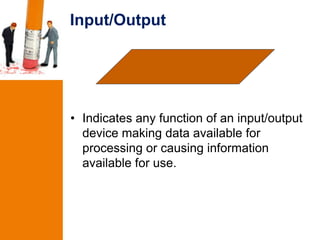
Input/Output


• Indicates any function of an input/output
  device making data available for
  processing or causing information
  available for use.
Decision


• Appoints the program where a
  comparison is to be made and alternative
  processing is to occur based upon the
  results of the comparison.
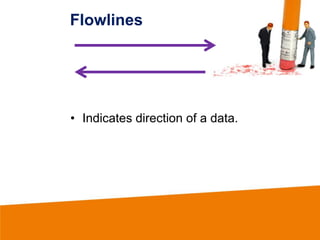
Flowlines


• Indicates direction of a data.
Preparation


• Used in declaring and initializing
  identifiers or variables that will be used in
  the programs.
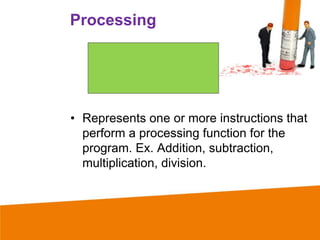
Processing


• Represents one or more instructions that
  perform a processing function for the
  program. Ex. Addition, subtraction,
  multiplication, division.
On page connector


• Indicates an entry form or an exit to
  another part of the program flowchart. It
  is also used to indicate the termination of
  a comparison operation.
Terminal


• This symbol documents the beginning or
  end of a program.
Off page connector


• This symbol indicates continuation to or
  from another page.
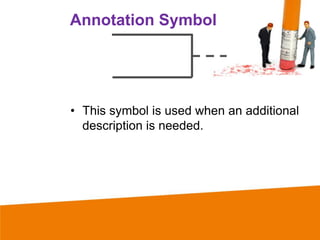
Annotation Symbol


• This symbol is used when an additional
  description is needed.
Pseudocode Language
 •   Accept – allow data
 •   Close – terminating a program
 •   Compute – mathematical computation
 •   Declare – defining various identifiers
 •   Display – displaying contents
 •   Entry – marking the beginning
 •   Exit – marking the end
 •   If – comparing contents
 •   Move – to copy or moved data
 •   Perform – perform procedure
 •   Start – marking the beginning
 •   Stop – terminating the program execution
 •   Write – for copying the content
Pseudocode Example
 Start
         FN = First Name
         LN = Last Name
         Num_St = number and street
         City = City
         Tel = Telephone number
         Input FN, LN
         Input Num_St, City
         Input Tel
         Print FN, LN, Num_St, City, Tel
 End
Flowcharting and pseudocoding

Flowcharting and pseudocoding

  • 1.
    Lesson 2 FLOWCHARTING AND PSEUDOCODING
  • 2.
    Flow Chart • Agraphic representation of the successive steps in a procedure that system, which usually uses symbols that are interconnected with lines to show sequence or process Pseudocode • A readable description of a computer program in textual form. It is usually used as a Let x = 1st num detailed step in the process of developing a program.
  • 3.
    Input/Output • Indicates anyfunction of an input/output device making data available for processing or causing information available for use.
  • 4.
    Decision • Appoints theprogram where a comparison is to be made and alternative processing is to occur based upon the results of the comparison.
  • 5.
  • 6.
    Preparation • Used indeclaring and initializing identifiers or variables that will be used in the programs.
  • 7.
    Processing • Represents oneor more instructions that perform a processing function for the program. Ex. Addition, subtraction, multiplication, division.
  • 8.
    On page connector •Indicates an entry form or an exit to another part of the program flowchart. It is also used to indicate the termination of a comparison operation.
  • 9.
    Terminal • This symboldocuments the beginning or end of a program.
  • 10.
    Off page connector •This symbol indicates continuation to or from another page.
  • 11.
    Annotation Symbol • Thissymbol is used when an additional description is needed.
  • 12.
    Pseudocode Language • Accept – allow data • Close – terminating a program • Compute – mathematical computation • Declare – defining various identifiers • Display – displaying contents • Entry – marking the beginning • Exit – marking the end • If – comparing contents • Move – to copy or moved data • Perform – perform procedure • Start – marking the beginning • Stop – terminating the program execution • Write – for copying the content
  • 13.
    Pseudocode Example Start FN = First Name LN = Last Name Num_St = number and street City = City Tel = Telephone number Input FN, LN Input Num_St, City Input Tel Print FN, LN, Num_St, City, Tel End