Introduction to 
Flowcharting
The Flowchart 
• (Dictionary) A schematic representation of a sequence of 
operations, as in a manufacturing process or computer 
program. 
• (Technical) A graphical representation of the sequence of 
operations in an information system or program. 
Information system flowcharts show how data flows from 
source documents through the computer to final 
distribution to users. Program flowcharts show the 
sequence of instructions in a single program or subroutine. 
Different symbols are used to draw each type of flowchart.
The Flowchart 
A Flowchart 
– shows logic of an algorithm 
– emphasizes individual steps and their 
interconnections 
– e.g. control flow from one action to the next
Flowchart Symbols 
Basic
Basic Flowchart 
Symbols 
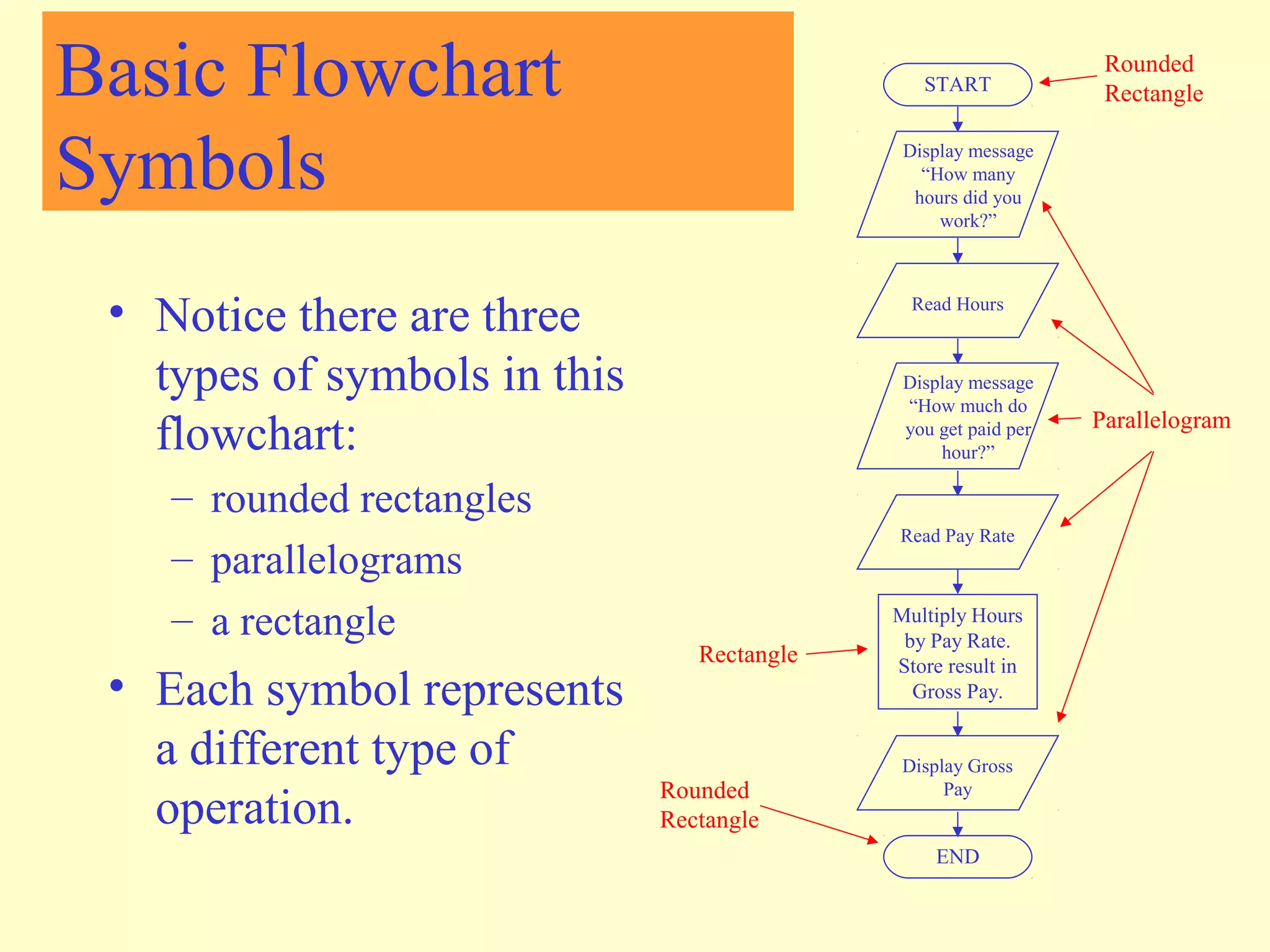
• Notice there are three 
types of symbols in this 
flowchart: 
– rounded rectangles 
– parallelograms 
– a rectangle 
• Each symbol represents 
a different type of 
operation. 
START 
Display message 
“How many 
hours did you 
work?” 
Read Hours 
Display message 
“How much do 
you get paid per 
hour?” 
Read Pay Rate 
Multiply Hours 
by Pay Rate. 
Store result in 
Gross Pay. 
Display Gross 
Pay 
END 
Rounded 
Rectangle 
Parallelogram 
Rectangle 
Rounded 
Rectangle
Basic Flowchart 
Symbols 
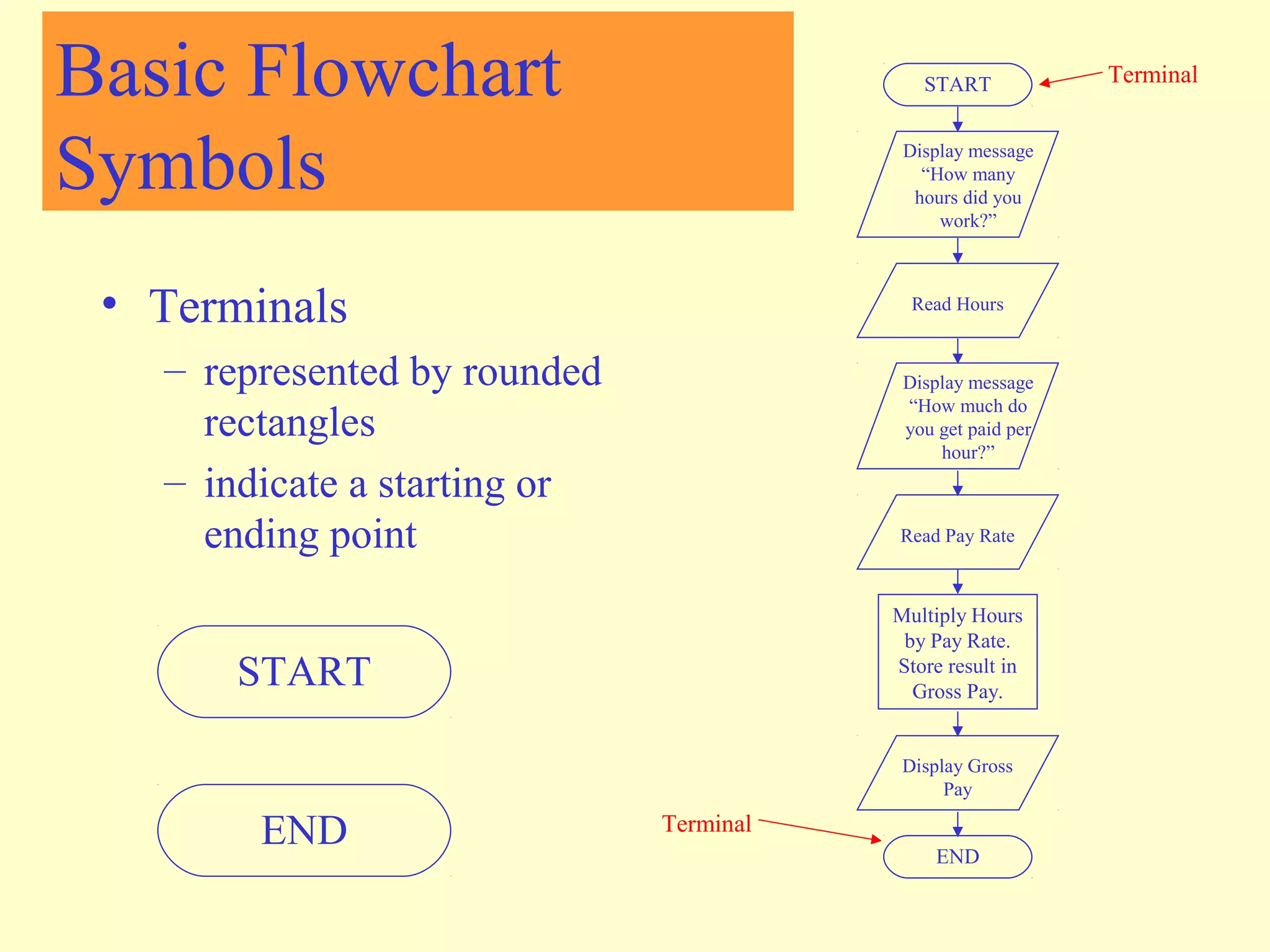
• Terminals 
– represented by rounded 
rectangles 
– indicate a starting or 
ending point 
START 
Display message 
“How many 
hours did you 
work?” 
Read Hours 
Display message 
“How much do 
you get paid per 
hour?” 
Read Pay Rate 
Multiply Hours 
by Pay Rate. 
Store result in 
Gross Pay. 
Display Gross 
Pay 
END 
Terminal 
START 
END Terminal
Basic Flowchart 
Symbols 
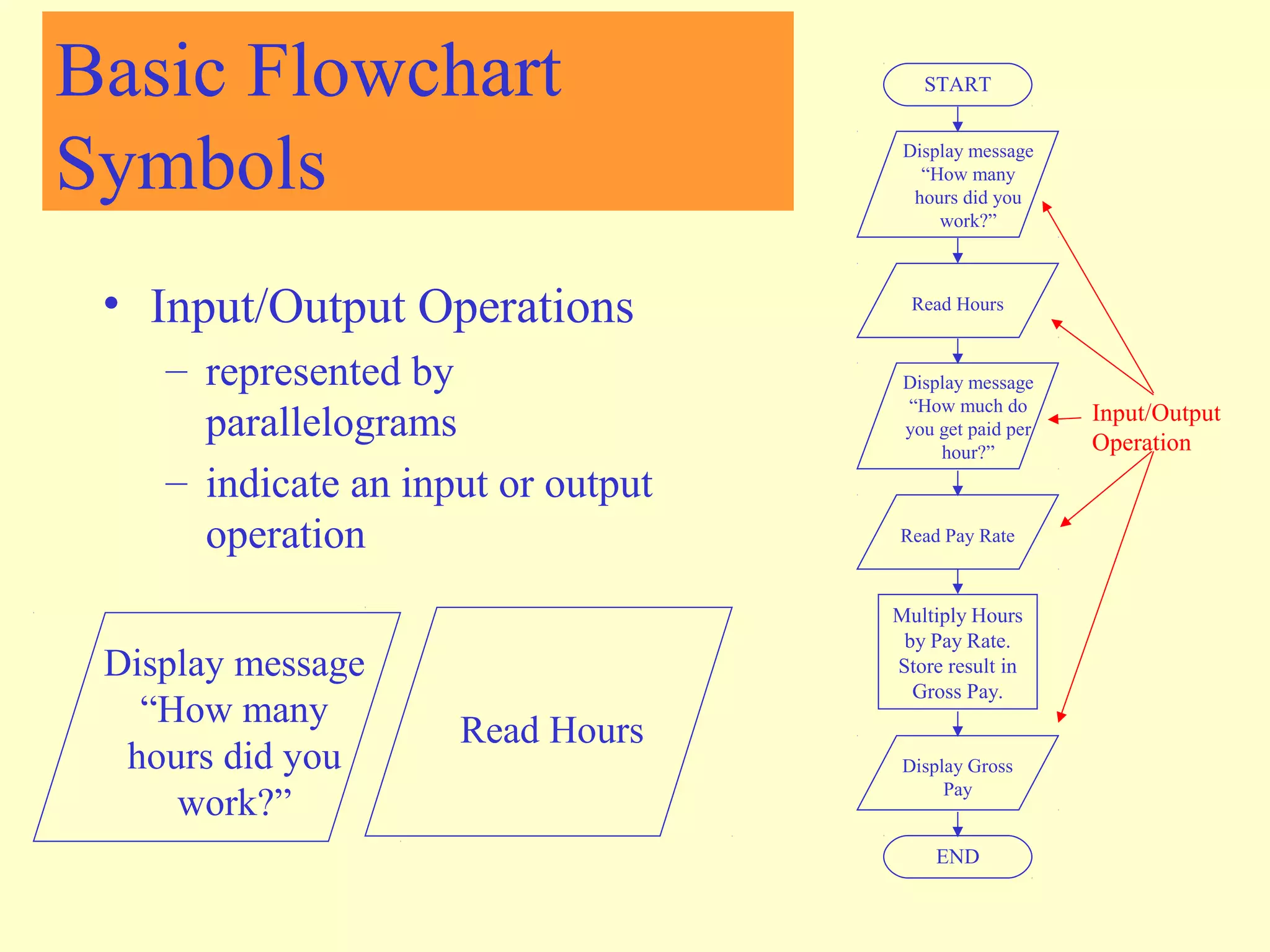
• Input/Output Operations 
– represented by 
parallelograms 
– indicate an input or output 
operation 
START 
Display message 
“How many 
hours did you 
work?” 
Read Hours 
Display message 
“How much do 
you get paid per 
hour?” 
Read Pay Rate 
Multiply Hours 
by Pay Rate. 
Store result in 
Gross Pay. 
Display Gross 
Pay 
END 
Display message 
“How many 
hours did you 
work?” 
Read Hours 
Input/Output 
Operation
Basic Flowchart 
Symbols 
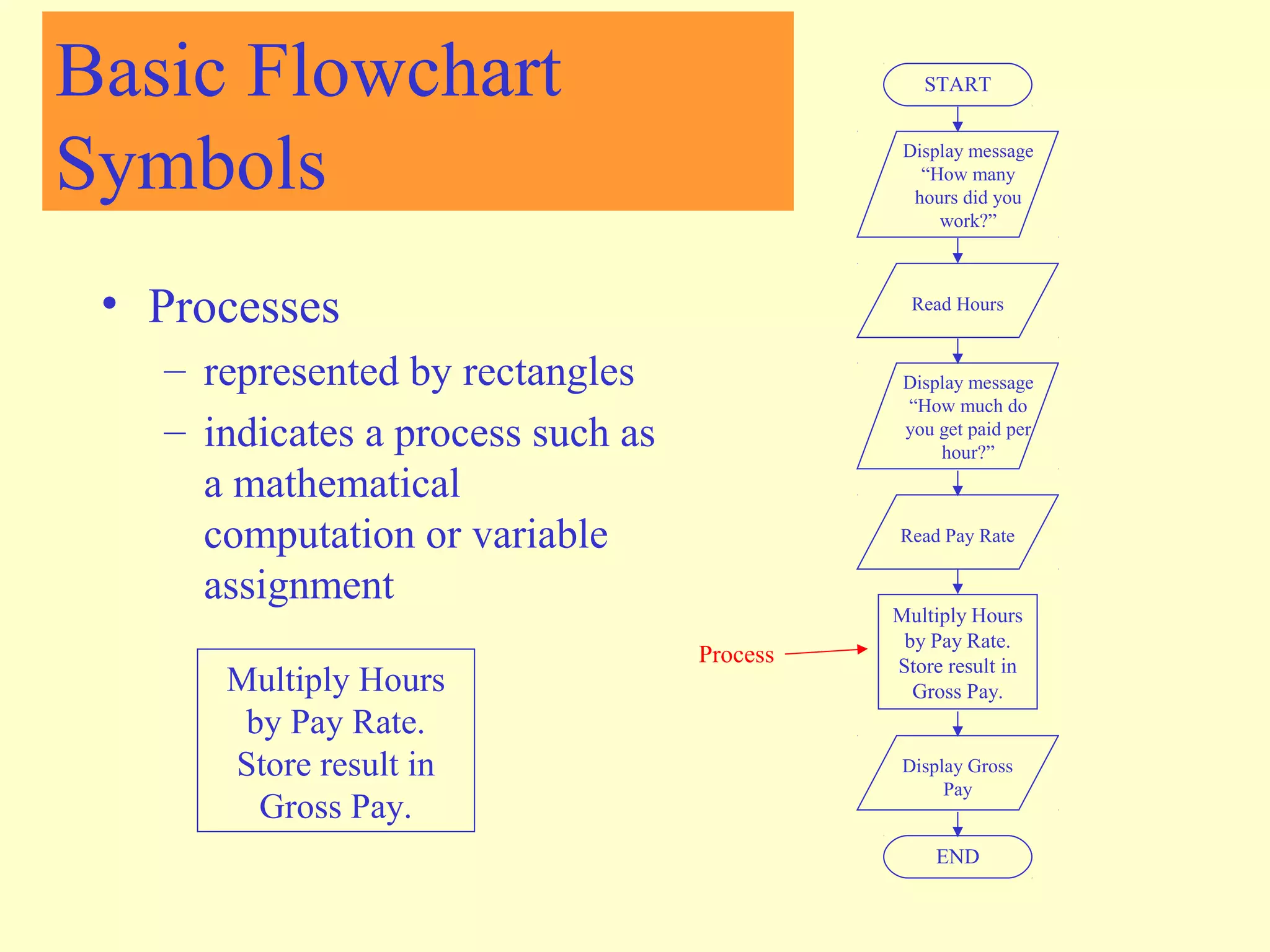
• Processes 
– represented by rectangles 
– indicates a process such as 
a mathematical 
computation or variable 
assignment 
START 
Display message 
“How many 
hours did you 
work?” 
Read Hours 
Display message 
“How much do 
you get paid per 
hour?” 
Read Pay Rate 
Multiply Hours 
by Pay Rate. 
Store result in 
Gross Pay. 
Display Gross 
Pay 
END 
Multiply Hours 
by Pay Rate. 
Store result in 
Gross Pay. 
Process
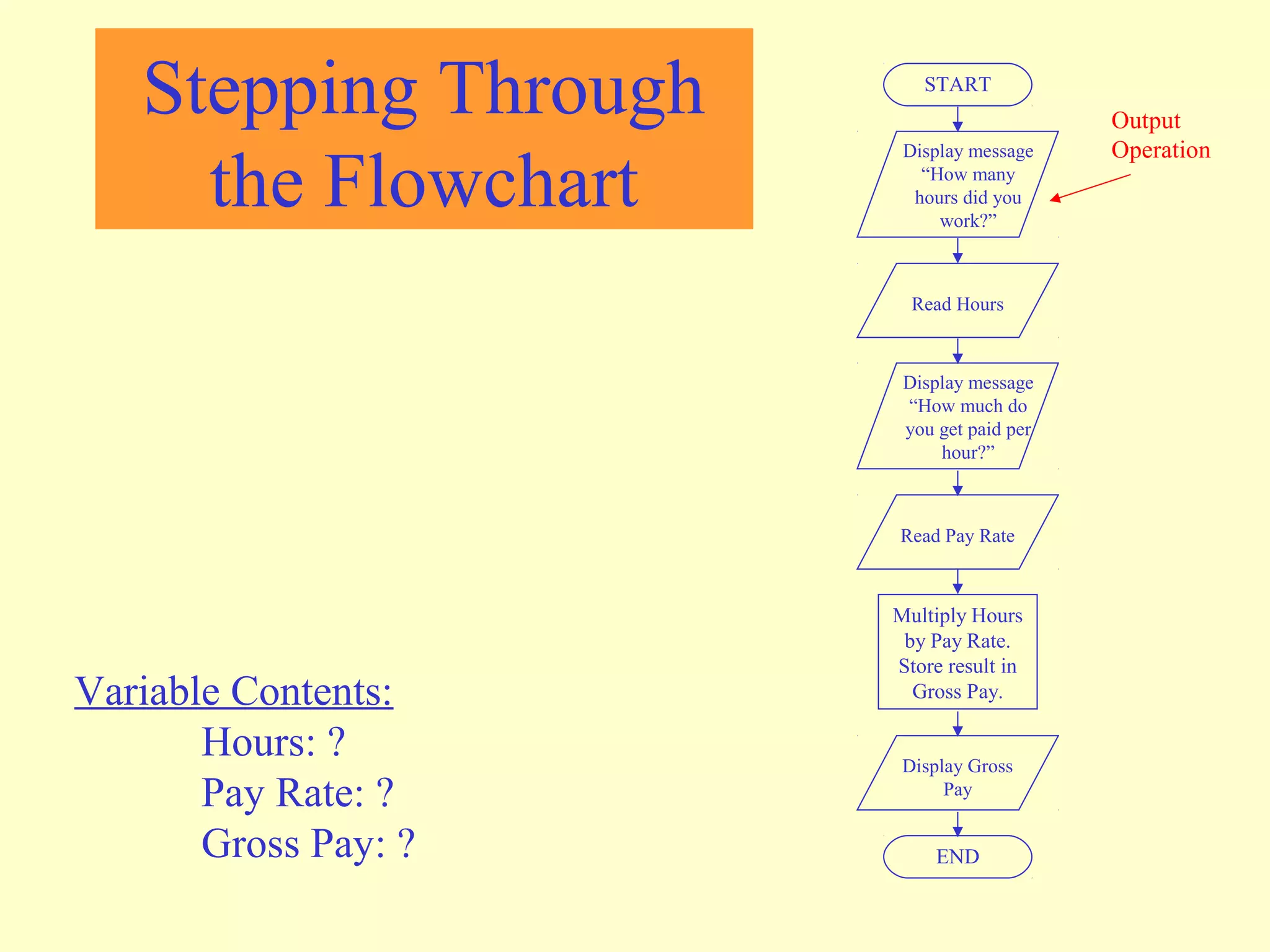
Stepping Through 
the Flowchart 
START 
Display message 
“How many 
hours did you 
work?” 
Read Hours 
Display message 
“How much do 
you get paid per 
hour?” 
Read Pay Rate 
Multiply Hours 
by Pay Rate. 
Store result in 
Gross Pay. 
Display Gross 
Pay 
END 
Variable Contents: 
Hours: ? 
Pay Rate: ? 
Gross Pay: ? 
Output 
Operation 
Stepping Through 
the Flowchart
Stepping Through 
the Flowchart 
Stepping Through 
the Flowchart 
START 
Display message 
“How many 
hours did you 
work?” 
Read Hours 
Display message 
“How much do 
you get paid per 
hour?” 
Read Pay Rate 
Multiply Hours 
by Pay Rate. 
Store result in 
Gross Pay. 
Display Gross 
Pay 
END 
Variable Contents: 
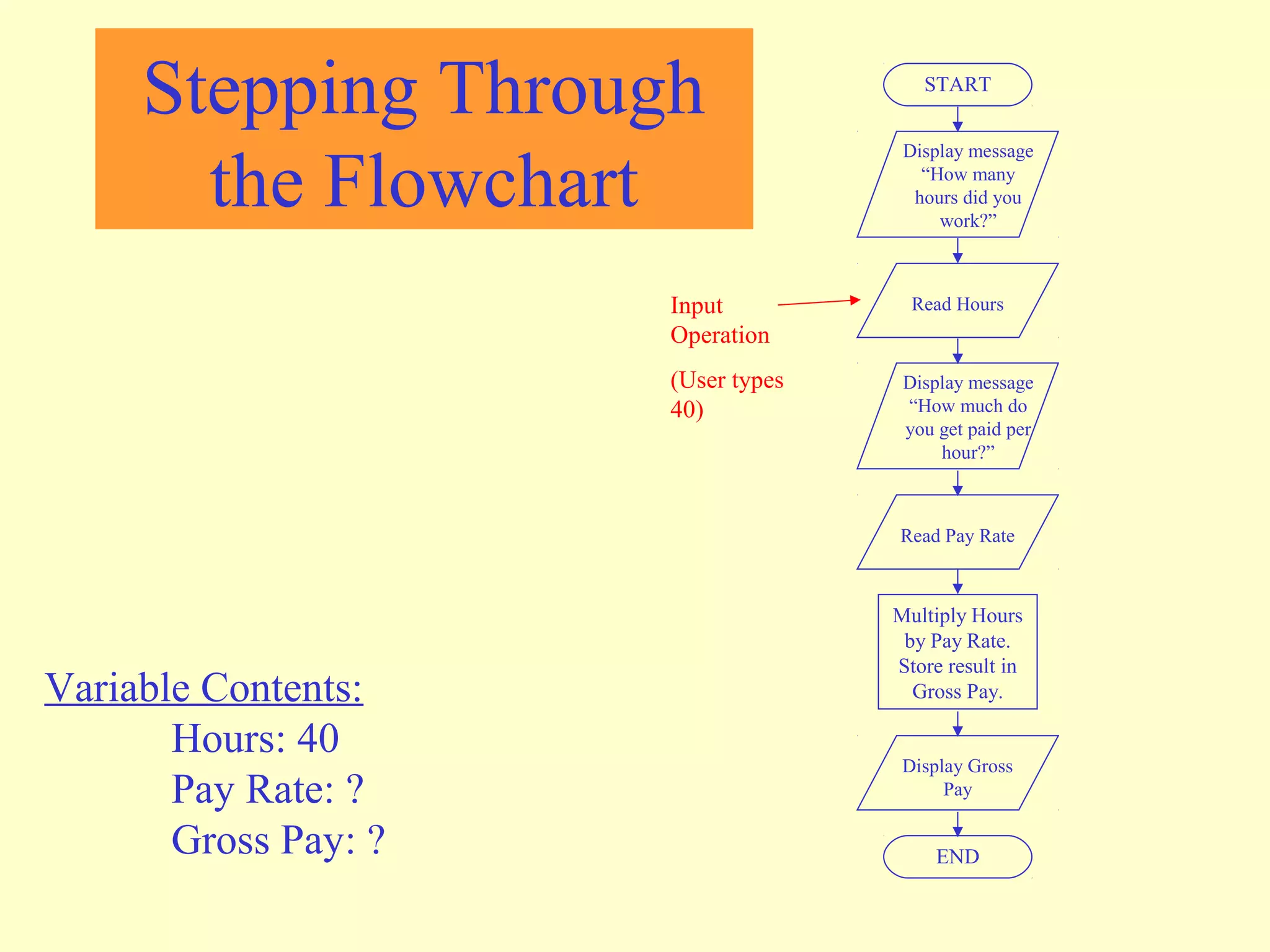
Hours: 40 
Pay Rate: ? 
Gross Pay: ? 
Input 
Operation 
(User types 
40)
Stepping Through 
the Flowchart 
Stepping Through 
the Flowchart 
START 
Display message 
“How many 
hours did you 
work?” 
Read Hours 
Display message 
“How much do 
you get paid per 
hour?” 
Read Pay Rate 
Multiply Hours 
by Pay Rate. 
Store result in 
Gross Pay. 
Display Gross 
Pay 
END 
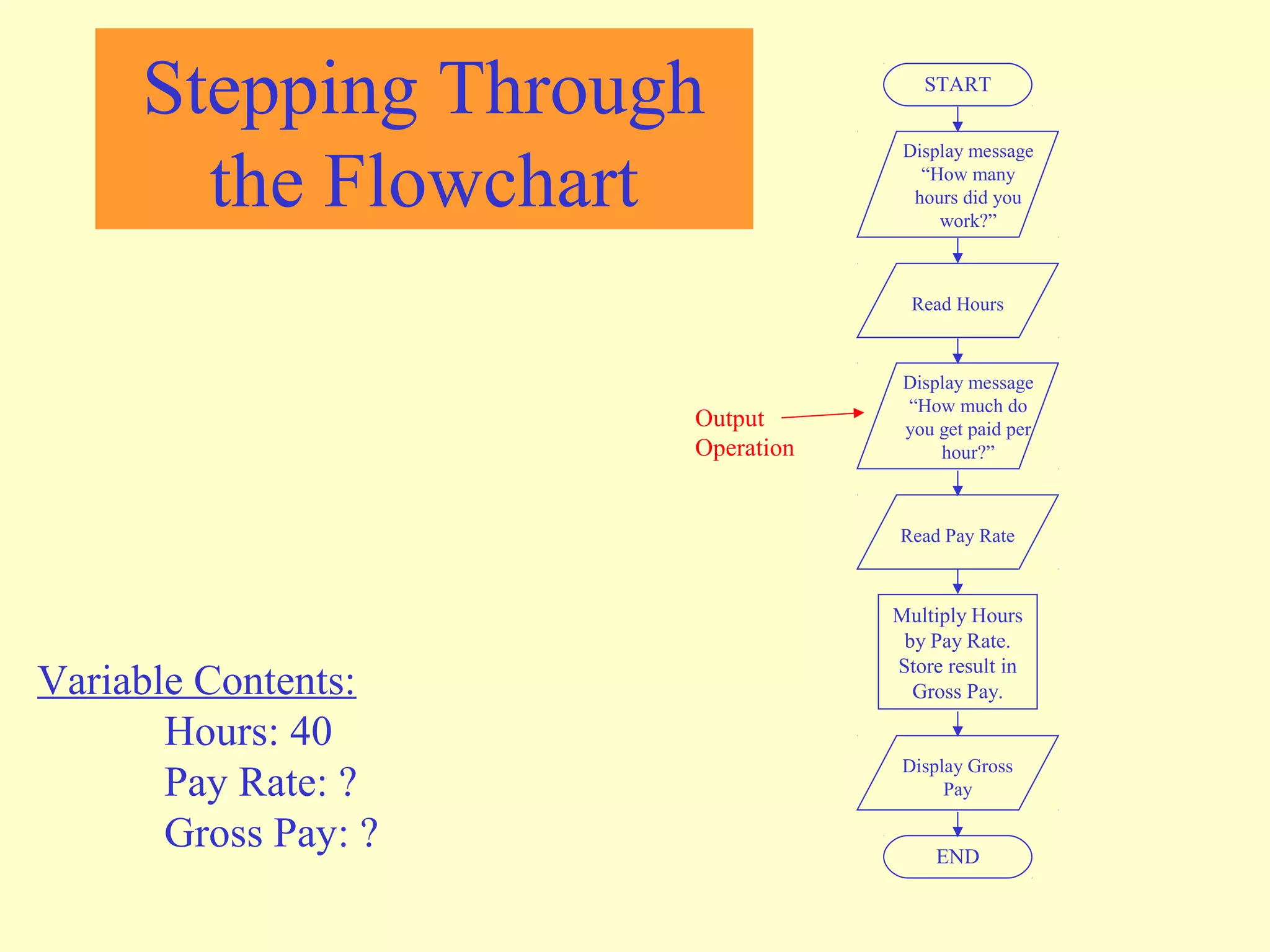
Variable Contents: 
Hours: 40 
Pay Rate: ? 
Gross Pay: ? 
Output 
Operation
Stepping Through 
the Flowchart 
Stepping Through 
the Flowchart 
How much 
do you get 
paid per 
hour? 20 
START 
Display message 
“How many 
hours did you 
work?” 
Read Hours 
Display message 
“How much do 
you get paid per 
hour?” 
Read Pay Rate 
Multiply Hours 
by Pay Rate. 
Store result in 
Gross Pay. 
Display Gross 
Pay 
END 
Variable Contents: 
Hours: 40 
Pay Rate: 20 
Gross Pay: ? 
Input 
Operation 
(User types 
20)
START 
Display message 
“How many 
hours did you 
work?” 
Read Hours 
Display message 
“How much do 
you get paid per 
hour?” 
Read Pay Rate 
Multiply Hours 
by Pay Rate. 
Store result in 
Gross Pay. 
Display Gross 
Pay 
END 
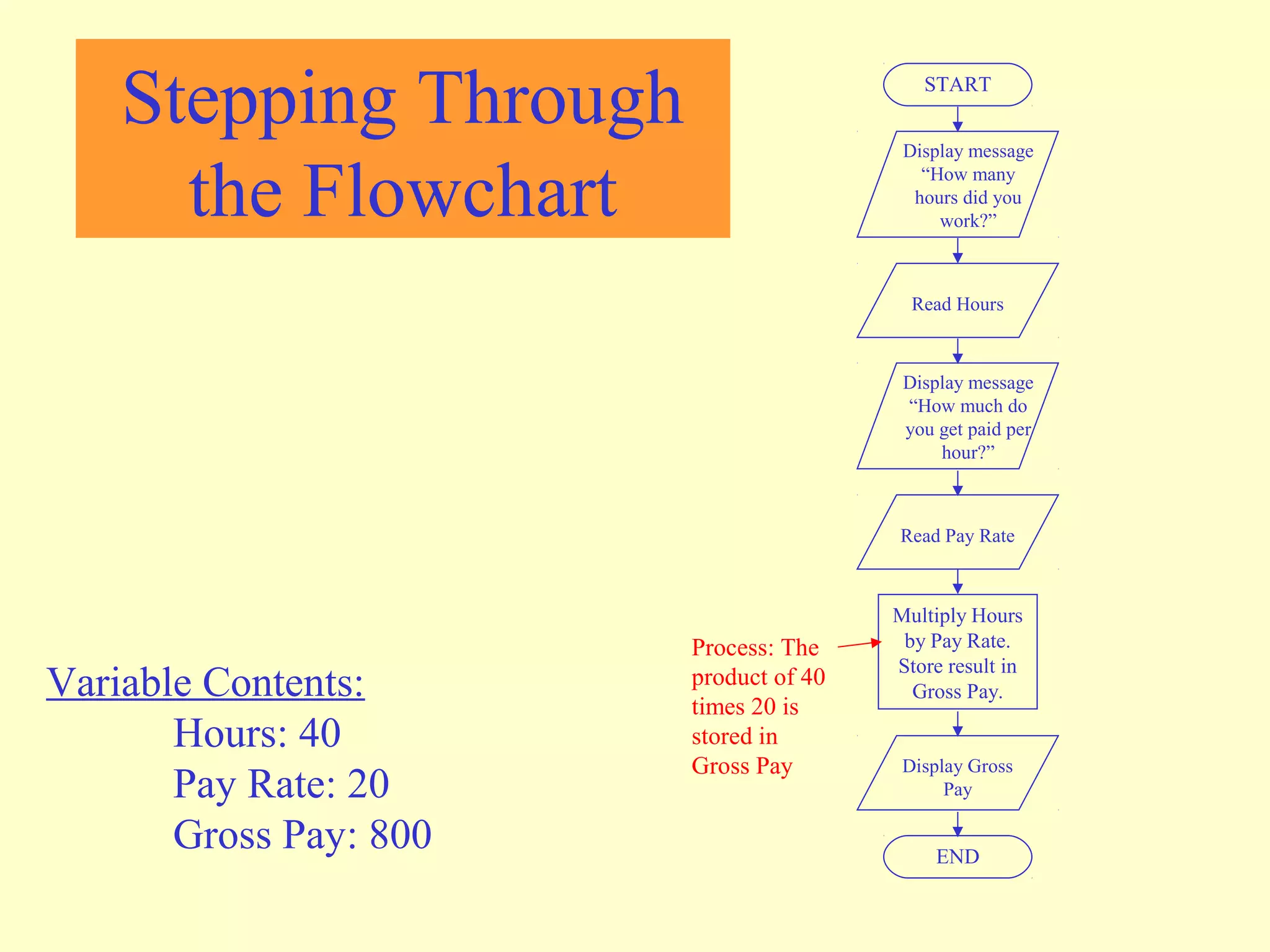
Variable Contents: 
Hours: 40 
Pay Rate: 20 
Gross Pay: 800 
Process: The 
product of 40 
times 20 is 
stored in 
Gross Pay 
Stepping Through 
the Flowchart
Stepping Through 
the Flowchart 
START 
Display message 
“How many 
hours did you 
work?” 
Read Hours 
Display message 
“How much do 
you get paid per 
hour?” 
Read Pay Rate 
Multiply Hours 
by Pay Rate. 
Store result in 
Gross Pay. 
Display Gross 
Pay 
END 
Variable Contents: 
Hours: 40 
Pay Rate: 20 
Gross Pay: 800 
Output 
Operation
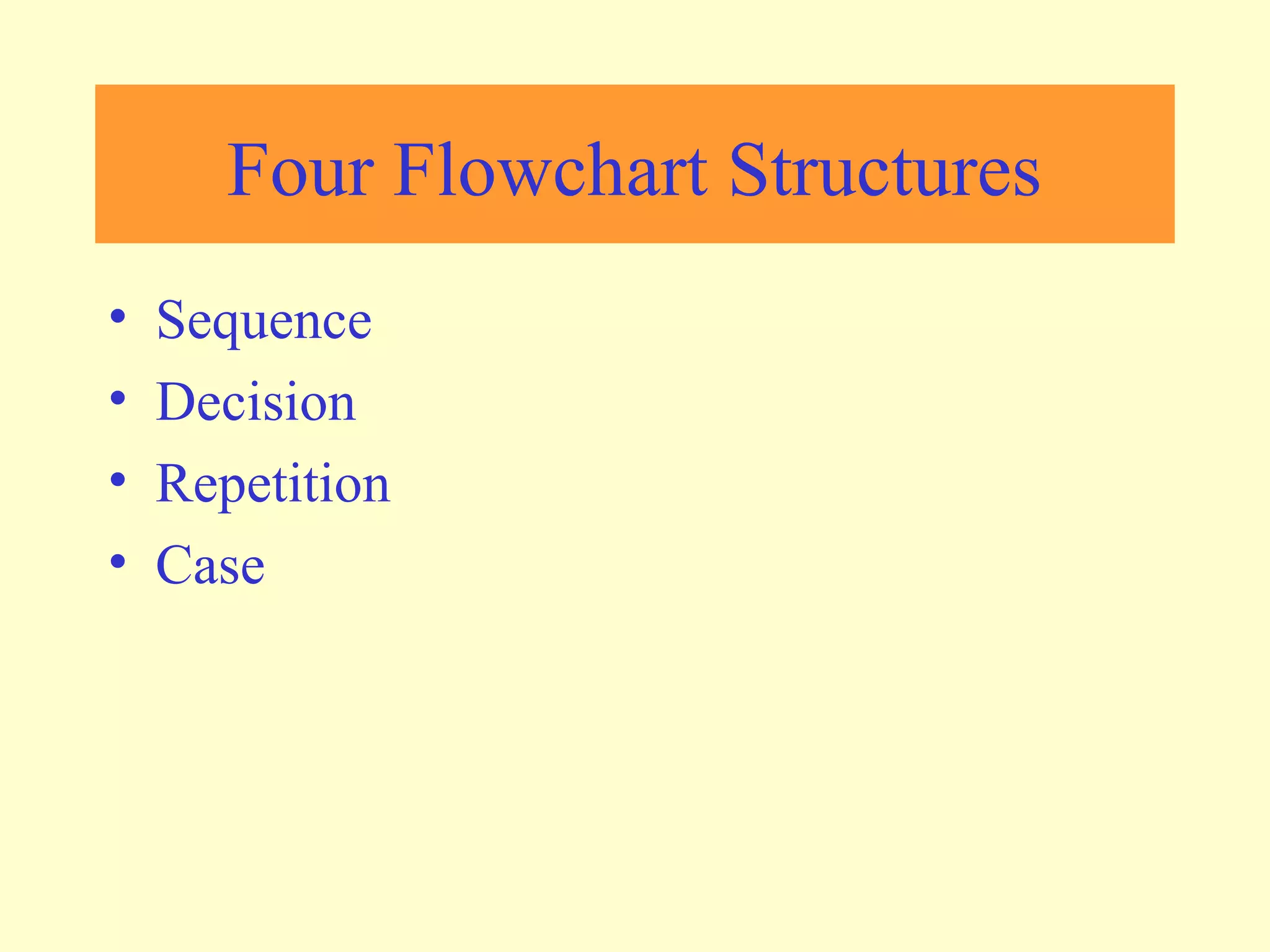
Four Flowchart Structures 
• Sequence 
• Decision 
• Repetition 
• Case
Sequence Structure 
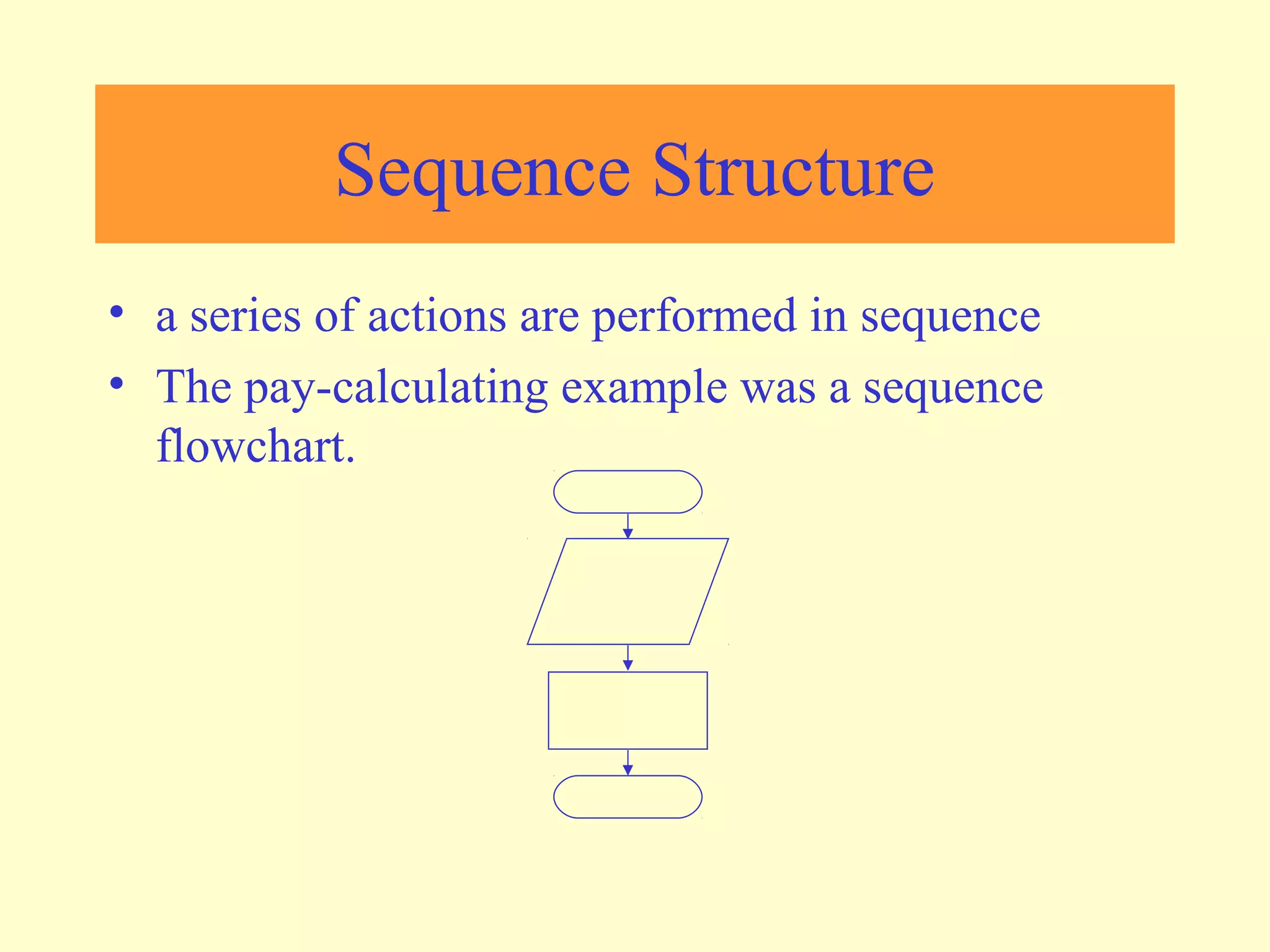
• a series of actions are performed in sequence 
• The pay-calculating example was a sequence 
flowchart.
Decision Structure 
• One of two possible actions is taken, depending on 
a condition.
Decision Structure 
• A new symbol, the diamond, indicates a yes/no question. If 
the answer to the question is yes, the flow follows one 
path. If the answer is no, the flow follows another path 
NO YES
Decision Structure 
• In the flowchart segment below, the question “is x < y?” is 
asked. If the answer is no, then process A is performed. If 
the answer is yes, then process B is performed. 
NO YES 
x < y? 
Process A Process B
Decision Structure 
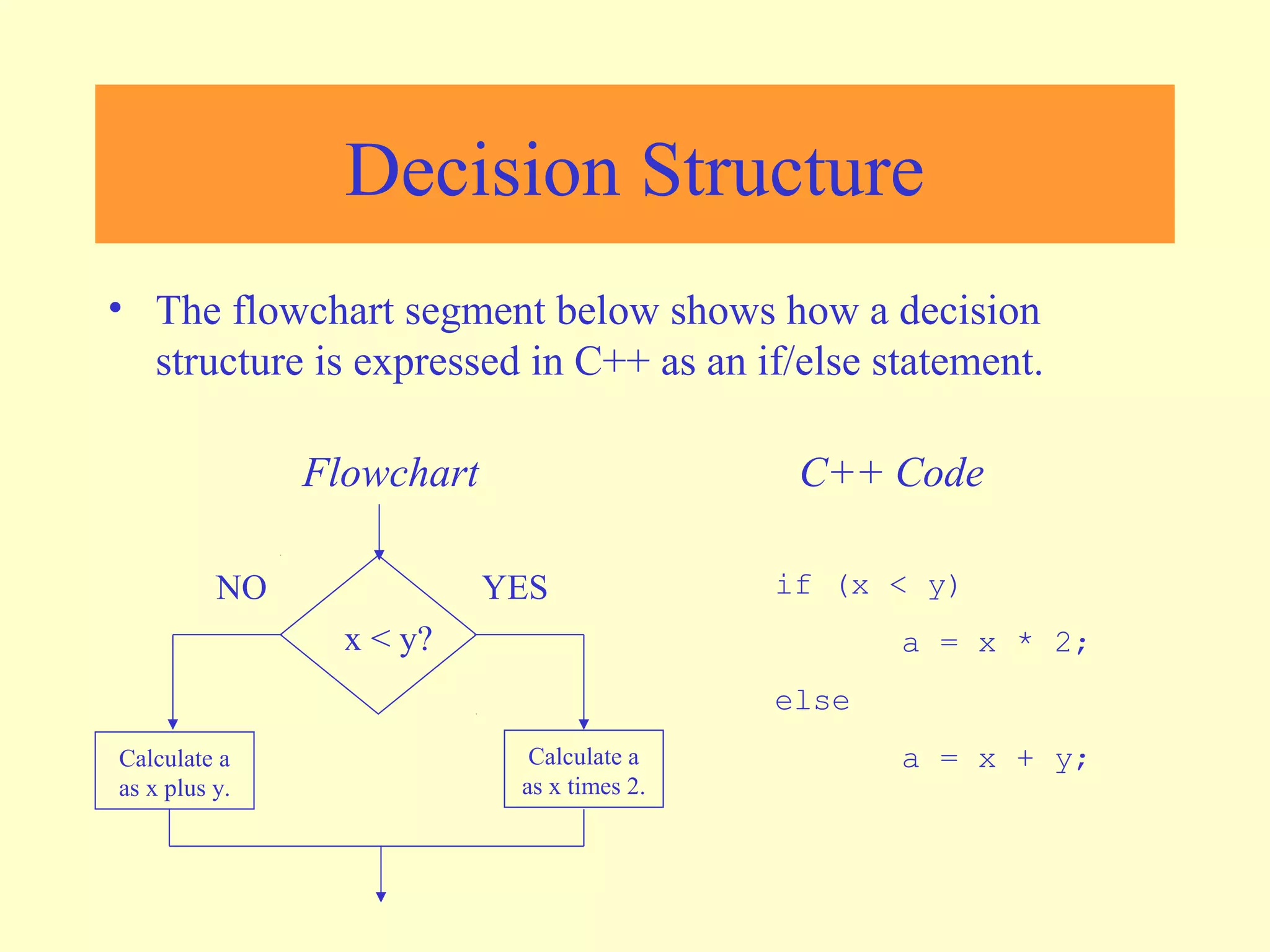
• The flowchart segment below shows how a decision 
structure is expressed in C++ as an if/else statement. 
Flowchart C++ Code 
NO YES 
x < y? 
Calculate a 
as x times 2. 
Calculate a 
as x plus y. 
if (x < y) 
a = x * 2; 
else 
a = x + y;
Decision Structure 
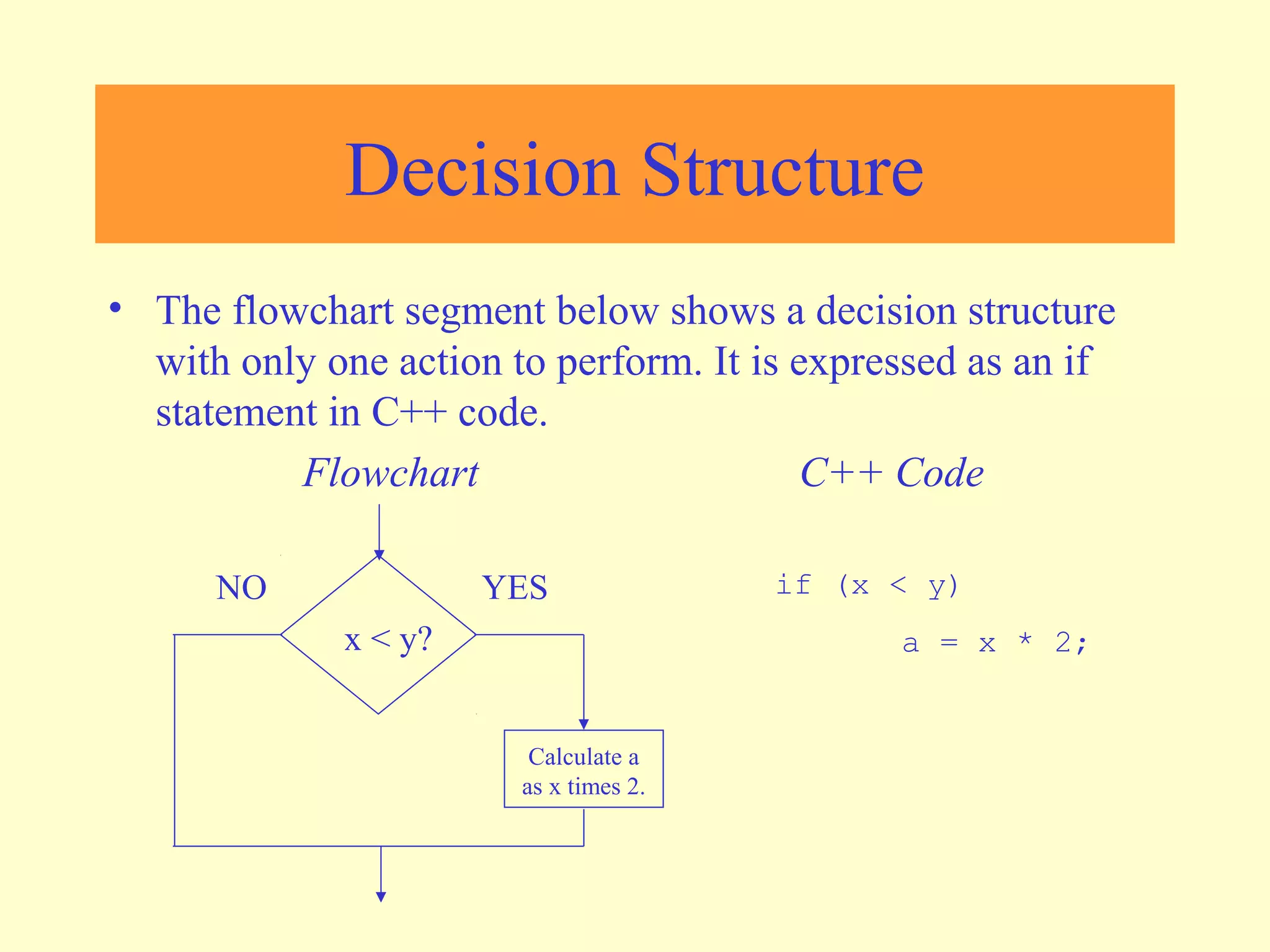
• The flowchart segment below shows a decision structure 
with only one action to perform. It is expressed as an if 
statement in C++ code. 
Flowchart C++ Code 
if (x < y) 
a = x * 2; 
NO YES 
x < y? 
Calculate a 
as x times 2.
Repetition Structure 
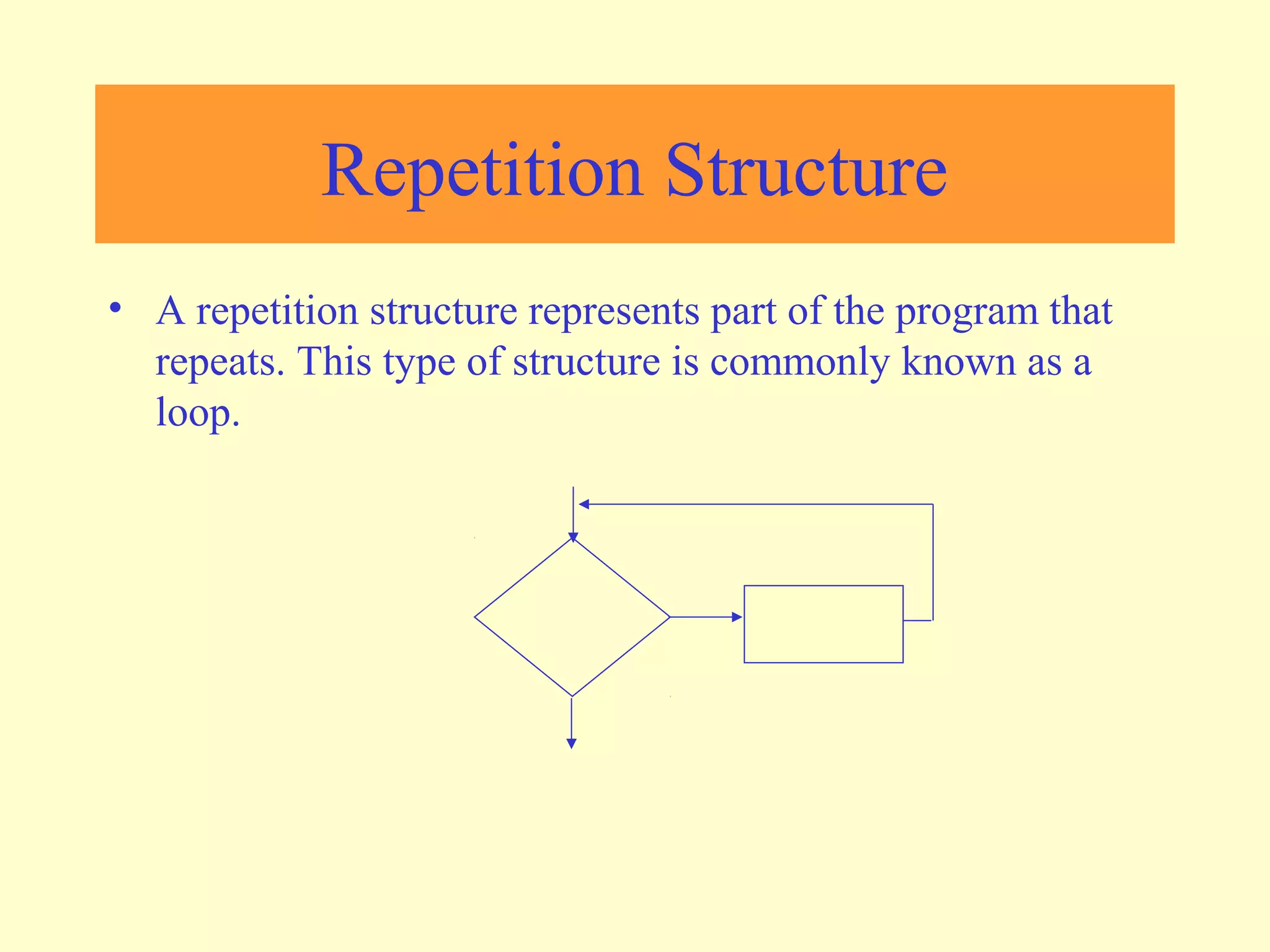
• A repetition structure represents part of the program that 
repeats. This type of structure is commonly known as a 
loop.
Repetition Structure 
• Notice the use of the diamond symbol. A loop tests a 
condition, and if the condition exists, it performs an action. 
Then it tests the condition again. If the condition still 
exists, the action is repeated. This continues until the 
condition no longer exists.
Repetition Structure 
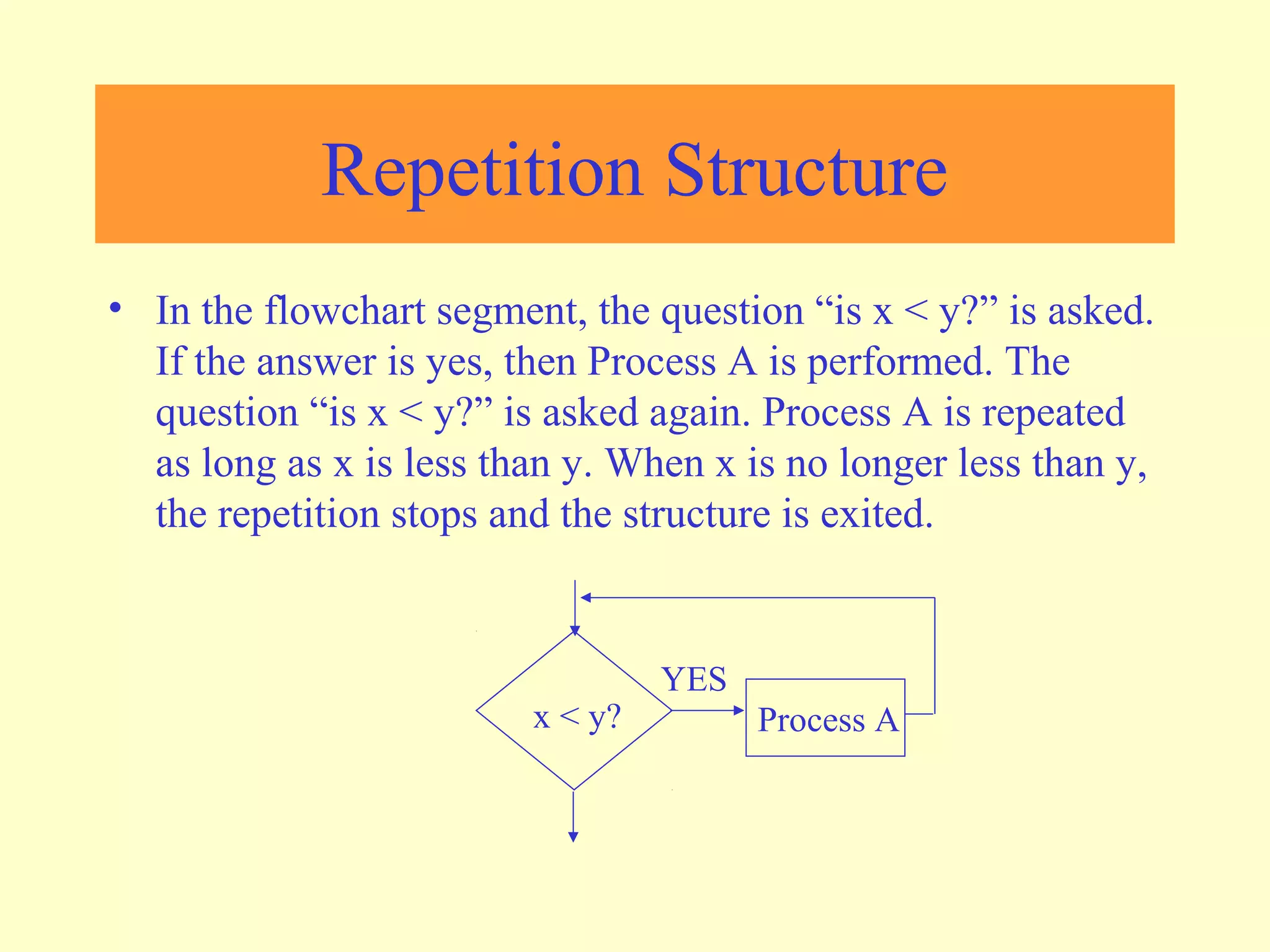
• In the flowchart segment, the question “is x < y?” is asked. 
If the answer is yes, then Process A is performed. The 
question “is x < y?” is asked again. Process A is repeated 
as long as x is less than y. When x is no longer less than y, 
the repetition stops and the structure is exited. 
YES 
x < y? Process A
Repetition Structure 
• The flowchart segment below shows a repetition structure 
expressed in C++ as a while loop. 
Flowchart C++ Code 
while (x < y) 
x++; 
YES 
x < y? Add 1 to x
Controlling a Repetition 
Structure 
• The action performed by a repetition structure must 
eventually cause the loop to terminate. Otherwise, an 
infinite loop is created. 
• In this flowchart segment, x is never changed. Once the 
loop starts, it will never end. 
• QUESTION: How can this 
flowchart be modified so 
YES 
it is no longer an infinite 
loop? 
x < y? Display x
Controlling a Repetition 
Structure 
• ANSWER: By adding an action within the repetition that 
changes the value of x. 
YES 
x < y? Display x Add 1 to x
A Pre-Test Repetition Structure 
• This type of structure is known as a pre-test repetition 
structure. The condition is tested BEFORE any actions are 
performed. 
YES 
x < y? Display x Add 1 to x
A Pre-Test Repetition Structure 
• In a pre-test repetition structure, if the condition does not 
exist, the loop will never begin. 
YES 
x < y? Display x Add 1 to x
A Post-Test Repetition Structure 
• This flowchart segment shows a post-test 
repetition structure. 
• The condition is tested AFTER the actions 
are performed. 
• A post-test repetition structure always 
performs its actions at least once. 
Display x 
Add 1 to x 
YES 
x < y?
A Post-Test Repetition Structure 
• The flowchart segment below shows a post-test repetition 
structure expressed in C++ as a do-while loop. 
do 
{ 
cout << x << endl; 
x++; 
} while (x < y); 
Flowchart 
C++ Code Display x 
Add 1 to x 
YES 
x < y?
Case Structure 
• One of several possible actions is taken, depending 
on the contents of a variable.
Case Structure 
• The structure below indicates actions to perform 
depending on the value in years_employed. 
CASE 
years_employed 
1 2 3 Other 
bonus = 100 bonus = 200 bonus = 400 bonus = 800
Case Structure 
CASE 
If years_employed = 3, 
bonus is set to 400 
years_employed 
If years_employed = 2, 
bonus is set to 200 
If years_employed = 1, 
bonus is set to 100 
If years_employed is 
any other value, bonus 
is set to 800 
1 2 3 Other 
bonus = 100 bonus = 200 bonus = 400 bonus = 800
Connectors 
• Sometimes a flowchart will not fit on one 
page. 
• A connector (represented by a small circle) 
allows you to connect two flowchart 
segments. 
A
Connectors 
A 
A 
START 
END 
•The “A” connector 
indicates that the second 
flowchart segment begins 
where the first segment 
ends.
Example 
N Y 
PRINT 
“PASS” 
Step 1: Input M1,M2,M3,M4 
Step 2: GRADE ¬ (M1+M2+M3+M4)/4 
Step 3: if (GRADE <50) then 
Print “FAIL” 
else 
Print “PASS” 
endif 
START 
Input 
M1,M2,M3,M4 
GRADE¬(M1+M2+M3+M4)/4 
IS 
GRADE<5 
0 
PRINT 
“FAIL” 
STOP
Example 2 
• Write an algorithm and draw a flowchart to 
convert the length in feet to centimeter. 
Pseudocode: 
• Input the length in feet (Lft) 
• Calculate the length in cm (Lcm) by 
multiplying LFT with 30 
• Print length in cm (LCM)
Example 2 
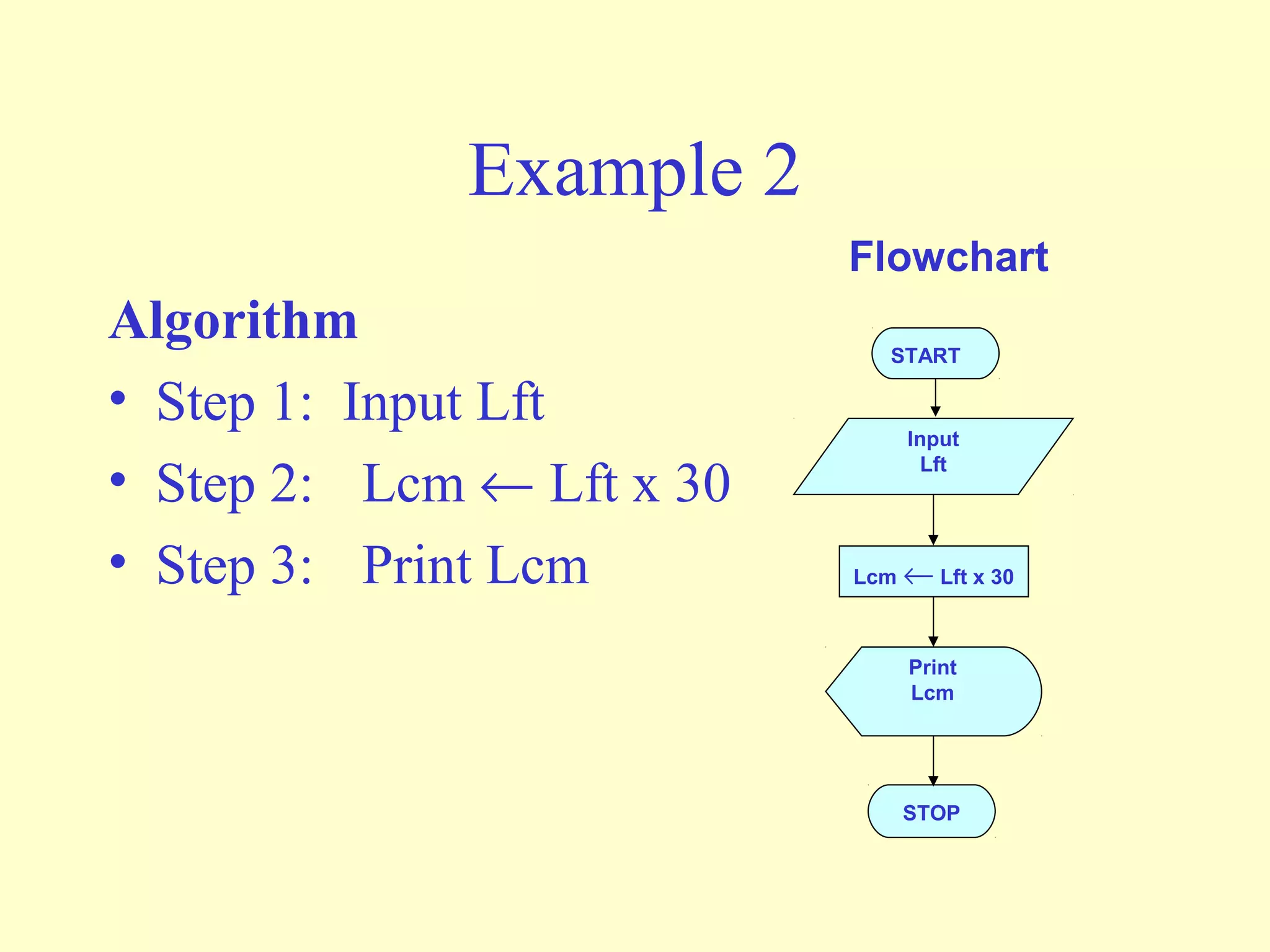
Algorithm 
• Step 1: Input Lft 
• Step 2: Lcm ¬ Lft x 30 
• Step 3: Print Lcm 
Flowchart 
START 
Input 
Lft 
Lcm ¬ Lft x 30 
Print 
Lcm 
STOP
Example 3 
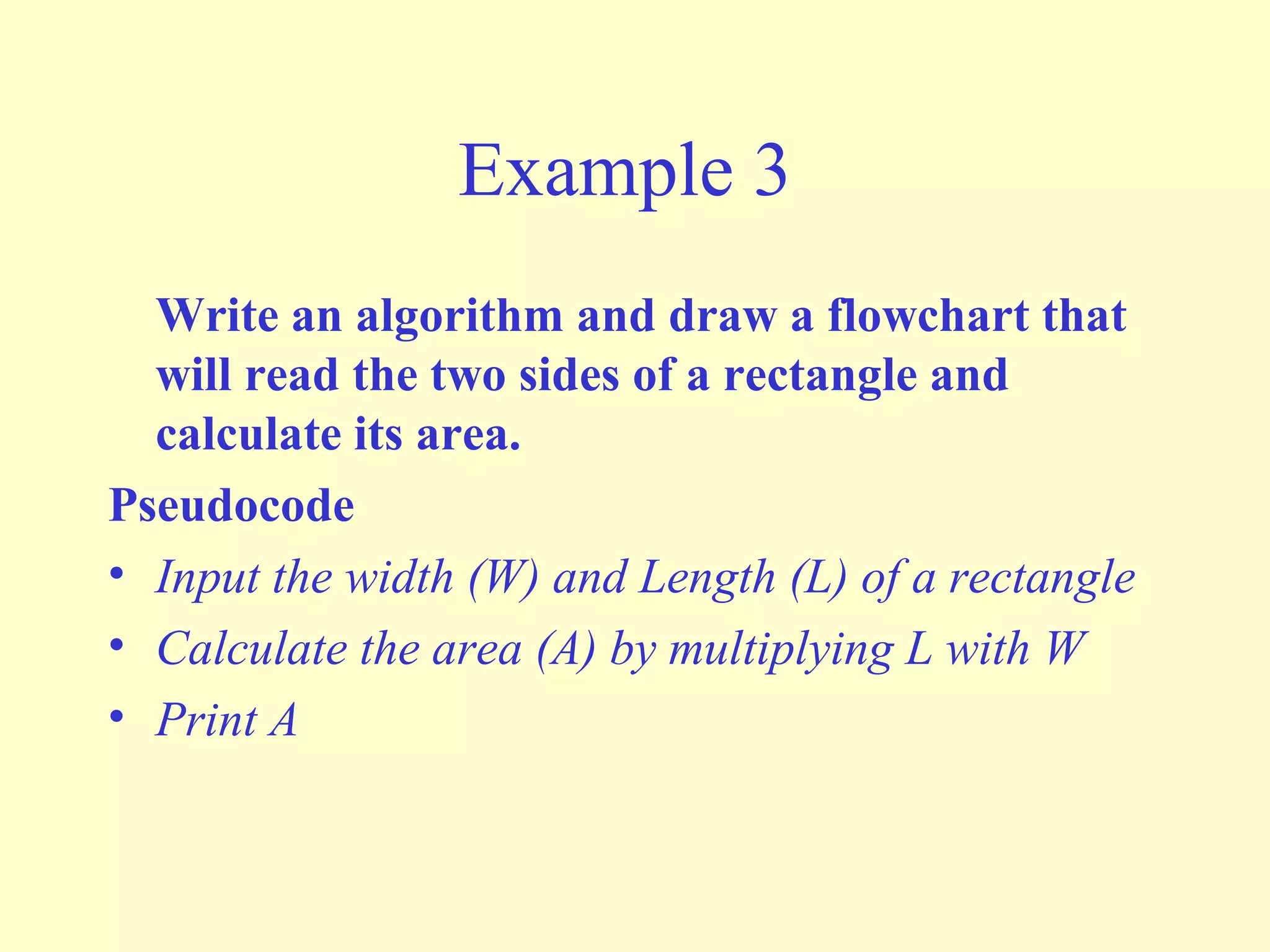
Write an algorithm and draw a flowchart that 
will read the two sides of a rectangle and 
calculate its area. 
Pseudocode 
• Input the width (W) and Length (L) of a rectangle 
• Calculate the area (A) by multiplying L with W 
• Print A
Example 3 
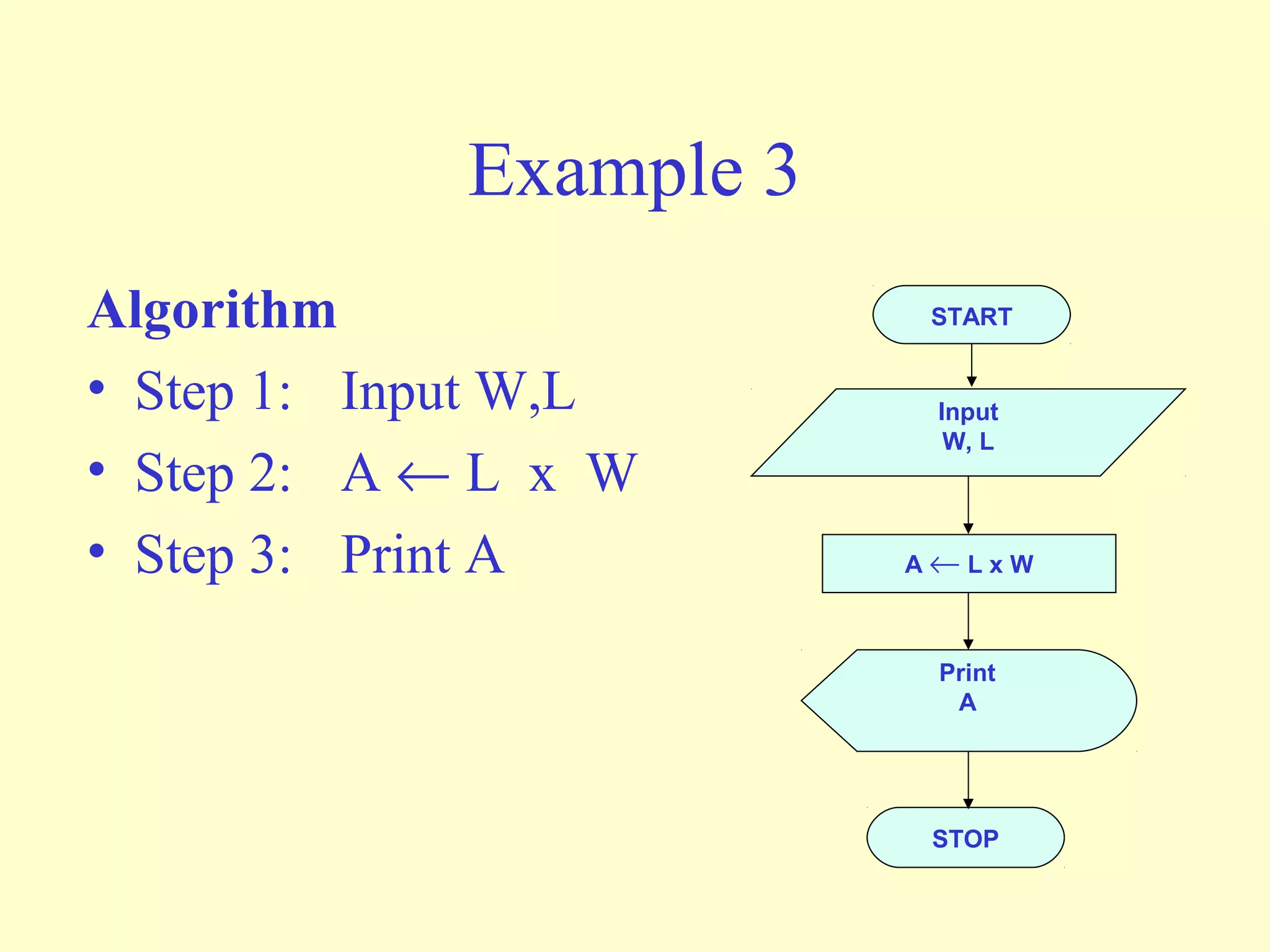
Algorithm 
• Step 1: Input W,L 
• Step 2: A ¬ L x W 
• Step 3: Print A 
START 
Input 
W, L 
A ¬ L x W 
Print 
A 
STOP
Example 4 
• Write an algorithm and draw a flowchart that 
will calculate the roots of a quadratic equation 
ax2 + bx + c = 0 
• Hint: d = sqrt ( b2 - 4ac 
), and the roots are: x1 
= (–b + d)/2a and x2 = (–b – d)/2a
Example 4 
Pseudocode: 
• Input the coefficients (a, b, c) of the 
quadratic equation 
• Calculate d 
• Calculate x1 
• Calculate x2 
• Print x1 and x2
Example 4 
• Algorithm: 
• Step 1: Input a, b, c 
• Step 2: d ¬ sqrt ( ) 
• Step 3: x1 ¬ (–b + d) / (2 x a) 
• Step 4: x2 ¬ (–b – d) / (2 x a) 
• Step 5: Print x1, x2 
START 
Input 
a, b, c 
d ¬ sqrt(b x b – 4 x a x c) 
x1 ¬(–b + d) / (2 x a) 
X2 ¬ (–b – d) / (2 x a) 
Print 
x1 ,x2 
STOP 
b´ b - 4´ a ´ c
DECISION STRUCTURES 
• The expression A>B is a logical expression 
• it describes a condition we want to test 
• if A>B is true (if A is greater than B) we take the 
action on left 
• print the value of A 
• if A>B is false (if A is not greater than B) we take 
the action on right 
• print the value of B
DECISION STRUCTURES 
Y N 
is 
A>B 
Print 
B 
Print 
A
IF–THEN–ELSE 
STRUCTURE 
• The structure is as follows 
If condition then 
true alternative 
else 
false alternative 
endif
IF–THEN–ELSE 
STRUCTURE 
• The algorithm for the flowchart is as 
follows: 
If A>B then 
print A 
else 
print B 
endif 
Y N 
is 
A>B 
Print 
B 
Print 
A
Relational Operators 
Operator Description 
> Greater than 
< Less than 
= Equal to 
³ Greater than or equal to 
£ Less than or equal to 
¹ Not equal to
Example 5 
• Write an algorithm that reads two values, determines the 
largest value and prints the largest value with an 
identifying message. 
ALGORITHM 
Step 1: Input VALUE1, VALUE2 
Step 2: if (VALUE1 > VALUE2) then 
MAX ¬ VALUE1 
else 
MAX ¬ VALUE2 
endif 
Step 3: Print “The largest value is”, MAX
Example 5 
START 
Input 
VALUE1,VALUE2 
Y N 
MAX ¬ VALUE1 
Print 
“The largest value is”, 
MAX 
STOP 
MAX ¬ VALUE2 
is 
VALUE1>VALUE2
NESTED IFS 
• One of the alternatives within an IF– 
THEN–ELSE statement 
– may involve further IF–THEN–ELSE statement
Example 6 
• Write an algorithm that reads three 
numbers and prints the value of the largest 
number.
Example 6 
Step 1: Input N1, N2, N3 
Step 2: if (N1>N2) then 
if (N1>N3) then 
MAX ¬ N1 [N1>N2, N1>N3] 
else 
MAX ¬ N3 [N3>N1>N2] 
endif 
else 
if (N2>N3) then 
MAX ¬ N2 [N2>N1, N2>N3] 
else 
MAX ¬ N3 [N3>N2>N1] 
endif 
endif 
Step 3: Print “The largest number is”, MAX
Example 6 
• Flowchart: Draw the flowchart of the 
above Algorithm.
Example 7 
• Write and algorithm and draw a flowchart to 
a) read an employee name (NAME), overtime 
hours worked (OVERTIME), hours absent 
(ABSENT) and 
b) determine the bonus payment (PAYMENT).
Example 7 
Bonus Schedule 
OVERTIME – (2/3)*ABSENT Bonus Paid 
>40 hours 
>30 but £ 40 hours 
>20 but £ 30 hours 
>10 but £ 20 hours 
£ 10 hours 
$50 
$40 
$30 
$20 
$10
Modules 
• A program module (such as a function in 
C++) is represented by a special symbol.
Modules 
•The position of the module 
symbol indicates the point the 
module is executed. 
•A separate flowchart can be 
constructed for the module. 
START 
Read Input. 
Call calc_pay 
function. 
Display results. 
END
Combining Structures 
• Structures are commonly combined to create more 
complex algorithms. 
• The flowchart segment below combines a decision 
structure with a sequence structure. 
YES 
x < y? Display x Add 1 to x
Combining Structures 
• This flowchart segment 
shows two decision 
structures combined. 
NO YES 
Displa y “x is 
within limits.” 
NO YES 
Display “x is 
outside the limits.” 
x > min? 
x < max? 
Displ ay “x is 
outside the limits.”
Review 
• What do each of the following symbols 
represent? 
(Answer on next slide)
Answer 
• What do each of the following symbols 
represent? 
Terminal 
Input/Output 
Operation 
Process 
Decision 
Connector 
Module
Review 
• Name the four flowchart structures. 
(Answer on next slide)
Answer 
• Sequence 
• Decision 
• Repetition 
• Case
Review 
• What type of structure is this? 
(Answer on next slide)
Answer 
• Repetition
Review 
• What type of structure is this? 
(Answer on next slide)
Answer 
• Sequence
Review 
• What type of structure is this? 
(Answer on next slide)
Answer 
• Case
Review 
• What type of structure is this? 
(Answer on next slide)
Answer 
• Decision

Flowchart

  • 1.
  • 2.
    The Flowchart •(Dictionary) A schematic representation of a sequence of operations, as in a manufacturing process or computer program. • (Technical) A graphical representation of the sequence of operations in an information system or program. Information system flowcharts show how data flows from source documents through the computer to final distribution to users. Program flowcharts show the sequence of instructions in a single program or subroutine. Different symbols are used to draw each type of flowchart.
  • 3.
    The Flowchart AFlowchart – shows logic of an algorithm – emphasizes individual steps and their interconnections – e.g. control flow from one action to the next
  • 4.
  • 5.
    Basic Flowchart Symbols • Notice there are three types of symbols in this flowchart: – rounded rectangles – parallelograms – a rectangle • Each symbol represents a different type of operation. START Display message “How many hours did you work?” Read Hours Display message “How much do you get paid per hour?” Read Pay Rate Multiply Hours by Pay Rate. Store result in Gross Pay. Display Gross Pay END Rounded Rectangle Parallelogram Rectangle Rounded Rectangle
  • 6.
    Basic Flowchart Symbols • Terminals – represented by rounded rectangles – indicate a starting or ending point START Display message “How many hours did you work?” Read Hours Display message “How much do you get paid per hour?” Read Pay Rate Multiply Hours by Pay Rate. Store result in Gross Pay. Display Gross Pay END Terminal START END Terminal
  • 7.
    Basic Flowchart Symbols • Input/Output Operations – represented by parallelograms – indicate an input or output operation START Display message “How many hours did you work?” Read Hours Display message “How much do you get paid per hour?” Read Pay Rate Multiply Hours by Pay Rate. Store result in Gross Pay. Display Gross Pay END Display message “How many hours did you work?” Read Hours Input/Output Operation
  • 8.
    Basic Flowchart Symbols • Processes – represented by rectangles – indicates a process such as a mathematical computation or variable assignment START Display message “How many hours did you work?” Read Hours Display message “How much do you get paid per hour?” Read Pay Rate Multiply Hours by Pay Rate. Store result in Gross Pay. Display Gross Pay END Multiply Hours by Pay Rate. Store result in Gross Pay. Process
  • 9.
    Stepping Through theFlowchart START Display message “How many hours did you work?” Read Hours Display message “How much do you get paid per hour?” Read Pay Rate Multiply Hours by Pay Rate. Store result in Gross Pay. Display Gross Pay END Variable Contents: Hours: ? Pay Rate: ? Gross Pay: ? Output Operation Stepping Through the Flowchart
  • 10.
    Stepping Through theFlowchart Stepping Through the Flowchart START Display message “How many hours did you work?” Read Hours Display message “How much do you get paid per hour?” Read Pay Rate Multiply Hours by Pay Rate. Store result in Gross Pay. Display Gross Pay END Variable Contents: Hours: 40 Pay Rate: ? Gross Pay: ? Input Operation (User types 40)
  • 11.
    Stepping Through theFlowchart Stepping Through the Flowchart START Display message “How many hours did you work?” Read Hours Display message “How much do you get paid per hour?” Read Pay Rate Multiply Hours by Pay Rate. Store result in Gross Pay. Display Gross Pay END Variable Contents: Hours: 40 Pay Rate: ? Gross Pay: ? Output Operation
  • 12.
    Stepping Through theFlowchart Stepping Through the Flowchart How much do you get paid per hour? 20 START Display message “How many hours did you work?” Read Hours Display message “How much do you get paid per hour?” Read Pay Rate Multiply Hours by Pay Rate. Store result in Gross Pay. Display Gross Pay END Variable Contents: Hours: 40 Pay Rate: 20 Gross Pay: ? Input Operation (User types 20)
  • 13.
    START Display message “How many hours did you work?” Read Hours Display message “How much do you get paid per hour?” Read Pay Rate Multiply Hours by Pay Rate. Store result in Gross Pay. Display Gross Pay END Variable Contents: Hours: 40 Pay Rate: 20 Gross Pay: 800 Process: The product of 40 times 20 is stored in Gross Pay Stepping Through the Flowchart
  • 14.
    Stepping Through theFlowchart START Display message “How many hours did you work?” Read Hours Display message “How much do you get paid per hour?” Read Pay Rate Multiply Hours by Pay Rate. Store result in Gross Pay. Display Gross Pay END Variable Contents: Hours: 40 Pay Rate: 20 Gross Pay: 800 Output Operation
  • 15.
    Four Flowchart Structures • Sequence • Decision • Repetition • Case
  • 16.
    Sequence Structure •a series of actions are performed in sequence • The pay-calculating example was a sequence flowchart.
  • 17.
    Decision Structure •One of two possible actions is taken, depending on a condition.
  • 18.
    Decision Structure •A new symbol, the diamond, indicates a yes/no question. If the answer to the question is yes, the flow follows one path. If the answer is no, the flow follows another path NO YES
  • 19.
    Decision Structure •In the flowchart segment below, the question “is x < y?” is asked. If the answer is no, then process A is performed. If the answer is yes, then process B is performed. NO YES x < y? Process A Process B
  • 20.
    Decision Structure •The flowchart segment below shows how a decision structure is expressed in C++ as an if/else statement. Flowchart C++ Code NO YES x < y? Calculate a as x times 2. Calculate a as x plus y. if (x < y) a = x * 2; else a = x + y;
  • 21.
    Decision Structure •The flowchart segment below shows a decision structure with only one action to perform. It is expressed as an if statement in C++ code. Flowchart C++ Code if (x < y) a = x * 2; NO YES x < y? Calculate a as x times 2.
  • 22.
    Repetition Structure •A repetition structure represents part of the program that repeats. This type of structure is commonly known as a loop.
  • 23.
    Repetition Structure •Notice the use of the diamond symbol. A loop tests a condition, and if the condition exists, it performs an action. Then it tests the condition again. If the condition still exists, the action is repeated. This continues until the condition no longer exists.
  • 24.
    Repetition Structure •In the flowchart segment, the question “is x < y?” is asked. If the answer is yes, then Process A is performed. The question “is x < y?” is asked again. Process A is repeated as long as x is less than y. When x is no longer less than y, the repetition stops and the structure is exited. YES x < y? Process A
  • 25.
    Repetition Structure •The flowchart segment below shows a repetition structure expressed in C++ as a while loop. Flowchart C++ Code while (x < y) x++; YES x < y? Add 1 to x
  • 26.
    Controlling a Repetition Structure • The action performed by a repetition structure must eventually cause the loop to terminate. Otherwise, an infinite loop is created. • In this flowchart segment, x is never changed. Once the loop starts, it will never end. • QUESTION: How can this flowchart be modified so YES it is no longer an infinite loop? x < y? Display x
  • 27.
    Controlling a Repetition Structure • ANSWER: By adding an action within the repetition that changes the value of x. YES x < y? Display x Add 1 to x
  • 28.
    A Pre-Test RepetitionStructure • This type of structure is known as a pre-test repetition structure. The condition is tested BEFORE any actions are performed. YES x < y? Display x Add 1 to x
  • 29.
    A Pre-Test RepetitionStructure • In a pre-test repetition structure, if the condition does not exist, the loop will never begin. YES x < y? Display x Add 1 to x
  • 30.
    A Post-Test RepetitionStructure • This flowchart segment shows a post-test repetition structure. • The condition is tested AFTER the actions are performed. • A post-test repetition structure always performs its actions at least once. Display x Add 1 to x YES x < y?
  • 31.
    A Post-Test RepetitionStructure • The flowchart segment below shows a post-test repetition structure expressed in C++ as a do-while loop. do { cout << x << endl; x++; } while (x < y); Flowchart C++ Code Display x Add 1 to x YES x < y?
  • 32.
    Case Structure •One of several possible actions is taken, depending on the contents of a variable.
  • 33.
    Case Structure •The structure below indicates actions to perform depending on the value in years_employed. CASE years_employed 1 2 3 Other bonus = 100 bonus = 200 bonus = 400 bonus = 800
  • 34.
    Case Structure CASE If years_employed = 3, bonus is set to 400 years_employed If years_employed = 2, bonus is set to 200 If years_employed = 1, bonus is set to 100 If years_employed is any other value, bonus is set to 800 1 2 3 Other bonus = 100 bonus = 200 bonus = 400 bonus = 800
  • 35.
    Connectors • Sometimesa flowchart will not fit on one page. • A connector (represented by a small circle) allows you to connect two flowchart segments. A
  • 36.
    Connectors A A START END •The “A” connector indicates that the second flowchart segment begins where the first segment ends.
  • 37.
    Example N Y PRINT “PASS” Step 1: Input M1,M2,M3,M4 Step 2: GRADE ¬ (M1+M2+M3+M4)/4 Step 3: if (GRADE <50) then Print “FAIL” else Print “PASS” endif START Input M1,M2,M3,M4 GRADE¬(M1+M2+M3+M4)/4 IS GRADE<5 0 PRINT “FAIL” STOP
  • 38.
    Example 2 •Write an algorithm and draw a flowchart to convert the length in feet to centimeter. Pseudocode: • Input the length in feet (Lft) • Calculate the length in cm (Lcm) by multiplying LFT with 30 • Print length in cm (LCM)
  • 39.
    Example 2 Algorithm • Step 1: Input Lft • Step 2: Lcm ¬ Lft x 30 • Step 3: Print Lcm Flowchart START Input Lft Lcm ¬ Lft x 30 Print Lcm STOP
  • 40.
    Example 3 Writean algorithm and draw a flowchart that will read the two sides of a rectangle and calculate its area. Pseudocode • Input the width (W) and Length (L) of a rectangle • Calculate the area (A) by multiplying L with W • Print A
  • 41.
    Example 3 Algorithm • Step 1: Input W,L • Step 2: A ¬ L x W • Step 3: Print A START Input W, L A ¬ L x W Print A STOP
  • 42.
    Example 4 •Write an algorithm and draw a flowchart that will calculate the roots of a quadratic equation ax2 + bx + c = 0 • Hint: d = sqrt ( b2 - 4ac ), and the roots are: x1 = (–b + d)/2a and x2 = (–b – d)/2a
  • 43.
    Example 4 Pseudocode: • Input the coefficients (a, b, c) of the quadratic equation • Calculate d • Calculate x1 • Calculate x2 • Print x1 and x2
  • 44.
    Example 4 •Algorithm: • Step 1: Input a, b, c • Step 2: d ¬ sqrt ( ) • Step 3: x1 ¬ (–b + d) / (2 x a) • Step 4: x2 ¬ (–b – d) / (2 x a) • Step 5: Print x1, x2 START Input a, b, c d ¬ sqrt(b x b – 4 x a x c) x1 ¬(–b + d) / (2 x a) X2 ¬ (–b – d) / (2 x a) Print x1 ,x2 STOP b´ b - 4´ a ´ c
  • 45.
    DECISION STRUCTURES •The expression A>B is a logical expression • it describes a condition we want to test • if A>B is true (if A is greater than B) we take the action on left • print the value of A • if A>B is false (if A is not greater than B) we take the action on right • print the value of B
  • 46.
    DECISION STRUCTURES YN is A>B Print B Print A
  • 47.
    IF–THEN–ELSE STRUCTURE •The structure is as follows If condition then true alternative else false alternative endif
  • 48.
    IF–THEN–ELSE STRUCTURE •The algorithm for the flowchart is as follows: If A>B then print A else print B endif Y N is A>B Print B Print A
  • 49.
    Relational Operators RelationalOperators Operator Description > Greater than < Less than = Equal to ³ Greater than or equal to £ Less than or equal to ¹ Not equal to
  • 50.
    Example 5 •Write an algorithm that reads two values, determines the largest value and prints the largest value with an identifying message. ALGORITHM Step 1: Input VALUE1, VALUE2 Step 2: if (VALUE1 > VALUE2) then MAX ¬ VALUE1 else MAX ¬ VALUE2 endif Step 3: Print “The largest value is”, MAX
  • 51.
    Example 5 START Input VALUE1,VALUE2 Y N MAX ¬ VALUE1 Print “The largest value is”, MAX STOP MAX ¬ VALUE2 is VALUE1>VALUE2
  • 52.
    NESTED IFS •One of the alternatives within an IF– THEN–ELSE statement – may involve further IF–THEN–ELSE statement
  • 53.
    Example 6 •Write an algorithm that reads three numbers and prints the value of the largest number.
  • 54.
    Example 6 Step1: Input N1, N2, N3 Step 2: if (N1>N2) then if (N1>N3) then MAX ¬ N1 [N1>N2, N1>N3] else MAX ¬ N3 [N3>N1>N2] endif else if (N2>N3) then MAX ¬ N2 [N2>N1, N2>N3] else MAX ¬ N3 [N3>N2>N1] endif endif Step 3: Print “The largest number is”, MAX
  • 55.
    Example 6 •Flowchart: Draw the flowchart of the above Algorithm.
  • 56.
    Example 7 •Write and algorithm and draw a flowchart to a) read an employee name (NAME), overtime hours worked (OVERTIME), hours absent (ABSENT) and b) determine the bonus payment (PAYMENT).
  • 57.
    Example 7 BonusSchedule OVERTIME – (2/3)*ABSENT Bonus Paid >40 hours >30 but £ 40 hours >20 but £ 30 hours >10 but £ 20 hours £ 10 hours $50 $40 $30 $20 $10
  • 58.
    Modules • Aprogram module (such as a function in C++) is represented by a special symbol.
  • 59.
    Modules •The positionof the module symbol indicates the point the module is executed. •A separate flowchart can be constructed for the module. START Read Input. Call calc_pay function. Display results. END
  • 60.
    Combining Structures •Structures are commonly combined to create more complex algorithms. • The flowchart segment below combines a decision structure with a sequence structure. YES x < y? Display x Add 1 to x
  • 61.
    Combining Structures •This flowchart segment shows two decision structures combined. NO YES Displa y “x is within limits.” NO YES Display “x is outside the limits.” x > min? x < max? Displ ay “x is outside the limits.”
  • 62.
    Review • Whatdo each of the following symbols represent? (Answer on next slide)
  • 63.
    Answer • Whatdo each of the following symbols represent? Terminal Input/Output Operation Process Decision Connector Module
  • 64.
    Review • Namethe four flowchart structures. (Answer on next slide)
  • 65.
    Answer • Sequence • Decision • Repetition • Case
  • 66.
    Review • Whattype of structure is this? (Answer on next slide)
  • 67.
  • 68.
    Review • Whattype of structure is this? (Answer on next slide)
  • 69.
  • 70.
    Review • Whattype of structure is this? (Answer on next slide)
  • 71.
  • 72.
    Review • Whattype of structure is this? (Answer on next slide)
  • 73.