Finding a job using social media


 Tuesday 20 December 2011
Today‟s workshop

 WiFi:
    BTBusinessHub-573: 8267301519
    IFNET: socialmedia
   Break: 10.45
   End: 12.30
   Link to slide deck will be emailed
   Facilities
   Fire exit
   Name plates
   Feedback form
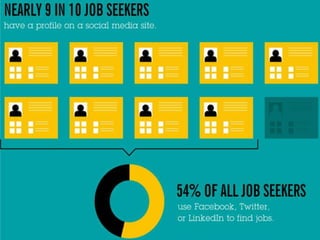
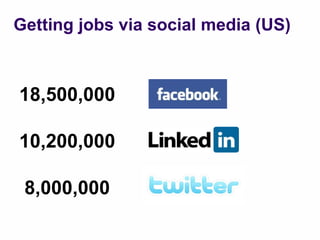
Getting jobs via social media (US)


18,500,000

10,200,000

 8,000,000
“Search and be
   found.”
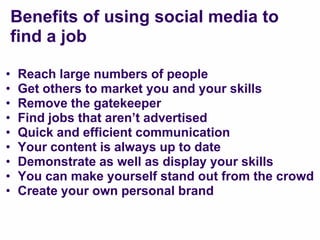
Benefits of using social media to
    find a job

•   Reach large numbers of people
•   Get others to market you and your skills
•   Remove the gatekeeper
•   Find jobs that aren‟t advertised
•   Quick and efficient communication
•   Your content is always up to date
•   Demonstrate as well as display your skills
•   You can make yourself stand out from the crowd
•   Create your own personal brand
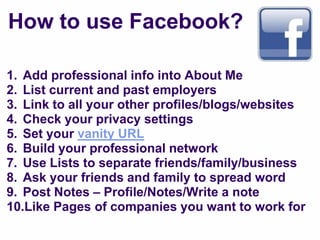
How to use Facebook?

1. Add professional info into About Me
2. List current and past employers
3. Link to all your other profiles/blogs/websites
4. Check your privacy settings
5. Set your vanity URL
6. Build your professional network
7. Use Lists to separate friends/family/business
8. Ask your friends and family to spread word
9. Post Notes – Profile/Notes/Write a note
10.Like Pages of companies you want to work for
What is LinkedIn?
Why use LinkedIn?
• Online CV
• Helps you build your network
• Raise your profile and develop personal brand

How to use LinkedIn
• Optimise your profile
• Obtain recommendations
• Use Find a job
• Use Advanced Search
• Join LinkedIn Groups
• Use LinkedIn Answers
Setting up

   Sign up at www.linkedin.com
   Complete your profile:
    • Profile pic, title, summary, experience,
       education, recommendations, URL, skills


   Import existing connections
   Check Colleagues, Classmates and People You
    May Know
“Be found”

Optimise profile with keyword/s:

1.   Headline
2.   Current work experience
3.   Past work experience
4.   Websites
5.   Summary
6.   Specialities
7.   Skills
8.   Unique personal URL
Using Groups

   Focus on Groups related to your sector

   See Groups You May Like

   Get noticed by adding value to discussions

   Set the frequency of Group digest emails
Using Answers

   Identify categories of expertise

   Ask and answer at least one question a week

   Connect with experts and those whose
    questions you answer

   Answer in depth questions via email/blog
Understand

   Tweets
   Followers
   Following/Friends
   Retweets (RT)
   Mentions/@ Messages
   Direct Messages (DMs)
   Hashtags #
   Lists
   Favorites
   Trending

See Glossary for more info
Optimal setup


   Add name
   Add location
   URL…that works
   Twitter name
   State your skills/looking for work in Bio
   Professional human photo
   Customised background
   Make yourself memorable!
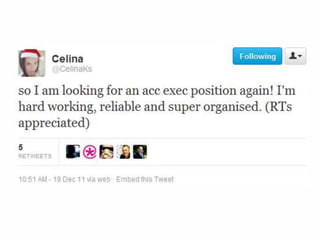
How to use Twitter to find work
1.   Follow companies you want to work for
2.   Engage with social influencers
3.   Use Advanced Search to find vacancies
4.   Download Tweet Deck and setup columns
5.   Network with industry professionals
6.   Follow local lists:
     •   Cheltenham tweeters (from @intranetfuture) and 2
     •   Glosbiz (from @glosjobs) and 2, 3, 4
.
Accounts to follow

 Recruitment agencies/sites

 @randstadchelt
 @glosjobs
 @jobscheltenham
 @gbsolutions
 @cheltenhamJCP
 @enjoy_your_job
Why use Google+?
• Target your jobs search using Circles
• Video interviews using Hangouts
• Add Google+ Pages to your Circles

Why use YouTube?
• Make yourself stand out
• Easily shared
• Employees get to see the real „you‟
Example of video CV
Tools
•   TweetDeck
•   Tweet Spinner
•   Bitly
•   Buffer
•   Facebook Search
•   LinkedIn Search
•   Twitter Search
•   Social Mention
•   Google Alerts
Homework
General
• Check out Can Facebook get you a job?
• Download Tweet Deck and setup columns
• Optimise profiles and check privacy settings
Facebook
• Set up Lists
• Post notes
Twitter
• Follow companies you‟d like to work for
• Network
LinkedIn
• Search jobs regularly
• Get involved in Groups/Answers
Questions?
Connect


01242 332016
intranetfuture.com
facebook.com/intranetfuture
@intranetfuture on Twitter
uk.linkedin.com/in/jonathanpollinger
info@intranetfuture.com
aweber.com/archive/intranetfuture
Google+ Profile and Page

Finding a job using social media

  • 1.
    Finding a jobusing social media Tuesday 20 December 2011
  • 2.
    Today‟s workshop  WiFi: BTBusinessHub-573: 8267301519 IFNET: socialmedia  Break: 10.45  End: 12.30  Link to slide deck will be emailed  Facilities  Fire exit  Name plates  Feedback form
  • 4.
    Getting jobs viasocial media (US) 18,500,000 10,200,000 8,000,000
  • 5.
  • 11.
    Benefits of usingsocial media to find a job • Reach large numbers of people • Get others to market you and your skills • Remove the gatekeeper • Find jobs that aren‟t advertised • Quick and efficient communication • Your content is always up to date • Demonstrate as well as display your skills • You can make yourself stand out from the crowd • Create your own personal brand
  • 12.
    How to useFacebook? 1. Add professional info into About Me 2. List current and past employers 3. Link to all your other profiles/blogs/websites 4. Check your privacy settings 5. Set your vanity URL 6. Build your professional network 7. Use Lists to separate friends/family/business 8. Ask your friends and family to spread word 9. Post Notes – Profile/Notes/Write a note 10.Like Pages of companies you want to work for
  • 14.
  • 16.
    Why use LinkedIn? •Online CV • Helps you build your network • Raise your profile and develop personal brand How to use LinkedIn • Optimise your profile • Obtain recommendations • Use Find a job • Use Advanced Search • Join LinkedIn Groups • Use LinkedIn Answers
  • 17.
    Setting up  Sign up at www.linkedin.com  Complete your profile: • Profile pic, title, summary, experience, education, recommendations, URL, skills  Import existing connections  Check Colleagues, Classmates and People You May Know
  • 18.
    “Be found” Optimise profilewith keyword/s: 1. Headline 2. Current work experience 3. Past work experience 4. Websites 5. Summary 6. Specialities 7. Skills 8. Unique personal URL
  • 19.
    Using Groups  Focus on Groups related to your sector  See Groups You May Like  Get noticed by adding value to discussions  Set the frequency of Group digest emails
  • 20.
    Using Answers  Identify categories of expertise  Ask and answer at least one question a week  Connect with experts and those whose questions you answer  Answer in depth questions via email/blog
  • 23.
    Understand  Tweets  Followers  Following/Friends  Retweets (RT)  Mentions/@ Messages  Direct Messages (DMs)  Hashtags #  Lists  Favorites  Trending See Glossary for more info
  • 24.
    Optimal setup  Add name  Add location  URL…that works  Twitter name  State your skills/looking for work in Bio  Professional human photo  Customised background  Make yourself memorable!
  • 25.
    How to useTwitter to find work 1. Follow companies you want to work for 2. Engage with social influencers 3. Use Advanced Search to find vacancies 4. Download Tweet Deck and setup columns 5. Network with industry professionals 6. Follow local lists: • Cheltenham tweeters (from @intranetfuture) and 2 • Glosbiz (from @glosjobs) and 2, 3, 4
  • 26.
  • 28.
    Accounts to follow Recruitment agencies/sites @randstadchelt @glosjobs @jobscheltenham @gbsolutions @cheltenhamJCP @enjoy_your_job
  • 29.
    Why use Google+? •Target your jobs search using Circles • Video interviews using Hangouts • Add Google+ Pages to your Circles Why use YouTube? • Make yourself stand out • Easily shared • Employees get to see the real „you‟
  • 30.
  • 31.
    Tools • TweetDeck • Tweet Spinner • Bitly • Buffer • Facebook Search • LinkedIn Search • Twitter Search • Social Mention • Google Alerts
  • 32.
    Homework General • Check outCan Facebook get you a job? • Download Tweet Deck and setup columns • Optimise profiles and check privacy settings Facebook • Set up Lists • Post notes Twitter • Follow companies you‟d like to work for • Network LinkedIn • Search jobs regularly • Get involved in Groups/Answers
  • 33.
  • 34.
    Connect 01242 332016 intranetfuture.com facebook.com/intranetfuture @intranetfuture onTwitter uk.linkedin.com/in/jonathanpollinger info@intranetfuture.com aweber.com/archive/intranetfuture Google+ Profile and Page

Editor's Notes

  • #7 ‘What can I give’ rather than ‘what can I get’