LinkedIn - The Story So Far


Founded in December 2002 and launched
             in May 2003

 As of 3 November 2011, LinkedIn reports
  more than 135 million registered users
in more than 200 countries and territories.
LinkedIn - The Story So Far


   It is the world’s largest business related
             Social Networking site.
In June 2011, LinkedIn had 47.6 million unique
         visitors, up 63 % from 2010
       77% of users are aged 25 plus
     The average household income of a
               user is £70k
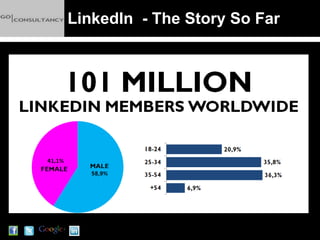
LinkedIn - The Story So Far
LinkedIn - Why Use It?

Create, develop and maintain business relationships
Create awareness of yourself among potential clients
and candidates (“personal branding”)
Demonstrate your competence and expertise to
establish the trust upon which business relationships
depend
LinkedIn - Why Use It?


Increase your Internet presence
Does a wonder to your SEO Efforts
Networking
Platform for showcasing your expertise
Create Ad’ Campaigns
Meet your clients/prospects through events
Build a company page as well as your profile
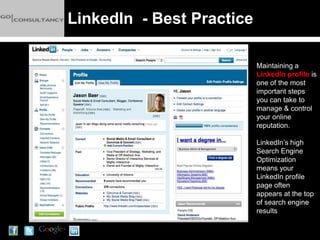
LinkedIn - Best Practice

                           Maintaining a
                           LinkedIn profile is
                           one of the most
                           important steps
                           you can take to
                           manage & control
                           your online
                           reputation.

                           LinkedIn’s high
                           Search Engine
                           Optimization
                           means your
                           LinkedIn profile
                           page often
                           appears at the top
                           of search engine
                           results
LinkedIn - Best Practice


Find Who You Know

Start with your existing contacts
Let LinkedIn scan your email address book to
find out who you know is on LinkedIn.

LinkedIn will NOT automatically send connection
requests to your contacts; you choose which
contacts to invite
LinkedIn - Best Practice


Personalise your URL

Change your LinkedIn profile URL (web address)
from the default setting to
www.linkedin.com/in/"yourname"
E.g.: www.linkedin.com/in/guyoutram

Helps people find you when they search for your
name within LinkedIn, Google and other search
engines
LinkedIn - Best Practice


Email Marketing
Include your LinkedIn URL in your email
signature

Add a Photo to Your Profile
Photographs personalize your profile and give
you social media credibility - Keep it professional
LinkedIn - Best Practice


Ask to Connect at Every Opportunity
Whenever you have business interactions with
people, ask them if they’re on LinkedIn and if
they’d like to connect

Send connection requests after meeting with
candidates and prospective clients
LinkedIn - Best Practice

Acquire Enough Connections
The more work experience you have the larger
your network should naturally be.

The more connections you have, the more
LinkedIn search results you will appear in (i.e.
makes you easier to be found).

Rule of thumb? Multiply your age by 10 and that
is the minimum number of connections that you
should aim for.
LinkedIn - Best Practice

Have a Profile Headline That “Brands” You

This is the single most important piece of
real estate on your LinkedIn Profile, and you
need to brand it as such!

Appears in search results next to your name
It’s your elevator speech in a few words.
Be creative! Think of something appealing other
than your title and company name?
LinkedIn - Best Practice

Fill Out As Much of Your Profile as You Can
Make Your Profile Rich with Keywords
Don’t hide - Change the settings on your profile to
“Full View”
Link to Yourself – Website, blog, Twitter feed
Give, and ask for, recommendations
LinkedIn - Best Practice

Update your Status Regularly and Strategically

Watch Others’ Status Updates to Initiate Contact

Join Groups

Post News within Groups

Ask Questions Strategically
LinkedIn - Best Practice

Answer Questions Posed by Others

Install Applications

Use the “Follow Company” Feature
7 Steps To LinkedIn Success:

1     Commit to connecting

With 5 current or lapsed business associates
every day. When you connect with people, you
and your business jumps to the forefront of their
mind. When that happens, they remember you
when someone needs the services you provide.
Connecting = Forefront of their Mind = Leads.
7 Steps To LinkedIn Success:

2   Join up with 17 relevant Groups.

Over the course of 30 days, Why 17? Because
it’s not 2 or 3, which is the number most people
join. The goal is to spread your visibility online
and the best way to do that is by joining 17
Groups, not just 2 or 3.
7 Steps To LinkedIn Success:

3     Answer 2 questions a week consistently.

Turning answers into leads is a longer term
strategy. It may take 5 answers to generate a
lead or it may take 25 or 50.
The key will be to keep at it consistently over
the long haul.
7 Steps To LinkedIn Success:

4     Start a discussion in each new Group

Every day for 5 days after you’ve joined with
them. After doing it for 5 days, you’ll have made
a few new friends in the group. If possible and
appropriate the discussion will include a link
back to your website to create more visibility.
If possible create an e- newsletter that they can
download. This captures their data for re-
marketing in the future.
7 Steps To LinkedIn Success:

5     Create a direct advert

The key here is to have a landing page on your
website where you can collect people’s contact
information when they sign up for something
you’re offering. You should write and create a
simple ad for this
7 Steps To LinkedIn Success:

6     Add applications on your Profile Page

If you want to make your Profile Page as
engaging as possible then adding Reading Lists
and SlideShare presentations are a good place
to start.
7 Steps To LinkedIn Success:

7     Review and repeat the above steps

The key to making LinkedIn work will be
consistency. It’s not easy,
You need to be there consistently so that you
can build up a following and an audience to
generate a steady stream of inbound leads.
LinkedIn – Other Tools:

Find Jobs & Post Jobs

Search companies

Polls – read & create surveys

Events – Find & Post
Next Time:


     What is Facebook?

     Why Use Facebook?

    How To Use Facebook

Facebook Success for Business

LinkedIn & Why You Should Embrace It

  • 1.
    LinkedIn - TheStory So Far Founded in December 2002 and launched in May 2003 As of 3 November 2011, LinkedIn reports more than 135 million registered users in more than 200 countries and territories.
  • 2.
    LinkedIn - TheStory So Far It is the world’s largest business related Social Networking site. In June 2011, LinkedIn had 47.6 million unique visitors, up 63 % from 2010 77% of users are aged 25 plus The average household income of a user is £70k
  • 3.
    LinkedIn - TheStory So Far
  • 4.
    LinkedIn - WhyUse It? Create, develop and maintain business relationships Create awareness of yourself among potential clients and candidates (“personal branding”) Demonstrate your competence and expertise to establish the trust upon which business relationships depend
  • 5.
    LinkedIn - WhyUse It? Increase your Internet presence Does a wonder to your SEO Efforts Networking Platform for showcasing your expertise Create Ad’ Campaigns Meet your clients/prospects through events Build a company page as well as your profile
  • 6.
    LinkedIn - BestPractice Maintaining a LinkedIn profile is one of the most important steps you can take to manage & control your online reputation. LinkedIn’s high Search Engine Optimization means your LinkedIn profile page often appears at the top of search engine results
  • 7.
    LinkedIn - BestPractice Find Who You Know Start with your existing contacts Let LinkedIn scan your email address book to find out who you know is on LinkedIn. LinkedIn will NOT automatically send connection requests to your contacts; you choose which contacts to invite
  • 8.
    LinkedIn - BestPractice Personalise your URL Change your LinkedIn profile URL (web address) from the default setting to www.linkedin.com/in/"yourname" E.g.: www.linkedin.com/in/guyoutram Helps people find you when they search for your name within LinkedIn, Google and other search engines
  • 9.
    LinkedIn - BestPractice Email Marketing Include your LinkedIn URL in your email signature Add a Photo to Your Profile Photographs personalize your profile and give you social media credibility - Keep it professional
  • 10.
    LinkedIn - BestPractice Ask to Connect at Every Opportunity Whenever you have business interactions with people, ask them if they’re on LinkedIn and if they’d like to connect Send connection requests after meeting with candidates and prospective clients
  • 11.
    LinkedIn - BestPractice Acquire Enough Connections The more work experience you have the larger your network should naturally be. The more connections you have, the more LinkedIn search results you will appear in (i.e. makes you easier to be found). Rule of thumb? Multiply your age by 10 and that is the minimum number of connections that you should aim for.
  • 12.
    LinkedIn - BestPractice Have a Profile Headline That “Brands” You This is the single most important piece of real estate on your LinkedIn Profile, and you need to brand it as such! Appears in search results next to your name It’s your elevator speech in a few words. Be creative! Think of something appealing other than your title and company name?
  • 13.
    LinkedIn - BestPractice Fill Out As Much of Your Profile as You Can Make Your Profile Rich with Keywords Don’t hide - Change the settings on your profile to “Full View” Link to Yourself – Website, blog, Twitter feed Give, and ask for, recommendations
  • 14.
    LinkedIn - BestPractice Update your Status Regularly and Strategically Watch Others’ Status Updates to Initiate Contact Join Groups Post News within Groups Ask Questions Strategically
  • 15.
    LinkedIn - BestPractice Answer Questions Posed by Others Install Applications Use the “Follow Company” Feature
  • 16.
    7 Steps ToLinkedIn Success: 1 Commit to connecting With 5 current or lapsed business associates every day. When you connect with people, you and your business jumps to the forefront of their mind. When that happens, they remember you when someone needs the services you provide. Connecting = Forefront of their Mind = Leads.
  • 17.
    7 Steps ToLinkedIn Success: 2 Join up with 17 relevant Groups. Over the course of 30 days, Why 17? Because it’s not 2 or 3, which is the number most people join. The goal is to spread your visibility online and the best way to do that is by joining 17 Groups, not just 2 or 3.
  • 18.
    7 Steps ToLinkedIn Success: 3 Answer 2 questions a week consistently. Turning answers into leads is a longer term strategy. It may take 5 answers to generate a lead or it may take 25 or 50. The key will be to keep at it consistently over the long haul.
  • 19.
    7 Steps ToLinkedIn Success: 4 Start a discussion in each new Group Every day for 5 days after you’ve joined with them. After doing it for 5 days, you’ll have made a few new friends in the group. If possible and appropriate the discussion will include a link back to your website to create more visibility. If possible create an e- newsletter that they can download. This captures their data for re- marketing in the future.
  • 20.
    7 Steps ToLinkedIn Success: 5 Create a direct advert The key here is to have a landing page on your website where you can collect people’s contact information when they sign up for something you’re offering. You should write and create a simple ad for this
  • 21.
    7 Steps ToLinkedIn Success: 6 Add applications on your Profile Page If you want to make your Profile Page as engaging as possible then adding Reading Lists and SlideShare presentations are a good place to start.
  • 22.
    7 Steps ToLinkedIn Success: 7 Review and repeat the above steps The key to making LinkedIn work will be consistency. It’s not easy, You need to be there consistently so that you can build up a following and an audience to generate a steady stream of inbound leads.
  • 23.
    LinkedIn – OtherTools: Find Jobs & Post Jobs Search companies Polls – read & create surveys Events – Find & Post
  • 24.
    Next Time: What is Facebook? Why Use Facebook? How To Use Facebook Facebook Success for Business