

17 September 2012
ebay for Beginners
Today’s workshop
 WiFi: MAXWAP_1
 11.00am - Coffee Break
 12.00pm - Close
 Facilities
 Cables
 Fire exit
 Please complete feedback form
 Link to slide deck will be emailed
@intranetfuture
@intranetfuture
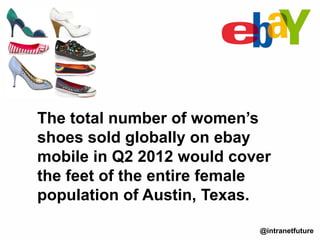
The total number of women’s
shoes sold globally on ebay
mobile in Q2 2012 would cover
the feet of the entire female
population of Austin, Texas.
Navigation
@intranetfuture
• What is ebay?
• What do you need?
• Getting started
• Selling
• Buying
• Top tips
• Search
• Beware – dangers!
• Questions
• World’s largest online marketplace
• Founded September 1995
• 200 million registered users
• More than 725,000 people make a full- or
part-time living on ebay
• Localised websites in 30 countries
• You can be a seller or a buyer
• Sellers can choose auction or ‘Buy it
now’
What is ebay?
@intranetfuture
• A PC, laptop or iPad
• A digital camera (if not using iPad)
• Internet connection
• Shipping supplies (eg
boxes, packets, tape, bubble wrap)
• Royal mail account or access to Post Office
What do you need?
@intranetfuture
• Go to ebay.co.uk
• Select Register or Sign in
• Register standard or business account
• Fill in contact details
• Choose user id, password, security
question and answer
• Select Submit then Confirm email
You’re all set to sell or buy on ebay!
Getting started
@intranetfuture
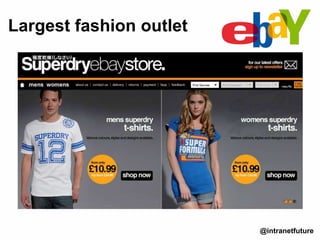
Largest fashion outlet
@intranetfuture
• Sign up with www.paypal.co.uk
• Decide what item you’re going to sell
• Search for similar items to get an idea on price
• Take 2 or 3 good photos
• Have all the important details about your item
to hand eg size, colour, condition
• Work out postage costs
Selling preparation
@intranetfuture
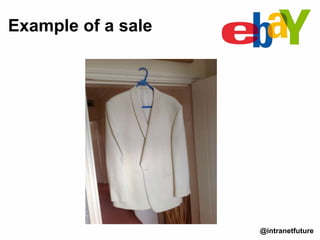
Example of a sale
@intranetfuture
• Click on Sell/Sell an item
• (top right of page)
• Select Quick sell or Advanced Sell
Selling
@intranetfuture
• Enter EAN – books, CDs, electronics or name of
item
• Click Start selling
• Enter title – be descriptive and include
keywords
• Select category
• Add at least one photo – add then browse to
your hard drive (cont.)
Quick sell
@intranetfuture
Quick sell (cont.)
@intranetfuture
• Add description – include keywords.
Use bold text with large font, list main
features but using bullets, stress
BENEFITS, include condition, shipping
info, guarantees
• Select Auction or Buy it now or both
• Choose listing duration
• Enter postage amount
• Add Payment details
• Save and preview
• List item after review
Advanced sell
@intranetfuture
• Title
• Subtitle
• Condition
• EAN
• Item specifics
• Add pictures
• Add description
• Listing designer
• Visitor counter
• Select Auction or Buy it now or both
• Choose listing duration
• Postage and packing
• Add Payment details
• Save and preview
• List item after review
• Select My ebay
• Review active listings
• Answer buyer’s questions
• Review number of watchers and
bids
• Edit listings as required
Reviewing/editing listing
@intranetfuture
• Ebay notifies you by email
• Check ebay fees – insertion plus final value
• PayPal takes 2.9% plus $0.30 transaction fee
• Receive payment
• Leave feedback
• Pack your item
• Post immediately
The sale
@intranetfuture
• Pay attention to what Top-rated Sellers do –
eg descriptions, pricing
• Spell and grammar check your listing
• Take good photos
• Use ebay iPad app
• Be a good communicator
• Give lots of feedback to buyers
• List in the evening and at weekends
• View videos on ebay YouTube channel
• Use Help and Customer Support
• Read ebay Selling Basics
Top tips for selling
@intranetfuture
@intranetfuture
• Find an item with Search or browse categories
or use ebay Fashion
• Read description carefully
• Check feedback – beware of buying from
people with less than 98% rating. Look at
number of ratings as well as feedback score
• Check photograph carefully
• ‘Buy it now’ (if offered) or Bid
• Pay immediately – via Pay Now button in
listing or email notification
Buying
@intranetfuture
• Use http://www.ebay.co.uk/fashion/
• Use ebay iPhone Fashion app
• Use ebay iPad, iPhone and Android apps
• Be a good communicator
• Give lots of feedback to sellers
• View videos on ebay YouTube channel
• Use Help and Customer Support
Top tips for buyers
@intranetfuture
• Search by category and filters
• Search for similar items when selling -
use completed listings filter
• See whether Buy it now or Auction most
successful
• Use search to obtain best price when
buying
Search
@intranetfuture
• Shilling
• Goods not as described scam
• Fake goods
• Fake emails
• False feedback
• Inflated postage
• Claiming goods not received
• Ship abroad to friend/relative scam
More advice: Ebay Safety Centre
ebay dangers
@intranetfuture
@intranetfuture
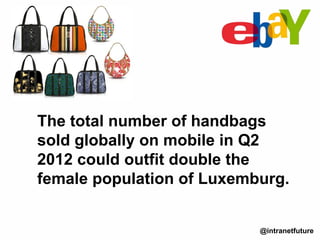
The total number of handbags
sold globally on mobile in Q2
2012 could outfit double the
female population of Luxemburg.
Advanced ebay
@intranetfuture
• ebay stats
• Selling
• Advanced tips for sellers
• Buying
• Advanced tips for buyers
• ebay shop benefits
• Setting up an ebay shop
• ebay tools
• Alternatives to ebay
• Attracting buyers
• Mobile ebay
• Using applications
• Questions
Questions?
@intranetfuture
Connect with
Jonathan Pollinger
+44 (0)1242 332016
intranetfuture.com
facebook.com/intranetfuture
@intranetfuture on Twitter
info@intranetfuture.com
uk.linkedin.com/in/jonathanpollinger
pinterest.com/intranetfuture
youtube.com/intranetfuture @intranetfuture

ebay for Beginners

  • 1.
  • 3.
    Today’s workshop  WiFi:MAXWAP_1  11.00am - Coffee Break  12.00pm - Close  Facilities  Cables  Fire exit  Please complete feedback form  Link to slide deck will be emailed @intranetfuture
  • 4.
    @intranetfuture The total numberof women’s shoes sold globally on ebay mobile in Q2 2012 would cover the feet of the entire female population of Austin, Texas.
  • 5.
    Navigation @intranetfuture • What isebay? • What do you need? • Getting started • Selling • Buying • Top tips • Search • Beware – dangers! • Questions
  • 6.
    • World’s largestonline marketplace • Founded September 1995 • 200 million registered users • More than 725,000 people make a full- or part-time living on ebay • Localised websites in 30 countries • You can be a seller or a buyer • Sellers can choose auction or ‘Buy it now’ What is ebay? @intranetfuture
  • 7.
    • A PC,laptop or iPad • A digital camera (if not using iPad) • Internet connection • Shipping supplies (eg boxes, packets, tape, bubble wrap) • Royal mail account or access to Post Office What do you need? @intranetfuture
  • 8.
    • Go toebay.co.uk • Select Register or Sign in • Register standard or business account • Fill in contact details • Choose user id, password, security question and answer • Select Submit then Confirm email You’re all set to sell or buy on ebay! Getting started @intranetfuture
  • 9.
  • 10.
    • Sign upwith www.paypal.co.uk • Decide what item you’re going to sell • Search for similar items to get an idea on price • Take 2 or 3 good photos • Have all the important details about your item to hand eg size, colour, condition • Work out postage costs Selling preparation @intranetfuture
  • 11.
    Example of asale @intranetfuture
  • 12.
    • Click onSell/Sell an item • (top right of page) • Select Quick sell or Advanced Sell Selling @intranetfuture
  • 13.
    • Enter EAN– books, CDs, electronics or name of item • Click Start selling • Enter title – be descriptive and include keywords • Select category • Add at least one photo – add then browse to your hard drive (cont.) Quick sell @intranetfuture
  • 14.
    Quick sell (cont.) @intranetfuture •Add description – include keywords. Use bold text with large font, list main features but using bullets, stress BENEFITS, include condition, shipping info, guarantees • Select Auction or Buy it now or both • Choose listing duration • Enter postage amount • Add Payment details • Save and preview • List item after review
  • 15.
    Advanced sell @intranetfuture • Title •Subtitle • Condition • EAN • Item specifics • Add pictures • Add description • Listing designer • Visitor counter • Select Auction or Buy it now or both • Choose listing duration • Postage and packing • Add Payment details • Save and preview • List item after review
  • 16.
    • Select Myebay • Review active listings • Answer buyer’s questions • Review number of watchers and bids • Edit listings as required Reviewing/editing listing @intranetfuture
  • 17.
    • Ebay notifiesyou by email • Check ebay fees – insertion plus final value • PayPal takes 2.9% plus $0.30 transaction fee • Receive payment • Leave feedback • Pack your item • Post immediately The sale @intranetfuture
  • 18.
    • Pay attentionto what Top-rated Sellers do – eg descriptions, pricing • Spell and grammar check your listing • Take good photos • Use ebay iPad app • Be a good communicator • Give lots of feedback to buyers • List in the evening and at weekends • View videos on ebay YouTube channel • Use Help and Customer Support • Read ebay Selling Basics Top tips for selling @intranetfuture
  • 19.
  • 20.
    • Find anitem with Search or browse categories or use ebay Fashion • Read description carefully • Check feedback – beware of buying from people with less than 98% rating. Look at number of ratings as well as feedback score • Check photograph carefully • ‘Buy it now’ (if offered) or Bid • Pay immediately – via Pay Now button in listing or email notification Buying @intranetfuture
  • 21.
    • Use http://www.ebay.co.uk/fashion/ •Use ebay iPhone Fashion app • Use ebay iPad, iPhone and Android apps • Be a good communicator • Give lots of feedback to sellers • View videos on ebay YouTube channel • Use Help and Customer Support Top tips for buyers @intranetfuture
  • 22.
    • Search bycategory and filters • Search for similar items when selling - use completed listings filter • See whether Buy it now or Auction most successful • Use search to obtain best price when buying Search @intranetfuture
  • 23.
    • Shilling • Goodsnot as described scam • Fake goods • Fake emails • False feedback • Inflated postage • Claiming goods not received • Ship abroad to friend/relative scam More advice: Ebay Safety Centre ebay dangers @intranetfuture
  • 24.
    @intranetfuture The total numberof handbags sold globally on mobile in Q2 2012 could outfit double the female population of Luxemburg.
  • 25.
    Advanced ebay @intranetfuture • ebaystats • Selling • Advanced tips for sellers • Buying • Advanced tips for buyers • ebay shop benefits • Setting up an ebay shop • ebay tools • Alternatives to ebay • Attracting buyers • Mobile ebay • Using applications • Questions
  • 26.
  • 27.
    Connect with Jonathan Pollinger +44(0)1242 332016 intranetfuture.com facebook.com/intranetfuture @intranetfuture on Twitter info@intranetfuture.com uk.linkedin.com/in/jonathanpollinger pinterest.com/intranetfuture youtube.com/intranetfuture @intranetfuture

Editor's Notes

  • #9 Id will be displayed – used in all transactions – poss use to reflect business
  • #11 Id will be displayed – used in all transactions – poss use to reflect business
  • #13 Id will be displayed – used in all transactions – poss use to reflect businessListing duration – short for in demand items. Longer for high value items.
  • #14 Id will be displayed – used in all transactions – poss use to reflect businessListing duration – short for in demand items. Longer for high value items.
  • #23 Red prices are items that didn’t sell. Green prices sold.