Creekside Christian Church May 2008
To stress the power of technology To highlight the connection between  business and technology To demonstrate the wealth of resources  To teach you how to leverage the tools for your job search  To educate you on new trends
Technology and its tools constantly change Business practices change as a result of technology evolution Corporate recruiting, and candidate job searching techniques not an exception The internet has and will continue to revolutionize how we do everything
The Internet is: A Free University A One Stop Shop for ALL information There IS NOTHING you can’t find on the internet It’s Power and Potential is Endless Each Resource has a potential function in your job search
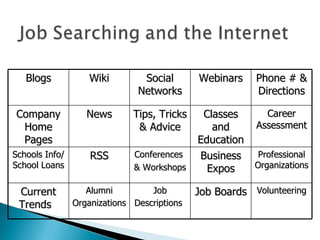
Blogs Wiki Social Networks Webinars Phone # & Directions Company Home Pages News Tips, Tricks & Advice Classes and Education Career Assessment Schools Info/ School Loans RSS Conferences  & Workshops Business Expos Professional Organizations  Current Trends  Alumni Organizations   Job Descriptions   Job Boards Volunteering
So much of today’s businesses thrive on technology and internet use/presence If you are currently employed you may be able to survive with limited knowledge If you are unemployed – a competitive advantage is feeling comfortable and being knowledgeable with use and function of internet or technology tools.
While Unemployed or at Home…  Use the Internet to: Explore and experiment Get smart and hone your skills Network Get Involved It’s what a hiring manager would want you doing on your down time!
Thinks of your resources in categories: 1.)Prework  2.)Work  3.)Execution Google or Yahoo  EVERYTHING!   Most sites are free (Free info is always available)  Many require registration/membership This could be part of your pre-work
Where the “new” meets the “old” The “new” being driven by: Transparency Accessibility Sound Bites Being and staying connected The “old” – Relationships and Networking
Why is “ networking ” and “ relationships ”  so important in multiple realms of work? i.e. Landing a job Getting promoted Growing your business Getting mentored or tutored
Networking is a skill set You must develop it  You must practice it  It’s very acceptable  Builds trust and loyalty It’s the differentiator when all else is equal
The new cultural norm: (Driven by Gen Y) It’s acceptable: “ To Be Out There” “ Share with others” “ Show your True Self” “ Be Accessible” “ To Approach and be Approached”
The newest “ communication medium”  that thrives on the concepts of transparency and networking A simple search can land you over 400 social networking sites on everything from Arts to Video Sharing Facebook My Space YouTube Twitter LinkedIn Badoo Spoke Black Planet MiGente For Job Searches focus on Social Networks that are either very popular or are strictly for “Business” purposes  only .  i.e. LinkedIn, FaceBook, MySpace, Twitter (Watch video: Social Networking in Plain English)
Currently the most widely used Social Network for “BUSSINESS” Networking  Growing your Business Meeting Colleagues Information Sharing  Recruiting and Job Seeking Advertising  (See YouTube Video - What is Linked In?)
By being on LinkedIn you are immediately telling recruiters or hiring mangers: You keep up with today’s popular business trends You are in the know You get it!  You are savvy You embrace change You are taking action You are networking  You are leveraging the tools available
Go to  www.linkedin.com  and register Check boxes on “How do you want to use  your LinkedIn? page. Go to Profile and begin filling it out See Profile Completeness bar – aim for 100% Create a customized URL! Learn about all your options and setting choices
A Mini Resume Your Picture (Make it a good one)  Your Groups *Your Recommendations - Go out and get them! Your Blog Your Contacts Your Questions and Answers
Click on Contacts Click on Add Connections at the top right page.  Go to import contacts.  You can import your contacts from accounts like Google, Yahoo, Hotmail, or AOL.  If you choose import from databases like Outlook, Lotus, Palm, follow instructions based on your program to first export a file and then upload the data to LinkedIn.  You can also add contacts using other tabs to individually invite others or you can find colleagues already on LinkedIn and invite them to your network. Tips for growing your network: Join Groups! Check out Network Statistics to be blown away!
Degrees of Proximity  Identifies how close this person is to you within your network  Shows you how many people your contact is connected to Receive update messages on any contact’s info change You can e-mail directly
Click on Groups Find Groups Directory and click on “Find Group” Search for a group using any key words like Jacksonville, Sales, Realtor, Ice Cream Why Join? - Because you want to expand your network.  Because you want people adding you to theirs.  Because it’s a source of information and education.  It gives you an opportunity to stay connected to the people and the subjects that matter most to you
Click on the Jobs Link Do a search in one of two ways: from  Simple Search: By Zip code - see how you can track the connections from a simple search Advanced Search: Specific, Uses more Filters The “Who do you know?...” Feature allows you to see who you can possibly contact and leverage for information and opportunity
Recruiters are really leveraging LinkedIn. They do people searches and contact people directly They can find new people by doing key word searches.  Jobs posted by recruiters shows recruiter info so you can check if any of your contacts is connected to them.  Recruiters who post on LinkedIn get notices of who replies to their LinkedIn job postings.  Recruiters often send out job posting to specific people or to a group inbox. Your contacts can forward jobs to their contacts.
When you do a company search on LinkedIn you will receive:  Assortment of company info and links List of current employees connected to you with job their job titles  List of former employees connected to you with their current job titles  List of most recent employee’s hired by the company with their current job titles Why is this important?...
A forum for: Dialogue Showcasing of expertise Sharing of information  Making new connections  All your Answers and Questions are posted and tracked for display Be careful what you write and how you write it.
Complete all sections in your profile Keep info accurate and up to date Connect with Former Mgrs, Co-workers and Partners Look and compare your profile to your colleagues Get Referrals from past bosses and co-workers Use LinkedIn Q & A to show expertise Focus on Accomplishments rather than duties Add all relevant job search keywords, buzzwords and skills sets Subscribe to LinkedIn JobInsider
Additional Social Networks that allow relationship and networking  Facebook: Create a Professional or business Mailing list and adjust the settings of what can be seen and read Twitter: A Micro blogging site that allows people to follow each other and know what they are doing at all times - “What are doing?
Saves time on searching surfing the web You create a dumping ground for all the new stuff posted on your favorite websites. Job Boards all have RSS Feeds that allow the job posting you are interested in reviewing come to you.

C:\Fakepath\Leveraging Technology For Your Job Search

  • 1.
  • 2.
    To stress thepower of technology To highlight the connection between business and technology To demonstrate the wealth of resources To teach you how to leverage the tools for your job search To educate you on new trends
  • 3.
    Technology and itstools constantly change Business practices change as a result of technology evolution Corporate recruiting, and candidate job searching techniques not an exception The internet has and will continue to revolutionize how we do everything
  • 4.
    The Internet is:A Free University A One Stop Shop for ALL information There IS NOTHING you can’t find on the internet It’s Power and Potential is Endless Each Resource has a potential function in your job search
  • 5.
    Blogs Wiki SocialNetworks Webinars Phone # & Directions Company Home Pages News Tips, Tricks & Advice Classes and Education Career Assessment Schools Info/ School Loans RSS Conferences & Workshops Business Expos Professional Organizations Current Trends Alumni Organizations Job Descriptions Job Boards Volunteering
  • 6.
    So much oftoday’s businesses thrive on technology and internet use/presence If you are currently employed you may be able to survive with limited knowledge If you are unemployed – a competitive advantage is feeling comfortable and being knowledgeable with use and function of internet or technology tools.
  • 7.
    While Unemployed orat Home… Use the Internet to: Explore and experiment Get smart and hone your skills Network Get Involved It’s what a hiring manager would want you doing on your down time!
  • 8.
    Thinks of yourresources in categories: 1.)Prework 2.)Work 3.)Execution Google or Yahoo EVERYTHING! Most sites are free (Free info is always available) Many require registration/membership This could be part of your pre-work
  • 9.
    Where the “new”meets the “old” The “new” being driven by: Transparency Accessibility Sound Bites Being and staying connected The “old” – Relationships and Networking
  • 10.
    Why is “networking ” and “ relationships ” so important in multiple realms of work? i.e. Landing a job Getting promoted Growing your business Getting mentored or tutored
  • 11.
    Networking is askill set You must develop it You must practice it It’s very acceptable Builds trust and loyalty It’s the differentiator when all else is equal
  • 12.
    The new culturalnorm: (Driven by Gen Y) It’s acceptable: “ To Be Out There” “ Share with others” “ Show your True Self” “ Be Accessible” “ To Approach and be Approached”
  • 13.
    The newest “communication medium” that thrives on the concepts of transparency and networking A simple search can land you over 400 social networking sites on everything from Arts to Video Sharing Facebook My Space YouTube Twitter LinkedIn Badoo Spoke Black Planet MiGente For Job Searches focus on Social Networks that are either very popular or are strictly for “Business” purposes only . i.e. LinkedIn, FaceBook, MySpace, Twitter (Watch video: Social Networking in Plain English)
  • 14.
    Currently the mostwidely used Social Network for “BUSSINESS” Networking Growing your Business Meeting Colleagues Information Sharing Recruiting and Job Seeking Advertising (See YouTube Video - What is Linked In?)
  • 15.
    By being onLinkedIn you are immediately telling recruiters or hiring mangers: You keep up with today’s popular business trends You are in the know You get it! You are savvy You embrace change You are taking action You are networking You are leveraging the tools available
  • 16.
    Go to www.linkedin.com and register Check boxes on “How do you want to use your LinkedIn? page. Go to Profile and begin filling it out See Profile Completeness bar – aim for 100% Create a customized URL! Learn about all your options and setting choices
  • 17.
    A Mini ResumeYour Picture (Make it a good one) Your Groups *Your Recommendations - Go out and get them! Your Blog Your Contacts Your Questions and Answers
  • 18.
    Click on ContactsClick on Add Connections at the top right page. Go to import contacts. You can import your contacts from accounts like Google, Yahoo, Hotmail, or AOL. If you choose import from databases like Outlook, Lotus, Palm, follow instructions based on your program to first export a file and then upload the data to LinkedIn. You can also add contacts using other tabs to individually invite others or you can find colleagues already on LinkedIn and invite them to your network. Tips for growing your network: Join Groups! Check out Network Statistics to be blown away!
  • 19.
    Degrees of Proximity Identifies how close this person is to you within your network Shows you how many people your contact is connected to Receive update messages on any contact’s info change You can e-mail directly
  • 20.
    Click on GroupsFind Groups Directory and click on “Find Group” Search for a group using any key words like Jacksonville, Sales, Realtor, Ice Cream Why Join? - Because you want to expand your network. Because you want people adding you to theirs. Because it’s a source of information and education. It gives you an opportunity to stay connected to the people and the subjects that matter most to you
  • 21.
    Click on theJobs Link Do a search in one of two ways: from Simple Search: By Zip code - see how you can track the connections from a simple search Advanced Search: Specific, Uses more Filters The “Who do you know?...” Feature allows you to see who you can possibly contact and leverage for information and opportunity
  • 22.
    Recruiters are reallyleveraging LinkedIn. They do people searches and contact people directly They can find new people by doing key word searches. Jobs posted by recruiters shows recruiter info so you can check if any of your contacts is connected to them. Recruiters who post on LinkedIn get notices of who replies to their LinkedIn job postings. Recruiters often send out job posting to specific people or to a group inbox. Your contacts can forward jobs to their contacts.
  • 23.
    When you doa company search on LinkedIn you will receive: Assortment of company info and links List of current employees connected to you with job their job titles List of former employees connected to you with their current job titles List of most recent employee’s hired by the company with their current job titles Why is this important?...
  • 24.
    A forum for:Dialogue Showcasing of expertise Sharing of information Making new connections All your Answers and Questions are posted and tracked for display Be careful what you write and how you write it.
  • 25.
    Complete all sectionsin your profile Keep info accurate and up to date Connect with Former Mgrs, Co-workers and Partners Look and compare your profile to your colleagues Get Referrals from past bosses and co-workers Use LinkedIn Q & A to show expertise Focus on Accomplishments rather than duties Add all relevant job search keywords, buzzwords and skills sets Subscribe to LinkedIn JobInsider
  • 26.
    Additional Social Networksthat allow relationship and networking Facebook: Create a Professional or business Mailing list and adjust the settings of what can be seen and read Twitter: A Micro blogging site that allows people to follow each other and know what they are doing at all times - “What are doing?
  • 27.
    Saves time onsearching surfing the web You create a dumping ground for all the new stuff posted on your favorite websites. Job Boards all have RSS Feeds that allow the job posting you are interested in reviewing come to you.