Doppler Radar System
Team Red
Manual Lopez
Gerardo Sanchez
Hong Li
EEC 134AB: Senior Design
University of California, Davis
June 10, 2016
Instructor: Dr. Xiaoguang Liu
TA: Hao Wang
1
Table of Conents
1. Abstract
2. Introduction
3. Design
3.1. Low Pass Filter
3.2. Amplifiers
3.3. VCO
3.4. Splitter​ and Mixer
3.5. Final Design
4. Cost
5. Conclusion
6. References
2
Abstract
The purpose of this Senior Design course is to allow us to showcase what we have learned throughout
our years as Engineering students at UC Davis. This course intrigued us becuase of the challenges that it
presented. It required us to use the skills learned in most, if not all, of our classes throughout our college years.
Our main objective for 134 was to design, build, modify and implement a radar gun system. The first quarter
introduced us to the different components of a radar and the techniques we could use to debug any issues that
arose with desgining and building our project. We were given two options at the end of the first quarter: Design
a UAV-based radar system or improve on the radar gun that we built during the first quarter. We unanimously
decided to take on the challenge of improving our current system by making it more accurate, lightweight, and
easier to use. All this was done by replacing some of our components with improved Printed Cricuit Board
versions.
Introduction
Design
The initial design of the system was not too difficult. Following the step-by-step Quarter one lab
tutorials, we were able to build a system that gave us accurate results. This system was built using the given
components, and a protoboard, along with some jumper cables for connections and an Arduino Teensy
microcontroller. Form here, we bagan making improvements by replacing the components that we had with new
Printed Cricuit Board versions of the components. We did two PCB runs, both ordered from Bay Area Circuits.
Along with switching out the components with PCBs, we were also able to make our system more compact and
lightweight. Replacing the VCO, two amps, and the Low Pass Filter definately gave a more lightweigth system.
We approached the system as individual modules that are later connected together to form the entire system. We
designed and soldered amps, VCO, Mixer, Splitter, and LPF all individually. We saw this as an advatage. If one
of the components were to either burn out or not work, we could easily switch out that PCB for a different
component. Another advatage is that it is much easier to debug this way. We are able to disconnect indivudals
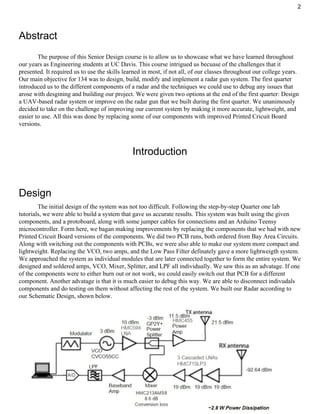
components and do testing on them without affecting the rest of the system. We built our Radar according to
our Schematic Design, shown below.
3
Low Pass FIlter
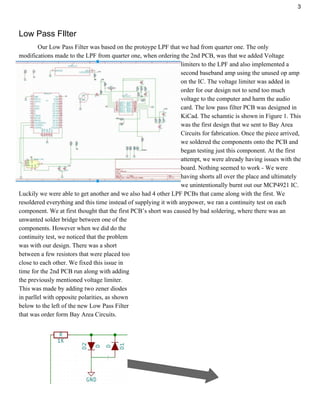
Our Low Pass Filter was based on the protoype LPF that we had from quarter one. The only
modifications made to the LPF from quarter one, when ordering the 2nd PCB, was that we added Voltage
limiters to the LPF and also implemented a
second baseband amp using the unused op amp
on the IC. The voltage limiter was added in
order for our design not to send too much
voltage to the computer and harm the audio
card. The low pass filter PCB was designed in
KiCad. The schamtic is shown in Figure 1. This
was the first design that we sent to Bay Area
Circuits for fabrication. Once the piece arrived,
we soldered the components onto the PCB and
began testing just this component. At the first
attempt, we were already having issues with the
board. Nothing seemed to work - We were
having shorts all over the place and ultimately
we unintentionally burnt out our MCP4921 IC.
Luckily we were able to get another and we also had 4 other LPF PCBs that came along with the first. We
resoldered everything and this time instead of supplying it with anypower, we ran a continuity test on each
component. We at first thought that the first PCB’s short was caused by bad soldering, where there was an
unwanted solder bridge between one of the
components. However when we did do the
continuity test, we noticed that the problem
was with our design. There was a short
between a few resistors that were placed too
close to each other. We fixed this issue in
time for the 2nd PCB run along with adding
the previously mentioned voltage limiter.
This was made by adding two zener diodes
in parllel with opposite polarities, as shown
below to the left of the new Low Pass Filter
that was order form Bay Area Circuits.
4
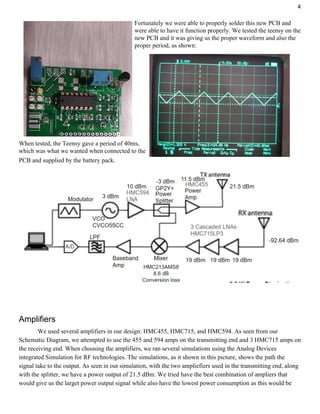
Fortunately we were able to properly solder this new PCB and
were able to have it function properly. We tested the teensy on the
new PCB and it was giving us the proper waveform and also the
proper period, as shown:
When tested, the Teensy gave a period of 40ms,
which was what we wanted when connected to the
PCB and supplied by the battery pack.
Amplifiers
We used several amplifiers in our design: HMC455, HMC715, and HMC594. As seen from our
Schematic Diagram, we attempted to use the 455 and 594 amps on the transmitting end and 3 HMC715 amps on
the receiving end. When choosing the amplifiers, we ran several simulations using the Analog Devices
integrated Simulation for RF technologies. The simulations, as it shown in this picture, shows the path the
signal take to the output. As seen in out simulation, with the two ampliefiers used in the transmitting end, along
with the splitter, we have a power output of 21.5 dBm. We tried have the best combination of ampliers that
would give us the larget power output signal while also have the lowest power consumption as this would be
5
taken into account when doing the competition. There was also a recieving-end simulation that was run using
the Analog Devices RF simulator. This end of the simulation gave us a power input of about -92dBm. This was
a good signal input - it allowed us to get a good reading of the position of the object.
VCO
We used a crystek Corp Voltage Controlled Oscillator. The VCO was the CVCO55CC which had the
capability of having an input frequency of 2300MHz - 2400MHz, which was great for our usage as we
centralized our frequency of the antennas as being 2400Mhz. This VCO had a Tuning Voltage range of 0.3 to
4.7V and had a power Output of 3dBm. This VCO was chosen becasue of it’s high output Power which we
wanted to be high since it was connecting to our transmitting end. We wanted a high output signal to be able to
produce good results. The VCO PCB was simple to make, eventhough we had an error with the first PCB
design. As can be seen in the following picture: In the first run of our PCB design, we failed to notice a critical
mistake in our design. To the left we have our PCB and to the write, we have the VCO that was ordered, As can
be seen by the picture, we incorrectly designed the PCB to mirror the bottom of the VCO. This prevented us
from soldering the VCO onto the Board and subsequently prevented us from testing our desgin with the VCO
attached. As soon as we noticed this error, we corrected it and ordered a new PCB on the 2nd run.
6
Splitter and Mixer
The final two components used in our design was the splitter and the Mixer. The Splitter was a
MiniCircuits GP2Y+. As can be seen from out schematic design, the Splitter was used in connecing the
HMC455 amplier and the Mixer, to the HMC549 amplifier. We chose this specific splitter becasuse it’s
operating frequency was well within our 2.4Ghz frequency and also because of its relatively low insertion loss.
This splitter has a typical insertion loss of 1.5dB, which was the smallest for a splitter that we were able to find
at a low price. There were more with virtually no loss but they were extremely expensive. The Mixer used was
the Analog Devices HMC213. This component had good and bad specifications to it. This component is a good
gain component which is why we choose it. It has a typical gain of about 10dBm. However the the sacrafice to
this was an 8.5dBm conversion loss.
Final Design
Once we had tested and debugged our individual components, we connected them together to form our
final design. We followed the design schatic earlier to connect the components. We used the provided SMA
connector to connect the components. At first, out design was not working as expected; there were instances
were the radar was not able to read any movement whether we were close or not. We used the big metal sheet
provided to us by the TAs, to test our design. One of us started walking sloly back and forth for about 20m and
the radar did not pick up anything. All we would get were red distortions on the first few seconds and the last
7
few seconds when we ran tests. As can be seen by the photos below, it would pick up something but not after
read anything after we moved. Even with the clutter rejection, the results weren’t desirable. What we then did
was switch out our PCB VCO with the VCO given at the beigning of the quarter, however when we tested this
design, we were getting about the same results as we did when we had out PCB VCO. We finally decided to
keep the MiniCircuits PCB and switch out
some of our amplifiers with the ones
provided by the professor at the beginning
of the quarter, this gave out some decent
looking results. As can be seen in the
image below, our radar was able to pick up
some movement, although there is clearly
lots of distortion and noise and the reading
isn’t as crisp and as accurate as we wanted
it to be. This was done at the range of
about 20m again and as can be seen, the
reading for the distance was also not that
accurate, but it was better than the previous
test. An important abnormality to note,
however, in this picture occurs at the
begining of our tests beteen seconds 0 and 5. While testing our desgin, there was an SUV that made it’s way out
of the parkign lot located by Bainer hall, and sped off in the direction that our radar was pointed; this was
noteably caught by the radar. This was exciting and made us esctatic to have a radar that was able to detect the
movement of a car as far as it did. The car was in the range of the radar for about 4 seconds and was going
baout 5 Miles an hour. This is relatively what the radar reading shows in the picture above. The speed distance
of the vehicle grew as the time increased and it was captured by our radar. Although these gave decent results,
we were not satisfied with how blurry and unclear the distance was shown in the graph. We then discussed
possibilities to improve our accuracy and we agreed that adding another amplifier might give us a better
reading. Instead of adding another Low-noise amplifier, we deicded to use another amp from the baseband. This
gave the following results which we thought were better than anything we had received thus far.: As seen in the
picture below, we have a clear understanding of position and time of the moving object.
8
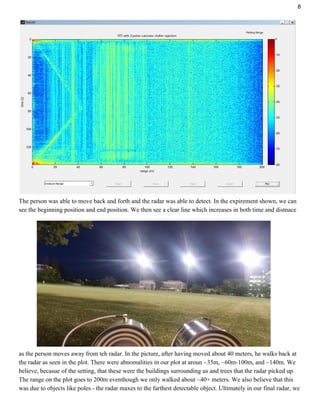
The person was able to move back and forth and the radar was able to detect. In the expirement shown, we can
see the beginning position and end position. We then see a clear line which increases in both time and distnace
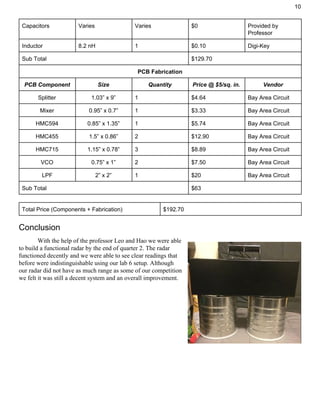
as the person moves away from teh radar. In the picture, after having moved about 40 meters, he walks back at
the radar as seen in the plot. There were abnomalities in our plot at aroun ~35m, ~60m-100m, and ~140m. We
believe, becasue of the setting, that these were the buildings surrounding us and trees that the radar picked up.
The range on the plot goes to 200m eventhough we only walked about ~40+ meters. We also believe that this
was due to objects like poles - the radar maxes to the farthest detectable object. Ultimately in our final radar, we
9
used a combination of our Printed Circuit Board amplifers and the lab 6 amplifiers.These paired with our PCB
Low Pass Filter, Baseband, and VCO lead to the best results.
Cost
We were able to get a lot of our components, especially the expensive ones, for free as samples from
vendors, or we were able to get some from the professor. below is a list of materials we used and what it cost us
to obtain them.
Product Description Quantity Price Vendor
SMA Connectors N/A 15 $0 Provided by
Professor
VCO CVCO55CC
2300-2400 Hz
1 $32.98
Mixer HMC213 1 $11.90 Mouser
Splitter GP2Y+ 8 $0 (Free samples) MiniCircuits
Amplifier HMC594 1 $42.42 Digi-Key
Amplifier HMC715 3 $30.99 Digi-Key
Amplifier HMC455 1 $11.31 Digi-Key
Resistors Varies Vaires $0 Provided by
Professor
10
Capacitors Varies Varies $0 Provided by
Professor
Inductor 8.2 nH 1 $0.10 Digi-Key
Sub Total $129.70
PCB Fabrication
PCB Component Size Quantity Price @ $5/sq. in. Vendor
Splitter 1.03” x 9” 1 $4.64 Bay Area Circuit
Mixer 0.95” x 0.7” 1 $3.33 Bay Area Circuit
HMC594 0.85” x 1.35” 1 $5.74 Bay Area Circuit
HMC455 1.5” x 0.86” 2 $12.90 Bay Area Circuit
HMC715 1.15” x 0.78” 3 $8.89 Bay Area Circuit
VCO 0.75” x 1” 2 $7.50 Bay Area Circuit
LPF 2” x 2” 1 $20 Bay Area Circuit
Sub Total $63
Total Price (Components + Fabrication) $192.70
Conclusion
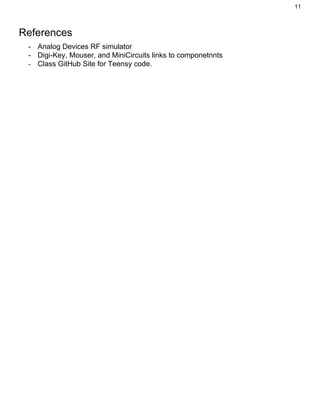
With the help of the professor Leo and Hao we were able
to build a functional radar by the end of quarter 2. The radar
functioned decently and we were able to see clear readings that
before were indistinguishable using our lab 6 setup. Although
our radar did not have as much range as some of our competition
we felt it was still a decent system and an overall improvement.
11
References
- Analog Devices RF simulator
- Digi-Key, Mouser, and MiniCircuits links to componetnnts
- Class GitHub Site for Teensy code.

FinalLabreport

  • 1.
    Doppler Radar System TeamRed Manual Lopez Gerardo Sanchez Hong Li EEC 134AB: Senior Design University of California, Davis June 10, 2016 Instructor: Dr. Xiaoguang Liu TA: Hao Wang
  • 2.
    1 Table of Conents 1.Abstract 2. Introduction 3. Design 3.1. Low Pass Filter 3.2. Amplifiers 3.3. VCO 3.4. Splitter​ and Mixer 3.5. Final Design 4. Cost 5. Conclusion 6. References
  • 3.
    2 Abstract The purpose ofthis Senior Design course is to allow us to showcase what we have learned throughout our years as Engineering students at UC Davis. This course intrigued us becuase of the challenges that it presented. It required us to use the skills learned in most, if not all, of our classes throughout our college years. Our main objective for 134 was to design, build, modify and implement a radar gun system. The first quarter introduced us to the different components of a radar and the techniques we could use to debug any issues that arose with desgining and building our project. We were given two options at the end of the first quarter: Design a UAV-based radar system or improve on the radar gun that we built during the first quarter. We unanimously decided to take on the challenge of improving our current system by making it more accurate, lightweight, and easier to use. All this was done by replacing some of our components with improved Printed Cricuit Board versions. Introduction Design The initial design of the system was not too difficult. Following the step-by-step Quarter one lab tutorials, we were able to build a system that gave us accurate results. This system was built using the given components, and a protoboard, along with some jumper cables for connections and an Arduino Teensy microcontroller. Form here, we bagan making improvements by replacing the components that we had with new Printed Cricuit Board versions of the components. We did two PCB runs, both ordered from Bay Area Circuits. Along with switching out the components with PCBs, we were also able to make our system more compact and lightweight. Replacing the VCO, two amps, and the Low Pass Filter definately gave a more lightweigth system. We approached the system as individual modules that are later connected together to form the entire system. We designed and soldered amps, VCO, Mixer, Splitter, and LPF all individually. We saw this as an advatage. If one of the components were to either burn out or not work, we could easily switch out that PCB for a different component. Another advatage is that it is much easier to debug this way. We are able to disconnect indivudals components and do testing on them without affecting the rest of the system. We built our Radar according to our Schematic Design, shown below.
  • 4.
    3 Low Pass FIlter OurLow Pass Filter was based on the protoype LPF that we had from quarter one. The only modifications made to the LPF from quarter one, when ordering the 2nd PCB, was that we added Voltage limiters to the LPF and also implemented a second baseband amp using the unused op amp on the IC. The voltage limiter was added in order for our design not to send too much voltage to the computer and harm the audio card. The low pass filter PCB was designed in KiCad. The schamtic is shown in Figure 1. This was the first design that we sent to Bay Area Circuits for fabrication. Once the piece arrived, we soldered the components onto the PCB and began testing just this component. At the first attempt, we were already having issues with the board. Nothing seemed to work - We were having shorts all over the place and ultimately we unintentionally burnt out our MCP4921 IC. Luckily we were able to get another and we also had 4 other LPF PCBs that came along with the first. We resoldered everything and this time instead of supplying it with anypower, we ran a continuity test on each component. We at first thought that the first PCB’s short was caused by bad soldering, where there was an unwanted solder bridge between one of the components. However when we did do the continuity test, we noticed that the problem was with our design. There was a short between a few resistors that were placed too close to each other. We fixed this issue in time for the 2nd PCB run along with adding the previously mentioned voltage limiter. This was made by adding two zener diodes in parllel with opposite polarities, as shown below to the left of the new Low Pass Filter that was order form Bay Area Circuits.
  • 5.
    4 Fortunately we wereable to properly solder this new PCB and were able to have it function properly. We tested the teensy on the new PCB and it was giving us the proper waveform and also the proper period, as shown: When tested, the Teensy gave a period of 40ms, which was what we wanted when connected to the PCB and supplied by the battery pack. Amplifiers We used several amplifiers in our design: HMC455, HMC715, and HMC594. As seen from our Schematic Diagram, we attempted to use the 455 and 594 amps on the transmitting end and 3 HMC715 amps on the receiving end. When choosing the amplifiers, we ran several simulations using the Analog Devices integrated Simulation for RF technologies. The simulations, as it shown in this picture, shows the path the signal take to the output. As seen in out simulation, with the two ampliefiers used in the transmitting end, along with the splitter, we have a power output of 21.5 dBm. We tried have the best combination of ampliers that would give us the larget power output signal while also have the lowest power consumption as this would be
  • 6.
    5 taken into accountwhen doing the competition. There was also a recieving-end simulation that was run using the Analog Devices RF simulator. This end of the simulation gave us a power input of about -92dBm. This was a good signal input - it allowed us to get a good reading of the position of the object. VCO We used a crystek Corp Voltage Controlled Oscillator. The VCO was the CVCO55CC which had the capability of having an input frequency of 2300MHz - 2400MHz, which was great for our usage as we centralized our frequency of the antennas as being 2400Mhz. This VCO had a Tuning Voltage range of 0.3 to 4.7V and had a power Output of 3dBm. This VCO was chosen becasue of it’s high output Power which we wanted to be high since it was connecting to our transmitting end. We wanted a high output signal to be able to produce good results. The VCO PCB was simple to make, eventhough we had an error with the first PCB design. As can be seen in the following picture: In the first run of our PCB design, we failed to notice a critical mistake in our design. To the left we have our PCB and to the write, we have the VCO that was ordered, As can be seen by the picture, we incorrectly designed the PCB to mirror the bottom of the VCO. This prevented us from soldering the VCO onto the Board and subsequently prevented us from testing our desgin with the VCO attached. As soon as we noticed this error, we corrected it and ordered a new PCB on the 2nd run.
  • 7.
    6 Splitter and Mixer Thefinal two components used in our design was the splitter and the Mixer. The Splitter was a MiniCircuits GP2Y+. As can be seen from out schematic design, the Splitter was used in connecing the HMC455 amplier and the Mixer, to the HMC549 amplifier. We chose this specific splitter becasuse it’s operating frequency was well within our 2.4Ghz frequency and also because of its relatively low insertion loss. This splitter has a typical insertion loss of 1.5dB, which was the smallest for a splitter that we were able to find at a low price. There were more with virtually no loss but they were extremely expensive. The Mixer used was the Analog Devices HMC213. This component had good and bad specifications to it. This component is a good gain component which is why we choose it. It has a typical gain of about 10dBm. However the the sacrafice to this was an 8.5dBm conversion loss. Final Design Once we had tested and debugged our individual components, we connected them together to form our final design. We followed the design schatic earlier to connect the components. We used the provided SMA connector to connect the components. At first, out design was not working as expected; there were instances were the radar was not able to read any movement whether we were close or not. We used the big metal sheet provided to us by the TAs, to test our design. One of us started walking sloly back and forth for about 20m and the radar did not pick up anything. All we would get were red distortions on the first few seconds and the last
  • 8.
    7 few seconds whenwe ran tests. As can be seen by the photos below, it would pick up something but not after read anything after we moved. Even with the clutter rejection, the results weren’t desirable. What we then did was switch out our PCB VCO with the VCO given at the beigning of the quarter, however when we tested this design, we were getting about the same results as we did when we had out PCB VCO. We finally decided to keep the MiniCircuits PCB and switch out some of our amplifiers with the ones provided by the professor at the beginning of the quarter, this gave out some decent looking results. As can be seen in the image below, our radar was able to pick up some movement, although there is clearly lots of distortion and noise and the reading isn’t as crisp and as accurate as we wanted it to be. This was done at the range of about 20m again and as can be seen, the reading for the distance was also not that accurate, but it was better than the previous test. An important abnormality to note, however, in this picture occurs at the begining of our tests beteen seconds 0 and 5. While testing our desgin, there was an SUV that made it’s way out of the parkign lot located by Bainer hall, and sped off in the direction that our radar was pointed; this was noteably caught by the radar. This was exciting and made us esctatic to have a radar that was able to detect the movement of a car as far as it did. The car was in the range of the radar for about 4 seconds and was going baout 5 Miles an hour. This is relatively what the radar reading shows in the picture above. The speed distance of the vehicle grew as the time increased and it was captured by our radar. Although these gave decent results, we were not satisfied with how blurry and unclear the distance was shown in the graph. We then discussed possibilities to improve our accuracy and we agreed that adding another amplifier might give us a better reading. Instead of adding another Low-noise amplifier, we deicded to use another amp from the baseband. This gave the following results which we thought were better than anything we had received thus far.: As seen in the picture below, we have a clear understanding of position and time of the moving object.
  • 9.
    8 The person wasable to move back and forth and the radar was able to detect. In the expirement shown, we can see the beginning position and end position. We then see a clear line which increases in both time and distnace as the person moves away from teh radar. In the picture, after having moved about 40 meters, he walks back at the radar as seen in the plot. There were abnomalities in our plot at aroun ~35m, ~60m-100m, and ~140m. We believe, becasue of the setting, that these were the buildings surrounding us and trees that the radar picked up. The range on the plot goes to 200m eventhough we only walked about ~40+ meters. We also believe that this was due to objects like poles - the radar maxes to the farthest detectable object. Ultimately in our final radar, we
  • 10.
    9 used a combinationof our Printed Circuit Board amplifers and the lab 6 amplifiers.These paired with our PCB Low Pass Filter, Baseband, and VCO lead to the best results. Cost We were able to get a lot of our components, especially the expensive ones, for free as samples from vendors, or we were able to get some from the professor. below is a list of materials we used and what it cost us to obtain them. Product Description Quantity Price Vendor SMA Connectors N/A 15 $0 Provided by Professor VCO CVCO55CC 2300-2400 Hz 1 $32.98 Mixer HMC213 1 $11.90 Mouser Splitter GP2Y+ 8 $0 (Free samples) MiniCircuits Amplifier HMC594 1 $42.42 Digi-Key Amplifier HMC715 3 $30.99 Digi-Key Amplifier HMC455 1 $11.31 Digi-Key Resistors Varies Vaires $0 Provided by Professor
  • 11.
    10 Capacitors Varies Varies$0 Provided by Professor Inductor 8.2 nH 1 $0.10 Digi-Key Sub Total $129.70 PCB Fabrication PCB Component Size Quantity Price @ $5/sq. in. Vendor Splitter 1.03” x 9” 1 $4.64 Bay Area Circuit Mixer 0.95” x 0.7” 1 $3.33 Bay Area Circuit HMC594 0.85” x 1.35” 1 $5.74 Bay Area Circuit HMC455 1.5” x 0.86” 2 $12.90 Bay Area Circuit HMC715 1.15” x 0.78” 3 $8.89 Bay Area Circuit VCO 0.75” x 1” 2 $7.50 Bay Area Circuit LPF 2” x 2” 1 $20 Bay Area Circuit Sub Total $63 Total Price (Components + Fabrication) $192.70 Conclusion With the help of the professor Leo and Hao we were able to build a functional radar by the end of quarter 2. The radar functioned decently and we were able to see clear readings that before were indistinguishable using our lab 6 setup. Although our radar did not have as much range as some of our competition we felt it was still a decent system and an overall improvement.
  • 12.
    11 References - Analog DevicesRF simulator - Digi-Key, Mouser, and MiniCircuits links to componetnnts - Class GitHub Site for Teensy code.