These were the fonts that I had been considering to use as my
masthead. I have decided to go for a font with sans serif, is bold and is
in capital letters. This is due to the fact that I want it to stand out to
the target audience. Also by looking at the ‘Billboard’ and ‘Top Of the
Pops’ masthead I realised that they had fonts which were of this
nature. And shared this common convention.
The colours I am considering to use for the masthead are:
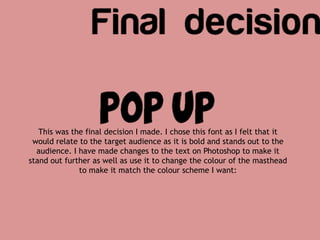
This was the final decision I made. I chose this font as I felt that it
would relate to the target audience as it is bold and stands out to the
audience. I have made changes to the text on Photoshop to make it
stand out further as well as use it to change the colour of the masthead
to make it match the colour scheme I want:
I used the text here to
position and resize it so
that the ‘pop’ is seen to be
bigger than ‘up’. This
means the word ‘pop’ will
be seen clearly by the
audience; creating the
effect that this word will
be the first word that
appeals to them. This
highlights the genre as
well.
As you can see, I have
changed the colour of the
masthead. I chose this
colour by making it match
with the lipstick of the
model. This creates
cohesion on the page.
I then clicked on the
blending options to edit
the font.
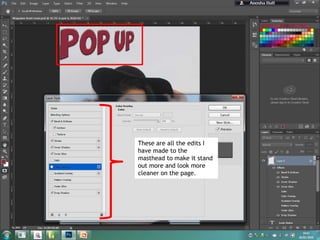
These are all the edits I
have made to the
masthead to make it stand
out more and look more
cleaner on the page.

Final Masthead Decisions

  • 2.
    These were thefonts that I had been considering to use as my masthead. I have decided to go for a font with sans serif, is bold and is in capital letters. This is due to the fact that I want it to stand out to the target audience. Also by looking at the ‘Billboard’ and ‘Top Of the Pops’ masthead I realised that they had fonts which were of this nature. And shared this common convention. The colours I am considering to use for the masthead are:
  • 3.
    This was thefinal decision I made. I chose this font as I felt that it would relate to the target audience as it is bold and stands out to the audience. I have made changes to the text on Photoshop to make it stand out further as well as use it to change the colour of the masthead to make it match the colour scheme I want:
  • 4.
    I used thetext here to position and resize it so that the ‘pop’ is seen to be bigger than ‘up’. This means the word ‘pop’ will be seen clearly by the audience; creating the effect that this word will be the first word that appeals to them. This highlights the genre as well.
  • 5.
    As you cansee, I have changed the colour of the masthead. I chose this colour by making it match with the lipstick of the model. This creates cohesion on the page. I then clicked on the blending options to edit the font.
  • 6.
    These are allthe edits I have made to the masthead to make it stand out more and look more cleaner on the page.