
By
Sudha Ch
 Copy the below SonarQube related zip files into the
local machine
 SonarQube-4.5.6.zip
 Sonar-runner-dist-2.4.zip
 Extract the zip files into the local machine
 Open Anypoint Studio and navigate to menu “Help->
Install new Software”
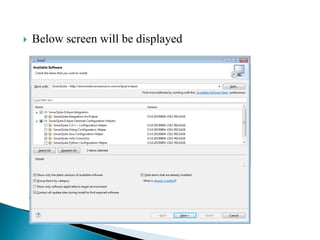
 Below screen will be displayed
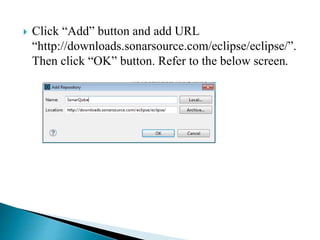
 Click “Add” button and add URL
“http://downloads.sonarsource.com/eclipse/eclipse/”.
Then click “OK” button. Refer to the below screen.
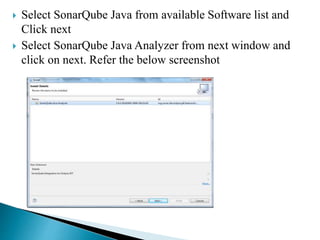
 Select SonarQube Java from available Software list and
Click next
 Select SonarQube Java Analyzer from next window and
click on next. Refer the below screenshot
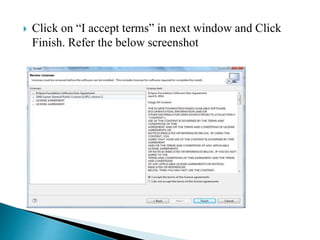
 Click on “I accept terms” in next window and Click
Finish. Refer the below screenshot
 This Completes Installation of SonarQube in your
Studio.
 To start working with SonarQube, run StartSonar.bat
from sonarqube-4.0binwindows-x86-64 folder in the
System where SonarQube Server installed, which will
start the server
How To Install Sonar Qube Plugin In Anypoint Studio

How To Install Sonar Qube Plugin In Anypoint Studio

  • 1.
  • 2.
     Copy thebelow SonarQube related zip files into the local machine  SonarQube-4.5.6.zip  Sonar-runner-dist-2.4.zip
  • 3.
     Extract thezip files into the local machine  Open Anypoint Studio and navigate to menu “Help-> Install new Software”
  • 4.
     Below screenwill be displayed
  • 5.
     Click “Add”button and add URL “http://downloads.sonarsource.com/eclipse/eclipse/”. Then click “OK” button. Refer to the below screen.
  • 6.
     Select SonarQubeJava from available Software list and Click next  Select SonarQube Java Analyzer from next window and click on next. Refer the below screenshot
  • 7.
     Click on“I accept terms” in next window and Click Finish. Refer the below screenshot
  • 8.
     This CompletesInstallation of SonarQube in your Studio.  To start working with SonarQube, run StartSonar.bat from sonarqube-4.0binwindows-x86-64 folder in the System where SonarQube Server installed, which will start the server