Mule JMS-Topics
GSN-K
JMS
 JMS (Java Message Service) is a widely-used API for Message
Oriented Middleware. It allows communication between different
components of a distributed application to be loosely coupled,
reliable, and asynchronous.
 JMS supports two models for messaging:
• Queues - Point-to-point
• Topics - Publish and subscribe
 Mule's JMS transport lets you easily send and receive messages to
queues and topics for any message service which implements the
JMS specification.
Topics
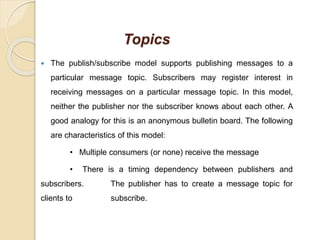
 The publish/subscribe model supports publishing messages to a
particular message topic. Subscribers may register interest in
receiving messages on a particular message topic. In this model,
neither the publisher nor the subscriber knows about each other. A
good analogy for this is an anonymous bulletin board. The following
are characteristics of this model:
• Multiple consumers (or none) receive the message
• There is a timing dependency between publishers and
subscribers. The publisher has to create a message topic for
clients to subscribe.
• The subscriber has to remain continuously active to receive
messages, unless it has established a durable subscription. In that
case, messages published while the subscriber is not connected
redistribute when it reconnects.
Example:
JMS Publisher Flow Configuration:
 Open the “jms” message flow and drag and drop an HTTP endpoint
on to the flow. Double-click on the HTTP endpoint to bring up the
properties dialog. Specify “jms_topic” for Path. This will make the
HTTP endpoint accessible using URL
http://localhost:7777/jms_topic.
 Set a payload that you want to add to Publish.
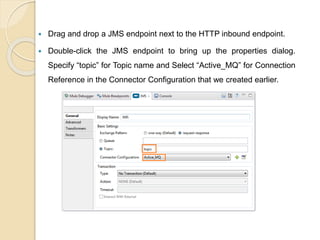
 Drag and drop a JMS endpoint next to the HTTP inbound endpoint.
 Double-click the JMS endpoint to bring up the properties dialog.
Specify “topic” for Topic name and Select “Active_MQ” for Connection
Reference in the Connector Configuration that we created earlier.
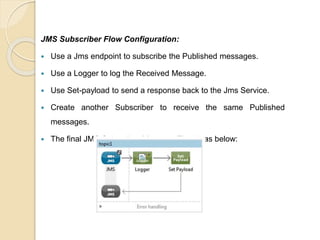
JMS Subscriber Flow Configuration:
 Use a Jms endpoint to subscribe the Published messages.
 Use a Logger to log the Received Message.
 Use Set-payload to send a response back to the Jms Service.
 Create another Subscriber to receive the same Published
messages.
 The final JMS Subscriber Message Flow is as below:
 Run the JMS flow. Open http://localhost:7777/jms_topic.
 This will publish the request to the ActiveMQ JMS Topic “topic”.
 Verify this by examining the ActiveMQ administration page at
http://localhost:8161/admin/topics.jsp. We can see the messages
enqueued, dequeued and the number of consumers.
 The Output you receive after the execution is the Payload Set by any
of the two subscribers JMS-Topic 1 or JMS-Topic2.
Example to understand how JMS uses serializing, and
de-serializing objects:
 Serialization is a process of converting an object into a sequence of
bytes which can be persisted to a disk or database or can be sent
through streams. The reverse process of creating object from
sequence of bytes is called deserialization.
Steps to share Objects via JMS are:
1. Open the “jms” message flow and drag and drop an HTTP endpoint
on to the flow. Double-click on the HTTP endpoint to bring up the
properties dialog. Specify “/jms_serializable_queue” for Path. This will
make the HTTP endpoint accessible using URL
http://localhost:7777//jms_serializable_queue.
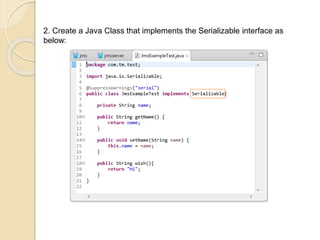
2. Create a Java Class that implements the Serializable interface as
below:
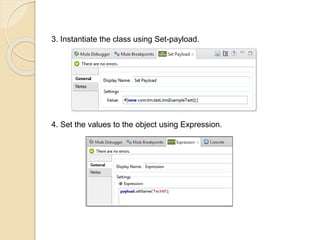
3. Instantiate the class using Set-payload.
4. Set the values to the object using Expression.
5. Drag and drop a JMS endpoint next to the HTTP inbound endpoint.
 Double-click the JMS endpoint to bring up the properties dialog.
 Specify “serial_queue” for queue name. Select “Active_MQ” for
Connection Reference in the Connector Configuration that we
created earlier.
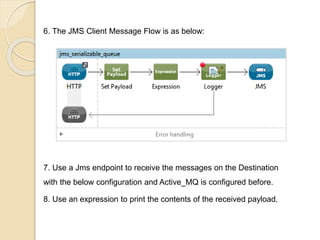
6. The JMS Client Message Flow is as below:
7. Use a Jms endpoint to receive the messages on the Destination
with the below configuration and Active_MQ is configured before.
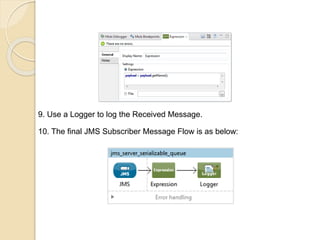
8. Use an expression to print the contents of the received payload.
9. Use a Logger to log the Received Message.
10. The final JMS Subscriber Message Flow is as below:
 Run the JMS flow. Open http://localhost:7777/jms_serialiable_queue.
 This will publish the request to the ActiveMQ JMS Topic “topic”. Verify
this by examining the ActiveMQ administration page at
http://localhost:8161/admin/queues.jsp. We can see the messages
enqueued, dequeued and the number of consumers.
 The Output you receive after the execution is the name that is sent
from the Client.
 The Serializable implementation is done in a similar way using Topic
but with many publishers and subscribers.
Thank You All

Mule jms-topics

  • 1.
  • 2.
    JMS  JMS (JavaMessage Service) is a widely-used API for Message Oriented Middleware. It allows communication between different components of a distributed application to be loosely coupled, reliable, and asynchronous.  JMS supports two models for messaging: • Queues - Point-to-point • Topics - Publish and subscribe  Mule's JMS transport lets you easily send and receive messages to queues and topics for any message service which implements the JMS specification.
  • 3.
    Topics  The publish/subscribemodel supports publishing messages to a particular message topic. Subscribers may register interest in receiving messages on a particular message topic. In this model, neither the publisher nor the subscriber knows about each other. A good analogy for this is an anonymous bulletin board. The following are characteristics of this model: • Multiple consumers (or none) receive the message • There is a timing dependency between publishers and subscribers. The publisher has to create a message topic for clients to subscribe.
  • 4.
    • The subscriberhas to remain continuously active to receive messages, unless it has established a durable subscription. In that case, messages published while the subscriber is not connected redistribute when it reconnects. Example: JMS Publisher Flow Configuration:  Open the “jms” message flow and drag and drop an HTTP endpoint on to the flow. Double-click on the HTTP endpoint to bring up the properties dialog. Specify “jms_topic” for Path. This will make the HTTP endpoint accessible using URL http://localhost:7777/jms_topic.  Set a payload that you want to add to Publish.
  • 5.
     Drag anddrop a JMS endpoint next to the HTTP inbound endpoint.  Double-click the JMS endpoint to bring up the properties dialog. Specify “topic” for Topic name and Select “Active_MQ” for Connection Reference in the Connector Configuration that we created earlier.
  • 6.
    JMS Subscriber FlowConfiguration:  Use a Jms endpoint to subscribe the Published messages.  Use a Logger to log the Received Message.  Use Set-payload to send a response back to the Jms Service.  Create another Subscriber to receive the same Published messages.  The final JMS Subscriber Message Flow is as below:
  • 7.
     Run theJMS flow. Open http://localhost:7777/jms_topic.  This will publish the request to the ActiveMQ JMS Topic “topic”.  Verify this by examining the ActiveMQ administration page at http://localhost:8161/admin/topics.jsp. We can see the messages enqueued, dequeued and the number of consumers.  The Output you receive after the execution is the Payload Set by any of the two subscribers JMS-Topic 1 or JMS-Topic2.
  • 8.
    Example to understandhow JMS uses serializing, and de-serializing objects:  Serialization is a process of converting an object into a sequence of bytes which can be persisted to a disk or database or can be sent through streams. The reverse process of creating object from sequence of bytes is called deserialization. Steps to share Objects via JMS are: 1. Open the “jms” message flow and drag and drop an HTTP endpoint on to the flow. Double-click on the HTTP endpoint to bring up the properties dialog. Specify “/jms_serializable_queue” for Path. This will make the HTTP endpoint accessible using URL http://localhost:7777//jms_serializable_queue.
  • 9.
    2. Create aJava Class that implements the Serializable interface as below:
  • 10.
    3. Instantiate theclass using Set-payload. 4. Set the values to the object using Expression.
  • 11.
    5. Drag anddrop a JMS endpoint next to the HTTP inbound endpoint.  Double-click the JMS endpoint to bring up the properties dialog.  Specify “serial_queue” for queue name. Select “Active_MQ” for Connection Reference in the Connector Configuration that we created earlier.
  • 12.
    6. The JMSClient Message Flow is as below: 7. Use a Jms endpoint to receive the messages on the Destination with the below configuration and Active_MQ is configured before. 8. Use an expression to print the contents of the received payload.
  • 13.
    9. Use aLogger to log the Received Message. 10. The final JMS Subscriber Message Flow is as below:
  • 14.
     Run theJMS flow. Open http://localhost:7777/jms_serialiable_queue.  This will publish the request to the ActiveMQ JMS Topic “topic”. Verify this by examining the ActiveMQ administration page at http://localhost:8161/admin/queues.jsp. We can see the messages enqueued, dequeued and the number of consumers.  The Output you receive after the execution is the name that is sent from the Client.  The Serializable implementation is done in a similar way using Topic but with many publishers and subscribers.
  • 15.